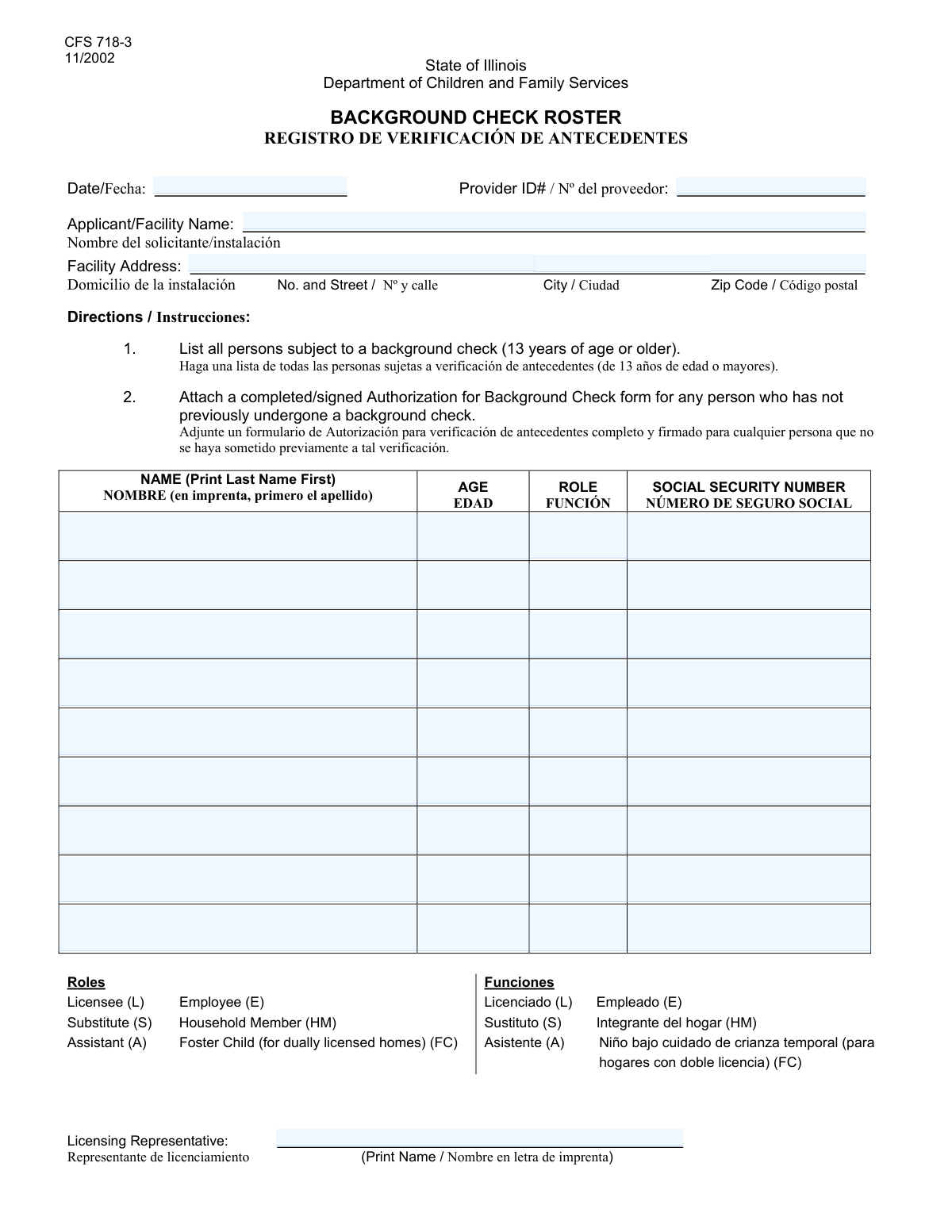
Yes! You can use AI to fill out Facility Personnel Roster
The Facility Personnel Roster is a crucial document for licensed providers to maintain an official record of all staff and associated individuals aged 13 or older. This form is essential for regulatory compliance, background checks, and ensuring that all personnel meet the required standards for the facility's operations. Today, this form can be filled out quickly and accurately using AI-powered services like Instafill.ai, which can also convert non-fillable PDF versions into interactive fillable forms, ensuring provider information is always up-to-date.
Facility Personnel Roster is part of the
personnel forms category on Instafill.
Our AI automatically handles information lookup, data retrieval, formatting, and form filling.
It takes less than a minute to fill out Facility Personnel Roster using our AI form filling.
Securely upload your data. Information is encrypted in transit and deleted immediately after the form is filled out.
Form specifications
| Form name: | Facility Personnel Roster |
| Number of fields: | 43 |
| Number of pages: | 1 |
| Filled form examples: | Form Facility Personnel Roster Examples |
| Language: | English |
Instafill Demo: How to fill out PDF forms in seconds with AI
How to Fill Out Facility Personnel Roster Online for Free in 2026
Are you looking to fill out a FACILITY PERSONNEL ROSTER form online quickly and accurately? Instafill.ai offers the #1 AI-powered PDF filling software of 2026, allowing you to complete your FACILITY PERSONNEL ROSTER form in just 37 seconds or less.
Follow these steps to fill out your FACILITY PERSONNEL ROSTER form online using Instafill.ai:
- 1 Navigate to Instafill.ai and upload or select the Facility Personnel Roster form, which the AI will make interactive.
- 2 Enter the current date, your Provider ID, and the full name and address of the applicant or facility.
- 3 Begin filling out the roster by entering the full name (last name first), age, role, and Social Security Number for the first person, ensuring they are 13 or older.
- 4 Continue to add details for each additional person on the roster, following the same format and age requirement for up to nine individuals.
- 5 Provide the printed name of the licensing representative in the final section to certify the information.
- 6 Review all entered data across the form, including facility details and each person's information, to ensure accuracy and completeness.
- 7 Securely download, print, or share the completed Facility Personnel Roster directly from the platform.
Our AI-powered system ensures each field is filled out correctly, reducing errors and saving you time.
Why Choose Instafill.ai for Your Fillable Facility Personnel Roster Form?
Speed
Complete your Facility Personnel Roster in as little as 37 seconds.
Up-to-Date
Always use the latest 2026 Facility Personnel Roster form version.
Cost-effective
No need to hire expensive lawyers.
Accuracy
Our AI performs 10 compliance checks to ensure your form is error-free.
Security
Your personal information is protected with bank-level encryption.
Frequently Asked Questions About Form Facility Personnel Roster
This form is used to create a roster of individuals associated with a facility, likely for licensing, registration, or background check purposes.
The applicant or an administrator of the facility is responsible for completing this form with information about all relevant individuals.
The form's instructions specify that detailed information like name, role, and Social Security Number is only required for individuals aged 13 and up, likely due to specific background check or regulatory requirements for that age group.
For individuals under the age of 13, you only need to enter their age. The fields for name, role, and Social Security Number should be left blank as per the form's instructions.
For each person listed, you must enter their full name with the last name printed first.
The Provider ID is a unique identification number assigned to your facility by the licensing authority. You should find it on previous correspondence or official documents from that agency.
This form has space for up to nine individuals. If you need to list more, you will likely need to complete and attach an additional copy of the form; check with the licensing agency for their specific procedure.
Yes, the form requires you to enter the Social Security Number for every individual listed who is 13 years of age or older.
In the 'Role' field, you should enter the person's function or position within the facility, such as 'Staff,' 'Volunteer,' or 'Resident,' according to the guidelines provided by the licensing agency.
Yes, services like Instafill.ai use AI to auto-fill form fields accurately from your saved data, which can save time and help prevent errors.
You can use a service like Instafill.ai to upload the PDF. Their platform will make the document interactive, allowing you to type your information directly into the fields online.
If you have a non-fillable or 'flat' PDF, you can use a tool like Instafill.ai. It can convert the document into an interactive, fillable form that you can complete on your computer.
The 'Licensing Representative' is typically the official from the governing agency who reviews and processes your form. You may be instructed to leave this blank for them to complete.
Compliance Facility Personnel Roster
Validation Checks by Instafill.ai
1
Conditional Requirement for Person Details Based on Age
This check verifies that for each person listed, if their age is 13 or older, the corresponding 'Name', 'Role', and 'Social Security Number' fields are all filled out. This is critical for ensuring complete data collection for individuals who require it for background checks or official records. A failure would prompt the user to complete the missing information for the specified person.
2
Social Security Number Format Validation
This validation ensures that all entered Social Security Numbers adhere to the standard 9-digit format, either as XXXXXXXXX or XXX-XX-XXXX. Correct formatting is essential for data processing and integration with federal systems. If an SSN is entered incorrectly, the system will reject the submission and highlight the invalid field.
3
Age Field Numeric and Range Validation
This check confirms that all 'Age' fields contain only positive numerical values within a reasonable human lifespan, such as 0 to 120. This prevents data entry errors like text or negative numbers, ensuring the age data is clean and usable for conditional logic. An invalid entry would trigger an error message asking for a valid age.
4
Facility Address Completeness
This validation ensures that the 'Street Address', 'City', and 'Zip Code' fields are all filled in. A complete address is mandatory for identifying the facility's physical location for licensing, correspondence, and emergency services. If any part of the address is missing, the form submission will be blocked until the fields are completed.
5
Date Field Format and Logical Range
This check validates that the 'Date' field contains a valid date in a recognized format (e.g., MM/DD/YYYY) and is not a future date. This ensures the form completion date is accurate and chronologically sound for record-keeping and auditing purposes. An invalid or future date would result in an error, requiring the user to enter the current or a past date.
6
Uniqueness of Social Security Numbers
This validation cross-references all entered Social Security Numbers on the form to ensure that each one is unique. This prevents accidental duplicate entry of the same individual in different roster slots, which is crucial for maintaining an accurate count and record of personnel. If a duplicate SSN is found, an error will indicate which entries are identical.
7
Conditional Emptiness for Minors' Sensitive Data
This check is the inverse of the conditional requirement; it ensures that if a person's age is less than 13, their 'Name', 'Role', and 'Social Security Number' fields are left empty as instructed. This is a privacy and compliance measure to prevent the unnecessary collection of sensitive information for young children. If these fields are filled for a child under 13, the user will be prompted to clear them.
8
Zip Code Format Validation
This check verifies that the 'Zip Code' field contains a valid 5-digit or 9-digit (ZIP+4) numeric format. A valid zip code is essential for mail delivery and geographic data accuracy. An incorrectly formatted entry would prevent form submission and prompt the user to enter a valid US zip code.
9
Sequential Roster Integrity
This validation ensures that the list of people is filled sequentially without gaps. For example, if 'Third Person Details' are provided, the form must also contain details for the 'First Person' and 'Second Person'. This maintains an orderly roster and prevents processing errors from sparse data. A failure would alert the user to the gap in the roster.
10
Required Fields for Form Identification
This check ensures that the primary identifiers for the submission, 'Provider ID' and 'Applicant or Facility Name', are not empty. These fields are fundamental to knowing who is submitting the form and for which entity, making them non-negotiable for processing. The form cannot be submitted if either of these fields is left blank.
11
Name Format 'Last Name First' Heuristic
This validation performs a simple check on the person name fields to see if they contain a comma, which is a strong indicator that the 'last name first' instruction was followed. While not foolproof, it helps enforce data consistency, which is important for sorting and official documentation. A missing comma could trigger a soft warning to remind the user of the required format.
12
Licensing Representative Name Completeness
This validation confirms that the 'Licensing Representative Printed Name' field is filled out. This name often serves as a form of signature or attestation, confirming that an authorized individual has reviewed and approved the submission. An empty field would block submission, as it indicates the form may not be properly authorized.
Common Mistakes in Completing Facility Personnel Roster
The form explicitly requires names to be entered with the 'last name first'. People often miss this instruction and write the name in the standard 'First Name Last Name' format. This can cause data processing errors and mismatches in background checks or official records. To avoid this, carefully read the instructions for each name field and double-check the order before submitting.
The form states that Name, Role, and SSN should only be filled out if the person's age is 13 or older. A common error is either providing this sensitive information for a child under 13 or leaving it blank for someone who is 13 or older. This can lead to privacy violations or an incomplete application, causing significant processing delays. Always check the age first before filling out the associated name, role, and SSN fields.
Social Security Numbers are critical for identification but are easily mistyped. Transposing digits, entering an incomplete number, or using an incorrect format will cause the application to be rejected or delayed. It's crucial to proofread the SSN carefully. AI-powered tools like Instafill.ai can help by validating the format (XXX-XX-XXXX) to catch structural errors before submission.
Applicants sometimes provide a partial address, omitting details like the street type (e.g., 'St.', 'Ave.', 'Ln.') or using a PO Box when a physical street address is required. An incomplete address can delay mail, inspections, and official correspondence. Ensure you enter the full, official street address, including city and the correct zip code, as it appears in postal records.
The form asks for the 'full name of the applicant or the facility.' People may use common abbreviations or a 'doing business as' (DBA) name instead of the full legal entity name. This can cause mismatches with official registration documents, leading to processing delays or rejection. Always use the complete, official legal name as registered with the relevant authorities.
While some fields are conditional, applicants might mistakenly skip required information like 'Role' or 'SSN' for individuals aged 13 and over. This oversight renders the submission incomplete and will require follow-up, delaying the entire process. Carefully review each person's entry on the roster to ensure all required fields are completed based on their age.
The Provider ID is a unique numerical identifier crucial for linking the form to the correct entity in the system. Simple data entry errors like transposing two digits can cause the form to be misfiled or rejected entirely. Double-check this number against your official documentation before submitting to ensure it is perfectly accurate.
If this form is only available as a non-fillable PDF, people often print it and fill it out by hand. Illegible handwriting, especially for critical data like names and SSNs, is a major cause of data entry errors on the receiving end. To avoid this, use a tool like Instafill.ai, which can convert flat PDFs into fillable forms, allowing you to type your answers clearly and ensure legibility.
The 'Date' field can be ambiguous if not formatted consistently (e.g., 01/02/2024 could be Jan 2nd or Feb 1st depending on the region). This can lead to confusion about when the form was completed, potentially affecting its validity. To prevent this, use a clear, standard format like MM/DD/YYYY or write out the month to avoid any misinterpretation.
The final field for the licensing representative's printed name is often overlooked, especially on a dense form. Forgetting to print the name can invalidate the submission, as it is required for authorization and accountability. Always do a final review of the entire form, paying special attention to the signature and authorization sections at the end.
Saved over 80 hours a year
“I was never sure if my IRS forms like W-9 were filled correctly. Now, I can complete the forms accurately without any external help.”
Kevin Martin Green
Your data stays secure with advanced protection from Instafill and our subprocessors
Robust compliance program
Transparent business model
You’re not the product. You always know where your data is and what it is processed for.
ISO 27001, HIPAA, and GDPR
Our subprocesses adhere to multiple compliance standards, including but not limited to ISO 27001, HIPAA, and GDPR.
Security & privacy by design
We consider security and privacy from the initial design phase of any new service or functionality. It’s not an afterthought, it’s built-in, including support for two-factor authentication (2FA) to further protect your account.
Fill out Facility Personnel Roster with Instafill.ai
Worried about filling PDFs wrong? Instafill securely fills facility-personnel-roster forms, ensuring each field is accurate.