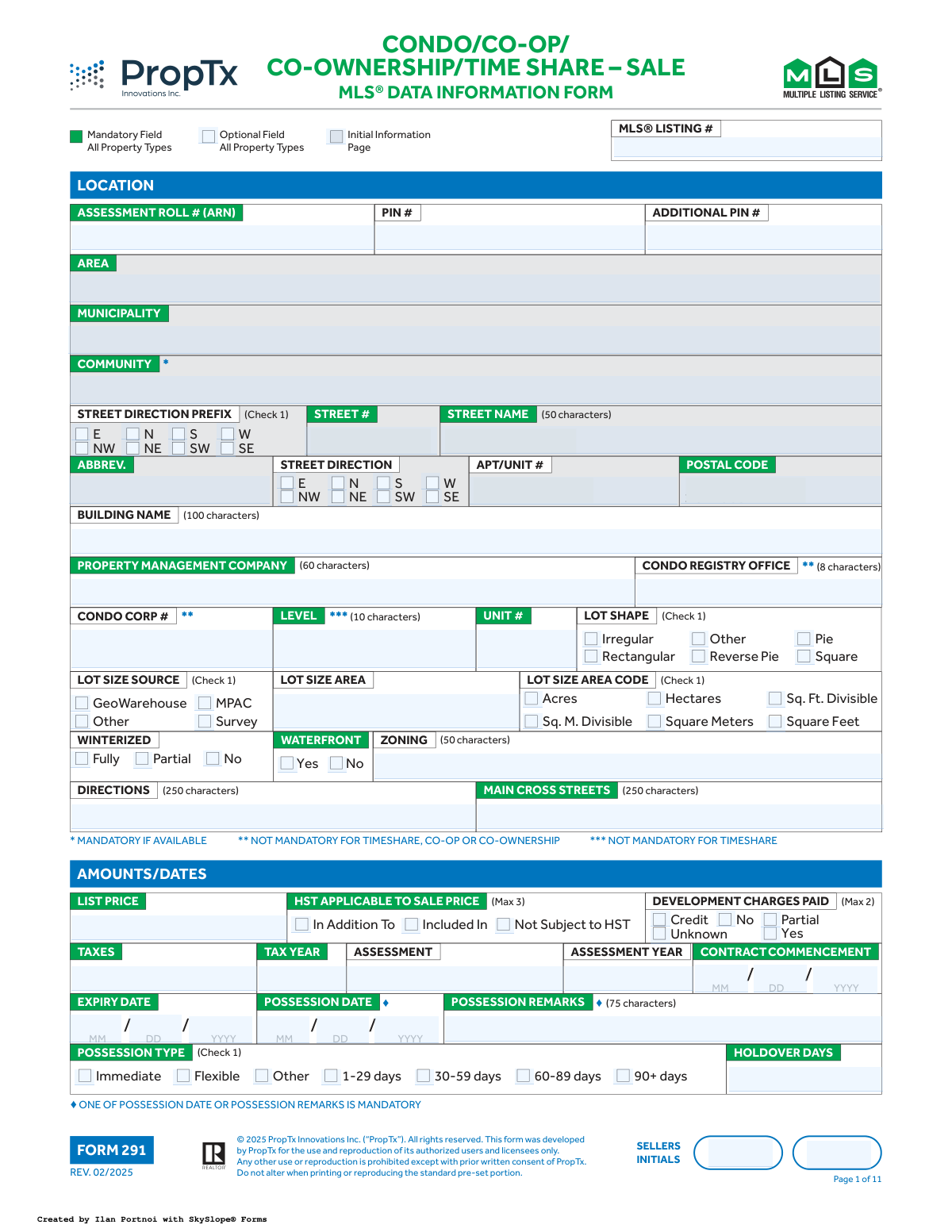
Yes! You can use AI to fill out Form 291, MLS® Data Information Form Condo/Co-op/Co-ownership/Time Share – Sale

Form 291, the MLS® Data Information Form for Condo/Co-op/Co-ownership/Time Share sales, is a detailed document used by real estate professionals to gather all necessary information for listing a property on the Multiple Listing Service (MLS). It covers extensive details including property identification, physical characteristics, amenities, financial information, and showing instructions. Compiling this information accurately is crucial for marketing the property effectively. Today, this form can be filled out quickly and accurately using AI-powered services like Instafill.ai, which can also convert non-fillable PDF versions into interactive fillable forms.
Form 291 is part of the ownership information forms category on Instafill.
Our AI automatically handles information lookup, data retrieval, formatting, and form filling.
It takes less than a minute to fill out Form 291 using our AI form filling.
Securely upload your data. Information is encrypted in transit and deleted immediately after the form is filled out.

Form specifications

Form name: Form 291, MLS® Data Information Form Condo/Co-op/Co-ownership/Time Share – Sale
Number of fields: 1155
Number of pages: 11
Filled form examples: Form Form 291 Examples
Language: English
main-image

Instafill Demo: How to fill out PDF forms in seconds with AI

How to Fill Out Form 291 Online for Free in 2026

Are you looking to fill out a FORM 291 form online quickly and accurately? Instafill.ai offers the #1 AI-powered PDF filling software of 2026, allowing you to complete your FORM 291 form in just 37 seconds or less.
Follow these steps to fill out your FORM 291 form online using Instafill.ai:
  1. 1 Navigate to Instafill.ai and upload or select the 'MLS® Data Information Form - Form 291'.
  2. 2 Use the AI assistant to automatically populate initial property details like address, PIN, and assessment roll number from public records.
  3. 3 Systematically complete each section, such as 'Location', 'Property Type', 'Exterior', and 'Interior', by checking the appropriate boxes and filling in specific details like amenities, room dimensions, and property features.
  4. 4 Enter all financial data, including the list price, tax information, maintenance fees, and details about any items under contract or for lease.
  5. 5 Fill out the descriptive sections, including 'Remarks for Clients', 'Realtor Only Remarks', and lists of inclusions and exclusions.
  6. 6 Review all 11 pages of the form to ensure every mandatory field is completed and all information is accurate.
  7. 7 Electronically sign the document, have the seller initial where required, and download the completed form for submission to the MLS.

Our AI-powered system ensures each field is filled out correctly, reducing errors and saving you time.

Why Choose Instafill.ai for Your Fillable Form 291 Form?

Speed

Complete your Form 291 in as little as 37 seconds.

Up-to-Date

Always use the latest 2026 Form 291 form version.

Cost-effective

No need to hire expensive lawyers.

Accuracy

Our AI performs 10 compliance checks to ensure your form is error-free.

Security

Your personal information is protected with bank-level encryption.

Frequently Asked Questions About Form Form 291

This form is used by real estate professionals to gather detailed information about a condo, co-op, co-ownership, or timeshare property for sale. The data collected is used to create the official MLS® listing that potential buyers and their agents will see.

The listing agent or brokerage typically fills out this form in collaboration with the property seller. The seller provides the necessary information and must initial and sign the form to acknowledge its accuracy.

These symbols indicate whether a field is mandatory. For example, a solid dot (♦) indicates a mandatory field for all property types, while other symbols denote fields that are required only under specific conditions, such as for waterfront properties.

The PIN (Property Identification Number) and ARN (Assessment Roll Number) are unique identifiers for the property used for legal and tax purposes. They are mandatory to ensure the correct property is being listed and to pull accurate assessment and tax information.

No, you only need to complete the detailed 'Waterfront / Rural' section if you checked 'Yes' for the 'Waterfront' field in the location section. For a standard city condo without waterfront features, this section can be skipped.

'Inclusions' are items included in the sale price, like appliances. 'Exclusions' are items the seller is taking with them. 'Rental Items/Under Contract' lists items that are not owned outright and have an ongoing payment, such as a hot water tank rental.

You must provide either a specific date when the new owner can take possession of the property or provide remarks explaining the possession terms. For example, you could enter a date or write 'Flexible' or 'Tenant requires 60 days notice' in the remarks field.

The seller's initials on each page serve as confirmation that they have reviewed and approved the information provided for that section. This is a crucial step to ensure the accuracy of the listing and protect all parties involved in the transaction.

These fields control how your listing appears online. Checking 'Yes' allows the listing and its address to be published on public websites, maximizing exposure, while checking 'No' can be used for more private or exclusive sales.

Yes, AI-powered services like Instafill.ai can significantly speed up the process. These tools can accurately auto-fill many fields, such as property details and owner information, saving you time and reducing the risk of manual errors.

Simply upload the Form 291 PDF to the Instafill.ai platform. The AI will analyze the form, identify the fields, and allow you to fill them in interactively, often with auto-fill suggestions to make the process faster and more accurate.

You can use a service like Instafill.ai to solve this problem. Instafill.ai can convert flat, non-fillable PDFs into interactive, fillable forms, allowing you to easily type in your information, check boxes, and complete the form digitally.

For each significant room, specify its level (e.g., Main), name (e.g., Kitchen), dimensions in metres, and up to three descriptive features from the provided list. This detailed information helps create a comprehensive and searchable listing for buyers.

This section is for confidential information intended only for other real estate agents, not the general public. It often includes showing instructions, offer presentation details, or other notes relevant to cooperating brokerages.

Compliance Form 291
Validation Checks by Instafill.ai

1
Conditional Possession Information Requirement
This validation ensures that at least one of the 'Possession Date' or 'Possession Remarks' fields is completed. The form explicitly states this requirement is mandatory. If neither field is filled upon submission, the system should display an error message prompting the user to provide either a specific date or explanatory remarks regarding possession, ensuring critical closing information is not omitted.
2
Logical Date Sequencing for Contract
This check verifies that the 'Expiry Date' is chronologically after the 'Contract Commencement Date'. It is logically impossible for a contract to expire before it begins. This validation prevents data entry errors that would create invalid contract timelines, and if the rule is violated, an error will be triggered to have the user correct one of the dates.
3
Parking Space Count Consistency
This validation ensures the value in 'Total Parking Spaces' is greater than or equal to the sum of 'Drive Parking Spaces' and 'Garage Parking Spaces'. This maintains logical consistency and prevents contradictory data. If the total is less than the sum of its parts, the form will flag an error, requiring the user to reconcile the parking space numbers.
4
Garage Details Logical Dependency
This check enforces consistency for garage-related fields. If the 'Garage' checkbox is set to 'No', the 'Garage Parking Spaces' field must be 0 (or empty) and the 'Garage Type' field must be 'None' (or empty). This prevents users from providing details about a garage that they have stated does not exist, reducing confusion and improving data quality.
5
Year Built and Approximate Age Correlation
This validation cross-references the 'Year Built' field with the selected 'Approximate Age' range. For example, if a user enters '2020' as the 'Year Built', the system will verify that the '0-5' years range is selected for 'Approximate Age'. This prevents discrepancies between specific and categorical data, ensuring the property's age is represented consistently. A mismatch would require the user to correct either the year or the age range.
6
Waterfront Conditional Mandatory Fields
This check activates when the 'Waterfront' field is marked 'Yes'. It then verifies that all dependent mandatory fields, marked with a '*', such as 'Shoreline', 'Water View', and 'Waterfront Features', are completed. This rule ensures that listings advertised as waterfront properties contain the necessary detailed information required by potential buyers. Failure to complete these fields will block submission until the required information is provided.
7
Property Type Based Mandatory Field Validation
This validation enforces the rule for fields marked with '◘' (e.g., 'Roofs', 'Foundation Detail'). It checks that these fields are filled unless the 'Property Type' is one of the specified exceptions (e.g., Condo, Locker, Farm, Vacant Land). This complex rule is critical for ensuring that relevant structural information is captured for standard residential properties while not being required for property types where it is irrelevant.
8
Checkbox Group Maximum Selection Limit
This validation applies to checkbox groups with a specified maximum number of selections, such as 'Exterior Features (Max 10)' or 'Roofs (Max 6)'. The system will count the number of selected options in the group upon submission. If the count exceeds the defined limit, an error message will appear, instructing the user to deselect options to meet the requirement.
9
Fireplace Details Consistency Check
This validation ensures logical consistency for fireplace information. If 'Fireplace / Stove' is marked 'Yes', the '# of Fireplaces' must be a number greater than or equal to 1. Conversely, if 'No' is selected, '# of Fireplaces' must be 0 and no 'Fireplace Features' can be selected. This prevents contradictory data, such as listing features for a non-existent fireplace.
10
Valid URL Format for Web Links
This check examines all fields designated for URLs (e.g., 'Unbranded Virtual Tour URL', 'Sales Brochure URL') to ensure they contain a validly formatted web address. The validation typically checks for a prefix like 'http://' or 'https://' and a plausible domain structure. This is important to ensure that links provided in the listing are functional for other agents and potential buyers, preventing broken links.
11
Canadian Postal Code Format Validation
This validation ensures the 'Postal Code' field adheres to the standard Canadian format of 'A1A 1A1' (letter-number-letter space number-letter-number). Correct formatting is essential for address verification, geocoding services, mapping, and mail delivery. An invalid format would trigger an error, prompting the user to correct the entry before proceeding.
12
Survey Year Entry Condition and Validity
This check ensures the 'Survey Year' field can only be filled if the 'Survey Type' is 'Available' or 'Up-to-Date'. Furthermore, it validates that the entered year is a valid 4-digit number that is not in the future. This prevents users from entering a survey year when no survey is available and ensures the data entered is logical and accurate.
13
Broker Open House Time Sequence
This validation verifies that the end time for the 'Broker Open House' is chronologically after the start time on the specified date. This prevents the creation of logically impossible time slots for an event. If the end time is before or the same as the start time, the system will prompt the user to correct the entry to ensure accurate scheduling.
14
Room Count vs. Detailed Room Entries
This validation compares the total number entered in the 'Number of Rooms' field against the number of individual rooms detailed in the 'Rooms / Details' grid. The system will flag an error if the number of detailed rooms exceeds the total declared room count. This ensures the summary information matches the detailed breakdown, maintaining data integrity across the form.

Common Mistakes in Completing Form 291

Incorrect or Incomplete Property Identification Numbers (PIN/ARN)

Users often mistype the long Assessment Roll Number (ARN) or Parcel Identification Number (PIN), or they pull them from an outdated source. These numbers are critical for legally identifying the property for tax and title purposes. An incorrect number can lead to significant delays in the listing process, transaction failures, or legal complications post-sale. To avoid this, double-check these numbers against official documents like a tax bill or property survey. AI-powered tools like Instafill.ai can help by cross-referencing public databases to validate these numbers automatically.

Ignoring Conditional Mandatory Fields

The form has many fields that become mandatory only if a specific preceding option is selected, such as the entire 'Waterfront / Rural' section after checking 'Yes' for 'Waterfront'. People frequently check the initial box but then overlook the subsequent required details. This results in an incomplete and misleading property profile that may be rejected by the MLS system. Carefully review all conditional requirements marked with symbols (e.g., *, **, ***) and ensure all dependent fields are completed.

Confusing Possession Date and Possession Remarks

The form explicitly states that 'ONE OF POSSESSION DATE OR POSSESSION REMARKS IS MANDATORY'. A common error is to either leave both blank or fill in both, creating ambiguity. Leaving both blank will result in an incomplete submission. Filling both can create conflicting information about when the new owner can take possession. You must provide either a specific MM/DD/YYYY date or a clear textual description (e.g., '30 days after closing') in the remarks field, but not both.

Inaccurate Room Dimension and Detail Entry

The 'Rooms / Details' grid is complex and prone to errors, such as entering dimensions in feet instead of the required metres, or using incorrect level codes. This misrepresents the property's size and layout, which can mislead buyers and potentially lead to disputes. To prevent this, carefully measure rooms in metres and use the official Level and Room codes provided at the end of the form. Since this form is a non-fillable PDF, a tool like Instafill.ai can convert it into a fillable version with built-in validation to ensure dimensions and codes are entered correctly.

Misclassifying Inclusions, Exclusions, and Rental Items

Sellers often confuse the 'Inclusions', 'Exclusions', and 'Rental Items/Under Contract' fields, for example, by listing a rented water heater as an 'Inclusion'. This creates false expectations for buyers and can lead to serious legal disputes and financial liability after closing. It is crucial to clearly differentiate between items that are part of the sale, items that are explicitly not part of the sale, and items that will remain on the property under a rental or lease agreement that the buyer must assume. Also, remember to fill in the 'Under Contract Monthly Costs' if applicable.

Exceeding Maximum Selections for Features

Many checkbox sections, such as 'Property Features / Area Influences (Max 6)' or 'Exterior (Max 2)', have a strict limit on the number of selections allowed. In an effort to make a property look more appealing, users may check more boxes than permitted. This can cause the form to be rejected by the system or lead to the MLS truncating the list, resulting in an inaccurate or incomplete listing. Always adhere to the specified maximum number of selections for each category.

Inconsistent or Unsourced Square Footage Data

The form asks for square footage in multiple ways (a range, specific above/below grade numbers) and requires a source for the data (e.g., MPAC, Builder, Estimated). A frequent mistake is providing conflicting numbers or failing to select a source. This undermines the credibility of the listing and can be a point of contention, as square footage is a key factor for buyers. Ensure all square footage figures are consistent and always cite the source to maintain accuracy and transparency.

Forgetting Required Seller Initials on Each Page

This multi-page form requires the seller's initials in the bottom corner of nearly every page to acknowledge the information provided. It is a simple but very common oversight to miss one or more of these initial boxes. Missing initials can render the listing agreement incomplete or invalid until corrected, causing delays in getting the property on the market. A thorough final review of every page is necessary to ensure all initial boxes are signed.

Ambiguous Parking and Locker Details

The sections for parking and lockers contain numerous specific fields for type (Owned, Exclusive, Rental), level, and spot number. Users often provide vague or incomplete information, such as checking 'Owned' but not providing the specific spot number. This ambiguity can cause confusion and problems during the sale, as parking and storage are valuable assets. Ensure all relevant details for each parking space and locker are filled out completely and accurately.

Exceeding Character Limits in Text Fields

Several free-text fields like 'Possession Remarks' (75 characters) and 'Directions' (250 characters) have strict character limits. Users often write detailed descriptions without regard for these limits, causing their text to be abruptly cut off when entered into the MLS system. This results in incomplete sentences and confusing information for other agents and potential buyers. Be concise and ensure your text fits within the specified character count. AI form-filling tools like Instafill.ai can warn you when you are about to exceed these limits.
Saved over 80 hours a year

“I was never sure if my IRS forms like W-9 were filled correctly. Now, I can complete the forms accurately without any external help.”

Kevin Martin Green

Your data stays secure with advanced protection from Instafill and our subprocessors

Robust compliance program

Transparent business model

You’re not the product. You always know where your data is and what it is processed for.

ISO 27001, HIPAA, and GDPR

Our subprocesses adhere to multiple compliance standards, including but not limited to ISO 27001, HIPAA, and GDPR.

Security & privacy by design

We consider security and privacy from the initial design phase of any new service or functionality. It’s not an afterthought, it’s built-in, including support for two-factor authentication (2FA) to further protect your account.

Fill out Form 291 with Instafill.ai

Worried about filling PDFs wrong? Instafill securely fills form-291-mls-data-information-form-condoco-opco-ownershiptime-share-sale forms, ensuring each field is accurate.