Yes! You can use AI to fill out Form 292, MLS® Data Information Form - Condo/Co-op/Co-ownership/Time Share – Lease/Sub-Lease
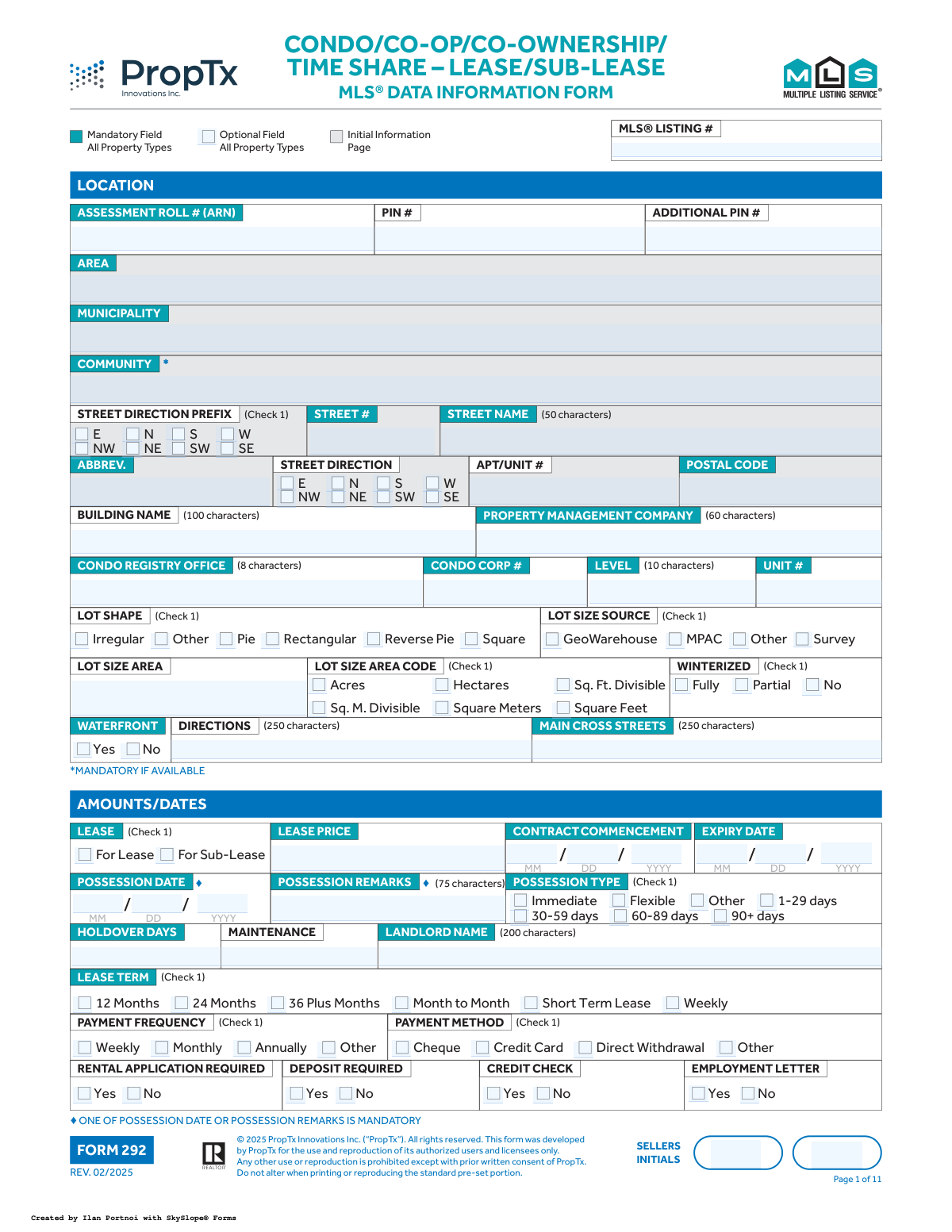
Form 292, the MLS® Data Information Form for Condo/Co-op/Co-ownership/Time Share Leases, is a detailed document used by real estate professionals to input property information into the Multiple Listing Service (MLS). Its purpose is to standardize and capture comprehensive data about a property for lease, including its physical characteristics, amenities, lease terms, and showing instructions, ensuring accuracy and consistency across listings. Today, this form can be filled out quickly and accurately using AI-powered services like Instafill.ai, which can also convert non-fillable PDF versions into interactive fillable forms.
Form 292 is part of the
ownership information forms category on Instafill.
Our AI automatically handles information lookup, data retrieval, formatting, and form filling.
It takes less than a minute to fill out Form 292 using our AI form filling.
Securely upload your data. Information is encrypted in transit and deleted immediately after the form is filled out.
Form specifications
| Form name: | Form 292, MLS® Data Information Form - Condo/Co-op/Co-ownership/Time Share – Lease/Sub-Lease |
| Number of fields: | 1185 |
| Number of pages: | 11 |
| Filled form examples: | Form Form 292 Examples |
| Language: | English |
Instafill Demo: How to fill out PDF forms in seconds with AI
How to Fill Out Form 292 Online for Free in 2026
Are you looking to fill out a FORM 292 form online quickly and accurately? Instafill.ai offers the #1 AI-powered PDF filling software of 2026, allowing you to complete your FORM 292 form in just 37 seconds or less.
Follow these steps to fill out your FORM 292 form online using Instafill.ai:
- 1 Navigate to Instafill.ai and upload or select the MLS® Data Information Form 292.
- 2 Allow the AI to scan and process the form, identifying all the fields for property details, lease terms, and agent information.
- 3 Systematically fill in the required information section by section, starting with Initial Information, Amounts/Dates, and property location details, using the AI-guided interface.
- 4 Proceed to the detailed sections, providing specifics on Exterior features, Interior features, Waterfront/Rural details, and Building Amenities by checking the appropriate boxes and filling in text fields.
- 5 Complete the Comments, Realtor Only Remarks, and Listing Brokerage information sections, ensuring all contact and commission details are accurate.
- 6 Review all 11 pages of the completed form for accuracy and completeness, paying special attention to mandatory fields and seller initials on each page.
- 7 Electronically sign the document where required and download the finalized, ready-to-submit Form 292.
Our AI-powered system ensures each field is filled out correctly, reducing errors and saving you time.
Why Choose Instafill.ai for Your Fillable Form 292 Form?
Speed
Complete your Form 292 in as little as 37 seconds.
Up-to-Date
Always use the latest 2026 Form 292 form version.
Cost-effective
No need to hire expensive lawyers.
Accuracy
Our AI performs 10 compliance checks to ensure your form is error-free.
Security
Your personal information is protected with bank-level encryption.
Frequently Asked Questions About Form Form 292
This form is used by real estate professionals to collect detailed information about a condo, co-op, or timeshare property that is being listed for lease or sub-lease on the Multiple Listing Service (MLS).
The listing salesperson or their brokerage is responsible for completing this form. The property owner (Landlord/Seller) must initial many of the pages to verify that the information provided is accurate.
Mandatory fields (♦) must be completed for the listing to be accepted on the MLS. Optional fields (◊) are not required, but filling them out provides more detail and can make the listing more appealing to potential tenants.
This means you are required to fill in the information if it exists and you can reasonably obtain it. For a standard property address, a postal code is always available and therefore must be entered.
If you check 'Yes' for the waterfront field on page 1, you must complete the detailed 'Waterfront / Rural' section on page 4. This includes mandatory details about the body of water, shoreline, access, and waterfront features.
'Remarks for Clients' is public information that appears on the MLS listing for potential tenants to see. 'Realtor Only Remarks' are private notes for other real estate agents, often containing showing instructions or offer details.
No, the form states that one of the two is mandatory. You can either enter a specific date or use the remarks field to describe the possession terms, such as 'Flexible' or 'Immediate'.
Most sections include an 'Other' checkbox. You can select this and provide more details in a corresponding comments field or in the general 'Remarks for Clients' section to describe the unique feature.
Use the 'Inclusions' section to list all items that come with the lease, such as appliances or window coverings. Use the 'Exclusions' section to list any items that the landlord will be removing and are not part of the lease.
Yes, services like Instafill.ai use AI to accurately auto-fill form fields from your data. This can save a significant amount of time and help reduce errors on complex forms like this one.
Simply upload the Form 292 PDF to Instafill.ai, and the platform will make it interactive. You can then use its AI-powered tools to quickly populate the fields with your property's information before downloading or sharing the completed document.
You can use a service like Instafill.ai, which is designed to convert flat, non-fillable PDFs into interactive, fillable forms. This allows you to easily type in your information and check boxes digitally without needing to print the form.
'Parking Type' describes the legal status of the spot (e.g., Owned, Exclusive, Rental). 'Parking/Drive' describes its physical location and characteristics (e.g., Underground, Surface, Tandem).
Compliance Form 292
Validation Checks by Instafill.ai
1
Ensures Lease Expiry Date is after Commencement Date
This validation checks that the 'Expiry Date' is chronologically after the 'Contract Commencement Date'. A lease cannot expire before it begins. This is critical for creating a legally valid and logical contract timeline. If validation fails, the user will be prompted to correct one or both of the dates.
2
Mandatory Possession Information
The form requires that either a specific 'Possession Date' is provided or details are entered into the 'Possession Remarks' field. This validation ensures that at least one of these two fields is completed. This is important for clarifying when the tenant can take possession of the property. A failure will prevent form submission until one of the fields is filled.
3
Conditional Waterfront Details Requirement
This check is triggered if the 'Waterfront' field is marked 'Yes'. It verifies that mandatory dependent fields, such as 'Water View', 'Access to Property', and 'Shoreline', are completed. This ensures that listings advertised as waterfront properties contain the necessary detailed information for potential clients. If these fields are empty, the user will be required to provide the information before proceeding.
4
Parking Space Total Consistency
This validation ensures that the value in 'Total Parking Spaces' is equal to the sum of 'Garage Parking Spaces' and 'Drive Parking Spaces'. This maintains data integrity and prevents confusion about the actual number of available parking spots. If the numbers do not add up, an error message will ask the user to reconcile the values.
5
Year Built and Approximate Age Correlation
This check verifies that the entered 'Year Built' aligns with the selected 'Approximate Age' range. For example, if the current year is 2025 and the 'Year Built' is 2022, the 'Approximate Age' must be '0-5'. This prevents contradictory information on the listing. A mismatch will trigger a warning asking the user to confirm or correct the entries.
6
Fireplace Count Mandatory if Applicable
If the 'Fireplace / Stove' field is checked 'Yes', this validation ensures that the '# OF FIREPLACES' field contains a number greater than zero. This provides essential detail when a fireplace is advertised as a feature. If the count is missing or zero, the user will be prompted to enter a valid number.
7
Valid URL Format for Web Links
This validation scans all fields intended for URLs, such as 'Unbranded Virtual Tour URL' and 'Sales Brochure URL', to ensure they follow a standard web address format (e.g., starting with http:// or https://). This is crucial for ensuring that links provided in the listing are functional for clients and other agents. Invalid formats will be flagged for correction.
8
Lease Price and Maintenance Fee Numeric Format
This check ensures that the 'Lease Price' and 'Maintenance' fields contain only positive numeric values. These fields are fundamental to the financial details of the lease and must be valid numbers for calculations and display. Any non-numeric characters or negative values will result in a validation error.
9
Foundation Detail Conditional Mandate
The 'Foundation Detail' section is mandatory for most property types. This validation ensures it is completed, unless the 'Property Type' is 'Condo', 'Locker', 'Parking Space', 'Farm', or 'Vacant Land'. This rule ensures structural information is provided where relevant. If the condition is met and the field is empty, the form will be considered incomplete.
10
Exclusive Selection for 'Included in Lease Cost'
This validation enforces that if 'All Inclusive' or 'None' is selected under the 'Included in Lease Cost' section, no other individual items in that same section can be checked. This prevents logical contradictions in the lease terms. If a conflict is detected, the user will be asked to deselect the conflicting options.
11
Total Square Footage Consistency
This check compares the sum of 'Above Grade Finished SQFT' and 'Below Grade Finished SQFT' with the range selected in 'Approximate Square Footage'. While not a strict failure, it will raise a warning if the calculated total falls outside the selected range. This helps ensure the square footage data is logical and consistent across the form.
12
Broker Open House Time Sequence
This validation ensures that the specified end time for a 'Broker Open House' is after the start time on the given date. This prevents scheduling errors and ensures the event information is logical and accurate. If the end time is before the start time, the user will be required to correct the time entries.
13
Water Body Type Dependency
As per the form's rules, this validation ensures that if a name is entered into the 'Body of Water Name' field, a selection is also made in the 'Water Body Type' field. This provides necessary context to the named body of water. Failure to select a type will result in an error, prompting the user to complete the required field.
14
Garage Details Requirement
This validation is triggered when 'Garage' is marked as 'Yes'. It ensures that the 'Garage Type' is selected and that a value greater than or equal to one is entered for 'Garage Parking Spaces'. This provides complete and accurate information when a garage is listed as a feature. If these details are missing, the user will be prompted to provide them.
Common Mistakes in Completing Form 292
This mistake occurs when a user checks an option like 'Yes' for 'Waterfront' but fails to complete the subsequent fields that become mandatory as a result, such as 'Shoreline' or 'Access to Property'. Users often focus on the primary question and overlook the fine-print dependencies. This leads to an incomplete listing that may be rejected by the system or lack critical information for potential tenants, delaying the entire leasing process.
The form asks for an 'Approximate Square Footage' range (e.g., 1200-1399 sqft) and also for specific 'Above Grade' and 'Below Grade' finished square footage values. A common error is selecting a range that contradicts the sum of the specific values entered. This creates confusing and untrustworthy data, which can mislead prospective tenants and cause disputes later on.
The form explicitly states that either the 'Possession Date' or 'Possession Remarks' field is mandatory. Users frequently overlook this instruction and leave both fields blank, especially if the possession date is flexible. This results in an incomplete submission and creates uncertainty for potential renters, who consider move-in dates a critical factor in their search.
Users often provide vague descriptions like 'appliances included' instead of specifying the exact items, brands, or models. Similarly, they may forget to list fixtures that will be removed, such as a specific chandelier or custom drapery. This ambiguity is a leading cause of disputes between landlords and tenants at the time of possession, potentially leading to legal complications.
This detailed grid is prone to errors, such as entering dimensions in feet instead of the required metres, or misaligning room descriptions with the wrong level. Users may also use informal room names instead of the standardized options provided at the end of the form. These mistakes result in inaccurate property data, which can cause the listing to be filtered out of relevant searches and misrepresent the layout to clients.
Several sections, such as 'Included in Lease Cost (Max 10)' and 'Exterior Features (Max 10)', limit the number of options that can be selected. It's common for users to check all applicable features without counting, thereby exceeding the limit. This can cause the system to either reject the form or arbitrarily save only a portion of the selected features, resulting in an inaccurate and less appealing listing.
The form requires dates to be in MM/DD/YYYY format, but users often enter them in other ways (e.g., D/M/YY, or 'Jan 1, 2025'). This can cause data validation errors, system rejection, or the entry of incorrect dates into the MLS. To avoid this, always use the specified format with leading zeros. AI-powered tools like Instafill.ai can automatically format dates correctly, preventing these errors.
The requirement to add seller initials at the bottom of nearly every page is a repetitive task that is easily forgotten. Missing even one set of initials can raise legal questions about whether the seller reviewed and approved that page's content. This forces the brokerage to follow up for missing signatures, delaying the activation of the listing.
The form provides separate checkboxes for 'STREET DIRECTION PREFIX' (e.g., 'N' for N Main St) and 'STREET DIRECTION' (e.g., 'E' for Main St E). Users frequently confuse these or fill in the wrong one, leading to an incorrect address in the system. This makes the property difficult to locate on maps, causing frustration for agents and potential tenants trying to find it for a showing.
Many free-text fields have specified character limits (e.g., 'Property Management Company (60 characters)'). Users often write or paste detailed information without regard for these limits, causing important details to be cut off mid-sentence. This not only looks unprofessional but can also omit crucial information. To prevent this, write concisely or use a character counter before entering text. If the form is a flat PDF, a tool like Instafill.ai can convert it to a fillable version and help manage these constraints.
Saved over 80 hours a year
“I was never sure if my IRS forms like W-9 were filled correctly. Now, I can complete the forms accurately without any external help.”
Kevin Martin Green
Your data stays secure with advanced protection from Instafill and our subprocessors

Robust compliance program
Transparent business model
You’re not the product. You always know where your data is and what it is processed for.
ISO 27001, HIPAA, and GDPR
Our subprocesses adhere to multiple compliance standards, including but not limited to ISO 27001, HIPAA, and GDPR.
Security & privacy by design
We consider security and privacy from the initial design phase of any new service or functionality. It’s not an afterthought, it’s built-in, including support for two-factor authentication (2FA) to further protect your account.
Fill out Form 292 with Instafill.ai
Worried about filling PDFs wrong? Instafill securely fills form-292-mls-data-information-form-condoco-opco-ownershiptime-share-leasesub-lease forms, ensuring each field is accurate.



