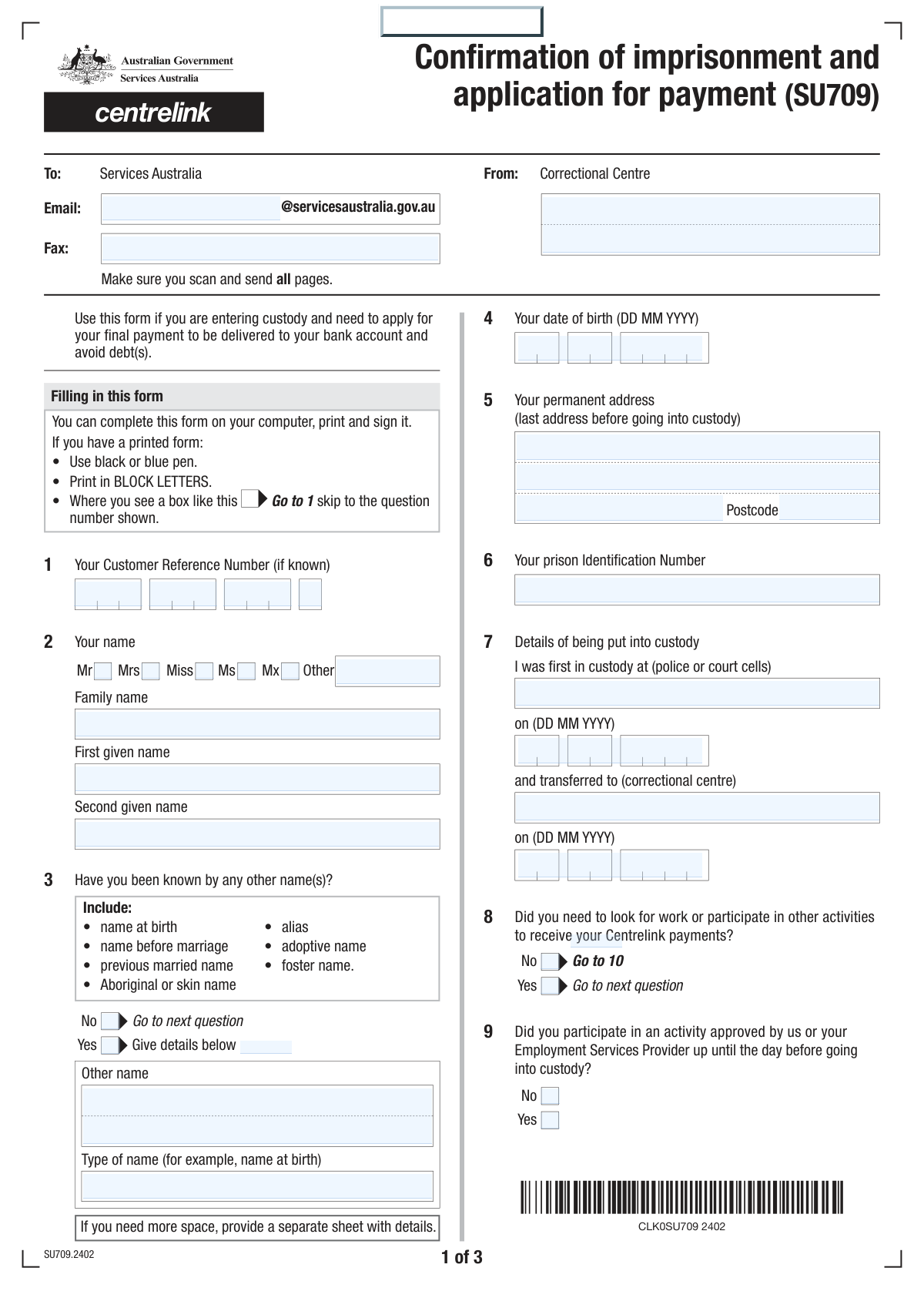
Yes! You can use AI to fill out Services Australia Advice of Imprisonment or Custody (MOD F)

The Services Australia Advice of Imprisonment or Custody form (MOD F) is a crucial document used to inform Centrelink that an individual has been incarcerated or taken into custody. It is important to submit this form promptly to ensure social security payments are managed correctly, preventing potential overpayments and debt, and to adjust any mutual obligations. Today, this form can be filled out quickly and accurately using AI-powered services like Instafill.ai, which can also convert non-fillable PDF versions into interactive fillable forms.
MOD F is part of the Services Australia forms category on Instafill.
Our AI automatically handles information lookup, data retrieval, formatting, and form filling.
It takes less than a minute to fill out MOD F using our AI form filling.
Securely upload your data. Information is encrypted in transit and deleted immediately after the form is filled out.

Form specifications

Form name: Services Australia Advice of Imprisonment or Custody (MOD F)
Number of fields: 92
Number of pages: 3
Filled form examples: Form MOD F Examples
Language: English
main-image

Instafill Demo: How to fill out PDF forms in seconds with AI

How to Fill Out MOD F Online for Free in 2026

Are you looking to fill out a MOD F form online quickly and accurately? Instafill.ai offers the #1 AI-powered PDF filling software of 2026, allowing you to complete your MOD F form in just 37 seconds or less.
Follow these steps to fill out your MOD F form online using Instafill.ai:
  1. 1 Go to Instafill.ai and upload your Advice of Imprisonment or Custody (MOD F) form or select it from the template library.
  2. 2 Enter your personal information, including your name, date of birth, and Centrelink Customer Reference Number, with AI-powered assistance.
  3. 3 Fill in the details about your custody, such as the correctional centre name, prison ID, and relevant dates.
  4. 4 Answer the questions about your work, study, or other Centrelink-required activities before your incarceration.
  5. 5 Provide information about your family circumstances, including partner status and any changes to care arrangements for children receiving Family Tax Benefit.
  6. 6 Review all the entered information for accuracy, then sign and date the declaration section to certify the details are correct.
  7. 7 Download the completed form for submission to Services Australia through the appropriate channels, such as the correctional centre's administration.

Our AI-powered system ensures each field is filled out correctly, reducing errors and saving you time.

Why Choose Instafill.ai for Your Fillable MOD F Form?

Speed

Complete your MOD F in as little as 37 seconds.

Up-to-Date

Always use the latest 2026 MOD F form version.

Cost-effective

No need to hire expensive lawyers.

Accuracy

Our AI performs 10 compliance checks to ensure your form is error-free.

Security

Your personal information is protected with bank-level encryption.

Frequently Asked Questions About Form MOD F

This form is used to notify Services Australia that you have entered custody. This information is essential for updating your Centrelink payments and services correctly.

You must complete this form if you were receiving Centrelink payments and have recently been taken into custody or transferred to a correctional centre.

Your Customer Reference Number (CRN) is your unique ID for Centrelink. You can find it on any letters from Centrelink, on your concession card, or by contacting them directly.

You will need your Customer Reference Number (CRN), your Prison Identification Number, details about your custody dates, and information about any recent paid work for yourself or your partner.

You must list all other names you have been known by, such as your name at birth, aliases, or previous married names, in the 'Other Names' section.

You need to provide your employer's name, the gross amount you were paid, and the start and end dates for the period that payment covered.

If you have a partner, you must state whether they were doing paid work before you went into custody and provide their employer and income details if applicable.

You must report the date your child left your care and provide the full name, address, and contact number of the child's current carer.

You must declare this on the form, as your entry into custody is a change of circumstances that will affect their eligibility for these payments.

This form is typically submitted from the correctional centre on your behalf. The form includes fields for the correctional centre's name and a fax number for submission.

Yes, services like Instafill.ai use AI to help you accurately auto-fill form fields, which can save time and help prevent errors.

You can upload the form's PDF to the Instafill.ai website. Their service allows you to fill out the form on your computer or mobile device, which you can then print for signature and submission.

If you have a non-fillable PDF, you can upload it to Instafill.ai. The platform can convert flat, non-interactive PDFs into fillable forms that you can easily complete online.

Compliance MOD F
Validation Checks by Instafill.ai

1
Customer Reference Number Completeness
Checks that all four parts of the Customer Reference Number are provided. This number is critical for linking the form to the correct individual in the system. If any part is missing, the form cannot be processed correctly, leading to delays or rejection.
2
Exclusive Title Selection
Validates that only one title (Mr, Mrs, Miss, Ms, Mx) is selected from the available options. This ensures data consistency and prevents ambiguity in official records and correspondence. A failure would prompt the user to select only one option before submission.
3
Conditional 'Other Name' Requirement
This check ensures that if a user indicates they have been known by other names (by selecting 'Yes' for Q3), they must provide details in the 'Other Name' and 'Type of Other Name' fields. This is crucial for background checks and verifying identity across different records. If the conditional fields are empty, the submission will be flagged as incomplete.
4
Date of Birth Logical Range
Verifies that the 'Date of Birth' is a valid date, is in the past, and falls within a logical age range, for example, the person is between 16 and 120 years old. This prevents data entry errors like typos or future dates and ensures the applicant is of a plausible age for the services requested. An invalid entry would require correction.
5
Custody Dates Chronological Consistency
This validation confirms that the 'Date Transferred to Correctional Centre' is on or after the 'Date First Custody'. It also ensures both dates are in the past and not before the applicant's date of birth. This maintains the logical timeline of events and is essential for determining eligibility and payment periods.
6
Conditional Paid Work Details Requirement
If the user answers 'Yes' to having performed paid work before custody, this check mandates that the 'Employer Name', 'Gross Amount Paid', and the 'Period From'/'Period To' dates are all filled out. This information is vital for calculating any final payments or entitlements. Failure to provide these details when required will halt the submission.
7
Paid Work Period Validity
Ensures the 'Period To' date for paid work is on or after the 'Period From' date. This logical check prevents impossible date ranges from being entered, which would make income assessment inaccurate. An error would require the user to correct the date range.
8
Conditional Partner's Work Details
This check is triggered if the user indicates they have a partner who did paid work. It validates that the partner's employer name, gross pay, and the payment period dates are all provided. This is necessary for assessing household income, which can affect the applicant's benefits.
9
Conditional Circumstance Details
Validates that if a user selects 'Yes' for 'Other Circumstance Changes', the corresponding 'Detailed Circumstance Changes' text area is not empty. This ensures that the user provides the necessary explanation for the change they have indicated. An empty details field would render the 'Yes' answer meaningless and require clarification.
10
Conditional Family Tax Benefit (FTB) Fields
If the user indicates they are 'Receiving Family Tax Benefit', this validation ensures that the child's name, date of birth, and the date the child left their care are all provided. This information is critical for adjusting FTB payments correctly. Missing data would prevent the correct processing of benefit changes.
11
Child Care Date Chronology
This check verifies that the 'Date Child Left Care' is a valid date that occurs after the 'Child's Date of Birth' and is not in the future. This ensures the logical and chronological accuracy of events related to child custody changes. An illogical date entry would require correction before the form can be processed.
12
Signature Date Finality
This validation ensures the 'Signature Date' is a valid date that is on or after any other event date on the form, such as 'Date First Custody' or 'Period To' for employment. The signature date legally finalizes the information as of that point in time, so it cannot precede the events being reported. An invalid signature date would block submission.
13
Postcode Format Validation
The 'Permanent Postcode' and 'Current Carer's Postcode' fields must contain a valid postcode format, such as a 4-digit number for Australia. This ensures address data is standardized and can be used for mail delivery and location-based services. An invalid format would trigger an error message.
14
Mandatory Name Fields
The 'Family Name' and 'First Given Name' fields must not be empty. These fields are fundamental for identifying the applicant and are the most basic requirement for creating or locating a record. Submission is not possible without this core information.

Common Mistakes in Completing MOD F

Incorrectly Entering Customer Reference Number (CRN)

The form requires the Customer Reference Number to be split into four separate parts, which often leads to transcription errors, transposed digits, or entering parts into the wrong boxes. These mistakes cause identification failures and significant processing delays for benefit adjustments. To avoid this, carefully copy the CRN from an official Services Australia letter or card, double-checking each of the four parts before entry. AI-powered tools like Instafill.ai can help by securely storing and accurately populating this number.

Failing to Disclose All Previous Names

Applicants frequently forget to list all names they have been known by, such as names at birth, maiden names, previous married names, or aliases. This omission can cause major delays in identity verification and cross-referencing records, potentially halting benefit adjustments. It is crucial to provide a complete history of names and specify the name type; if unsure, include any name you have used on official documents. Also, remember to check the 'Yes' box for 'Other Names' to make the entry fields visible.

Confusing Custody Dates and Locations

The form distinguishes between the 'First Custody Location' (e.g., a police station) and the 'Correctional Centre' where one is transferred. People often mistakenly enter the correctional centre for both, or they confuse the date of their initial arrest with the date of their transfer. This incorrect information can affect the timeline for payment adjustments and create discrepancies in official records. To prevent this, carefully recall the sequence of events, noting the initial holding location and date separately from the transfer to the main correctional facility.

Reporting Net Pay Instead of Gross Income

When asked for the 'Gross Amount Paid' for work done before custody, individuals often enter their take-home pay (net) instead of the full amount before taxes and deductions (gross). This leads to inaccurate income reporting, which can result in incorrect payment calculations and potential debts to the agency. Always refer to a payslip to find the gross income figure for the specified period to ensure accuracy.

Providing Incomplete or Estimated Partner Details

Applicants may not have their partner's exact employment and income details readily available while in custody, leading them to guess or leave fields blank. Incomplete or inaccurate partner information is a primary reason for processing delays, as the agency must verify these details independently. Before filling out the form, try to obtain your partner's recent payslips or have them provide the exact employer name, gross pay, and pay period dates.

Misjudging the Duration of a Change in Child's Care

For Family Tax Benefit, the form asks if the change in the child's care will last longer than 4 weeks. Applicants may be uncertain about their situation and select the wrong option, which has significant consequences for who is eligible to receive payments. This error can lead to overpayments that must be repaid or underpayments that affect the child's new carer. It is vital to make the best possible assessment; if the change is indefinite or likely to exceed 4 weeks, you must indicate this and provide the new carer's details.

Providing Vague Details for 'Other Circumstance Changes'

In the section for 'Other Circumstance Changes,' people often write brief, unhelpful notes like 'address change' or 'income different' without providing the necessary specifics. This forces the agency to seek clarification, delaying any required adjustments to payments or records. To avoid this, provide complete details: for an address change, give the full new address; for an income change, state the new amount, source, and frequency.

Ignoring Conditional 'Yes/No' Logic

Many sections, like those for paid work or partner details, only require completion if a preceding 'Yes' box is checked. A common error is to either miss checking 'Yes' and then skip a required section, or to fill out a section that should have been left blank. This leads to an incomplete or confusing application. Carefully read each question and only fill out the subsequent fields if your answer is 'Yes'. Digital form-filling tools like Instafill.ai can automatically show or hide these dependent fields, preventing this error.

Listing the Correctional Centre as the Permanent Address

When asked for a 'Permanent Address', an applicant might be confused and enter the address of the correctional facility they are in. The form is seeking the applicant's last stable residential address before incarceration, which is used for record-keeping. Entering the prison address can cause confusion in the system and may affect eligibility for certain services upon release. You should provide your last home address, even if you no longer live there.

Forgetting to Sign and Date the Form

Forgetting to sign and date the declaration is one of the most common and critical errors, as it renders the entire form legally invalid. An unsigned form cannot be processed, leading to an automatic rejection and requiring the applicant to start over. Always perform a final check to ensure the signature and the correct date are present in the designated fields. If the form is a non-fillable PDF, a tool like Instafill.ai can convert it to a fillable version, making it easier to add a digital signature and date.
Saved over 80 hours a year

“I was never sure if my IRS forms like W-9 were filled correctly. Now, I can complete the forms accurately without any external help.”

Kevin Martin Green

Your data stays secure with advanced protection from Instafill and our subprocessors

Robust compliance program

Transparent business model

You’re not the product. You always know where your data is and what it is processed for.

ISO 27001, HIPAA, and GDPR

Our subprocesses adhere to multiple compliance standards, including but not limited to ISO 27001, HIPAA, and GDPR.

Security & privacy by design

We consider security and privacy from the initial design phase of any new service or functionality. It’s not an afterthought, it’s built-in, including support for two-factor authentication (2FA) to further protect your account.

Fill out MOD F with Instafill.ai

Worried about filling PDFs wrong? Instafill securely fills services-australia-advice-of-imprisonment-or-custody-mod-f forms, ensuring each field is accurate.