Yes! You can use AI to fill out ABSTUDY Claim for Fares Allowance

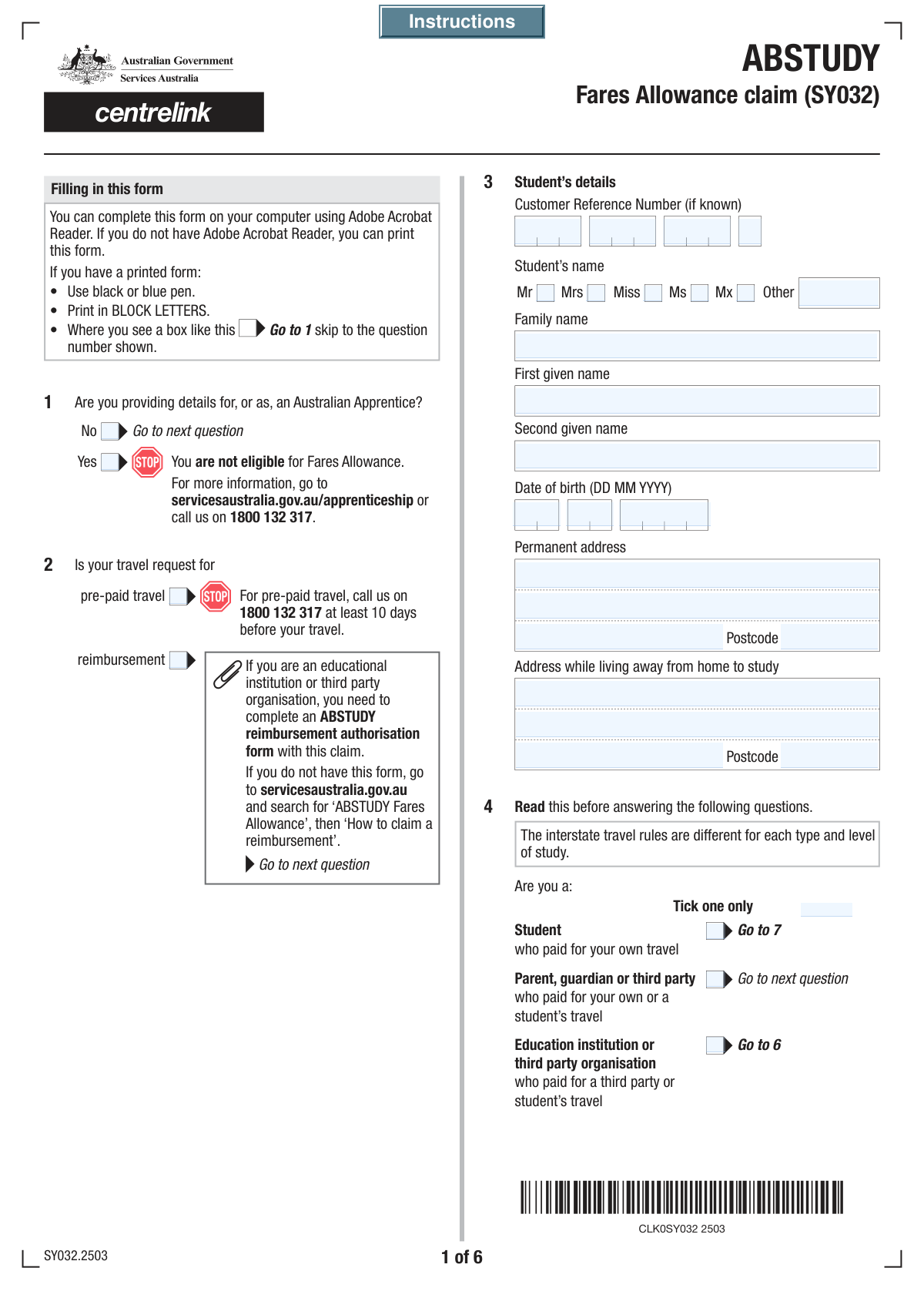
The ABSTUDY Claim for Fares Allowance is an official document used to apply for financial assistance from the Australian Government to cover travel expenses for eligible Aboriginal and Torres Strait Islander students and apprentices. This allowance helps students travel between their permanent home and their place of study for approved courses or activities, and submitting this form correctly is crucial for receiving timely reimbursement or pre-paid travel arrangements. Today, this form can be filled out quickly and accurately using AI-powered services like Instafill.ai, which can also convert non-fillable PDF versions into interactive fillable forms.
ABSTUDY Fares Allowance is part of the VA claim forms category on Instafill.
Our AI automatically handles information lookup, data retrieval, formatting, and form filling.
It takes less than a minute to fill out ABSTUDY Fares Allowance using our AI form filling.
Securely upload your data. Information is encrypted in transit and deleted immediately after the form is filled out.

Form specifications

Form name: ABSTUDY Claim for Fares Allowance
Number of fields: 377
Number of pages: 8
Filled form examples: Form ABSTUDY Fares Allowance Examples
Language: English
main-image

Instafill Demo: How to fill out PDF forms in seconds with AI

How to Fill Out ABSTUDY Fares Allowance Online for Free in 2026

Are you looking to fill out a ABSTUDY FARES ALLOWANCE form online quickly and accurately? Instafill.ai offers the #1 AI-powered PDF filling software of 2026, allowing you to complete your ABSTUDY FARES ALLOWANCE form in just 37 seconds or less.
Follow these steps to fill out your ABSTUDY FARES ALLOWANCE form online using Instafill.ai:
  1. 1 Navigate to Instafill.ai and upload the ABSTUDY Claim for Fares Allowance form. The platform will automatically make the document fillable.
  2. 2 Use the AI assistant to fill in your personal details. Specify whether you are the student, a parent/guardian, or an organization, and provide the required identification and contact information.
  3. 3 Detail your travel claim. Indicate if it's for pre-paid travel or reimbursement, and provide specifics about each journey, including departure/arrival locations, dates, and travel methods.
  4. 4 Itemize all associated costs. If you used private transport or incurred extra expenses like meals, enter the details and amounts in the designated sections, noting where you have receipts.
  5. 5 Provide payment details by entering the BSB, account number, and account holder's name for the bank account where the reimbursement should be sent.
  6. 6 Carefully review the entire form for accuracy, then electronically sign and date the claimant's declaration before downloading the completed document for submission to Services Australia.

Our AI-powered system ensures each field is filled out correctly, reducing errors and saving you time.

Why Choose Instafill.ai for Your Fillable ABSTUDY Fares Allowance Form?

Speed

Complete your ABSTUDY Fares Allowance in as little as 37 seconds.

Up-to-Date

Always use the latest 2026 ABSTUDY Fares Allowance form version.

Cost-effective

No need to hire expensive lawyers.

Accuracy

Our AI performs 10 compliance checks to ensure your form is error-free.

Security

Your personal information is protected with bank-level encryption.

Frequently Asked Questions About Form ABSTUDY Fares Allowance

This form is used to claim travel assistance, known as Fares Allowance, for students and Australian Apprentices. You can use it to request pre-paid travel arrangements or to seek reimbursement for travel costs you have already paid.

This form can be completed by students, Australian Apprentices, or a parent, guardian, or third party (like an educational institution) who has paid for travel costs on behalf of the student for study-related purposes.

Select 'pre-paid travel' if you want the government to book and pay for your travel in advance. Choose 'reimbursement' if you have already paid for your travel expenses and are now requesting to be paid back.

Your Customer Reference Number (CRN) is a unique identifier provided by Services Australia. You can find it on any letters or correspondence from them, on your concession card, or by logging into your online account.

The claimant is the person or organization who paid for the travel and is requesting the payment. In this case, you would select 'Parent, guardian or third party' as the claimant type and enter your own details in the relevant section.

If you used private transport, you must provide the vehicle's make, model, year, and engine capacity. You will also need to state the total kilometers traveled and provide a reason for using a private vehicle, such as public transport being unavailable.

If you are claiming reimbursement but cannot provide receipts or tickets for the entire journey, you must indicate this on the form. You will be required to provide a detailed written explanation for why the evidence is missing.

Yes, for reimbursement claims, you must itemize each travel cost in the journey details section. This ensures your claim is processed accurately and includes the date, a description of the expense, and its cost.

You must attach evidence to support your claim, as indicated in the checklist section. This includes receipts, tickets, or dockets for travel costs, and may also include confirmation of your 'Away From Base' activity attendance.

You should provide the bank account details for the person or organization that should receive the reimbursement. The form allows you to specify whether the payment should go to the student, a parent or guardian, or a third-party organization.

Yes, services like Instafill.ai use AI to accurately auto-fill form fields from your saved profile, which can save you significant time and reduce errors. This is especially helpful for long forms with repetitive information like names and addresses.

Simply upload the form's PDF to the Instafill.ai platform. The service will make it fillable online, and you can use its AI-powered features to complete the fields quickly before downloading the finished document for submission.

If you have a non-fillable or 'flat' PDF, you can use a service like Instafill.ai. It can convert the static PDF into an interactive, fillable form that you can easily complete on your computer.

Compliance ABSTUDY Fares Allowance
Validation Checks by Instafill.ai

1
Mandatory Claimant Type Selection
This check ensures that the user has selected one, and only one, option from the 'Claimant Type' section (Student, Parent/Guardian, or Education Institution). This selection is critical as it dictates which subsequent sections of the form are required and relevant for the user to complete. If no selection or multiple selections are made, the form submission should be blocked with an error message prompting the user to choose a single claimant type.
2
Conditional Section Completion for Claimant
This validation verifies that if the claimant type is 'Parent, guardian or third party' or 'Education institution or third party organisation', the corresponding detailed sections are filled out. It prevents the submission of an incomplete form where critical information about the payer is missing. If the claimant type is selected but the details are absent, an error will highlight the mandatory fields in the relevant section.
3
Student Date of Birth Validity
This check validates that the entered Day, Month, and Year for the student's date of birth form a real calendar date and that the date is in the past. It also checks that the age is within a reasonable range for a student (e.g., not in the future or more than 100 years ago). This prevents data entry errors and ensures the eligibility of the student based on age-related criteria. An invalid or illogical date will trigger an error.
4
Australian Business Number (ABN) Format
This validation checks that the 11-digit Australian Business Number (ABN) provided for an organisation is in the correct format and passes the official checksum algorithm. This is crucial for correctly identifying the business entity for payment and tax purposes. An invalid ABN would cause payment processing to fail, so the system will reject any number that does not conform to the standard structure.
5
Bank Branch (BSB) Number Format
This check ensures the 'Branch Number (BSB)' field contains exactly six digits. The BSB is essential for routing payments to the correct bank branch in Australia. Validating the format prevents payment rejections and delays due to typographical errors. If the entry is not a 6-digit number, the user will be prompted to correct it before proceeding.
6
Travel Chronology Consistency
This validation compares the departure and arrival date/time fields for any given travel leg to ensure the arrival is after the departure. This logical check prevents impossible data entries, such as an arrival time that precedes the departure time. This is essential for calculating travel duration and allowances correctly. A failed check will require the user to review and correct the travel times.
7
Activity Date Sequence Logic
This check ensures that the 'Activity End Date' is on or after the 'Activity Start Date' for any 'Away From Base' activities. This maintains logical data integrity and is crucial for determining the duration of the activity for which support is being claimed. If the end date is before the start date, the system will flag an error and prevent submission until the dates are corrected.
8
Conditional 'Other Reasons' Explanation
This validation ensures that if the user checks the 'Other reasons' box for using private transport, the corresponding 'Other Reasons Details' text field is not left empty. This is important to gather necessary justification for audit and approval purposes when a standard reason is not applicable. If the box is checked and the details are missing, the user will be prompted to provide an explanation.
9
Australian Postcode Format
This check verifies that all postcode fields (e.g., 'Permanent Postcode', 'Postcode (Address While Away From Home)') contain a valid 4-digit number. Correct postcodes are essential for address verification, mail delivery, and determining eligibility for certain regional allowances. The system will reject any entry that is not a four-digit number, ensuring data quality for location-based processing.
10
Private Transport Details Requirement
This validation rule ensures that if the user indicates 'Yes' for 'Private Transport Usage', then the related fields such as 'Vehicle Make and Model', 'Vehicle Year', and 'Engine Capacity' are mandatory. This information is required to calculate the correct reimbursement rate based on vehicle type and to verify the claim. Failure to provide these details will block the form submission until the required information is entered.
11
Mandatory Declaration and Date
This check confirms that the 'Claimant's Declaration' checkbox is ticked and that the declaration date is provided and is a valid, recent date. This is a legal requirement to confirm the applicant agrees to the terms and attests to the accuracy of the information provided. The form cannot be submitted without a valid declaration, protecting both the organization and the claimant.
12
Reimbursement Evidence Explanation
This validation is triggered if the travel request is for 'reimbursement'. It checks that if the user selects 'No' to being able to provide evidence, the 'Brief Explanation' and 'Detailed Explanation' fields are filled. This justification is critical for the processing team to assess the claim under exceptional circumstances. The form will prompt the user to provide this mandatory explanation if it is missing.
13
Exclusive Choice for Apprentice Status
This check ensures that the user selects either 'Yes' or 'No' for 'Australian Apprentice Status', but not both, and that at least one is selected. This is a fundamental piece of information that determines eligibility and the logic for subsequent questions on the form. An error will be displayed if the user fails to make a single, exclusive choice, preventing ambiguity in the application.
14
Conditional Help Details Requirement
This validation ensures that if a user checks 'Yes' for 'Employer/Education Institution Help', they must provide details in the 'Help Provided Amount' and 'Details of Employer/Education Institution Help' fields. This information is crucial to prevent double payment and to accurately calculate the net amount of allowance payable. If 'Yes' is selected but the details are missing, the system will prompt the user to complete the required fields.

Common Mistakes in Completing ABSTUDY Fares Allowance

Incorrectly Completing Claimant Sections

This form has separate, detailed sections for claimants who are students, parents/guardians, or organizations. A common error is for a parent filling out the form on behalf of a student to enter their own details in the student section, or to skip the required parent/guardian section entirely. This leads to incorrect data association, significant processing delays, and potential claim rejection. To avoid this, carefully identify your role as the claimant at the start and only complete the sections that apply to you, as indicated by the form's instructions.

Mistyping Segmented Reference Numbers

The Customer Reference Number (CRN) and Australian Business Number (ABN) are split into multiple input boxes. Users often make transcription errors, swap digits between boxes, or leave a box empty, causing record-matching to fail. This will halt the claim process until the correct number is provided. Always double-check each segment of the number against your source document before submitting.

Failing to Follow Conditional Logic

Many fields are conditional, meaning they should only be filled if a specific answer was given previously (e.g., 'Fill only if Yes is Yes'). People often miss these instructions and either fill out sections that are irrelevant to them or, more critically, skip sections that are required. This results in an incomplete or invalid application, requiring follow-up from the processing agency. To prevent this, read each field's instructions carefully; AI-powered tools like Instafill.ai can also help by automatically showing or hiding relevant fields based on your answers.

Inconsistent or Incorrect Date Formatting

The form inconsistently asks for two-digit ('YY') or four-digit ('YYYY') years across different sections, particularly in the repetitive expense tables. Entering '2024' in a 'YY' field or '24' in a 'YYYY' field is a frequent mistake that can cause data validation errors and processing delays. Pay close attention to the specific format required for each date field (DD, MM, YY, YYYY) to ensure your data is captured correctly.

Forgetting to Check 'Receipt' Boxes for Expenses

When claiming reimbursement, the form provides numerous rows to itemize expenses, each with its own 'Tick if with receipt' checkbox. It is very common for applicants to list an expense but forget to tick the corresponding box, or to tick the box without attaching the required evidence. This can lead to the specific expense being denied. To avoid this, create a habit of ticking the box immediately after entering the details for each receipted item.

Entering Vague Expense Descriptions

In the journey and extra cost details sections, users often enter generic descriptions like 'Travel' or 'Food'. These vague entries do not provide enough information for the claim to be assessed, leading to requests for clarification and delaying reimbursement. Always provide specific details, such as 'Train ticket from Central to Hornsby' or 'Lunch at airport cafe', to ensure the expense is clearly understood and can be approved.

Providing Incomplete Bank Account Details

Errors in the payment details section are critical and will directly prevent reimbursement. Common mistakes include mistyping the BSB or Account Number, providing a credit card number instead of a bank account number, or entering an account holder name that does not exactly match the bank's records. Carefully transcribe all banking information and verify that the account holder name is written precisely as it appears on bank statements to ensure payment can be processed successfully.

Missing Justification for 'Other' Selections

Several questions, such as 'Reason for Private Transport', offer an 'Other' option that requires a mandatory detailed explanation in a subsequent field. Applicants frequently select 'Other' but forget to provide the required written justification. This omission makes the response incomplete and can lead to that part of the claim being questioned or denied. If you select an 'Other' option, always look for the corresponding text box to provide your detailed explanation.

Confusing Permanent vs. Temporary Address

The form asks for both a 'Permanent Address' and an 'Address While Away From Home'. Students may mistakenly enter their term-time address in the permanent address field, or vice-versa. This can impact eligibility assessments and cause important correspondence to be sent to the wrong location. Ensure you enter your primary, long-term family home address as 'Permanent' and your temporary study address as 'Away From Home'.

Submitting an Unsigned or Undated Declaration

Forgetting to sign and date the final declaration is a simple but critical error that invalidates the entire form submission. This often happens when a person is focused on completing the many complex sections and overlooks the final step. Before submitting, always perform a final review focused solely on the declaration section to ensure it is signed and dated correctly. If the form is a non-fillable PDF, a tool like Instafill.ai can convert it to a fillable version, making it easy to add a digital signature and date.
Saved over 80 hours a year

“I was never sure if my IRS forms like W-9 were filled correctly. Now, I can complete the forms accurately without any external help.”

Kevin Martin Green

Your data stays secure with advanced protection from Instafill and our subprocessors

Robust compliance program

Transparent business model

You’re not the product. You always know where your data is and what it is processed for.

ISO 27001, HIPAA, and GDPR

Our subprocesses adhere to multiple compliance standards, including but not limited to ISO 27001, HIPAA, and GDPR.

Security & privacy by design

We consider security and privacy from the initial design phase of any new service or functionality. It’s not an afterthought, it’s built-in, including support for two-factor authentication (2FA) to further protect your account.

Fill out ABSTUDY Fares Allowance with Instafill.ai

Worried about filling PDFs wrong? Instafill securely fills abstudy-claim-for-fares-allowance forms, ensuring each field is accurate.