
Yes! You can use AI to fill out ABSTUDY Private Boarding Details and Payment Direction
Don't type 54 fields by hand. Tell our AI about yourself, or upload a document you already have, and it fills every field in seconds. You check it, then download, print or sign.
The AI does the filling. You just check it.
No typing into boxes, nothing to install.
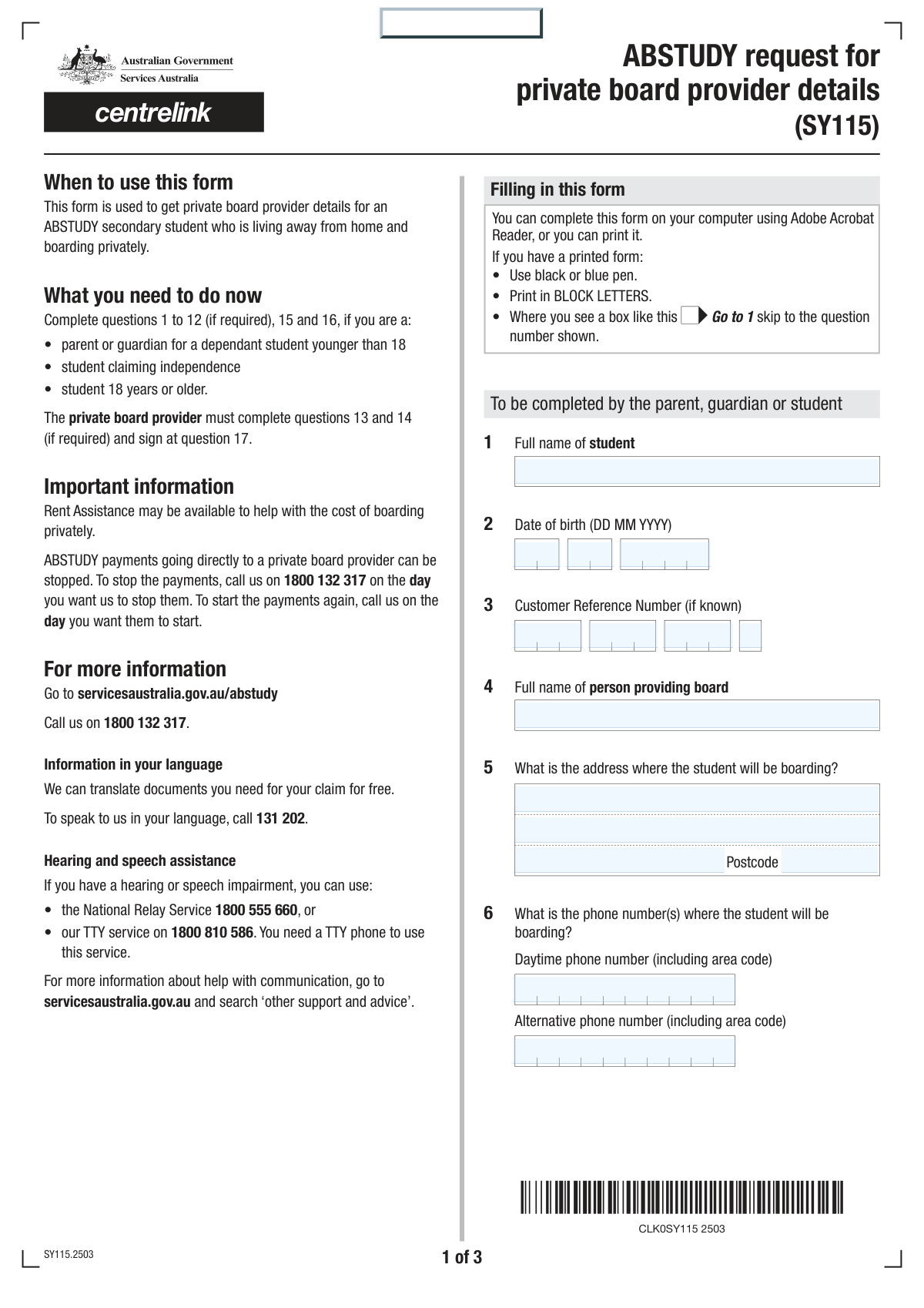
What this form asks for
The AI fills all of it, from your answers or your documents.
The AI checks your answers before you download
14 checks built for this form, so a wrong date or a missing answer is caught before anyone else sees it.
This check validates that the combination of day, month, and year for the student's Date of Birth forms a real, past date. It also ensures the calculated age is within a reasonable range for a student eligible for ABSTUDY, for example, between 5 and 25 years old. If the date is invalid or the age is outside the expected range, the form submission will be rejected to prevent data entry errors and fraudulent applications.
This validation ensures that all four parts of the Student's Customer Reference Number are filled out and adhere to their expected format (e.g., numeric, specific length). This number is critical for identifying the student within the system, so incomplete or malformed numbers would prevent the application from being processed correctly. An error will prompt the user to review and correct all four fields.
This check verifies that the 'Boarding Postcode' field contains a valid postcode format, such as four numerical digits for an Australian address. Correctly formatted postcodes are essential for mail delivery, address verification, and regional data analysis. An invalid format will trigger an error, requiring the user to enter a valid postcode before proceeding.
This validation ensures the 'Date student started living away from home' is chronologically after the 'Student's Date of Birth'. It is logically impossible for a student to start living away from home before they were born. This check prevents significant data entry errors that would corrupt the student's record and affect eligibility calculations.
This check ensures that the user selects either the 'Lodgings only' checkbox or the 'Board and lodgings' checkbox, but not both. These options are mutually exclusive, as they describe different billing situations. Allowing both to be selected would create ambiguity in calculating costs and payments, so an error is shown if both or neither are selected.
This validation rule enforces that if 'Lodgings only' is checked, the 'Fortnightly Lodgings Cost' field must contain a value, and if 'Board and lodgings' is checked, the 'Fortnightly Board and Lodgings Cost' field must be filled. This ensures that a cost is always provided for the selected accommodation type. Failure to provide the corresponding cost will result in a validation error, preventing submission with incomplete financial information.
And 8 more checks
- Exclusive ABSTUDY Payment Direction
- Conditional Private Board Provider Details Requirement
- BSB Number Format Validation
- Payment Amount Consistency Check
- Payment Start Date Logic
- Declaration Agreement Requirement
- Declaration Date Validity
- Bank Account Holder Name Consistency
Let AI fill out your ABSTUDY Private Boarding Form
No typing. Every field filled in seconds, checked, ready to sign.
How to Fill Out ABSTUDY Private Boarding Form Online for Free in 2026
What the AI walks you through.
- Navigate to Instafill.ai and upload or select the ABSTUDY Private Boarding Details form.
- Use the AI assistant to automatically fill in the student's personal information, such as full name, date of birth, and Customer Reference Number.
- Enter the complete details of the private board provider, including their name and the full boarding address.
- Specify the fortnightly accommodation costs and indicate whether the payment is for lodgings only or for both board and lodgings.
- Complete the payment direction section, choosing who will receive the ABSTUDY payments and providing the provider's bank details if necessary.
- Carefully review all the information, then have the parent/guardian/student and the private board provider complete their respective declaration and signature sections.
- Download, print, or securely submit the completed and signed form as required by Services Australia.
Common Mistakes in Completing ABSTUDY Private Boarding Form
The ones the AI is built to catch.
Incorrect Customer Reference Number Entry
Mismatched Payment Frequency for Costs
Invalid Provider Bank Account Details
Incomplete Conditional Field Sections
Confusion Between 'Lodgings' and 'Board'
Using Informal or Incomplete Names
Missing Signatures or Declaration Agreements
Incorrect Date Field Entry
Inaccurate Boarding Address Formatting
Misinterpreting the 'Number of Students' Field
Frequently Asked Questions About ABSTUDY Private Boarding Form
Is it really free for 7 days?
Can I fill other forms too?
How do I cancel?
How does the AI fill out ABSTUDY Private Boarding Form?
What happens to my information?
How complex is ABSTUDY Private Boarding Form to fill out?
What is the purpose of this form?
Who needs to complete and sign this form?
Where can I find the student's Customer Reference Number (CRN)?
What is the difference between 'lodgings only' and 'board and lodgings'?
Can I have the ABSTUDY payment sent directly to my landlord?
Whose bank account details are required on the form?
What should I do if my rent or boarding costs change?
How are payments handled during school holidays?
Why does the form ask for the number of other students at the address?
Both the student/guardian and the board provider need to sign. Do we have to sign at the same time?
Can AI tools help me fill out this form?
How can I fill this form online using Instafill.ai?
The PDF version of this form I have is not fillable. What can I do?
Get your ABSTUDY Private Boarding Form filled out by AI
$0 today. Cancel before Nov 11 and you pay nothing.
Other forms like this one
Centrelink forms: SU599 Assurer's statement to Centrelink, Centrelink Confirmation of Personal and Study Details, Centrelink Form SY041 - Verification of your family circumstances: Unreasonable to live at home, Centrelink Special Disability Trust Details Form, Centrelink - Real Estate Details (Mod R), Centrelink Form SY015 - Verification of 'Unreasonable to Live at Home', ABSTUDY Claim for Fares Allowance
Services Australia forms: Services Australia Advice of Imprisonment or Custody (MOD F), ABSTUDY Claim for Fares Allowance
payment forms: Form 5405, Repayment of First-Time Homebuyer Credit, Form 1127, Application for Extension of Time for Payment of Tax Due to Undue Hardship, Form 1099-G, Certain Government Payments, Form 1099-K, Payment Card and Third Party Network Transactions, Form 1099-Q, Payments From Qualified Education Programs, Form SSA-8, Application for Lump-Sum Death Payment, Form 1845-0163, Borrower Defense to Repayment Application, application-and-contract-for-electric-facilities-w, Carer Payment and Carer Allowance – Medical Report (SA431) for a child under 16 years, Income-Driven Repayment (IDR) Plan Request (PAYE, IBR, and ICR) — William D. Ford Federal Direct Loan (Direct Loan) Program and Federal Family Education Loan (FFEL) Programs (OMB No. 1845-0102), Fidelity NetBenefits Distribution - Recurring Payments, Electronic Dividend and Interest Payment Authorization Form, Vanguard Super Apply for a financial hardship payment, Special Tax Notice Regarding Plan Payments, Empower Loan Payment Change Request Form, Empower Retirement Payment Request Form, Empower 401(k) Loan Prepayment Request Form, Special Tax Notice Regarding Plan Payments, Transamerica Automatic Payment Authorization, Excess Withdrawal Request and Form W-4R, Withholding Certificate for Nonperiodic Payments and Eligible Rollover Distributions
ETA forms: ETA Form 9061, Work Opportunity Tax Credit Individual Characteristics Form (ICF), Form UD-100, Complaint—Unlawful Detainer, 2420 - Served by Publication/Posting Forcible Detainer - Notice by Posting (CCM 0086), Oregon Practitioner Credentialing Application (including Attachment A: Professional Liability Action Detail), Judicial Council of California Form UD-105, Answer—Unlawful Detainer, Murrieta Police Department Citizen Complaint Form (California Penal Code § 148.6 Advisory Statement), Judicial Council of California Form UD-150, Request/Counter-Request to Set Case for Trial—Unlawful Detainer, Judicial Council of California Form UD-105, Answer—Unlawful Detainer, Louisiana Secretary of State – Notice of Change of Registered Office and/or Change of Registered Agent (Domestic Limited Liability Company) (R.S. 12:1308) (Form SS983, Rev. 01/24), Judicial Council of California Form UD-150, Request/Counter-Request to Set Case for Trial—Unlawful Detainer, TIAA-CREF Funds IRA 60-Day Rollover Request (Retail Class Only), TIAA-CREF Funds IRA Distribution Form (Retail Class Only), TIAA-CREF Funds Beneficiary Designation Form (Retail Class Only), Vanguard Personal Investor – Unregulated Trust details – Account information update, Application Form: Individual Investor | Monthly Liquidity – Retail Hedge Fund, Application Form: Legal Entities | Retail Hedge Fund - Fundrock, Application Form: Individual Investor | Retail Hedge Fund, Fundrock Application Form: Legal Entities | Monthly Liquidity – Retail Hedge Fund, Form C8, Confidential contact details, Judicial Council of California Form UD-100, Complaint—Unlawful Detainer
Let AI fill out your ABSTUDY Private Boarding Form
Your trial starts once a card is added. You pay nothing before Nov 11.
Our AI already knows this form, all 54 fields of it. Skip the typing: tell it about yourself, or upload what you have, and it fills the whole form in seconds.
- AI fills every field on all 3 pages, tables and checkboxes included
- No typing into boxes: answer a few questions, or upload a document you already have, an old copy of this form, a photo of a document
- The AI checks the answers; you review and change anything before you download
- Download the finished PDF, print it, or sign it online
- Encrypted, and never used to train AI
Cancel before Nov 11 and you pay nothing.
A card is needed to start the trial. Cancel in two clicks from your account.
Terms · Privacy