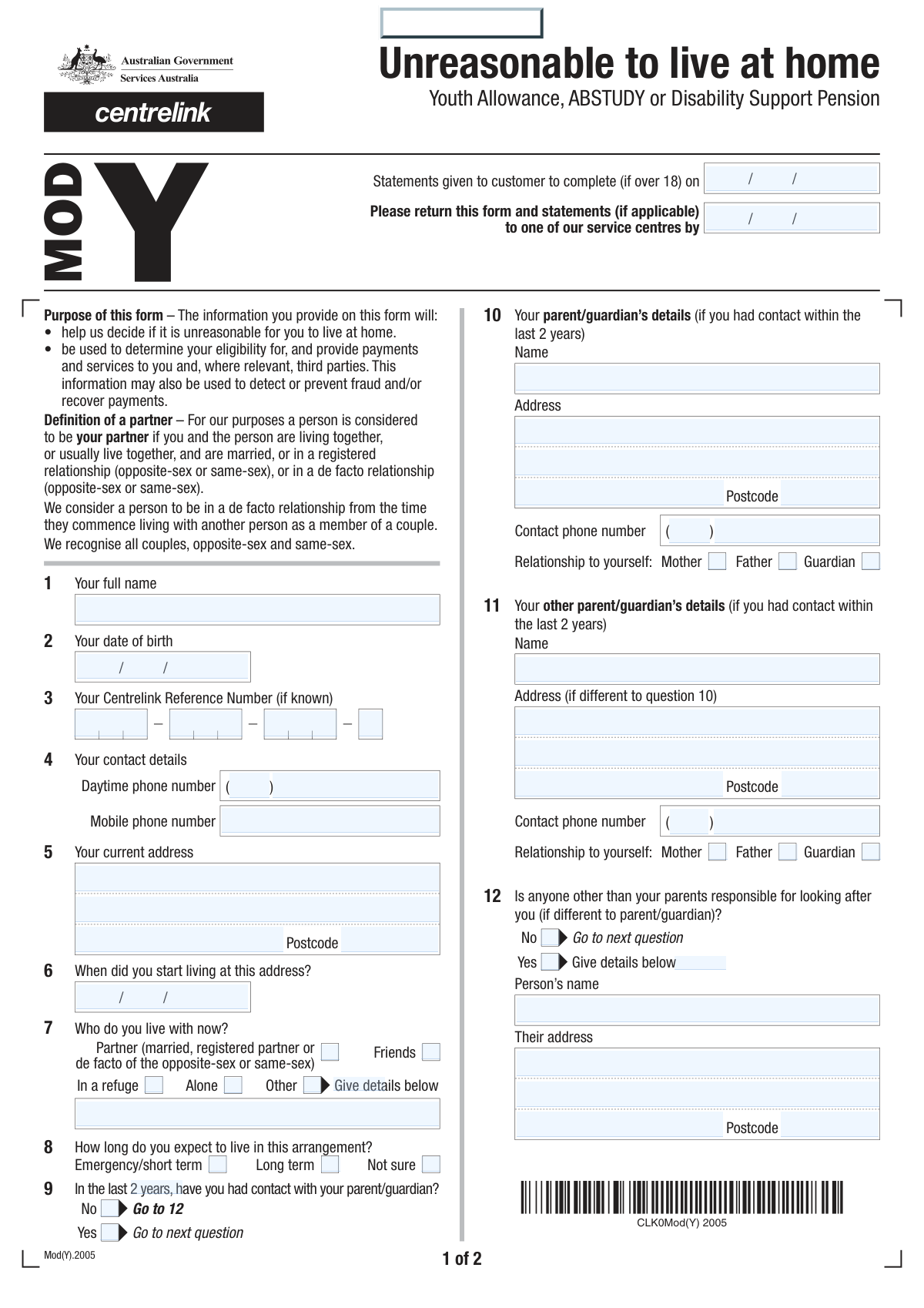
Yes! You can use AI to fill out Centrelink Form SY041 - Verification of your family circumstances: Unreasonable to live at home
Centrelink Form SY041, 'Verification of your family circumstances: Unreasonable to live at home,' is an Australian government document used by young people to substantiate their claim that they cannot live with their parents. It is a critical step in applying for payments like Youth Allowance under independent criteria, requiring detailed information about living arrangements, family contact, and financial support. Today, this form can be filled out quickly and accurately using AI-powered services like Instafill.ai, which can also convert non-fillable PDF versions into interactive fillable forms.
Our AI automatically handles information lookup, data retrieval, formatting, and form filling.
It takes less than a minute to fill out SY041 using our AI form filling.
Securely upload your data. Information is encrypted in transit and deleted immediately after the form is filled out.
Form specifications
| Form name: | Centrelink Form SY041 - Verification of your family circumstances: Unreasonable to live at home |
| Number of fields: | 101 |
| Number of pages: | 2 |
| Filled form examples: | Form SY041 Examples |
| Language: | English |
Instafill Demo: How to fill out PDF forms in seconds with AI
How to Fill Out SY041 Online for Free in 2026
Are you looking to fill out a SY041 form online quickly and accurately? Instafill.ai offers the #1 AI-powered PDF filling software of 2026, allowing you to complete your SY041 form in just 37 seconds or less.
Follow these steps to fill out your SY041 form online using Instafill.ai:
- 1 Navigate to Instafill.ai and upload or select the Centrelink Form SY041.
- 2 Allow the AI to scan the form and identify all the required fields for personal details, living arrangements, and family information.
- 3 Provide your personal information, including your full name, date of birth, contact details, and Centrelink Reference Number (CRN).
- 4 Detail your current living situation and provide a comprehensive explanation for why it is unreasonable for you to live with your parents.
- 5 Enter information about your parents/guardians, any contact you've had, and details of any other responsible persons or third-party contacts who can verify your situation.
- 6 Input your bank account details for payment and digitally sign the declaration to certify the accuracy of the information provided.
- 7 Review the completed form for accuracy, then download the filled PDF to print and submit to a Centrelink service centre as instructed.
Our AI-powered system ensures each field is filled out correctly, reducing errors and saving you time.
Why Choose Instafill.ai for Your Fillable SY041 Form?
Speed
Complete your SY041 in as little as 37 seconds.
Up-to-Date
Always use the latest 2026 SY041 form version.
Cost-effective
No need to hire expensive lawyers.
Accuracy
Our AI performs 10 compliance checks to ensure your form is error-free.
Security
Your personal information is protected with bank-level encryption.
Frequently Asked Questions About Form SY041
This form is used by Centrelink to gather information about your personal circumstances, particularly your living arrangements and relationship with your parents or guardians. It is typically required for individuals applying for or updating their details for certain Centrelink payments where independence needs to be assessed.
Your CRN is a unique number that identifies you to Centrelink, usually found on letters or cards from Centrelink or in your online MyGov account. If you don't have one or can't find it, you may need to contact Centrelink directly.
You should check the 'Friends' box under the 'Living Arrangement' section. You can then specify if this is an 'Emergency/short term' arrangement in the following question to accurately reflect your situation.
No, if you have not had contact with your parent or guardian in the last two years, you should check the 'No' box for question 9. You will then be directed to skip the section asking for their details.
In this section, you should provide a detailed and honest explanation of your situation. Describe the circumstances that make it unreasonable or impossible for you to live at your parental home.
Yes, you should declare any form of regular support, including money for food, rent, or bills, from parents, guardians, or anyone else. Describe the nature and frequency of this support in the space provided.
No, you are not required to give permission, and you can indicate this by checking the 'No' box in the relevant sections. However, not giving permission may affect Centrelink's ability to verify your circumstances and process your claim.
Centrelink requires your bank account details, including the BSB and account number, to pay any eligible payments directly into your account. Ensure the name on the account matches the name on your form to avoid payment issues.
The form should be returned to a service centre by the 'Statements Return Date' indicated on the first page. Make sure all required sections are complete to avoid delays in processing.
This is a person, such as a relative, social worker, or community leader, who knows about your family situation and can confirm the details you have provided. You can nominate someone if you think it will help Centrelink understand your circumstances.
Yes, you can use AI-powered services like Instafill.ai to help complete this form. These tools can accurately auto-fill your information into the correct fields, saving you time and reducing errors.
Simply upload the form to the Instafill.ai platform. The AI will identify the fields, and you can then fill them in online or have the AI auto-fill them with your saved information before downloading the completed PDF.
If you have a non-fillable or 'flat' PDF, you can use a service like Instafill.ai to make it interactive. Upload the file, and the tool will convert it into a fillable form that you can complete on your computer.
If you or your family have had involvement with a state or territory Child Protection Agency, you should check 'Yes' for question 16. You will then need to provide more details and may be asked to attach verification.
Yes, question 19 allows you to authorize another person or organization to enquire or act on your behalf when dealing with Centrelink. If you select 'Yes', you will need to provide their details.
Compliance SY041
Validation Checks by Instafill.ai
1
Statement Dates Chronology
This validation ensures that the 'Statements Return Date' is on or after the 'Date Statements Issued'. It prevents logical errors where a form is due for return before it was even provided to the applicant. If the return date is earlier than the issue date, the system should display an error and require the user to correct one or both of the dates before proceeding.
2
Conditional 'Other Living Arrangement' Details
This check verifies that if the 'Other' checkbox is selected in the 'Living Arrangement' section, the 'Other Living Arrangement Details' text field is not left empty. It is a crucial completeness check to ensure that the user provides necessary clarification for their non-standard living situation. If 'Other' is checked and the details are missing, a validation error should prompt the user to describe their arrangement.
3
Mutually Exclusive Living Arrangement Selection
This validation ensures that only one option is selected from the 'Living Arrangement' checkboxes (e.g., 'Alone', 'With friends', 'Partner'). A person's primary living arrangement is typically singular, so this check prevents contradictory or ambiguous data. If a user selects more than one option, an error message should appear, instructing them to choose only the one option that best describes their current situation.
4
Conditional Parent/Guardian Details Requirement
This check validates that if the 'Yes' box is checked for the 'Parent/Guardian Contact Question', then the required fields in the 'Parent/Guardian Details' section (e.g., Name, Address, Phone) are filled out. This enforces the form's conditional logic, ensuring that necessary contact information is captured when the applicant indicates they have had recent contact. If 'Yes' is checked but the details are missing, the user will be prompted to complete the required parent/guardian information.
5
Start Date at Address Must Be in the Past
This validation ensures that the 'Start Date at Address' is not a future date. It is logically impossible for a person to have started living at an address in the future, so this check prevents data entry errors. If a future date is entered, the system should flag it as an error and require the user to enter a date that is on or before the current date.
6
Centrelink Reference Number (CRN) Format
This validation checks that the entered Centrelink Reference Number (CRN) conforms to the expected format, which is typically 9 digits followed by a letter. This check is critical for correctly identifying the applicant within the Centrelink system. An invalid format would trigger an error message explaining the correct format (e.g., 'Your CRN should be 9 numbers and 1 letter') and prevent submission until corrected.
7
Australian BSB Number Format
This check ensures the 'BSB (Branch Number)' field contains a valid 6-digit number. The BSB is essential for routing payments to the correct bank branch, and an incorrect number will cause payment failure. This validation prevents submission of structurally invalid BSBs, reducing payment processing errors. The system should reject any input that is not 6 digits long.
8
Account Holder Name Consistency Check
This validation compares the 'Account Holders Name(s)' with the applicant's 'Full Name'. While names may differ for valid reasons (e.g., joint accounts), a significant mismatch can indicate an error or a third-party account, which may be disallowed. If the names do not match, the system should display a warning, asking the user to confirm that the account details are correct and that they are an authorized holder of the account.
9
Declaration Date Logical Validity
This validation ensures the 'Date Signed' in the declaration is not a future date and is on or after the 'Date Statements Issued'. This confirms the applicant is signing the form on a valid day after having received it. An invalid date would prevent form submission and prompt the user for a correction, ensuring the legal validity of the declaration.
10
Conditional Financial Support Description
This check verifies that if 'Yes' is selected for 'Financial Support Details', the 'Support Description' field is filled in. This is a conditional requirement to ensure that when an applicant indicates they receive support, they provide the necessary details for assessment. If 'Yes' is checked but the description is empty, an error should prompt the user to describe the support they receive.
11
Australian Postcode Format Validation
This validation ensures that all postcode fields ('Current Postcode', 'Parent/Guardian Postcode', etc.) contain a 4-digit number. This is the standard format for Australian postcodes and is essential for accurate address records and mail delivery. Any input that is not a 4-digit number should be rejected with an informative error message.
12
Conditional Alternative Contact Person Details
This check ensures that if 'Yes' is selected for 'Alternative Contact Person Details', the subsequent fields for that person's name, relationship, and address are completed. This enforces the form's logic, guaranteeing that when a user indicates an alternative contact exists, their information is actually captured. If 'Yes' is checked but the details are missing, the form should prompt the user to either provide the details or change their selection to 'No'.
13
Phone Number Assembly and Validation
This validation checks that when a phone number is provided, both the area code and the local number parts are present. It prevents the submission of incomplete and unusable phone numbers. The system should treat the area code and number as a single logical unit that must be provided together for any phone contact field.
14
Parent/Guardian Relationship Uniqueness
This validation checks that the relationship selected for the first 'Parent/Guardian Details' (e.g., 'Mother') is not the same as the relationship selected for the 'Other Parent/Guardian Details'. An applicant cannot have two different individuals both listed as their mother. This logical check prevents contradictory data entry and ensures the family structure information is coherent and accurate.
Common Mistakes in Completing SY041
Users often mistype their 9-digit CRN and suffix letter due to transcription errors or confusion about the number's format. This mistake is critical as the CRN is the primary identifier, and an incorrect entry means the system cannot locate the applicant's file. This leads to immediate processing halts or outright rejection, requiring the applicant to resubmit. To avoid this, carefully double-check the CRN against an official Centrelink document or card before entering it. AI-powered tools like Instafill.ai can help by validating the format of such reference numbers to catch errors before submission.
Applicants frequently enter their entire address into 'Address Line 1' or incorrectly split information, such as putting the suburb in Line 1 and the street in Line 2. This happens due to rushing or not reading the field labels carefully. The consequence is failed address validation, returned mail, and significant delays in receiving important correspondence or payments. To prevent this, always put the unit number, street number, and street name in Line 1, and the suburb, state, and postcode in the subsequent dedicated fields. AI form-fillers can automatically parse and correctly structure addresses from a single line of input.
The form requires applicants to fill out detailed sections only if they answer 'Yes' to a preceding question (e.g., providing parent details after confirming contact). A common error is either checking 'Yes' and forgetting to provide the required details, or checking 'No' and filling them in anyway. This results in an incomplete or confusing application that cannot be processed, forcing the agency to contact the applicant for clarification and causing delays. To avoid this, read instructions like 'Fill only if Yes' carefully. Using a tool like Instafill.ai can convert a flat PDF into a smart, fillable form where these sections automatically appear or disappear based on your answers.
People often use inconsistent date formats (e.g., MM/DD/YY vs DD/MM/YYYY), enter illogical dates (e.g., a 'Date Signed' that is before the 'Statements Issued' date), or forget to fill in the date fields altogether. This can cause data entry rejection by automated systems or raise questions about the form's validity, leading to processing delays. Always use a consistent format (DD/MM/YYYY is standard in Australia) and double-check that all dates are present and logical before submitting.
When asked for detailed explanations, such as in the 'Reason for not living with parents' field, applicants often provide short, unhelpful answers like 'family issues' or 'it's complicated'. This occurs because they may find the topic difficult or underestimate the level of detail required. Such vague responses give the assessor insufficient information to make a decision, leading to requests for more information, interviews, or even claim denial. To avoid this, provide specific, factual, and comprehensive details that directly answer the question.
Transposing digits in the BSB or Account Number is a frequent and costly mistake, as is providing a 16-digit card number instead of the actual account number. These errors lead to payment failure, meaning the applicant will not receive their funds on time. Correcting this mistake can take weeks, causing significant financial hardship. To prevent this, carefully copy the BSB and Account Number from a bank statement or online banking portal, not from memory or a debit card, and double-check each digit before submission.
An applicant might enter their legal name on the form, but the bank account provided is under a slightly different name, a maiden name, or is a joint account. Banks and payment systems often reject transactions where the names do not match exactly as an anti-fraud measure. This results in failed payments and delays. Ensure the 'Account Holders Name(s)' field is filled out exactly as it appears on the bank statement, including any middle initials or additional names on a joint account.
The form asks for a separate 'Area Code' and 'Phone Number'. A common mistake is to enter the entire phone number (e.g., 02 9999 8888) into the main number field, leaving the area code blank, or putting the '0' in one box and the '2' in another. This can cause automated dialing systems to fail and prevent case officers from being able to contact the applicant. To avoid this, enter only the area code (e.g., '02', '03', '08') in its designated field and the remaining digits in the main number field.
In the rush to complete a long form, the final declaration signature and date are easily missed. An unsigned or undated form is legally invalid and cannot be processed. It will be returned to the applicant, resetting the processing timeline and causing major delays. Always perform a final review of the entire form before submission, paying special attention to the signature block to ensure it is signed and dated for the day of submission.
Applicants sometimes select multiple, conflicting options in the 'Living Arrangement' section (e.g., checking both 'Alone' and 'With Friends') or select 'Other' without providing the mandatory explanation. This ambiguity forces a processor to guess or, more likely, halt the application to seek clarification. To ensure smooth processing, select only the one option that best describes your primary living situation and always provide a clear, detailed explanation if you choose 'Other'.
Saved over 80 hours a year
“I was never sure if my IRS forms like W-9 were filled correctly. Now, I can complete the forms accurately without any external help.”
Kevin Martin Green
Your data stays secure with advanced protection from Instafill and our subprocessors
Robust compliance program
Transparent business model
You’re not the product. You always know where your data is and what it is processed for.
ISO 27001, HIPAA, and GDPR
Our subprocesses adhere to multiple compliance standards, including but not limited to ISO 27001, HIPAA, and GDPR.
Security & privacy by design
We consider security and privacy from the initial design phase of any new service or functionality. It’s not an afterthought, it’s built-in, including support for two-factor authentication (2FA) to further protect your account.
Fill out SY041 with Instafill.ai
Worried about filling PDFs wrong? Instafill securely fills centrelink-form-sy041-verification-of-your-family-circumstances-unreasonable-to-live-at-home forms, ensuring each field is accurate.