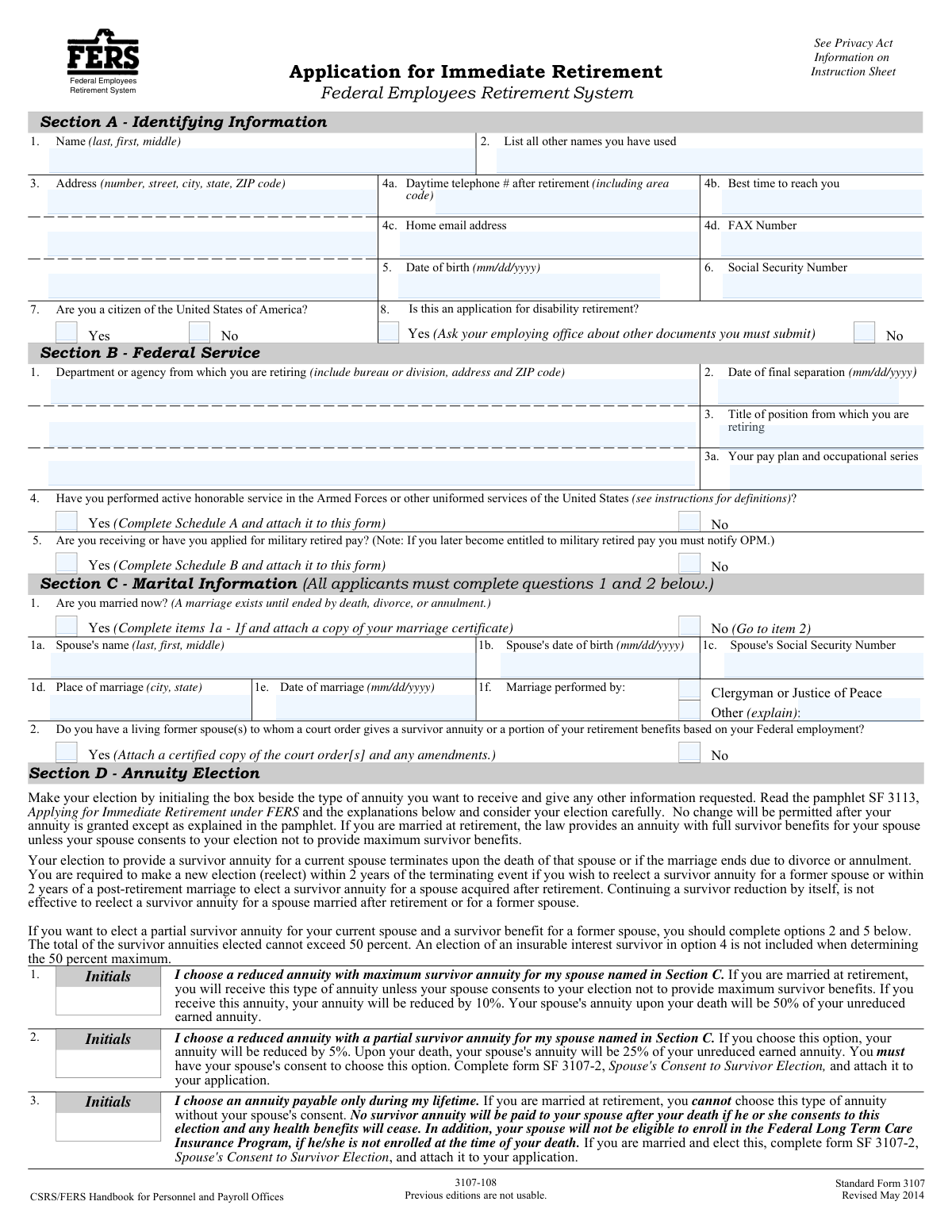
Yes! You can use AI to fill out Standard Form 3107, Application for Immediate Retirement, Federal Employees Retirement System
Standard Form 3107 is the official application used by Federal employees covered by the Federal Employees Retirement System (FERS) to apply for an immediate retirement annuity. It is a critical document for initiating the process of receiving retirement benefits, requiring detailed information about the employee's service history, marital status, and annuity elections. Today, this form can be filled out quickly and accurately using AI-powered services like Instafill.ai, which can also convert non-fillable PDF versions into interactive fillable forms.
Our AI automatically handles information lookup, data retrieval, formatting, and form filling.
It takes less than a minute to fill out SF 3107 using our AI form filling.
Securely upload your data. Information is encrypted in transit and deleted immediately after the form is filled out.
Form specifications
| Form name: | Standard Form 3107, Application for Immediate Retirement, Federal Employees Retirement System |
| Number of fields: | 471 |
| Number of pages: | 14 |
| Language: | English |
Instafill Demo: How to fill out PDF forms in seconds with AI
How to Fill Out SF 3107 Online for Free in 2026
Are you looking to fill out a SF 3107 form online quickly and accurately? Instafill.ai offers the #1 AI-powered PDF filling software of 2026, allowing you to complete your SF 3107 form in just 37 seconds or less.
Follow these steps to fill out your SF 3107 form online using Instafill.ai:
- 1 Navigate to Instafill.ai and upload or select the SF 3107, Application for Immediate Retirement form.
- 2 Use the AI-powered tool to automatically populate your personal identifying information in Section A, including your name, Social Security Number, and contact details.
- 3 Provide details of your federal service in Section B, such as your retiring agency and date of final separation, and answer questions about military service.
- 4 Complete Section C with your marital information and make your annuity election in Section D, specifying survivor benefits for a spouse or former spouse if applicable.
- 5 Fill out insurance information in Section E (Health, Life, Dental/Vision) and provide payment instructions for your annuity in Section H.
- 6 Review all the information pre-filled by the AI for accuracy, make any necessary corrections, and then digitally sign and date the applicant's certification in Section I.
- 7 Download the completed SF 3107 and submit it along with any required schedules (A, B, C) and supporting documents to your employing agency's personnel office.
Our AI-powered system ensures each field is filled out correctly, reducing errors and saving you time.
Why Choose Instafill.ai for Your Fillable SF 3107 Form?
Speed
Complete your SF 3107 in as little as 37 seconds.
Up-to-Date
Always use the latest 2026 SF 3107 form version.
Cost-effective
No need to hire expensive lawyers.
Accuracy
Our AI performs 10 compliance checks to ensure your form is error-free.
Security
Your personal information is protected with bank-level encryption.
Frequently Asked Questions About Form SF 3107
This form is for Federal employees covered by the Federal Employees Retirement System (FERS) who are applying for an immediate retirement annuity. An immediate annuity is one that begins within 30 days of your separation from Federal service.
You should not use this form if you are applying for a deferred or postponed annuity, which begins more than 30 days after your separation. For that, you need to request Form RI 92-19 from the Office of Personnel Management (OPM).
You should give your completed application and all required documents to the personnel office of your employing agency. They will review it and forward it to your agency's payroll office and then to OPM for final processing.
You must complete Schedule A, attach proof of honorable service (like a DD 214), and pay a military service deposit to your agency before you retire. If you receive military retired pay, you may also need to complete Schedule B and waive that pay.
By law, a married employee automatically receives a reduced annuity with maximum survivor benefits for their spouse. If you wish to provide a partial benefit or no benefit, you must obtain your spouse's notarized consent on Form SF 3107-2, Spouse's Consent to Survivor Election.
Commonly required documents include a copy of your marriage certificate, military discharge papers (DD 214), and any relevant court orders for former spouses. Use the Applicant's Checklist on the form to ensure you have attached all necessary documentation.
If a court order requires you to provide a survivor annuity, you must attach a certified copy of the order. You can also voluntarily elect a survivor annuity for a former spouse in Section D, but this may require your current spouse's consent.
Annuity payments are made electronically through Direct Deposit to a checking or savings account or via a Direct Express debit card. You must provide your payment information in Section H of the application.
If your address changes after your application has been forwarded to OPM, you must call them at 1-888-767-6738 to update your information. Be prepared to provide your name, date of birth, and Social Security Number.
If you have a history with the Office of Workers' Compensation Programs (OWCP), you must check 'yes' in Section F and complete Schedule C. The law generally prohibits receiving both a FERS annuity and OWCP disability compensation for the same period of time.
Yes, services like Instafill.ai use AI to accurately auto-fill form fields from your saved profile. This can save significant time and help reduce errors on complex government forms like this one.
You can use a service like Instafill.ai to easily fill out your SF 3107 online. Simply upload the form, and the AI will help you complete the fields, after which you can download, print, and sign the completed application for submission.
If you have a non-fillable or 'flat' PDF, you can upload it to a platform like Instafill.ai. Their technology can convert it into an interactive, fillable form that you can complete on your computer, saving you from having to print and fill it out by hand.
Compliance SF 3107
Validation Checks by Instafill.ai
1
Validates Social Security Number Presence and Format
This check ensures that the Social Security Number in Section A, Item 6 is provided and follows the standard XXX-XX-XXXX format. The SSN is a primary identifier for locating records and processing benefits, so its accuracy is critical. If the SSN is missing or incorrectly formatted, the application processing will be halted until the correct information is obtained, causing significant delays.
2
Ensures Applicant Signature and Date are Present
This validation verifies that the applicant has physically signed the application in Section I and provided a valid date. An unsigned application is legally invalid and cannot be processed. This certification confirms the applicant attests to the truthfulness of the information provided, which is a legal requirement. Failure to sign will result in the immediate rejection of the application.
3
Verifies Consistency of Marital Status and Spousal Information
This check confirms that if the applicant answers 'Yes' to being married in Section C, Item 1, then all spousal details in items 1a through 1f (Spouse's name, DOB, SSN, etc.) are fully completed. This information is essential for determining survivor benefits and health insurance eligibility for the spouse. An incomplete section will require follow-up with the applicant, delaying the calculation and payment of the annuity.
4
Confirms Spousal Consent Form Attachment for Non-Maximum Survivor Annuity
This validation checks if a married applicant selects any annuity option in Section D other than the maximum survivor benefit for their current spouse (i.e., they do not initial Box 1). If so, it verifies that a completed and notarized SF 3107-2, Spouse's Consent to Survivor Election, is attached. This is a legal requirement to protect spousal rights, and its absence will prevent the finalization of the retirement claim.
5
Validates Date of Final Separation is Logical
This check ensures the 'Date of final separation' in Section B, Item 2 is a valid date in MM/DD/YYYY format and is logically sound. The date must not be before the applicant's date of birth and should be consistent with an 'immediate' retirement (i.e., within 30 days of application). An illogical or invalid date would make it impossible to determine eligibility and the annuity commencement date, requiring correction.
6
Checks Total Survivor Annuity Percentage for Former Spouse(s)
This validation applies if the applicant elects a survivor annuity for a former spouse in Section D, Box 5. It verifies that the 'Total' percentage entered is exactly 25% or 50%, as stipulated by the form's instructions. It also checks that the sum of the individual percentages equals the stated total. An incorrect total makes the election invalid and prevents OPM from knowing the applicant's true intent.
7
Ensures Schedule A is Attached for Claimed Military Service
This check verifies that if an applicant answers 'Yes' to having performed active honorable military service in Section B, Item 4, then the corresponding Schedule A form is completed and attached. Schedule A provides the detailed information necessary to determine creditable service for the annuity calculation. Missing this schedule will result in the military service not being credited, potentially lowering the annuity amount until the information is provided.
8
Ensures Schedule C is Attached for Workers' Compensation History
This validation confirms that if an applicant answers 'Yes' to having received or applied for workers' compensation in Section F, Item 1, then the corresponding Schedule C form is completed and attached. This is critical because federal law prohibits the dual payment of FERS annuity and workers' compensation benefits for the same period. Failure to provide Schedule C will halt annuity payments until OPM can confirm the applicant's compensation status.
9
Verifies Attachment of Court Orders for Former Spouse or Children
This check ensures that if the applicant answers 'Yes' to Section C, Item 2 (court order for former spouse) or Section E, Item 1b (court order for child health benefits), a copy of the relevant court order is attached. These legal documents are required for OPM to comply with judicial mandates regarding benefit distribution. Without the certified orders, OPM cannot correctly allocate survivor benefits or enforce health coverage requirements.
10
Validates Completeness of Direct Deposit Information
This check verifies that if the applicant selects payment via Direct Deposit in Section H, then the Financial Institution Routing Number, Account Number, and Account Type are all provided. The routing number must be a valid 9-digit number. Incomplete or invalid banking information will prevent the electronic payment of the annuity, leading to payment delays or the need to issue paper checks until the information is corrected.
11
Prevents Insurable Interest Annuity Election for Disability Retirement
This logical check cross-references Section A, Item 8 ('Is this an application for disability retirement?') with Section D, Item 4 (Insurable Interest Annuity). If the applicant is applying for disability retirement, they are not eligible to elect an insurable interest annuity. This validation prevents an invalid election that would be rejected during processing, requiring the applicant to make a new, valid election.
12
Validates Logical Sequence of Marriage and Divorce Dates
For any former spouse listed in Section D, Box 5, this check ensures the 'Date of divorce' is after the 'Date of marriage'. This simple chronological validation helps catch data entry errors and confirms the logical consistency of the marital history provided. An illogical date sequence would cast doubt on the validity of the information and require clarification before processing.
Common Mistakes in Completing SF 3107
Saved over 80 hours a year
“I was never sure if my IRS forms like W-9 were filled correctly. Now, I can complete the forms accurately without any external help.”
Kevin Martin Green
Your data stays secure with advanced protection from Instafill and our subprocessors

Robust compliance program
Transparent business model
You’re not the product. You always know where your data is and what it is processed for.
ISO 27001, HIPAA, and GDPR
Our subprocesses adhere to multiple compliance standards, including but not limited to ISO 27001, HIPAA, and GDPR.
Security & privacy by design
We consider security and privacy from the initial design phase of any new service or functionality. It’s not an afterthought, it’s built-in, including support for two-factor authentication (2FA) to further protect your account.
Fill out SF 3107 with Instafill.ai
Worried about filling PDFs wrong? Instafill securely fills standard-form-3107-application-for-immediate-retirement-federal-employees-retirement-system forms, ensuring each field is accurate.