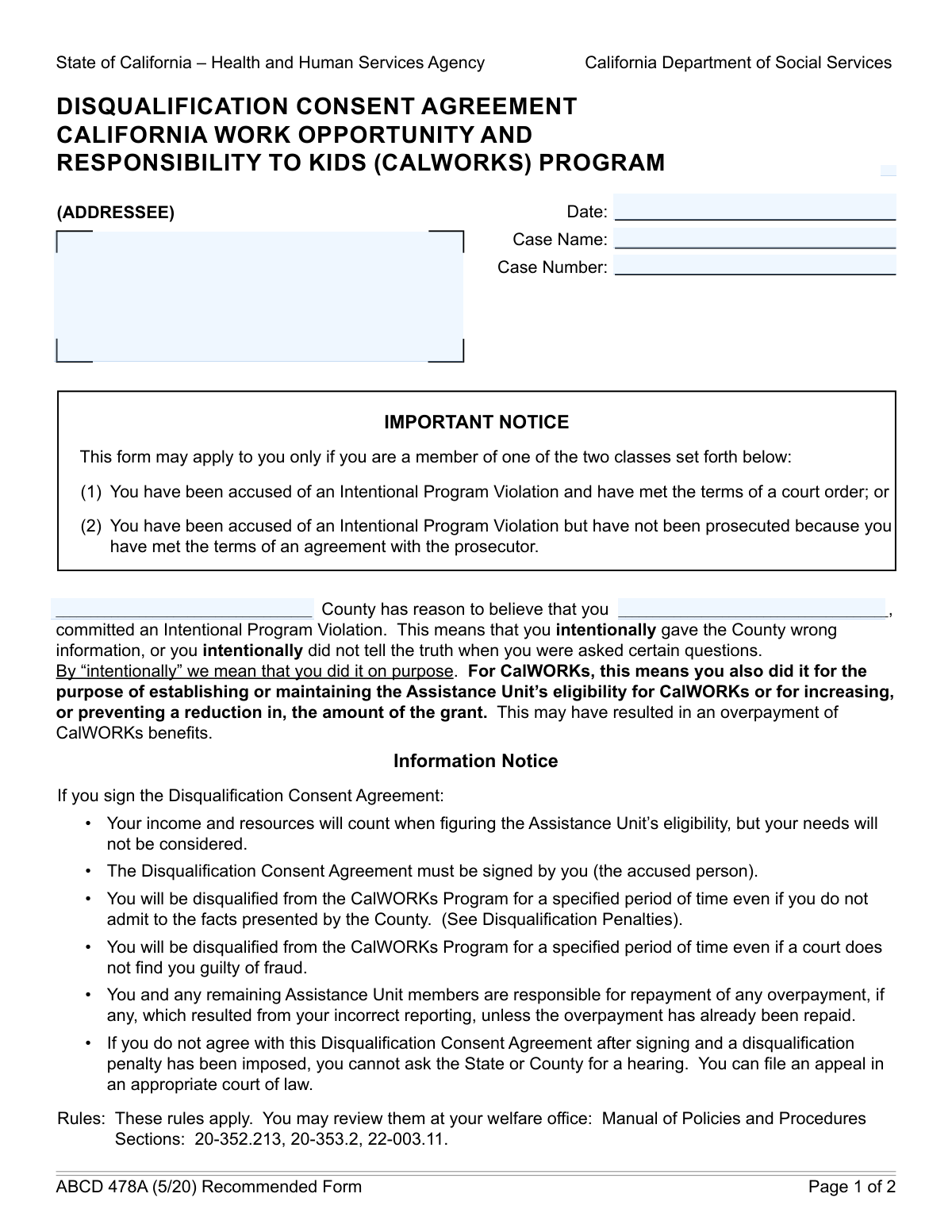
Yes! You can use AI to fill out TEMP 2203, CalWORKs Disqualification Consent Agreement
The TEMP 2203, or CalWORKs Disqualification Consent Agreement, is a form used by California counties when an individual is believed to have committed an Intentional Program Violation (IPV). This agreement allows the accused person to waive their right to an administrative hearing and consent to a specific period of disqualification from the CalWORKs program, formalizing the penalty for violations. Today, this form can be filled out quickly and accurately using AI-powered services like Instafill.ai, which can also convert non-fillable PDF versions into interactive fillable forms.
Our AI automatically handles information lookup, data retrieval, formatting, and form filling.
It takes less than a minute to fill out TEMP 2203 using our AI form filling.
Securely upload your data. Information is encrypted in transit and deleted immediately after the form is filled out.
Form specifications
| Form name: | TEMP 2203, CalWORKs Disqualification Consent Agreement |
| Number of fields: | 31 |
| Number of pages: | 2 |
| Language: | English |
Instafill Demo: How to fill out PDF forms in seconds with AI
How to Fill Out TEMP 2203 Online for Free in 2026
Are you looking to fill out a TEMP 2203 form online quickly and accurately? Instafill.ai offers the #1 AI-powered PDF filling software of 2026, allowing you to complete your TEMP 2203 form in just 37 seconds or less.
Follow these steps to fill out your TEMP 2203 form online using Instafill.ai:
- 1 Navigate to Instafill.ai and upload your TEMP 2203 form or select it from the template library.
- 2 Use the AI assistant to fill in the Addressee and Case Information, including the case name, number, and date.
- 3 Enter the details of the Intentional Program Violation, specifying the accused party's name and the date of the notice.
- 4 Review the Disqualification Penalties section and check the box corresponding to the specific violation and penalty period agreed upon.
- 5 Indicate your consent by checking whether you admit to the facts or not, while still agreeing to the disqualification.
- 6 Electronically sign and date the form in the designated signature fields, which the AI will help you locate.
- 7 Review the entire completed agreement for accuracy, then download, print, or securely share your finalized TEMP 2203 form.
Our AI-powered system ensures each field is filled out correctly, reducing errors and saving you time.
Why Choose Instafill.ai for Your Fillable TEMP 2203 Form?
Speed
Complete your TEMP 2203 in as little as 37 seconds.
Up-to-Date
Always use the latest 2026 TEMP 2203 form version.
Cost-effective
No need to hire expensive lawyers.
Accuracy
Our AI performs 10 compliance checks to ensure your form is error-free.
Security
Your personal information is protected with bank-level encryption.
Frequently Asked Questions About Form TEMP 2203
This form is used when you are accused of an Intentional Program Violation. It outlines the specific violation and the resulting disqualification penalty, allowing you to consent to the penalty without an administrative hearing.
An agency representative will fill in the case information and the details of the violation and penalty. The person accused of the violation must then review the form, select a consent option, and provide their signature and date.
By signing this form, you are agreeing to be disqualified from the program for the period specified in the 'Disqualification Penalties' section. This means you will stop receiving benefits for that duration.
You can either admit the facts are correct or not admit to them. In either case, signing the agreement means you accept the disqualification penalty to resolve the matter.
The penalty duration is based on the type of violation and whether it is a first, second, or third offense. Penalties can range from six months to a permanent disqualification for severe or repeated violations.
You are primarily responsible for checking a box under 'Consent Agreement Options,' signing your name in the 'Signature of Accused Person' field, and writing the date.
The form provides a 'Legal Aid Contact Information' section with a name and phone number. You should contact them for legal advice regarding your case.
A permanent penalty means you will be disqualified from receiving aid from the program for life. This is reserved for the most serious offenses, such as a third violation or significant fraud.
No, signing is voluntary. If you choose not to sign, your case will likely proceed to an administrative disqualification hearing to determine if a violation occurred.
Yes, services like Instafill.ai use AI to help you accurately fill out forms. These tools can auto-fill your information into the correct fields, which saves time and helps prevent errors.
You can upload a digital copy of the form to the Instafill.ai platform. The service will make the fields interactive so you can type your information, check boxes, and e-sign before downloading the completed document.
If you have a non-fillable or 'flat' PDF, you can use a tool like Instafill.ai. It can convert the document into an interactive form that you can easily complete on your computer.
According to the form, a two-year penalty can be applied for a first violation involving filing multiple aid applications or a first felony conviction where the overpayment was less than $2,000.
Compliance TEMP 2203
Validation Checks by Instafill.ai
1
Ensures Case Information is Complete
This check verifies that the 'Case Name', 'Case Number', and 'Date' fields under 'Case Information' are all filled out. These fields are fundamental for identifying and tracking the case file correctly. If this validation fails, the form cannot be processed as it lacks the basic identifiers for record-keeping and retrieval.
2
Validates Case Information Date Format and Logic
This validation ensures the 'Date' under 'Case Information' is in a valid format (e.g., MM/DD/YYYY) and is not a future date. An incorrect or future date can cause significant issues with case timelines and official records. A failed validation would require the user to correct the date before submission to maintain chronological accuracy.
3
Verifies Chronological Consistency of Dates
This check compares the 'Date of Notice' with the 'Date (Case Information)'. The 'Date of Notice' must be on or before the 'Date (Case Information)' to ensure a logical sequence of events. This is crucial for legal and administrative accuracy, as the notice cannot predate the creation of the case file itself. Failure would prompt the user to review and correct the dates.
4
Requires at Least One Disqualification Penalty Selection
This validation ensures that if the form is being filled out for an Intentional Program Violation, at least one checkbox from the 'Disqualification Penalties' section is selected. This is critical because the entire purpose of this section is to define the penalty. If no penalty is selected, the form is incomplete and cannot be used to enforce a disqualification.
5
Enforces Mutually Exclusive Penalty Selections
This check prevents the user from selecting conflicting penalty checkboxes simultaneously, such as 'Six months for first reporting violation' and 'Twelve months for second reporting violation'. A single case should correspond to a single violation level (e.g., first, second, or third). A validation failure would require the user to select only one appropriate penalty level to ensure logical consistency.
6
Validates Parent-Child Checkbox Logic for Penalties
This check ensures that if a specific sub-penalty is selected (e.g., 'First felony conviction'), its corresponding parent category (e.g., 'Two years first violation category') is also checked. This maintains the hierarchical structure of the form and ensures the general category of the violation is recorded along with the specific reason. Failure would prompt the user to select the parent category.
7
Ensures Consistency Between Penalty Selection and Duration Field
This validation verifies that the 'Penalty Duration' field is filled and its value matches the selected penalty checkbox. For example, if 'Six months for first reporting violation' is checked, the duration field must state '6 months'. This cross-reference prevents data entry errors and ensures the recorded penalty duration is accurate. A mismatch would block submission until the fields are aligned.
8
Requires Exclusive Selection in Consent Agreement
This check ensures that only one of the two 'Consent Agreement Options' ('Admit facts' or 'Do not admit facts') is selected. A user cannot simultaneously admit and not admit to the facts. This validation is crucial for establishing the legal basis of the consent agreement. If both or neither are checked, the form is invalid and must be corrected.
9
Conditional Requirement for Signature Fields
This validation confirms that if either 'Admit facts' or 'Do not admit facts' is checked, the 'Signature of Accused Person' and 'Date' fields in the signature block are completed. The signature and date are what make the consent agreement legally binding. Without them, the agreement is void, so the form cannot be submitted until they are provided.
10
Validates Signature Date Logic
This check ensures the 'Date' in the signature block is a valid date that occurs on or after the 'Date of Notice'. A person cannot sign an agreement before the notice of violation was even established. This maintains the chronological integrity of the legal process. An invalid date would require correction before the form can be accepted.
11
Validates Legal Aid Phone Number Format
This check verifies that the 'Legal Aid Phone Number' field contains a valid, standard phone number format (e.g., XXX-XXX-XXXX). This ensures that the contact information is usable and that interested parties can successfully reach the legal aid contact. An improperly formatted number would trigger an error, prompting the user to correct the entry.
12
Conditional Requirement for Penalty Duration and Consent Period
This validation ensures that if any 'Disqualification Penalties' checkbox is selected, both the 'Penalty Duration' and 'Disqualification Period (Consent Period)' fields are filled. These fields are essential for defining the terms of the disqualification. If a penalty is chosen, these fields must be completed to make the form's intent clear, otherwise the submission will be rejected.
13
Ensures Completeness of Addressee and Accused Party Information
This check verifies that the 'Addressee' and 'Accused Party Name' fields are not empty. These fields are essential for identifying who the notice is for and who the subject of the action is. Missing this information would make the document legally and administratively meaningless, so the form cannot be processed without it.
14
Matches Consent Period to Penalty Duration
This validation ensures the value entered in 'Disqualification Period (Consent Period)' is identical to the value in 'Penalty Duration'. These two fields should reflect the same agreed-upon timeframe for the disqualification. Any discrepancy could lead to legal ambiguity and disputes over the length of the penalty, so they must match for the form to be valid.
Common Mistakes in Completing TEMP 2203
This form has three separate date fields: 'Date' for the form submission, 'Date of Notice' for the violation, and 'Date' for the signature. Users often enter the current date in all fields, which creates an inaccurate timeline of events. This can lead to legal challenges regarding the notice period and invalidate the document. To avoid this, carefully read the label for each date field and enter the specific date required for that section.
People frequently make typos in the street name or ZIP code, or forget to include an apartment or suite number in the 'Addressee' field. An incomplete address can result in critical legal notices being returned as undeliverable, causing the addressee to miss deadlines or default on their case. Always double-check the mailing address for accuracy and completeness before submitting.
The 'Disqualification Penalties' section is complex, with many similar-sounding options based on specific monetary values and violation counts. It is easy to misread the criteria and check the wrong box, applying an incorrect penalty period. This error can invalidate the agreement and require a lengthy correction process. Carefully review each penalty description to ensure it precisely matches the circumstances of the violation.
A common oversight is filling out the entire form but failing to provide a signature and date in the final section after selecting a consent option. An unsigned agreement is legally non-binding and will be rejected by the agency. This halts the entire process until a properly executed form is submitted, causing significant delays. Always make signing and dating the form your final check before submission.
Many fields on this form are conditional, meaning they should only be filled out if a specific previous option is selected. Users either miss these instructions and leave required fields blank, or fill out sections that should have been skipped. This results in an incomplete or improperly filled form that will be rejected. AI-powered tools like Instafill.ai can help by automatically showing or hiding relevant fields based on your answers.
The choice between 'Admit facts' and 'Do not admit facts' has significant legal consequences, but the distinction can be confusing. Choosing 'Admit facts' can be used against the person in other proceedings, while the alternative is more akin to a 'no contest' plea. Selecting the wrong option can lock the individual into an unintended legal position. It is crucial to seek legal advice to fully understand the implications before checking either box.
The 'Case Number' is a unique identifier used to file the document correctly, and it often has a specific format of letters, numbers, and dashes. Users may transpose digits or omit parts of the number, causing the document to be misfiled or lost in the system. This can lead to major processing delays. To prevent this, carefully copy the case number exactly as it appears on other official case documents.
The form requires selecting a penalty checkbox (e.g., 'Six months for first reporting violation') and then manually entering that same duration in the 'Penalty Duration' and 'Disqualification Period' fields. Users often forget to fill the manual fields or enter a duration that contradicts the checkbox they selected. This ambiguity can make the consent agreement legally questionable. Ensure the duration you write in the text fields perfectly matches the penalty you selected.
Users sometimes enter the individual's name in the 'Case Name' field, which is meant for the official title of the legal proceeding (e.g., 'County of Example vs. John Doe'). This causes administrative confusion and can slow down the processing and filing of the document. The 'Case Name' should be copied from official court or agency notices, while 'Accused Party Name' is for the individual's full name only.
If this form is only available as a flat, non-fillable PDF, users may try to print it and fill it out by hand, leading to illegible handwriting and data entry errors. This can cause the form to be rejected or misinterpreted. To ensure clarity and accuracy, a tool like Instafill.ai can convert a non-fillable PDF into an interactive, fillable version, making it easier to complete electronically and reducing the chance of errors.
Saved over 80 hours a year
“I was never sure if my IRS forms like W-9 were filled correctly. Now, I can complete the forms accurately without any external help.”
Kevin Martin Green
Your data stays secure with advanced protection from Instafill and our subprocessors

Robust compliance program
Transparent business model
You’re not the product. You always know where your data is and what it is processed for.
ISO 27001, HIPAA, and GDPR
Our subprocesses adhere to multiple compliance standards, including but not limited to ISO 27001, HIPAA, and GDPR.
Security & privacy by design
We consider security and privacy from the initial design phase of any new service or functionality. It’s not an afterthought, it’s built-in, including support for two-factor authentication (2FA) to further protect your account.
Fill out TEMP 2203 with Instafill.ai
Worried about filling PDFs wrong? Instafill securely fills temp-2203-calworks-disqualification-consent-agreement forms, ensuring each field is accurate.