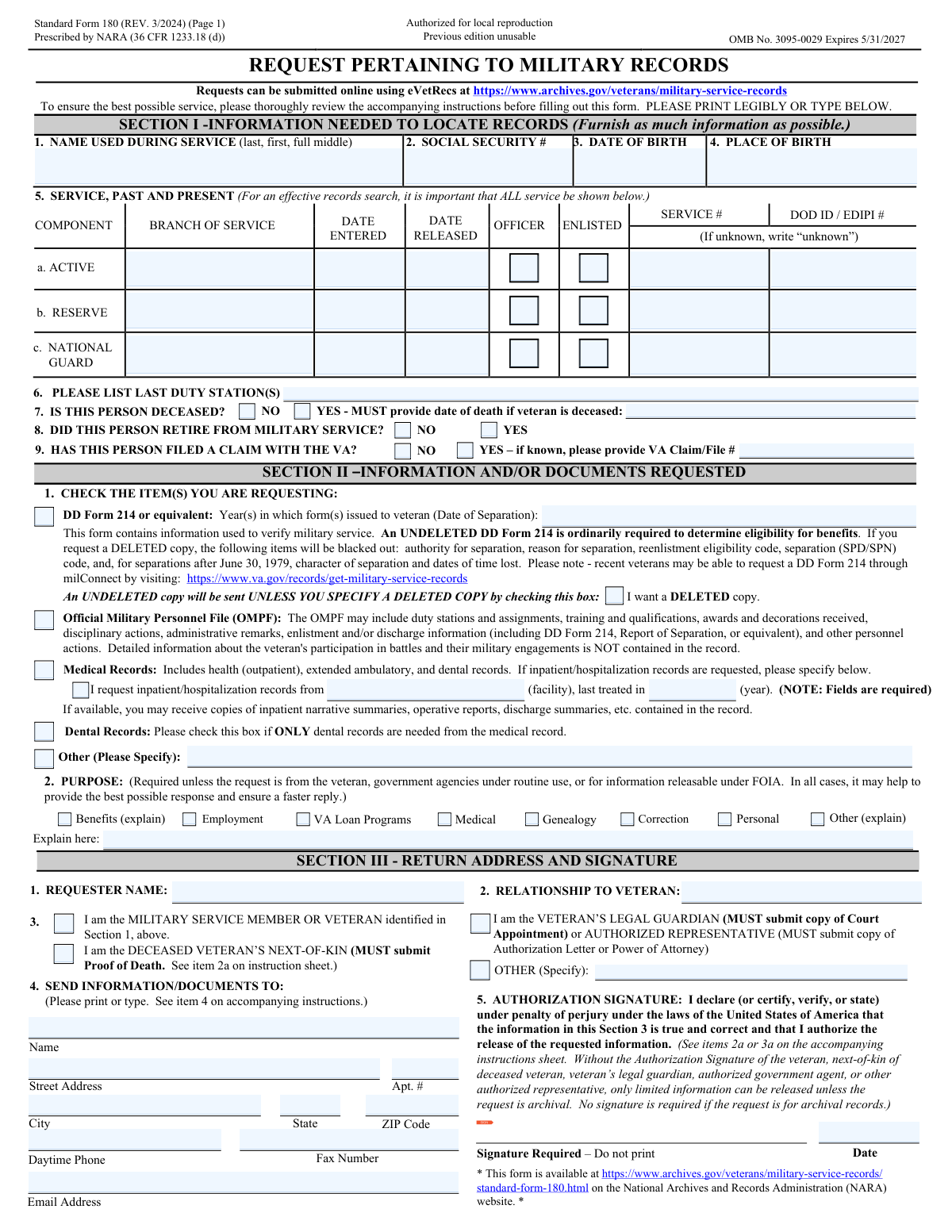
Yes! You can use AI to fill out Standard Form 180, Request Pertaining to Military Records

The Standard Form 180 (SF 180) is a crucial document used to request information from a veteran's military records, including their Official Military Personnel File (OMPF), DD Form 214, and medical records. It is essential for veterans, their next-of-kin, or authorized representatives to access records for benefits applications, medical history, employment verification, or genealogical research. Today, this form can be filled out quickly and accurately using AI-powered services like Instafill.ai, which can also convert non-fillable PDF versions into interactive fillable forms.
Our AI automatically handles information lookup, data retrieval, formatting, and form filling.
It takes less than a minute to fill out SF 180 using our AI form filling.
Securely upload your data. Information is encrypted in transit and deleted immediately after the form is filled out.

Form specifications

Form name: Standard Form 180, Request Pertaining to Military Records
Number of fields: 72
Number of pages: 2
Language: English
Categories: Military forms, military record forms
main-image

Instafill Demo: How to fill out PDF forms in seconds with AI

How to Fill Out SF 180 Online for Free in 2026

Are you looking to fill out a SF 180 form online quickly and accurately? Instafill.ai offers the #1 AI-powered PDF filling software of 2026, allowing you to complete your SF 180 form in just 37 seconds or less.
Follow these steps to fill out your SF 180 form online using Instafill.ai:
  1. 1 Navigate to Instafill.ai and upload or select the SF 180, Request Pertaining to Military Records.
  2. 2 Use the AI assistant to accurately fill out Section I with the veteran's identifying information, such as name used during service, Social Security Number, and date of birth.
  3. 3 Provide details of the veteran's service history in Section I, including branch of service, dates of service, and component (Active, Reserve, National Guard).
  4. 4 In Section II, check the boxes for the specific documents you are requesting (e.g., DD Form 214, OMPF, Medical Records) and state the purpose of your request.
  5. 5 Complete Section III by providing the requester's name, relationship to the veteran, and the return mailing address for the documents.
  6. 6 Review all the information for accuracy, then digitally sign and date the authorization signature line in Section III to certify the request.
  7. 7 Download the completed form and consult Page 2 of the SF 180 to determine the correct mailing address for submission based on the veteran's branch and service dates.

Our AI-powered system ensures each field is filled out correctly, reducing errors and saving you time.

Why Choose Instafill.ai for Your Fillable SF 180 Form?

Speed

Complete your SF 180 in as little as 37 seconds.

Up-to-Date

Always use the latest 2026 SF 180 form version.

Cost-effective

No need to hire expensive lawyers.

Accuracy

Our AI performs 10 compliance checks to ensure your form is error-free.

Security

Your personal information is protected with bank-level encryption.

Frequently Asked Questions About Form SF 180

The Standard Form 180 (SF 180) is used to request information and documents from military personnel records, such as a DD Form 214, medical records, or the Official Military Personnel File (OMPF).

The service member or veteran, the deceased veteran's next-of-kin (with proof of death), or a legal guardian or authorized representative (with supporting documents) can request records. The public can request archival records.

Records for military members who were discharged, retired, or died 62 or more years ago are considered 'archival' and are publicly available. Newer records are 'non-archival' and are subject to privacy restrictions, requiring authorization for release.

Do not send the form to the address on the instruction sheet. You must use the chart on page 2 to find the correct mailing address based on the veteran's branch of service, status, and dates of separation.

You should provide as much information as possible to help locate the record. If you cannot obtain the information for a specific item, write 'NA' for 'not available'.

As the next-of-kin, you must check the 'DECEASED VETERAN'S NEXT-OF-KIN' box in Section III and submit proof of death, such as a copy of the death certificate or a published obituary, along with the form.

The DD Form 214 is a certificate of release or discharge from active duty, used to verify service for benefits. An undeleted copy is typically required for benefits, while a deleted copy blacks out sensitive information like the reason for separation.

There is usually no charge for most services provided to veterans or their next-of-kin. However, a fee may be charged for copies of archival records, and you will receive an invoice if payment is required.

For non-archival records (less than 62 years since discharge), the veteran, next-of-kin, or authorized representative must sign the form. A signature is not required to request archival records.

Yes, the form indicates that you can submit requests online using the eVetRecs system on the National Archives website at archives.gov/veterans.

Yes, services like Instafill.ai use AI to accurately auto-fill form fields, which saves time and helps ensure the information is entered correctly.

You can use a service like Instafill.ai, which can convert flat, non-fillable PDFs into interactive forms that you can easily complete and sign online.

Simply upload the SF 180 to the Instafill.ai platform. The AI will identify the fields, and you can then type your information directly into the interactive form, sign it electronically, and download the completed document.

You can request Service Treatment Records (STR), which include outpatient health and dental records. If you need inpatient or hospitalization records, you must specify the facility name and the year you were last treated.

Compliance SF 180
Validation Checks by Instafill.ai

1
Validates Social Security Number Format
This check ensures that the Social Security Number entered in Section I, item 2, follows the standard 9-digit format, with or without hyphens (e.g., XXX-XX-XXXX or XXXXXXXXX). The SSN is a primary identifier for locating military records, and an incorrectly formatted number can lead to search failures. If the format is invalid, the user should be prompted to correct the entry before submission.
2
Ensures Date of Death is Provided for Deceased Veterans
This validation checks that if the 'YES' box is checked for 'Is this person deceased?' (Section I, item 7), then the 'Date of death' field is not empty. Providing the date of death is mandatory as stated on the form and is critical for verifying status and locating the correct records, especially for determining if they are archival. Failure to provide this date will delay or prevent the processing of the request.
3
Verifies Consistency Between Requester Relationship and Veteran's Deceased Status
This check ensures logical consistency between the requester's stated relationship and the veteran's status. If the requester checks 'I am the DECEASED VETERAN’S NEXT-OF-KIN' in Section III, the system verifies that 'YES' is also selected for 'Is this person deceased?' in Section I. This prevents contradictory information and ensures the correct processing path and documentation requirements (i.e., proof of death) are applied.
4
Validates Chronology of Service Dates
For each service period listed in Section I, item 5 (Active, Reserve, National Guard), this check verifies that the 'DATE RELEASED' is on or after the 'DATE ENTERED'. An end date that precedes a start date is a logical impossibility and indicates a data entry error. Correcting this ensures the service history is accurate, which is essential for a successful records search.
5
Requires Inpatient Facility and Year if Requested
This validation enforces a conditional requirement in Section II, item 1. If the 'Medical Records' box is checked and the sub-option to request inpatient records is also selected, the 'facility' name and 'last treated in (year)' fields must be filled. The form explicitly marks these as required, and without this information, the specific inpatient records cannot be located.
6
Ensures Year is Provided for DD Form 214 Request
This check confirms that if the 'DD Form 214 or equivalent' box is checked in Section II, the corresponding 'Year(s) in which form(s) issued' field is completed. The year of separation helps staff quickly locate the correct DD-214, especially for veterans with multiple service periods. An incomplete request may result in delays or the wrong document being sent.
7
Requires Explanation for 'Other' Purpose
This validation ensures that if the 'Other (explain)' checkbox is selected under 'PURPOSE' in Section II, item 2, the associated explanation text field is not left blank. Providing a purpose can help staff provide the best possible response and may be required in certain cases. Leaving the explanation blank when 'Other' is selected makes the request ambiguous and may slow down processing.
8
Flags Required Documentation for Guardians and Next-of-Kin
This check verifies that if a requester identifies as 'VETERAN’S LEGAL GUARDIAN' or 'DECEASED VETERAN’S NEXT-OF-KIN' in Section III, the system flags that supporting documentation is required. The form explicitly states that a Court Appointment, Power of Attorney, or Proof of Death must be submitted. This validation serves as a critical reminder to the user and a processing check to ensure the request is legally authorized and complete.
9
Validates Signature Requirement for Non-Archival Records
This check determines if an authorization signature is required and present. Based on the instructions, records are archival if the veteran was discharged over 62 years ago; these do not require a signature. For all other (non-archival) records, a signature from the veteran or an authorized representative in Section III is mandatory to comply with the Privacy Act. The system should calculate the time since discharge and flag any non-archival request that is missing a signature.
10
Verifies Completeness of Return Mailing Address
This validation ensures that essential components of the return address in Section III, item 4, are provided, including 'Name', 'Street Address', 'City', 'State', and 'ZIP Code'. Without a complete and valid mailing address, the requested documents cannot be delivered to the requester. The system should flag any submission with missing information in these core address fields.
11
Validates ZIP Code Format
This check ensures the 'ZIP Code' provided in the return address (Section III, item 4) is in a valid 5-digit or 9-digit (ZIP+4) format. An invalid ZIP code can cause mail to be delayed or returned as undeliverable. This simple format check improves the reliability of document delivery.
12
Ensures Officer/Enlisted Selections are Mutually Exclusive
For each of the three service periods in Section I, item 5, this validation ensures that only one of the 'OFFICER' or 'ENLISTED' checkboxes is selected. A service member cannot be both an officer and enlisted simultaneously within the same service period entry. This check prevents contradictory data that would require manual clarification and delay the records search.
13
Validates Date of Birth is Before All Other Dates
This logical check ensures the 'DATE OF BIRTH' in Section I is chronologically before all other dates on the form, such as 'DATE ENTERED' for service and 'DATE OF DEATH'. A date of birth that occurs after a service or death date is a clear data entry error. This fundamental check maintains the logical integrity of the veteran's timeline.
14
Requires Explanation for 'Other' Relationship
This validation confirms that if the 'OTHER (Specify)' checkbox is selected for the requester's relationship in Section III, the corresponding text field is filled out. Defining the relationship is necessary to determine the requester's legal standing and right to access the records. An empty field would leave the requester's authority unclear, halting the request until clarification is obtained.

Common Mistakes in Completing SF 180

Saved over 80 hours a year

“I was never sure if my IRS forms like W-9 were filled correctly. Now, I can complete the forms accurately without any external help.”

Kevin Martin Green

Your data stays secure with advanced protection from Instafill and our subprocessors

Robust compliance program

Transparent business model

You’re not the product. You always know where your data is and what it is processed for.

ISO 27001, HIPAA, and GDPR

Our subprocesses adhere to multiple compliance standards, including but not limited to ISO 27001, HIPAA, and GDPR.

Security & privacy by design

We consider security and privacy from the initial design phase of any new service or functionality. It’s not an afterthought, it’s built-in, including support for two-factor authentication (2FA) to further protect your account.

Fill out SF 180 with Instafill.ai

Worried about filling PDFs wrong? Instafill securely fills standard-form-180-request-pertaining-to-military-records forms, ensuring each field is accurate.