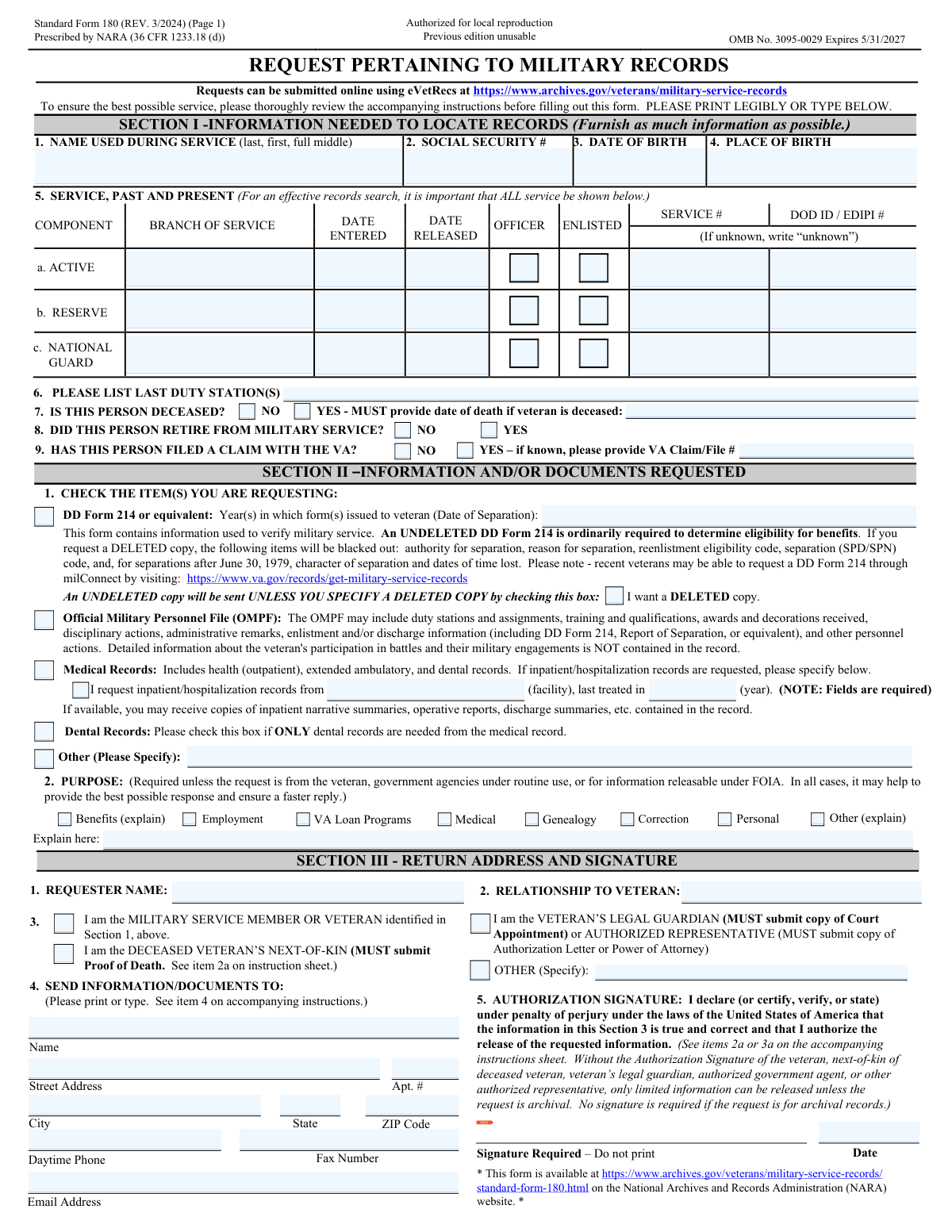
Yes! You can use AI to fill out Standard Form 180 (SF 180), Request Pertaining to Military Records (REV. 3/2024)

SF 180 (Request Pertaining to Military Records) is an official NARA-prescribed form used by veterans, next-of-kin, and authorized representatives to request copies of military personnel and medical/service treatment records. It collects identifying details (name used during service, SSN, birth information, service dates/branch, last duty station) and specifies which documents are needed (e.g., DD-214, OMPF, medical/dental or inpatient records) and the purpose of the request. The form is important because complete and accurate information helps the correct custodian locate the right record and determines what can be released under FOIA/Privacy Act rules (or as archival records). Today, SF 180 can be filled out quickly and accurately using AI-powered services like Instafill.ai, which can also convert non-fillable PDF versions into interactive fillable forms.
Our AI automatically handles information lookup, data retrieval, formatting, and form filling.
It takes less than a minute to fill out SF 180 using our AI form filling.
Securely upload your data. Information is encrypted in transit and deleted immediately after the form is filled out.

Form specifications

Form name: Standard Form 180 (SF 180), Request Pertaining to Military Records (REV. 3/2024)
Number of pages: 2
Language: English
Categories: veteran forms, government forms, Military forms, military record forms
main-image

Instafill Demo: filling out a legal form in seconds

How to Fill Out SF 180 Online for Free in 2026

Are you looking to fill out a SF 180 form online quickly and accurately? Instafill.ai offers the #1 AI-powered PDF filling software of 2026, allowing you to complete your SF 180 form in just 37 seconds or less.
Follow these steps to fill out your SF 180 form online using Instafill.ai:
  1. 1 Go to Instafill.ai and upload the SF 180 PDF (or select SF 180 from the form library).
  2. 2 Use the AI prompt/interview to enter the veteran/service member’s identifying information (name used during service, SSN, date/place of birth) and service details (branch/component, dates entered/released, service number/DOD ID, last duty station).
  3. 3 Indicate special status details such as whether the person is deceased (and date of death), retired, and whether a VA claim was filed (and VA claim/file number if known).
  4. 4 Choose the records requested in Section II (e.g., DD Form 214—deleted or undeleted, OMPF, medical/STR, dental-only, inpatient/hospitalization with facility and last-treated year, or other specified documents).
  5. 5 Select the purpose of the request (benefits, employment, VA loan, medical, genealogy, correction, personal, or other) and add a clear explanation if required.
  6. 6 Enter the requester information and delivery details (requester name/relationship/status, mailing address, phone/fax/email), then e-sign and date the authorization as applicable (noting archival requests may not require a signature).
  7. 7 Review the AI validation checks for missing/invalid fields, download the completed form, and submit it to the correct custodian address/code listed on page 2 (or follow the applicable online submission option if available).

Our AI-powered system ensures each field is filled out correctly, reducing errors and saving you time.

Why Choose Instafill.ai for Your Fillable SF 180 Form?

Speed

Complete your SF 180 in as little as 37 seconds.

Up-to-Date

Always use the latest 2026 SF 180 form version.

Cost-effective

No need to hire expensive lawyers.

Accuracy

Our AI performs 10 compliance checks to ensure your form is error-free.

Security

Your personal information is protected with bank-level encryption.

Frequently Asked Questions About Form SF 180

SF 180 (Request Pertaining to Military Records) is used to request military personnel records and/or medical/service treatment records (STRs). It helps the correct agency locate and provide the records you need, such as a DD Form 214, OMPF, or medical records.

The veteran/service member can submit the request, as can an authorized legal guardian or representative (with documentation), or the deceased veteran’s next-of-kin (with proof of death). Members of the public may request archival records (62+ years old) without authorization, though some information may still be withheld under FOIA privacy exemptions.

A signature is generally required for non-archival records unless the request qualifies for release under FOIA or other routine uses. No signature is required for archival records (discharged/retired/died in service 62 or more years ago).

Records become “archival” when the service member was discharged, retired, or died in service 62 or more years ago and the records are in NARA’s legal custody. Archival records are generally open to the public, and fees may apply for copies.

Provide the name used during service, Social Security number, date and place of birth, and complete service details (branch/component and dates entered/released). Adding last duty station(s) and any service/DOD ID numbers can help prevent delays.

If you don’t have an item and can’t obtain it, write “NA” or “unknown” as instructed. Include as much information as you can, because missing details may slow the search.

In Section II, check the DD Form 214 box and list the year(s) issued or the separation date. A “deleted” copy blacks out certain separation-related items; an undeleted copy is sent unless you specifically check the box requesting a deleted copy.

Check “Medical Records” in Section II for outpatient/extended ambulatory/dental records, and check the inpatient/hospitalization option if needed. For inpatient/hospitalization records, you must specify the facility name and the year last treated (these fields are required).

Check the “Dental Records” box in Section II to indicate you only want dental records from the medical record. This helps the custodian narrow the request and respond more efficiently.

If you are next-of-kin, you must provide proof of death (for example, a death certificate, obituary/death notice, coroner’s report, funeral director’s statement, verdict of coroner’s jury, or DD Form 1300). Next-of-kin includes an unmarried/surviving spouse, parent, child, sibling.

Do not send it to the College Park, MD address listed for burden comments. Use the address list on page 2 of SF 180 and select the correct custodian code based on branch and discharge/retirement dates (or current status).

Yes—NARA notes you can submit requests online using eVetRecs at https://www.archives.gov/veterans/military-service-records. Some recent veterans may also be able to request a DD Form 214 through milConnect or via VA records resources listed on the form.

For many requests by service members or next-of-kin of deceased veterans, there is no charge, though some services may have a nominal fee and you may receive an invoice. For archival records, copies are provided for a fee and you’ll be invoiced if applicable.

Yes, the reply can be sent to the service member or another designated address, but you must provide a complete USPS-valid address (including apartment/unit numbers). If the address is not registered to the addressee, include the addressee name and “c/o” the person the address is registered to; for sending medical records to a third party, a DD Form 2870 authorization may be required.

Yes—AI tools can help reduce errors and save time by auto-filling fields from the information you provide; services like Instafill.ai use AI to accurately populate form fields. To use Instafill.ai, upload the SF 180 PDF, answer the prompted questions (service details, requested documents, requester status), review the filled entries for accuracy, then download the completed form for signature and submission to the correct address.

If the PDF isn’t fillable, you can still complete it by printing and writing legibly, or use a tool that converts it into a fillable form. Instafill.ai can convert flat non-fillable PDFs into interactive fillable forms and then auto-fill the fields for you.

Compliance SF 180
Validation Checks by Instafill.ai

1
Veteran Name Used During Service is present and structured as Last, First, Middle
Validates that the 'Name Used During Service' field is not blank and contains at least a last name and first name, with middle name/initial captured when provided. This is critical because record searches are primarily keyed on the name used while serving, and missing/partial names can cause mismatches or delays. If validation fails, the submission should be rejected or returned for correction with a prompt to provide the full service-used name.
2
Social Security Number format and plausibility check
Ensures the SSN is either blank/NA (if allowed by the channel) or matches a valid 9-digit format (optionally with hyphens) and is not an obvious invalid value (e.g., all zeros). SSN is a primary identifier for locating records and reducing false matches. If validation fails, the system should flag the field and require correction or an explicit 'NA' per instructions if the requester truly cannot provide it.
3
Date of Birth format and reasonable range validation
Checks that Date of Birth is a valid calendar date in an accepted format (e.g., MM/DD/YYYY) and falls within a reasonable range (not in the future, not implausibly old). DOB is used to disambiguate individuals with similar names and is essential for accurate retrieval. If validation fails, the form should not proceed until a valid DOB is provided or the user indicates 'NA' where permitted.
4
Place of Birth completeness (city/state/country) and character validation
Validates that Place of Birth includes at minimum a city and a state/province (or country if outside the U.S.), and does not contain invalid characters or purely numeric content. Place of birth is often used as a secondary identifier when SSN/service number is missing. If validation fails, the system should request a more complete location to avoid search delays.
5
Service period date logic: Date Entered must be before Date Released
For each service row provided (Active, Reserve, National Guard), verifies that Date Entered and Date Released are valid dates and that the entered date is earlier than (or not later than) the released date. This prevents impossible timelines that can route the request incorrectly or cause record searches to fail. If validation fails, the system should highlight the specific row and require corrected dates.
6
Service component row consistency (branch + dates + status) when any service data is entered
If a requester provides any field within a service row (e.g., branch, service number, DoD ID), the validation requires the associated component/branch and at least one date (entered/released) to be present to make the row actionable. Partial rows reduce the ability to locate the correct custodian and record set. If validation fails, the system should require completion of the row or removal of the partial entry.
7
Officer vs Enlisted selection is mutually exclusive per service row
Ensures that within each service row, the 'Officer' and 'Enlisted' checkboxes are not both selected at the same time, and ideally at least one is selected when the row is otherwise populated. This classification can affect how records are indexed and searched. If validation fails, the system should force the requester to choose only one (or allow neither only if the row is otherwise minimal/unknown).
8
Service Number and DoD ID/EDIPI format validation (including 'unknown' allowance)
Validates that Service Number and DoD ID/EDIPI fields contain either an allowed literal such as 'unknown' (as instructed) or conform to expected numeric/alphanumeric patterns and length constraints (e.g., EDIPI commonly 10 digits). Correct identifiers significantly improve match accuracy, especially for older records where SSN may not be present. If validation fails, the system should prompt for correction and explicitly allow 'unknown' where applicable.
9
Deceased status selection required and mutually exclusive (Yes vs No)
Checks that exactly one of 'Deceased Status - Yes' or 'Deceased Status - No' is selected. This drives downstream authorization requirements (proof of death, next-of-kin access) and can change what information may be released. If validation fails, the submission should be blocked until a single clear selection is made.
10
Date of Death required and valid when Deceased = Yes
If the person is marked deceased, validates that Date of Death is provided, is a valid date, and is not in the future (and not before Date of Birth if DOB is provided). The form instructions explicitly require a date of death for deceased veterans, and it supports eligibility and access determinations. If validation fails, the system should require a corrected date before accepting the request.
11
VA claim indicator logic and VA Claim/File Number format when provided
Ensures the VA Claim Information Yes/No selection is mutually exclusive, and if 'Yes' is selected and a claim/file number is entered, it meets basic format constraints (non-empty, reasonable length, allowed characters). While the claim number may be optional ('if known'), invalid values can misroute or slow coordination with VA. If validation fails, the system should either require a valid number or allow the field to be blank with a clear 'unknown/not known' state.
12
Requested documents: at least one item selected in Section II
Validates that the requester has selected at least one record type (e.g., DD214, OMPF, Medical Records, Inpatient/Hospitalization, Dental-only, or Other). Without a selected item, the request cannot be fulfilled because there is no defined deliverable. If validation fails, the system should prompt the requester to choose at least one document/information type.
13
Inpatient/Hospitalization request requires facility name and last treated year
If inpatient/hospitalization records are requested, validates that both the facility name and the 'last treated in (year)' are provided, and that the year is a 4-digit year within a reasonable range (not in the future). The form notes these fields are required, and missing them prevents targeted retrieval of inpatient records. If validation fails, the system should block submission until both fields are completed correctly.
14
DD Form 214 request requires separation year(s)/date of separation
When the DD Form 214 (or equivalent) is requested, validates that the issuance year(s) or date of separation is provided in an acceptable format (year list/range or a valid date). This information helps locate the correct separation document(s), especially for multiple periods of service. If validation fails, the system should request the missing year(s)/date or allow an explicit 'unknown' only if the workflow supports it.
15
Purpose selection and explanation required when applicable
Validates that a purpose category is selected, and that 'Purpose Explanation' is provided when required (e.g., when the requester is not the veteran and the request is not clearly a routine-use government request or FOIA-releasable). Purpose information supports proper handling, prioritization, and compliance with disclosure rules. If validation fails, the system should require a purpose selection and a sufficiently detailed explanation (minimum length/meaningful text).
16
Authorization and proof documentation requirements based on requester status and record type
Checks that exactly one requester status is selected (Veteran, Next-of-Kin, Legal Guardian/Authorized Representative, or Other with specification) and enforces required supporting documentation rules: next-of-kin must provide proof of death; legal guardian/authorized representative must provide court appointment or authorization/POA. Also validates that an authorization signature and signature date are present for non-archival requests, while allowing no signature for archival records (62+ years since discharge/retirement/death) when the system can determine archival status from dates. If validation fails, the system should prevent submission and clearly list missing signature/date and/or required attachments.

Common Mistakes in Completing SF 180

Using a current name instead of the name used during service

People often enter a married name, nickname, or a later legal name change instead of the exact name used while serving (last, first, full middle). This can prevent the records center from matching the request to the correct file, causing delays or an incorrect “no record found” response. Always enter the service-era name exactly as it appeared on military documents, and add clarifying notes in “Other (Please Specify)” if multiple names were used. AI-powered form filling tools like Instafill.ai can help by standardizing name formats and prompting for prior names when a mismatch is likely.

Missing or inconsistent identifiers (SSN vs DoD ID/EDIPI vs Service #)

Requesters sometimes leave the SSN blank, transpose digits, or enter a DoD ID/EDIPI in the wrong field, especially when they only have one of the identifiers. Incorrect or incomplete identifiers make it harder to locate the correct record and can significantly slow processing. Double-check all numbers against official documents and, if a value is truly unknown, follow the instruction to write “unknown” (not a guess). Instafill.ai can reduce these errors by validating number length/format and flagging inconsistencies across fields.

Providing incomplete service history (not listing ALL Active/Reserve/National Guard periods)

A very common issue is listing only one period of service (often active duty) and omitting Reserve, IRR, or National Guard time, or leaving dates entered/released blank. Because record location depends on branch, component, and dates, missing service segments can send the request to the wrong custodian or result in partial records. List every component served (Active, Reserve, National Guard) with accurate start/end dates and branch for each line. Instafill.ai can help by prompting for additional service periods and ensuring each service row has the required fields completed.

Checking both Officer and Enlisted (or neither) for a service period

Applicants sometimes mark both “Officer” and “Enlisted,” or forget to mark either, especially if the member changed status over time. This creates ambiguity and can complicate the search or lead to follow-up requests for clarification. Mark the status that applies to that specific service period/row; if the member transitioned, reflect it by using separate entries or clarifying in an attachment/notes. Instafill.ai can prevent contradictory selections by enforcing mutually exclusive checkbox logic.

Not completing required inpatient/hospitalization details (facility and last treated year)

When requesting inpatient/hospitalization records, people often check the box but fail to provide the facility name and the year last treated, even though the form notes these fields are required. Without those details, the agency may be unable to locate inpatient records and may return only outpatient STRs or request more information, delaying the response. Always specify the hospital/facility and the last treated year as precisely as possible (and include city/state if helpful). Instafill.ai can enforce required-field completion when inpatient records are selected and format the year correctly.

Requesting a DELETED DD Form 214 by mistake (or not specifying when needed)

Some requesters accidentally check the “DELETED copy” box without realizing it removes key separation details that many benefits/employers require. The consequence is receiving a DD214 that may be unusable for eligibility determinations, forcing a second request and added wait time. Only request a deleted copy if you specifically need redacted information; otherwise leave it unchecked to receive an undeleted copy by default. Instafill.ai can warn users when a deleted copy conflicts with the stated purpose (e.g., benefits, VA loan, employment).

Leaving the Purpose section blank or too vague when it is required

People often skip the “Purpose” explanation or write something generic like “records request,” even though the form states it is required in many cases and can speed processing. A vague purpose can lead to back-and-forth clarification or the agency providing a response that doesn’t match what you actually need. Check the most accurate purpose category (Benefits, Employment, Correction, etc.) and add a short, specific explanation (what document, for what transaction, and any deadlines). Instafill.ai can generate a clear purpose statement from your selected options and ensure the explanation is present when required.

Incorrect requester status selection and missing supporting documents

Requesters frequently select the wrong status (e.g., “Next-of-kin” vs “Authorized Representative”) or forget to include required proof such as proof of death, court appointment, or power of attorney. This can limit what can be released under Privacy Act/FOIA rules or cause the request to be rejected or delayed pending documentation. Carefully choose the correct requester category and attach the required evidence (proof of death for NOK; court appointment/POA for guardians/representatives). Instafill.ai can prompt for the correct supporting documents based on the selected requester status and reduce omissions.

Marking the veteran as deceased without providing the date of death (or proof of death for NOK)

A common mistake is checking “Yes” for deceased but leaving the date of death blank, or (for next-of-kin requests) not including proof of death as required by the instructions. Missing death details can prevent the agency from applying the correct access rules and may trigger a request for additional information. Always provide the date of death if deceased is selected, and include acceptable proof of death (e.g., death certificate, obituary, DD Form 1300) when requesting as next-of-kin. Instafill.ai can enforce the dependency between the deceased checkbox and the date/proof requirements.

Return address errors (missing apartment/unit, wrong addressee, or missing c/o when required)

People often omit apartment/suite/unit numbers, use an address not registered to the addressee without adding “c/o,” or provide an incomplete name/address combination. This can result in returned mail, privacy risks, or significant delays in receiving records. Follow the instruction to include the complete mailing address and, if the address is not registered to the addressee, put both the addressee name and “c/o” the registered person’s name on the NAME line. Instafill.ai can validate address completeness and prompt for c/o formatting when the recipient differs from the registered addressee.

Missing signature/date or using an invalid signature format for non-archival requests

Many submissions are delayed because the requester prints their name instead of signing, forgets to date the signature, or assumes no signature is needed. For non-archival records, the authorization signature is often required to release more than limited information, and missing/invalid signatures can lead to denial or a reduced response. Sign in the signature field (handwritten or valid e-signature as accepted) and include the signature date; note that archival requests generally do not require a signature. Instafill.ai can flag missing signature/date fields and guide users on when a signature is required based on record type and requester status.
Saved over 80 hours a year

“I was never sure if my IRS forms like W-9 were filled correctly. Now, I can complete the forms accurately without any external help.”

Kevin Martin Green

Your data stays secure with advanced protection from Instafill and our subprocessors

Robust compliance program

Transparent business model

You’re not the product. You always know where your data is and what it is processed for.

ISO 27001, HIPAA, and GDPR

Our subprocesses adhere to multiple compliance standards, including but not limited to ISO 27001, HIPAA, and GDPR.

Security & privacy by design

We consider security and privacy from the initial design phase of any new service or functionality. It’s not an afterthought, it’s built-in, including support for two-factor authentication (2FA) to further protect your account.

Fill out SF 180 with Instafill.ai

Worried about filling PDFs wrong? Instafill securely fills standard-form-180-sf-180-request-pertaining-to-military-records-rev-32024 forms, ensuring each field is accurate.