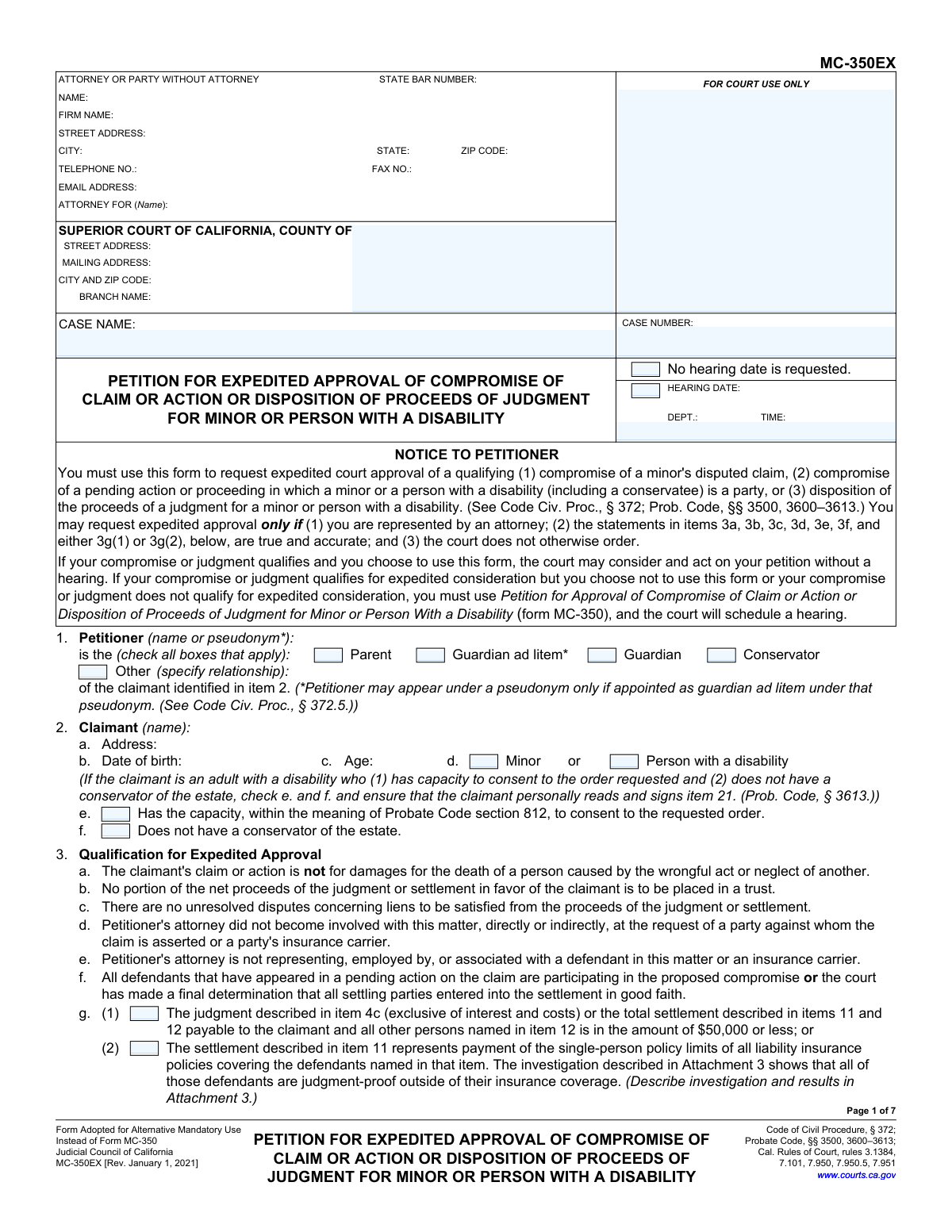
Yes! You can use AI to fill out Form MC-350EX, Petition for Expedited Approval of Compromise of Claim or Action or Disposition of Proceeds of Judgment for Minor or Person With a Disability

Form MC-350EX is a California court form used by attorneys to petition for expedited approval of a settlement or judgment proceeds for a minor or a person with a disability. It serves as a faster alternative to the standard Form MC-350, allowing for approval without a court hearing if specific criteria, such as the settlement amount and nature of the claim, are met. This process ensures the settlement is fair and in the best interest of the vulnerable party. Today, this form can be filled out quickly and accurately using AI-powered services like Instafill.ai, which can also convert non-fillable PDF versions into interactive fillable forms.
MC-350EX is part of the disability claim forms category on Instafill.
Our AI automatically handles information lookup, data retrieval, formatting, and form filling.
It takes less than a minute to fill out MC-350EX using our AI form filling.
Securely upload your data. Information is encrypted in transit and deleted immediately after the form is filled out.

Form specifications

Form name: Form MC-350EX, Petition for Expedited Approval of Compromise of Claim or Action or Disposition of Proceeds of Judgment for Minor or Person With a Disability
Number of fields: 200
Number of pages: 13
Language: English
main-image

Instafill Demo: How to fill out PDF forms in seconds with AI

How to Fill Out MC-350EX Online for Free in 2026

Are you looking to fill out a MC-350EX form online quickly and accurately? Instafill.ai offers the #1 AI-powered PDF filling software of 2026, allowing you to complete your MC-350EX form in just 37 seconds or less.
Follow these steps to fill out your MC-350EX form online using Instafill.ai:
  1. 1 Navigate to Instafill.ai and upload the MC-350EX form, or select it from a library of court documents.
  2. 2 Provide essential case information, including the court, case name, and case number in the header section.
  3. 3 Identify the petitioner and claimant, specifying their relationship and the claimant's status as a minor or person with a disability.
  4. 4 Carefully complete the 'Qualification for Expedited Approval' section, and provide details about the incident, injuries, and medical treatment received.
  5. 5 Enter the financial details of the settlement, including the total amount, a breakdown of medical expenses, attorney's fees, and other costs.
  6. 6 Specify the proposed disposition of the net proceeds for the claimant, selecting the appropriate options for how the funds will be managed (e.g., blocked account, annuity).
  7. 7 Review the entire completed petition for accuracy, attach all required documents like medical reports and lien agreements, then e-sign and download the final document for court filing.

Our AI-powered system ensures each field is filled out correctly, reducing errors and saving you time.

Why Choose Instafill.ai for Your Fillable MC-350EX Form?

Speed

Complete your MC-350EX in as little as 37 seconds.

Up-to-Date

Always use the latest 2026 MC-350EX form version.

Cost-effective

No need to hire expensive lawyers.

Accuracy

Our AI performs 10 compliance checks to ensure your form is error-free.

Security

Your personal information is protected with bank-level encryption.

Frequently Asked Questions About Form MC-350EX

Form MC-350EX is used to request expedited, or faster, court approval for a legal settlement or judgment on behalf of a minor or a person with a disability. This streamlined process may allow the court to approve the petition without a formal hearing.

You can only use this form if you are represented by an attorney and the case meets several strict criteria listed in Item 3. Key requirements include that the settlement is $50,000 or less (or a policy-limit settlement), no funds are going into a trust, and there are no unresolved lien disputes.

MC-350EX is for expedited approval without a hearing, but only for qualifying cases represented by an attorney. If your case does not qualify for the expedited process, you must use the standard Form MC-350, which requires a scheduled court hearing for approval.

You may still qualify for expedited approval if the settlement represents the full liability insurance policy limits and the defendants are proven to be judgment-proof otherwise. If not, you must use the standard Form MC-350 and attend a hearing.

You must attach several documents, including medical reports detailing the claimant's injuries and recovery (Attachment 9), a copy of your attorney fee agreement and a declaration supporting the fees (Attachment 14a), and final demand letters from lienholders like Medicare or Medi-Cal (Attachment 13).

A blocked account is a court-protected, insured bank account that holds the settlement funds for the minor or person with a disability. Funds cannot be withdrawn without a specific court order, which safeguards the money until the minor turns 18 or the court authorizes its use.

Form MC-351 is the Order the judge signs to approve the settlement. Form MC-355 is the Order to Deposit Money into a Blocked Account, which you provide to the bank. Form MC-356 is the receipt the bank completes to confirm the deposit, which you must then file with the court.

No, you cannot use the expedited form if any portion of the settlement proceeds is to be placed in a trust. In that situation, you are required to use the standard Form MC-350 and seek approval at a court hearing.

You must list all medical expenses, specify any amounts paid by insurers, and detail any negotiated reductions. It is crucial to attach copies of final demand letters or agreements from lienholders like Medi-Cal, Medicare, or private health plans showing the final reimbursement amount.

You must state the total fee amount and attach a declaration from your attorney that explains the basis for the fee, along with a copy of the signed attorney fee agreement. The declaration should discuss the relevant factors listed in the California Rules of Court.

Yes, services like Instafill.ai use AI to auto-fill form fields accurately and save time. These tools can help you and your attorney populate the form with information from your case files, reducing the risk of errors.

To fill out the form online, you can upload the PDF to a platform like Instafill.ai. The service will make the document interactive, allowing you to easily type in all the required information before printing the completed form for filing.

If you have a non-fillable or 'flat' PDF, you can use a service like Instafill.ai to help. It can convert the static document into an interactive, fillable form so you can easily complete it on your computer.

Compliance MC-350EX
Validation Checks by Instafill.ai

1
Validates Claimant's Age Against Date of Birth
This check ensures the 'Age' entered in item 2c is the correct calculation based on the 'Date of birth' provided in item 2b. It is important for verifying the claimant's legal status as a minor or an adult, which affects how the case is handled. If the age and date of birth do not correspond, the form submission will be flagged for correction to ensure data accuracy.
2
Ensures All Conditions for Expedited Approval are Met
This validation verifies that all required checkboxes in item 3 (specifically 3a, 3b, 3c, 3d, 3e, 3f, and either 3g(1) or 3g(2)) are marked. These conditions are mandatory for using the expedited MC-350EX form. If any condition is not met, the petitioner is ineligible for expedited approval and must use the standard MC-350 form, so the submission would be rejected.
3
Verifies Completion of Disability-Specific Fields
If the 'Person with a disability' box is checked in item 2d, this validation confirms that checkboxes 2e ('Has the capacity...to consent') and 2f ('Does not have a conservator') are also completed. This information is critical for determining if the claimant's personal consent is legally required under Probate Code § 3613. An incomplete section prevents the court from making necessary findings and will result in the petition being returned.
4
Validates Consistency of Total and Itemized Settlement Amounts
This check confirms that the 'Total amount offered' in item 11a is equal to the sum of the individual amounts listed for each defendant in item 11b. This ensures mathematical accuracy and transparency in the settlement figures presented to the court. A discrepancy indicates a data entry error and must be corrected for the petition to be considered.
5
Verifies Settlement Summary Calculation Accuracy
This validation ensures the arithmetic in the summary section (item 17) is correct. It verifies that item 17e (Total fees and expenses) is the sum of 17b, 17c, and 17d, and that item 17f (Balance for claimant) is the result of subtracting 17e from 17a (Gross amount). This check is vital for the court's review; incorrect calculations will lead to rejection and require resubmission.
6
Ensures Disposition Amounts Match Net Balance
This check validates that the sum of all monetary amounts entered across the various sub-options in item 19 ('Disposition of balance') equals the 'Net balance of proceeds' specified in item 16 and 17f. This is a critical cross-reference to ensure the entire net settlement is accounted for in the proposed disbursement plan. Any mismatch will halt the approval process until the funds are fully and correctly allocated.
7
Confirms Attachment for Attorney's Fees Declaration
If an amount greater than zero is entered for 'Total amount of attorney's fees' in item 14a, this validation checks that Attachment 14a is indicated as being included. The form explicitly requires a declaration from the attorney explaining the basis for the fees. Without this required attachment, the court cannot evaluate the reasonableness of the fees, and the petition will be deemed incomplete.
8
Verifies Required Documentation for Medicare/Medi-Cal Reimbursement
If item 13b(2) (Medicare paid) or 13c(2) (Medi-Cal paid) is checked, this validation ensures the corresponding attachment (e.g., final demand letter) is referenced. This documentation is mandatory to confirm that government liens have been properly resolved. Failure to provide this proof will prevent the court from approving the settlement due to the risk of unresolved liens.
9
Validates Claimant Signature Requirement for Capable Adults
This check ensures that if the claimant is an adult with a disability who has capacity to consent and no conservator (items 2d, 2e, and 2f are checked), then item 21 must be signed by the claimant. This signature is a legal requirement under Probate Code § 3613 to confirm consent. An absent signature under these specific conditions renders the petition invalid and will cause it to be rejected.
10
Validates Settlement Amount Against Expedited Approval Cap
If checkbox 3g(1) is selected to qualify for expedited approval, this validation confirms that the total settlement amount from item 11a (plus any amounts in item 12) is $50,000 or less. This monetary cap is a primary qualifier for the expedited process. If the amount exceeds the cap, the petitioner must use the standard MC-350 form, and the system should flag this as an error.
11
Ensures Case Number Consistency Across All Pages
This validation verifies that the 'Case Number' field is populated and is identical on every page of the form packet (MC-350EX, MC-351, etc.). Maintaining a consistent case number is essential for correct filing and record-keeping within the court's system. A mismatch or missing number could lead to documents being misfiled or rejected, delaying the case.
12
Requires Petitioner Relationship Specification
This check validates that at least one checkbox in item 1 is selected to identify the petitioner's relationship to the claimant. If the 'Other' box is checked, it further validates that the relationship is specified in the corresponding text field. This information is fundamental for establishing the petitioner's legal standing to file the petition.

Common Mistakes in Completing MC-350EX

Using the Expedited Form (MC-350EX) Improperly

Petitioners often use the expedited MC-350EX form when their case does not meet the strict qualifying criteria outlined in Item 3, such as having a settlement over $50,000, unresolved liens, or placing proceeds into a trust. This mistake happens due to a misunderstanding of the form's purpose. The consequence is an automatic rejection of the petition by the court clerk, causing significant delays and requiring the petitioner to refile using the standard, longer MC-350 form and attend a mandatory hearing.

Inconsistent Financial Calculations Across Sections

A frequent error is inconsistency in the financial figures. For example, the total settlement in Item 11a may not equal the sum of amounts in 11b, or the summary in Item 17 (Gross Amount, Fees, Net Balance) does not arithmetically match the detailed breakdowns in Items 11, 13, and 14. These errors occur from manual calculation mistakes and lead to the court rejecting the petition for correction, delaying the approval and disbursement of funds. AI-powered tools like Instafill.ai can prevent this by performing automatic calculations and cross-field validation to ensure all financial figures are consistent.

Failing to Match Net Proceeds with Disposition Plan

The net balance calculated for the claimant in Item 16 must perfectly match the sum of all amounts being disbursed or deposited in the various options under Item 19. Petitioners often miscalculate or forget to account for all funds, creating a discrepancy. Even a one-cent difference will cause the court to return the petition, halting the process until the figures are reconciled and refiled.

Incomplete or Missing Medical Lien Documentation

Item 13 requires a detailed breakdown of medical expenses and liens, but petitioners often fail to attach the required supporting documents. This includes forgetting the final demand letters from Medicare or Medi-Cal (Item 13b/13c) or neglecting to attach statements from providers (Item 13g). Without this proof, the court cannot verify that all liens have been properly resolved, which is a prerequisite for approval, leading to rejection and requests for further information.

Submitting an Inadequate Attorney's Fee Declaration

The form requires more than just stating the attorney's fee amount in Item 14a; it mandates an attached declaration that explains the basis for the fee, discusses factors from Cal. Rules of Court 7.955(b), and includes the fee agreement. Attorneys frequently overlook this requirement or provide a declaration that is not sufficiently detailed. This will cause the court to question the reasonableness of the fees and delay the petition's approval until a compliant declaration is submitted.

Forgetting to List and Attach All Necessary Documents

The petition references numerous potential attachments for things like doctor's reports (Attachment 9), settlement terms (11c), and medical bills (13g). A common mistake is failing to attach a required document or forgetting to list the total number of attached pages in Item 23. This administrative oversight is a frequent reason for the court clerk to reject the filing outright, forcing the petitioner to reassemble and resubmit the entire package.

Inconsistent Case Header Information

The Case Name, Case Number, and Court information must be entered identically on the top of every single page of the petition and on all associated forms (MC-351, MC-355, MC-356). People often use autofill features that populate old information or make typos on one of the pages. This creates confusion and can lead to documents being misfiled or rejected, delaying the legal process. Using a tool like Instafill.ai ensures this core data is entered consistently across all pages and related forms.

Incorrectly Completing the Proposed Order (MC-351)

The petitioner's attorney typically prepares the Order (MC-351) for the judge to sign. A critical mistake is having any discrepancy between the financial details on the Order and the approved Petition (MC-350EX). All amounts—from the gross settlement to attorney's fees and the final net balance—must match perfectly. A judge will not sign an order that contains inconsistencies, requiring the attorney to correct and resubmit the form.

Failing to File the Blocked Account Receipt (MC-356) on Time

After the court approves the petition and the funds are deposited into a blocked account, the Order (MC-351, Item 9b) requires the petitioner to file the 'Receipt and Acknowledgment' (MC-356) with the court within 15 days. This is a crucial follow-up step that is often forgotten in the post-settlement process. Failure to file this receipt places the petitioner in non-compliance with a court order and can create future legal and administrative problems when trying to access the funds.

Using a Non-Fillable PDF Version of the Form

Many people find these forms online as flat, non-fillable PDFs, leading them to print and fill them out by hand. This often results in illegible handwriting, calculation errors, and missed fields, which are common grounds for court rejection. It also makes correcting a mistake difficult, often requiring the entire form to be filled out again. Tools like Instafill.ai can convert these non-fillable PDFs into interactive, fillable forms, which helps prevent legibility issues and data entry errors.
Saved over 80 hours a year

“I was never sure if my IRS forms like W-9 were filled correctly. Now, I can complete the forms accurately without any external help.”

Kevin Martin Green

Your data stays secure with advanced protection from Instafill and our subprocessors

Robust compliance program

Transparent business model

You’re not the product. You always know where your data is and what it is processed for.

ISO 27001, HIPAA, and GDPR

Our subprocesses adhere to multiple compliance standards, including but not limited to ISO 27001, HIPAA, and GDPR.

Security & privacy by design

We consider security and privacy from the initial design phase of any new service or functionality. It’s not an afterthought, it’s built-in, including support for two-factor authentication (2FA) to further protect your account.

Fill out MC-350EX with Instafill.ai

Worried about filling PDFs wrong? Instafill securely fills form-mc-350ex-petition-for-expedited-approval-of-compromise-of-claim-or-action-or-disposition-of-proceeds-of-judgment forms, ensuring each field is accurate.