Yes! You can use AI to fill out Form 4506-W, Request for Copy of Withholding Tax Forms

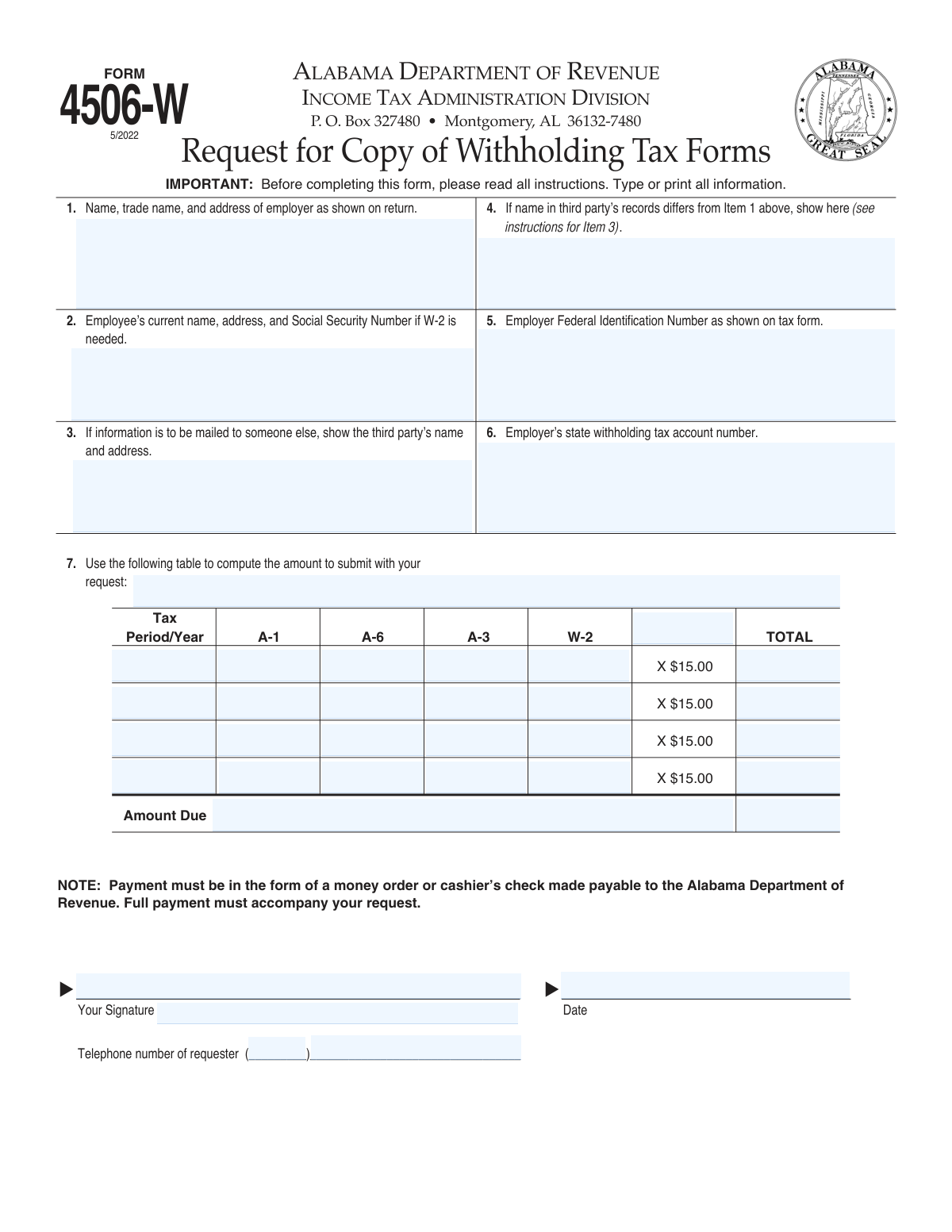
Form 4506-W, Request for Copy of Withholding Tax Forms, is an official document from the Alabama Department of Revenue used by employers or employees to obtain copies of previously filed state withholding tax returns and W-2 statements. This form is essential for record-keeping, resolving discrepancies, or providing proof of income and tax payments when original documents are lost or unavailable. Today, this form can be filled out quickly and accurately using AI-powered services like Instafill.ai, which can also convert non-fillable PDF versions into interactive fillable forms.
Form 4506-W is part of the tax withholding forms category on Instafill.
Form 4506-W has a basic Form Complexity Index of 41/100 — 39 fillable fields across 1 page. Instafill’s AI completes it accurately in under a minute.

Form specifications

Form name: Form 4506-W, Request for Copy of Withholding Tax Forms
Number of fields: 39
Number of pages: 2
FCI: Basic (41/100)
Filled form examples: Form 4506-W Examples
Language: English
Our AI automatically handles information lookup, data retrieval, formatting, and form filling.
It takes less than a minute to fill out Form 4506-W using our AI form filling.
Securely upload your data. Information is encrypted in transit and deleted immediately after the form is filled out.
Preview of Form 4506-W, Request for Copy of Withholding Tax Forms

Instafill Demo: How to fill out PDF forms in seconds with AI

How to Fill Out Form 4506-W Online for Free in 2026

Are you looking to fill out a FORM 4506-W form online quickly and accurately? Instafill.ai offers the #1 AI-powered PDF filling software of 2026, allowing you to complete your FORM 4506-W form in just 37 seconds or less.
Follow these steps to fill out your FORM 4506-W form online using Instafill.ai:
  1. 1 Navigate to Instafill.ai and upload your Form 4506-W or select it from the platform's template library.
  2. 2 Provide the employer's name, trade name, address, Federal Identification Number, and state withholding tax account number in the designated fields.
  3. 3 If requesting a W-2, enter the employee’s current name, address, and Social Security Number.
  4. 4 Specify the tax period/year and the quantity of each form type (A-1, A-6, A-3, W-2) you are requesting in the table.
  5. 5 If the copies should be mailed to a third party, provide their name and address.
  6. 6 Review all the information populated by the AI for accuracy, then provide your signature, date, and telephone number.
  7. 7 Download the completed form and mail it with the calculated payment (money order or cashier's check) to the Alabama Department of Revenue.

Our AI-powered system ensures each field is filled out correctly, reducing errors and saving you time.

Why Choose Instafill.ai for Your Fillable Form 4506-W Form?

Speed

Complete your Form 4506-W in as little as 37 seconds.

Up-to-Date

Always use the latest 2026 Form 4506-W form version.

Cost-effective

No need to hire expensive lawyers.

Accuracy

Our AI performs 10 compliance checks to ensure your form is error-free.

Security

Your personal information is protected with bank-level encryption.

Frequently Asked Questions About Form 4506-W

Form 4506-W has a Form Complexity Index of 41 out of 100, placing it in the basic complexity tier. This score is calculated deterministically from the form’s own structure using Instafill’s published Form Complexity Index methodology, so it can be reproduced and independently verified — it is not a subjective estimate.

For Form 4506-W specifically, the score reflects 39 fillable fields across 1 page, plus 1 page of printed instructions. The number of fields is the largest factor in the base score (weighted 36%), followed by how difficult those fields are to complete based on their type, where free-text and signature fields count for more than simple checkboxes (26%). The number of pages that actually contain fields (15%), the amount of conditional “fill-only-if” logic (16%), and how many sections the form is divided into (7%) account for the rest of the base. On top of that base, the index adds points for tables and repeating lists, bundled instruction pages, and dense page layouts — capturing difficulty the base alone can miss.

In practical terms, a basic score means the form is relatively light, but still needs careful, accurate entry. Instafill removes that effort entirely: our AI reads your information, maps each value to the correct field — including the conditional ones — and completes Form 4506-W accurately in under a minute, with every field available for you to review before you download. See exactly how the Form Complexity Index is calculated.

This form is used to request copies of Alabama withholding tax returns (Forms A-1, A-6, A-3) or an employee's Wage and Tax Statement (Form W-2) from the Alabama Department of Revenue.

Employers, employees, or authorized third parties can fill out this form. If you are not the employer or employee, you must provide proof of authorization, such as a power of attorney.

The fee is $15.00 for each copy of each form requested. You must calculate the total amount due and submit it with your request.

Payment must be a money order or cashier's check made payable to the Alabama Department of Revenue. Personal checks and cash are not accepted.

You should allow eight to ten weeks for your request to be processed after the department receives your form and payment.

Mail your completed Form 4506-W and payment to: Alabama Department of Revenue, Income Tax Administration Division, P. O. Box 327480, Montgomery, AL 36132-7480.

You must provide your current name, address, and Social Security Number in Item 2, as well as the employer's information in Item 1.

Yes, you can have the documents mailed to a third party by providing their name and address in Item 3 of the form.

If the department cannot fill your request, they will refund your money. If you designated a third party, they will be notified directly.

The Federal Employer Identification Number (FEIN) format is XX-XXXXXXX, and the employer's state withholding tax account number is a 6-digit number.

If you have a non-fillable PDF, you can use a service like Instafill.ai to convert it into an interactive, fillable form online.

Yes, services like Instafill.ai use AI to accurately auto-fill form fields, which can save you time and help prevent errors.

You can use a platform like Instafill.ai to upload the form, fill it out securely online, and then download the completed PDF to print and mail.

Incomplete forms may not provide enough information for processing and could be rejected. It is important to fill out the form completely and accurately.

Compliance Form 4506-W
Validation Checks by Instafill.ai

1
Validates Federal Employer Identification Number (FEIN) Format
This check verifies that the Employer Federal Identification Number entered in Item 5 adheres to the specified XX-XXXXXXX format. This format is crucial for database lookups and uniquely identifying the employer within federal and state systems. A submission with an incorrectly formatted FEIN will fail to match with an existing record, causing the request to be rejected or significantly delayed.
2
Validates State Withholding Account Number Format
This check ensures the employer's state withholding tax account number in Item 6 is a 6-digit number as specified in the instructions. The Alabama Department of Revenue's system relies on this exact format to locate the correct state-level account. If the number has too few or too many digits, or contains non-numeric characters, the system will be unable to process the request.
3
Ensures Employee Information is Provided for W-2 Requests
This validation confirms that if any W-2 forms are requested in the table in Item 7, then the employee's name, address, and Social Security Number are all provided in Item 2. W-2 forms are employee-specific documents, and this information is essential for locating the correct individual's records. A request for a W-2 without corresponding employee details is incomplete and cannot be fulfilled.
4
Validates Employee Social Security Number (SSN) Format
This check verifies that the SSN provided in Item 2 follows the standard XXX-XX-XXXX or XXXXXXXXX format. A validly formatted SSN is critical for accurately identifying the employee and retrieving their wage and tax statements. An invalid format will lead to a failed search and rejection of the W-2 request portion of the submission.
5
Verifies Calculation of Amount Due Per Tax Period
For each row in the request table (Item 7), this check validates that the 'Amount Due' is correctly calculated by summing the number of A-1, A-6, A-3, and W-2 forms and multiplying the total by $15.00. This ensures the payment amount aligns with the number of documents requested for that period. Incorrect calculations can lead to payment discrepancies and processing holds until the correct amount is remitted.
6
Verifies Calculation of Total Amount Due
This validation confirms that the final 'Total Amount Due' is the sum of the individual 'Amount Due' values from each requested tax period row. An accurate total is required for the payment to match the request, preventing underpayment or overpayment issues. The entire request will be held or returned if the submitted payment does not match this calculated total.
7
Ensures At Least One Tax Form is Requested
This validation ensures that the requester has entered a quantity of 1 or more for at least one form type (A-1, A-6, A-3, or W-2) in the table in Item 7. A form submitted with no documents requested is considered an empty request and serves no purpose. Such submissions would be returned to the sender as incomplete and un-processable.
8
Requires Tax Period for Each Row with Requested Forms
This check verifies that for every row in Item 7 where one or more forms are requested, the corresponding 'Tax Period/Year' field is also filled out. The tax period is essential context for locating the correct historical documents from the archives. A request for forms without a specified year or period is ambiguous and cannot be fulfilled.
9
Confirms Requester's Signature is Present
This validation checks for the presence of a signature on the designated line. A signature is a legal requirement to authorize the release of confidential tax information and affirms the identity of the requester. A form submitted without a signature is not legally valid and will be rejected immediately upon review.
10
Validates Presence and Format of Submission Date
This check ensures the 'Date' field next to the signature is filled and follows a recognizable date format (e.g., MM/DD/YYYY). The date establishes when the request was authorized and is important for record-keeping and tracking processing timelines. An invalid or missing date can cause administrative issues or rejection of the form.
11
Validates Requester's Telephone Number Format
This validation verifies that the requester's telephone number is entered with a 3-digit area code and a 7-digit main number. A complete and valid phone number is crucial in case the department needs to contact the requester for clarification or to resolve issues. An incomplete number hinders communication and can delay processing if questions arise.
12
Ensures Employer Name and Address are Complete
This validation confirms that the employer's name, trade name, and full address in Item 1 are provided. This information is the primary identifier for the business entity whose records are being requested. Without this fundamental information, the Department of Revenue cannot begin to search for the correct account or documents, rendering the request void.
13
Validates Form Count Fields are Numeric and Non-Negative
This check ensures that all fields for the number of A-1, A-6, A-3, and W-2 forms contain only non-negative integers. These fields represent a quantity of documents, so text, decimals, or negative numbers are invalid inputs. Invalid data would break the cost calculation and make the request impossible to interpret and process.

Common Mistakes in Completing Form 4506-W

Miscalculating the Total Amount Due

A frequent error occurs in Item 7, where users must calculate the fee. People often add the number of forms requested instead of multiplying the total count by $15.00 for each tax period. This leads to submitting an incorrect payment amount, which will cause the request to be rejected and returned, delaying the process until the correct payment is received.

Submitting an Unacceptable Form of Payment

The form explicitly states that payment must be a money order or cashier's check. Many applicants overlook this and send a personal check, business check, or even cash. These payment methods are not accepted and will result in the entire request being sent back unprocessed, forcing the applicant to start over.

Entering Incorrectly Formatted Employer ID Numbers

The instructions specify the exact format for the Federal Employer Identification Number (00-0000000) in Item 5 and the State Withholding Number (000000) in Item 6. Users often omit the hyphen in the FEIN, add dashes to the state number, or transpose the two numbers entirely. This formatting error can prevent the system from locating the employer's account, leading to a failed search and rejection of the request. AI-powered form fillers like Instafill.ai can help by auto-formatting these numbers correctly.

Forgetting to Sign or Date the Form

An unsigned or undated form is legally invalid and cannot be processed. It is a very common oversight for applicants to complete all the fields but forget the final step of signing and dating the request. This simple mistake halts the entire process, as the department must return the form for a signature, causing a delay of several weeks.

Missing Employee Details for W-2 Requests

When requesting a copy of a W-2, it is mandatory to completely fill out Item 2, including the employee's full name, current address, and Social Security Number. A common mistake is omitting the SSN or providing an incomplete one. Without the correct SSN, the department cannot accurately identify the specific employee record, making it impossible to fulfill the W-2 request.

Neglecting to Include Required Third-Party Authorization

If the person requesting the information is not the employer or employee (e.g., a CPA, mortgage company, or attorney), they must attach proof of authorization, such as a Power of Attorney. Many third parties forget to include this crucial documentation with the form. Due to strict privacy laws, the department will automatically deny any request lacking proper authorization.

Providing Outdated or Incomplete Employer Information

Item 1 requires the employer's name and address *as shown on the tax return* for the period requested. Applicants sometimes enter the employer's current name or address, which may differ from the historical data on file, especially if the company has moved or changed names. This discrepancy can lead to a failed record search. It is crucial to use the exact information from the relevant tax period.

Submitting an Illegible, Hand-Written Form

This form is often distributed as a non-fillable PDF, forcing users to print and complete it by hand. Illegible handwriting, especially for critical numbers like an SSN or FEIN, is a major source of errors. A misread digit can lead to a failed search or pulling the wrong taxpayer's information. Using a tool like Instafill.ai, which can make non-fillable PDFs fillable, ensures all information is typed and perfectly legible, preventing such data entry mistakes.

Making Payment to the Wrong Payee

The instructions require the money order or cashier's check to be made payable to the 'Alabama Department of Revenue'. Applicants frequently write incorrect payee names, such as 'AL State Tax,' 'AL DOR,' or 'State of Alabama.' This can cause the payment to be rejected by the finance department or significantly delay its processing, which in turn delays the fulfillment of the form request.

Failing to Annotate the Payment Correctly

The form instructs the requester to write their account number (state or federal) and 'Form 4506-W request' on the payment itself. This step is often missed. Without this annotation, the revenue department's mailroom may have difficulty matching the payment to the corresponding form, especially during busy periods, increasing the risk of processing delays or errors.
Saved over 80 hours a year

“I was never sure if my IRS forms like W-9 were filled correctly. Now, I can complete the forms accurately without any external help.”

Kevin Martin Green

Your data stays secure with advanced protection from Instafill and our subprocessors

Robust compliance program

Transparent business model

You’re not the product. You always know where your data is and what it is processed for.

ISO 27001, HIPAA, and GDPR

Our subprocesses adhere to multiple compliance standards, including but not limited to ISO 27001, HIPAA, and GDPR.

Security & privacy by design

We consider security and privacy from the initial design phase of any new service or functionality. It’s not an afterthought, it’s built-in, including support for two-factor authentication (2FA) to further protect your account.

Fill out Form 4506-W with Instafill.ai

Worried about filling PDFs wrong? Instafill securely fills form-4506-w-request-for-copy-of-withholding-tax-forms forms, ensuring each field is accurate.