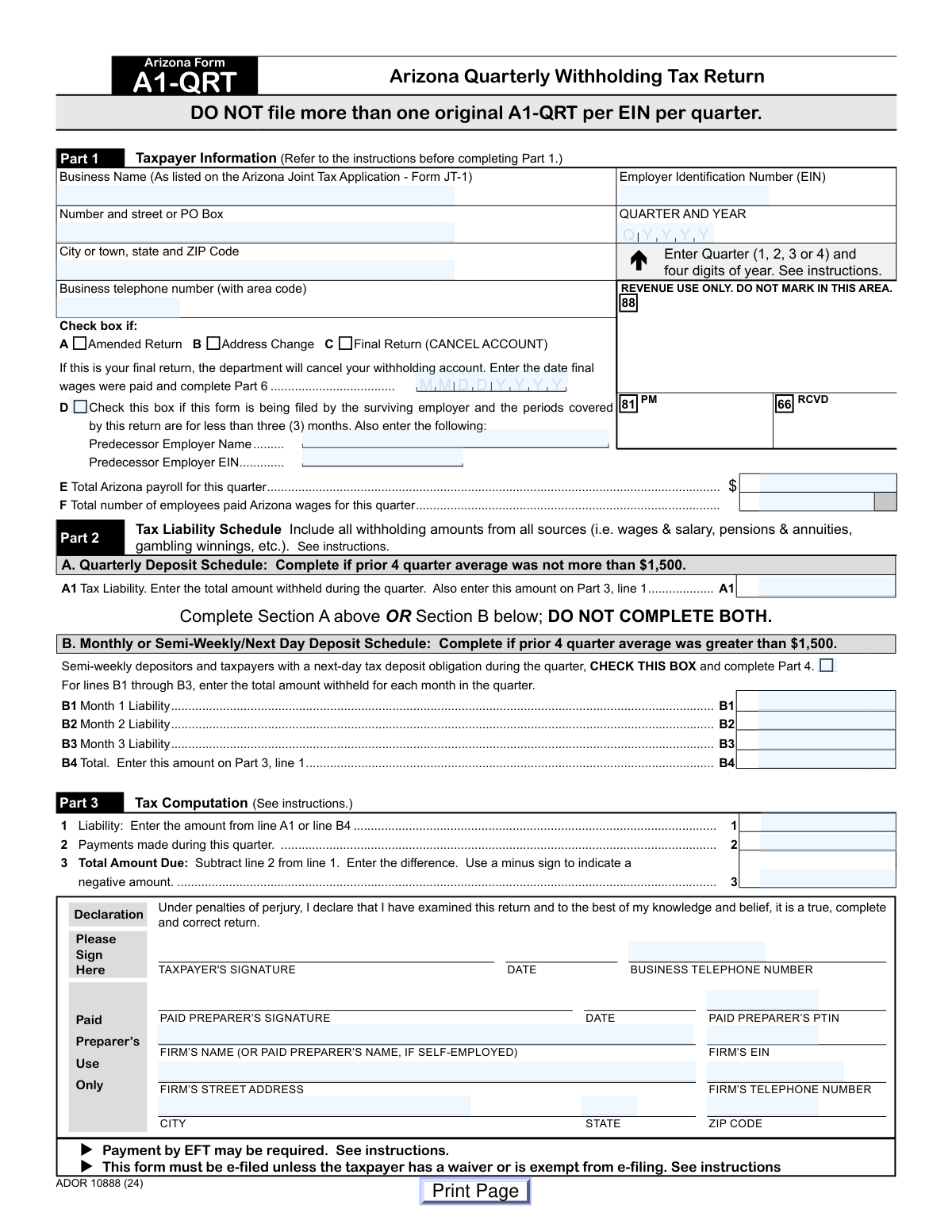
Yes! You can use AI to fill out Arizona Form A1-QRT, Arizona Quarterly Withholding Tax Return

Arizona Form A1-QRT, the Quarterly Withholding Tax Return, is a state tax document that employers in Arizona must file to report the amount of income tax they have withheld from their employees' paychecks during a quarter. This form is crucial for ensuring compliance with state tax laws and remitting the correct amount of withheld tax to the Arizona Department of Revenue. Today, this form can be filled out quickly and accurately using AI-powered services like Instafill.ai, which can also convert non-fillable PDF versions into interactive fillable forms.
A1-QRT is part of the quarterly tax forms, tax forms, tax withholding forms and withholding forms categories on Instafill.
Our AI automatically handles information lookup, data retrieval, formatting, and form filling.
It takes less than a minute to fill out A1-QRT using our AI form filling.
Securely upload your data. Information is encrypted in transit and deleted immediately after the form is filled out.

Form specifications

Form name: Arizona Form A1-QRT, Arizona Quarterly Withholding Tax Return
Number of fields: 245
Number of pages: 2
Language: English
main-image

Instafill Demo: How to fill out PDF forms in seconds with AI

How to Fill Out A1-QRT Online for Free in 2026

Are you looking to fill out a A1-QRT form online quickly and accurately? Instafill.ai offers the #1 AI-powered PDF filling software of 2026, allowing you to complete your A1-QRT form in just 37 seconds or less.
Follow these steps to fill out your A1-QRT form online using Instafill.ai:
  1. 1 Navigate to Instafill.ai and upload or select the Arizona Form A1-QRT.
  2. 2 Provide your business information in Part 1, including your business name, EIN, address, and the reporting quarter and year.
  3. 3 Complete the Tax Liability Schedule in Part 2 by entering your total withheld amounts according to your deposit schedule (quarterly, monthly, or semi-weekly).
  4. 4 The AI will assist in calculating the tax computation in Part 3, determining the total amount due or overpayment.
  5. 5 If filing an amended or final return, complete the required information in Part 5 or Part 6 respectively.
  6. 6 Review all the information pre-filled by the AI for accuracy and make any necessary corrections.
  7. 7 Electronically sign the declaration and download the completed Form A1-QRT for your records or e-filing.

Our AI-powered system ensures each field is filled out correctly, reducing errors and saving you time.

Why Choose Instafill.ai for Your Fillable A1-QRT Form?

Speed

Complete your A1-QRT in as little as 37 seconds.

Up-to-Date

Always use the latest 2026 A1-QRT form version.

Cost-effective

No need to hire expensive lawyers.

Accuracy

Our AI performs 10 compliance checks to ensure your form is error-free.

Security

Your personal information is protected with bank-level encryption.

Frequently Asked Questions About Form A1-QRT

Form A1-QRT, the Arizona Quarterly Withholding Tax Return, is used by employers to report and pay the Arizona income tax they have withheld from employee wages, pensions, and other sources on a quarterly basis.

Any employer registered with the Arizona Department of Revenue (ADOR) who withholds Arizona income tax from their employees' pay is required to file this form each quarter.

Complete Part 2A if your average withholding tax liability for the prior four quarters was not more than $1,500. If your average was greater than $1,500, you must complete Part 2B to report your liability for each month of the quarter.

This form must be filed electronically unless you have an approved waiver from the ADOR. Payments may also be required via Electronic Funds Transfer (EFT), so mailing a paper form is generally not an option.

If you are closing your business or will no longer have employees, you must file a final return. Check the 'Final Return (CANCEL ACCOUNT)' box in Part 1, enter the date final wages were paid, and complete Part 6 to explain why the account is being closed.

To correct a previously filed return, you must file an amended return by checking the 'Amended Return' box in Part 1. You will also need to complete Part 5 to provide a clear explanation for the changes.

You will need your business name, Employer Identification Number (EIN), total Arizona payroll for the quarter, the number of employees paid, and records of all Arizona taxes withheld and payments made during the quarter.

Part 4 is only for employers who are semi-weekly depositors or had a next-day tax deposit obligation during the quarter. These are typically larger employers with a higher tax liability.

To update your address with the Arizona Department of Revenue, simply check the 'Address Change' box in Part 1 when you file your quarterly return. The department will update your records based on the address provided on the form.

The amount due is your total tax liability for the quarter (from Part 2) minus any payments you have already made for that quarter. If the result is a negative number, it indicates an overpayment which may be refunded or credited.

Yes, services like Instafill.ai use AI to help you fill out forms like the A1-QRT accurately and efficiently. These tools can auto-fill fields based on your information, saving time and reducing the risk of errors.

To fill out the form online, you can upload the A1-QRT PDF to Instafill.ai. The service will convert it into a user-friendly, fillable format that you can complete on your computer and then download.

If you have a non-fillable or 'flat' PDF, you can use a service like Instafill.ai to make it interactive. The tool automatically detects the fields and allows you to type your information directly into the form.

Compliance A1-QRT
Validation Checks by Instafill.ai

1
Validates Employer Identification Number (EIN) Format
This check ensures the Employer Identification Number (EIN) entered in Part 1 is a valid 9-digit number, formatted as XX-XXXXXXX. The EIN is a critical unique identifier for the business, and an incorrect format can lead to misidentification of the taxpayer account. If the format is invalid, the submission should be rejected with an error message prompting the user to correct the number.
2
Ensures Reporting Period is Valid
This validation verifies that the 'Quarter' field in Part 1 is a single digit from 1 to 4 and the 'Year' field is a valid four-digit year. This is crucial for associating the tax payment with the correct filing period. The system should flag entries for future periods or historically distant years, preventing significant accounting errors and ensuring the return is processed for the intended timeframe.
3
Prevents Duplicate Quarterly Filings
This check cross-references the submitted EIN, Quarter, and Year against the database of previously filed returns. The form explicitly states not to file more than one original A1-QRT per EIN per quarter. This validation prevents accidental duplicate submissions, which can cause confusion and require manual intervention to resolve. If a duplicate is detected, the system should inform the user and direct them to file an 'Amended Return' if changes are needed.
4
Enforces Exclusive Selection of Tax Liability Schedule
This check validates that the user has completed EITHER Part 2A (Quarterly Deposit Schedule) OR Part 2B (Monthly or Semi-Weekly Deposit Schedule), but not both. The form instructions explicitly state this rule. Enforcing this prevents ambiguity in determining the total tax liability and ensures the filer has followed the correct reporting path based on their deposit schedule. If both sections are filled, the form should be flagged for user correction.
5
Verifies Part 2B Monthly Liability Calculation
This validation confirms that the total on line B4 of Part 2B is the correct sum of the amounts entered on lines B1, B2, and B3. This is a critical mathematical check to ensure the total monthly liability is calculated correctly before being carried forward to the tax computation section. An incorrect sum would lead to an erroneous tax due or refund calculation, so failure should prompt an immediate correction.
6
Confirms Part 3 Liability Source Consistency
This check ensures that the amount entered on Part 3, line 1 ('Liability') is identical to the amount from either Part 2, line A1 or Part 2, line B4. This is a crucial data integrity check to confirm that the correct total liability from the appropriate schedule has been transferred to the final tax computation. A mismatch would invalidate the entire tax calculation and must be corrected before submission.
7
Validates Part 3 Final Tax Computation
This check verifies that the 'Total Amount Due' on Part 3, line 3 is the result of subtracting line 2 ('Payments made') from line 1 ('Liability'). This is the final and most important calculation on the form, determining whether the taxpayer owes money or is due a refund. An error here could result in incorrect payment or overpayment, so the calculation must be precise.
8
Requires Explanation for Amended Return
This is a conditional validation that checks if the 'Amended Return' box in Part 1 is checked. If it is, the system must ensure that the explanation field in Part 5 is not empty. This explanation is mandatory for the tax authority to understand the reason for the change and process the amended return correctly. A failure to provide an explanation should block the submission until the field is completed.
9
Enforces Final Return Requirements
If the 'Final Return (CANCEL ACCOUNT)' box in Part 1 is checked, this validation ensures two conditions are met: the 'Date final wages were paid' field is completed with a valid date, and at least one reason in Part 6 is selected. This information is essential for the tax department to properly close the withholding account. Submissions failing this check should be blocked until all required information for account cancellation is provided.
10
Verifies Page Header Consistency
This check confirms that the 'Name' and 'EIN' entered in the header of page 2 exactly match the corresponding values from Part 1 on page 1. This is a simple but important data integrity check to ensure that all pages of the return belong to the same taxpayer. Mismatched pages can lead to processing errors or the rejection of the entire form.
11
Validates Semi-Weekly Depositor Schedule Logic
This check ensures that if the 'Semi-weekly depositors' checkbox in Part 2B is checked, then Part 4 has been completed. Conversely, if Part 4 contains any entries, the checkbox in Part 2B must be checked. This maintains logical consistency between the filer's declared depositor status and the provision of the detailed daily deposit schedule.
12
Cross-references Part 4 Monthly Totals with Part 2B
This validation verifies that the monthly liability totals calculated at the bottom of each section in Part 4 (Semi-Weekly/Next Day Deposit Schedule) are correctly transferred to the corresponding lines in Part 2B. Specifically, the total from Part 4A must match line B1, Part 4B must match line B2, and Part 4C must match line B3. This ensures the summary in Part 2 accurately reflects the detailed breakdown in Part 4.
13
Enforces Conditional Field Completion in Part 6
This check validates that if a checkbox in Part 6 that requires further information is selected, the corresponding detail fields are filled. For example, if 'Other (specify reason)' is checked, the text field must be completed. Likewise, if the boxes for 'records kept at a different location' or 'successor employer' are checked, their respective name and address fields must not be empty.
14
Validates Date of Final Wages
This check ensures the 'Date final wages were paid' in Part 1 is a valid date in MM/DD/YYYY format. Furthermore, it should verify that the date is not in the future and falls within a logical timeframe relative to the reporting quarter. This prevents data entry errors and ensures the date provided for account cancellation is reasonable and accurate.

Common Mistakes in Completing A1-QRT

Incorrectly Completing Both Liability Schedules (Part 2A and 2B)

Filers often fill out both the quarterly (Section A) and monthly (Section B) liability schedules, despite the form's instruction to complete one OR the other, but not both. This mistake stems from confusion over which schedule applies to their business. Submitting a form with both sections completed causes processing delays and requires the tax agency to contact the filer for clarification, potentially leading to late filing notices. To avoid this, determine your deposit schedule based on your prior 4-quarter average liability before starting the form.

Mismatched Business Name or EIN

The Business Name and Employer Identification Number (EIN) in Part 1 must exactly match the information on file with the Arizona Department of Revenue, as listed on the original Form JT-1. Filers often use a DBA, a trade name, or a slightly different legal name, causing the return to be rejected or misapplied by automated systems. This can lead to non-filing notices and penalties even if the tax was paid. Always verify the exact legal name and EIN from official registration documents before filing.

Forgetting to Complete Page 2 Header

The top of Page 2 requires the business name and EIN to be re-entered, a step that is frequently overlooked. If the pages get separated during mail processing, the critical information in Parts 4, 5, or 6 can be lost. This results in an incomplete return, incorrect processing of amended or final returns, and unnecessary follow-up correspondence from the ADOR. Always ensure the header is filled out on every page of a multi-page form.

Failing to Complete Required Sections for Special Filings

When checking the 'Amended Return' or 'Final Return' box in Part 1, filers frequently forget to complete the corresponding detailed sections (Part 5 or Part 6). For a final return, this means the account may not be properly closed, leading to future non-filing notices. For an amended return, the lack of explanation in Part 5 makes it impossible for the agency to process the change correctly. Always ensure that if you check a box in Part 1, you provide all the required follow-up information in the designated part of the form.

Incorrectly Calculating the Total Amount Due

Simple arithmetic errors in Part 3 are very common, particularly when subtracting payments (Line 2) from liability (Line 1) to get the Total Amount Due (Line 3). Filers may also forget to use a minus sign to indicate an overpayment, causing confusion about whether a payment or refund is expected. These calculation errors can result in underpayments with penalties and interest, or overpayments that are not properly refunded. AI-powered tools like Instafill.ai can prevent this by performing calculations automatically.

Incorrect Reporting Period Format

The 'QUARTER AND YEAR' field requires a specific format: a single digit for the quarter (1, 2, 3, or 4) and a four-digit year (e.g., 2024). Common mistakes include writing 'Q2,' '2nd Qtr,' or using a two-digit year like '24.' These formatting errors can cause automated processing systems to fail, delaying the application of the return and payment to the correct tax period. Using a tool like Instafill.ai can help ensure data is entered in the correct format.

Choosing the Wrong Tax Liability Schedule

Part 2 requires businesses to select a deposit schedule (Quarterly in Section A or Monthly/Semi-Weekly in Section B) based on their prior 4-quarter average tax liability. Many filers are unsure of this average or misunderstand the $1,500 threshold, causing them to complete the wrong section. This results in an incorrectly filed return that doesn't match their deposit history, triggering reviews and potential penalties. Businesses should review their filing history to determine their correct depositor status before filling out this section.

Missing Signature and Date

A return submitted without a valid signature and date in the Declaration section is considered incomplete and invalid. This is a simple oversight that often happens when filers are in a hurry. An unsigned return will be sent back, which can easily lead to missing the filing deadline and incurring late filing penalties and interest. Always perform a final review of the form before submission, paying special attention to the signature block.

Misunderstanding the 'Total Arizona Payroll' Field

Field E in Part 1 asks for the 'Total Arizona payroll for this quarter,' which refers to gross wages, not just the taxable portion or the amount of tax withheld. Filers sometimes mistakenly enter the tax liability amount from Part 2 or the net payroll amount. This incorrect data can skew economic statistics and may trigger a review by the department to reconcile the discrepancy between reported payroll and withholding. It is essential to report the total gross payroll paid to all Arizona employees for the quarter.

Filing a Paper Form When E-Filing is Required

The form instructions state that it must be e-filed unless the taxpayer has a waiver or is exempt. Many filers are unaware of this mandate and submit a paper copy, which may be rejected or have its processing significantly delayed. This can lead to penalties for failing to comply with the e-filing requirement. Before filling out a paper version, always verify if you are required to e-file. If the form is only available as a non-fillable PDF, tools like Instafill.ai can convert it into a fillable version to aid in preparation, but the e-filing mandate must still be followed.
Saved over 80 hours a year

“I was never sure if my IRS forms like W-9 were filled correctly. Now, I can complete the forms accurately without any external help.”

Kevin Martin Green

Your data stays secure with advanced protection from Instafill and our subprocessors

Robust compliance program

Transparent business model

You’re not the product. You always know where your data is and what it is processed for.

ISO 27001, HIPAA, and GDPR

Our subprocesses adhere to multiple compliance standards, including but not limited to ISO 27001, HIPAA, and GDPR.

Security & privacy by design

We consider security and privacy from the initial design phase of any new service or functionality. It’s not an afterthought, it’s built-in, including support for two-factor authentication (2FA) to further protect your account.

Fill out A1-QRT with Instafill.ai

Worried about filling PDFs wrong? Instafill securely fills arizona-form-a1-qrt-arizona-quarterly-withholding-tax-return forms, ensuring each field is accurate.