
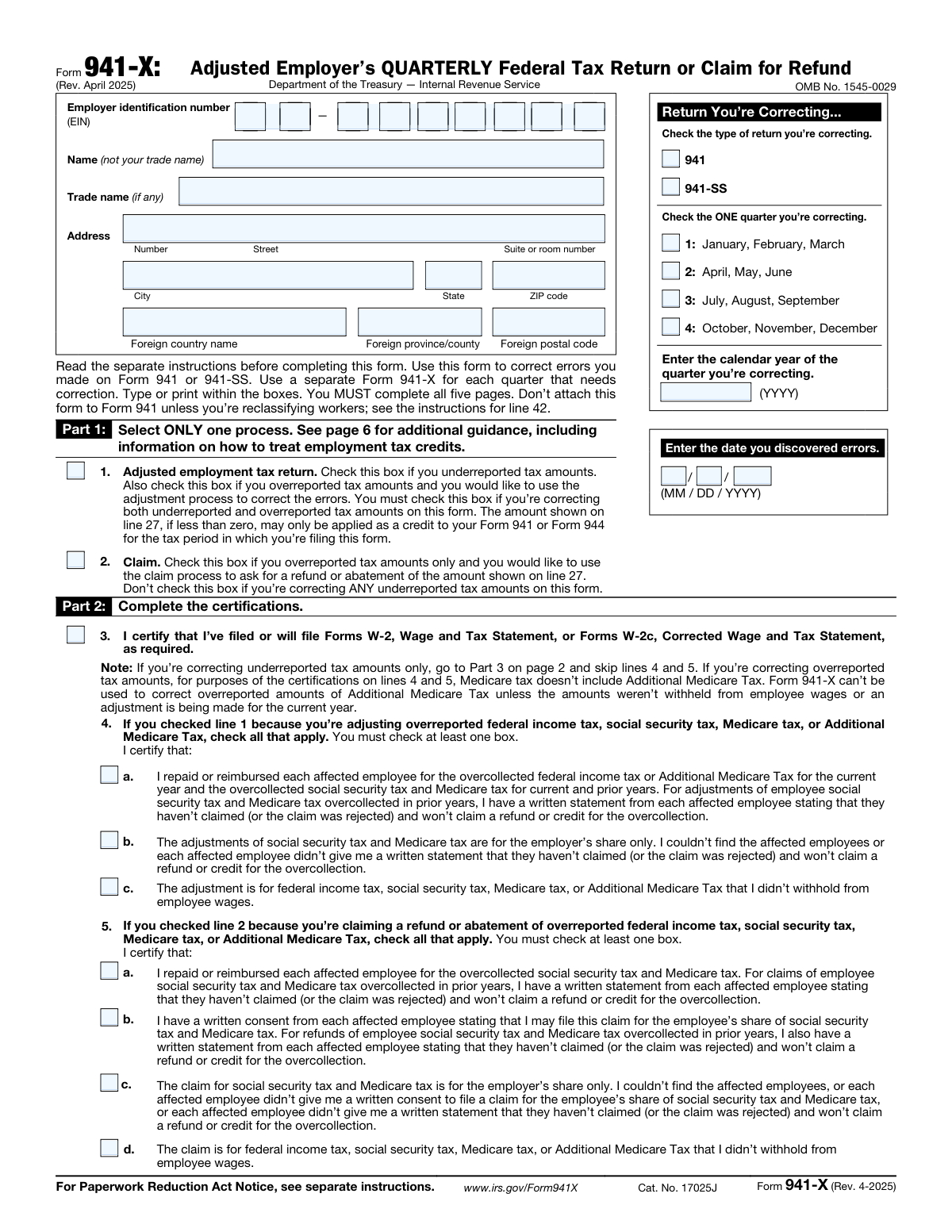
Yes! You can use AI to fill out Form 941-X, Adjusted Employer’s QUARTERLY Federal Tax Return or Claim for Refund
Don't type 350 fields by hand. Tell our AI about yourself, or upload your W-2 or last year's return, and it fills every field in seconds. You check it, then download, print or sign.
The AI does the filling. You just check it.
No typing into boxes, nothing to install.
What this form asks for
The AI fills all of it, from your answers or your documents.
The AI checks your answers before you download
14 checks built for this form, so a wrong date or a missing answer is caught before anyone else sees it.
This check ensures the Employer Identification Number (EIN) is entered in the correct XX-XXXXXXX format. The EIN is a critical identifier for the business entity, and an incorrect format can lead to processing delays or misidentification of the taxpayer. If the format is invalid, the submission should be rejected with an error message prompting the user to correct the entry.
Validates that exactly one checkbox is selected in Part 1, either line 1 (Adjusted return) or line 2 (Claim). These options are mutually exclusive and determine the entire processing path for the form. If neither or both boxes are checked, the form is ambiguous and cannot be processed correctly, requiring a rejection and user correction.
This check verifies that one quarter is selected and a valid calendar year in YYYY format is entered in the 'Return You’re Correcting' section. This information is fundamental for identifying the specific tax period being amended. A missing quarter or year makes it impossible for the IRS to locate the original return, so the form must be considered incomplete.
Ensures the 'date you discovered errors' is a valid date in MM/DD/YYYY format and is not a future date. This date is legally significant for determining timeliness and potential penalties. An invalid or future date would be a logical impossibility and must be flagged for correction before the form can be accepted.
For each row in Part 3 (lines 6 through 40), this validation confirms that the value in Column 3 equals the value in Column 1 minus the value in Column 2. This arithmetic check is the foundation of the entire correction, as Column 3 represents the change being reported. A mismatch indicates a calculation error by the filer, which would invalidate all subsequent tax calculations on the form.
Verifies the calculation for tax correction fields that use a multiplier, such as line 8 (Taxable social security wages). The check ensures that the value in Column 4 is the product of the value in Column 3 and the specified tax rate (e.g., 0.124). This is crucial for ensuring the corrected tax amount is calculated accurately according to tax law; an error here directly impacts the amount owed or refunded.
And 8 more checks
- Part 3 Column 4 Tax Correction Calculation (Direct Copy)
- Line 23 Subtotal Calculation
- Line 27 Total Calculation
- Mandatory Explanation in Part 4
- Conditional Certification for Overreported Adjustments
- Conditional Certification for Claims
- Signature and Date Presence
- Header Information Consistency Across Pages
Let AI fill out your 941-X
No typing. Every field filled in seconds, checked, ready to sign.
How to Fill Out 941-X Online for Free in 2026
What the AI walks you through.
- Navigate to Instafill.ai and upload your Form 941-X, or select it from the platform's library of official documents.
- Enter your business identification details, including EIN, name, and address, and specify the quarter and calendar year being corrected.
- In Part 1, select the appropriate process (adjustment or claim) and complete the certifications in Part 2 regarding employee notifications and consents.
- Use the AI-guided interface to complete Part 3, entering the total corrected amounts, the originally reported amounts, and letting the system calculate the differences and tax corrections.
- Provide a clear and detailed explanation for the corrections in Part 4, as required by the IRS.
- Review all the information you've entered for accuracy, then provide your digital signature and date in Part 5 to certify the return.
- Download the completed form for your records and file it with the IRS according to their instructions, paying any amount due.
Common Mistakes in Completing 941-X
The ones the AI is built to catch.
Incorrect Process Selection in Part 1
Submitting One Form for Multiple Quarters
Vague or Missing Explanation on Line 43
Mathematical and Sign Errors in Part 3
Using Incorrect Tax Rates in Column 4
Incomplete Header Information on Subsequent Pages
Improper Certification in Part 2
Using a Trade Name Instead of the Legal Name
Forgetting to File Corrected Forms W-2c
Filing a Non-Fillable PDF with Manual Errors
Frequently Asked Questions About 941-X
Is it really free for 7 days?
Can I fill other forms too?
How do I cancel?
How does the AI fill out 941-X?
What happens to my information?
How complex is 941-X to fill out?
What is the purpose of Form 941-X?
I made mistakes on my tax returns for two different quarters. Can I use one Form 941-X to fix both?
What's the difference between an 'Adjusted employment tax return' (line 1) and a 'Claim' (line 2)?
What should I do if I both underreported and overreported taxes in the same quarter?
What information do I need from my original Form 941 to complete this form?
Do I need to explain my corrections to the IRS?
What happens if the total on line 27 is a positive or negative number?
If I correct an overcollection of an employee's Social Security tax, what do I need from them?
If I file Form 941-X, do I also need to update my employees' W-2 forms?
Where do I send the completed Form 941-X?
Can AI tools help me fill out Form 941-X?
How can I fill out Form 941-X online if it's a PDF?
The Form 941-X I downloaded is a 'flat' PDF that I can't type in. What can I do?
Get your 941-X filled out by AI
$0 today. Cancel before Nov 10 and you pay nothing.
Other forms like this one
employer forms: Form 940, Employer’s Annual FUTA Tax Return, Form 8027, Employer’s Annual Information Return, Form DE 1, Commercial Employer Account Registration, Form 8994, Employer Credit for Paid Family and Medical Leave, Form 1095-C, Employer-Provided Health Insurance Offer and Coverage, Form 941, Employer’s Quarterly Federal Tax Return, Form I-129CWR, Semiannual Report for CW-1 Employers, Form 941-X (Rev. April 2023), Adjusted Employer’s QUARTERLY Federal Tax Return or Claim for Refund, C139 – Employer’s Information Questionnaire (WCB Alberta), Form SS-4 (Rev. December 2025), Application for Employer Identification Number, City of Carlinville Application for Employment (An Equal Opportunity Employer), Form 941, Employer's QUARTERLY Federal Tax Return (Rev. March 2025), Easy Transfer Form: Moving Funds to an Employer-Sponsored Retirement Plan at TIAA, Form F10462, Moving Funds to an Employer-Sponsored Retirement Plan at TIAA, Moving Funds to an Employer-Sponsored Retirement Plan at TIAA, Form F10794, Cash Withdrawal or Rollover Transfer Payout Annuity for Private Employer Plans, DWC002, Employer’s report for reimbursement of voluntary payment, DWC001S, Employer’s first report of injury or illness, DWC Form-001, Employer’s first report of injury or illness, The E-Verify Memorandum of Understanding for Employers
tax forms: W-9, Request for Taxpayer Identification Number and Certification, Form W-2, Wage and Tax Statement, Form 1040-X, Amended U.S. Individual Income Tax Return, Form 130, Taxpayer's Notice to Initiate an Appeal, Form 1040-C, U.S. Departing Alien Income Tax Return, Form 940, Employer’s Annual FUTA Tax Return, Form 720, Quarterly Federal Excise Tax Return, Form 982, Reduction of Tax Attributes, Form 4137, Social Security and Medicare Tax on Unreported Tip Income, Form 911, Request for Taxpayer Advocate Service Assistance, Form 8960, Net Investment Income Tax, Form 8959, Additional Medicare Tax, Form 8919, Uncollected Social Security and Medicare Tax, Form 8801, Credit for Prior Year Minimum Tax, Form 990-T, Exempt Org Business Income Tax Return, Form 945, Annual Return of Withheld Federal Income Tax, Form 5330, Return of Excise Taxes, Form FTB 3514, California Earned Income Tax Credit, Form 100, CA Corp Tax Return, Form 8288, U.S. Withholding Tax Return
federal forms: Form CA-1, Federal Employee's Notice of Traumatic Injury, Form 720, Quarterly Federal Excise Tax Return, Form OF-306, Declaration for Federal Employment, Form 945, Annual Return of Withheld Federal Income Tax, Form 941, Employer’s Quarterly Federal Tax Return, Form 941-X (Rev. April 2023), Adjusted Employer’s QUARTERLY Federal Tax Return or Claim for Refund, Personal Financial Statement (REV 06/2018) – Northwest Federal Credit Union, Income-Driven Repayment (IDR) Plan Request (PAYE, IBR, and ICR) — William D. Ford Federal Direct Loan (Direct Loan) Program and Federal Family Education Loan (FFEL) Programs (OMB No. 1845-0102), Direct Consolidation Loan Request to Add Loans (William D. Ford Federal Direct Loan Program) (OMB No. 1845-0007), Form 941, Employer's QUARTERLY Federal Tax Return (Rev. March 2025), Loan Rehabilitation: Income and Expense Information, William D. Ford Federal Direct Loan (Direct Loan) Program/Federal Family Education Loan (FFEL) Program, 2026–27 FAFSA® Form, Free Application for Federal Student Aid, Form OF-612, Optional Application for Federal Employment, Navy Federal Voluntary Removal of Joint Owner Request, FS Form 5179, Legacy Treasury Direct Security Transfer Request, Formato de Inscripción al Registro Federal De Contribuyentes a Través de Oficina Virtual, Free Application for Federal Student Aid (FAFSA), Navy Federal Change of Information/Add Joint Owner (for primary account holders 18 and over), Optional Form 306, Declaration for Federal Employment, Form AO 243, Motion to Vacate, Set Aside, or Correct a Sentence
VA claim forms: Form OWCP-915, Claim for Medical Reimbursement, Form 8862, Information To Claim Certain Credits, Form CA-7, Claim for Compensation, Form CA-5, Claim for Compensation, Form SC-100, Plaintiff's Claim and ORDER to Go to Small Claims Court, Form 20-0995, Decision Review Request: Supplemental Claim, Form 104, List of Creditors 20 Largest Unsecured Claims, Form 941-X (Rev. April 2023), Adjusted Employer’s QUARTERLY Federal Tax Return or Claim for Refund, Judicial Council of California Form SC-104, Proof of Service (Small Claims), Immigration and Refugee Board of Canada (IRB) – Refugee Protection Division (RPD) Basis of Claim Form (for persons claiming refugee protection in Canada) (RPD.02.01), SC-108, Request to Correct or Cancel Judgment and Answer (Small Claims), Judicial Council of California Form SC-105, Request for Court Order and Answer (Small Claims), SC-120, Defendant’s Claim and ORDER to Go to Small Claims Court (Small Claims), Judicial Council of California Form SC-104, Proof of Service (Small Claims), Continental American Insurance Company (CAIC) / Aflac Group Critical Illness Claim Form (with Attending Physician’s Statement, HIPAA Authorization to Obtain Information, and Electronic Funds Transaction Authorization), Judicial Council of California Form SC-108, Request to Correct or Cancel Judgment and Answer (Small Claims), SC-105, Request for Court Order and Answer (Small Claims), Judicial Council of California Form SC-120, Defendant’s Claim and ORDER to Go to Small Claims Court (Small Claims), Small Claim and Notice of Small Claim (ORS 46.425) (OJD Official) (Jan 2026), VA Form 21-4138, Statement in Support of Claim
federal tax forms: Form 720, Quarterly Federal Excise Tax Return, Form 945, Annual Return of Withheld Federal Income Tax, Form 941, Employer’s Quarterly Federal Tax Return, Form 941-X (Rev. April 2023), Adjusted Employer’s QUARTERLY Federal Tax Return or Claim for Refund, Form 941, Employer's QUARTERLY Federal Tax Return (Rev. March 2025), Form 911, Request for Taxpayer Advocate Service Assistance (And Application for Taxpayer Assistance Order), Form 2290, Heavy Highway Vehicle Use Tax Return, Form SS-8, Determination of Worker Status
employer tax forms: Form 941, Employer's QUARTERLY Federal Tax Return (Rev. March 2025), Form 940, Employer’s Annual FUTA Tax Return, Form 941, Employer’s Quarterly Federal Tax Return, Form 941-X (Rev. April 2023), Adjusted Employer’s QUARTERLY Federal Tax Return or Claim for Refund, Form 8850, Pre-Screening Notice and Certification Request for the Work Opportunity Credit
quarterly tax forms: Form 941, Employer's QUARTERLY Federal Tax Return (Rev. March 2025), Form 720, Quarterly Federal Excise Tax Return, Form 941, Employer’s Quarterly Federal Tax Return, Form 941-X (Rev. April 2023), Adjusted Employer’s QUARTERLY Federal Tax Return or Claim for Refund, Arizona Form A1-QRT, Arizona Quarterly Withholding Tax Return
Let AI fill out your 941-X
Your trial starts once a card is added. You pay nothing before Nov 10.
Our AI already knows this form, all 350 fields of it. Skip the typing: tell it about yourself, or upload what you have, and it fills the whole form in seconds.
- AI fills every field on all 5 pages, checkboxes included
- No typing into boxes: answer a few questions, or upload your W-2 or last year's return, an old copy of this form, a photo of a document
- The AI checks the answers; you review and change anything before you download
- Download the finished PDF, print it, or sign it online
- Encrypted, and never used to train AI
Cancel before Nov 10 and you pay nothing.
A card is needed to start the trial. Cancel in two clicks from your account.
Terms · Privacy