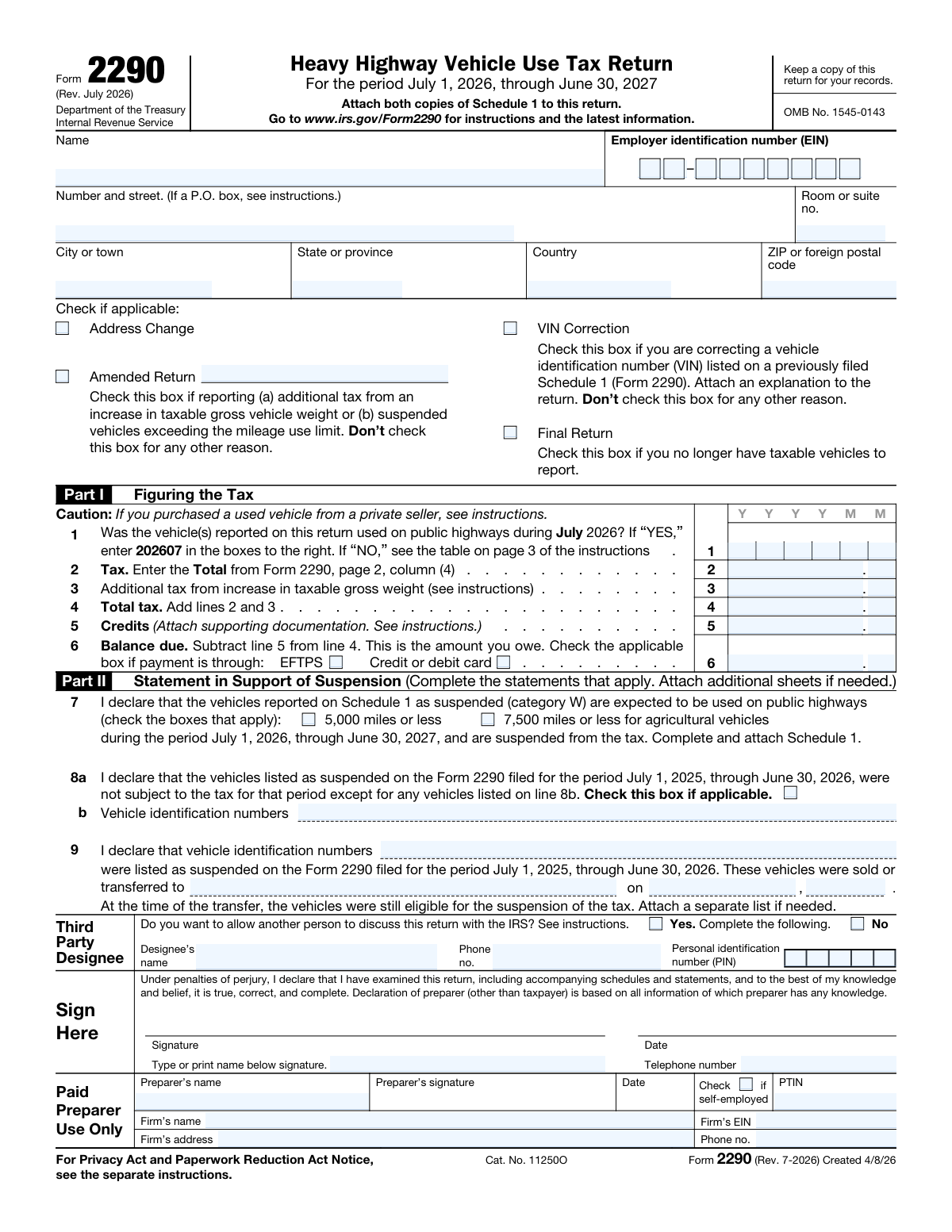
Yes! You can use AI to fill out Form 2290, Heavy Highway Vehicle Use Tax Return

Form 2290, Heavy Highway Vehicle Use Tax Return, is an IRS document used to figure and pay the tax due on heavy highway motor vehicles with a taxable gross weight of 55,000 pounds or more. Filing this form is crucial for vehicle owners as the stamped Schedule 1, returned by the IRS after processing, serves as proof of payment and is required for state vehicle registration. Today, this form can be filled out quickly and accurately using AI-powered services like Instafill.ai, which can also convert non-fillable PDF versions into interactive fillable forms.
Form 2290 is part of the business tax forms, federal tax forms, IRS forms and tax forms categories on Instafill.
Form 2290 has a complex Form Complexity Index of 66/100 — 366 fillable fields across 10 pages. Instafill’s AI completes it accurately in under a minute.

Form specifications

Form name: Form 2290, Heavy Highway Vehicle Use Tax Return
Number of fields: 366
Number of pages: 10
FCI: Complex (66/100)
Filled form examples: Form 2290 Examples
Language: English
Our AI automatically handles information lookup, data retrieval, formatting, and form filling.
It takes less than a minute to fill out Form 2290 using our AI form filling.
Securely upload your data. Information is encrypted in transit and deleted immediately after the form is filled out.
Preview of Form 2290, Heavy Highway Vehicle Use Tax Return

Instafill Demo: How to fill out PDF forms in seconds with AI

How to Fill Out Form 2290 Online for Free in 2026

Are you looking to fill out a FORM 2290 form online quickly and accurately? Instafill.ai offers the #1 AI-powered PDF filling software of 2026, allowing you to complete your FORM 2290 form in just 37 seconds or less.
Follow these steps to fill out your FORM 2290 form online using Instafill.ai:
  1. 1 Navigate to Instafill.ai and upload or select Form 2290.
  2. 2 Enter your business name, Employer Identification Number (EIN), and address in the designated fields.
  3. 3 Complete Part I by calculating the total tax based on the number and category of your vehicles as detailed on page 2. Indicate if it's an amended or final return.
  4. 4 If you have vehicles that are expected to be used less than the mileage use limit (5,000 miles or 7,500 for agricultural vehicles), complete Part II to claim a suspension of the tax.
  5. 5 Fill out Schedule 1, listing the Vehicle Identification Number (VIN) and weight category for each vehicle being reported, including suspended ones.
  6. 6 Review all entered information for accuracy, then provide your signature and date to certify the return under penalties of perjury.
  7. 7 Select your payment method for the balance due, such as EFTPS or credit card, and submit the completed form as directed by the service for filing with the IRS.

Our AI-powered system ensures each field is filled out correctly, reducing errors and saving you time.

Why Choose Instafill.ai for Your Fillable Form 2290 Form?

Speed

Complete your Form 2290 in as little as 37 seconds.

Up-to-Date

Always use the latest 2026 Form 2290 form version.

Cost-effective

No need to hire expensive lawyers.

Accuracy

Our AI performs 10 compliance checks to ensure your form is error-free.

Security

Your personal information is protected with bank-level encryption.

Frequently Asked Questions About Form 2290

Form 2290 has a Form Complexity Index of 66 out of 100, placing it in the complex complexity tier. This score is calculated deterministically from the form’s own structure using Instafill’s published Form Complexity Index methodology, so it can be reproduced and independently verified — it is not a subjective estimate.

For Form 2290 specifically, the score reflects 366 fillable fields across 10 pages. The number of fields is the largest factor in the base score (weighted 36%), followed by how difficult those fields are to complete based on their type, where free-text and signature fields count for more than simple checkboxes (26%). The number of pages that actually contain fields (15%), the amount of conditional “fill-only-if” logic (16%), and how many sections the form is divided into (7%) account for the rest of the base. On top of that base, the index adds points for tables and repeating lists, bundled instruction pages, and dense page layouts — capturing difficulty the base alone can miss.

In practical terms, a complex score means the form is demanding, with many fields, multiple pages and branching rules that are easy to get wrong. Instafill removes that effort entirely: our AI reads your information, maps each value to the correct field — including the conditional ones — and completes Form 2290 accurately in under a minute, with every field available for you to review before you download. See exactly how the Form Complexity Index is calculated.

Form 2290, the Heavy Highway Vehicle Use Tax Return, is used to figure and pay the annual tax due on highway motor vehicles with a taxable gross weight of 55,000 pounds or more.

You must file Form 2290 if a taxable highway motor vehicle with a gross weight of 55,000 pounds or more is registered in your name. This applies to individuals, corporations, partnerships, and other organizations.

This revision of Form 2290 is for the tax period beginning on July 1, 2026, and ending on June 30, 2027. Do not use this version for tax periods that began on or before June 30, 2026.

Schedule 1 is used to list all the vehicles you are reporting. After you file, the IRS will stamp and return a copy of Schedule 1, which you need as proof of payment to register your vehicle(s) with your state.

You will need your Employer Identification Number (EIN), the Vehicle Identification Number (VIN) for each vehicle, and the taxable gross weight of each vehicle to determine its tax category.

A vehicle is 'tax-suspended' if it is expected to be used 5,000 miles or less (7,500 for agricultural vehicles) during the tax period. You must report these vehicles (Category W), but you do not have to pay the tax unless they exceed the mileage limit.

The tax is calculated based on the vehicle's taxable gross weight category, as shown in the 'Tax Computation' table on page 2 of the form. Find your vehicle's weight category to determine the annual tax amount.

You can pay via the Electronic Federal Tax Payment System (EFTPS), credit or debit card, or by mailing a check or money order with the Form 2290-V payment voucher.

Check the 'Amended Return' box if you need to report additional tax, such as when a vehicle's taxable gross weight increases or a suspended vehicle exceeds its mileage limit during the tax period.

To correct a Vehicle Identification Number (VIN), you must file a new Form 2290 for the same tax period, check the 'VIN Correction' box, and attach a written explanation.

Form 2290-V should be completed and sent with your payment if you are paying your tax by check or money order. It helps the IRS credit your payment to your account promptly and accurately.

Yes, services like Instafill.ai use AI to auto-fill form fields accurately with your saved information, which can save time and reduce the chance of errors.

You can use a service like Instafill.ai to upload the PDF form and fill it out directly on their website. This allows you to easily type your information, save your progress, and download the completed document.

If you have a non-fillable or 'flat' PDF, you can upload it to Instafill.ai. The platform's technology can convert it into an interactive, fillable form that you can complete on your computer or mobile device.

Compliance Form 2290
Validation Checks by Instafill.ai

1
EIN Format and Presence Validation
This check ensures the Employer Identification Number (EIN) is present and correctly formatted as XX-XXXXXXX. The EIN is the primary identifier for the business entity filing the tax return. A missing or malformed EIN will cause the submission to be rejected, as the IRS cannot associate the filing with a taxpayer account.
2
First Use Month Format and Range Validation
Validates that the 'Month of first use' on Schedule 1 is in the required YYYYMM format and falls within the correct tax period (e.g., from 202607 to 202706). This date is critical for determining whether the full annual tax or a prorated partial-period tax applies. An incorrect date will lead to an inaccurate tax calculation and potential penalties.
3
VIN Format and Completeness Validation
This check verifies that each Vehicle Identification Number (VIN) listed on Schedule 1, Part II consists of exactly 17 alphanumeric characters. A valid VIN is required for the IRS to process the tax payment and for the filer to register the vehicle with a state DMV. An incomplete or invalid VIN will result in the rejection of the proof of payment for that vehicle.
4
Tax Computation Cross-Check (Page 2 to Line 2)
This validation ensures that the total amount from the 'Amount of tax' column (Column 4) on the Tax Computation table (Page 2) correctly sums and matches the value entered on Form 2290, Line 2. This is a critical integrity check to confirm that the detailed tax calculation is accurately reflected on the main return. A mismatch indicates a calculation error that invalidates the entire tax due amount.
5
Total Tax Calculation (Line 4)
Verifies that the 'Total tax' on Line 4 is the correct arithmetic sum of the 'Tax' on Line 2 and 'Additional tax' on Line 3. This is a fundamental calculation check on the main form. An error at this stage would make all subsequent financial figures, including the balance due, incorrect.
6
Balance Due Calculation (Line 6)
This check confirms that the 'Balance due' on Line 6 is correctly calculated by subtracting 'Credits' (Line 5) from 'Total tax' (Line 4). This ensures the final amount the filer needs to pay is accurate. An incorrect balance could lead to an underpayment notice and penalties, or an overpayment that is difficult to recover.
7
Schedule 1 Vehicle Count Consistency
This validation ensures the 'Total number of taxable vehicles' from Schedule 1, Part I, line c, is equal to the sum of all vehicles entered in the 'Number of vehicles' column (Column 3) of the Tax Computation table on page 2. This confirms that the vehicle summary on Schedule 1 aligns with the detailed breakdown used for the tax calculation. A discrepancy suggests either a miscalculation or that vehicles are not properly accounted for.
8
Schedule 1 Summary Arithmetic Check
This check verifies that on Schedule 1, Part I, the 'Total number of taxable vehicles' (line c) is the correct result of subtracting the 'number of suspended vehicles' (line b) from the 'Total number of reported vehicles' (line a). This is a basic data integrity check on the schedule itself. An error here indicates a miscounting of vehicles in the summary section.
9
Suspended Vehicle Declaration Requirement
If any vehicle on Schedule 1 is assigned to category 'W' (Tax-Suspended), this check ensures that the corresponding declaration in Part II, line 7, on Form 2290 is completed. This declaration is a legal requirement for claiming tax suspension. Failure to complete this section when claiming a suspension will result in the suspension being disallowed and the tax becoming due.
10
Amended Return Justification
If the 'Amended Return' checkbox is checked, this validation confirms that a valid reason for the amendment is provided, such as an entry on Line 3 for additional tax due to a weight increase. The form specifies limited reasons for filing an amended return. Checking the box without providing the corresponding data makes the filing ambiguous and subject to rejection.
11
Third Party Designee Information Completeness
This check verifies that if the 'Yes' box is checked to authorize a third-party designee, then the designee's name, phone number, and Personal Identification Number (PIN) fields are all filled out. This information is mandatory for the IRS to grant authorization to discuss the return with another person. Incomplete information renders the authorization void.
12
Header Information Consistency Across Schedules
This validation confirms that the filer's Name and Employer Identification Number (EIN) are identical on the main Form 2290 and on all attached Schedule 1 copies. This is crucial for ensuring all documents in the submission are correctly associated with the same taxpayer account. Mismatched information can lead to significant processing delays or rejection of the entire filing.
13
Credit Amount Validity
This check ensures the credit amount claimed on Line 5 is not greater than the total tax on Line 4. Credits on this form can only be used to reduce the tax liability, potentially to zero, but cannot result in a refund. Claiming credits in excess of the tax due is not permitted and will cause a calculation error.
14
Payment Method Selection for Balance Due
If the 'Balance due' on Line 6 is greater than zero, this validation ensures that a payment method (EFTPS or Credit/debit card) is selected. This indicates the filer's intent to pay the tax owed. Failing to select a payment method for a non-zero balance makes the submission incomplete and may delay processing.

Common Mistakes in Completing Form 2290

Using an SSN Instead of an EIN

Form 2290 is a business tax return and requires an Employer Identification Number (EIN) for filing, not a personal Social Security Number (SSN). This mistake often happens with new owner-operators who are not yet familiar with business tax requirements. Using an SSN will cause the IRS to reject the filing, leading to significant processing delays and potential late-filing penalties. To avoid this, ensure you have an EIN from the IRS; if not, you must apply for one before filing.

Entering Incorrect Vehicle Identification Numbers (VINs)

A single mistyped character in a 17-digit VIN is one of the most common and consequential errors. These typos occur during manual data entry from vehicle documents. An incorrect VIN on the stamped Schedule 1 will cause the vehicle registration to be rejected by the state DMV, preventing the vehicle from operating legally until a corrected Schedule 1 is obtained. To prevent this, meticulously double-check each VIN against the vehicle's title. AI-powered tools like Instafill.ai can help validate VIN formats to catch errors before submission.

Using the Wrong Taxable Gross Weight

Filers frequently confuse a vehicle's unladen weight with its 'taxable gross weight,' which is the total weight of the truck, trailer, and the heaviest load it will carry. This leads to selecting an incorrect weight category (A-V) on the tax computation table. This error results in an incorrect tax calculation, potentially leading to an underpayment notice and penalties from the IRS. Always determine the correct taxable gross weight for each vehicle and use that to find the correct tax category on page 2 of the form.

Failing to Prorate Tax for Partial-Year Vehicles

The tax on a vehicle first used after July (the start of the tax period) must be prorated. Many filers mistakenly calculate the tax using the full annual rate from column (1) on page 2, rather than using the partial-period tax tables found in the form's instructions. This common oversight results in a significant overpayment of taxes. To avoid this, carefully determine the vehicle's first month of use and consult the specific partial-period tax tables to find the correct, lower tax amount.

Incorrectly Reporting Tax-Suspended Vehicles

A vehicle is 'tax-suspended' if it's expected to be used less than 5,000 miles (7,500 for agricultural vehicles) in the tax period. A common mistake is to suspend a vehicle that later exceeds this mileage limit and then forget to file an amended return to pay the tax. The IRS tracks this, and failure to pay the tax due can result in penalties and interest charges. Be realistic with mileage estimates, and if a suspended vehicle's use changes, promptly file an amended return.

Improperly Correcting a VIN

When a VIN is entered incorrectly on a filed return, filers often mistakenly file a completely new return or check the 'Amended Return' box. The correct procedure is to check the 'VIN Correction' box on a new Form 2290 and attach an explanation. Using the wrong method creates duplicate filings and processing confusion at the IRS, delaying the issuance of a valid, corrected Schedule 1 needed for registration. AI-powered form-filling tools like Instafill.ai can help prevent initial VIN errors, reducing the need for corrections.

Using an Outdated Form Version

The IRS issues a new revision of Form 2290 each year for the specific tax period (e.g., Rev. July 2026 for the 2026-2027 period). Filers often accidentally use a form saved from a previous year. Submitting an outdated form will lead to an automatic rejection by the IRS, forcing you to restart the entire filing process and risking late penalties. Always ensure you are using the current revision by downloading it directly from the IRS website for the correct tax period.

Inconsistent Vehicle Counts Between Schedules

This error occurs when the total number of taxable vehicles reported on the tax computation table (Page 2) does not match the total number of taxable vehicles calculated on Schedule 1, Part I, line c. This discrepancy signals a calculation or data entry error to the IRS and can trigger processing delays or a notice. To avoid this, carefully count the vehicles in each category on page 2 and ensure the final totals match the summary on Schedule 1 before filing.

Forgetting to Submit Both Copies of Schedule 1

The instructions require filing two identical copies of Schedule 1, but filers sometimes submit only one. The IRS keeps one copy and returns the second copy with a stamp, which serves as the official proof of payment required by state DMVs for vehicle registration. Failing to submit the second copy means you will not receive the stamped proof you need, halting your registration process. Since this form is often a non-fillable PDF, using a tool like Instafill.ai can help you fill it out once and easily print two clean copies.

Missing Signature on the Consent to Disclosure

On Schedule 1, there is a separate 'Consent to Disclosure of Tax Information' section that requires its own signature. Many filers overlook this, assuming the main signature on Form 2290 is sufficient. This consent is critical as it allows the IRS to share your payment status with DMVs; without it, the electronic verification system may not be updated, delaying your vehicle registration. Always review every page for all required signatures before submitting the form.
Saved over 80 hours a year

“I was never sure if my IRS forms like W-9 were filled correctly. Now, I can complete the forms accurately without any external help.”

Kevin Martin Green

Your data stays secure with advanced protection from Instafill and our subprocessors

Robust compliance program

Transparent business model

You’re not the product. You always know where your data is and what it is processed for.

ISO 27001, HIPAA, and GDPR

Our subprocesses adhere to multiple compliance standards, including but not limited to ISO 27001, HIPAA, and GDPR.

Security & privacy by design

We consider security and privacy from the initial design phase of any new service or functionality. It’s not an afterthought, it’s built-in, including support for two-factor authentication (2FA) to further protect your account.

Fill out Form 2290 with Instafill.ai

Worried about filling PDFs wrong? Instafill securely fills form-2290-heavy-highway-vehicle-use-tax-return forms, ensuring each field is accurate.