
Instafill.ai
7 days free
AI form filling · 116 fields · 2 pages · done in seconds

Yes! You can use AI to fill out Form DS-234, Special Immigrant Visa Biodata Form

Don't type 116 fields by hand. Tell our AI about yourself, or upload your current passport, and it fills every field in seconds. You check it, then download, print or sign.
7 days free, then $19.99/month · Cancel anytime
AI fills it, no typingEncrypted, never used to train AICancel in two clicks
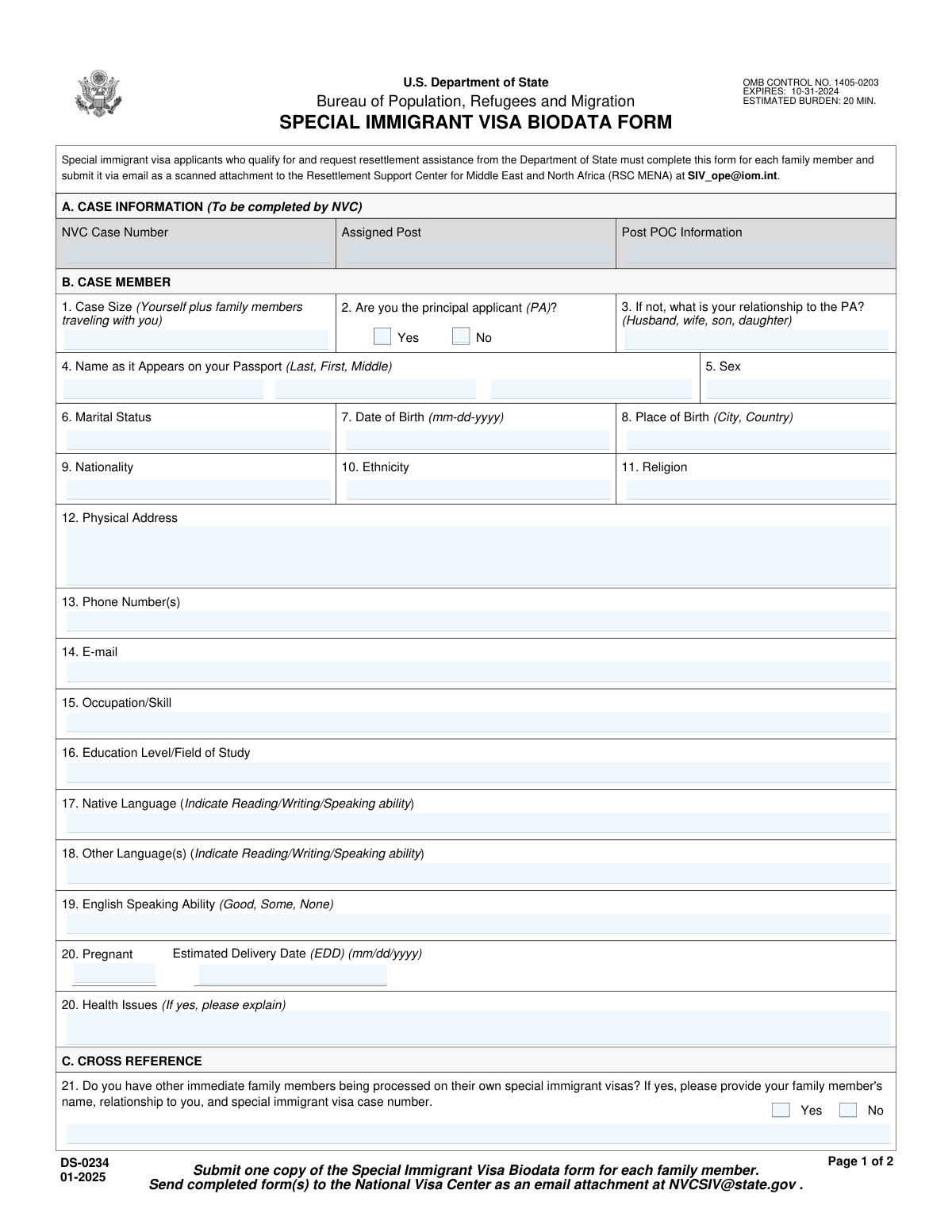
Form DS-234, Special Immigrant Visa Biodata Form, page 1
Complex · 79/100Form Complexity Index

The AI does the filling. You just check it.

No typing into boxes, nothing to install.

Tell the AI about youAnswer a few questions in plain words, or upload your current passport. That is all the typing there is.
AI fills every field in secondsIt puts each answer in the right box on every page, tables and checkboxes included.
Check it and downloadReview every field, change anything, then download, print or sign the PDF.

What this form asks for

The AI fills all of it, from your answers or your documents.

Form DS-234, Special Immigrant Visa Biodata Form, is a required document for individuals applying for a U.S. Special Immigrant Visa (SIV). It is submitted to the National Visa Center (NVC) and collects comprehensive personal, family, and contact information needed to process the visa application and prepare for the consular interview. This form ensures that the U.S. government has all the necessary background data to adjudicate the SIV case. Today, this form can be filled out quickly and accurately using AI-powered services like Instafill.ai, which can also convert non-fillable PDF versions into interactive fillable forms.
Fillable fields116
Pages2
Sections23
Tables and lists2
Questions that depend on earlier answers73
Form Complexity IndexComplex, 79/100

The AI checks your answers before you download

12 checks built for this form, so a wrong date or a missing answer is caught before anyone else sees it.

NVC Case Number Format Validation

This check ensures the 'NVC Case Number' follows the standard format, which is typically a combination of letters and numbers (e.g., 3 letters followed by 10 digits). This is critical for correctly identifying and routing the case within the system. If the format is incorrect, the form submission should be rejected with a message guiding the user to enter a valid case number.

Principal Applicant Exclusive Selection

This validation verifies that the user has selected either 'Yes (Principal Applicant)' or 'No (Not Principal Applicant)', but not both. These options are mutually exclusive and one must be chosen to determine the applicant's status. A failure would occur if neither or both are selected, prompting the user to make a single, valid choice.

Conditional Relationship to Principal Applicant

This check ensures that if the user selects 'No (Not Principal Applicant)', the 'Relationship to Principal Applicant' field must be filled out. This information is essential for understanding the case structure and the applicant's connection to the primary beneficiary. If the condition is met but the relationship field is empty, an error should be displayed requiring the user to provide this information.

Applicant Full Name Completeness

This validation confirms that the 'Passport Name - Last (Surname)' and 'Passport Name - First (Given)' fields are not empty. A full name is a fundamental identifier for the applicant and is required for all official documentation and processing. Failure to provide a first and last name would prevent the form from being submitted.

Date of Birth Logical and Format Check

This check validates that the 'Date of Birth' is a real, valid date and that it is in the past. It prevents impossible dates (e.g., February 30) and future dates, which are logically incorrect for a date of birth. This ensures data accuracy for identity verification and eligibility determination; an invalid entry would trigger an error message.

Email Address Format Validation

This check verifies that the value entered in the 'Email Address' field conforms to a standard email format (e.g., '[email protected]'). A valid email is crucial for communication with the applicant regarding their case status and any required actions. If the format is invalid, the system should prompt the user to correct it before proceeding.

And 6 more checks
  • Pregnancy and Estimated Delivery Date Consistency
  • Other Immediate Family Members Conditional Requirement
  • Family Member Date of Birth Exclusivity
  • U.S. Contact Information Conditional Requirement
  • Case Size Is a Positive Integer
  • U.S. Contact Phone Number Format

Let AI fill out your DS-234

No typing. Every field filled in seconds, checked, ready to sign.

7 days free, then $19.99/month · Cancel anytime

How to Fill Out DS-234 Online for Free in 2026

What the AI walks you through.

  1. Navigate to Instafill.ai and upload your Form DS-234, or select it from the platform's library of official documents.
  2. Allow the AI to scan the document and identify all the required fields for case information, applicant details, family members, and U.S. contacts.
  3. Follow the guided prompts to enter your NVC case number, personal details (name, birth date, nationality), and current contact information.
  4. Provide comprehensive information about your family members, including those with separate SIV cases and any relatives or friends already residing in the United States.
  5. Review all the information entered by the AI-powered tool. The system will flag any incomplete sections or potential errors for your correction.
  6. Once you have verified that all data is accurate and complete, finalize the form and download the finished DS-234, ready for submission as instructed by the NVC.

Common Mistakes in Completing DS-234

The ones the AI is built to catch.

Name Does Not Match Passport Exactly
Applicants often enter a nickname, a shortened version of their name, or omit their middle name, failing to match their passport exactly. This discrepancy can cause significant processing delays or rejection as identity verification is critical. To avoid this, meticulously copy your full name from your passport, ensuring every part matches perfectly. AI-powered tools like Instafill.ai can help prevent this by saving your official name and auto-filling it correctly across documents.
Incorrect NVC or SIV Case Number
Applicants frequently mistype the long and complex National Visa Center (NVC) or Special Immigrant Visa (SIV) case numbers due to transcription errors. An incorrect number can cause the application to be misfiled or unlinked from the primary file, halting all progress and causing major delays. Always copy the number directly from official correspondence and double-check it character by character before submission.
Inconsistent Answers in Conditional Sections
The form has many sections that depend on a 'Yes/No' answer, such as listing family members. A common error is to check 'Yes' but leave the required details blank, or to check 'No' but fill in the details anyway. This creates confusion and requires clarification, delaying the case. To prevent this, carefully read the instructions for each section; if you answer 'Yes,' ensure all corresponding fields are completed.
Miscalculating the 'Case Size'
Applicants often misinterpret the 'Case Size' field by forgetting to include themselves (the principal applicant) in the total or omitting other family members applying with them. This mistake can lead to logistical issues and delays in processing derivative visas for the uncounted individuals. To avoid this, remember to count yourself plus every single family member who is applying for a visa under the same case.
Using a P.O. Box for Physical Address
Applicants sometimes provide a P.O. Box instead of the required 'Physical Address,' which is needed for residency verification and certain official deliveries. This will result in a request for information (RFI) and delay the application process. Always provide the full street address where you actually live. Tools like Instafill.ai can validate address formats to ensure they meet requirements.
Using an Ambiguous or Incorrect Date Format
When entering dates of birth, applicants may use their local format (e.g., DD/MM/YYYY) instead of the expected U.S. format (MM/DD/YYYY), causing ambiguity and data entry errors. This can create significant problems with identity verification and eligibility checks. To avoid this, use the specified format or write out the month (e.g., 05-APR-2001) to prevent confusion. AI form fillers like Instafill.ai can automatically format dates correctly.
Mishandling the Middle Name Field
When an applicant has no middle name, they might incorrectly enter 'N/A' or 'None' instead of leaving the field blank as instructed. This can be misinterpreted by systems as an actual name, causing a data mismatch with official documents. If you do not have a middle name on your passport, you must leave the field completely empty. If the form is a non-fillable PDF, tools like Instafill.ai can convert it to a fillable version, making it easier to manage fields correctly.
Failing to Disclose or Update Pregnancy Status
An applicant who is pregnant may forget to fill out the pregnancy section or fail to update their form if they become pregnant after the initial submission. This is critical information as it affects medical examinations, travel planning, and the need to register the newborn. Failing to disclose this can lead to major logistical complications and delays near the time of travel.
Incomplete U.S. Contact Information
When listing family or friends in the U.S., applicants sometimes provide incomplete addresses (e.g., missing a ZIP code or apartment number) or outdated phone numbers. This information may be used for verification, and incorrect details can hinder the process or cause important documents to be lost. Before submitting, confirm the full, current address and contact details with your U.S.-based contacts. Using a tool like Instafill.ai can help by storing and accurately populating this information from a saved profile.
Vague Occupation or Skill Description
In the 'Occupation or Skill' field, applicants may use overly broad terms like 'Manager,' 'Consultant,' or 'Engineer' without providing necessary context. This lack of detail can make it difficult for consular officers to assess the applicant's background and qualifications, potentially triggering requests for additional evidence. Be specific by providing a clear job title and a brief description of your industry to avoid delays.

Frequently Asked Questions About DS-234


Is it really free for 7 days?
Yes. You pay $0 today. Cancel before Nov 4 and you are never charged. Keep it, and it is $19.99 a month for 5 fills of your DS-234.
Can I fill other forms too?
This plan is for your DS-234: your own AI agent fills it as often as 5 times a month. To fill other forms and upload your own, choose a Professional plan from your account.
How do I cancel?
From your account, in two clicks, any time. No email, no call.
How does the AI fill out DS-234?
You answer a few questions in plain words, or upload your current passport. The AI reads what you give it and puts each answer into the right field of DS-234, on every page, in seconds. It checks the answers against the form's own rules, and you review and change anything before you download, print or sign.
What happens to my information?
It is encrypted in transit and at rest, and it is never used to train AI.
How complex is DS-234 to fill out?
DS-234 has a Form Complexity Index of 79 out of 100, in the complex tier: 116 fillable fields across 2 pages. Instafill.ai's AI fills it in under a minute, with every field there for you to review before you download.
What is the purpose of this form?
This form is used to collect essential personal, contact, and family information from Special Immigrant Visa (SIV) applicants. It helps the National Visa Center (NVC) and the assigned U.S. embassy or consulate process your case efficiently.
Who should complete the 'CASE INFORMATION' section at the top?
This section is typically completed by the National Visa Center (NVC) before they send the form to you. You should verify the information is correct, but you do not need to fill it in yourself unless specifically instructed to do so.
What do I enter for 'Case Size'?
Enter the total number of people included in your specific SIV case. This includes yourself and any derivative family members, like a spouse or children, who are applying for a visa with you under the same case number.
I am the main applicant. Do I check 'Yes' or 'No' for 'Principal Applicant'?
If you are the primary individual on whose behalf the SIV petition was filed, you should check 'Yes' for 'Principal Applicant'. Spouses and children applying with the main applicant should check 'No' and specify their relationship.
My passport does not list a middle name. What should I do?
If you do not have a middle name listed on your passport, you should leave the 'Passport Name - Middle' field blank. It is important that your name on the form matches your passport exactly.
What is the 'Other Immediate Family Members Being Processed (Cross Reference)' section for?
This section is for listing immediate family members who are also applying for a Special Immigrant Visa but have their own separate SIV case number. Do not list family members who are included in your case.
What if I don't know the exact date of birth for a family member I need to list?
The form provides a 'Date of Birth Unknown' checkbox for each family member in the cross-reference tables. If you cannot provide a complete date of birth, you should check this box.
I am pregnant. What information do I need to provide?
Yes, you must indicate that you are pregnant in the 'Medical and Pregnancy Information' section and provide your Estimated Delivery Date (EDD). This information is important for medical and processing considerations during your visa application.
Where do I submit this form once it's completed?
You should follow the specific submission instructions provided by the National Visa Center (NVC) or the U.S. embassy/consulate handling your case. This typically involves uploading the document to an online portal or sending it via email as directed.
What information do I need to have ready before filling out this form?
You should have your passport, your NVC case number, and the full names and dates of birth for any family members you need to list. You will also need their SIV case numbers if they have separate cases, and the contact details for any family or friends you have in the U.S.
Can I use an AI tool to help me fill out this form?
Yes, services like Instafill.ai can help you complete this form quickly and accurately. These tools use AI to auto-fill your information, reducing the time spent on paperwork and minimizing errors.
How can I fill out this form online if I only have a non-fillable PDF?
You can use a service like Instafill.ai to convert the non-fillable PDF into an interactive, fillable form. Simply upload the file, and the platform will make the fields editable so you can type your answers directly online.
What should I write in the 'Comments' section?
Use the 'Comments' section for any additional relevant information that you couldn't fit elsewhere on the form. For example, you can use it if you need to list more family members or U.S. contacts than the form has space for.
Encrypted in transit and at restNever used to train AIDelete your forms any time

Get your DS-234 filled out by AI

$0 today. Cancel before Nov 4 and you pay nothing.

7 days free, then $19.99/month · Cancel anytime