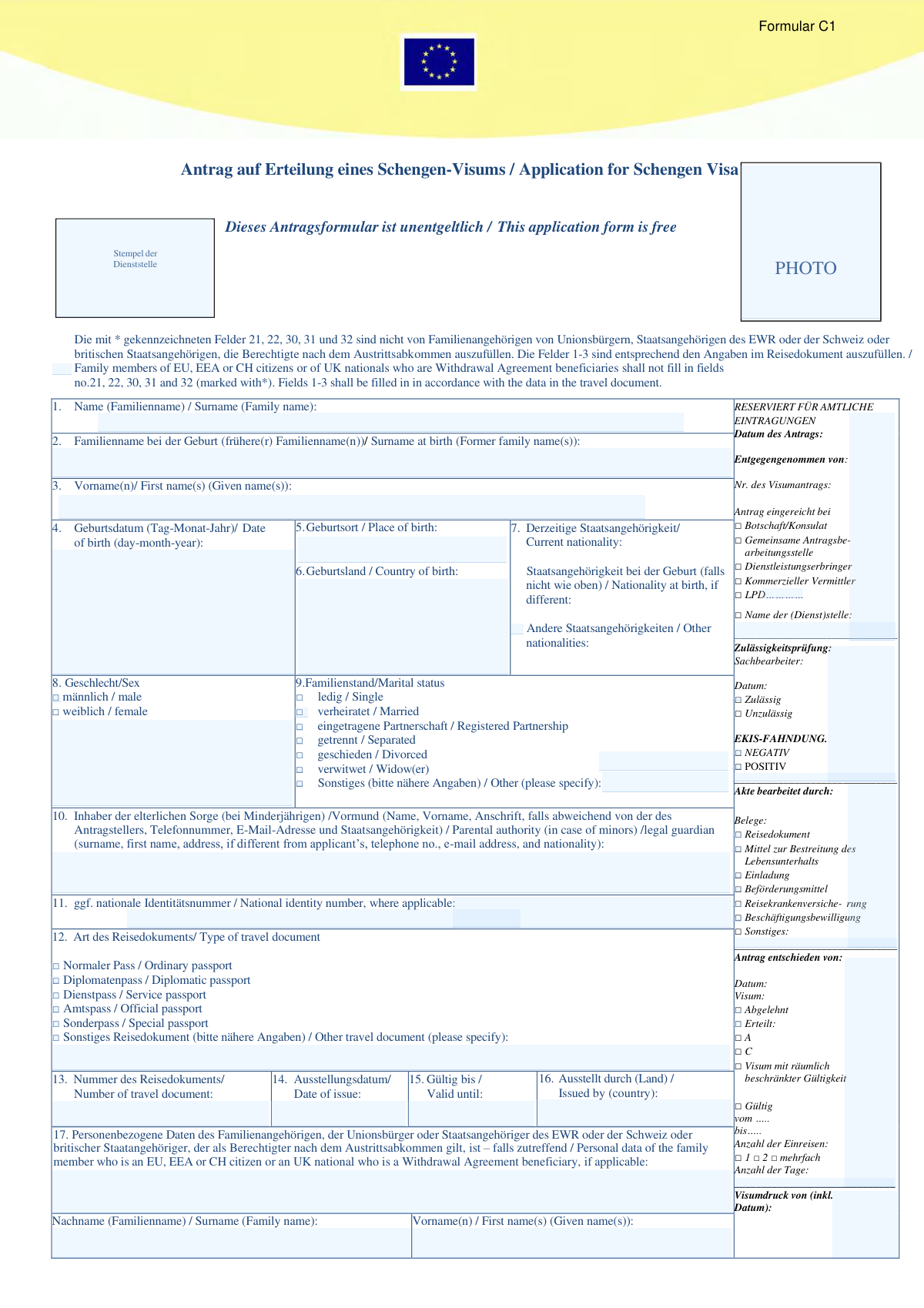
Yes! You can use AI to fill out Formular C1 – Antrag auf Erteilung eines Schengen-Visums (Application for Schengen Visa)
Formular C1 ist das standardisierte Schengen-Visumantragsformular, das bei Botschaften/Konsulaten bzw. Visa-Annahmestellen zur Prüfung eines Visumantrags verwendet wird. Es dient dazu, Identität, Reisezweck, Reiseroute, Aufenthaltsdauer, Unterkunft sowie die Finanzierung des Aufenthalts nachvollziehbar zu dokumentieren. Die Angaben werden zur Entscheidung über den Antrag herangezogen und können in das Visa-Informationssystem (VIS) eingetragen werden, einschließlich Foto und ggf. Fingerabdrücken. Vollständige und wahrheitsgemäße Angaben sind wichtig, da falsche Erklärungen zur Ablehnung oder Annullierung eines Visums und ggf. zu rechtlichen Konsequenzen führen können.
Our AI automatically handles information lookup, data retrieval, formatting, and form filling.
It takes less than a minute to fill out Formular C1 using our AI form filling.
Securely upload your data. Information is encrypted in transit and deleted immediately after the form is filled out.
Form specifications
| Form name: | Formular C1 – Antrag auf Erteilung eines Schengen-Visums (Application for Schengen Visa) |
| Number of pages: | 4 |
| Filled form examples: | Form Formular C1 Examples |
| Language: | English |
Instafill Demo: filling out a legal form in seconds
How to Fill Out Formular C1 Online for Free in 2026
Are you looking to fill out a FORMULAR C1 form online quickly and accurately? Instafill.ai offers the #1 AI-powered PDF filling software of 2026, allowing you to complete your FORMULAR C1 form in just 37 seconds or less.
Follow these steps to fill out your FORMULAR C1 form online using Instafill.ai:
- 1 Reisedokument und Basisdaten bereitlegen (Reisepass, frühere Namen, Geburtsdaten/-ort, Staatsangehörigkeit, Kontaktdaten) und ein aktuelles Passfoto gemäß Vorgaben vorbereiten.
- 2 Abschnitte 1–16 ausfüllen: persönliche Daten, Familienstand, ggf. nationale ID-Nummer sowie Passart, Passnummer, Ausstellungsdatum, Gültigkeit und ausstellender Staat.
- 3 Falls zutreffend, Angaben zu EU/EWR/CH-/UK-WA-Familienangehörigen in den Feldern 17–18 eintragen (Personendaten und Verwandtschaftsverhältnis).
- 4 Reiseangaben erfassen: Zweck der Reise (Feld 23), zusätzliche Zweckangaben (24), Hauptreiseziel und erste Einreise (25–26), gewünschte Einreisen und geplante An-/Abreisedaten (27).
- 5 VIS-/Vorvisa-Informationen ergänzen: frühere Fingerabdrücke für Schengen-Visa (28) und ggf. Einreisegenehmigung für das Endbestimmungsland (29).
- 6 Unterkunft/Einladung und Kostenübernahme angeben: einladende Person oder Hotel/Unterkunft (30), ggf. einladendes Unternehmen/Organisation (31) sowie Finanzierung und Nachweise der Mittel (32).
- 7 Erklärungen/Einwilligungen lesen, Ort und Datum eintragen und unterschreiben (bei Minderjährigen durch Sorgeberechtigte); anschließend die geforderten Belege (z. B. Reisekrankenversicherung, Einladung, Nachweis der Mittel, Transport/Unterkunft) digital hochladen und den Antrag einreichen.
Our AI-powered system ensures each field is filled out correctly, reducing errors and saving you time.
Why Choose Instafill.ai for Your Fillable Formular C1 Form?
Speed
Complete your Formular C1 in as little as 37 seconds.
Up-to-Date
Always use the latest 2026 Formular C1 form version.
Cost-effective
No need to hire expensive lawyers.
Accuracy
Our AI performs 10 compliance checks to ensure your form is error-free.
Security
Your personal information is protected with bank-level encryption.
Frequently Asked Questions About Form Formular C1
Form C1 is the application form for a Schengen visa. It is used to request permission to enter and stay in the Schengen area for a short stay (typically up to 90 days in any 180-day period) or for airport transit, depending on your purpose of travel.
No. The form is free of charge (“This application form is free”). Note that visa fees may still apply when you submit the application.
Fields 1–3 (surname, surname at birth, and first names) must be completed exactly as shown in your travel document. Using different spelling or order can cause delays or problems during processing.
Family members of EU citizens, EEA citizens, Swiss citizens, or UK nationals who are beneficiaries under the Withdrawal Agreement do not fill in the starred fields 21, 22, 30, 31, and 32. Everyone else should complete them if applicable.
You must provide a passport-style photo in the space marked “PHOTO.” Use a recent photo that meets the consulate’s biometric/photo requirements for Schengen visa applications.
For minors, you must complete field 10 with the parental authority/legal guardian’s details (name, address if different, phone, email, and nationality). The form must be signed by the parent/legal guardian in the signature section.
Select “Yes” and provide your residence permit (or equivalent document) number and its validity date. If you do not have legal residence in that country, your application may be considered incomplete or inadmissible.
In field 23, tick the main purpose (tourism, business, visiting family/friends, study, medical, etc.). In field 24, briefly explain the purpose (e.g., conference name, family visit details, itinerary, or study program).
Field 25 is the Schengen country where you will spend the most time (or the main purpose occurs). Field 26 is the country you will enter first when you arrive in the Schengen area.
Choose single entry if you will enter the Schengen area once, two entries if you will leave and re-enter once, and multiple entries if you plan several trips. Your requested option is not guaranteed; the final decision is made by the visa authority.
Tick “Yes” and provide the date and visa sticker number if you know them. Even if you previously gave fingerprints, you may still be asked to provide them again in some cases.
Complete field 29 only if you need an entry permit/visa for a country you will travel to after the Schengen area (your final destination). Provide who issued it and the validity dates, if applicable.
If you are invited by a person, complete field 30 with the inviter’s name, address/email, and phone. If you are staying in a hotel or temporary accommodation instead, list the hotel/accommodation details; for business trips, complete field 31 with the inviting company/organization and contact person details.
Indicate whether you pay yourself or a sponsor covers costs, then tick the relevant means of support (cash, credit card, prepaid accommodation/transport, accommodation provided, all expenses covered, etc.). If a sponsor pays, reference the inviter in field 30 or the organization in field 31, or specify another sponsor.
The form lists typical supporting evidence such as a travel document (passport), proof of means of subsistence, invitation, transport booking, travel medical insurance, and (where relevant) a work permit or other documents. The exact required documents depend on your purpose of travel and the consulate’s instructions.
No. The form states that the visa fee is not refunded if the visa is refused.
Yes. The form states you must have adequate travel medical insurance for your first stay and any subsequent visits when applying for a multiple-entry visa.
Your data, photo, and (if applicable) fingerprints are collected for processing and shared with relevant Schengen authorities. The information is stored in the Visa Information System (VIS) for up to five years, and you have rights to request access, correction, or deletion of unlawfully processed data.
The form indicates applications may be submitted to an embassy/consulate, a joint application center, or via a service provider/commercial intermediary, depending on local arrangements. The decision is made by the competent visa authority of the Member State handling your application.
Compliance Formular C1
Validation Checks by Instafill.ai
1
Ensures mandatory identity fields (1–7, 8, 12–16, 19, 23, 25–27, signature/date) are completed
Validates that core applicant identity, travel document, contact, travel purpose, destination, travel dates, and the final place/date and signature are present before submission. These fields are essential to establish who is applying, with which document, and for what travel plan, and are typically required for admissibility. If any required field is missing, the submission should be blocked and the user prompted to complete the missing items.
2
Validates name fields match travel document conventions (Fields 1–3)
Checks that surname, surname at birth (if applicable), and given names are provided in a plausible format (e.g., not only initials, no forbidden characters, reasonable length) and align with the travel document instruction that fields 1–3 must follow the passport. This reduces identity mismatches and downstream rejections due to inconsistent biographic data. If validation fails, the system should request correction and, where possible, prompt the user to copy the spelling exactly as in the passport MRZ/biographic page.
3
Validates date formats and real calendar dates (Fields 4, 14, 15, 27, 28, 29, signature date)
Ensures all dates are entered in the expected day-month-year format and represent valid calendar dates (e.g., no 31-02-2026). Correct date parsing is critical for eligibility checks (age, document validity, stay duration) and for consistent storage/printing. If a date is invalid or ambiguous, the submission should be rejected with a clear message indicating the field and required format.
4
Checks logical consistency of travel document validity (Fields 14–15)
Verifies that the travel document 'Valid until' date is after the 'Date of issue' and is not already expired at the time of application. This prevents applications being processed with invalid passports and avoids automatic refusal later in the workflow. If the document is expired or dates are inconsistent, the system should block submission and require corrected dates or a different document.
5
Validates travel document number format and issuer country (Fields 13 and 16)
Checks that the travel document number is present, uses an allowed character set (typically A–Z, 0–9), and meets reasonable length constraints; also validates that the issuing country is provided and is a recognized country value. Accurate document identifiers are essential for VIS checks, sticker issuance, and border verification. If validation fails, the system should require re-entry and prevent submission until corrected.
6
Validates nationality fields against controlled lists and internal consistency (Fields 6–7)
Ensures country of birth and nationality values come from standardized country/nationality lists and that 'Nationality at birth' is provided when indicated as different. This supports correct routing, fee rules, and risk checks, and avoids free-text variants that break reporting. If values are not recognized or inconsistent, the system should prompt the applicant to select valid standardized options.
7
Ensures exactly one selection for sex and marital status, with required specification for 'Other' (Fields 8–9)
Validates that the applicant selects one (and only one) option for sex and marital status, and that if 'Other' is chosen for marital status, a descriptive text is provided. Single-choice enforcement prevents contradictory data and improves data quality for identity matching. If multiple or no options are selected, or 'Other' lacks details, the submission should be blocked.
8
Minor applicant guardian/parental authority completeness check (Field 10 vs Field 4)
Calculates the applicant’s age from date of birth and, if the applicant is a minor, requires completion of parental authority/legal guardian details (name, address if different, phone, email, nationality). This is important for legal consent and contactability for minors. If the applicant is underage and guardian data is missing or incomplete, the system should prevent submission and highlight the missing subfields.
9
Validates applicant contact details format and completeness (Field 19)
Checks that home address is not empty, email address is syntactically valid, and telephone number(s) follow an acceptable international format (e.g., includes country code or meets configured national rules). Reliable contact data is required for appointment coordination, requests for additional documents, and decision notification. If email/phone formats are invalid or address is missing, the system should require correction before submission.
10
Residence in another country logic and permit validity (Field 20)
If 'Yes' is selected for residence in a country other than current nationality, validates that the residence permit/equivalent document number and its 'Valid until' date are provided and that the permit is not expired. This is important for determining where the application may be lodged and for legal stay in the country of application. If 'Yes' is selected but permit details are missing/expired, the system should block submission or flag as inadmissible per business rules.
11
Conditional requirement enforcement for fields marked with * (21, 22, 30, 31, 32)
Applies the rule that family members of EU/EEA/CH citizens or UK Withdrawal Agreement beneficiaries should not fill fields 21, 22, 30, 31, and 32, while other applicants must complete them when applicable. This prevents collecting unnecessary data for protected categories and ensures required sponsor/employment data is captured for others. If the applicant is in the exempt category and fills these fields, the system should warn and clear/ignore them; if not exempt and required fields are missing, the system should block submission.
12
Purpose of journey selection and 'Other' specification (Field 23) with supporting detail (Field 24)
Validates that at least one purpose of journey is selected and that if 'Other' is selected, a clear description is provided; additionally, enforces that Field 24 is completed when the chosen purpose typically requires explanation (e.g., medical, study, official visit). Purpose drives document requirements and assessment criteria, so ambiguity can lead to delays or refusal. If purpose is missing or 'Other' lacks details, the system should prevent submission and request clarification.
13
Destination and first entry consistency (Fields 25–26)
Checks that the Member State of main destination is provided and that the Member State of first entry is provided; if multiple destinations are listed, ensures the main destination is one of them and that first entry is a valid Schengen Member State. This supports correct jurisdiction and routing to the competent authority. If values are missing or inconsistent, the system should prompt correction and block submission until resolved.
14
Travel dates and stay duration logic (Field 27 arrival/departure and entries requested)
Validates that intended arrival date is before intended departure date and that the implied stay length is positive and within configured limits for the requested visa type (e.g., short-stay constraints). Also checks that the number of entries requested is selected and is compatible with the travel plan (e.g., multiple entry should not be requested with a clearly single-trip itinerary unless justified). If dates are illogical or duration exceeds limits, the system should block submission and request corrected dates or justification per policy.
15
Fingerprints prior collection conditional fields (Field 28)
If 'Yes' is selected for prior fingerprint collection, validates that at least one of 'Date (if known)' or 'Visa sticker number (if known)' is provided, and that any provided date follows the required format. This improves the ability to locate prior VIS records and reduces duplicate biometric capture. If 'Yes' is selected but both details are blank or malformed, the system should prompt the applicant to provide available information or change the answer.
16
Invitation/accommodation and sponsor cost coverage coherence (Fields 30–32)
Ensures that accommodation/inviting person (Field 30) or inviting company/organisation (Field 31) details are provided when relevant to the stated purpose, and that the cost coverage section (Field 32) has exactly one payer path selected (self vs sponsor/other) with at least one means-of-support checkbox ticked. This is critical for assessing subsistence and lodging arrangements and for matching sponsor details to the declared payer. If payer selection is missing/contradictory or required invitation/accommodation details are absent, the system should block submission and highlight the inconsistent sections.
Common Mistakes in Completing Formular C1
Applicants often type their surname/first names as they commonly use them (or as shown on other IDs) instead of exactly as printed in the passport’s MRZ/biographic page. This can cause mismatches with booking details, insurance, and the visa sticker, leading to delays or a request to resubmit the form. Avoid this by copying spelling, order, hyphens, spaces, and diacritics exactly from the passport, and ensure all given names are included if they appear in the passport.
People frequently skip this field after marriage/divorce or misunderstand it as optional even when they have changed their name. Missing or incorrect former names can trigger identity checks and requests for additional civil-status documents, slowing processing. If you have ever had a different family name, list it exactly as it appeared on prior documents; if not applicable, write “N/A” (or the accepted equivalent) rather than leaving it empty.
A very common error is using the wrong format (e.g., month/day/year) or mixing formats across the form, especially for birth date, passport issue/expiry, and intended arrival/departure. Incorrect dates can make the application invalid, create conflicts with flight/hotel bookings, or suggest the passport is not valid for the trip. Always use day-month-year as stated, double-check that passport validity covers the trip, and ensure arrival is before departure and aligns with your itinerary.
Applicants often list only their current nationality and forget nationality at birth or other nationalities, or they enter a country of residence instead of nationality. Inconsistencies can lead to additional scrutiny and requests for supporting documents (e.g., naturalization certificates). Avoid this by listing current nationality exactly as in the passport, adding nationality at birth if different, and declaring any additional nationalities you hold.
Some applicants tick “ordinary passport” by default even when they hold a different document type, or they enter the city/authority instead of the issuing country. This can cause classification errors and delays, especially for special/official documents. Check the passport cover/biographic page for the document type and issuing country, and select the matching checkbox; if “Other,” specify the exact document name.
People frequently provide an incomplete address, omit country/zip code, or use an email/phone number they rarely check. If the consulate needs clarification, unreachable contact details can lead to missed deadlines, appointment issues, or refusal due to unresolved questions. Provide a full residential address, include country code for phone numbers, and use an email you monitor daily (and ensure it’s typed correctly).
Applicants residing in a country different from their nationality often forget to tick “Yes” or fail to provide the residence permit number and validity. This can make the application appear incomplete or raise doubts about legal residence in the application country, causing delays or rejection at admissibility checks. If you live abroad, tick “Yes” and enter the permit details exactly as shown on the card/document, including expiry date.
A common mistake is writing broad terms like “employee,” “business,” or “student” without specifying the employer/school name, full address, and phone number, or providing outdated information. Weak or unverifiable occupation details can undermine the assessment of ties to the home country and lead to requests for additional proof. Use your official job title, list the employer/educational institution’s full legal name and complete contact details, and ensure they match your supporting documents.
Applicants often tick a purpose (e.g., tourism, business, visit) but leave the “additional information” blank or provide details that contradict the selected purpose. Inconsistencies can trigger doubts about the real intent of travel and lead to extra questions or refusal. Choose the primary purpose that best matches your documents and briefly summarize the plan in Field 24 (who/what/where, key dates, and main activities) consistent with invitations, bookings, and itinerary.
Many applicants mix up the Member State of main destination with the first entry country, or they list multiple countries without identifying where they will spend the most time. This can result in applying at the wrong consulate, which may cause the application to be redirected or refused as inadmissible. Set Field 25 to the country where you will spend the longest stay (or main purpose), and Field 26 to the country you enter first according to your travel route.
People frequently provide only a hotel name without address, omit the inviter’s full name, or forget email/phone details, making the stay unverifiable. Missing accommodation/invitation information often leads to requests for additional documents (hotel confirmations, invitation letters) and delays. Provide complete details for each stay: full name of inviter or hotel, full address, email, and phone; if multiple locations, attach a clear list matching your itinerary.
Applicants often tick multiple funding options without being able to prove them, or they select “sponsor” but fail to reference the inviter/company and provide supporting evidence. This can lead to doubts about financial sufficiency and is a common reason for refusal. Select the single accurate funding arrangement (self/sponsor/other), tick only the means you can document (bank statements, payslips, sponsorship letter, prepaid bookings), and ensure it matches the invitation and submitted financial proof.
Saved over 80 hours a year
“I was never sure if my IRS forms like W-9 were filled correctly. Now, I can complete the forms accurately without any external help.”
Kevin Martin Green
Your data stays secure with advanced protection from Instafill and our subprocessors
Robust compliance program
Transparent business model
You’re not the product. You always know where your data is and what it is processed for.
ISO 27001, HIPAA, and GDPR
Our subprocesses adhere to multiple compliance standards, including but not limited to ISO 27001, HIPAA, and GDPR.
Security & privacy by design
We consider security and privacy from the initial design phase of any new service or functionality. It’s not an afterthought, it’s built-in, including support for two-factor authentication (2FA) to further protect your account.
Fill out Formular C1 with Instafill.ai
Worried about filling PDFs wrong? Instafill securely fills formular-c1-antrag-auf-erteilung-eines-schengen-vi forms, ensuring each field is accurate.