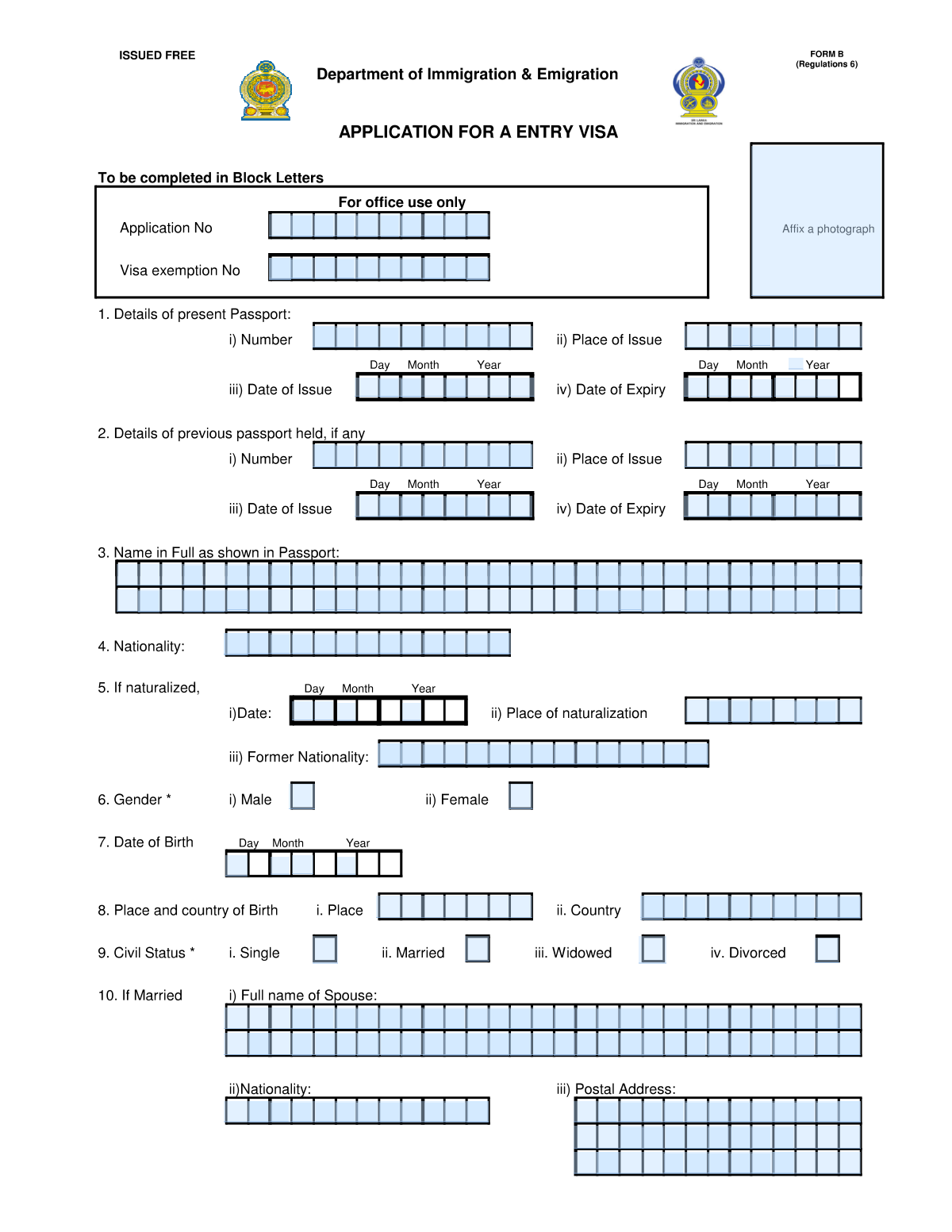
Yes! You can use AI to fill out Application for Visit Visa (Sri Lanka)
The Application for Visit Visa (Sri Lanka) is a comprehensive document used by the Sri Lankan government to collect essential information from individuals applying for a short-term visa. It gathers personal data, passport details, travel itinerary, and the purpose of the visit to assess the applicant's eligibility for entry. Accurate completion is critical for the visa approval process. Today, this form can be filled out quickly and accurately using AI-powered services like Instafill.ai, which can also convert non-fillable PDF versions into interactive fillable forms.
Our AI automatically handles information lookup, data retrieval, formatting, and form filling.
It takes less than a minute to fill out Sri Lanka Visit Visa Application using our AI form filling.
Securely upload your data. Information is encrypted in transit and deleted immediately after the form is filled out.
Form specifications
| Form name: | Application for Visit Visa (Sri Lanka) |
| Number of pages: | 5 |
| Language: | English |
| Categories: | visa application forms, visa forms |
Instafill Demo: How to fill out PDF forms in seconds with AI
How to Fill Out Sri Lanka Visit Visa Application Online for Free in 2026
Are you looking to fill out a SRI LANKA VISIT VISA APPLICATION form online quickly and accurately? Instafill.ai offers the #1 AI-powered PDF filling software of 2026, allowing you to complete your SRI LANKA VISIT VISA APPLICATION form in just 37 seconds or less.
Follow these steps to fill out your SRI LANKA VISIT VISA APPLICATION form online using Instafill.ai:
- 1 Navigate to Instafill.ai and upload or select the Sri Lanka Visit Visa Application form.
- 2 Use the AI assistant to automatically populate personal information such as your full name, date of birth, nationality, and passport details.
- 3 Enter your permanent address, contact information, and details about your profession or occupation.
- 4 Provide specific details about your trip, including your address during your stay in Sri Lanka, the purpose of your visit, and the requested duration.
- 5 If applicable, fill in information about your spouse, previous travel to Sri Lanka, and any distinguishing marks.
- 6 Review all the AI-populated and manually entered information for complete accuracy, then sign and date the application electronically.
- 7 Download the completed, signed application, ready for submission to the appropriate Sri Lankan embassy or consulate.
Our AI-powered system ensures each field is filled out correctly, reducing errors and saving you time.
Why Choose Instafill.ai for Your Fillable Sri Lanka Visit Visa Application Form?
Speed
Complete your Sri Lanka Visit Visa Application in as little as 37 seconds.
Up-to-Date
Always use the latest 2026 Sri Lanka Visit Visa Application form version.
Cost-effective
No need to hire expensive lawyers.
Accuracy
Our AI performs 10 compliance checks to ensure your form is error-free.
Security
Your personal information is protected with bank-level encryption.
Frequently Asked Questions About Form Sri Lanka Visit Visa Application
This appears to be a visa application or arrival card for Sri Lanka. It should be completed by foreign nationals planning to visit the country for tourism, business, or other specified purposes.
You must write your full name exactly as it appears on your passport, using the individual boxes provided for each letter and space. Ensure you follow the passport's exact formatting, including all given and family names.
Yes, if the form requests information about a previous passport, you must fill it in completely. This information is used for identity verification and to review your travel history.
You must leave any sections marked 'For Office Use Only' completely blank. These areas are reserved for immigration officials to fill in with application numbers, visa details, and other official notes.
Yes, if you select 'Married' as your civil status, you are required to provide your spouse's full name, nationality, and postal address as requested in the designated sections.
You should provide the address of your first intended accommodation, such as the hotel or guesthouse you have booked for your initial stay. If staying with friends or family, use their full address.
If your reason for visiting is not one of the main options, check the 'Other Purpose' box. Then, use the space provided to briefly and clearly specify your reason, such as 'Business Meetings' or 'Visiting Family'.
This form is likely designed for automated data capture (OCR), which requires clear, separated characters. While tedious, it is crucial to fill one character per box to ensure your information is processed accurately.
You will need your current passport and, if applicable, your previous passport. It is also helpful to have your travel itinerary, accommodation details in Sri Lanka, and your employer's information readily available.
Avoid writing your name differently from how it appears in your passport, leaving required fields blank, or writing outside the designated boxes. Always double-check passport numbers and dates for accuracy before submission.
Yes, services like Instafill.ai can be a great help with tedious forms like this. They use AI to accurately auto-fill your personal information into the correct fields, saving you time and reducing the risk of errors.
If you have a non-fillable or 'flat' PDF, you can use a service like Instafill.ai to make it interactive. Simply upload the PDF, and their tool will convert it into a fillable form that you can complete on your computer.
To fill this form with Instafill.ai, upload the form to their platform. The AI will identify the fields, allowing you to automatically populate your information from a saved profile, which makes completing even complex forms quick and easy.
Compliance Sri Lanka Visit Visa Application
Validation Checks by Instafill.ai
1
Validates Passport Issue and Expiry Dates
This check ensures the 'Present Passport Date of Issue' is chronologically before the 'Present Passport Date of Expiry'. This is critical for confirming the validity of the travel document at the time of application. An invalid date sequence would indicate a significant data entry error or a fraudulent document, causing the application to be flagged for manual review.
2
Ensures Date of Birth Precedes Passport Issue Date
This validation confirms that the applicant's 'Date of Birth' is earlier than the 'Present Passport Date of Issue'. It is logically impossible for a passport to be issued to a person before they are born. This check prevents fundamental data errors, and a failure would require immediate correction of the date fields.
3
Validates Completeness of Spouse Information if Married
This check verifies that if the 'Civil Status' is marked as 'Married', then the fields for 'Full Name of Spouse', 'Spouse Nationality', and 'Spouse Postal Address' are all populated. This is important for gathering complete family information as required by immigration authorities. If the applicant is married but these fields are empty, the form is considered incomplete.
4
Ensures Applicant's Full Name is Provided
Verifies that the 'Name in Full (as shown in Passport)' field is not empty. The applicant's name is the primary identifier on the form and is essential for all processing and background checks. An empty name field makes the application unusable and must be flagged as a critical error.
5
Verifies Logical Sequence of Previous and Present Passports
If a 'Previous Passport Number' is provided, this check ensures that the 'Previous Passport Date of Expiry' is before the 'Present Passport Date of Issue'. This confirms a logical progression from an old passport to a new one and helps verify the applicant's travel document history. An inconsistency could suggest an error or a more complex passport situation that needs clarification.
6
Validates Naturalization Details if Former Nationality Exists
This rule checks that if the 'Former Nationality' field is filled, then the 'If Naturalized - Date' and 'If Naturalized - Place of Naturalization' fields are also completed. This ensures that a claim of changed nationality is properly documented with the required details for verification. Failure to provide these details when a former nationality is listed results in an incomplete application.
7
Ensures Former and Present Nationalities are Different
This validation confirms that the value entered for 'Former Nationality' is not the same as the value for the current 'Nationality'. An individual cannot have a former nationality that is identical to their current one in the context of naturalization. This check catches logical errors and ensures the data accurately reflects a change in citizenship.
8
Validates Single and Mandatory Gender Selection
This check ensures that exactly one option ('Male' or 'Female') is selected for the 'Gender' field. The field cannot be left blank, nor can both options be selected simultaneously. This is a fundamental demographic data point required for identification, and an invalid selection would halt processing until corrected.
9
Validates Date of Birth for Plausibility
This validation checks that the 'Date of Birth' is a valid calendar date and falls within a reasonable range, ensuring the applicant's age is plausible (e.g., not in the future and not over 120 years old). This helps catch significant typographical errors or nonsensical entries that would corrupt the applicant's profile. An invalid date of birth would require immediate correction.
10
Requires Specification for 'Other' Purpose of Visit
This rule verifies that if the 'Other Purpose' option is selected under 'Object of present visit', the corresponding text field specifying the purpose is not left empty. This is crucial for immigration officials to understand the reason for travel when it doesn't fit standard categories. An empty specification field would make the purpose of the visit unclear and require the applicant to provide more information.
11
Validates Completeness of Address During Stay in Sri Lanka
This validation ensures that the 'Address during stay in Sri Lanka' field is filled out. This information is vital for authorities to know the applicant's whereabouts within the country for security and contact purposes. An incomplete or missing address can lead to the rejection of the visa application.
12
Validates Exclusive Civil Status Selection
This check ensures that exactly one option is selected from the 'Civil Status' choices (Single, Married, Widowed, Divorced). The application cannot proceed if no status is selected or if multiple statuses are chosen. This information is fundamental for determining which other sections of the form are required, such as spouse details.
Common Mistakes in Completing Sri Lanka Visit Visa Application
Applicants often fail to enter their name exactly as it appears on their passport. This includes omitting middle names, using nicknames, or reversing the order of family and given names, especially when filling out the character-by-character boxes. Any discrepancy between the form and the passport can lead to immediate processing delays or rejection during identity verification. To avoid this, meticulously copy your full name from your passport's machine-readable zone, ensuring every part of your name is included in the correct order.
This form's reliance on character-box grids for names, addresses, and passport numbers is a major source of errors. People often misalign characters, forget to leave a box empty for a space, or run out of boxes for long information, leading to truncated or illegible data. This can make the form unscannable and cause it to be rejected. To prevent this, write one clear capital letter per box and carefully plan spacing. AI-powered tools like Instafill.ai can help by automatically formatting data to fit perfectly within these grids.
The form requests information for both the 'Present Passport' and 'Previous Passport'. A common error is for applicants to confuse the two sections, entering details from an expired passport into the fields for the current one. This causes validation failures and can be interpreted as providing false information. To avoid this, carefully read each section header and have both passports (if applicable) organized before you start, double-checking that the correct document's details are entered in the corresponding fields.
Dates for birth, passport issuance, and expiry must be entered in a specific format, often split into individual DD, MM, and YYYY boxes. Applicants frequently make mistakes by using a different regional format (e.g., MM/DD/YYYY instead of DD/MM/YYYY) or transposing digits within the boxes. An incorrect date can invalidate the application, especially if it makes a passport appear expired. Always check the labels (DD, MM, YY) for each box before entering the numbers.
The form contains conditional sections like 'If Married', 'If Naturalized', and 'If in business' that should only be completed if the applicant meets the condition. Two mistakes are common: checking the box (e.g., 'Married') but failing to provide the required spouse details, or filling in a conditional section that doesn't apply to them. Both errors create an inconsistent application that may be returned for correction. A thorough final review is crucial to ensure all required conditional information is provided and all non-applicable sections are left blank.
Applicants sometimes mistakenly fill in sections clearly marked 'For Office Use Only', such as the fields for 'Application No' or 'Visa Exemption No'. While often done with the intent of being thorough, this can interfere with the official processing workflow, as officials use this space for stamps, codes, and annotations. An application with writing in these areas may be considered improperly filled and could be delayed. Always leave these sections completely empty.
The form asks for 'Nationality', 'Former Nationality', and 'Country of Birth' as distinct pieces of information. A frequent and critical error is confusing these terms, such as listing the country of birth as the current nationality. This can lead to a misunderstanding of the applicant's citizenship status and result in rejection. It's vital to understand that 'Nationality' is your country of citizenship, which may be different from where you were born.
Passport numbers often contain a mix of letters and numbers, leading to common transcription errors like confusing the letter 'O' with the number '0' or 'I' with '1'. Given the form's character-box format, such a mistake is easy to make but will cause an automatic failure in any background or database check, halting the application. To prevent this, carefully transcribe the number character by character and have someone else review it against the passport document.
Applicants often provide incomplete addresses, omitting crucial details like postal codes, apartment numbers, or the country, especially when trying to fit the information into the form's restrictive character boxes. The form requires multiple addresses (permanent, in Sri Lanka, employer), and an incomplete or inaccurate address can prevent the delivery of important correspondence and cause delays in background checks. Ensure you provide the full, standardized address for each required field. If the form is a non-fillable PDF, a tool like Instafill.ai can convert it into a fillable version, making it easier to enter long addresses without error.
When an applicant's reason for travel doesn't fit the standard options, they must check 'Other Purpose' and provide a specific description. A common mistake is to provide a vague or one-word answer like 'Business' or 'Personal'. This lack of detail gives the visa officer no basis to approve the application and often leads to requests for more information or denial. To avoid this, provide a clear and concise explanation, such as 'To attend the Colombo International Book Fair' or 'Visiting family for a wedding ceremony'.
Saved over 80 hours a year
“I was never sure if my IRS forms like W-9 were filled correctly. Now, I can complete the forms accurately without any external help.”
Kevin Martin Green
Your data stays secure with advanced protection from Instafill and our subprocessors

Robust compliance program
Transparent business model
You’re not the product. You always know where your data is and what it is processed for.
ISO 27001, HIPAA, and GDPR
Our subprocesses adhere to multiple compliance standards, including but not limited to ISO 27001, HIPAA, and GDPR.
Security & privacy by design
We consider security and privacy from the initial design phase of any new service or functionality. It’s not an afterthought, it’s built-in, including support for two-factor authentication (2FA) to further protect your account.
Fill out Sri Lanka Visit Visa Application with Instafill.ai
Worried about filling PDFs wrong? Instafill securely fills application-for-visit-visa-sri-lanka forms, ensuring each field is accurate.