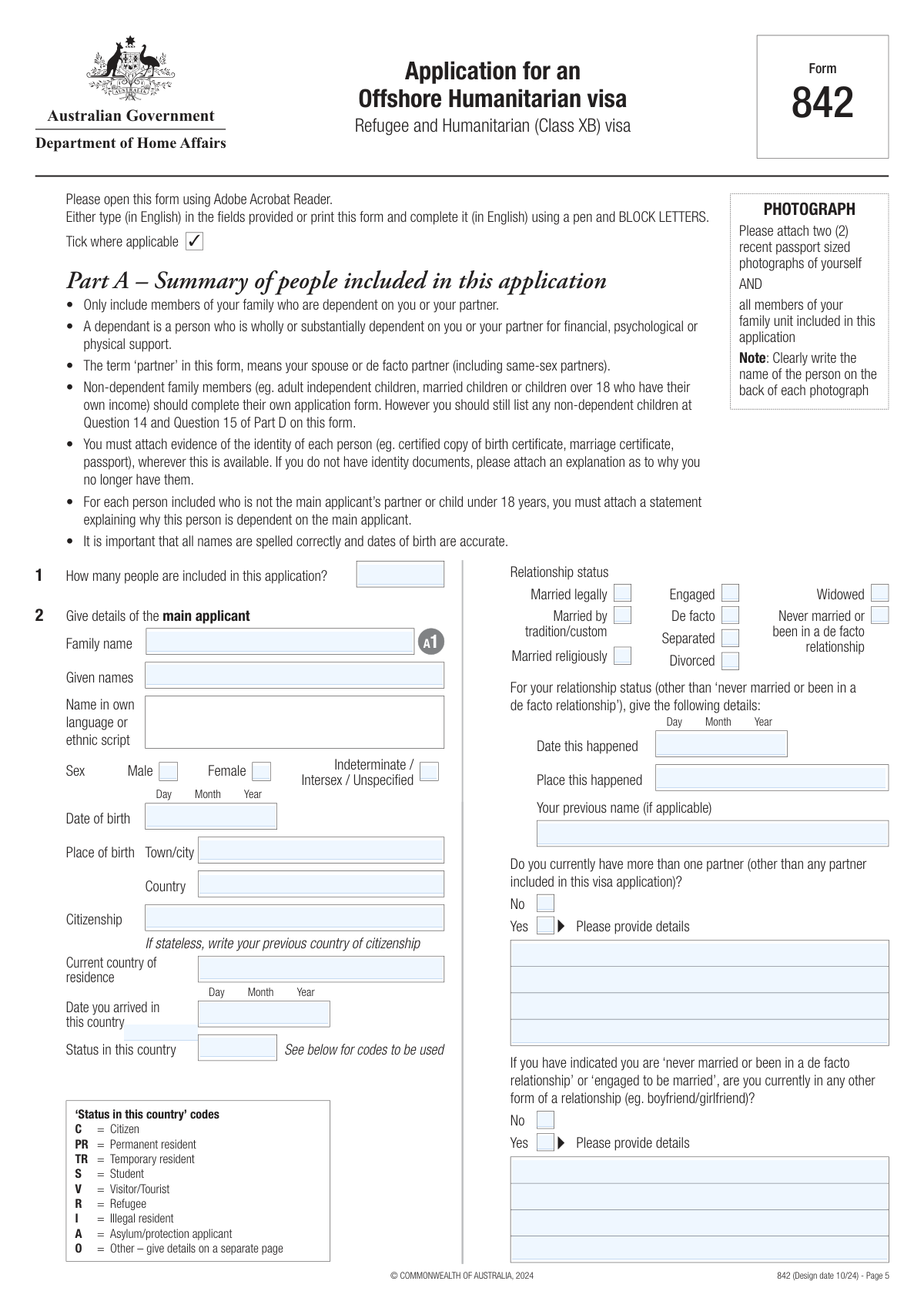
Yes! You can use AI to fill out Form 842, Application for an Offshore Humanitarian visa (Refugee and Humanitarian (Class XB) visa)

Form 842 is an Australian Department of Home Affairs application form for people outside Australia seeking entry on humanitarian grounds under the Refugee and Humanitarian (Class XB) visa class, covering five subclasses (200 Refugee, 201 In-country Special Humanitarian, 202 Global Special Humanitarian, 203 Emergency Rescue, and 204 Woman at Risk). It collects detailed information about the main applicant and dependent family members, identity and travel documents, contact details, family background, links to Australia, humanitarian claims, address history, employment/education, and health/character declarations, and it requires signatures for the Australian values statement, biometrics consent, and formal declarations. Completing it fully and attaching the correct certified supporting documents (and proposal forms such as Form 681 or Form 1417 where required) is important because incomplete or inconsistent information can delay processing or lead to refusal. Today, this form can be filled out quickly and accurately using AI-powered services like Instafill.ai, which can also convert non-fillable PDF versions into interactive fillable forms.
Our AI automatically handles information lookup, data retrieval, formatting, and form filling.
It takes less than a minute to fill out Form 842 using our AI form filling.
Securely upload your data. Information is encrypted in transit and deleted immediately after the form is filled out.

Form specifications

Form name: Form 842, Application for an Offshore Humanitarian visa (Refugee and Humanitarian (Class XB) visa)
Number of pages: 34
Language: English
Categories: immigration forms, Australian immigration forms, visa forms, humanitarian forms
main-image

Instafill Demo: filling out a legal form in seconds

How to Fill Out Form 842 Online for Free in 2026

Are you looking to fill out a FORM 842 form online quickly and accurately? Instafill.ai offers the #1 AI-powered PDF filling software of 2026, allowing you to complete your FORM 842 form in just 37 seconds or less.
Follow these steps to fill out your FORM 842 form online using Instafill.ai:
  1. 1 Go to Instafill.ai and upload Form 842 (or select it from the form library) and choose your preferred output (fillable PDF and/or ready-to-print package).
  2. 2 Enter or import applicant profiles for the main applicant and all dependent family members included in the application (names, sex, dates/places of birth, citizenship, relationship details).
  3. 3 Use the AI assistant to complete contact details, family background sections, relatives information, and links to Australia, ensuring consistency across all parts of the form.
  4. 4 Provide humanitarian claims information (country feared, reasons for fear, harm risk, protection availability, travel history, UNHCR referral/registration details, camps/detention history, interpreter needs) and have Instafill.ai format longer statements as properly labeled attachments when needed.
  5. 5 Add background details such as travel/identity documents, 10-year address history, 15-year employment history, languages, and education; then answer health and character questions with supporting explanations for any “Yes” responses.
  6. 6 Upload and tag supporting documents for the checklist (photos, certified identity documents, UNHCR evidence, custody/adoption documents, visas/permits, Form 681 and/or Form 1417 if applicable, written statements), and let Instafill.ai validate completeness against Part Q.
  7. 7 Review the generated form for accuracy, then e-sign/prepare signature pages for the Australian values statement, biometrics consent, and declarations (as required by age), and export the final submission-ready package for electronic lodgement or printing/posting per Department instructions.

Our AI-powered system ensures each field is filled out correctly, reducing errors and saving you time.

Why Choose Instafill.ai for Your Fillable Form 842 Form?

Speed

Complete your Form 842 in as little as 37 seconds.

Up-to-Date

Always use the latest 2026 Form 842 form version.

Cost-effective

No need to hire expensive lawyers.

Accuracy

Our AI performs 10 compliance checks to ensure your form is error-free.

Security

Your personal information is protected with bank-level encryption.

Frequently Asked Questions About Form Form 842

Form 842 is used to apply for an Offshore Humanitarian visa under the Refugee and Humanitarian (Class XB) program when you are outside Australia and seeking entry on humanitarian grounds. It covers five subclasses (200, 201, 202, 203, 204) and is also used for certain proposed-entry pathways like the Community Support Program.

You should complete Form 842 if you are outside Australia and want to be considered for a Refugee and Humanitarian (Class XB) visa. The main applicant completes the form and includes all dependent family members who are part of the family unit.

This form is assessed against five subclasses: Refugee (subclass 200), In-country Special Humanitarian (subclass 201), Global Special Humanitarian (subclass 202), Emergency Rescue (subclass 203), and Woman at Risk (subclass 204). You must meet the requirements for at least one subclass to be granted a visa.

A proposer is required for Global Special Humanitarian (subclass 202) and for “split family” applications, and you must include a valid Form 681 with Form 842. For the Community Support Program, an Approved Proposing Organisation (APO) proposes you using Form 1417 instead.

You should include all dependent members of your family unit, such as your spouse/de facto partner (including same-sex partner), dependent children outside Australia, and other dependent relatives who usually live with you. Non-dependent family members (for example, independent adult children) should generally lodge their own Form 842 if they want to be considered.

You must list them at Question 12 and explain why they are not migrating with you. If you fail to declare immediate family members, it may affect their ability to use “split family” provisions later.

You must attach two passport-sized photos for each person included (with the person’s name written on the back) and provide identity evidence where available (for example, certified copies of birth certificates, passports, marriage certificates, or national ID cards). The form also includes a document checklist in Part Q to help ensure you submit a complete application.

Yes—copies must be certified as true copies of the original by an authorised person (for example, a Justice of the Peace in Australia, or an equivalent authority outside Australia). If you cannot provide a document listed in Part Q, you should include a written explanation of why it is not available.

You must provide a residential address where you intend to live while your application is being processed, and you must update the Department if it changes. A PO Box is not accepted as a residential address, and not providing a residential address can make your application invalid.

Refugee category (subclass 200) applications must be lodged at an Australian overseas mission. Electronic lodgement is available for certain pathways such as Global Special Humanitarian (subclass 202), “split family” applications, and the Community Support Program, following the Department’s online instructions.

Most applicants do not pay a charge to lodge Form 842. However, applicants in the Community Support Program must pay a Visa Application Charge (see the Department’s fees and charges information).

Processing can take a long time due to strong demand and limited places in the program. Not all applicants are interviewed, and a decision may be made based only on the information and documents you provide.

You must inform the Department if your circumstances change after lodgement, including relationship changes, a new child, or a new address. A child born after lodgement can be included if you provide the details before a final decision is made.

The Australian Values Statement must be signed by the main applicant and each person aged 18 or over included in the application. The biometrics declaration must be signed by the main applicant and each accompanying person aged 16 or over, and the main declaration must be signed by the main applicant and all persons aged 18 or over included.

Yes—AI tools can help you draft and organise answers and auto-fill form fields; services like Instafill.ai use AI to accurately populate fields and save time. If your PDF is flat or not fillable, Instafill.ai can convert it into an interactive fillable form, then you can upload the form, map your information, and export a completed version for printing/signing and submission according to Department instructions.

Compliance Form 842
Validation Checks by Instafill.ai

1
Validates total number of people included matches the number of person records provided
Checks that 'Number of People Included in Application' equals 1 (main applicant) plus the count of completed dependent person entries in Part A (A2–A7 and any continuation pages). This prevents downstream processing errors where attachments, signatures, and eligibility assessments are calculated per person. If the count does not match, the submission should be flagged as inconsistent and returned for correction before lodgement.
2
Ensures exactly one sex option is selected per person
Validates that for each person (main applicant and each included family member), exactly one of Male/Female/Indeterminate-Intersex-Unspecified is selected. Multiple selections or no selection can cause identity and biometrics mismatches and may invalidate data exchange with other systems. If validation fails, the form should require the user to correct the selection before submission.
3
Validates all date fields are real calendar dates and use complete components
Checks that all dates (DOBs, arrival dates, relationship dates, departure dates, issue/expiry dates, employment dates, custody dates, camp dates, signature dates) have valid day/month/year values and represent real dates (e.g., no 31/02). Also enforces that where the form requires a full date, all components are present (not just a year). If invalid or incomplete, the system should block submission and highlight the specific field(s).
4
Validates chronological consistency for paired date ranges (From/To)
Ensures that for every date range (relationships, employment periods, camp stays, travel through other countries, address history periods), the 'From' date is not after the 'To' date. This is critical for assessing continuous residence, employment history, and credibility of claims. If a range is reversed or overlaps illogically, the submission should be flagged and the applicant prompted to correct the timeline.
5
Validates main applicant identity fields are complete and non-empty
Checks that the main applicant has Family name, Given names, Date of birth, Place of birth (town/city and country), Citizenship (or stateless instruction followed), Current country of residence, Date arrived in current country, and Status in country completed. These are core identity and eligibility fields used to create the case record and conduct checks. If any are missing, the application should be treated as incomplete and prevented from being lodged.
6
Validates 'Status in this country' uses only allowed codes and requires details for 'O'
Verifies that the status in country of residence is one of the permitted codes (C, PR, TR, S, V, R, I, A, O) for the main applicant and any relatives tables where codes are used. If 'O' (Other) is selected, the system must require an attached or entered explanation as instructed. If an invalid code is entered or 'O' lacks details, the submission should be rejected or routed to exception handling.
7
Validates relationship status selection and conditional relationship details
Ensures exactly one relationship status is selected for the main applicant (and for each included person where relationship status is captured). If the status is anything other than 'Never married or been in a de facto relationship', the 'Date this happened' and 'Place this happened' fields must be provided. If these conditional fields are missing, the system should prompt for completion because relationship status affects family unit composition and dependency assessment.
8
Validates multiple-partner and other-relationship conditional disclosures
If the applicant answers 'Yes' to currently having more than one partner, the 'Multiple Partner Details' field must be completed with sufficient identifying information. If the applicant is 'Never married' or 'Engaged' and answers 'Yes' to being in another relationship, the 'Other Relationship Details' must be completed. Missing details should trigger a validation error because undisclosed relationships can affect eligibility and integrity checks.
9
Validates dependent person entries are complete when any name is provided
For each additional person section (A2–A7), if any key field (e.g., family name or given names) is entered, then the system must require the full minimum set: names, sex, DOB, place of birth, citizenship, relationship status, and relationship to main applicant. Partial person records create ambiguity about who is included and can break per-person document and signature requirements. If incomplete, the system should require either completion of the record or removal of the partial entry.
10
Validates biological relationship Yes/No is answered and requires the correct explanation field
For each included person where the form asks whether they are biologically related to the main applicant, validates that either Yes or No is selected (not both, not neither). If 'Yes' is selected, a precise biological relationship description must be provided; if 'No' is selected, an explanation of how they are related must be provided. If missing, the submission should be flagged because dependency and family unit determinations rely on this information.
11
Validates residential address is provided and is not a PO Box
Checks that the residential address fields are populated with a physical address and do not contain PO Box indicators (e.g., 'PO Box', 'P.O. Box', 'Locked Bag') as the form states a PO Box is not accepted for residential address and missing residential address can make the application invalid. This is important for contactability and legal validity of the application. If a PO Box or blank address is detected, the system should block submission and request a compliant residential address.
12
Validates contact details formatting (phone and email) and conditional requirements
Validates telephone numbers follow a reasonable international format: country code numeric, area code numeric (if provided), and main number numeric with acceptable length; mobile/cell similarly validated. If the applicant agrees to email communication, at least one validly formatted primary email address must be provided (RFC-style basic validation such as local@domain). If formatting fails or email consent is 'Yes' without an email, the system should prompt correction to avoid missed communications.
13
Validates UNHCR mandate/registration details and evidence attachment when answered 'Yes'
If any person is marked as mandated/registered by UNHCR, requires at least one set of details (name, mandate/registration number, and country of mandate/registration) and requires the checklist item for certified evidence to be attached. This supports verification of refugee status and may affect processing pathways. If 'Yes' is selected but details or evidence are missing, the submission should be flagged as incomplete and not decision-ready.
14
Validates proposal/split-family selections require the correct supporting forms (681/1417) and related fields
If the applicant indicates they are being proposed (Q18), the system must require either Form 681 (proposer) or Form 1417 (APO) as appropriate, and require proposer/APO identifying details and contact number. If applying under split-family provisions (Q19), the system must require Form 681 plus evidence of the proposer’s visa and relationship evidence, and must capture last lived together date/location and separation reason. If required forms/fields are missing, the submission should be blocked or routed to a missing-documents workflow.
15
Validates travel/identity document section completeness and issue/expiry logic
For each person, enforces that either 'No document' is selected with an attached explanation, or 'Yes' is selected with document type code (P/UN/A/CI/S/NIC), document number, country of issue, issue date, expiry date, and issuing authority/place. Also checks that expiry date is after issue date and that document numbers meet basic length/character constraints (e.g., non-empty, no illegal characters). If inconsistent or incomplete, the system should flag the record because identity verification and travel facilitation depend on accurate document data.
16
Validates required signatures and dates based on age thresholds (Australian values, biometrics, declaration)
Checks that the Australian Values Statement (Part N) is signed by the main applicant and every included person aged 18 or over, and that the Declaration (Part P) is signed by the main applicant and all included persons aged 18 or over. Separately, checks that the Biometrics Declaration (Part O) is signed by the main applicant and each accompanying person aged 16 or over, with signature dates present and valid. If any required signature is missing for an eligible person, the submission should be rejected as not legally complete.

Common Mistakes in Completing Form 842

Including the wrong people as ‘dependants’ (or leaving out required family members)

Applicants often misunderstand “family unit” and “dependant” and either include independent adult children/relatives who should lodge their own Form 842, or fail to include dependants who are wholly/substantially dependent. This can cause delays, requests for clarification, or missed opportunities for family members to be considered together (and can affect later ‘split family’ options if people are not declared). To avoid this, follow the form’s definition of dependant and still list non-dependent children/relatives in the relevant questions (eg Q12, Q14–15) even if they are not migrating. AI-powered tools like Instafill.ai can help by prompting for required family declarations and flagging inconsistent “included vs not included” entries.

Using a PO Box or postal address as the residential address (invalid application risk)

Many people enter only a mailing address or a PO Box in Part C, not realising the form requires a residential address and states the application can be invalid without it. This can lead to the Department treating the application as invalid or being unable to contact you for time-sensitive requests. Always provide a physical residential address where you are living while the application is processed, and update the Department if it changes. Instafill.ai can validate address types and warn when a PO Box is entered in a residential field.

Not completing the ‘Status in this country’ field using the required codes

Applicants frequently write free-text (eg “waiting”, “no papers”) instead of using the specified codes (C, PR, TR, S, V, R, I, A, O) for current country of residence status. This creates ambiguity and often triggers follow-up questions or delays because the Department cannot classify your lawful status. Use the exact code and, if ‘O = Other’, attach a separate page with a clear explanation. Instafill.ai can enforce code-only inputs and automatically add an “Other” explanation page when needed.

Inconsistent or incorrect name spelling across sections and documents

A very common issue is spelling names differently between Part A, UNHCR details, travel document details, and attached evidence (or mixing family name/given names order). Even small differences can cause identity matching problems, requests for further evidence, and processing delays. Copy names exactly as shown on identity documents and keep the same format throughout the form; if you have aliases/previous names, record them where requested. Instafill.ai can standardise name formatting and cross-check repeated fields for consistency.

Selecting multiple relationship status options or omitting the date/place details

Applicants sometimes tick more than one relationship status (eg de facto and married) or tick a status but leave the “Date this happened” and “Place this happened” blank. This can create contradictions that require clarification and may affect assessment of family composition and dependency. Tick only the single status that best applies now, and complete the required date/place fields for any status other than “never married or been in a de facto relationship.” Instafill.ai can prevent multiple conflicting selections and require the date/place fields when a status is chosen.

Failing to disclose previous partners/relationships and children from those relationships

People often omit prior marriages, de facto relationships, customary/religious marriages, or children from previous relationships—sometimes because the relationship ended long ago or the partner is missing/deceased. Non-disclosure can lead to credibility concerns, delays, or refusal if the Department later finds inconsistencies with documents or interviews. List all prior relationships as instructed (including missing/deceased partners) and name all children from those relationships. Instafill.ai can prompt for completeness when a “Yes” is selected and ensure each prior relationship entry includes end reason and children details.

Missing custody/consent evidence for children under 18 (especially where parents are separated)

For children from previous relationships or where only one parent is applying, applicants often forget custody orders or written consent evidence, or assume it is optional. The form warns that if custody documents are not provided or are unsatisfactory, the former partner may need to provide evidence of consent—this can significantly delay processing. Provide certified custody documents where available, and if not available, include a clear explanation and be prepared to provide consent evidence. Instafill.ai can flag when Q10 indicates children from previous relationships and remind you to attach custody/consent documentation.

Not providing biological parent details and adoption/custody information for non-biological children

When a child is not the biological child of the main applicant or partner, applicants often leave biological parents’ names/whereabouts blank or do not explain customary/traditional adoption arrangements. This can raise child welfare and legal responsibility questions and may lead to requests for additional evidence or refusal if the child’s circumstances are unclear. Complete Q11 fully (biological father/mother names, whereabouts, adoption status, custody commencement date) and attach certified adoption papers or a detailed statement explaining the circumstances. Instafill.ai can ensure required subfields are completed when “non-biological child” is selected and generate a structured attachment checklist.

Submitting uncertified copies (or no explanation when documents are missing)

Applicants frequently attach plain photocopies without proper certification, or they omit key documents and do not include the required written explanation for why documents are unavailable. This can cause delays, additional document requests, or a decision being made on limited information. Ensure copies are certified by an authorised person (or equivalent outside Australia) and provide a clear written explanation for any missing items listed in Part Q. Instafill.ai can help track checklist items, remind you about certification requirements, and format “missing document” explanations consistently.

Providing a generic humanitarian statement instead of detailed personal incidents (Q28–Q32)

A common mistake is writing only general country conditions and not focusing on what happened to the applicant/family, with dates, locations, perpetrators, and reasons (race/religion/nationality/social group/political opinion). This weakens the claim and can lead to refusal because the Department may decide based only on the written information without an interview. Use Q28–Q32 to describe specific incidents, timelines, who harmed you, what you fear will happen, and why authorities cannot protect you. Instafill.ai can guide structured narratives (date/place/actor/harm/outcome) and ensure the statement aligns with the form’s assessment factors.

Incomplete 10-year address history and 15-year employment history (missing gaps/unemployment)

Applicants often list only current address/employer and forget earlier addresses, short stays, or periods of unemployment, even though the form requires every address for the last 10 years and all jobs/unemployment for the last 15 years for each person. Gaps can trigger integrity concerns and requests for clarification, slowing processing. Work backwards, include month/year ranges, and explicitly record unemployment or informal work periods rather than leaving blanks. Instafill.ai can detect timeline gaps and prompt you to fill missing periods with “unemployed,” “homemaker,” “student,” or other accurate statuses.

Missing required signatures for Australian values, biometrics consent, and declarations (age-based)

People frequently sign only for the main applicant and overlook that the Australian Values Statement must be signed by each person aged 18+ (Part N), biometrics consent by each person aged 16+ (Part O), and the main declaration by all persons aged 18+ (Part P). Missing signatures can make the application incomplete and lead to delays or return of the application for correction. Before lodging, cross-check ages of all included applicants and ensure each required section is signed and dated, including any additional pages. Instafill.ai can generate a signature checklist by applicant age and flag missing signature blocks before submission.
Saved over 80 hours a year

“I was never sure if my IRS forms like W-9 were filled correctly. Now, I can complete the forms accurately without any external help.”

Kevin Martin Green

Your data stays secure with advanced protection from Instafill and our subprocessors

Robust compliance program

Transparent business model

You’re not the product. You always know where your data is and what it is processed for.

ISO 27001, HIPAA, and GDPR

Our subprocesses adhere to multiple compliance standards, including but not limited to ISO 27001, HIPAA, and GDPR.

Security & privacy by design

We consider security and privacy from the initial design phase of any new service or functionality. It’s not an afterthought, it’s built-in, including support for two-factor authentication (2FA) to further protect your account.

Fill out Form 842 with Instafill.ai

Worried about filling PDFs wrong? Instafill securely fills form-842-application-for-an-offshore-humanitarian-visa-refugee-and-humanitarian-class-xb-visa forms, ensuring each field is accurate.