Yes! You can use AI to fill out IDOC/DCFS Incarcerated Parent Video Contact Agreement

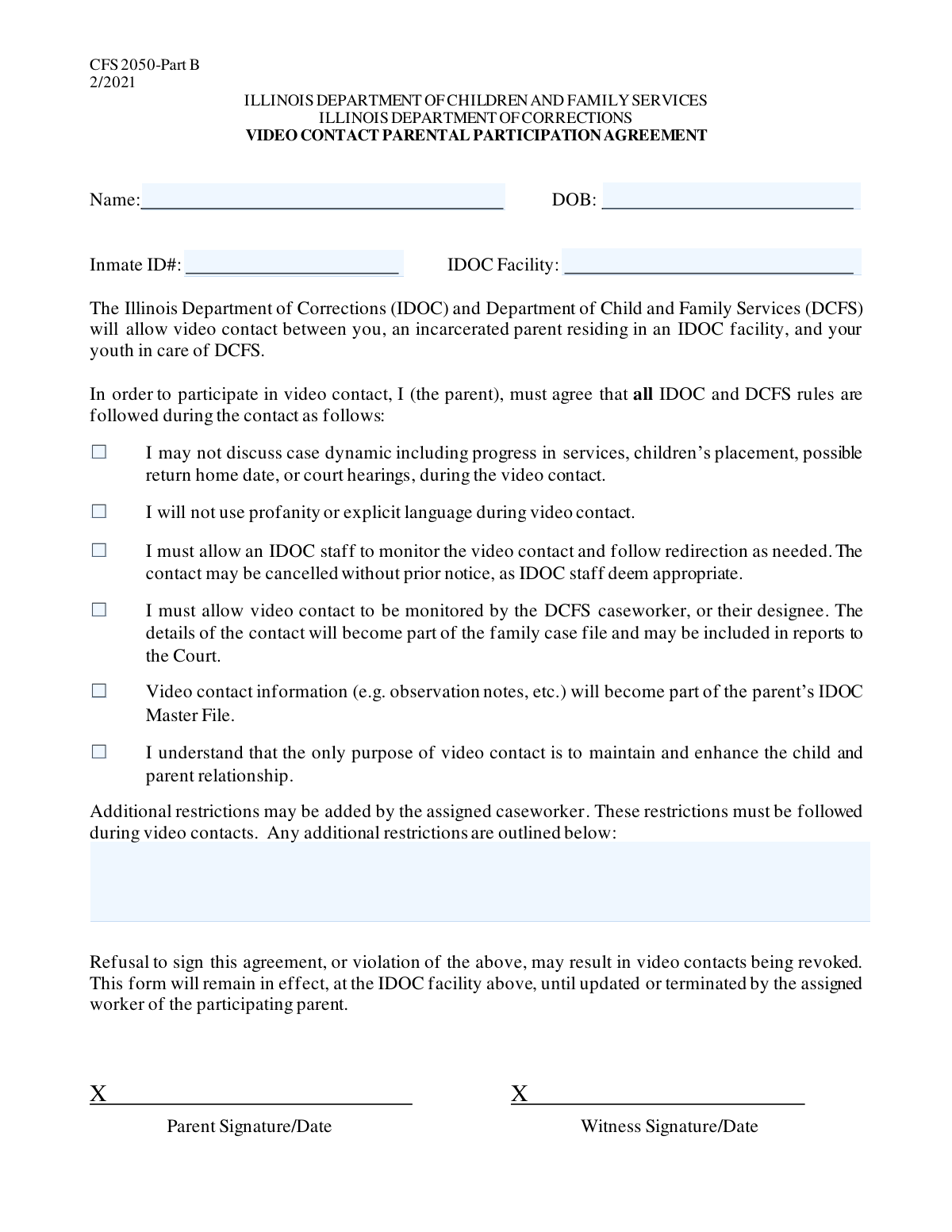
The IDOC/DCFS Incarcerated Parent Video Contact Agreement is a formal document establishing the terms and conditions for video communication between a parent in an Illinois Department of Corrections facility and their child. It ensures that all parties, including the parent, DCFS, and IDOC, agree on the rules for monitoring, content, and purpose of the contact, which is solely to maintain the parent-child relationship. Today, this form can be filled out quickly and accurately using AI-powered services like Instafill.ai, which can also convert non-fillable PDF versions into interactive fillable forms.
IDOC/DCFS Video Contact Agreement is part of the CAR forms category on Instafill.
Our AI automatically handles information lookup, data retrieval, formatting, and form filling.
It takes less than a minute to fill out IDOC/DCFS Video Contact Agreement using our AI form filling.
Securely upload your data. Information is encrypted in transit and deleted immediately after the form is filled out.

Form specifications

Form name: IDOC/DCFS Incarcerated Parent Video Contact Agreement
Number of fields: 11
Number of pages: 1
Filled form examples: Form IDOC/DCFS Video Contact Agreement Examples
Language: English
main-image

Instafill Demo: How to fill out PDF forms in seconds with AI

How to Fill Out IDOC/DCFS Video Contact Agreement Online for Free in 2026

Are you looking to fill out a IDOC/DCFS VIDEO CONTACT AGREEMENT form online quickly and accurately? Instafill.ai offers the #1 AI-powered PDF filling software of 2026, allowing you to complete your IDOC/DCFS VIDEO CONTACT AGREEMENT form in just 37 seconds or less.
Follow these steps to fill out your IDOC/DCFS VIDEO CONTACT AGREEMENT form online using Instafill.ai:
  1. 1 Navigate to Instafill.ai and upload or select the IDOC/DCFS Incarcerated Parent Video Contact Agreement form.
  2. 2 Use the AI assistant to accurately fill in the 'Parent Information' section with the parent's full name, date of birth, inmate ID, and IDOC facility.
  3. 3 Carefully read each item in the 'Agreement Terms' section and use the tool to check each box, confirming your understanding and consent to the rules of video contact.
  4. 4 If the assigned caseworker has provided any additional rules, enter them into the 'Additional Restrictions' field.
  5. 5 Review all the information you have entered and the agreements you have checked to ensure everything is correct and complete.
  6. 6 Securely sign the form electronically and download the completed agreement to submit to the relevant DCFS and IDOC authorities.

Our AI-powered system ensures each field is filled out correctly, reducing errors and saving you time.

Why Choose Instafill.ai for Your Fillable IDOC/DCFS Video Contact Agreement Form?

Speed

Complete your IDOC/DCFS Video Contact Agreement in as little as 37 seconds.

Up-to-Date

Always use the latest 2026 IDOC/DCFS Video Contact Agreement form version.

Cost-effective

No need to hire expensive lawyers.

Accuracy

Our AI performs 10 compliance checks to ensure your form is error-free.

Security

Your personal information is protected with bank-level encryption.

Frequently Asked Questions About Form IDOC/DCFS Video Contact Agreement

This form is an agreement that outlines the rules for video contact between an incarcerated parent and their child. It must be completed to ensure the interaction is positive and focused on maintaining the parent-child relationship.

The incarcerated parent must review and agree to all the terms on this form to be eligible for video visits. The DCFS caseworker may also be involved in completing certain sections.

You will need the incarcerated parent's full name, date of birth, their inmate ID number, and the name of the IDOC facility where they are currently housed.

This means you must not talk about legal case details, progress in services, the child's placement, potential return home dates, or court hearings. The call's purpose is solely to connect with the child.

By signing, you agree that the video calls can be monitored by both IDOC (Illinois Department of Corrections) staff and the DCFS caseworker or their designee.

If you violate the terms, such as by using profanity, the IDOC staff may end the video contact immediately, possibly without warning. This may also be noted in your official files.

The IDOC Master File is the parent's official, permanent record kept by the Illinois Department of Corrections. Notes and observations from the video contact will be added to this file.

Details and observation notes from the video contact become part of the family's DCFS case file. This information may also be included in reports that are submitted to the Court.

This section allows the assigned DCFS caseworker to add any other specific rules or limitations on the video contact that are not already listed in the main agreement.

You must agree to all the listed terms to be approved for video contact. If you have concerns about a specific rule, you should discuss them directly with your DCFS caseworker.

Submission instructions are not on the form itself, but you should typically return the completed form to your DCFS caseworker. Confirm the correct procedure with them to avoid delays.

Yes, services like Instafill.ai use AI to help you accurately auto-fill form fields with your information. This can save time and help prevent common errors.

Simply upload the form to the Instafill.ai platform. The AI will make the form interactive, allowing you to click and fill each field with your saved information or type directly into them.

You can use a service like Instafill.ai, which can convert flat, non-fillable PDFs into interactive forms. This allows you to easily type your information into the correct fields online before printing.

Compliance IDOC/DCFS Video Contact Agreement
Validation Checks by Instafill.ai

1
Parent Name Required
This check ensures that the 'Parent Name' field is not left empty. It is a mandatory field required to identify the incarcerated individual for whom the video contact is being requested. If this field is empty, the form submission will be rejected with an error message prompting the user to enter the parent's full name.
2
Parent Name Format Validation
Verifies that the 'Parent Name' field contains only alphabetic characters, spaces, hyphens, or apostrophes, and is of a reasonable length (e.g., 3-100 characters). This prevents the entry of numbers, special characters, or nonsensical data, ensuring data quality for official records. A validation failure would trigger an error asking the user to enter a valid full name.
3
Date of Birth Required and Valid Format
This validation confirms that the 'Parent Date of Birth' field is not empty and adheres to a standard date format, such as MM/DD/YYYY. A valid date is crucial for identity verification and record-keeping. If the field is empty or the format is incorrect, the submission will fail and the user will be instructed to enter a valid date.
4
Logical Date of Birth Check
Ensures the 'Parent Date of Birth' is a plausible date that is not in the future and results in a reasonable age for a parent (e.g., over 16 years old). This check prevents data entry errors, such as accidentally entering the current year or a future date. An invalid or illogical date will result in a validation error explaining the requirement for a realistic birth date.
5
Inmate ID Number Required
This check verifies that the 'Inmate ID Number' field has been filled out. The Inmate ID is the primary unique identifier for the parent within the correctional system and is essential for locating the correct individual. The form cannot be processed without this information, and a failure will block submission until the ID is provided.
6
Inmate ID Number Format
Validates that the 'Inmate ID Number' conforms to the expected format, which may include a specific length, alphanumeric pattern, or other structural rules defined by the IDOC system. This ensures the ID is syntactically correct, reducing the chance of failed lookups. If the format is incorrect, an error message will specify the expected format.
7
IDOC Facility Required
Ensures the 'IDOC Facility' field is not submitted empty. Knowing the specific facility is critical for coordinating the video contact and routing the request to the correct staff. A missing facility name will cause the submission to be rejected, prompting the user to specify the location.
8
IDOC Facility Name Verification
This check validates the entered 'IDOC Facility' name against a predefined list of official IDOC facilities. This prevents misspellings and ensures the request is sent to a valid, existing location, preventing processing delays or rejections. If the entered name is not on the list, the user will be shown an error and may be presented with a list of valid options.
9
Mandatory Agreement Terms Confirmation
Verifies that all six checkboxes under 'Agreement Terms' have been checked, confirming the user's understanding and consent to all conditions. These agreements are legally and procedurally binding for the video contact to proceed. If any box is unchecked, the form submission will be blocked with a message indicating that all terms must be accepted.
10
Additional Restrictions Character Limit
This validation imposes a maximum character limit (e.g., 2000 characters) on the 'Additional Restrictions' text field. While the field is optional, this check prevents excessively long inputs that could cause data storage issues or be used for unintended purposes. If the limit is exceeded, the user will be notified to shorten their entry.
11
Inmate ID and Facility Cross-Validation
Performs a logical check to confirm that the provided 'Inmate ID Number' is currently associated with the selected 'IDOC Facility' in the backend system. This is a crucial integrity check to ensure the request is for a real inmate at the specified location before it is processed. A mismatch would result in an error stating that the inmate could not be found at that facility.

Common Mistakes in Completing IDOC/DCFS Video Contact Agreement

Entering an Incomplete or Incorrect Parent Name

Applicants often use a nickname or an incomplete version of the parent's name instead of their full legal name. This causes a mismatch with official IDOC and DCFS records, which can delay processing or lead to the rejection of the application because the system cannot identify the individual. To avoid this, always use the full legal name as it appears on government-issued identification or official prison records.

Transposing Digits in the Inmate ID Number

The Inmate ID Number is a critical and unique identifier, but it's easy to accidentally transpose digits or make a typo when entering it. An incorrect ID number is the most common reason for immediate rejection, as it makes it impossible for the system to locate the correct individual in the database. Carefully double-check the number against an official source before submitting the form to prevent this critical error.

Using an Outdated or Abbreviated Facility Name

An incarcerated parent may be transferred between facilities, and applicants often use an old location name or an unofficial abbreviation. This mistake can cause the request to be routed to the wrong facility, leading to significant delays or the request being lost entirely. Always verify the parent's current facility through the official IDOC inmate locator and use the full, official facility name.

Incorrect Date of Birth Formatting

Entering the date of birth in the wrong format (e.g., DD/MM/YYYY instead of MM/DD/YYYY) or simply entering the wrong date is a frequent error. This can cause validation failures in digital forms or data mismatches with official records, delaying the verification process. To prevent this, pay close attention to the required date format and carefully review the numbers before submission. AI-powered form fillers like Instafill.ai can automatically format dates correctly.

Skipping Mandatory Agreement Checkboxes

In a rush to complete the form, applicants may overlook one or more of the mandatory checkboxes in the 'Agreement Terms' section. The form is considered incomplete if even one required box is not checked, and it will be rejected without processing. To avoid this, slowly review each term and ensure every single checkbox is ticked, as this signifies your binding agreement to all conditions.

Checking Agreement Boxes Without Reading the Terms

Many people treat agreement sections as a formality and check the boxes without understanding the content. This is risky, as these terms are binding; for example, agreeing to monitoring means conversations can be used in court reports. Violating a term you didn't read (e.g., by discussing the case) can lead to immediate termination of the call and revocation of future video contact privileges. Always take the time to read and understand what you are agreeing to.

Misusing the 'Additional Restrictions' Field

This field is specifically for caseworkers to add official, case-related restrictions. However, applicants often mistakenly use this space to add personal notes, make requests, or ask questions, which confuses processors and can delay the application. Unless you are the assigned caseworker or have been explicitly instructed by them, this field should be left blank to avoid misinterpretation and processing errors.

Submitting a Form with Illegible Handwriting

When a form is only available as a non-fillable PDF, people print it and fill it out by hand, often with illegible handwriting. This can lead to data entry clerks misinterpreting names, dates, or ID numbers, causing the request to be rejected or incorrectly processed. To prevent this, use a tool like Instafill.ai, which can convert flat PDFs into fillable versions, allowing you to type information clearly. If you must write by hand, use black ink and print legibly in all-caps.

Leaving Required Information Fields Blank

Applicants sometimes submit the form without filling in all the necessary information, often because they don't have it on hand or simply overlook a field. Any submission with missing mandatory information, such as the Parent's Date of Birth or Inmate ID, is considered incomplete and will be automatically rejected. Before submitting, do a final review of the entire form to ensure every required field has been filled out accurately.
Saved over 80 hours a year

“I was never sure if my IRS forms like W-9 were filled correctly. Now, I can complete the forms accurately without any external help.”

Kevin Martin Green

Your data stays secure with advanced protection from Instafill and our subprocessors

Robust compliance program

Transparent business model

You’re not the product. You always know where your data is and what it is processed for.

ISO 27001, HIPAA, and GDPR

Our subprocesses adhere to multiple compliance standards, including but not limited to ISO 27001, HIPAA, and GDPR.

Security & privacy by design

We consider security and privacy from the initial design phase of any new service or functionality. It’s not an afterthought, it’s built-in, including support for two-factor authentication (2FA) to further protect your account.

Fill out IDOC/DCFS Video Contact Agreement with Instafill.ai

Worried about filling PDFs wrong? Instafill securely fills idocdcfs-incarcerated-parent-video-contact-agreement forms, ensuring each field is accurate.