Yes! You can use AI to fill out VA Form 21P-527EZ, Application for Pension

VA Form 21P-527EZ, Application for Pension, is the official document used by veterans to apply for pension benefits from the U.S. Department of Veterans Affairs. This form is crucial for veterans with qualifying wartime service who are over 65, permanently and totally disabled, or in a nursing home, as it collects the necessary personal, service, financial, and medical information to determine eligibility. Today, this form can be filled out quickly and accurately using AI-powered services like Instafill.ai, which can also convert non-fillable PDF versions into interactive fillable forms.
VA Form 21P-527EZ is part of the pension application forms category on Instafill.
VA Form 21P-527EZ has a very complex Form Complexity Index of 92/100 — 617 fillable fields across 17 pages. Instafill’s AI completes it accurately in under a minute.

Form specifications

Form name: VA Form 21P-527EZ, Application for Pension
Number of fields: 617
Number of pages: 17
FCI: Very Complex (92/100)
Language: English
Our AI automatically handles information lookup, data retrieval, formatting, and form filling.
It takes less than a minute to fill out VA Form 21P-527EZ using our AI form filling.
Securely upload your data. Information is encrypted in transit and deleted immediately after the form is filled out.
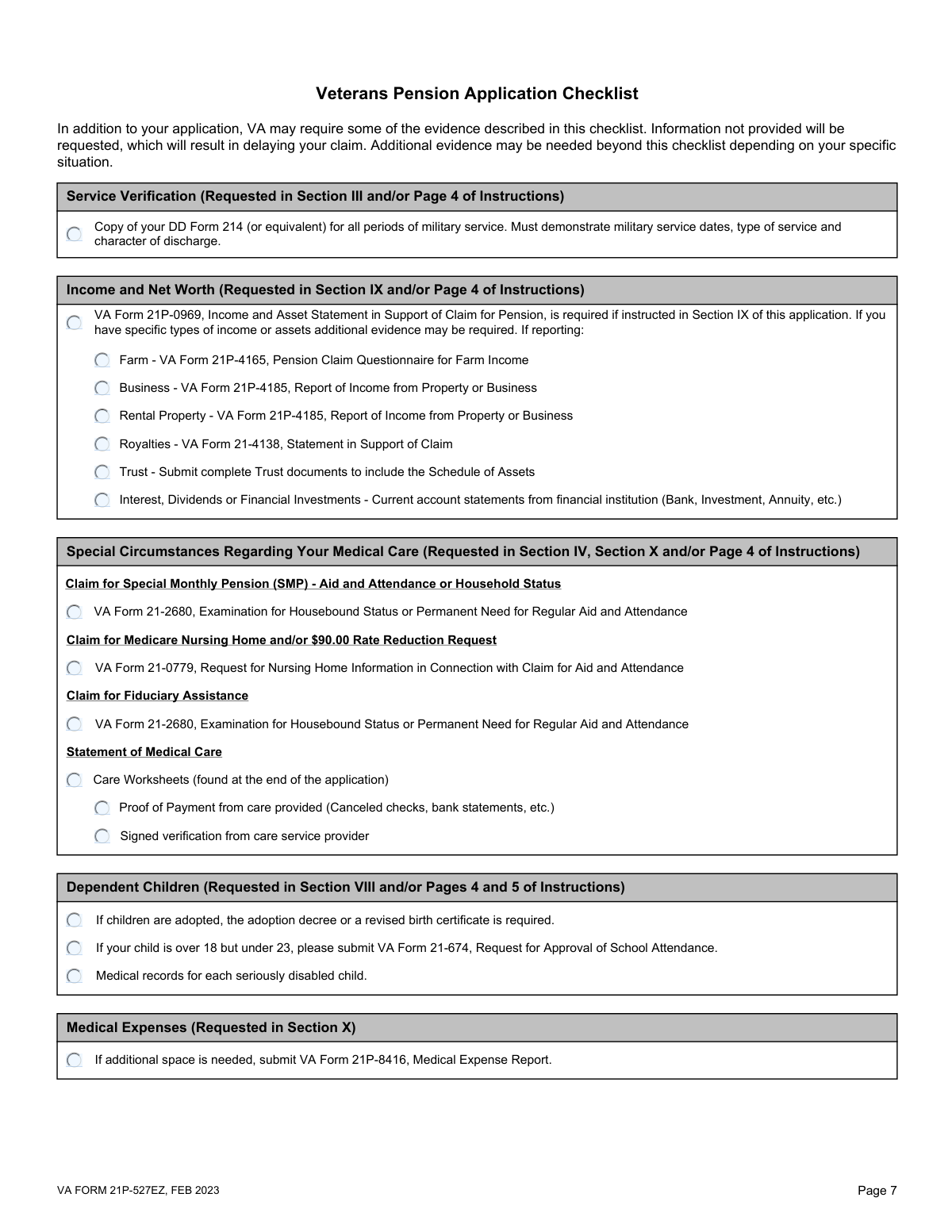
Preview of VA Form 21P-527EZ, Application for Pension

Instafill Demo: How to fill out PDF forms in seconds with AI

How to Fill Out VA Form 21P-527EZ Online for Free in 2026

Are you looking to fill out a VA FORM 21P-527EZ form online quickly and accurately? Instafill.ai offers the #1 AI-powered PDF filling software of 2026, allowing you to complete your VA FORM 21P-527EZ form in just 37 seconds or less.
Follow these steps to fill out your VA FORM 21P-527EZ form online using Instafill.ai:
  1. 1 Navigate to Instafill.ai and upload your VA Form 21P-527EZ or select it from the platform's template library.
  2. 2 Use the AI assistant to populate the veteran's personal information, including name, Social Security Number, date of birth, and contact details.
  3. 3 Provide details about military service, marital history, and any prior marriages, letting the AI guide you through the required fields for both the veteran and spouse.
  4. 4 Enter information for any dependent children, and then report all income sources and net worth, including assets like bank accounts, property, and investments.
  5. 5 List all unreimbursed medical expenses for the veteran, spouse, and dependents, as these can be deducted from your countable income, and check boxes for any supporting documents you will provide.
  6. 6 Carefully review the entire application, ensuring all information is correct and all necessary supporting form checkboxes are ticked, then electronically sign the form to finalize your application.

Our AI-powered system ensures each field is filled out correctly, reducing errors and saving you time.

Why Choose Instafill.ai for Your Fillable VA Form 21P-527EZ Form?

Speed

Complete your VA Form 21P-527EZ in as little as 37 seconds.

Up-to-Date

Always use the latest 2026 VA Form 21P-527EZ form version.

Cost-effective

No need to hire expensive lawyers.

Accuracy

Our AI performs 10 compliance checks to ensure your form is error-free.

Security

Your personal information is protected with bank-level encryption.

Frequently Asked Questions About VA Form 21P-527EZ

VA Form 21P-527EZ has a Form Complexity Index of 92 out of 100, placing it in the very complex complexity tier. This score is calculated deterministically from the form’s own structure using Instafill’s published Form Complexity Index methodology, so it can be reproduced and independently verified — it is not a subjective estimate.

For VA Form 21P-527EZ specifically, the score reflects 617 fillable fields across 17 pages, grouped into 126 sections, and 271 conditional fields that only apply depending on earlier answers, 6 tables or repeating lists. The number of fields is the largest factor in the base score (weighted 36%), followed by how difficult those fields are to complete based on their type, where free-text and signature fields count for more than simple checkboxes (26%). The number of pages that actually contain fields (15%), the amount of conditional “fill-only-if” logic (16%), and how many sections the form is divided into (7%) account for the rest of the base. On top of that base, the index adds points for tables and repeating lists, bundled instruction pages, and dense page layouts — capturing difficulty the base alone can miss.

In practical terms, a very complex score means the form is exceptionally demanding — a very large number of fields, often combined with tables, dense pages or extensive conditional logic. Instafill removes that effort entirely: our AI reads your information, maps each value to the correct field — including the conditional ones — and completes VA Form 21P-527EZ accurately in under a minute, with every field available for you to review before you download. See exactly how the Form Complexity Index is calculated.

This form is a comprehensive application for veterans to claim VA pension benefits. It gathers essential information about your military service, financial status, dependents, and medical needs to determine your eligibility.

You must include a copy of your DD Form 214 (or equivalent) to verify your military service. You should also provide supporting financial documents like bank statements and proof of medical expenses, such as receipts or canceled checks.

If you have business or property income, you must complete and submit VA Form 21P-4185, 'Report of Income from Property or Business'. Be sure to check the 'Business' or 'Rental Property' box on the application checklist.

To claim Special Monthly Pension for Aid and Attendance or Housebound status, you must check the 'YES' box in question 4E. You also need to submit VA Form 21-2680, which must be completed by a medical professional to certify your need for assistance.

You must report that you live in a nursing home and indicate if Medicaid covers any of your costs. You may also need to submit VA Form 21-0779, 'Request for Nursing Home Information,' to provide the VA with details about your facility.

For a dependent child between the ages of 18 and 23 who is attending school, you must submit VA Form 21-674, 'Request for Approval of School Attendance'. This verifies their status as a student, allowing them to be included in your pension claim.

If you need more space to list your medical expenses, you must use VA Form 21P-8416, 'Medical Expense Report'. Check the box on the application to indicate that you are attaching this additional form.

The Fully Developed Claim (FDC) Program is an optional, faster process for claims submitted with all required evidence. By not checking the box in Section 12A, you are opting into the FDC program, certifying that you have no more evidence to submit.

The worksheets are for documenting care provided in an assisted living facility or by an in-home attendant. They must be completed and signed by the care provider to verify the services and costs associated with your medical care.

Yes, Section 11 for Direct Deposit information is mandatory. You must provide your financial institution's name, routing number, and account number to receive your pension payments.

Yes, services like Instafill.ai use AI to accurately auto-fill form fields from your saved profile, which can save you significant time and help prevent errors. This is especially useful for complex forms that require repetitive personal information.

Simply upload the form to the Instafill.ai platform. The AI will identify the fields and automatically populate them with your information, allowing you to review, edit, and complete the form quickly online.

You can use a service like Instafill.ai, which can convert flat, non-fillable PDFs into interactive, fillable forms. This allows you to type your answers directly into the fields instead of printing and filling it out by hand.

Compliance VA Form 21P-527EZ
Validation Checks by Instafill.ai

1
Validates Veteran's Social Security Number
This check ensures that all three parts of the Veteran's Social Security Number (1B) are filled in and combine to form a valid 9-digit number. An SSN is a critical unique identifier for processing claims and accessing records. Failure to provide a complete and correctly formatted SSN will prevent the form from being processed and will require the applicant to correct the information.
2
Ensures Service Release Date is After Entry Date
This validation confirms that the 'Final Release Date From Active Duty' (3C) is on or after the 'Date Initially Entered Active Duty' (3B). This is a critical logical check to ensure the service period is valid and makes chronological sense. An invalid date range would lead to rejection of the service history and delay the claim processing until corrected.
3
Validates VA File Number Entry Based on Prior Claim Status
This check enforces the rule that the 'VA File Number' field (1E) should only be filled if the veteran answered 'YES' to having previously filed a claim with the VA (1D). This prevents unnecessary data entry and potential confusion with incorrect numbers. If a user answers 'NO' but provides a file number, the submission will be flagged for review to resolve the discrepancy.
4
Requires POW Confinement Dates if Applicable
This validation ensures that if a veteran indicates they were a Prisoner of War by checking 'YES' in question 3G, they must provide at least one set of confinement start and end dates in questions 3H and 3I. This information is essential for determining eligibility for specific benefits related to POW status. A failure to provide these dates when required will result in an incomplete application and a request for more information.
5
Verifies Marriage Date is Logically Possible
This check confirms that the 'Date of Marriage' (6E) occurs after both the veteran's 'Date of Birth' (1C) and the spouse's 'Date of Birth' (6C). This prevents logically impossible data entry errors, ensuring the integrity of the marital history provided. An illogical date would cause the marital information to be rejected pending correction.
6
Ensures a Single Branch of Service is Selected
This validation checks that the applicant has selected exactly one option from the 'Branch of Service' list in question 3E. Selecting zero or multiple branches is ambiguous and prevents proper service verification. The form should not be submittable until one and only one branch is chosen.
7
Validates Signature or Alternate Signer Completion
This check ensures that the form is properly certified by verifying that either the claimant's signature field (12B) is signed or the 'ALTERNATE SIGNER' section (Section 14) is fully completed. A form cannot be legally processed without a valid signature. If neither is present, the submission is invalid and must be returned.
8
Validates Direct Deposit Routing Number Format
This check verifies that the bank 'ROUTING NUMBER' provided in Section 11C is exactly 9 digits long and contains only numbers. This is crucial for ensuring that direct deposit payments are sent to the correct financial institution. An incorrectly formatted number will cause payment failure and require manual intervention to fix.
9
Cross-references Child's Age, School Status, and Required Form
This validation checks that if a dependent child's status (8F) is marked as '18 TO 23 YEARS OLD (IN SCHOOL),' their birth date (8C) confirms they are in that age range. It also verifies that the corresponding 'VA Form 21-674 for children age 18–22' checkbox is also checked in the supporting documents section. This ensures all required information and documentation for dependent school attendance benefits are aligned, preventing processing delays.
10
Ensures Nursing Home Follow-up Question is Answered
This check validates that if a veteran answers 'Yes' to living in a nursing home (4C), the subsequent question about Medicaid coverage (4D) must also be answered. This information is critical for determining the correct pension rate and potential reductions. An incomplete section will halt the processing of the Aid and Attendance portion of the claim.
11
Validates Start and End Dates of Prior Marriages
For any prior marriage entered in Section 7, this check ensures the 'END DATE' (e.g., 7C) is on or after the 'START DATE'. This maintains the logical integrity of the veteran's marital history, which is essential for determining dependency and benefit eligibility. An inverted date range would be flagged as an error requiring correction.
12
Ensures Veteran's First and Last Name are Provided
This validation confirms that the 'First Name' and 'Last Name' fields for the veteran (1A) are not left blank. The veteran's full legal name is the most fundamental piece of identifying information on the claim. A submission without a complete name is considered invalid and cannot be processed.
13
Validates Date of Birth is a Realistic Past Date
This check ensures the Veteran's Date of Birth (1C) is a complete, valid date that is not in the future and is within a reasonable human lifespan (e.g., not more than 120 years ago). This prevents data entry errors that would make age-based eligibility calculations impossible. An invalid date will require correction before the claim can be evaluated.
14
Cross-validates Special Monthly Pension Claim and Documentation
This check verifies that if the veteran claims Special Monthly Pension by checking 'YES' in question 4E, they have also checked the box indicating they will provide the required supporting documentation, such as 'VA Form 21-2680'. This ensures that the claim is submitted with the necessary evidence, preventing delays caused by missing forms. A mismatch would trigger a warning to the user to include the required documentation.

Common Mistakes in Completing VA Form 21P-527EZ

Forgetting to Attach Required Supporting Documents

This form acts as a checklist for numerous other VA forms and documents, such as the DD Form 214, VA Form 21-2680 for Aid and Attendance, or financial statements. Applicants often check a box indicating they will provide a document but then forget to include it with their submission. This omission is a primary cause of significant processing delays, as the VA must issue a request for the missing evidence and wait for a response. To avoid this, use the checklist section as a final review to ensure every checked item corresponds to an attached document before sending the application. AI-powered tools like Instafill.ai can help by generating a clear summary of required attachments based on your answers.

Incomplete or Inaccurate Marital History

Section 7 requires detailed information on all prior marriages for both the veteran and their current spouse, including names, dates, and places of marriage and termination. Applicants frequently provide incomplete dates, forget to include a prior marriage, or skip the section entirely if they are currently married, misinterpreting the instructions. Inaccurate marital history can lead to incorrect dependency determinations and benefit calculations, causing delays or denials. Carefully gather all relevant marriage certificates and divorce decrees before filling out this section to ensure all information is complete and accurate.

Failing to Submit Medical Evidence for Special Monthly Pension

When claiming Special Monthly Pension for Aid & Attendance or Housebound status (Question 4E), applicants must submit specific medical evidence, typically on VA Form 21-2680. A common error is checking the 'YES' box for this claim without providing the required examination form completed by a physician. Without this medical justification, the claim for the higher pension rate cannot be evaluated and will be denied, even if the basic pension is approved. Always ensure that VA Form 21-2680 or other required medical records are completed and submitted simultaneously with the main application.

Incorrectly Formatting Dates, SSNs, and Phone Numbers

The form breaks down dates (MM/DD/YYYY), Social Security Numbers, and phone numbers into separate, distinct fields. People often try to enter the entire number or date into the first box, leaving the others blank, or they transpose the month and day. This can cause data entry rejection in digital systems or processing errors by VA staff, potentially linking the claim to the wrong record or causing contact issues. To prevent this, carefully enter only the requested digits into each specific box (e.g., the first three digits of the SSN in the first box, the two-digit month in the month box, etc.).

Incomplete or Unsigned Care Provider Worksheets

The worksheets at the end of the application for assisted living or in-home care expenses are critical for deducting these costs from income. These sections are often completed by a third-party care provider who may not understand their importance, leading to missing signatures, incomplete service descriptions, or incorrect cost information. An unsigned or incomplete worksheet will be rejected, preventing the applicant from getting credit for these significant medical expenses. It is crucial to review the worksheet after the provider fills it out to ensure it is fully completed and signed before submitting the entire package.

Answering Conditional Questions Inconsistently

The form contains many questions that depend on the answer to a previous one (e.g., providing a VA File Number in 1E only if you answer 'YES' to 1D). A frequent mistake is to answer 'NO' to a screening question but then proceed to fill out the subsequent fields, or vice-versa. For example, answering 'NO' to living in a nursing home (4C) but then answering question 4D about Medicaid coverage for nursing home costs. This creates confusion and can halt processing while the VA seeks clarification. Read each question carefully and only answer the follow-up questions as directed by the form's logic.

Errors in Direct Deposit Information

Section 11 requires the financial institution's routing number and the applicant's account number for direct deposit. Transposing just one or two digits in either of these long numbers is a very common and costly mistake. An incorrect number will cause the payment to be rejected by the bank or, in a worst-case scenario, deposited into someone else's account. To avoid this, double-check the numbers against a check or an official bank statement, and consider having a second person review them for accuracy before submission.

Invalid Signature Due to Missing Witnesses

If a claimant is unable to sign their name and instead uses an 'X' or other mark in the signature block (12B), the form explicitly requires the signatures and addresses of two witnesses in Section 13. Applicants often miss this requirement, submitting a form with an 'X' but no witness attestations. This invalidates the signature and the entire application, which will be returned unprocessed. If signing with a mark, ensure two people watch you make the mark and then complete Section 13 in its entirety.

Misreporting Dependent Child Status and Documentation

Section 8 has specific requirements for dependent children, which are often missed. For example, if a child is between 18 and 23 and attending school, VA Form 21-674 must be submitted, but applicants often just list the child without the required form. Similarly, if a child is adopted or seriously disabled, a corresponding adoption decree or medical records must be attached. Failing to provide the correct documentation for a child's specific status will result in that child not being recognized as a dependent for benefit calculations until the proper evidence is received. Advanced form-filling tools like Instafill.ai can help by prompting for these specific documents when a certain child status is selected.

Exceeding Character Limits in Text Fields

Many fields on this form, particularly for names and addresses, have strict character limits (e.g., 'Spouse's First Name' has a 12-character max). When filling out a paper or non-validating PDF form, it's easy to write a name or city that is too long. This can result in the information being truncated and entered incorrectly into the VA's system, leading to mail being returned or records being mismatched. Be mindful of these limits and use standard, acceptable abbreviations where necessary to ensure your full response fits. If the form is a non-fillable PDF, a tool like Instafill.ai can convert it to a fillable version where these limits are often enforced automatically.
Saved over 80 hours a year

“I was never sure if my IRS forms like W-9 were filled correctly. Now, I can complete the forms accurately without any external help.”

Kevin Martin Green

Your data stays secure with advanced protection from Instafill and our subprocessors

Robust compliance program

Transparent business model

You’re not the product. You always know where your data is and what it is processed for.

ISO 27001, HIPAA, and GDPR

Our subprocesses adhere to multiple compliance standards, including but not limited to ISO 27001, HIPAA, and GDPR.

Security & privacy by design

We consider security and privacy from the initial design phase of any new service or functionality. It’s not an afterthought, it’s built-in, including support for two-factor authentication (2FA) to further protect your account.

Fill out VA Form 21P-527EZ with Instafill.ai

Worried about filling PDFs wrong? Instafill securely fills va-form-21p-527ez-application-for-pension forms, ensuring each field is accurate.