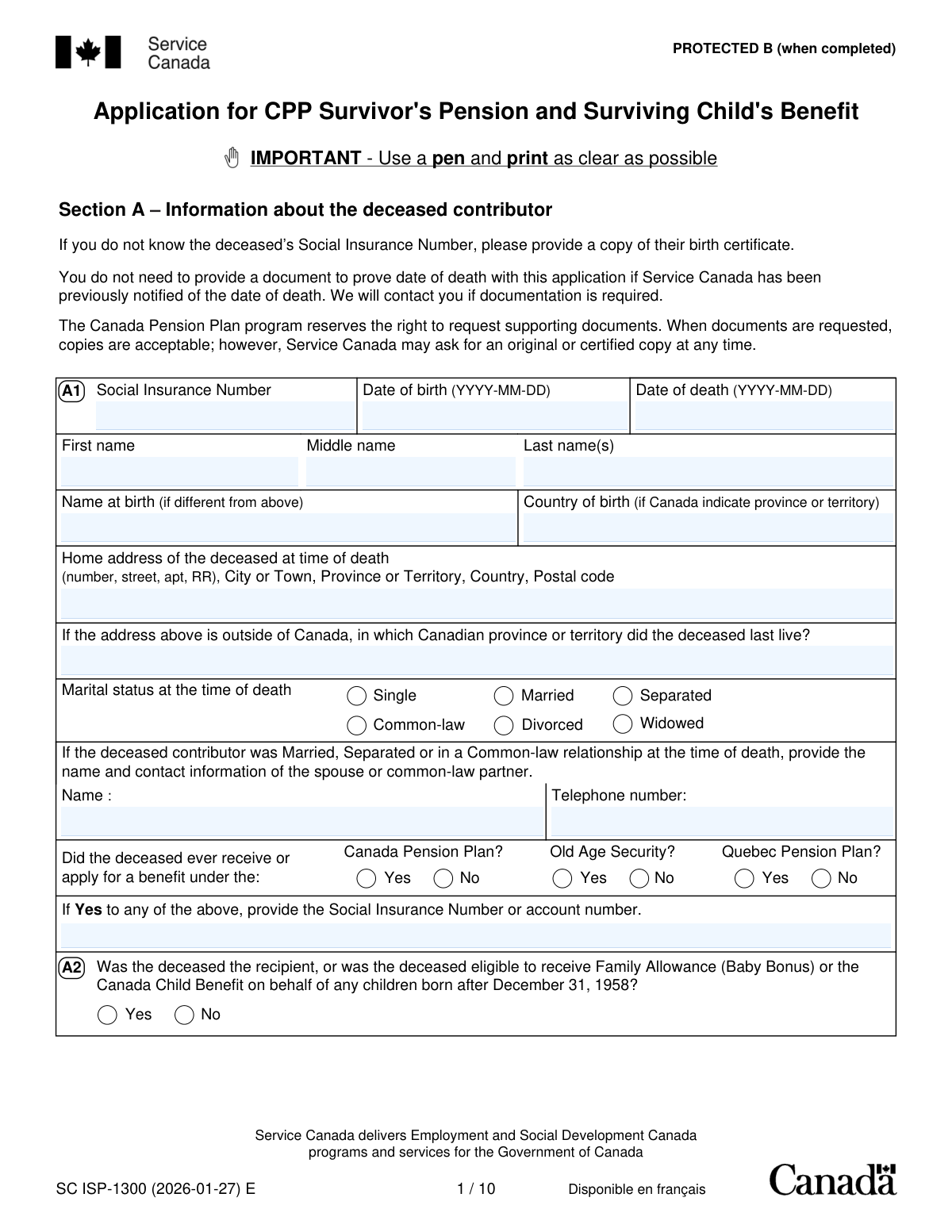
Yes! You can use AI to fill out Form SC ISP-1300, Application for CPP Survivor's Pension and Surviving Child's Benefit

Form SC ISP-1300 is an application used by the legal spouse, common-law partner, or the person responsible for a dependent child of a deceased Canada Pension Plan (CPP) contributor to apply for survivor benefits. These benefits provide financial support to the family after the contributor's death. Today, this form can be filled out quickly and accurately using AI-powered services like Instafill.ai, which can also convert non-fillable PDF versions into interactive fillable forms.
Our AI automatically handles information lookup, data retrieval, formatting, and form filling.
It takes less than a minute to fill out SC ISP-1300 using our AI form filling.
Securely upload your data. Information is encrypted in transit and deleted immediately after the form is filled out.

Form specifications

Form name: Form SC ISP-1300, Application for CPP Survivor's Pension and Surviving Child's Benefit
Number of pages: 15
Language: English
Categories: benefit forms
main-image

Instafill Demo: How to fill out PDF forms in seconds with AI

How to Fill Out SC ISP-1300 Online for Free in 2026

Are you looking to fill out a SC ISP-1300 form online quickly and accurately? Instafill.ai offers the #1 AI-powered PDF filling software of 2026, allowing you to complete your SC ISP-1300 form in just 37 seconds or less.
Follow these steps to fill out your SC ISP-1300 form online using Instafill.ai:
  1. 1 Navigate to Instafill.ai and upload or select the SC ISP-1300 form.
  2. 2 Provide information about the deceased contributor, such as their Social Insurance Number (SIN), date of birth, and date of death in Section A.
  3. 3 Enter your personal details as the applicant in Section C, including your SIN, contact information, and your relationship to the deceased.
  4. 4 Complete Section E with information about the deceased's dependent children to apply for the Surviving Child's Benefit.
  5. 5 Fill out the payment information in Section F for direct deposit and specify any voluntary tax deductions in Section G.
  6. 6 Carefully review all the information populated by the AI for accuracy, then sign and date the declaration in Section H.
  7. 7 Download the completed application and mail it to the appropriate Service Canada office as indicated in the form's instructions.

Our AI-powered system ensures each field is filled out correctly, reducing errors and saving you time.

Why Choose Instafill.ai for Your Fillable SC ISP-1300 Form?

Speed

Complete your SC ISP-1300 in as little as 37 seconds.

Up-to-Date

Always use the latest 2026 SC ISP-1300 form version.

Cost-effective

No need to hire expensive lawyers.

Accuracy

Our AI performs 10 compliance checks to ensure your form is error-free.

Security

Your personal information is protected with bank-level encryption.

Frequently Asked Questions About Form SC ISP-1300

This form is used to apply for the Canada Pension Plan (CPP) Survivor's Pension and/or the Surviving Child's Benefit after a CPP contributor has passed away.

The legal spouse or common-law partner of the deceased contributor at the time of their death can apply. The deceased must also have made sufficient contributions to the CPP.

You can apply on behalf of a dependent child under 18 using this same form (ISP-1300). Complete Section E with the child's information.

Dependent children aged 18 to 25 who are attending school must complete their own separate application. They need to use form ISP1402, the 'Child’s Benefit Application and Declaration for a Student'.

No, you cannot submit the completed ISP-1300 form electronically. You must print the form, sign it, and mail it or drop it off at a Service Canada Centre.

You must submit the completed and signed application form. While you don't need to provide proof of death or marriage initially, Service Canada may request original or certified copies of supporting documents at any time.

If the deceased only worked in Quebec or last lived in Quebec after working elsewhere, you must apply to Retraite Québec for QPP benefits instead of the CPP. The form provides guidance on who to contact.

Yes, a separated legal spouse can apply for the survivor's pension. However, you may not be eligible if the deceased had a common-law partner at the time of death.

Service Canada will review your application and may contact you if more information is needed. Once a decision is made, you will receive a notification letter by mail.

Yes, all CPP pensions and benefits are considered taxable income. You can choose to have a specific amount of federal income tax deducted from your monthly payments by completing Section G of the form.

Yes, services like Instafill.ai use AI to help you accurately auto-fill form fields from your records. This can save time and help you avoid common errors.

Simply upload the ISP-1300 PDF to Instafill.ai to make it an interactive online form. The AI can then assist you in filling out the fields before you print the completed document for signing and submission.

You can use a service like Instafill.ai, which converts flat, non-fillable PDFs into interactive forms you can complete on your computer. After filling it out, you can print the completed form to sign and mail.

Payments are made via direct deposit into a Canadian bank account that is in your name. You must provide your banking information in Section F of the application to set this up.

If the deceased did not make enough CPP contributions to qualify for benefits, credits from a country with a social security agreement with Canada may be used. Providing this information in Section B allows Service Canada to explore this possibility for you.

Compliance SC ISP-1300
Validation Checks by Instafill.ai

1
Deceased's Date of Death and Date of Birth Consistency
This check ensures that the 'Date of death' (YYYY-MM-DD) entered in Section A is chronologically after the 'Date of birth' (YYYY-MM-DD). This is a fundamental logical validation to prevent data entry errors. If the date of death is before the date of birth, the application is invalid and cannot be processed.
2
Social Insurance Number (SIN) Format Validation
Verifies that all Social Insurance Number fields (for the deceased, applicant, and children) adhere to the standard 9-digit format. This is critical for accurately identifying individuals in the system and linking their contribution records. An invalid SIN format will prevent record matching and halt the application processing until corrected.
3
Common-Law Relationship Minimum Duration
This check validates that the common-law relationship lasted for at least one continuous year up to the date of death, as required for eligibility. It calculates the duration between the 'Date you began living together' (Section D2) and the deceased's 'Date of death' (Section A). If the duration is less than one year, the applicant may not qualify as a common-law partner, and the application will be flagged for review or denial.
4
Conditional Requirement for Spouse/Partner Information
Ensures that if the deceased's marital status in Section A is marked as 'Married', 'Separated', or 'Common-law', the corresponding fields for the spouse or common-law partner's name and telephone number are completed. This information is vital for verifying marital status and identifying all potential beneficiaries or relevant parties. Failure to provide this information will result in an incomplete application.
5
Child's Age Eligibility for Benefit Type
This validation checks the child's date of birth in Section E to ensure their age corresponds to the correct benefit category. Children listed in Section E1 must be under 18, while those in Section E3 must be between 18 and 25. This is crucial for determining eligibility for the Surviving Child's benefit and ensuring the correct application process is followed for students over 18.
6
Conditional Requirement for Child's Caregiver Information
In Section E1, if the applicant indicates a child is not in their care by checking 'No', this validation ensures that the caregiver's full name and address fields are mandatory. This information is necessary to direct payments to the correct individual or agency responsible for the child. An omission here would delay or misdirect benefit payments.
7
Separation and Marriage Date Consistency
For applicants who were separated, this check verifies the logical sequence of dates in Section D1. The 'Date of separation' must be after the 'Date of marriage' and on or before the deceased's 'Date of death'. This validation ensures the marital history is reported accurately, which is essential for determining survivor eligibility under CPP rules.
8
Direct Deposit Information Completeness and Format
If the applicant selects to provide new or updated direct deposit information in Section F, this check validates that the Branch (5 digits), Institution (3 digits), and Account Number (max 12 digits) fields are filled and correctly formatted. Correct banking information is essential for the electronic transfer of funds. Incorrect or incomplete data will cause payment failures and require manual intervention.
9
Applicant Type Selection Requirement
This check ensures that at least one box is checked in Section C1, indicating whether the applicant is applying for the Survivor's Pension, the Surviving Child's Benefit, or both. This selection is fundamental as it defines the scope of the application and which benefits will be assessed. Without this information, the processing center cannot determine the applicant's intent.
10
Applicant Signature and Date Requirement
Verifies that the 'Signature of applicant' and the 'Date' fields in Section H are completed. The signature legally certifies that the information provided is true and complete, which is a mandatory requirement for processing any government application. An unsigned or undated application is considered incomplete and will be returned.
11
Exclusive Selection for Voluntary Tax Deduction
In Section G, if the applicant chooses to specify a voluntary tax deduction amount, this validation ensures that either the dollar amount OR the percentage field is filled, but not both. This prevents ambiguity in the tax withholding instructions. If both are filled, it creates a conflict that must be resolved before the payment profile can be set up.
12
Foreign Work/Residency History Completeness
This check ensures that if the applicant answers 'Yes' to question B1 ('Had the deceased ever lived or worked in another country?'), at least one entry in the corresponding table is completed. This information is critical for determining if an international social security agreement can be used to help the applicant qualify for benefits. Missing details can lead to a potential loss of benefits for the applicant.

Common Mistakes in Completing SC ISP-1300

Applying to the Wrong Pension Plan (CPP vs. QPP)

Applicants may mistakenly apply to the Canada Pension Plan (CPP) when the deceased primarily lived or worked in Quebec, which has its own Quebec Pension Plan (QPP). This error occurs from not carefully reading the instructions on page 2, leading to the application being rejected and sent back, causing significant delays in receiving benefits. To avoid this, carefully review the deceased's work and residency history; if it involves Quebec, contact Retraite Québec first to determine the correct plan to apply to.

Incorrectly Detailing Marital or Common-Law Status

In Section D, applicants often confuse the definitions of 'separated', 'divorced', and 'living apart for reasons beyond our control', or misstate the start date of a common-law relationship. An incorrect status or date can affect eligibility, as a common-law relationship must be continuous for at least one year. This leads to processing delays while Service Canada requests clarification or proof. Always use the exact legal definitions provided and double-check dates before submitting.

Forgetting to Write the Deceased's SIN on Every Page

The form explicitly instructs applicants to write the deceased's Social Insurance Number (SIN) at the top of each page, but this is a frequently overlooked step. This instruction exists to ensure that if pages get separated during mail handling or processing, they can be correctly re-associated with the application. Forgetting this can lead to lost information and significant processing delays. Before mailing, flip through each page to confirm the SIN is present.

Listing Dependent Children Aged 18-25 on this Form

Applicants often list all dependent children in Section E, including those aged 18 to 25 who are students. However, the form specifies that children in this age group must apply for benefits themselves using a separate form (ISP1402). This mistake creates confusion and delays the child's benefit, as their information cannot be processed from this application. Applicants should only list children under 18 in Section E1 and ensure eligible older children receive and complete their own separate application.

Entering Invalid Direct Deposit Information

In Section F, applicants frequently make data entry errors when providing their banking details, such as transposing digits in the branch, institution, or account number. This happens due to simple oversight when copying the numbers from a cheque or bank statement. An incorrect number will cause the direct deposit to fail, resulting in delayed payments or the issuance of a physical cheque, which takes longer to arrive. Carefully double-check all banking numbers before submission. AI-powered tools like Instafill.ai can help by validating the format of these numbers to catch potential errors.

Forgetting to Sign and Date the Application

The most common reason for an application to be immediately returned is a missing signature or date in Section H. In the stress of completing the paperwork, applicants simply forget to sign. An unsigned application is legally invalid and cannot be processed, halting the entire process until a signed copy is received. Always perform a final check of the signature block on page 9 before sealing the envelope. Smart form-filling tools can flag mandatory signature fields to prevent this oversight.

Omitting Social Insurance Numbers (SINs)

Applicants may not know or may forget to include the SIN for the deceased, themselves, or the dependent children. The form states that if a SIN is missing, a copy of a birth certificate is required, but applicants often miss this and submit the form with neither. This forces Service Canada to halt processing and request the missing information or document, significantly delaying the determination of eligibility. To avoid this, gather all SINs before starting the application or have birth certificate copies ready.

Failing to Disclose the Deceased's Foreign History

Applicants sometimes leave Section B blank, even if the deceased lived or worked in another country, assuming it's not relevant. However, if the deceased's CPP contributions are insufficient to qualify for benefits, a social security agreement with another country could provide the necessary credits. Omitting this information can lead to a wrongful denial of the application. It is crucial to list all countries the deceased lived or worked in, as it can be the key to qualifying for the pension.

Misunderstanding the 'Authorized Representative' Signature

The signature block for an 'Authorized Representative' on page 10 is often misused by applicants who have a friend or family member helping them fill out the form. This section is strictly for a legally appointed representative (e.g., someone with Power of Attorney), and requires submission of legal documents. An incorrect signature here invalidates the application. Unless you have legal authority, you must sign as the 'applicant' in Section H; if you need help with information, use form ISP1603 instead.

Attempting to Submit the Fillable PDF Electronically

The instructions note that the fillable PDF version of the form can be saved to a computer but cannot be submitted electronically. Many users, accustomed to online services, overlook this and assume they can email the form or upload it through their My Service Canada Account. This results in a lost application, as it is never officially received. The completed form must be printed, signed in pen, and mailed or dropped off at a Service Canada Centre. For non-fillable PDFs, tools like Instafill.ai can convert them into fillable versions to ensure clean, legible entries before printing.
Saved over 80 hours a year

“I was never sure if my IRS forms like W-9 were filled correctly. Now, I can complete the forms accurately without any external help.”

Kevin Martin Green

Your data stays secure with advanced protection from Instafill and our subprocessors

Robust compliance program

Transparent business model

You’re not the product. You always know where your data is and what it is processed for.

ISO 27001, HIPAA, and GDPR

Our subprocesses adhere to multiple compliance standards, including but not limited to ISO 27001, HIPAA, and GDPR.

Security & privacy by design

We consider security and privacy from the initial design phase of any new service or functionality. It’s not an afterthought, it’s built-in, including support for two-factor authentication (2FA) to further protect your account.

Fill out SC ISP-1300 with Instafill.ai

Worried about filling PDFs wrong? Instafill securely fills form-sc-isp-1300-application-for-cpp-survivors-pension-and-surviving-childs-benefit forms, ensuring each field is accurate.