Yes! You can use AI to fill out VA Form 21P-534EZ, Application for D.I.C., Survivors Pension, and/or Accrued Benefits

VA Form 21P-534EZ, Application for D.I.C., Survivors Pension, and/or Accrued Benefits, is a Department of Veterans Affairs form used by eligible survivors to claim financial benefits following a veteran's death. These benefits provide crucial support to families and include Dependency and Indemnity Compensation (D.I.C.), Survivors Pension, and any accrued benefits due to the veteran. Today, this comprehensive form can be filled out quickly and accurately using AI-powered services like Instafill.ai, which can also convert non-fillable PDF versions into interactive fillable forms.
VA Form 21P-534EZ is part of the benefit forms, pension application forms, pension benefit forms, pension forms and survivor benefit forms categories on Instafill.
Our AI automatically handles information lookup, data retrieval, formatting, and form filling.
It takes less than a minute to fill out VA Form 21P-534EZ using our AI form filling.
Securely upload your data. Information is encrypted in transit and deleted immediately after the form is filled out.

Form specifications

Form name: VA Form 21P-534EZ, Application for D.I.C., Survivors Pension, and/or Accrued Benefits
Number of fields: 680
Number of pages: 20
Language: English
main-image

Instafill Demo: How to fill out PDF forms in seconds with AI

How to Fill Out VA Form 21P-534EZ Online for Free in 2026

Are you looking to fill out a VA FORM 21P-534EZ form online quickly and accurately? Instafill.ai offers the #1 AI-powered PDF filling software of 2026, allowing you to complete your VA FORM 21P-534EZ form in just 37 seconds or less.
Follow these steps to fill out your VA FORM 21P-534EZ form online using Instafill.ai:
  1. 1 Navigate to Instafill.ai and upload or select VA Form 21P-534EZ.
  2. 2 Provide the deceased veteran's personal identification, service history, and date of death in Section I and III.
  3. 3 Enter your (the claimant's) personal information, relationship to the veteran, and detailed marital history in Sections II, IV, and V.
  4. 4 If applicable, list information for the veteran's dependent children in Section VI and specify the benefits you are claiming in Section VII.
  5. 5 Complete the income, assets, and medical expense sections (IX and X) if you are applying for needs-based benefits like Survivors Pension.
  6. 6 Set up your direct deposit information in Section XI and carefully review all sections before providing your signature in Section XII to certify the claim.
  7. 7 Download the completed form and gather all required supporting documents, such as the veteran's death certificate and DD 214, to submit to the VA.

Our AI-powered system ensures each field is filled out correctly, reducing errors and saving you time.

Why Choose Instafill.ai for Your Fillable VA Form 21P-534EZ Form?

Speed

Complete your VA Form 21P-534EZ in as little as 37 seconds.

Up-to-Date

Always use the latest 2026 VA Form 21P-534EZ form version.

Cost-effective

No need to hire expensive lawyers.

Accuracy

Our AI performs 10 compliance checks to ensure your form is error-free.

Security

Your personal information is protected with bank-level encryption.

Frequently Asked Questions About Form VA Form 21P-534EZ

This form is used by survivors of a deceased veteran to apply for benefits like Dependency and Indemnity Compensation (D.I.C.), Survivors Pension, and/or Accrued Benefits. You should fill it out if you are a surviving spouse or child of a veteran and believe you may be eligible for these benefits.

D.I.C. is a benefit for survivors of veterans whose death was service-related, while Survivors Pension is a needs-based benefit for low-income survivors of veterans with wartime service. The form allows you to apply for either or both if you may be eligible.

The FDC Program is an optional, expedited process for claims submitted with all necessary evidence. By submitting a complete application and all required documents at once, you can get your claim processed faster than through the standard process.

You will generally need a copy of the veteran's death certificate and their DD 214 for service verification. Depending on your claim, you may also need marriage certificates, children's birth certificates, and forms detailing your income, assets, and medical expenses.

You can submit VA Form 21-0966, Intent to File a Claim, to protect your potential effective date. If you then submit the full VA Form 21P-534EZ within one year, your claim will be considered filed as of the date you submitted the Intent to File form.

You only need to complete the Income and Assets section if you are claiming Survivors Pension benefits, as it is a needs-based program. If you are only claiming D.I.C. or Accrued Benefits, you can skip this section.

Eligibility after remarriage is complex and depends on the specific benefit you are claiming. You must report any remarriages in Section IV of the form, and the VA will determine your eligibility based on its rules.

Yes, in certain situations, such as for a child between 18 and 23 who is attending school (requires VA Form 21-674). Benefits may also be available for a child of any age who became permanently incapable of self-support before their 18th birthday.

The form notes this possibility for certain Army and Air Force veterans. If you believe the records were destroyed, you should complete and submit NA Form 13075, Questionnaire About Military Service, to help reconstruct the service history and avoid delays.

Reporting your unreimbursed medical expenses is important if you are applying for Survivors Pension. The VA may deduct these expenses from your countable income, which could increase your eligibility for or the amount of your pension benefit.

You can submit the form online via direct upload at access.va.gov or mail the completed application and all supporting evidence to the Pension Intake Center in Janesville, WI. The form provides the full mailing address on page 8.

Yes, services like Instafill.ai use AI to accurately auto-fill form fields, which can save you time and help prevent errors. These tools can make completing the detailed application much more manageable.

Simply upload the VA Form 21P-534EZ to the Instafill.ai platform. The AI will identify the fields, and you can provide your information through a user-friendly interface to have the form filled out automatically and accurately.

If you have a non-fillable or 'flat' PDF, you can use a service like Instafill.ai to make it interactive. The platform can convert the static document into a fillable form, allowing you to easily type your information directly into the fields.

Compliance VA Form 21P-534EZ
Validation Checks by Instafill.ai

1
Verifies Veteran's Date of Death is After Date of Birth
This validation checks that the date entered in Item 1H (Veteran's Date of Death) is chronologically after the date in Item 1C (Veteran's Date of Birth). This is a fundamental logical check to prevent data entry errors for critical dates. If validation fails, the form cannot be processed as it contains a logical impossibility, and the user must correct one or both dates.
2
Ensures Claimant Signature and Date are Present
This check validates that the claimant has signed in Item 12B and provided a signature date in Item 12C. A signature is a legal requirement for certifying the information provided and authorizing the VA to process the claim. Without a valid signature and date, the application is incomplete and legally non-binding, and will be rejected.
3
Validates Social Security Number Format
This check ensures that the Social Security Numbers entered for the veteran (Item 1B) and the claimant (Item 2C) follow the standard 9-digit format. This is crucial for correctly identifying individuals in VA and other federal systems. An incorrectly formatted SSN will cause record-matching failures and significant processing delays.
4
Enforces Conditional Requirement for VA File Number
This validation checks if the user selected "YES" in Item 1D, indicating a prior claim was filed, and then verifies that a value has been entered into Item 1E for the VA File Number. This ensures that the VA can link the new application to existing records, which is essential for continuity and efficient processing. If Item 1E is blank after a "YES" in 1D, the system should prompt the user to provide the file number if known.
5
Validates Completion of Marital Information for Spouse
This check verifies that if the claimant's relationship to the veteran (Item 2B) is "SURVIVING SPOUSE," then Section IV (Marital Information) has been completed. This section is critical for establishing the claimant's legal status as a spouse, which is a primary eligibility requirement for many survivor benefits. Failure to complete this section will result in an incomplete application and a request for more information.
6
Confirms Remarriage Details are Provided if Applicable
This validation checks the logic in Section IV. If the claimant indicates they have remarried since the veteran's death by selecting "YES" in Item 4L, the system must verify that the dates of remarriage (Item 4M) and the status of that marriage (Item 4N) are provided. Remarriage can affect eligibility for certain benefits, so this information is mandatory for a correct determination.
7
Flags Requirement for Aid and Attendance/Nursing Home Forms
This check determines if the claimant has answered "YES" to Item 8A (claiming Special Monthly Pension/D.I.C.) or 8B (is in a nursing home). If "YES," the system flags that the corresponding required form (VA Form 21-2680 or VA Form 21-0779) must be attached to the submission. This proactive check prevents claims from being delayed due to missing mandatory medical evidence.
8
Validates Submission of Income/Asset Form when Required
This validation triggers if the claimant is applying for Survivors Pension and answers "YES" to having over $25,000 in assets (Item 9A), having transferred assets (Item 9B), or having more than four income sources (Item 9G). A "YES" answer makes the submission of VA Form 21P-0969 mandatory. This check ensures all necessary financial documentation is included for needs-based benefit calculations.
9
Ensures Direct Deposit Information is Complete
This check verifies that Section XI, which is marked as "MUST COMPLETE," is filled out correctly. The claimant must either provide a valid 9-digit routing number and account number for direct deposit or explicitly check the box certifying they do not have a bank account. This is required by the Department of the Treasury for all federal benefit payments and ensures timely receipt of funds if the claim is approved.
10
Verifies School Attendance Form for Dependent Child 18-23
This check identifies when a claimant lists a dependent child (Section VI) and checks the box for "18-23 YEARS OLD (in school)". The system should then validate that VA Form 21-674 (Request for Approval of School Attendance) is either attached or flagged as a required document. This form is necessary to prove the child's dependent status and eligibility for benefits beyond the age of 18.
11
Validates Chronological Order of Marriage Dates
This validation applies to all marriage history sections (IV and V). It ensures that for any reported marriage, the end date is not before the start date. This basic logical check prevents common data entry errors that would make the marital history timeline impossible to interpret.
12
Confirms Alternate Signer Information if Claimant Signature is Missing
This check is triggered if Item 12B (Claimant's Signature) is left blank. It verifies that Section XIV (Alternate Signer Certification and Signature) has been fully completed, including the signature and date. This is crucial for claims filed by a representative on behalf of a claimant who is unable to sign, ensuring the person signing has the legal authority to do so.
13
Ensures at Least One Benefit Type is Claimed
This validation confirms that the claimant has selected at least one checkbox in Item 2I ("WHAT ARE YOU CLAIMING?"). The form allows claims for D.I.C., Survivors Pension, and/or Accrued Benefits, and the VA needs to know which benefit(s) are being sought to properly adjudicate the claim. An empty selection would make the claim's purpose ambiguous and unprocessable.
14
Verifies Medical Expense Details are Provided When Claimed
This check is triggered if the claimant answers "YES" to Item 10A, indicating they are claiming unreimbursed medical expenses. The system then verifies that details about these expenses are provided in the subsequent fields (10B-10J) or that the appropriate worksheets are completed. Claiming expenses without providing any details or proof would prevent the VA from calculating potential deductions from income.

Common Mistakes in Completing VA Form 21P-534EZ

Misunderstanding the Fully Developed Claim (FDC) Program

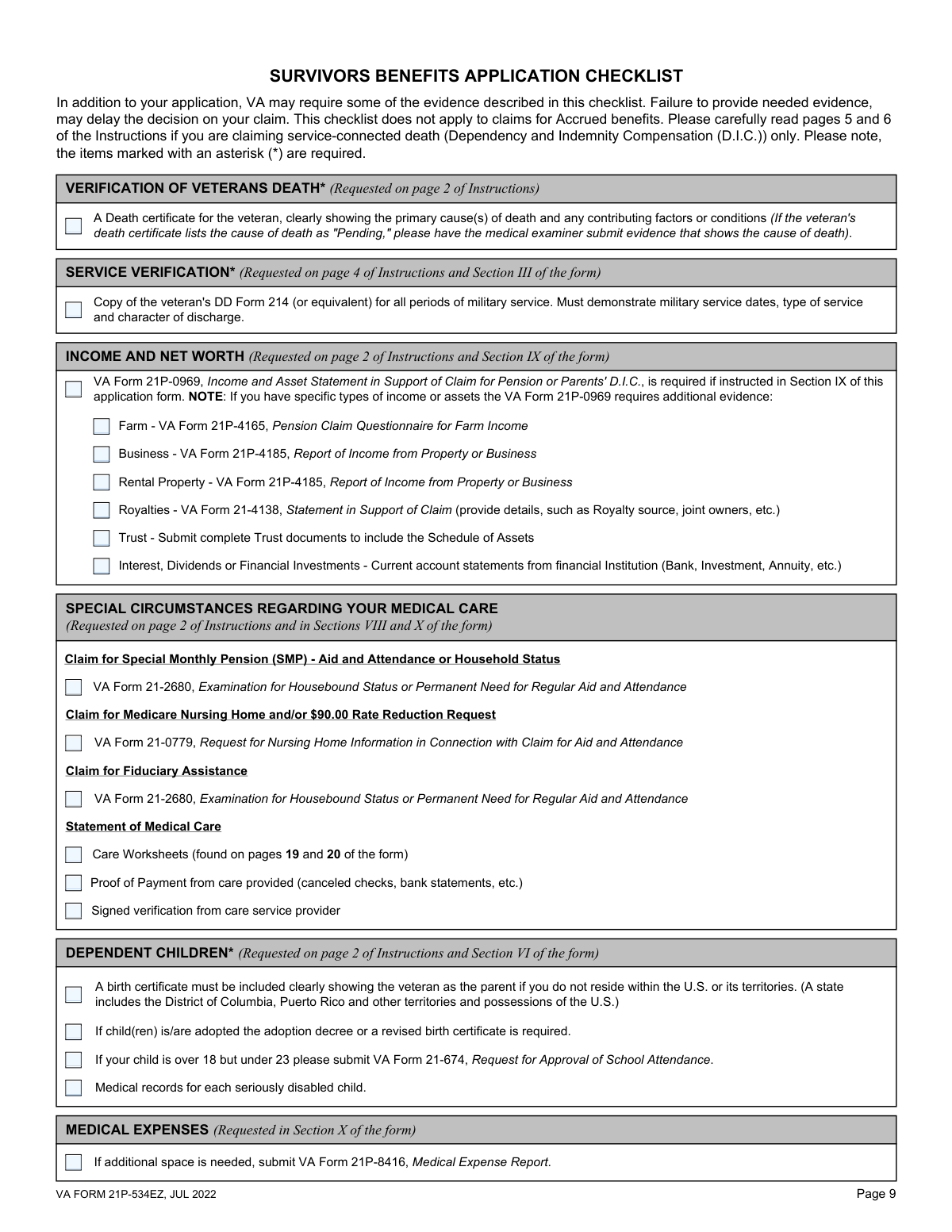
Applicants often fail to understand the FDC program's requirements, assuming that just using the 'EZ' form guarantees expedited processing. They submit the application without all necessary evidence, causing the VA to remove the claim from the FDC Program and place it in the much slower Standard Claim Process. To avoid this, use the checklist on page 10 to gather all required documents, such as the veteran's death certificate and DD 214, and submit them simultaneously with the completed application.

Incomplete or Incorrect Marital History

Section V requires a complete history of all prior marriages for both the claimant and the veteran, including names, dates, and how each marriage ended. Applicants frequently omit marriages or provide incorrect dates due to forgotten details or misplaced documents, leading to significant processing delays as the VA must request this information to verify eligibility. Before filling out the form, gather all marriage certificates, divorce decrees, and death certificates for all previous spouses to ensure accuracy.

Incorrectly Reporting Income and Assets

Section IX is a common source of errors, particularly for pension claims. Claimants may underreport by forgetting income sources, or they may incorrectly report net income instead of the required gross monthly income. A critical error is missing the instruction to complete the separate VA Form 21P-0969 if assets exceed $25,000 or if there are more than four income sources, which stalls the claim. To avoid this, carefully list all sources of gross income and total all assets, being prepared to fill out the additional form if needed.

Failing to Submit Required Supporting Forms

This application often requires other VA forms based on the claimant's circumstances, such as VA Form 21-674 for a child in school or VA Form 21-2680 for Aid and Attendance. Claimants often overlook these requirements, which are mentioned in the instructions, assuming the main application is sufficient. Submitting the 21P-534EZ without these necessary supporting forms results in an incomplete application and significant delays. Carefully read the 'SPECIAL CIRCUMSTANCES' on page 2 to identify and complete all additional forms relevant to your claim.

Submitting Original Documents Instead of Photocopies

The instructions on page 4 explicitly warn applicants not to send original documents, as they will not be returned. Despite this, stressed applicants often mail original birth certificates, death certificates, or military records, risking the permanent loss of irreplaceable documents. To prevent this, always make clear photocopies of all supporting evidence to submit with your application and keep all original documents in a safe place.

Incomplete Medical Expense Reporting

When claiming medical expense deductions in Section X, applicants often provide incomplete information, which prevents the VA from processing the deduction. Common errors include omitting provider names, payment frequencies, or failing to complete the mandatory worksheets on pages 19-20 for in-home or facility care. To ensure expenses are counted, fill out every field in Section X for each expense and complete the appropriate worksheet for any care facility or in-home attendant, having the provider sign it as required.

Missing or Invalid Signatures

A missing signature in Section XII is a simple but critical error that will cause the entire application to be returned unprocessed. Furthermore, if the claimant signs with a mark ('X'), they often forget that two witness signatures are then required in Section XIII, which invalidates the signature. Always double-check that the claimant has signed and dated the form in Section XII, and if a mark is used, ensure two witnesses complete Section XIII correctly.

Using the Wrong Form for the Intended Benefit

The VA has many similar-sounding forms, and applicants sometimes use this form when they should be using VA Form 21P-535 (for Parents' D.I.C.) or VA Form 21P-601 (for Accrued Benefits only). This mistake occurs from confusion over the different benefit types and form numbers, leading to an immediate rejection and the need to start over. Before filling, carefully read the 'WHEN TO USE THIS FORM' section on page 1 to confirm it is the correct one for your specific situation.

Failure to Provide Complete Veteran Service Information

Section III requires key details about the veteran's military service, but applicants may incorrectly skip it or fail to provide a copy of the DD 214. This forces the VA to spend extra time requesting records from national archives, which can significantly delay the claim, especially if records were affected by the 1973 fire mentioned on page 4. To avoid this, always complete Section III unless you are certain the veteran was receiving VA benefits at death, and always attach a clear copy of the DD 214.

Incorrect Direct Deposit Information

Section XI for Direct Deposit information is mandatory, yet it is a frequent source of data entry errors. A simple typo in the routing or account number can lead to payments being rejected or sent to the wrong account, causing severe delays in receiving benefits. To prevent this, carefully double-check the routing and account numbers against a check or bank statement before entering them. AI-powered form filling tools like Instafill.ai can help prevent these errors by automatically validating and formatting data correctly, and can also make this non-fillable PDF into a fillable version.

Submitting with an Ambiguous Cause of Death

For D.I.C. claims, the veteran's cause of death is critical. The checklist on page 10 notes that if the death certificate lists the cause as 'Pending,' further evidence is required from the medical examiner. Applicants often submit the initial certificate to file quickly, but this stalls the claim until a final cause is provided. To avoid this, it is best to wait for the final, amended death certificate that lists the specific cause(s) of death before submitting the application.
Saved over 80 hours a year

“I was never sure if my IRS forms like W-9 were filled correctly. Now, I can complete the forms accurately without any external help.”

Kevin Martin Green

Your data stays secure with advanced protection from Instafill and our subprocessors

Robust compliance program

Transparent business model

You’re not the product. You always know where your data is and what it is processed for.

ISO 27001, HIPAA, and GDPR

Our subprocesses adhere to multiple compliance standards, including but not limited to ISO 27001, HIPAA, and GDPR.

Security & privacy by design

We consider security and privacy from the initial design phase of any new service or functionality. It’s not an afterthought, it’s built-in, including support for two-factor authentication (2FA) to further protect your account.

Fill out VA Form 21P-534EZ with Instafill.ai

Worried about filling PDFs wrong? Instafill securely fills va-form-21p-534ez-application-for-dic-survivors-pension-andor-accrued-benefits forms, ensuring each field is accurate.