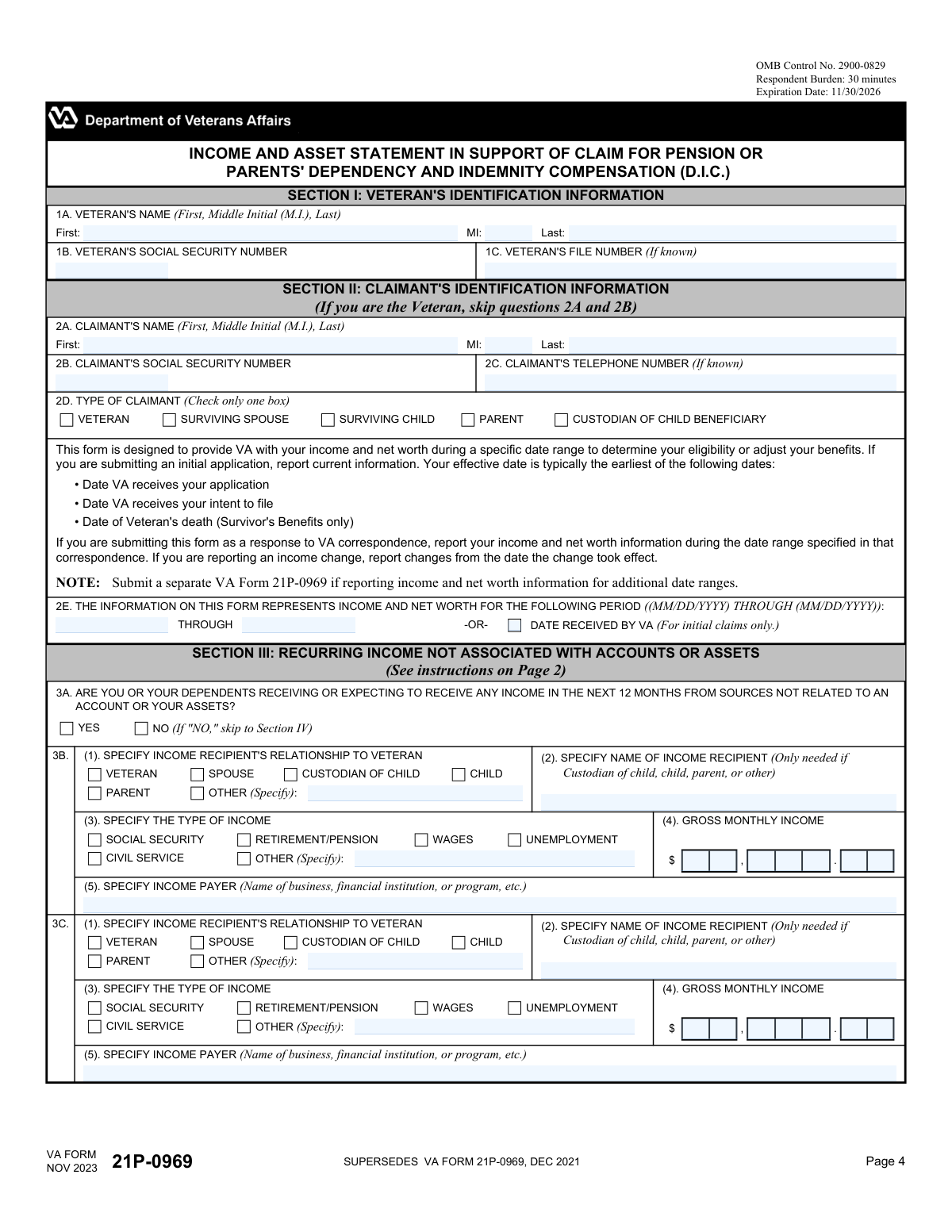
Yes! You can use AI to fill out VA Form 21P-0969, Income and Asset Statement in Support of Claim for Pension or Parents' Dependency and Indemnity Compensation (D.I.C.)
VA Form 21P-0969 is a comprehensive financial statement required by the Department of Veterans Affairs to determine a claimant's eligibility for needs-based benefits like Pension or Parents' Dependency and Indemnity Compensation (D.I.C.). The form requires detailed reporting of all income, assets, and net worth for the claimant and their dependents to ensure benefit amounts are calculated correctly. Today, this form can be filled out quickly and accurately using AI-powered services like Instafill.ai, which can also convert non-fillable PDF versions into interactive fillable forms.
VA Form 21P-0969 is part of the
income forms, income statement forms, NJ state forms, PA state forms, pension claim forms, pension forms, state ID forms, state pension forms and VA claim forms categories on Instafill.
Our AI automatically handles information lookup, data retrieval, formatting, and form filling.
It takes less than a minute to fill out VA Form 21P-0969 using our AI form filling.
Securely upload your data. Information is encrypted in transit and deleted immediately after the form is filled out.
Form specifications
| Form name: | VA Form 21P-0969, Income and Asset Statement in Support of Claim for Pension or Parents' Dependency and Indemnity Compensation (D.I.C.) |
| Number of fields: | 649 |
| Number of pages: | 11 |
| Language: | English |
More forms in Income forms
Instafill Demo: How to fill out PDF forms in seconds with AI
How to Fill Out VA Form 21P-0969 Online for Free in 2026
Are you looking to fill out a VA FORM 21P-0969 form online quickly and accurately? Instafill.ai offers the #1 AI-powered PDF filling software of 2026, allowing you to complete your VA FORM 21P-0969 form in just 37 seconds or less.
Follow these steps to fill out your VA FORM 21P-0969 form online using Instafill.ai:
- 1 Navigate to Instafill.ai and upload or select VA Form 21P-0969.
- 2 Provide identification information for the veteran and the claimant in Sections I and II.
- 3 Use the AI assistant to accurately report all sources of income and net worth, including recurring income, financial accounts, owned assets, and royalties in Sections III through VI.
- 4 Detail any asset transfers, trusts, annuities, or previously unreported assets in Sections VII through X.
- 5 Complete the sections for discontinued, irregular, or waived income if applicable (Sections XI and XII).
- 6 Review all auto-filled information for accuracy, then digitally sign and date the certification in Section XIII.
- 7 Download the completed form and mail it to the VA Pension Intake Center as instructed on the form.
Our AI-powered system ensures each field is filled out correctly, reducing errors and saving you time.
Why Choose Instafill.ai for Your Fillable VA Form 21P-0969 Form?
Speed
Complete your VA Form 21P-0969 in as little as 37 seconds.
Up-to-Date
Always use the latest 2026 VA Form 21P-0969 form version.
Cost-effective
No need to hire expensive lawyers.
Accuracy
Our AI performs 10 compliance checks to ensure your form is error-free.
Security
Your personal information is protected with bank-level encryption.
Frequently Asked Questions About Form VA Form 21P-0969
This form is used to report or verify your income and net worth to the VA. It is required to support claims for VA Pension or Parents' Dependency and Indemnity Compensation (D.I.C.).
Veterans, surviving spouses, surviving children, or parents of veterans who are applying for or already receiving VA Pension or Parents' D.I.C. must use this form to report their financial information.
This depends on your claimant type. Generally, you must report income and assets for yourself, your spouse, and your dependent children, but you should consult the specific instructions on page 1 of the form.
No, you must use a separate VA Form 21P-0969 for each year that you are reporting changes to your income and net worth.
Section III is for recurring income not associated with an account, such as wages or Social Security. Section IV is for income generated from financial accounts, like interest from savings or dividends from stocks.
You must report the income in Section V of this form and also submit a completed VA Form 21P-4185, Report of Income from Property or Business.
You should report the details of the transaction in Section VII: Asset Transfers. Any remaining proceeds from the sale should be reported as part of your assets in the other appropriate sections of the form.
In Section II, question 2E, you must specify the date range. If it's an initial application, report current information; if you are responding to a VA request, use the date range specified in their correspondence.
No, you do not need to report the value of your primary residence or its residential lot area, as long as it does not exceed 2 acres. The value of any land exceeding 2 acres must be reported.
After completing the form, you should mail it to the Department of Veterans Affairs, Pension Intake Center, P.O. Box 5365, Janesville, WI 53547-5365.
Yes, services like Instafill.ai use AI to accurately auto-fill form fields from your documents, which can save you time and help reduce errors.
You can use a service like Instafill.ai to upload the form and fill it out on your computer. The platform allows you to easily type your information into the correct fields and then save or print the completed document.
If you have a non-fillable or 'flat' PDF, you can use a tool like Instafill.ai. It can convert the document into an interactive, fillable form that you can easily complete online.
Compliance VA Form 21P-0969
Validation Checks by Instafill.ai
1
Veteran and Claimant SSN Format
This check verifies that the Social Security Numbers entered in Section I (1B) for the Veteran and in Section II (2B) for the Claimant are in a valid format (XXX-XX-XXXX or XXXXXXXXX). It is critical for correctly identifying individuals and matching records with the Social Security Administration and IRS. If the format is invalid, the form cannot be processed, leading to claim delays or rejection.
2
Exclusive Claimant Type Selection
Validates that exactly one box is checked in Section II, Question 2D (Type of Claimant). This selection is fundamental as it determines the rules for whose income and assets must be reported. Failure to select one and only one type would make it impossible to correctly assess the claim, requiring manual intervention and clarification from the claimant.
3
Reporting Period Date Logic
Ensures the dates in Section II, Question 2E are logical and correctly formatted (MM/DD/YYYY). The 'THROUGH' date must be on or after the start date. This validation is crucial for defining the exact timeframe for which income and assets are being reported, preventing ambiguity in eligibility assessment. An invalid period would render all financial data on the form contextless.
4
Conditional Section Completion
This check ensures that if a user answers 'YES' to a gateway question (e.g., 3A, 4A, 5A), they must provide at least one complete entry in the corresponding section. Conversely, if they answer 'NO', the subsequent fields in that section must be empty. This prevents both incomplete data submissions and extraneous information, ensuring the form is filled out as intended and can be processed automatically.
5
Required 'Other (Specify)' Text
Verifies that if a user selects an 'Other (Specify)' checkbox in any section (e.g., 3B(3) for income type), the associated text field is not left empty. This rule prevents ambiguity and ensures that all necessary details are captured for non-standard entries. An empty 'Other' field would create an incomplete record requiring follow-up.
6
Claimant Information Exclusivity
This validation checks if the 'VETERAN' box is selected in Question 2D. If it is, the system ensures that the Claimant's Name (2A) and Claimant's SSN (2B) fields are left blank. This prevents redundant data entry and potential conflicts if the claimant is the veteran. If the fields are filled when they shouldn't be, it could cause confusion during processing.
7
Asset Transfer Value Consistency
In Section VII, this check enforces logical consistency between asset values. If 'Was the asset transferred for less than fair market value?' (7B(8)) is 'YES', then the 'Sale Price' (7B(10)) must be less than the 'Fair Market Value' (7B(9)). Additionally, if the transfer method (7B(2)) is 'Gave Away', the 'Sale Price' must be zero. This prevents contradictory financial reporting that could impact eligibility.
8
Trust Conditional Field Requirement
In Section VIII, this validation ensures that if a user answers 'YES' to adding funds to a trust (8E), they must complete the date (8F) and amount (8G) fields. Similarly, if they answer 'YES' to receiving income (8H), the annual amount (8I) is required. This ensures that affirmative answers are followed by the necessary quantitative details for proper assessment.
9
Annuity Liquidation Value Requirement
This check validates the logic in Section IX. If the user indicates that an annuity can be liquidated by answering 'YES' to question 9J, then the 'Surrender Value' in question 9K must be provided. The surrender value is a key component of net worth, and its absence when applicable would result in an incomplete financial picture.
10
Discontinued Income Date Plausibility
This validation ensures the 'Date Income Last Paid' in Section XI (11B(6)) is a valid date that falls within or logically near the reporting period specified in Question 2E. The date cannot be a future date. This is important for verifying the timeline of income changes and accurately calculating total income for the period.
11
Signature Date Logic
Verifies that the 'Date Signed' in Section XIII (13B) is a valid, non-future date. The signature date should also be on or after the reporting period end date (2E), as the claimant is certifying information for that entire period. An illogical date could invalidate the certification and halt the claim.
12
Witness Requirement for 'X' Mark Signature
This check is triggered if the signature in Section XIII (13A) is an 'X' mark. It validates that two witnesses have provided their full name, signature, and address in Section XIV. This is a legal requirement to validate the claimant's intent when they cannot provide a standard signature, and failure to comply would render the submission invalid.
13
Associated Form Submission Flag
In Section V, if the claimant identifies an asset as a 'Farm' or 'Business/Rental Property' (5B(3)), this validation flags the submission to ensure the required supplemental forms (VA Form 21P-4165 or 21P-4185) are also submitted. While it may not block submission, it serves as a critical reminder or check to ensure the complete application package is received for these complex asset types.
14
Monetary Field Numeric Validation
Applies a check to all fields intended for dollar amounts (e.g., Gross Monthly Income, Value of Account, Fair Market Value) across the entire form. This validation ensures the fields contain only numeric digits and, where applicable, a single decimal point, and are non-negative. This maintains data integrity and is essential for the system to perform calculations for eligibility.
Common Mistakes in Completing VA Form 21P-0969
The form repeatedly asks for 'Gross Monthly Income,' which is the total amount before any taxes or deductions. Many applicants mistakenly enter their take-home pay (net income), which underreports their actual income. This discrepancy will be flagged when the VA cross-references data with the IRS and SSA, leading to significant processing delays, benefit recalculations, and potential accusations of providing false information. Always use your pre-tax income figures from pay stubs or benefit statements.
This form is a gateway to other required documents. For example, Section V explicitly states that if you have farm, business, or rental property income, you must submit VA Form 21P-4165 or 21P-4185. Simply listing the income on this form is not enough. Failure to attach these mandatory supplemental forms will result in an incomplete application, halting the process until the correct documents are received.
Question 2E asks for a specific date range for the income and net worth being reported, which is a frequent point of confusion. The correct period depends on whether it's an initial claim, a response to VA correspondence, or a report of a change. Entering an incorrect date range can lead to inaccurate benefit calculations or the rejection of the form. Carefully read the instructions for 2E to determine if you should use the current date, a past calendar year, or a specific period requested by the VA.
The form requires reporting income and assets for not just the claimant, but also their spouse and dependent children in most cases. Claimants often forget or don't realize they must include income from a spouse's job or a child's Social Security benefits. This omission leads to an inaccurate financial picture and will cause delays and benefit adjustments when discovered. Always review the instructions on page 1 to confirm exactly whose finances must be included based on your claimant type.
When the claimant is not the veteran (e.g., a surviving spouse or parent), it's common to mix up the information in Section I (Veteran) and Section II (Claimant). A surviving spouse might incorrectly fill their own details in the veteran's section or skip Section II entirely. This basic error confuses the identity of the parties involved and requires the VA to request clarification, delaying the claim. If you are not the veteran, you must complete both sections accurately.
Section XI is dedicated to discontinued or irregular income, such as lottery winnings, inheritances, gambling winnings, or a one-time work bonus from the previous year. People often forget about these lump sums, assuming they don't count as regular income. However, the VA matches data with the IRS, and failing to report this income can lead to claim denial, overpayment collection, and penalties. It is crucial to review the entire reporting period for any income received, regardless of frequency.
This section asks about any assets sold, traded, or given away, particularly for less than fair market value. Claimants may misunderstand what constitutes a reportable transfer (e.g., gifting money to a child) or may be tempted to omit this information to avoid penalties. This is a critical error, as improper asset transfers can create a penalty period where the claimant is ineligible for benefits. Full transparency in this section is essential to avoid future complications and potential fraud allegations.
Claimants often fail to report income they are entitled to but have chosen not to receive, such as deferred compensation or a legal settlement. They mistakenly believe that if they don't have the cash in hand, it doesn't need to be reported. The VA considers most waived income as countable, and failing to disclose it is unlawful and can lead to severe penalties. You must report any income you have a right to receive, even if you have deferred its payment.
A form without a valid signature is immediately invalid. Common mistakes include forgetting to sign (13A), not entering the date (13B), or, if signing with an 'X', failing to have two witnesses complete Section XIV. An incomplete signature or witness section will cause the form to be returned, effectively resetting the submission date and delaying the entire process. Double-check that Section XIII is complete, and if witnesses are needed, ensure their information is fully provided.
The instructions on the first page clearly state that this form (21P-0969) is for income and net worth, while medical expenses and dependent changes must be reported on separate, specific forms (21P-8416 and 21-686c, respectively). Claimants often try to include notes about medical costs or new dependents on this form, but that information will be disregarded. This mistake delays potential benefit increases because the correct process was not followed. Always use the designated form for each specific type of update.
The form distinguishes between the value of an asset and the income it produces, but applicants often conflate the two. For example, in Section IV, a claimant might list the total value of their IRA (the asset) in the 'Gross Monthly Income' field, instead of just the monthly distribution amount (the income). This error drastically inflates their reported income and will lead to an incorrect eligibility determination. It is vital to report only the income received in the income fields and the asset's total value in the net worth or value fields. AI-powered form-filling tools like Instafill.ai can help prevent this by guiding users to enter the correct information in the appropriate fields based on the field's context.
This form contains numerous fields for dates (MM/DD/YYYY) and segmented dollar amounts that can be easily filled out incorrectly, especially on a non-fillable PDF. A user might write '$500.00' in a box designed for only the first few digits, reverse the month and day, or use an incorrect year format. These formatting errors can cause data entry problems for the VA and may require clarification, slowing down the claim. Using a tool like Instafill.ai can automatically format dates and numbers correctly and can even make a flat PDF like this one fillable to ensure data is entered in the right structure.
Saved over 80 hours a year
“I was never sure if my IRS forms like W-9 were filled correctly. Now, I can complete the forms accurately without any external help.”
Kevin Martin Green
Your data stays secure with advanced protection from Instafill and our subprocessors

Robust compliance program
Transparent business model
You’re not the product. You always know where your data is and what it is processed for.
ISO 27001, HIPAA, and GDPR
Our subprocesses adhere to multiple compliance standards, including but not limited to ISO 27001, HIPAA, and GDPR.
Security & privacy by design
We consider security and privacy from the initial design phase of any new service or functionality. It’s not an afterthought, it’s built-in, including support for two-factor authentication (2FA) to further protect your account.
Fill out VA Form 21P-0969 with Instafill.ai
Worried about filling PDFs wrong? Instafill securely fills va-form-21p-0969-income-and-asset-statement-in-support-of-claim-for-pension-or-parents-dependency-and-indemnity forms, ensuring each field is accurate.