Yes! You can use AI to fill out ABA Retirement Funds Program Distribution Request Form

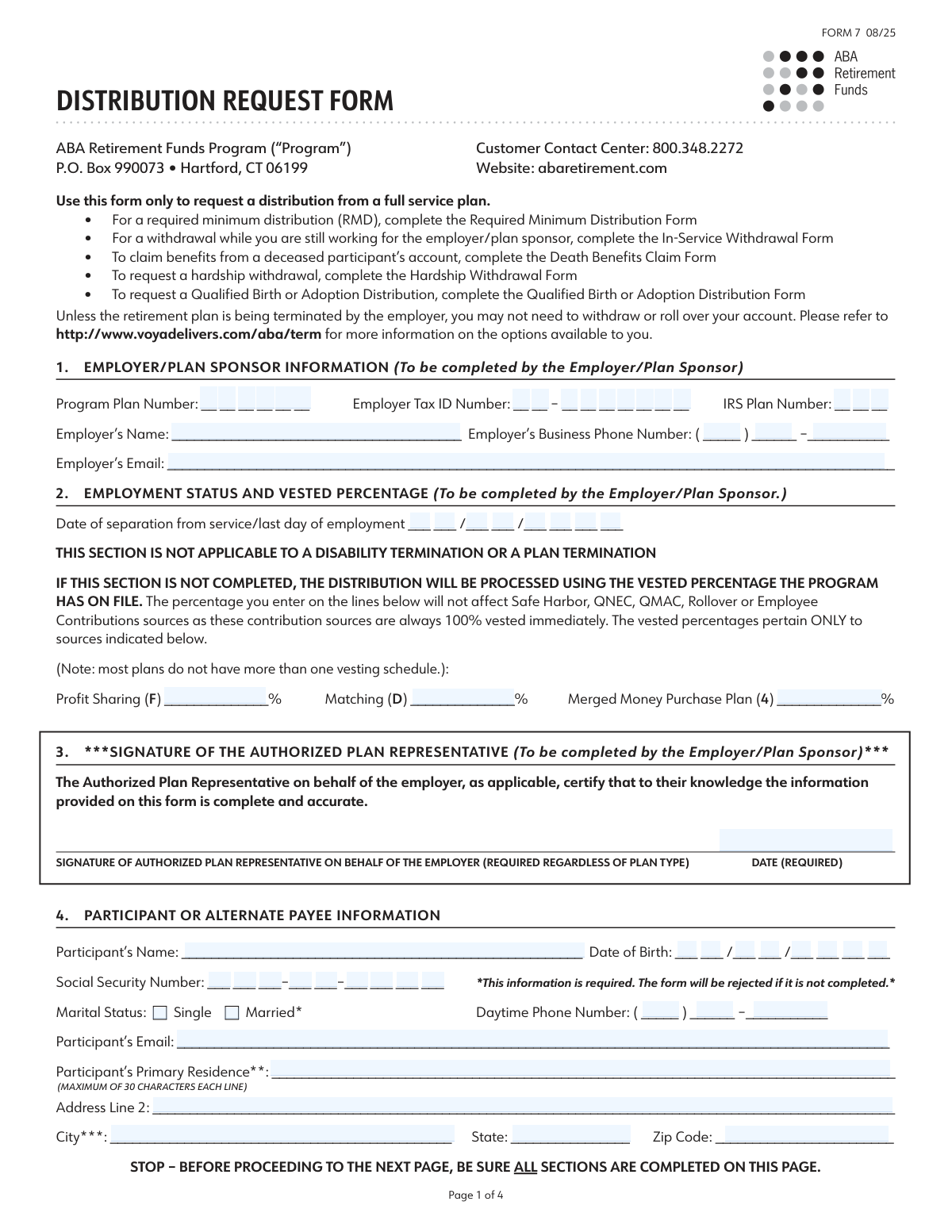
The ABA Retirement Funds Program Distribution Request Form is a crucial document for participants wishing to access their retirement savings from a full-service plan. It allows individuals to request a distribution due to termination of employment, disability, or plan termination, specifying how they want to receive their funds, such as a lump sum, partial payment, or direct rollover. Today, this form can be filled out quickly and accurately using AI-powered services like Instafill.ai, which can also convert non-fillable PDF versions into interactive fillable forms.
Our AI automatically handles information lookup, data retrieval, formatting, and form filling.
It takes less than a minute to fill out Form 7 using our AI form filling.
Securely upload your data. Information is encrypted in transit and deleted immediately after the form is filled out.

Form specifications

Form name: ABA Retirement Funds Program Distribution Request Form
Number of pages: 1
Language: English
Categories: retirement forms, ABA forms
main-image

Instafill Demo: How to fill out PDF forms in seconds with AI

How to Fill Out Form 7 Online for Free in 2026

Are you looking to fill out a FORM 7 form online quickly and accurately? Instafill.ai offers the #1 AI-powered PDF filling software of 2026, allowing you to complete your FORM 7 form in just 37 seconds or less.
Follow these steps to fill out your FORM 7 form online using Instafill.ai:
  1. 1 Navigate to Instafill.ai and upload or select the ABA Distribution Request Form.
  2. 2 Provide your personal details in Section 4, including your name, Social Security Number, date of birth, and contact information, letting the AI guide you through the fields.
  3. 3 Ensure your Employer/Plan Sponsor completes Sections 1, 2, and 3 with the necessary plan information, your employment status, vested percentage, and their authorized signature.
  4. 4 In Sections 5 and 6, select your reason for the distribution and specify the form of benefit you want, such as a full or partial payment, installments, or a rollover.
  5. 5 If you are choosing a direct rollover, complete Section 9 with the information for the receiving financial institution or IRA.
  6. 6 Sign and date the form in Section 10. If you are married and your plan requires it, have your spouse provide their consent and signature in Section 11, witnessed by a notary or plan representative.
  7. 7 Review the entire form for accuracy, then submit it to the ABA Retirement Funds Program via one of the approved methods listed on the form.

Our AI-powered system ensures each field is filled out correctly, reducing errors and saving you time.

Why Choose Instafill.ai for Your Fillable Form 7 Form?

Speed

Complete your Form 7 in as little as 37 seconds.

Up-to-Date

Always use the latest 2026 Form 7 form version.

Cost-effective

No need to hire expensive lawyers.

Accuracy

Our AI performs 10 compliance checks to ensure your form is error-free.

Security

Your personal information is protected with bank-level encryption.

Frequently Asked Questions About Form Form 7

This form is used to request a distribution, such as a withdrawal or rollover, from your ABA Retirement Funds Program account after you have retired, terminated employment, or become disabled.

Your employer or plan sponsor must complete Sections 1, 2, and 3. These sections cover plan details, your employment status, vested percentage, and require an authorized signature.

Your Social Security Number is required information in Section 4. The form will be rejected and your distribution request will be delayed if this information is not completed.

You can submit the form via mail, overnight delivery, or by emailing it to [email protected]. If you email the form, do not mail the original, as this could cause your transaction to be processed twice.

Yes, you must mail the form if spousal consent is required and the witness is a notary, as the original notary seal must be confirmed. Forms for death benefit claims must also be mailed.

Forms emailed by 1 p.m. Eastern time on a business day are considered received that day. Forms received after 1 p.m. will be considered received on the next business day.

Spousal consent in Section 11 may be required if you are married and your plan is not a profit-sharing plan. Consent is needed if you waive the standard annuity payment option.

If you have an outstanding loan, the amount may be offset from your distribution. This loan offset is treated as a taxable distribution and will be reported to the IRS.

Complete Section 9, 'Direct Rollover Instructions,' to have your funds sent directly to another financial institution. You must provide the name of the receiving IRA custodian or employer plan.

If your reason for request is disability, you must include the Notice of Disability from the Social Security Administration or your long-term disability plan along with this form.

Yes, for vested balances of $1,000 or less, your employer can select the 'Cash Out of Small Account' option in Section 6. This generally does not require your signature unless you choose a direct rollover.

Yes, services like Instafill.ai use AI to accurately identify and auto-fill form fields, which can save you time and help prevent common errors.

You can upload the PDF of the Distribution Request Form to the Instafill.ai platform. Its AI will make the document interactive, allowing you to type your information directly into the fields online.

Services like Instafill.ai can convert flat, non-fillable PDFs into interactive, fillable forms. This allows you to easily complete the form on your computer before printing it for necessary signatures.

Compliance Form 7
Validation Checks by Instafill.ai

1
Participant Signature Date Validity (180-Day Rule)
This check verifies that the participant's signature date in Section 10 is present and is not more than 180 days prior to the date the form is being processed. This is a regulatory requirement to ensure the participant's consent is recent and still valid. If the signature is stale, the form must be rejected and a new, currently dated form must be submitted.
2
Spousal Consent Requirement for Married Participants
This validation confirms that if a participant indicates they are 'Married' in Section 4 and the distribution is from a plan type requiring spousal consent (e.g., not a profit-sharing plan), Section 11 is completed. This is critical for protecting spousal rights to survivor benefits under federal law. A failure to provide spousal consent when required will result in the form being considered 'not in good order' and will delay processing until the consent is obtained.
3
Spouse and Witness Signature Date Consistency
This check ensures the date entered for the spouse's signature in Section 11 is identical to the date entered for the witness's signature. This confirms that the witness observed the spouse signing the consent on that specific day. A mismatch in dates can invalidate the witness attestation, causing the form to be rejected for legal and compliance reasons.
4
SSN Format and Completeness
This validation ensures the Social Security Number field in Section 4 is not empty and follows the standard XXX-XX-XXXX format. The SSN is a critical identifier for locating the correct participant account and for mandatory tax reporting to the IRS. An incomplete or malformed SSN will cause the form to be rejected immediately as the participant cannot be uniquely and correctly identified.
5
Reason for Request Selection Completeness
This check verifies that the participant has selected exactly one option in Section 5, 'Reason for Request'. This information is essential for determining eligibility for the distribution and for correct tax reporting. If no reason is selected, or multiple reasons are selected, the request is ambiguous and cannot be processed, leading to a delay.
6
Form of Benefit and Detail Consistency
This validation ensures that if a participant selects 'Partial Payment' or 'Installments' in Section 6, the necessary corresponding details (e.g., investment options and amounts, or installment frequency and payment amounts) are also filled out. Without these details, the system cannot determine how much money to distribute or on what schedule. Incomplete information will halt the processing of the request.
7
Installment Payment Minimums
This check validates that if a participant chooses to receive their distribution in a specific number of installment payments (Section 6), the number entered meets the plan's minimum requirements (e.g., minimum 36 for monthly, 12 for quarterly). This rule ensures the distribution complies with plan rules for periodic payments. A request for fewer than the minimum number of payments will be rejected.
8
Authorized Plan Representative Signature and Date
This validation confirms that the signature and date fields in Section 3, for the Authorized Plan Representative, are both completed. The employer's authorization is required to certify the participant's employment status and vesting information. Missing a signature or date means the employer has not officially approved the distribution, rendering the form incomplete and unprocessable.
9
Separation Date Logical Check
This check validates that the 'Date of separation from service' in Section 2 is a valid date that occurs on or before the date the form is signed by the participant and the plan representative. A future separation date is not valid for a current distribution request based on termination of employment. This logical error would cause the form to be flagged for correction.
10
Foreign Address and Citizenship Status
This validation ensures that if the participant's address in Section 4 is a foreign address, the subsequent question confirming U.S. citizenship status is answered. This information is crucial for determining the correct tax withholding rules, as different regulations apply to U.S. citizens abroad versus non-resident aliens. Failure to provide this will delay processing until the tax status can be clarified.
11
Disability Claim Documentation Check
This check flags submissions where the reason for request in Section 5 is 'I have become disabled'. The system should verify that the required supporting documentation, such as a Notice of Disability from the Social Security Administration, is attached to the submission. Without this proof, the eligibility for a disability-based distribution cannot be confirmed, and the request will be placed on hold.
12
Rollover Payee Information Completeness
This validation confirms that if a participant selects any direct rollover option in Section 9, the name of the receiving financial institution ('check payee name') is provided. The check must be made payable to the receiving institution for the rollover to be processed correctly. Omitting this information makes it impossible to issue the rollover check, thus halting the request.

Common Mistakes in Completing Form 7

Using the Incorrect Form for the Distribution Type

This form is exclusively for distributions from a full-service plan after employment termination. Applicants often mistakenly use it for other purposes like Required Minimum Distributions (RMDs), in-service withdrawals, or hardship requests, all of which require different, specific forms. This error leads to immediate rejection and requires the applicant to start the entire process over with the correct paperwork, causing significant delays. To avoid this, carefully read the instructions at the top of the form to ensure your situation matches its intended use.

Improper Submission Method (Email vs. Mail)

The form has very strict rules about how it can be submitted, and choosing the wrong method guarantees a rejection. For example, if spousal consent is notarized, the form must be physically mailed for the seal to be verified; emailing it is not allowed. Conversely, emailing a form and then mailing the original will cause the transaction to be processed twice. To prevent this, review the delivery instructions carefully and choose the single correct method based on your form's requirements, especially if a notary is involved.

Participant Completing Employer-Only Sections

Sections 1, 2, and 3 are explicitly marked to be completed by the Employer/Plan Sponsor, including plan numbers, vested percentages, and a required signature. Participants sometimes fill these sections out themselves, providing incorrect data or leaving the mandatory employer signature blank. This results in the form being considered 'not in good order' and rejected, as the plan administrator cannot process a distribution without official employer verification. Always submit the form to your authorized plan representative first to have them complete and sign their required sections.

Missing or Invalid Spousal Consent

For married participants in certain plan types (e.g., non-profit sharing plans), waiving the default annuity benefit requires spousal consent in Section 11. Common mistakes include forgetting the spouse's signature, having the signature witnessed by the participant instead of a notary or plan representative, or the witness date not matching the spouse's signature date. An incomplete or improperly witnessed consent section will lead to an automatic rejection of the request. This is a critical step that must be completed perfectly to proceed.

Ambiguous Partial Distribution or Installment Instructions

In Section 6, when requesting a partial or installment payment, applicants must be precise. People often provide ambiguous instructions, such as writing a number without specifying if it's a dollar amount ($) or a percentage (%), or selecting both a dollar amount and a number of payments for installments. While the form may default to a pro-rata distribution, any ambiguity can cause delays as the processor may need to seek clarification or reject the form. Ensure all payment instructions are clear, specific, and mutually exclusive.

Incomplete or Incorrect Rollover Instructions

When completing a direct rollover in Section 9, errors in the receiving institution's information are frequent. Applicants may provide an incomplete name, exceed the 30-character limit for the payee, or fail to select the correct destination account type (e.g., IRA vs. Roth IRA). These mistakes can lead to the rollover being rejected or, worse, processed incorrectly, creating unintended tax consequences for the participant. Double-check the receiving institution's name and rollover requirements before submitting.

Ignoring Personal Choice Retirement Account (PCRA) Instructions

Participants who have a PCRA must complete the specific actions outlined in Section 7, which involve either liquidating the account or arranging an electronic transfer. Many participants with these accounts overlook this section entirely. Failure to complete this section will halt the distribution process, as the funds in the PCRA cannot be moved until these explicit instructions are provided and acted upon. If you have a PCRA, this section is not optional.

Submitting a Stale-Dated Form

The participant and spousal signatures in Sections 10 and 11 are only valid for 180 days from the date they are signed. It is common for individuals to sign the form but delay submitting it to the plan administrator for various reasons. If the form is received after the 180-day window has passed, it is considered expired and will be rejected, requiring all parties to sign and date a new form. To avoid this, ensure the form is submitted promptly after all signatures are gathered.

Forgetting Required Supporting Documentation

Certain distribution reasons require additional proof. For instance, if selecting 'disability' as the reason for the request in Section 5, the applicant must include a Notice of Disability from the Social Security Administration or a long-term disability plan. Forgetting to attach this mandatory documentation will render the form 'not in good order' and suspend processing until the required proof is provided. Always check if your selected reason for distribution requires supplementary paperwork.

Incorrect Personal Information and Formatting

Simple data entry errors in Section 4, such as a mistyped Social Security Number, address, or date of birth, are a frequent cause of rejection. Since the address is used for mailing checks and determining tax withholding, an error can cause lost payments or tax complications. AI-powered tools like Instafill.ai can help prevent these mistakes by auto-filling information and validating data formats, ensuring accuracy. If the form is a non-fillable PDF, Instafill.ai can also convert it into an interactive, fillable version to reduce manual entry errors.
Saved over 80 hours a year

“I was never sure if my IRS forms like W-9 were filled correctly. Now, I can complete the forms accurately without any external help.”

Kevin Martin Green

Your data stays secure with advanced protection from Instafill and our subprocessors

Robust compliance program

Transparent business model

You’re not the product. You always know where your data is and what it is processed for.

ISO 27001, HIPAA, and GDPR

Our subprocesses adhere to multiple compliance standards, including but not limited to ISO 27001, HIPAA, and GDPR.

Security & privacy by design

We consider security and privacy from the initial design phase of any new service or functionality. It’s not an afterthought, it’s built-in, including support for two-factor authentication (2FA) to further protect your account.

Fill out Form 7 with Instafill.ai

Worried about filling PDFs wrong? Instafill securely fills aba-retirement-funds-program-distribution-request-form forms, ensuring each field is accurate.