Yes! You can use AI to fill out Bakery and Confectionery Pension Fund Pension Application

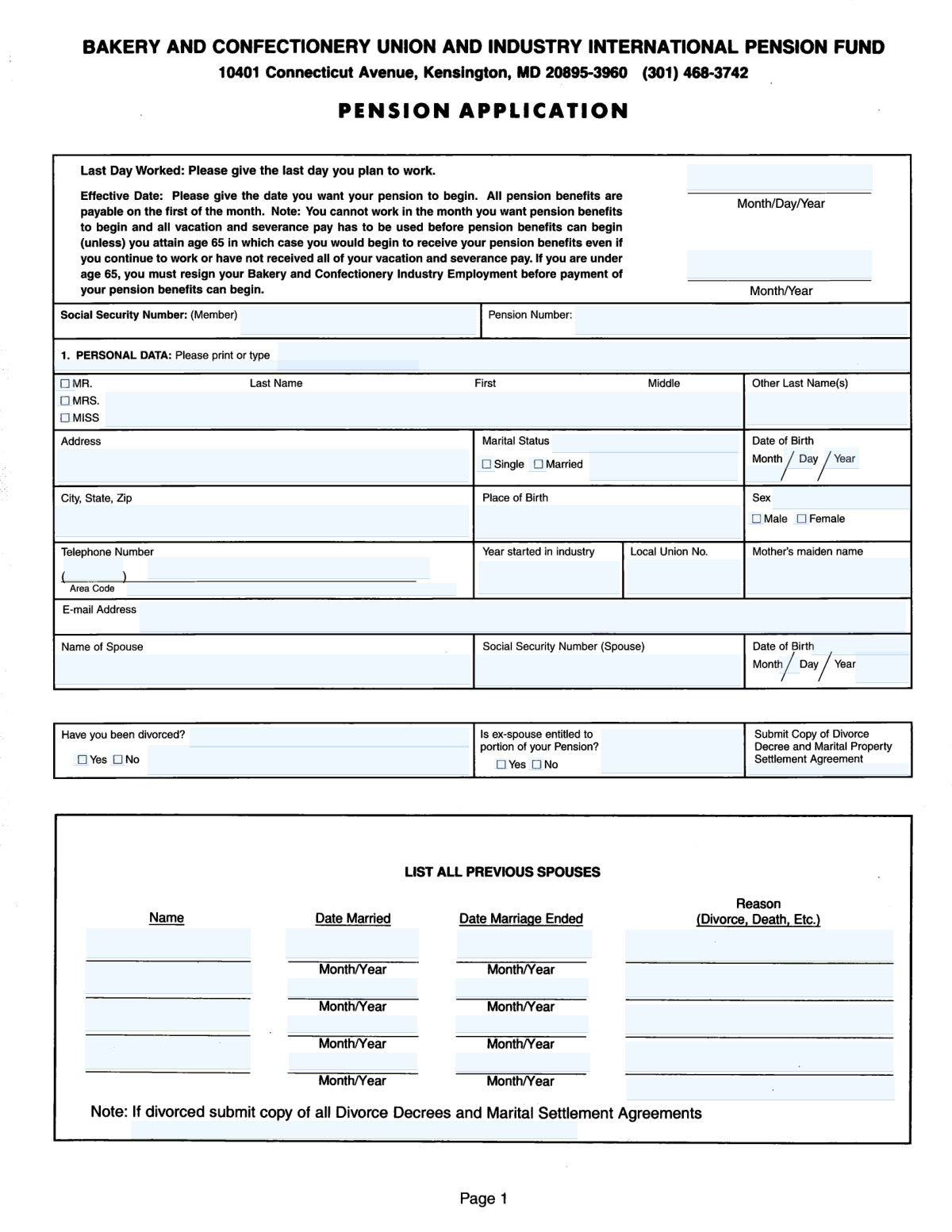
This form is the official application for members of the Bakery and Confectionery Pension Fund to claim their retirement or disability pension benefits. It requires comprehensive details about the applicant's identity, marital history (including current and previous spouses), and a thorough record of employment within the industry to correctly calculate service credits and benefit amounts. Today, this form can be filled out quickly and accurately using AI-powered services like Instafill.ai, which can also convert non-fillable PDF versions into interactive fillable forms.
Our AI automatically handles information lookup, data retrieval, formatting, and form filling.
It takes less than a minute to fill out B&C Pension Application using our AI form filling.
Securely upload your data. Information is encrypted in transit and deleted immediately after the form is filled out.

Form specifications

Form name: Bakery and Confectionery Pension Fund Pension Application
Number of pages: 4
Language: English
Categories: pension forms
main-image

Instafill Demo: How to fill out PDF forms in seconds with AI

How to Fill Out B&C Pension Application Online for Free in 2026

Are you looking to fill out a B&C PENSION APPLICATION form online quickly and accurately? Instafill.ai offers the #1 AI-powered PDF filling software of 2026, allowing you to complete your B&C PENSION APPLICATION form in just 37 seconds or less.
Follow these steps to fill out your B&C PENSION APPLICATION form online using Instafill.ai:
  1. 1 Navigate to Instafill.ai and upload or select the Bakery and Confectionery Pension Fund Application form.
  2. 2 Provide your personal information, including your full name, Social Security Number, date of birth, and contact details.
  3. 3 Complete the marital history section, providing details for your current spouse and any previous spouses as required.
  4. 4 Detail your employment history, listing your employers in the bakery and confectionery industry, dates of employment, and union affiliation.
  5. 5 If applying for a disability pension, complete the specific section with information about your disability, last day worked, and supporting documentation.
  6. 6 Review all the information pre-filled by the AI for accuracy, make any necessary corrections, and then sign and submit the application as instructed by the pension fund.

Our AI-powered system ensures each field is filled out correctly, reducing errors and saving you time.

Why Choose Instafill.ai for Your Fillable B&C Pension Application Form?

Speed

Complete your B&C Pension Application in as little as 37 seconds.

Up-to-Date

Always use the latest 2026 B&C Pension Application form version.

Cost-effective

No need to hire expensive lawyers.

Accuracy

Our AI performs 10 compliance checks to ensure your form is error-free.

Security

Your personal information is protected with bank-level encryption.

Frequently Asked Questions About Form B&C Pension Application

This form is an application for pension benefits from the Bakery and Confectionery Pension Fund. It is used to collect personal, marital, and employment information to process your retirement or disability pension.

This form should be completed by members of the Bakery and Confectionery Pension Fund who are ready to apply for their pension benefits. This includes applications for standard retirement as well as disability pensions.

You will need your Social Security Number, Pension Number, full employment history for at least your five most recent employers, and complete marital history. If you are married or have been divorced, you will also need information for your current and/or previous spouses.

If you are currently married, you must provide your spouse's full name, Social Security Number, and date of birth in the 'Marital Status and Spouse Info' section.

If you have been divorced, you must provide details about the divorce and indicate if an ex-spouse is entitled to a portion of your pension. You may be required to submit copies of your divorce decree and marital property settlement agreement.

Information about previous spouses, including marriage dates and how the marriage ended, is necessary to determine any potential survivor benefits or obligations required by law, such as those outlined in a divorce decree.

Provide the most accurate month and year you can recall for your employment history. It is better to provide a close estimate than to leave the fields blank, as this information is crucial for calculating your pension credits.

To apply for a disability pension, you must check the box indicating you want to apply and complete the specific disability sections. You will need to provide the date you became disabled, your last day worked, and details about your disability.

The 'Pension Effective Date' is the date you want your pension payments to officially begin. This date must be after your last day of paid employment.

This refers to a legal requirement, typically from a divorce settlement or Qualified Domestic Relations Order (QDRO), that designates a portion of your pension benefits to be paid to your ex-spouse. You must disclose this and provide details if it applies to you.

The form fields do not specify a submission address or method. Please refer to the official instructions that came with the form or contact the Bakery and Confectionery Pension Fund directly for submission details.

Yes, services like Instafill.ai use AI to accurately auto-fill form fields from your saved profile. This can save you significant time and help reduce errors on complex forms like this one.

Simply upload the form to the Instafill.ai platform, and its AI will identify the fields and populate them with your secure information. You can then review, edit, and finalize the form directly on the site before downloading or printing.

If your PDF is not interactive, you can use a service like Instafill.ai to convert it into a fillable form online. This allows you to easily type your answers into the fields instead of having to print the form and complete it by hand.

Compliance B&C Pension Application
Validation Checks by Instafill.ai

1
Validates Social Security Number Format
This check ensures that the 'Social Security Number (Member)' and 'Spouse Social Security Number' fields contain a valid 9-digit number, optionally formatted with dashes (XXX-XX-XXXX). This is critical for uniquely identifying the member and spouse for legal and financial processing. If the format is incorrect, the system cannot process the application, leading to delays and rejection.
2
Ensures Conditional Spouse Information is Complete
This validation verifies that if 'Marital Status - Married' is checked, then the 'Name of Spouse', 'Spouse Social Security Number', and 'Spouse Date of Birth' fields are all filled out. This information is essential for determining survivor benefits and other spousal entitlements. A failure in this check would result in an incomplete application for a married individual, requiring manual follow-up.
3
Verifies Pension Effective Date Chronology
This check confirms that the 'Pension Effective Date' is on or after the 'Last Day Worked'. A person cannot logically begin receiving pension benefits before they have officially stopped working. This validation prevents data entry errors that could lead to incorrect benefit calculations and payment scheduling.
4
Checks for Logical Previous Marriage Dates
For each 'Previous Spouse' row, this validation ensures that the 'Date Marriage Ended' is after the 'Date Married'. This maintains the chronological integrity of the member's marital history, which is crucial for legal and benefit entitlement reviews. An illogical date sequence would indicate a data error and require correction before the record can be considered valid.
5
Validates Minimum Age for Industry Start
This check compares the member's 'Date of Birth' with the 'Year Started in Industry' to ensure the member was of a plausible working age (e.g., at least 14 years old) when they began working. This acts as a sanity check to catch significant typos or data entry errors in either date field. An impossible age would flag the record for manual review.
6
Ensures Valid Email Address Format
This validation inspects the 'E-mail Address' field to confirm it follows a standard email format (e.g., '[email protected]'). A valid email is a primary method for communication regarding the application status and pension fund updates. If the email is invalid, the fund loses a critical contact channel, potentially delaying important notifications.
7
Verifies Completeness of Multi-Part Telephone Number
This check ensures that if any part of the phone number ('Telephone Area Code', 'Telephone Number (prefix)', 'Telephone Number (exchange and line)') is filled, all three parts are present and contain numeric data. The complete 10-digit number is required for successful communication. An incomplete number is unusable and would prevent the pension fund from contacting the member by phone.
8
Enforces Mutually Exclusive Marital Status Selection
This validation ensures that a user cannot select both 'Marital Status - Single' and 'Marital Status - Married' simultaneously. These statuses are mutually exclusive, and selecting both creates an ambiguous and invalid record. The check enforces data integrity at the point of entry, preventing downstream processing errors.
9
Ensures Conditional Divorce Information is Provided
This check verifies that if 'Have you been divorced? - Yes' is selected, then related fields like 'Divorce details (explanation)' and 'Ex‑spouse entitlement details' are filled. This information is legally required to determine if a portion of the pension is owed to an ex-spouse per a divorce decree. Failure to provide these details when divorced will halt the application pending legal review.
10
Validates Completeness of Previous Spouse Records
This validation ensures that if a name is entered for any 'Previous Spouse' row (e.g., 'Previous Spouse 2 - Name'), then the corresponding 'Date Married', 'Date Marriage Ended', and 'Reason Marriage Ended' fields for that same row are also completed. This prevents incomplete or orphaned data entries in the marital history section. An incomplete record for a previous spouse is unusable for legal or benefit verification.
11
Checks for Logical Military Service Dates
This validation confirms that the 'Date Discharged from Military Service' occurs after the 'Date Entered Military Service'. This ensures the time period for which the member is claiming additional pension credit is chronologically valid. An invalid date range would render the claim for military service credit void until corrected.
12
Verifies Consistency Between Salutation and Sex
This check cross-references the selected salutation ('MR.', 'MRS.', 'MISS') with the selected 'Sex' ('Male', 'Female'). For instance, if 'MR.' is checked, the 'Sex' field should be 'Male'. This helps catch simple user errors and ensures the data presented on official documents is consistent and professional.
13
Validates Employment Date Sequence
For each of the employment history entries (e.g., 'Second Most Recent Employment'), this check ensures the 'Employment End Date' is after the 'Employment Start Date'. This logic is fundamental for accurately calculating work history and pension credits. An inverted date range would indicate a data entry error that must be fixed to correctly process the employment history.
14
Ensures Conditional Disability Fields are Complete
This validation checks that if the 'Apply for Disability Pension (indicator)' is marked 'Yes' or checked, then the 'Date First Became Disabled' and 'Last Day Worked (Disability Pension Application)' fields are mandatory. These dates are the basis for a disability claim and are essential for determining eligibility and the benefit calculation period. Missing this information would make it impossible to process the disability application.

Common Mistakes in Completing B&C Pension Application

Incomplete or Inconsistent Marital History

The form requires detailed information for a current spouse and up to four previous spouses, including names and specific marriage start/end dates. Applicants often fail to list all previous spouses or provide incomplete dates, especially for marriages that ended long ago. This missing information can delay the application process, as it is crucial for determining survivor benefits and verifying legal marital status. To avoid this, gather all relevant documents like marriage certificates and divorce decrees before starting the form.

Ignoring Conditional Logic for Dependent Sections

This form contains several sections (Spouse Info, Divorce Details, Disability Application) that should only be completed if a specific condition is met, such as checking 'Married' or 'Yes' to 'Have you been divorced?'. A common error is either checking the box and then failing to fill out the required dependent fields, or ignoring the section entirely. This results in an incomplete application that requires follow-up. AI-powered tools like Instafill.ai can help by automatically showing or hiding relevant sections based on your answers, ensuring you complete all necessary fields.

Failing to Detail Ex-Spouse Pension Entitlements

When an applicant indicates they are divorced and an ex-spouse is entitled to a portion of the pension, they often fail to provide the specific details in the 'Ex‑spouse entitlement details' field. Simply checking 'Yes' is not enough; the fund needs the exact percentage, dollar amount, or a reference to the court order (QDRO). Omitting these legal details will halt the pension calculation and require submission of additional legal documents, causing significant delays.

Incorrect or Incomplete Social Security Number

Entering an incorrect or incomplete Social Security Number for the member or their spouse is a frequent and critical error. This often happens due to simple typos or transposing digits. Since the SSN is the primary identifier for tracking earnings and verifying identity, any mistake will lead to processing failures and delays until the correct number is provided. Double-check the number against your Social Security card before submitting, or use a tool that can validate the format.

Missing Key Employer Information

The employment history section requires not just company names and dates, but also full addresses, local union numbers, and whether the company is still in business. Applicants frequently leave these details blank, especially for jobs held many years ago. This information is vital for the pension fund to verify your work history and calculate service credits accurately. Missing data forces the fund to conduct time-consuming research, delaying your application's approval.

Confusing 'Last Day Worked' with 'Pension Effective Date'

Applicants often misunderstand the distinction between the 'Last Day Worked' and the 'Pension Effective Date' and may enter the same date for both. The 'Last Day Worked' is your final day of employment, while the 'Pension Effective Date' is the first day you wish to receive benefits, which is typically the first day of the following month. This confusion can lead to an incorrect benefit start date and potential financial complications. Carefully read the field descriptions to ensure you enter the correct date for each.

Using Nicknames or Informal Names

In fields like 'Last / First / Middle', applicants sometimes enter a nickname or a shortened version of their name instead of their full legal name. Pension and government forms require the full legal name as it appears on official documents like your Social Security card and birth certificate for identity verification. Using an informal name can create a mismatch in the system and delay the verification of your identity and records.

Forgetting to List All Previous Last Names

The 'Other Last Name(s)' field is critical but often overlooked by applicants who have changed their name due to marriage or other reasons. Failing to list a maiden name or a name from a previous marriage hinders the pension fund's ability to verify your complete work history, as some records may be filed under a previous name. To ensure all service credits are counted, list every last name you have ever used for employment.

Fragmented Telephone Number Entry

The form splits the telephone number into three separate fields: 'Telephone Area Code', 'prefix', and 'exchange and line'. Users are accustomed to entering a full 10-digit number and may mistakenly put the entire number in the first box or mix up the parts. This can result in an invalid contact number, making it difficult for the pension fund to contact you with questions. Pay close attention to how the form requests the number be broken down.

Incomplete Disability Application Details

Applicants who wish to apply for a disability pension may check the corresponding box but then fail to complete the associated required fields, such as 'Date First Became Disabled' and 'Last Day Worked'. These dates are essential for determining eligibility and the benefit calculation period. An incomplete disability section renders that part of the application void and requires significant follow-up. If the form is a non-fillable PDF, a tool like Instafill.ai can convert it to a smart, fillable version that helps guide you through these conditional sections.
Saved over 80 hours a year

“I was never sure if my IRS forms like W-9 were filled correctly. Now, I can complete the forms accurately without any external help.”

Kevin Martin Green

Your data stays secure with advanced protection from Instafill and our subprocessors

Robust compliance program

Transparent business model

You’re not the product. You always know where your data is and what it is processed for.

ISO 27001, HIPAA, and GDPR

Our subprocesses adhere to multiple compliance standards, including but not limited to ISO 27001, HIPAA, and GDPR.

Security & privacy by design

We consider security and privacy from the initial design phase of any new service or functionality. It’s not an afterthought, it’s built-in, including support for two-factor authentication (2FA) to further protect your account.

Fill out B&C Pension Application with Instafill.ai

Worried about filling PDFs wrong? Instafill securely fills bakery-and-confectionery-pension-fund-pension-application forms, ensuring each field is accurate.