Yes! You can use AI to fill out VA Form 21-0966, Intent to File a Claim for Compensation and/or Pension, or Survivors Pension and/or DIC
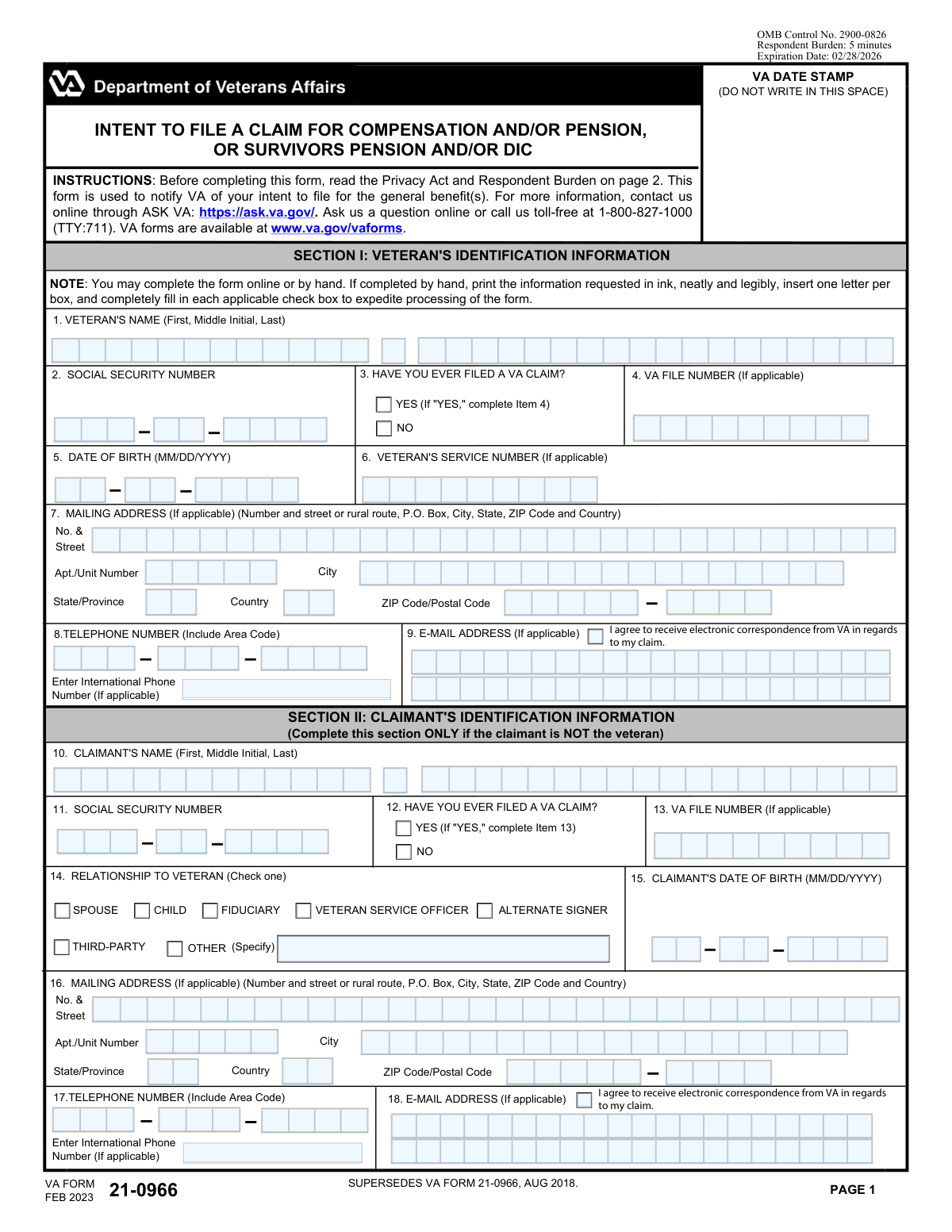
VA Form 21-0966, Intent to File a Claim, is a critical document used by veterans and their survivors to inform the Department of Veterans Affairs (VA) that they plan to file for benefits like compensation, pension, or DIC. Submitting this form establishes a potential effective date for benefits, which means if the subsequent claim is approved, payments may be backdated to the date the VA received this form. Today, this form can be filled out quickly and accurately using AI-powered services like Instafill.ai, which can also convert non-fillable PDF versions into interactive fillable forms.
VA Form 21-0966 is part of the
pension claim forms, pension forms and VA claim forms categories on Instafill.
Our AI automatically handles information lookup, data retrieval, formatting, and form filling.
It takes less than a minute to fill out VA Form 21-0966 using our AI form filling.
Securely upload your data. Information is encrypted in transit and deleted immediately after the form is filled out.
Form specifications
| Form name: | VA Form 21-0966, Intent to File a Claim for Compensation and/or Pension, or Survivors Pension and/or DIC |
| Number of fields: | 69 |
| Number of pages: | 2 |
| Filled form examples: | Form VA Form 21-0966 Examples |
| Language: | English |
More forms in Pension claim forms
Instafill Demo: How to fill out PDF forms in seconds with AI
How to Fill Out VA Form 21-0966 Online for Free in 2026
Are you looking to fill out a VA FORM 21-0966 form online quickly and accurately? Instafill.ai offers the #1 AI-powered PDF filling software of 2026, allowing you to complete your VA FORM 21-0966 form in just 37 seconds or less.
Follow these steps to fill out your VA FORM 21-0966 form online using Instafill.ai:
- 1 Navigate to Instafill.ai and upload your VA Form 21-0966 or select it from the platform's template library.
- 2 Provide the veteran's identifying information in Section I, including their full name, Social Security Number, date of birth, and service number.
- 3 If you are not the veteran, complete Section II with your information as the claimant, including your name, SSN, date of birth, and relationship to the veteran.
- 4 In Section III, check the box for the specific benefit you intend to file for, such as Compensation, Pension, or Survivors Pension/DIC.
- 5 Enter the current contact information, including mailing address, phone number, and email address, for both the veteran and the claimant (if applicable).
- 6 Carefully review all entered information for accuracy, then digitally sign and date the form in Section IV to declare your intent.
- 7 Download the completed and signed form to your device for submission to the VA via mail or their official online portal.
Our AI-powered system ensures each field is filled out correctly, reducing errors and saving you time.
Why Choose Instafill.ai for Your Fillable VA Form 21-0966 Form?
Speed
Complete your VA Form 21-0966 in as little as 37 seconds.
Up-to-Date
Always use the latest 2026 VA Form 21-0966 form version.
Cost-effective
No need to hire expensive lawyers.
Accuracy
Our AI performs 10 compliance checks to ensure your form is error-free.
Security
Your personal information is protected with bank-level encryption.
Frequently Asked Questions About Form VA Form 21-0966
This form is used to declare your intent to file a claim for VA benefits, such as compensation, pension, or survivor benefits. Submitting it establishes a potential effective date for your benefits, which can protect you from losing benefits while you gather all the necessary evidence.
This form should be completed by a veteran intending to file for benefits, or by a claimant such as a surviving spouse, child, or an authorized representative acting on the veteran's behalf.
The 'Veteran' section is for the service member's information. The 'Claimant' section is for the person filing the claim; if you are the veteran filing for yourself, you will fill out both sections with your information.
Yes, if you are the veteran filing the claim, you are also the claimant. You should complete the veteran's information section and also the claimant's information section with your details.
The VA File Number is only required if you have previously filed a claim and been assigned one. If you have never filed a claim before or do not have a file number, you can leave this field blank.
Select 'COMPENSATION' for disability benefits related to service-connected conditions. Choose 'PENSION' for a needs-based benefit for wartime veterans with limited income. Select 'SURVIVORS PENSION AND/OR DIC' only if you are a surviving dependent filing for benefits.
Providing an email is optional, but it is required if you wish to receive electronic correspondence from the VA about your claim. Checking the consent box allows the VA to communicate with you via email, which can be faster than traditional mail.
After the VA receives your intent to file, you generally have one year to complete and submit the full application for benefits. Submitting this form reserves your effective date, so it's important to follow up with the complete application within the timeframe.
Your Social Security Number is your unique 9-digit identifier from the Social Security Administration. Your VA File Number is assigned by the Department of Veterans Affairs for your claims and records; for many veterans, this is now the same as their SSN.
Yes, services like Instafill.ai use AI to accurately auto-fill form fields from your profile, which can save you significant time and help prevent errors.
Simply upload the form to the Instafill.ai platform. The AI will identify the fields, and you can use your saved profile information to populate your personal details with a single click.
If you have a non-fillable or 'flat' PDF, you can upload it to Instafill.ai. The service can convert it into an interactive, fillable form that you can easily complete and sign online.
Compliance VA Form 21-0966
Validation Checks by Instafill.ai
1
Veteran's Social Security Number Integrity
This check validates that all three parts of the veteran's Social Security Number are provided and are numeric. It ensures Part 1 is 3 digits, Part 2 is 2 digits, and Part 3 is 4 digits. This is crucial for correctly identifying the veteran in federal systems and preventing data entry errors that could delay or misdirect benefits.
2
Veteran's Date of Birth Logical Validity
Validates that the entered Birth Month, Day, and Year combine to form a legitimate calendar date (e.g., not 02/30/1980). It also ensures the date is in the past and represents a reasonable age for a veteran. This prevents impossible dates from being entered and ensures data accuracy for eligibility and identity verification.
3
Conditional VA File Number Requirement
This check ensures that if the user selects 'Yes — I have filed a VA claim', the 'VA File Number' field is not left blank. This is important for linking the new submission to the veteran's existing records, ensuring continuity and preventing duplicate files. If the condition is met and the field is empty, the user will be prompted to provide the file number.
4
Email Address Requirement for Electronic Correspondence
This validation confirms that if the 'Agree to receive electronic correspondence from VA' box is checked, the 'Email Address' field is filled out with a validly formatted email address. This prevents a situation where consent is given but there is no address to send correspondence to. If consent is checked but the email is missing or invalid, the submission will be blocked.
5
Email Address Confirmation Match
Verifies that the value entered in the 'Email Address' field is identical to the value entered in the 'Confirm Email Address' field. This check is critical to prevent typos in the email address, which would lead to the veteran or claimant not receiving important communications. If the two fields do not match, an error is displayed, forcing the user to correct the entry.
6
Exclusive Phone Number Entry Logic
This check ensures that the user provides either a domestic phone number (Area Code, Prefix, Line) or an 'International Phone Number', but not both simultaneously for the same person. This prevents data ambiguity and ensures the correct contact method is stored. If data is entered into both international and domestic fields, the system will prompt the user to choose one and clear the other.
7
Conditional 'Other' Relationship Specification
This rule validates that if the 'OTHER (Specify)' checkbox is selected in the 'Relationship to Veteran' section, the corresponding text field 'Relationship - Other (specify)' is not empty. This ensures that the specific relationship is captured when it doesn't fit standard categories, which is vital for understanding the claimant's standing. If 'OTHER' is checked and the text field is blank, an error will prompt the user to provide the details.
8
Signature Date Logical Validity
This check validates that the 'Date Signed' (Month, Day, Year) is a valid calendar date that is not in the future. This is a legal requirement to confirm when the declaration was made and to prevent fraudulent or invalid submissions. A future or impossible date will result in a validation error requiring correction.
9
Benefit Selection Consistency with Claimant Relationship
This validation ensures the type of benefit selected is consistent with the claimant's relationship to the veteran. For example, if the claimant is a 'SPOUSE' or 'CHILD', they should select 'SURVIVORS PENSION AND/OR DIC', not general 'COMPENSATION'. This logic prevents incorrect benefit applications from being submitted, saving time for both the claimant and the VA.
10
Mailing Address Core Fields Completeness
Verifies that the essential components of the mailing address—specifically 'Street Address', 'City', 'State/Province', 'Country', and 'ZIP/Postal Code'—are all provided. A complete and accurate mailing address is critical for sending physical correspondence and important documents. If any of these core fields are missing, the form cannot be submitted.
11
ZIP Code Format Validation
This validation checks that the 'ZIP/Postal Code' is in a valid format, such as 5 digits for a standard US ZIP code. It also validates that the optional 'ZIP+4 / Postal Extension' field, if filled, contains exactly 4 digits. Correctly formatted postal codes are essential for efficient mail sorting and delivery.
12
Claimant Information Completeness for Non-Veterans
This validation checks if a 'Relationship to Veteran' is selected, indicating the claimant is not the veteran. If so, it ensures that the claimant's own name, SSN, and date of birth fields are fully completed. This is essential for identifying who is filing the claim on behalf of the veteran and verifying their identity.
13
Mutually Exclusive Prior Claim Status Selection
This check ensures that the user selects either 'Yes — I have filed a VA claim' or 'No — I have not filed a VA claim', but not both. It also ensures that one of them is selected. This prevents contradictory or ambiguous data entry that would require manual clarification and ensures a key processing question is answered.
14
Veteran's Name Completeness
This check ensures that both the 'Veteran's First Name' and 'Veteran's Last Name' fields are filled out. These fields are fundamental for identifying the individual and are required for all subsequent processing and record-keeping. A submission with a missing first or last name will be rejected until the information is provided.
Common Mistakes in Completing VA Form 21-0966
The form has separate sections for the veteran's and the claimant's personal information (e.g., Name, SSN). A common mistake, especially when the claimant is not the veteran, is to enter their own information in the veteran's section or vice-versa. This leads to critical identity mismatches, causing claim rejection or significant processing delays. To avoid this, carefully read the label for each section and double-check that you are entering the correct person's information in the corresponding fields.
Many fields are conditional, meaning they only need to be filled out if you answer 'Yes' to a preceding question (e.g., 'Have You Ever Filed a VA Claim?'). People often check 'Yes' but then forget to provide the required follow-up information, such as the VA File Number. This omission creates an incomplete application that cannot be processed without follow-up, delaying the claim. Always review your answers and ensure you have completed all required fields based on your responses.
The form requires specific formats for dates and numbers, such as two digits for the birth month (MM) and day (DD). A frequent error is entering a single digit (e.g., '5' instead of '05'), which can be rejected by automated systems. This happens due to rushing or overlooking the instructions. To prevent this, pay close attention to format examples like '(MM/DD/YYYY)' and ensure all single-digit months and days are preceded by a zero.
The form asks for multiple unique identifiers: Social Security Number, VA File Number, and Veteran's Service Number. Applicants often confuse these numbers, entering one in the field intended for another. This error can lead to a failure to locate the correct records, causing the claim to be delayed or denied. Carefully read each field's label and description to ensure you are providing the correct number, and leave a field blank if it is not applicable to you.
The mailing address is broken into multiple fields (Street, Apt/Unit, City, ZIP, ZIP+4). A common mistake is to combine information, such as putting the apartment number on the same line as the street address or entering the full nine-digit ZIP code in the primary five-digit ZIP field. This can lead to mail being returned as undeliverable, causing you to miss important correspondence. Use the dedicated fields for each piece of your address to ensure accuracy.
Typos in the email address are very common and are often repeated in the 'Confirm Email' field, rendering them useless for verification. This error means you will not receive critical electronic updates about your claim. Another mistake is checking the box to 'Agree to receive electronic correspondence' but forgetting to enter an email address, or vice-versa. To avoid this, slowly type your email and double-check it character by character before confirming. Ensure you provide both the email and consent if you wish to receive electronic notices.
When a claimant's relationship to the veteran is not one of the standard options, they must check the 'OTHER' box and write in the specific relationship. A frequent oversight is checking the box but leaving the specification field blank. This leaves the relationship ambiguous and requires the VA to contact the applicant for clarification, delaying the process. If you select 'OTHER', always provide a clear, concise description in the space provided.
Fields like the Social Security Number and Telephone Number are broken into multiple smaller boxes (e.g., Area Code, Prefix, Line Number). People sometimes try to enter the entire number into the first box, or they misalign the parts, putting the area code in the prefix box, for example. This scrambles the data and makes it unusable. To prevent this, enter only the digits requested for each specific box, following the form's structure precisely. AI-powered form-filling tools like Instafill.ai can help by automatically parsing and placing data into the correct fragmented fields.
The form requires the applicant to select the benefit they are applying for, such as 'COMPENSATION' or 'PENSION'. These are distinct VA programs with different eligibility requirements, but applicants who are unfamiliar with the terminology may select the wrong one or check multiple boxes incorrectly. This can lead to the application being processed for a benefit the person is not eligible for, resulting in denial and lost time. It is crucial to understand the difference between these benefits before filling out the form.
Forgetting to sign the form is one of the most common and critical errors, as an unsigned application is legally invalid and will be immediately rejected. Another mistake is entering the wrong date, such as using a date of birth instead of the current date. If the form is a non-fillable PDF, finding the signature line can be difficult. Always perform a final review to ensure the signature and correct current date are present in the declaration section. Tools like Instafill.ai can convert flat PDFs into fillable forms, making it easier to locate and complete all fields, including digital signatures.
Saved over 80 hours a year
“I was never sure if my IRS forms like W-9 were filled correctly. Now, I can complete the forms accurately without any external help.”
Kevin Martin Green
Your data stays secure with advanced protection from Instafill and our subprocessors

Robust compliance program
Transparent business model
You’re not the product. You always know where your data is and what it is processed for.
ISO 27001, HIPAA, and GDPR
Our subprocesses adhere to multiple compliance standards, including but not limited to ISO 27001, HIPAA, and GDPR.
Security & privacy by design
We consider security and privacy from the initial design phase of any new service or functionality. It’s not an afterthought, it’s built-in, including support for two-factor authentication (2FA) to further protect your account.
Fill out VA Form 21-0966 with Instafill.ai
Worried about filling PDFs wrong? Instafill securely fills va-form-21-0966-intent-to-file-a-claim-for-compensation-andor-pension-or-survivors-pension-andor-dic forms, ensuring each field is accurate.



