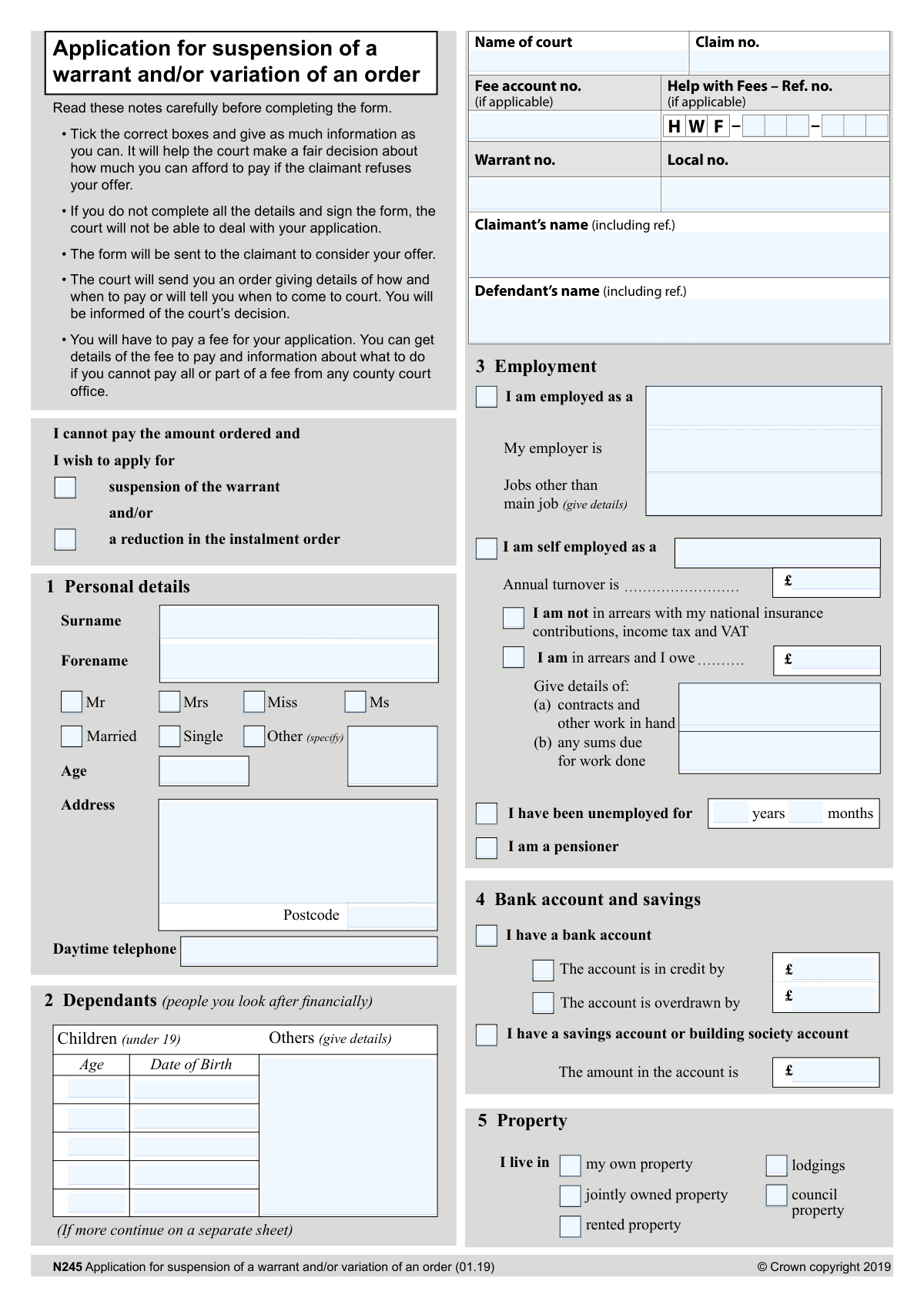
Yes! You can use AI to fill out Form N245, Application for suspension of a warrant and/or variation of an order

Form N245 is a legal document used in the UK to apply to a court to either suspend an enforcement warrant or vary the terms of a payment order. It is crucial for individuals who find themselves unable to meet the financial obligations set by a court judgment, allowing them to present their financial situation and propose a new, affordable payment plan. Today, this form can be filled out quickly and accurately using AI-powered services like Instafill.ai, which can also convert non-fillable PDF versions into interactive fillable forms.
Our AI automatically handles information lookup, data retrieval, formatting, and form filling.
It takes less than a minute to fill out N245 using our AI form filling.
Securely upload your data. Information is encrypted in transit and deleted immediately after the form is filled out.

Form specifications

Form name: Form N245, Application for suspension of a warrant and/or variation of an order
Number of pages: 2
Language: English
main-image

Instafill Demo: How to fill out PDF forms in seconds with AI

How to Fill Out N245 Online for Free in 2026

Are you looking to fill out a N245 form online quickly and accurately? Instafill.ai offers the #1 AI-powered PDF filling software of 2026, allowing you to complete your N245 form in just 37 seconds or less.
Follow these steps to fill out your N245 form online using Instafill.ai:
  1. 1 Navigate to Instafill.ai and upload or select Form N245.
  2. 2 Enter the court and case details, including the claim number, warrant number, and the names of the claimant and defendant.
  3. 3 Provide your personal information, such as your name, address, age, and details about any dependents you support financially.
  4. 4 Complete the detailed financial statement sections, listing all sources of income (employment, benefits, pensions) and all regular expenses (rent/mortgage, utilities, food, travel).
  5. 5 List all your debts, including priority debts like rent or council tax arrears, other court orders, and credit debts like loans or credit cards.
  6. 6 Calculate and propose a new affordable monthly payment offer based on your income and expenditure.
  7. 7 Carefully review all the information you've provided, sign the declaration, and submit the completed form to the correct court.

Our AI-powered system ensures each field is filled out correctly, reducing errors and saving you time.

Why Choose Instafill.ai for Your Fillable N245 Form?

Speed

Complete your N245 in as little as 37 seconds.

Up-to-Date

Always use the latest 2026 N245 form version.

Cost-effective

No need to hire expensive lawyers.

Accuracy

Our AI performs 10 compliance checks to ensure your form is error-free.

Security

Your personal information is protected with bank-level encryption.

Frequently Asked Questions About Form N245

This form is used to ask a court to either suspend a warrant of control or reduce your court-ordered payment instalments because you cannot afford the current amount.

You should fill out this form if you are a defendant in a court case, have been ordered to pay money, and your financial circumstances have changed, making it difficult to meet the payment terms.

Suspending a warrant temporarily stops bailiffs from taking action to collect the debt. Varying an order means you are asking the court to change the terms, such as lowering the amount you have to pay in each instalment.

You will need detailed information about your finances, including your income from all sources, regular household expenses, and details of all your debts, such as other court orders, loans, and any arrears.

To calculate a realistic offer, subtract your total expenses (section 7) and debt payments (sections 8, 9, and 10) from your total income (section 6). The remaining amount is a good starting point for what you can afford to pay each month.

Priority debts are urgent arrears that can have serious consequences if not paid, such as rent, mortgage, council tax, and fuel arrears. These should be listed separately from your regular monthly bills.

If you do not complete all the required details and sign the declaration, the court will not be able to process your application. It is crucial to provide as much information as possible to support your request.

Yes, there is a fee for this application. You can find out the current fee amount from any county court office, which can also provide information on fee assistance if you have a low income.

You must return your completed and signed form to the court that originally issued the order or warrant you are applying to change.

The court will send your application to the claimant for their consideration. The court will then either send you a new order with updated payment details or notify you of a date to attend a court hearing.

Yes, services like Instafill.ai use AI to help you accurately auto-fill form fields with your saved information, which can save you significant time and help avoid errors.

You can use a service like Instafill.ai to upload the N245 PDF. Their platform allows you to fill in all the required fields online, after which you can download or print the completed form for submission.

If you have a non-fillable or 'flat' PDF, you can use a tool like Instafill.ai. It can convert the document into an interactive, fillable form that you can easily complete on your computer.

Compliance N245
Validation Checks by Instafill.ai

1
Ensures Application Purpose is Selected
This check validates that the applicant has selected at least one of the two primary application reasons: 'suspension of the warrant' or 'a reduction in the instalment order'. This is a fundamental requirement for the court to understand the applicant's request. If neither box is checked, the application's purpose is unknown and it cannot be processed.
2
Validates Consistency between Child's Age and Date of Birth
This check calculates the age based on the 'Date of Birth' provided for a child dependant and verifies it matches the 'Age' entered in the same row. This ensures data accuracy and prevents simple entry errors that could affect the assessment of financial dependency. A mismatch would require the applicant to correct the information before the form can be accepted.
3
Enforces Mutually Exclusive Employment Status
This validation ensures that the applicant selects only one primary status from 'I am employed', 'I am self employed', 'I have been unemployed for', and 'I am a pensioner'. These categories are mutually exclusive, and selecting more than one creates a logical contradiction about the applicant's main source of income. The form must be rejected for clarification if multiple statuses are chosen.
4
Requires Employment Details if 'Employed' Status is Selected
This check validates that if the 'I am employed' box is checked, the 'Employed as' (job title) and 'My employer is' (employer name) fields are also filled out. This information is crucial for verifying the applicant's income and employment claims. An application with a declared employment status but missing details is incomplete and cannot be properly assessed.
5
Enforces Mutually Exclusive Bank Account Status
This check ensures that in Section 4, an applicant cannot state their bank account is both 'in credit' and 'overdrawn' simultaneously. These two states are logically impossible for a single balance. Selecting both indicates a user error and makes the financial statement for the bank account nonsensical, requiring correction before the application can be processed.
6
Cross-Validates Property Status with Housing Expenses
This check ensures logical consistency between the property status in Section 5 and the housing expenses in Section 7. If the applicant selects 'my own property' or 'jointly owned property', a 'Mortgage' payment is expected, while a 'Rent' payment would be flagged as a potential error. Conversely, an applicant in 'rented property' should not list a mortgage payment, ensuring the financial statement is coherent.
7
Verifies Total Income Calculation
This check automatically sums all individual income amounts entered in Section 6, after normalizing them to a common period (e.g., monthly). The calculated sum is then compared against the 'Total income' value entered by the user. This is critical for financial accuracy; a discrepancy indicates a calculation error and could misrepresent the applicant's ability to pay, requiring correction before assessment.
8
Verifies Total Expenses Calculation
This validation sums all individual expense amounts listed in Section 7, after standardizing the payment periods. It then compares this calculated total with the 'Total expenses' figure provided by the applicant. Ensuring these figures match is essential for a correct assessment of the applicant's disposable income, and an incorrect total will render the application inaccurate.
9
Validates UK Postcode Format
This check verifies that the 'Postcode' field in Section 1 conforms to a valid UK postcode format (e.g., SW1A 0AA, M1 1AE). A valid postcode is essential for all court correspondence and for verifying the applicant's address. An invalid format will cause mail to be returned and can significantly delay the legal process, so the form must be rejected until a valid postcode is provided.
10
Requires Description for 'Other' Financial Entries
This validation ensures that whenever a monetary value is entered into an 'Other' field in the income (Section 6), expenses (Section 7), or priority debts (Section 8) sections, the corresponding 'details' or 'description' field is also completed. An amount without a description is meaningless and prevents the court from understanding the nature of the income or liability. The form is incomplete without this context and cannot be properly assessed.
11
Checks Plausibility of Payment Offer
This check compares the 'I can pay a month' amount in Section 11 with the applicant's calculated disposable income (Total Income minus all expenses and debt repayments). It flags offers that are significantly higher than the calculated disposable income (which may be unsustainable) or extremely low without justification. This helps the court assess the reasonableness of the offer and may prompt a request for further clarification.
12
Ensures Declaration is Signed and Dated
This validation confirms that the 'Signed' and 'Date' fields in the declaration section are not empty. The signature and date are legally required to attest that the information provided is true and to make the application valid. An unsigned or undated form has no legal standing and will be immediately rejected by the court.
13
Validates 'Help with Fees' Reference Number Format
This check verifies that the 'Help with Fees – Ref. no.', if provided, follows the standard 'HWF-XXX-XXX' pattern. An incorrectly formatted reference number will fail lookup in the HWF system, preventing the fee waiver from being applied correctly. This validation ensures the reference is syntactically correct to avoid administrative delays.
14
Ensures Child Dependant Age is Under 19
This check validates that the 'Age' entered for any child in Section 2 is less than 19, as per the form's explicit instruction 'Children (under 19)'. This rule is important as financial dependency rules often have age limits for benefits and legal considerations. An entry over this age may be a mistake or may refer to a dependant who does not qualify under this category, requiring clarification.

Common Mistakes in Completing N245

Using Inconsistent Payment Frequencies

Applicants often list some income and expenses as weekly, others as monthly, and fail to convert them to a single, consistent time period (e.g., per month) for the total calculations. This leads to significant mathematical errors in the 'Total income' and 'Total expenses' sections, presenting a distorted view of their financial situation. To avoid this, convert all figures to a single frequency (e.g., multiply weekly amounts by 4.33 to get a monthly figure) before totaling them. AI-powered tools like Instafill.ai can automate these conversions and calculations to ensure accuracy.

Confusing Regular Expenses with Priority Debt Arrears

A frequent error is listing a regular payment in both Section 7 (Expenses) and Section 8 (Priority debts). For example, an applicant might enter their £100 monthly council tax payment in Section 7 and also list a £100 payment in Section 8 for 'Council tax arrears'. Section 7 is for current, ongoing bills, while Section 8 is exclusively for payments made towards past-due, accumulated debt (arrears). This mistake double-counts expenses and misrepresents the applicant's financial obligations, which can lead the court to misjudge their disposable income.

Making Calculation Errors in Financial Totals

Simple arithmetic mistakes when adding up the columns in Section 6 (Income), Section 7 (Expenses), and Section 8 (Priority debts) are extremely common. An incorrect total undermines the credibility of the entire application and can lead to the court making an unfair assessment of the applicant's ability to pay. It is crucial to double-check all calculations before submitting the form. Using a calculator is recommended, and advanced form-filling tools like Instafill.ai can automatically calculate totals, eliminating the risk of human error.

Proposing an Unrealistic Offer of Payment

In Section 11, applicants often propose a payment amount that is not supported by the financial details provided in the rest of the form. They might offer an arbitrarily low amount that the claimant will likely reject, or an overly optimistic amount they cannot sustain. The form explicitly guides the applicant to calculate a realistic offer based on their total income minus all expenses and debts. Failing to follow this logic can result in the application being refused or the applicant defaulting on the new arrangement.

Omitting 'Other' Sources of Income or Expenses

Applicants frequently neglect to list all sources of income or all regular expenses in the 'Other' fields, providing an incomplete financial snapshot. Common omissions include small side jobs, contributions from a partner for income, or expenses like phone bills, internet, childcare, and travel costs not related to work. This lack of detail can weaken the application, as the court may assume the applicant has more disposable income than they actually do. It is vital to be thorough and list every relevant financial detail.

Forgetting to Sign and Date the Declaration

Forgetting to sign and date the declaration in Section 12 is a simple but critical error that renders the entire application invalid. The court cannot process an unsigned form, and it will be returned to the applicant, causing significant delays. This is particularly dangerous when applying to suspend a warrant, as enforcement action could proceed while the form is being corrected and resubmitted. Always perform a final check to ensure the form is signed and dated before sending it.

Entering Incorrect or Incomplete Case Numbers

Applicants often make typos or omit crucial details when entering the 'Claim no.' and 'Warrant no.' at the top of the form. These numbers are the primary identifiers for the case, and any error can lead to the application being misfiled, delayed, or rejected because the court staff cannot match it to the correct file. Carefully copy these numbers directly from the original court order or warrant. AI form fillers like Instafill.ai can help by validating number formats or auto-populating this data from previous documents to prevent transcription errors.

Entering Gross Pay Instead of 'Take Home' Pay

The form specifically asks for 'take home pay' in Section 6, which means the net amount received after all taxes, national insurance, and other deductions. A common mistake is to enter the gross salary (the amount before deductions), which significantly inflates the applicant's stated income. This leads the court to believe the applicant has more money available than they actually do, resulting in an unaffordable payment order and the potential rejection of their application.

Leaving Financial Fields Blank Instead of Entering '0'

When an applicant has no income, expense, or debt for a particular category, they sometimes leave the field blank. This creates ambiguity, as the court may not know if the value is zero or if the information was simply forgotten or intentionally withheld. To avoid this, always enter '£0' in any financial field that does not apply. This provides clarity and shows that you have considered every section, strengthening the credibility of your financial statement. If the form is a non-fillable PDF, a tool like Instafill.ai can convert it to a fillable version to make entering this information easier.
Saved over 80 hours a year

“I was never sure if my IRS forms like W-9 were filled correctly. Now, I can complete the forms accurately without any external help.”

Kevin Martin Green

Your data stays secure with advanced protection from Instafill and our subprocessors

Robust compliance program

Transparent business model

You’re not the product. You always know where your data is and what it is processed for.

ISO 27001, HIPAA, and GDPR

Our subprocesses adhere to multiple compliance standards, including but not limited to ISO 27001, HIPAA, and GDPR.

Security & privacy by design

We consider security and privacy from the initial design phase of any new service or functionality. It’s not an afterthought, it’s built-in, including support for two-factor authentication (2FA) to further protect your account.

Fill out N245 with Instafill.ai

Worried about filling PDFs wrong? Instafill securely fills form-n245-application-for-suspension-of-a-warrant-andor-variation-of-an-order forms, ensuring each field is accurate.