
Yes! You can use AI to fill out Form SC ISP-1300, Canada Pension Plan Survivor's Pension and Surviving Child's Benefit Application
Don't type 206 fields by hand. Tell our AI about yourself, or upload a document you already have, and it fills every field in seconds. You check it, then download, print or sign.
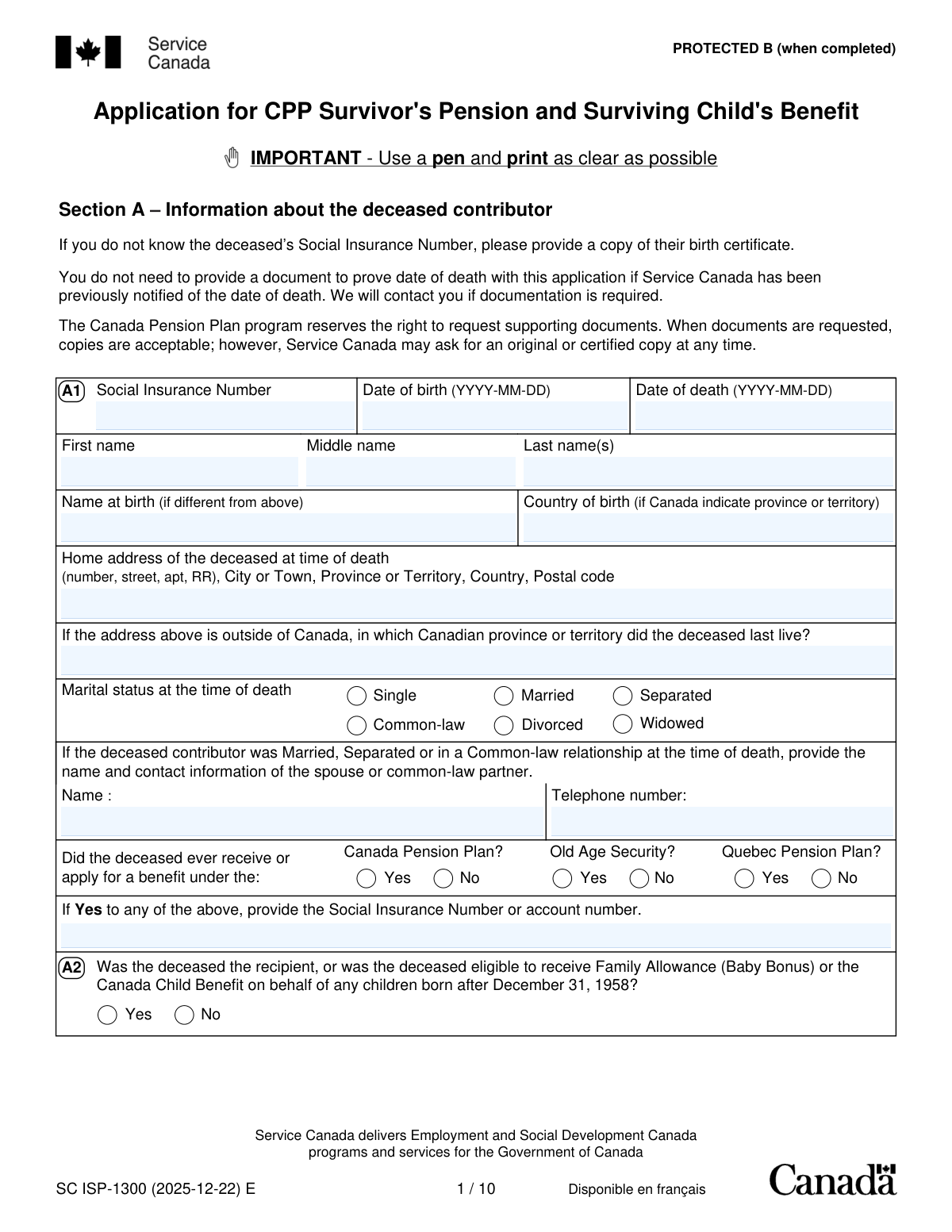
The AI does the filling. You just check it.
No typing into boxes, nothing to install.
What this form asks for
The AI fills all of it, from your answers or your documents.
The AI checks your answers before you download
15 checks built for this form, so a wrong date or a missing answer is caught before anyone else sees it.
This check ensures that the 'Date of death' in Section A is chronologically after the 'Date of birth'. This is a fundamental logical check to prevent data entry errors and ensure the validity of the core information about the deceased. If the date of death is not after the date of birth, the application cannot be processed and must be returned for correction.
This check verifies that the Social Insurance Numbers for the deceased, the applicant, and any children are in the correct 9-digit format. The SIN is a critical unique identifier for accessing CPP records and calculating benefits, so its accuracy is paramount. An invalid format will halt processing until a valid SIN is provided or alternative identification (like a birth certificate) is supplied as per the form's instructions.
This validation confirms that the applicant's date of birth (Section C2) is before the deceased contributor's date of death (Section A1). This is a logical impossibility check, as a person cannot apply for a survivor's benefit if they were born after the contributor passed away. An error here indicates a significant data entry mistake that must be corrected before eligibility can be determined.
This check ensures that if the deceased's marital status in Section A is marked as 'Married', 'Separated', or 'Common-law', then the name and telephone number of the spouse or common-law partner must be provided. This information is crucial for verifying marital status and identifying all potential eligible survivors. Failure to provide this information will result in an incomplete application and a request for the missing details.
This check verifies that the duration of the common-law relationship meets the minimum requirement of one continuous year up to the date of death. It calculates the difference between the 'Date you began living together' (Section D2) and the deceased's 'Date of death' (Section A1). If the duration is less than one year, the applicant may not qualify as a common-law partner, and the application for a survivor's pension will likely be denied on this basis.
This validation confirms that any child listed in Section E1 was under the age of 18 at the time of the contributor's death. It compares the child's 'Date of birth' to the deceased's 'Date of death'. This is a primary eligibility requirement for the Surviving Child's Benefit for minors, and an incorrect age will lead to a denial of the benefit for that child.
And 9 more checks
- Conditional Requirement for Child's Caregiver Information
- Verify Child's Age for 18-25 Benefit Eligibility
- Mandatory Applicant Type Selection in Section C1
- Conditional Requirement for Foreign Country Details
- Validate Completeness of New Direct Deposit Information
- Validate Chronology of Marriage and Separation Dates
- Confirm Presence of Applicant Signature and Date
- Ensure Consistency of Deceased's SIN Across Pages
- Mutually Exclusive Selection for Voluntary Tax Deduction
Let AI fill out your SC ISP-1300
No typing. Every field filled in seconds, checked, ready to sign.
How to Fill Out SC ISP-1300 Online for Free in 2026
What the AI walks you through.
- Navigate to Instafill.ai and upload or select the SC ISP-1300 form to begin the process.
- Provide information about the deceased contributor in Section A, including their Social Insurance Number (SIN), personal details, and any prior benefits received.
- Complete Section C with your personal information as the applicant, including your SIN, contact details, and relationship to the deceased.
- Fill out Section E with details about the deceased's dependent children under the age of 25 to apply for the Surviving Child's Benefit.
- Enter your banking information for direct deposit in Section F and specify any voluntary income tax deductions in Section G.
- Carefully review all the information populated by the AI for accuracy, then e-sign and date the declaration in Section H.
- Download the completed application and submit it to the appropriate Service Canada office, along with any required supporting documents.
Common Mistakes in Completing SC ISP-1300
The ones the AI is built to catch.
Missing or Incorrect Social Insurance Numbers (SINs)
Applying to the Wrong Pension Plan (CPP vs. QPP)
Incorrectly Applying for Children Aged 18-25
Vague or Incomplete Marital and Separation Details
Forgetting to Print, Sign, and Mail the Application
Inaccurate Direct Deposit Information
Omitting the Deceased's International History
Forgetting to Write the Deceased's SIN on Every Page
Misunderstanding the 'Authorized Representative' Section
Frequently Asked Questions About SC ISP-1300
Is it really free for 7 days?
Can I fill other forms too?
How do I cancel?
How does the AI fill out SC ISP-1300?
What happens to my information?
How complex is SC ISP-1300 to fill out?
What is the purpose of the ISP-1300 form?
Who is eligible to apply for the CPP Survivor's Pension?
My child is 19 and in university. Can I use this form to apply for their benefit?
What documents do I need to submit with my application?
I don't know the deceased person's Social Insurance Number (SIN). What should I do?
Can I submit this application online?
The deceased worked in both Ontario and Quebec. Where do I apply?
My spouse and I were separated but not divorced when they passed away. Can I still apply?
How will I receive my payments if my application is approved?
Are the survivor's pension and child's benefit taxable?
How long will it take to process my application?
Can an AI tool help me fill out this form?
The PDF version of the form I found online is not fillable. How can I type my answers?
How can I use Instafill.ai to complete the ISP-1300 form online?
Get your SC ISP-1300 filled out by AI
$0 today. Cancel before Nov 3 and you pay nothing.
Other forms like this one
benefit forms: Form SSA-16, Application for Disability Benefits, Form SSA-1-BK, Application for Retirement Benefits, Form SSA-2-BK, Application for Spouse's Benefits, Form SSA-4-BK, Application for Child's Insurance Benefits, Form SSA-10, Application for Widow's or Widower's Insurance Benefits, Form SSA-10, Widow's or Widower's Benefits, Form SSA-4-BK, Application for Social Security Benefits, Form SSA-5-BK, Application for Mother's or Father's Benefits, Form DBQ, Knee and Lower Leg Disability Benefits, Form DBQ, Heart Conditions Disability Benefits, Form DBQ, Hypertension Disability Benefits, Form DBQ, Scars/Disfigurement Disability Benefits, Form DBQ, Diabetes Mellitus Disability Benefits Questionnaire, Form DBQ, Endocrine Diseases Disability Benefits, Form DBQ, Diabetes Mellitus Disability Benefits Questionnaire, Back (Thoracolumbar Spine) Conditions Disability Benefits Questionnaire, Ankle Conditions Disability Benefits Questionnaire, Back (Thoracolumbar Spine) Conditions Disability Benefits Questionnaire, Elbow and Forearm Conditions Disability Benefits Questionnaire, Foot Conditions, Including Flatfoot (Pes Planus) Disability Benefits Questionnaire
pension forms: Form 1099-R, Distributions From Pensions etc., Form N245, Application for suspension of a warrant and/or variation of an order, Anmeldung zum R+V-Firmenportal Vorsorge (Registration for the R+V Company Portal for Pensions), The Principal Pension Plan Summary Plan Description: Cash Balance Formula for Employees and Individual Field, The Principal Pension Plan Summary Plan Description: Traditional and Cash Balance Formulas for Employees and Individual Field, Form SC ISP-1300, Application for CPP Survivor's Pension and Surviving Child's Benefit, United Kingdom (UK) State Pension claim form, Form W-4P (2026), Withholding Certificate for Periodic Pension or Annuity Payments, Bakery and Confectionery Pension Fund Pension Application, ABA Retirement Funds Program Distribution Request Form, Beneficiary Designation Form for Plans Subject to QJSA (Form F11607), Form F6776, Authorization of Interest-Only Payments (ERISA), Form F7381, Authorization of Interest-Only Payments (Non ERISA), New York State Comptroller Form RS 5127, Designation of Beneficiary with Contingent Beneficiaries, Qualified Retirement Plan Designation of Beneficiary, VA Form 21P-0969, Income and Asset Statement in Support of Claim for Pension or Parents' Dependency and Indemnity Compensation (D.I.C.), VA Form 21P-534EZ, Application for D.I.C., Survivors Pension, and/or Accrued Benefits, VA Form 21-0966, Intent to File a Claim for Compensation and/or Pension, or Survivors Pension and/or DIC, Form SA474, Claim for an Australian Survivor Pension for a person living outside Australia, Form SY029 - Claim for Pensioner Education Supplement
benefit plan forms: Form 5500, Annual Return/Report of Employee Benefit Plan, Foot Conditions, Including Flatfoot (Pes Planus) Disability Benefits Questionnaire, Fidelity NetBenefits Auditor's Guide: An Overview of Fidelity's 2024 Plan Year Reporting Package, New York State Deferred Compensation Plan Benefit Distribution Request, Form 5500, Annual Return/Report of Employee Benefit Plan, SC ISP-2519, Medical Report for Canada Pension Plan Disability Benefits (2025-05-08), SC ISP-2519, Medical Report for Canada Pension Plan Disability Benefits (2024-05-17), Fidelity Plan-to-Plan Direct Rollover Form, Plan-to-Plan Direct Rollover Form
survivor benefit forms: Transamerica Survivor Benefits Request, Form SC ISP-1300, Application for CPP Survivor's Pension and Surviving Child's Benefit, VA Form 21P-534EZ, Application for D.I.C., Survivors Pension, and/or Accrued Benefits
pension application forms: Bakery and Confectionery Pension Fund Pension Application, Form N245, Application for suspension of a warrant and/or variation of an order, Form SC ISP-1300, Application for CPP Survivor's Pension and Surviving Child's Benefit, VA Form 21P-534EZ, Application for D.I.C., Survivors Pension, and/or Accrued Benefits, VA Form 21P-527EZ, Application for Veterans Pension, VA Form 21P-527EZ, Application for Pension
pension plan forms: Fidelity Advisor Investment-Only Retirement Plan Master Application, The Principal Pension Plan Summary Plan Description: Cash Balance Formula for Employees and Individual Field, The Principal Pension Plan Summary Plan Description: Traditional and Cash Balance Formulas for Employees and Individual Field, SC ISP-2519, Medical Report for Canada Pension Plan Disability Benefits (2025-05-08), SC ISP-2519, Medical Report for Canada Pension Plan Disability Benefits (2024-05-17), Form 1099-R, Distributions From Pensions etc.
Canada Pension Plan forms: SC ISP-2519, Medical Report for Canada Pension Plan Disability Benefits (2025-05-08), SC ISP-2519, Medical Report for Canada Pension Plan Disability Benefits (2024-05-17)
CPP survivor forms: Form SC ISP-1300, Application for CPP Survivor's Pension and Surviving Child's Benefit
pension benefit forms: Form SC ISP-1300, Application for CPP Survivor's Pension and Surviving Child's Benefit, VA Form 21P-534EZ, Application for D.I.C., Survivors Pension, and/or Accrued Benefits, SC ISP-2519, Medical Report for Canada Pension Plan Disability Benefits (2025-05-08), SC ISP-2519, Medical Report for Canada Pension Plan Disability Benefits (2024-05-17)
Let AI fill out your SC ISP-1300
Your trial starts once a card is added. You pay nothing before Nov 3.
Our AI already knows this form, all 206 fields of it. Skip the typing: tell it about yourself, or upload what you have, and it fills the whole form in seconds.
- AI fills every field on all 15 pages, tables and checkboxes included
- No typing into boxes: answer a few questions, or upload a document you already have, an old copy of this form, a photo of a document
- The AI checks the answers; you review and change anything before you download
- Download the finished PDF, print it, or sign it online
- Encrypted, and never used to train AI
Cancel before Nov 3 and you pay nothing.
A card is needed to start the trial. Cancel in two clicks from your account.
Terms · Privacy