Yes! You can use AI to fill out VA Form 21P-527EZ, Application for Veterans Pension
VA Form 21P-527EZ, Application for Veterans Pension, is a crucial document for veterans seeking financial support through the VA's needs-based pension program. This form gathers detailed information about the veteran's service history, marital status, dependents, income, assets, and medical expenses to determine eligibility. Today, this comprehensive form can be filled out quickly and accurately using AI-powered services like Instafill.ai, which can also convert non-fillable PDF versions into interactive fillable forms.
21P-527EZ is part of the
pension application forms category on Instafill.
Our AI automatically handles information lookup, data retrieval, formatting, and form filling.
It takes less than a minute to fill out 21P-527EZ using our AI form filling.
Securely upload your data. Information is encrypted in transit and deleted immediately after the form is filled out.
Form specifications
| Form name: | VA Form 21P-527EZ, Application for Veterans Pension |
| Number of fields: | 621 |
| Number of pages: | 17 |
| Language: | English |
Instafill Demo: How to fill out PDF forms in seconds with AI
How to Fill Out 21P-527EZ Online for Free in 2026
Are you looking to fill out a 21P-527EZ form online quickly and accurately? Instafill.ai offers the #1 AI-powered PDF filling software of 2026, allowing you to complete your 21P-527EZ form in just 37 seconds or less.
Follow these steps to fill out your 21P-527EZ form online using Instafill.ai:
- 1 Navigate to Instafill.ai and upload or select the VA Form 21P-527EZ.
- 2 Use the AI assistant to accurately enter your identification, contact, and military service information in Sections I-III.
- 3 Complete the sections on pension information, employment history, marital status, and dependent children (Sections IV-VIII).
- 4 Answer the detailed questions regarding your income and assets in Section IX, preparing to attach VA Form 21P-0969 if your assets or income sources exceed the stated thresholds.
- 5 Provide information about unreimbursed medical expenses in Section X and enter your direct deposit details in Section XI for benefit payments.
- 6 Carefully review all the information you've entered, then proceed to Section XII to certify and digitally sign your application.
- 7 Download the completed and signed form, along with any required attachments, and submit it to the VA Pension Intake Center as instructed on the form.
Our AI-powered system ensures each field is filled out correctly, reducing errors and saving you time.
Why Choose Instafill.ai for Your Fillable 21P-527EZ Form?
Speed
Complete your 21P-527EZ in as little as 37 seconds.
Up-to-Date
Always use the latest 2026 21P-527EZ form version.
Cost-effective
No need to hire expensive lawyers.
Accuracy
Our AI performs 10 compliance checks to ensure your form is error-free.
Security
Your personal information is protected with bank-level encryption.
Frequently Asked Questions About Form 21P-527EZ
This form is the application for Veterans Pension, which is a needs-based benefit for wartime veterans. It is also used to apply for Special Monthly Pension and benefits for a veteran's seriously disabled child.
Wartime veterans with limited income and net worth who are permanently and totally disabled, or are age 65 or older, should use this form. Do not use this form for disability compensation or survivor benefits, as those require different forms.
The FDC Program is an optional, expedited process for veterans who submit all required evidence with their application. The Standard Process allows you up to a year to submit evidence and the VA may assist in obtaining records, but it generally takes longer to process.
You should submit a copy of your DD Form 214, along with evidence of income, assets, and any unreimbursed medical expenses. Depending on your situation, you may also need to provide marriage certificates, birth certificates for dependent children, or specific medical forms.
No, if you are age 65 or older, you do not need to submit medical evidence to prove you are disabled for basic pension purposes. However, you must submit medical evidence if you are claiming Special Monthly Pension for conditions requiring aid and attendance or housebound status.
To claim Special Monthly Pension, check the appropriate box in Section IV and submit additional medical evidence. This typically involves having a physician complete VA Form 21-2680, or if you are in a nursing home, submitting VA Form 21-0779.
You should file VA Form 21-0969, Intent to File a Claim. This will secure your potential effective date, and you will have one year from the date it's received to submit your completed VA Form 21P-527EZ.
You can mail your completed form and all supporting documents to the Pension Intake Center in Janesville, Wisconsin. Alternatively, you can upload your documents directly online via access.va.gov.
The instructions state to leave sections blank that do not apply to you. However, be careful in the income and medical expense sections, as leaving required fields blank may be interpreted as having no income or expenses to report or could delay your claim.
The form acknowledges this possibility and recommends visiting the National Archives website for information on alternative methods to reconstruct your service records. Providing alternative proof of service can help avoid delays in processing your claim.
Use Section IX to report your income sources. If you have more than four income sources or over $25,000 in assets (excluding your primary home), you must also complete and submit VA Form 21P-0969.
Yes, you can report unreimbursed medical expenses for yourself, your spouse, and dependents in Section X. If you receive in-home care or live in a care facility, you must also have the provider complete the corresponding worksheet at the end of the form.
Yes, services like Instafill.ai use AI to accurately auto-fill form fields, which can save you significant time and help reduce errors. These tools can extract information from your documents to populate the form for you.
Simply upload your VA Form 21P-527EZ to the Instafill.ai platform. The AI will identify the form fields, and you can then answer questions or upload supporting documents to have the information automatically and accurately placed onto the form.
If you have a non-fillable or 'flat' PDF, you can use a service like Instafill.ai. It can convert any non-fillable PDF into an interactive, fillable form that you can easily complete and sign online.
Compliance 21P-527EZ
Validation Checks by Instafill.ai
1
Validates Social Security Number Format
This check ensures that the Social Security Numbers entered for the veteran (1B), spouse (6D), and any dependent children (8D, 8I, 8N) are in the correct 9-digit format. This is critical for uniquely identifying individuals and cross-referencing with other government agencies. If the format is incorrect, the claim cannot be processed and will be rejected for correction.
2
Ensures Logical Consistency of Service Dates
This validation confirms that the 'Final Release Date From Active Duty' (3C) is on or after the 'Date Initially Entered Active Duty' (3B). This prevents impossible data entry errors that would invalidate the service period. A failure would indicate a data entry mistake, requiring the user to correct the dates before the claim can be properly evaluated for service eligibility.
3
Verifies Signature and Alternate Signer Requirements
This check ensures that the form is properly signed. It verifies that either the veteran's signature in Item 12B is present, or if it is blank, the Alternate Signer Certification in Section XIV is fully completed. A claim without a valid signature from the claimant or an authorized representative is legally incomplete and will be rejected.
4
Confirms Witness Signatures for Mark ('X')
If the claimant signs with an 'X' in Item 12B, this validation ensures that two witnesses have provided their signatures, printed names, and addresses in Section XIII. This is a legal requirement to attest that the mark was made by the claimant. Failure to provide two witnesses for a signature by mark invalidates the signature and will halt the claim's processing.
5
Checks for Conditional VA File Number Entry
This validation is triggered by the answer to 'Have you ever filed a claim with VA?' (1D). If the answer is 'YES', the system verifies that a VA File Number has been entered in Item 1E. Providing the file number helps the VA quickly locate existing records, speeding up processing. If it's missing, the system may prompt the user to provide it to avoid potential delays.
6
Validates Dependent Child Age for School Attendance Status
This check cross-references a child's birth date (e.g., 8C) with their status (e.g., 8F). If the '18-23 YEARS OLD (in school)' box is checked, the system calculates the child's current age to confirm it falls within this range. This ensures benefits are only considered for appropriately aged dependents, and if there's a mismatch, it will require correction or clarification.
7
Verifies Completion of Direct Deposit Information
This check ensures that if the 'I do not have an account' box in Item 11B is unchecked, then the financial institution name (11A), account type (11B), routing number (11C), and account number (11D) are all completed. The Treasury Department requires electronic payments, so this information is mandatory for benefit disbursement. Incomplete information will delay payments until corrected.
8
Validates Bank Routing Number Format
This check specifically targets the Routing Number field (11C) within the Direct Deposit section. It verifies that the entry is exactly nine digits and contains only numbers. An incorrect routing number will cause the electronic funds transfer to fail, so this validation is crucial for ensuring the veteran receives their payment without issue.
9
Ensures Marital Separation Details are Provided
If the marital status in Item 6A is marked as 'SEPARATED', this validation confirms that a reason for separation is selected in Item 6I and the spouse's address is provided in 6J. This information is necessary for the VA to determine if the spouse's income and assets should be counted. Missing this information will require the VA to request it, delaying the claim decision.
10
Triggers Requirement for Supplemental Income/Asset Form
This validation checks the answers to questions 9A, 9B, and 9G. If the applicant answers 'YES' to having over $25,000 in assets, transferring assets, or having more than four income sources, the system flags that a VA Form 21P-0969 is required. This ensures all necessary financial details are captured for a complete and accurate pension calculation.
11
Validates Logical Progression for Nursing Home Questions
This check ensures that if a veteran indicates they live in a nursing home (Item 4C is 'YES'), they must then answer the follow-up question about Medicaid coverage (Item 4D). This information is critical for determining the correct pension rate and medical expense deductions. An incomplete sequence here would result in a request for more information from the VA.
12
Verifies Consistency of Prior Marriage Dates
For any prior marriages listed in Section VII, this validation ensures the marriage 'END' date is not before the 'START' date. This simple chronological check prevents data entry errors that would make the marital history nonsensical. An invalid date range would require correction before the veteran's marital status can be officially established for benefit purposes.
Common Mistakes in Completing 21P-527EZ
Section VII requires detailed information for all prior marriages of both the veteran and their current spouse, including exact start/end dates and locations. Applicants often provide incomplete dates or leave prior marriages out entirely, assuming they are not relevant. An incomplete marital history will halt the claim's processing, as the VA cannot determine dependency and entitlement without a complete record, leading to significant delays.
In Section IX, applicants frequently report net income instead of the required gross monthly income, or they forget to include all sources like interest or small retirement payments. A critical error is failing to complete the mandatory VA Form 21P-0969 if assets exceed $25,000 or were recently transferred. These mistakes can lead to an incorrect benefit calculation, processing delays, or an outright denial of the needs-based pension.
To deduct medical costs, applicants must provide extensive proof in Section X, but often fail to do so. Common errors include not submitting proof of payment for unreimbursed expenses or, most critically, failing to have the required worksheets (pages 16-17) completed and signed by the care facility or in-home attendant. Without this specific documentation, valid expenses cannot be deducted, which may result in a lower pension amount or failure to qualify at all.
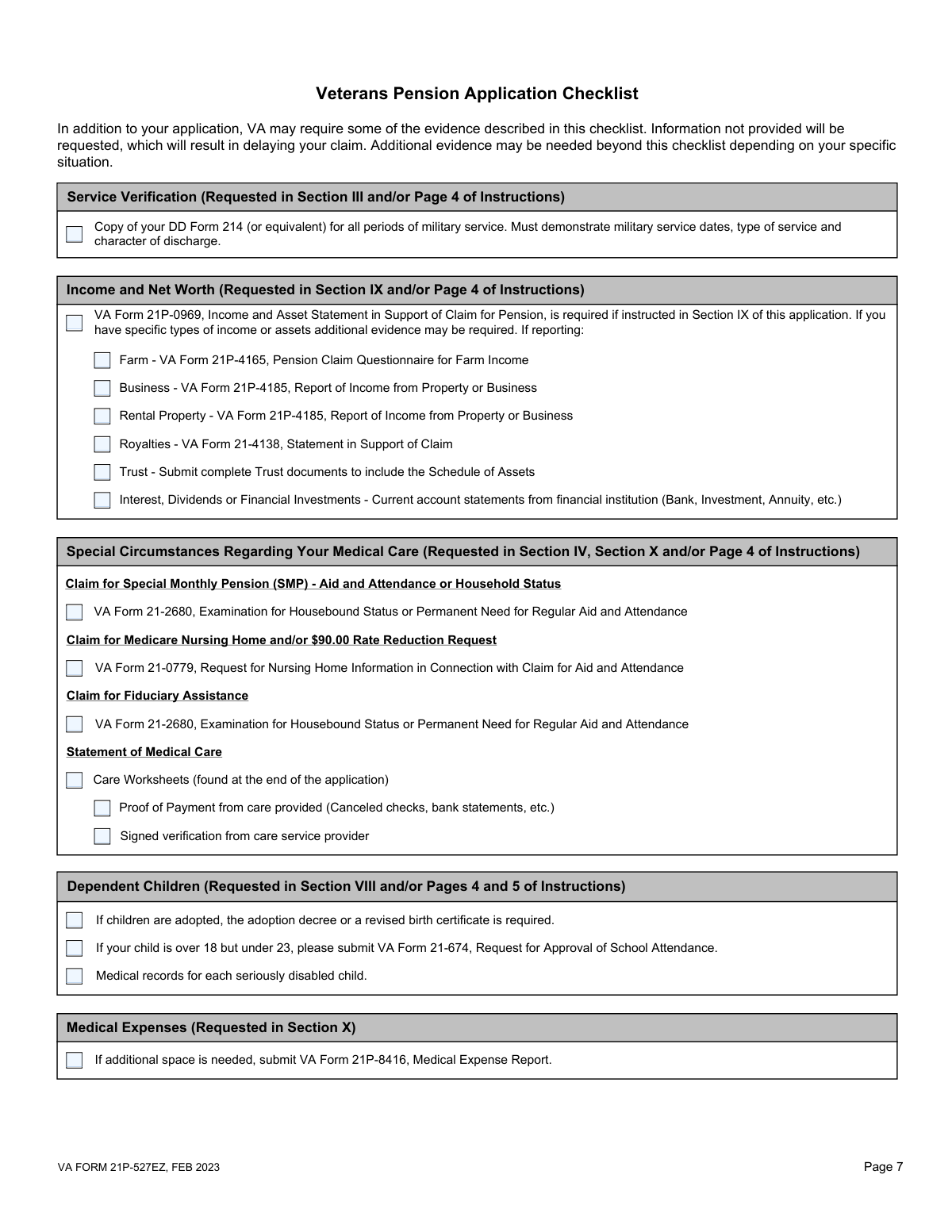
The form encourages using the FDC program for faster processing, but applicants often submit their claim without all necessary evidence, such as the DD-214, medical records, or income statements. This automatically removes the claim from the expedited FDC process and places it in the much slower standard processing queue. To avoid this, applicants should use the checklist on page 7 to ensure every required document is included with the initial submission.
Applicants may check 'Yes' in item 4E to claim Special Monthly Pension (for Aid & Attendance or Housebound status) without understanding the strict medical requirements. They then fail to submit the mandatory VA Form 21-2680, which must be completed by a physician. This results in the request for the higher SMP rate being delayed or denied, even if the base pension is approved.
When claiming dependents in Section VIII, applicants often overlook the need for additional forms based on the child's circumstances. A frequent mistake is failing to attach VA Form 21-674 for a child in school between ages 18-23, or not providing private medical records for a child who is permanently incapable of self-support. This omission prevents the VA from verifying the dependent, resulting in a lower benefit payment until the correct forms are received.
Although it is a primary requirement for eligibility, many veterans forget to include a copy of their DD-214 or equivalent service record with their application. They may assume the VA already has it on file or can easily retrieve it. While the VA will attempt to find the record, this significantly delays the claim and disqualifies it from the expedited FDC program. Always include a clear copy with your submission.
Simple data entry errors in Section XI, such as transposing digits in the bank routing or account number, are extremely common. While this won't delay the claim's approval, it will cause payment to fail once benefits are awarded, leading to significant financial hardship and frustration. To prevent this, carefully double-check the numbers against a check or bank statement. AI-powered form-filling tools like Instafill.ai can help by automatically validating routing numbers to ensure they are correct.
Forgetting to sign and date the application in Section XII is a fundamental error that renders the entire claim invalid. Another common mistake occurs when a veteran signs with an 'X' mark but fails to have two witnesses sign and provide their addresses in Section XIII as required. An invalid signature will cause the VA to return the application, delaying the potential start date of benefits.
The form instructs applicants to leave non-applicable items blank, which can be confusing. However, certain sections like Service Information (III) and Marital Status (VI) are mandatory for all applicants. Mistakenly skipping these required fields results in an incomplete application that the VA cannot process, leading to requests for information and significant delays. Since this form is a non-fillable PDF, tools like Instafill.ai can convert it into an interactive version that helps guide users through required fields, preventing such omissions.
Saved over 80 hours a year
“I was never sure if my IRS forms like W-9 were filled correctly. Now, I can complete the forms accurately without any external help.”
Kevin Martin Green
Your data stays secure with advanced protection from Instafill and our subprocessors

Robust compliance program
Transparent business model
You’re not the product. You always know where your data is and what it is processed for.
ISO 27001, HIPAA, and GDPR
Our subprocesses adhere to multiple compliance standards, including but not limited to ISO 27001, HIPAA, and GDPR.
Security & privacy by design
We consider security and privacy from the initial design phase of any new service or functionality. It’s not an afterthought, it’s built-in, including support for two-factor authentication (2FA) to further protect your account.
Fill out 21P-527EZ with Instafill.ai
Worried about filling PDFs wrong? Instafill securely fills va-form-21p-527ez-application-for-veterans-pension forms, ensuring each field is accurate.