
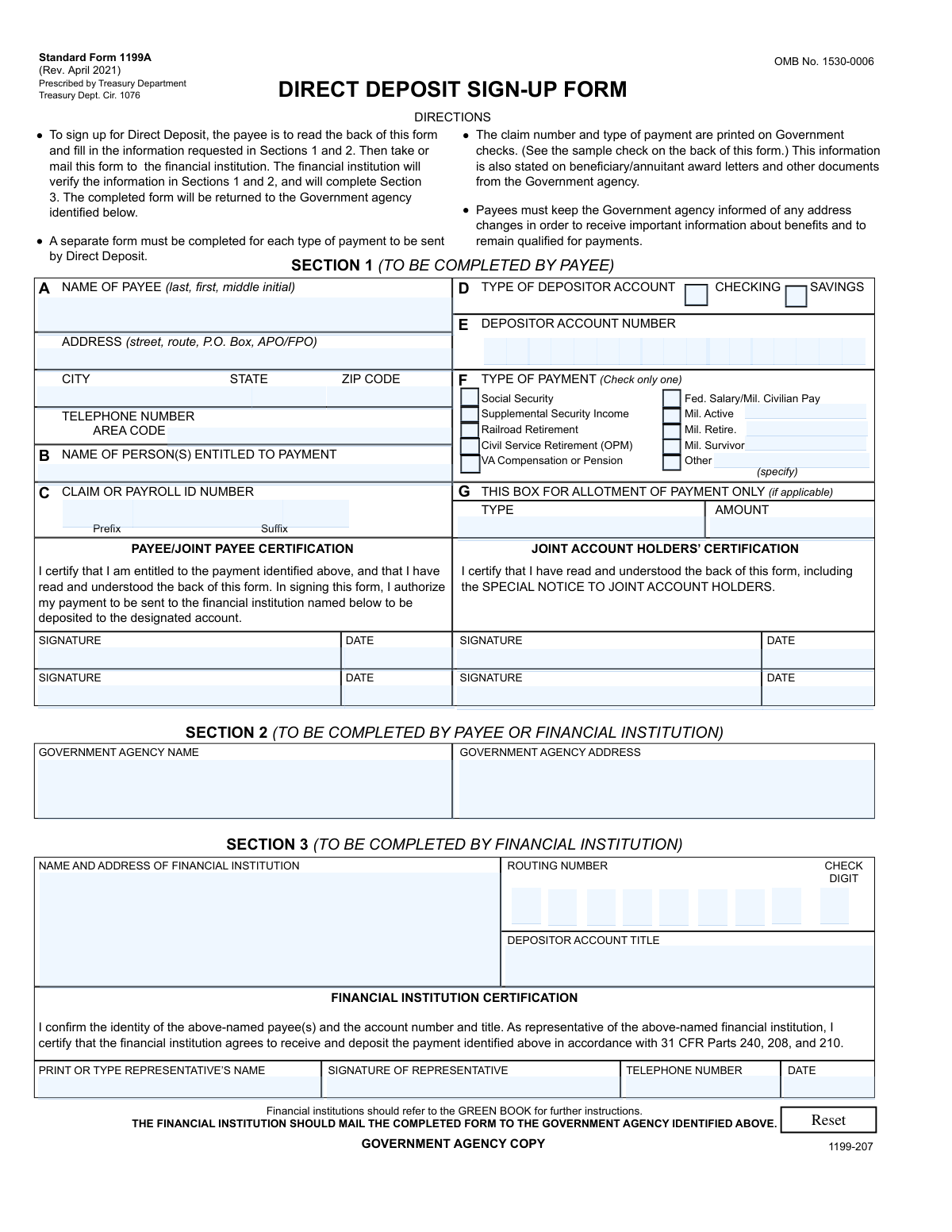
Yes! You can use AI to fill out Form SF 1199A, Direct Deposit Sign-Up
Don't type 216 fields by hand. Tell our AI about yourself, or upload a document you already have, and it fills every field in seconds. You check it, then download, print or sign.
The AI does the filling. You just check it.
No typing into boxes, nothing to install.
What this form asks for
The AI fills all of it, from your answers or your documents.
The AI checks your answers before you download
15 checks built for this form, so a wrong date or a missing answer is caught before anyone else sees it.
The AI ensures that the NAME OF PAYEE field in Section 1A of Form SF 1199A is filled out correctly, following the format of last name, first name, and middle initial. It checks for the presence of all three components and verifies that they are entered in the specified order. The AI also confirms that the name matches the payee's legal name to prevent any discrepancies with the financial institution's records.
The AI confirms that if the NAME OF PERSON(S) ENTITLED TO PAYMENT is different from the payee, it is provided in Section 1B of the form. It checks for the completeness and accuracy of this information, ensuring that it aligns with the legal entitlement to the payment. The AI also validates that this section is not left blank if there is a different entitlement.
The AI verifies that the CLAIM OR PAYROLL ID NUMBER entered in Section 1C matches exactly as it appears on government checks or award letters. It checks for the correct sequence of numbers and/or letters, ensuring that there are no transpositions or omissions. The AI also ensures that this identifier is necessary for the accurate processing of the direct deposit.
The AI checks that Section 1D and 1E of Form SF 1199A are signed by both the PAYEE and the JOINT PAYEE, if applicable. It ensures that the signatures are present and valid to certify entitlement to the payment and to authorize the direct deposit. The AI also confirms that the date of signing is provided and that it is a recent date to reflect current authorization.
The AI validates that the GOVERNMENT AGENCY NAME is correctly entered in Section 1F of the form. It checks for the proper spelling and official designation of the agency to ensure that the direct deposit is routed to the correct government entity. The AI also confirms that this information is consistent with other official documents or records.
The AI ensures that the name and address of the financial institution are captured correctly in Section 1G of Form SF 1199A. It cross-references the provided information with official databases to confirm accuracy. The AI also checks for any typographical errors and corrects them to prevent any issues with the direct deposit setup. Additionally, it validates the format of the address to ensure it adheres to postal standards.
And 9 more checks
- Ensures the PAYEE'S ADDRESS, CITY, STATE, ZIP CODE, and TELEPHONE NUMBER with AREA CODE are correctly entered
- Verifies the TYPE OF DEPOSITOR ACCOUNT is indicated as either CHECKING or SAVINGS and the DEPOSITOR ACCOUNT NUMBER is provided
- Checks the TYPE OF PAYMENT is selected and specifies if it's an ALLOTMENT OF PAYMENT
- Ensures the financial institution's REPRESENTATIVE has PRINTED OR TYPED their NAME, SIGNED, and provided the TELEPHONE NUMBER and DATE in Section 2
- Verifies the ROUTING NUMBER, DEPOSITOR ACCOUNT TITLE, and CHECK DIGIT
- Confirms FINANCIAL INSTITUTION CERTIFICATION
- Checks that the financial institution agrees to receive and deposit the payment
- Ensures the COMPLETED FORM is mailed to the GOVERNMENT AGENCY IDENTIFIED
- Validates that all additional instructions on the back of the form have been read and understood
Let AI fill out your SF 1199A
No typing. Every field filled in seconds, checked, ready to sign.
How to Fill Out SF 1199A Online for Free in 2026
What the AI walks you through.
- Visit instafill.ai site and select SF 1199A
- Enter payee's name and address
- Provide claim or payroll ID number
- Select type of payment and account
- Enter financial institution details
- Sign and date the form electronically
- Check for accuracy and submit form
Common Mistakes in Completing SF 1199A
The ones the AI is built to catch.
Omitting the government agency name that issues payment
Entering incorrect claim or payroll ID number
Payee or joint payee forgetting to sign the form
Not including middle initial in the payee's name
Failing to provide complete address and telephone number
Selecting the wrong type of depositor account
Leaving the depositor account number blank
Not specifying the type of payment being received
Financial institution not verifying the routing number
Financial representative forgetting to sign or date the form
Incomplete financial institution certification
Sending the completed form to the wrong government agency
Not reading the back of the form for additional instructions
Failing to inform the government agency of address changes
Using one form for multiple types of payments
Not maintaining accounts at both institutions during changes
Making false statements or fraudulent claims
Financial institution not referring to the GREEN BOOK for guidance
Frequently Asked Questions About SF 1199A
Is it really free for 7 days?
Can I fill other forms too?
How do I cancel?
How does the AI fill out SF 1199A?
What happens to my information?
How complex is SF 1199A to fill out?
What is Form SF 1199A used for?
Who needs to complete Section 1 of Form SF 1199A?
What information is required from the payee in Section 1 of Form SF 1199A?
How does a payee certify their entitlement to the payment on Form SF 1199A?
What types of payments can be received through Direct Deposit using Form SF 1199A?
What is the role of the financial institution in the Direct Deposit sign-up process?
What should be done with the completed Form SF 1199A?
Is a separate Form SF 1199A required for each type of payment?
How can a payee find their claim number and type of payment for Form SF 1199A?
Why must payees keep the Government agency informed of any address changes?
What is the estimated average time burden for completing Form SF 1199A?
What should joint account holders do in the event of the death of a beneficiary?
How can a recipient cancel the Direct Deposit authorization on Form SF 1199A?
Can a financial institution cancel the Direct Deposit authorization on Form SF 1199A?
What happens if a payee wants to change the financial institution receiving the Direct Deposit?
What are the legal consequences of presenting a false statement or making a fraudulent claim on Form SF 1199A?
Where can financial institutions find further instructions for completing Form SF 1199A?
What information from a government check is needed to complete boxes A, C, and F in Section 1?
What is the purpose of the SPECIAL NOTICE TO JOINT ACCOUNT HOLDERS on Form SF 1199A?
What should a payee do if the financial institution cancels the Direct Deposit authorization?
Get your SF 1199A filled out by AI
$0 today. Cancel before Oct 31 and you pay nothing.
Other forms like this one
direct deposit forms: Authorization Agreement for Direct Deposit, Employee Direct Deposit Banking Authorization Form (RUN Powered by ADP®), Form F11182, Direct Deposit Authorization, ACH Authorization Agreement, ACH Authorization Agreement (FRM-ACH-02-20), Direct Deposit Authorization Form
Let AI fill out your SF 1199A
Your trial starts once a card is added. You pay nothing before Oct 31.
Our AI already knows this form, all 216 fields of it. Skip the typing: tell it about yourself, or upload what you have, and it fills the whole form in seconds.
- AI fills every field on all 3 pages, tables and checkboxes included
- No typing into boxes: answer a few questions, or upload a document you already have, an old copy of this form, a photo of a document
- The AI checks the answers; you review and change anything before you download
- Download the finished PDF, print it, or sign it online
- Encrypted, and never used to train AI
Cancel before Oct 31 and you pay nothing.
A card is needed to start the trial. Cancel in two clicks from your account.
Terms · Privacy