
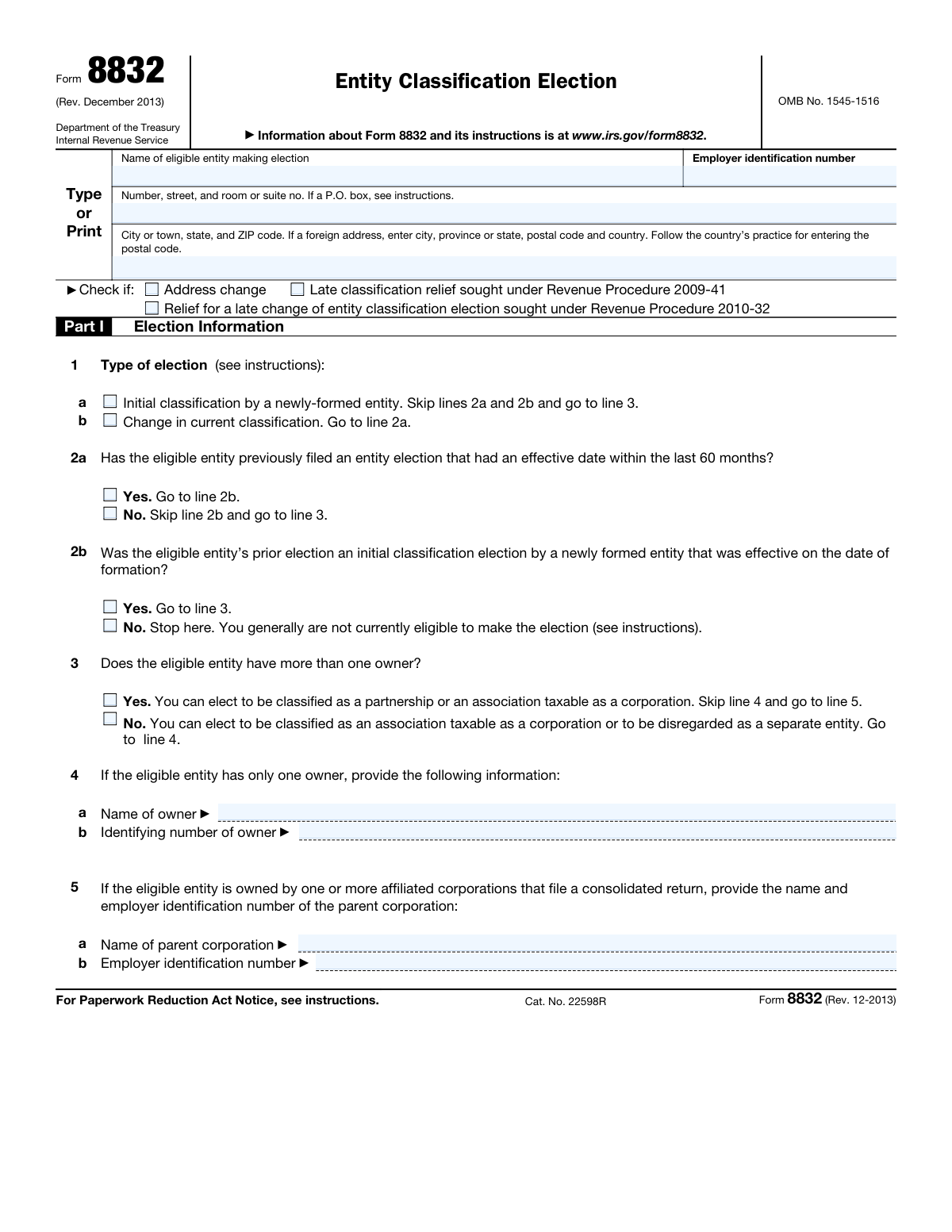
Yes! You can use AI to fill out Form 8832, Entity Classification Election
Don't type 71 fields by hand. Tell our AI about yourself, or upload a document you already have, and it fills every field in seconds. You check it, then download, print or sign.
The AI does the filling. You just check it.
No typing into boxes, nothing to install.
What this form asks for
The AI fills all of it, from your answers or your documents.
The AI checks your answers before you download
19 checks built for this form, so a wrong date or a missing answer is caught before anyone else sees it.
The software ensures that the Entity Classification Election form being filled out is the December 2013 revision, which is the version currently required by the IRS. It checks the revision date printed on the form against the IRS's latest requirements. If the form is not the correct revision, the software alerts the user to obtain the correct version. This validation is crucial to prevent the submission of outdated forms that could be rejected by the IRS.
The software confirms that the mailing address provided on the Entity Classification Election form corresponds to the state or country of the taxpayer. It cross-references the address with a database of valid addresses to ensure compliance with IRS guidelines. If the address does not match the taxpayer's location, the software prompts the user to correct it. This check is important to ensure that the IRS can properly deliver any correspondence related to the form.
The software verifies that the name of the entity and its Employer Identification Number (EIN) are accurately entered in Part I of the Entity Classification Election form. It checks the EIN format for correctness and matches the entity's name against the EIN to ensure they are associated. Any discrepancies or errors in the EIN or entity name are flagged for the user to review and correct. This validation is essential for the IRS to identify the entity correctly.
The software checks that the entity's full address is correctly entered on the Entity Classification Election form, paying special attention to foreign address details if applicable. It validates the format of the address, including the ZIP code or foreign postal code, and ensures that all necessary fields are filled out. If any part of the address is incomplete or incorrectly formatted, the software notifies the user to make the necessary corrections. This check is vital for accurate IRS records and correspondence.
The software confirms that any indication of an address change or a request for late classification relief is clearly marked on the Entity Classification Election form. It ensures that the appropriate boxes are checked and that any supplemental information required for these indications is provided. If these sections are not properly completed when applicable, the software alerts the user to address these issues. This validation is important for the IRS to process any special considerations related to the entity's classification.
The AI ensures that the form clearly indicates whether the entity is making an initial classification election or if it is requesting a change in its current classification. It checks for the appropriate selection or indication on the form that corresponds to the entity's intent. This validation is crucial as it determines the subsequent information and declarations that need to be completed. The AI also prompts the user if this critical information is missing or appears to be inconsistent with other provided details.
And 13 more checks
- Ensures that any previous election within the last 60 months is indicated if changing classification
- Verifies the correct classification is elected based on the number of owners
- Confirms the owner's name and identifying number are provided for single-owner entities
- Checks that the name and EIN of the parent corporation are provided for entities owned by affiliated corporations
- Ensures the selection of the correct entity type and desired classification
- Verifies the foreign country of organization is provided for entities created or organized in a foreign jurisdiction
- Confirms the effective date of the election is indicated
- Checks the name, title, and telephone number of the contact person are provided in Part I
- Ensures all members or authorized individuals have signed the consent statement in Part II
- Verifies the form is signed, dated, and includes the title of the person signing in Part III if late election relief is applicable
- Confirms a copy of Form 8832 is attached to the entity's federal tax or information return for the tax year of the election
- Ensures the form is filed within the appropriate time frame and all information is accurate and complete
- Validates compliance with the Paperwork Reduction Act Notice requirements
Let AI fill out your Form 8832
No typing. Every field filled in seconds, checked, ready to sign.
How to Fill Out Form 8832 Online for Free in 2026
What the AI walks you through.
- Visit instafill.ai site and select Form 8832.
- Enter the name of the eligible entity.
- Provide the employer identification number.
- Fill in the address details accurately.
- Select the type of election and entity classification.
- Sign and date the form electronically.
- Check for accuracy and submit the form.
Common Mistakes in Completing Form 8832
The ones the AI is built to catch.
Using an outdated version of the form
Providing an incorrect or incomplete name of the eligible entity or its EIN
Omitting the entity's address or providing an incorrect address
Failing to indicate if there is an address change or if late classification relief is sought
Misidentification of the type of election (initial or change in classification)
Neglecting to indicate previous election filings
Omitting the name and identifying number of owners or parent corporation
Selecting the incorrect entity type or classification
Failing to provide the effective date of the election
Neglecting to sign the form and provide required titles and dates
Failure to provide an explanation for late filing of the election (if applicable)
Failure to attach a copy of Form 8832 to the entity's federal tax or information return
Failure to file the form with the appropriate Internal Revenue Service Center
Failure to comply with the Paperwork Reduction Act Notice requirements
Frequently Asked Questions About Form 8832
Is it really free for 7 days?
Can I fill other forms too?
How do I cancel?
How does the AI fill out Form 8832?
What happens to my information?
How complex is Form 8832 to fill out?
What is the Entity Classification Election form used for?
Who needs to file Form 8832?
What is the deadline to file Form 8832?
What information is required on Form 8832?
What is the difference between a partnership and an association taxable as a corporation?
What is the difference between a disregarded entity and a partnership?
What is the difference between a domestic eligible entity and a foreign eligible entity?
What is the difference between a corporation and an association?
What is the difference between a partnership and a sole proprietorship?
What is the difference between a C corporation and an S corporation?
What is the difference between a limited liability company (LLC) and a partnership?
What is the difference between a taxpayer identification number (TIN) and an employer identification number (EIN)?
What is the difference between a late election and a late change of entity classification election?
What is the difference between a default classification and an elected classification?
Get your Form 8832 filled out by AI
$0 today. Cancel before Nov 1 and you pay nothing.
Let AI fill out your Form 8832
Your trial starts once a card is added. You pay nothing before Nov 1.
Our AI already knows this form, all 71 fields of it. Skip the typing: tell it about yourself, or upload what you have, and it fills the whole form in seconds.
- AI fills every field on all 4 pages, tables and checkboxes included
- No typing into boxes: answer a few questions, or upload a document you already have, an old copy of this form, a photo of a document
- The AI checks the answers; you review and change anything before you download
- Download the finished PDF, print it, or sign it online
- Encrypted, and never used to train AI
Cancel before Nov 1 and you pay nothing.
A card is needed to start the trial. Cancel in two clicks from your account.
Terms · Privacy