
Instafill.ai
7 days free
AI form filling · 57 fields · 2 pages · done in seconds

Yes! You can use AI to fill out Form 120, Amendment to Agreement of Purchase and Sale

Don't type 57 fields by hand. Tell our AI about yourself, or upload a document you already have, and it fills every field in seconds. You check it, then download, print or sign.
7 days free, then $19.99/month · Cancel anytime
AI fills it, no typingEncrypted, never used to train AICancel in two clicks
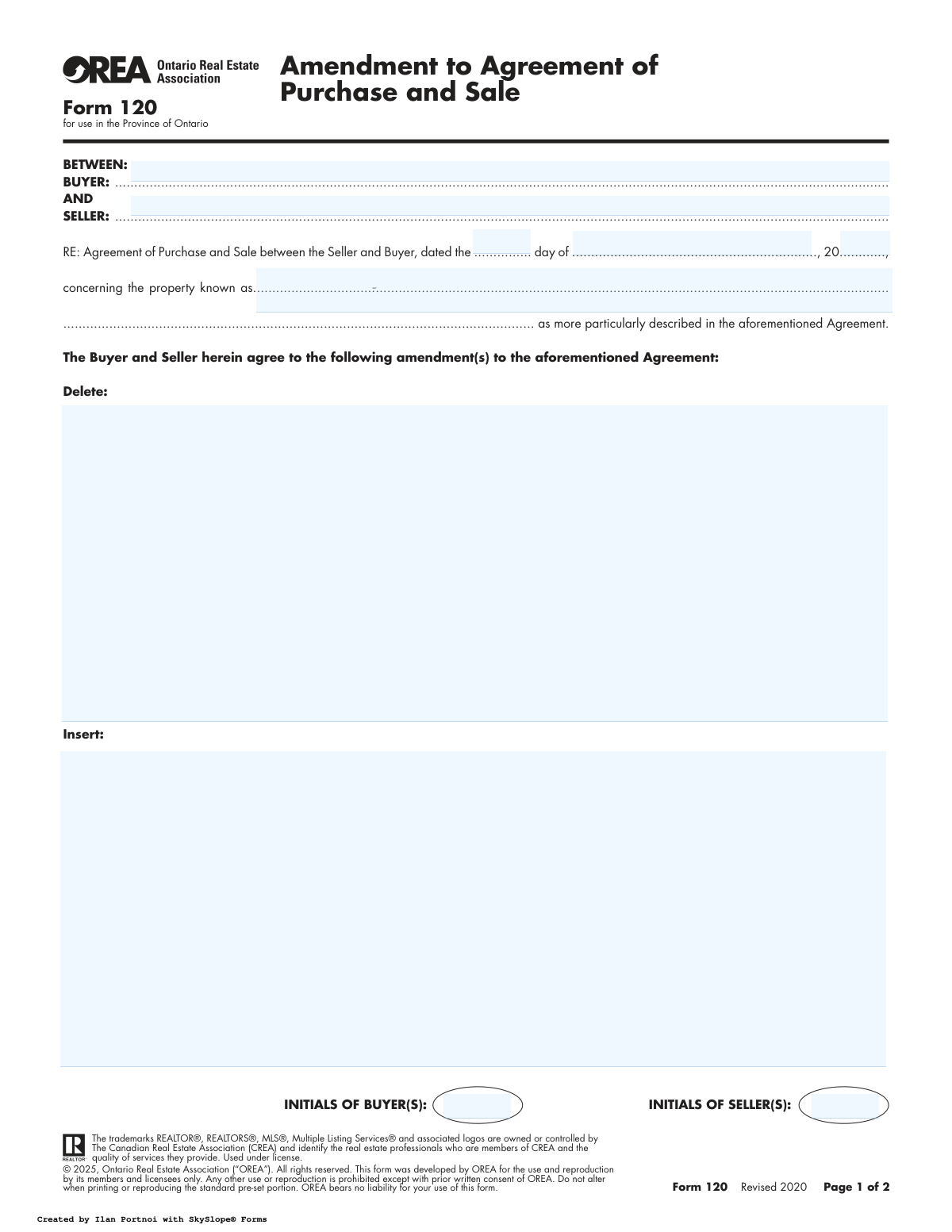
Form 120, Amendment to Agreement of Purchase and Sale, page 1
Moderate · 59/100Form Complexity Index

The AI does the filling. You just check it.

No typing into boxes, nothing to install.

Tell the AI about youAnswer a few questions in plain words, or upload a document you already have. That is all the typing there is.
AI fills every field in secondsIt puts each answer in the right box on every page, tables and checkboxes included.
Check it and downloadReview every field, change anything, then download, print or sign the PDF.

What this form asks for

The AI fills all of it, from your answers or your documents.

OREA Form 120 is a legal document used in Ontario real estate transactions to make changes to an existing Agreement of Purchase and Sale. It is essential for formally recording any agreed-upon modifications, such as adjustments to the price, closing date, or other conditions, ensuring the changes are legally binding for both the buyer and seller. Today, this form can be filled out quickly and accurately using AI-powered services like Instafill.ai, which can also convert non-fillable PDF versions into interactive fillable forms.
Fillable fields57
Pages2
Sections24
Tables and lists3
Questions that depend on earlier answers3
Form Complexity IndexModerate, 59/100

The AI checks your answers before you download

13 checks built for this form, so a wrong date or a missing answer is caught before anyone else sees it.

Chronological Date Integrity

This validation ensures that all dates on the form follow a logical sequence. The date of the original Agreement of Purchase and Sale must precede all dates on this amendment. Furthermore, the final acceptance date must occur on or before the irrevocability deadline. This is critical to ensure the amendment is legally valid and was accepted within the specified timeframe, preventing disputes over expired offers.

Acceptance Prior to Irrevocability Deadline

This check specifically verifies that the 'Confirmation of Acceptance' date and time are not later than the 'Irrevocability' date and time. The irrevocability clause creates a firm deadline by which the offer to amend must be accepted. If acceptance occurs after this deadline, the offer is considered null and void, and the amendment is not binding.

Amendment Content Presence

This validation ensures that at least one of the 'Delete' or 'Insert' text areas is populated. An amendment form must contain a change to the original agreement to have any purpose. Submitting a blank amendment is an error, and this check prevents the processing of pointless or accidental submissions, ensuring user intent is captured.

Irrevocability Clause Completeness

This check confirms that if the irrevocability clause is used, all its components are filled: the party making it irrevocable ('Seller' or 'Buyer'), the date, and the time (including a.m./p.m.). An incomplete clause creates ambiguity about the offer's deadline, potentially leading to legal challenges. A failed validation would require the user to complete all parts of the clause before submission.

Party Name Consistency Across Form

This validation cross-references the Buyer and Seller names provided at the top of the form with the names entered in the signature and acknowledgement sections. This ensures the same legal entities are identified throughout the document, preventing ambiguity about who is party to the amendment. A mismatch could invalidate the document or indicate a data entry error that needs correction.

Original Agreement Date Validity

This check ensures the provided day, month, and year for the original Agreement of Purchase and Sale constitute a valid calendar date. It prevents impossible dates like 'April 31' or 'February 30'. This is important for accurately referencing the legal document being amended; an incorrect reference could render the amendment void.

And 7 more checks
  • Required Party and Property Identification
  • Lawyer Email Address Format
  • Conditional Spousal Consent Validation
  • Signature and Date Pairing
  • Acknowledgement Date Logic
  • Irrevocability Party Specificity
  • Canadian Telephone Number Format

Let AI fill out your Form 120

No typing. Every field filled in seconds, checked, ready to sign.

7 days free, then $19.99/month · Cancel anytime

How to Fill Out Form 120 Online for Free in 2026

What the AI walks you through.

  1. Navigate to Instafill.ai and upload or select OREA Form 120.
  2. Provide the details of the original Agreement of Purchase and Sale, including the buyer, seller, property address, and agreement date.
  3. Clearly specify the clauses or text to be deleted from the original agreement and enter the new clauses to be inserted.
  4. Define the irrevocability period for the amendment offer, stating who is making the offer and the exact deadline for acceptance.
  5. Review all entered information, including party details, property information, and the specific amendments, to ensure accuracy.
  6. Electronically sign the document and invite the other parties, such as the buyer/seller, witnesses, and any consenting spouses, to add their signatures.
  7. Download the fully executed amendment and distribute copies to all relevant parties, including your lawyer and real estate agent.

Common Mistakes in Completing Form 120

The ones the AI is built to catch.

Incorrectly Referencing the Original Agreement
This mistake involves entering the wrong date or an incomplete property address from the original Agreement of Purchase and Sale. It often happens when filers don't have the original document handy and rely on memory. An incorrect reference can create ambiguity or even invalidate the amendment, as it fails to properly link to the contract it intends to modify. Always double-check the date and property description against the original agreement to ensure legal continuity.
Ambiguous 'Delete' and 'Insert' Clauses
Users often write vague or imprecise language in the 'Delete' and 'Insert' sections, which form the core of the amendment. This ambiguity can lead to serious legal disputes over the intended change, as parties may interpret the new terms differently. To avoid this, be extremely specific, quoting the exact text to be deleted and clearly writing the full, unambiguous text to be inserted. Vague terms like 'the usual clause' should never be used.
Mismatched Buyer or Seller Names
The full legal names of the Buyer(s) and Seller(s) on this amendment must exactly match those on the original Agreement of Purchase and Sale. People frequently use nicknames, initials, or forget to include all parties listed on the title. This discrepancy can cause legal challenges and delays, particularly during closing, as it creates uncertainty about who is bound by the amendment. Ensure all names are spelled correctly and are identical to the original contract.
Improperly Completing the Irrevocability Clause
This section is often filled out incorrectly by failing to specify the party (Buyer or Seller), the exact time with 'a.m.' or 'p.m.', and a clear date. As this clause makes the amendment a binding offer for a set period, any ambiguity can render the offer void or lead to disputes about when it expired. To prevent this, clearly state who is making the offer and provide a precise, unambiguous deadline. AI-powered tools like Instafill.ai can help format dates and times correctly to avoid such errors.
Missing or Invalid Witness Signatures
Each signature from a Buyer, Seller, or consenting Spouse requires a corresponding witness signature. A common error is forgetting the witness entirely or having another party to the contract (like the other buyer) act as a witness, which is invalid. A missing or invalid witness can call the authenticity of the signatures into question and weaken the legal standing of the amendment. Always ensure an independent, third-party witness signs for each party.
Overlooking the Spousal Consent Section
If the property is a matrimonial home, the consent of a non-titled spouse may be legally required for any changes to the sale agreement. This section is frequently ignored or left blank when it is applicable. Failing to obtain spousal consent can jeopardize the entire transaction and may lead to the agreement being voided. Always verify if spousal consent is needed and, if so, ensure the section is properly signed, dated, and witnessed.
Incomplete 'Confirmation of Acceptance' Details
The form requires the exact time and date of final acceptance to be recorded, which officially makes the amendment binding. Filers often leave this section blank or only partially fill it out. Because the contract states 'Time shall in all respects be of the essence', failing to document the precise moment of acceptance creates legal uncertainty about when the amended terms took effect. This can be critical in disputes over deadlines.
Forgetting to Initial the First Page
The bottom of the first page includes designated spots for all Buyers and Sellers to initial. This is a simple but frequently missed step that serves as confirmation that all parties have reviewed and acknowledged the proposed changes. Missing initials can be used to argue that a party was not fully aware of the amendment's contents, potentially complicating enforcement. It's a quick check that adds a layer of security to the document.
Missing Information for Multiple Parties
When there are two or more Buyers or Sellers, the form provides multiple signature and acknowledgement lines for each. A common mistake is for only one of the parties to sign or acknowledge, leaving the others blank. For the amendment to be fully binding on all parties, every individual listed on the original agreement must sign. Using a tool like Instafill.ai can help ensure all required signature fields are identified and addressed, even on complex, non-fillable PDFs it converts to fillable versions.
Incomplete or Missing Lawyer Information
This form includes sections to provide contact details for both the Buyer's and Seller's lawyers. People often leave this information blank, assuming it's not critical. However, omitting these details can delay crucial communication between legal representatives, slowing down the closing process and making it difficult to resolve any subsequent issues. Providing complete and accurate lawyer information ensures a smoother transaction for everyone involved.

Frequently Asked Questions About Form 120


Is it really free for 7 days?
Yes. You pay $0 today. Cancel before Nov 5 and you are never charged. Keep it, and it is $19.99 a month for 5 fills of your Form 120.
Can I fill other forms too?
This plan is for your Form 120: your own AI agent fills it as often as 5 times a month. To fill other forms and upload your own, choose a Professional plan from your account.
How do I cancel?
From your account, in two clicks, any time. No email, no call.
How does the AI fill out Form 120?
You answer a few questions in plain words, or upload a document you already have. The AI reads what you give it and puts each answer into the right field of Form 120, on every page, in seconds. It checks the answers against the form's own rules, and you review and change anything before you download, print or sign.
What happens to my information?
It is encrypted in transit and at rest, and it is never used to train AI.
How complex is Form 120 to fill out?
Form 120 has a Form Complexity Index of 59 out of 100, in the moderate tier: 57 fillable fields across 2 pages. Instafill.ai's AI fills it in under a minute, with every field there for you to review before you download.
What is Form 120, the Amendment to Agreement of Purchase and Sale, used for?
This form is used to make official changes to an existing Agreement of Purchase and Sale in Ontario. It is used when both the buyer and seller agree to modify terms such as the price, closing date, or other conditions after the original agreement has been signed.
Who needs to fill out and sign this form?
Both the buyer and the seller must agree to the changes and sign the form for the amendment to be legally binding. It is often prepared by one party's real estate agent for the other party to review and accept.
How do I use the 'Delete' and 'Insert' sections correctly?
In the 'Delete' section, you must write the exact wording of the clause from the original agreement that you wish to remove. In the 'Insert' section, you write the new clause or wording that will be added to the agreement.
Does this amendment replace my original Agreement of Purchase and Sale?
No, this form only amends the original agreement. The form itself states, 'All other Terms and Conditions in the aforementioned Agreement to remain the same,' meaning the rest of your original contract is still in effect.
What does the 'Irrevocability' clause mean?
The Irrevocability clause sets a firm deadline for the other party to accept the proposed amendment. If they do not sign and accept by the specified date and time, the offer to amend automatically becomes null and void.
What information do I need before I start filling out this form?
You will need the full legal names of the buyer(s) and seller(s), the property address, and the date of the original Agreement of Purchase and Sale. You must also know the exact text of the clauses you wish to delete or insert.
Why is there a signature line for a spouse?
If the property is a matrimonial home, a non-titled spouse may still have legal rights to it. The spousal consent signature ensures they agree to the changes being made to the sale agreement, which is a requirement under Ontario law.
What happens after everyone signs the amendment?
Once signed by all required parties, the amendment becomes a legally binding part of the Agreement of Purchase and Sale. Copies should be sent to both parties' lawyers and brokerages for their records.
Can I use an AI tool to help me fill out this form?
Yes, services like Instafill.ai use AI to help you accurately auto-fill form fields, which saves time and helps prevent errors. Always review the completed form with your real estate professional or lawyer before signing.
How can I fill out Form 120 online?
You can use a service like Instafill.ai to complete the form digitally. Simply upload the form, and the platform will make the fields interactive so you can type your information, sign electronically, and share it.
My copy of Form 120 is a flat PDF and I can't type in it. What should I do?
You can use a tool like Instafill.ai, which can convert flat, non-fillable PDFs into interactive forms. This allows you to easily type your information into the correct fields online without needing to print the document.
Why do I need to initial the bottom of the first page?
Initialing the page confirms that both the buyer and seller have reviewed and acknowledged the contents of that specific page. This is a standard practice to ensure no pages are changed or added after the fact.
What is the purpose of the 'Confirmation of Acceptance' section?
This section is used to record the exact time and date that the amendment was finally accepted by all parties. This is critical for legal purposes, as it establishes a clear timeline for the contractual change.
Why do I need to provide my lawyer's contact information on the form?
Providing your lawyer's details authorizes the brokerage to forward a copy of the accepted amendment directly to your legal representative. This ensures your lawyer is aware of all changes to the agreement and can advise you accordingly.
Encrypted in transit and at restNever used to train AIDelete your forms any time

Get your Form 120 filled out by AI

$0 today. Cancel before Nov 5 and you pay nothing.

7 days free, then $19.99/month · Cancel anytime