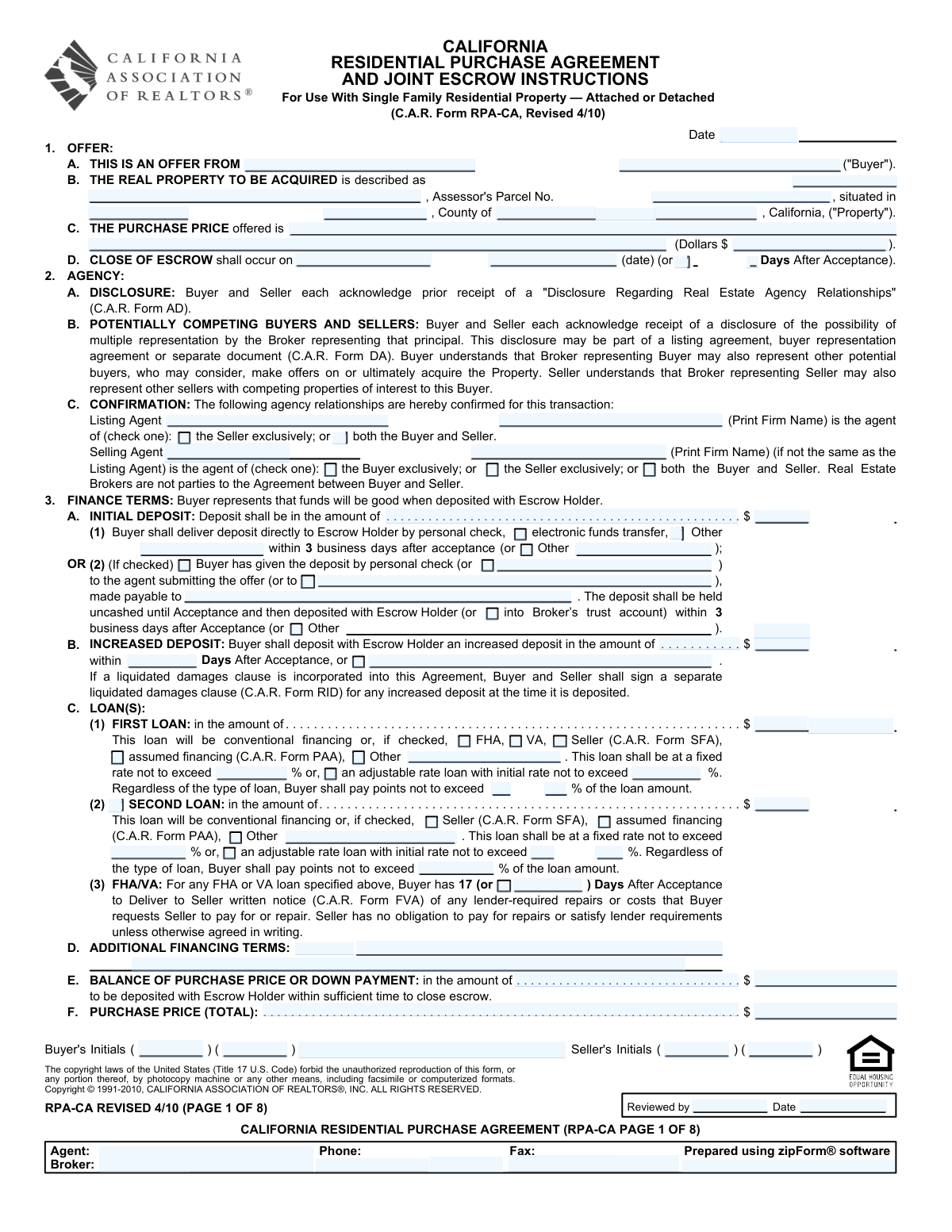
Yes! You can use AI to fill out California Residential Purchase Agreement and Joint Escrow Instructions
The California Residential Purchase Agreement and Joint Escrow Instructions (RPA-CA) is the legally binding contract used in California real estate transactions. It outlines every critical detail, including the purchase price, financing terms, contingencies, and responsibilities of both the buyer and seller, making it the foundational document for the sale. Today, this comprehensive form can be filled out quickly and accurately using AI-powered services like Instafill.ai, which can also convert non-fillable PDF versions into interactive fillable forms.
RPA-CA is part of the
purchase agreement forms category on Instafill.
Our AI automatically handles information lookup, data retrieval, formatting, and form filling.
It takes less than a minute to fill out RPA-CA using our AI form filling.
Securely upload your data. Information is encrypted in transit and deleted immediately after the form is filled out.
Form specifications
| Form name: | California Residential Purchase Agreement and Joint Escrow Instructions |
| Number of fields: | 438 |
| Number of pages: | 10 |
| Language: | English |
More forms in Purchase agreement forms
Instafill Demo: How to fill out PDF forms in seconds with AI
How to Fill Out RPA-CA Online for Free in 2026
Are you looking to fill out a RPA-CA form online quickly and accurately? Instafill.ai offers the #1 AI-powered PDF filling software of 2026, allowing you to complete your RPA-CA form in just 37 seconds or less.
Follow these steps to fill out your RPA-CA form online using Instafill.ai:
- 1 Navigate to Instafill.ai and upload or select the California Residential Purchase Agreement (RPA-CA) form.
- 2 Use the AI assistant to automatically identify and label all form fields, including buyer/seller information, property details, and purchase price.
- 3 Enter the key transaction details, such as buyer/seller names, property address, and the offered purchase price, allowing the AI to populate this information across the document.
- 4 Specify financing terms, including loan amounts, types (Conventional, FHA, VA), interest rates, and contingency details.
- 5 Define the allocation of costs for inspections, reports, escrow, title insurance, and HOA fees by checking the appropriate boxes for the buyer or seller.
- 6 Review all entered information for accuracy, then securely add digital signatures and initials for all parties to execute the agreement.
- 7 Download, print, or securely share the completed and signed RPA-CA form directly from the platform with your agent, lender, and escrow officer.
Our AI-powered system ensures each field is filled out correctly, reducing errors and saving you time.
Why Choose Instafill.ai for Your Fillable RPA-CA Form?
Speed
Complete your RPA-CA in as little as 37 seconds.
Up-to-Date
Always use the latest 2026 RPA-CA form version.
Cost-effective
No need to hire expensive lawyers.
Accuracy
Our AI performs 10 compliance checks to ensure your form is error-free.
Security
Your personal information is protected with bank-level encryption.
Frequently Asked Questions About Form RPA-CA
This is a California Residential Purchase Agreement, a legally binding contract used by a buyer to make an offer to purchase real estate from a seller. It outlines all the terms and conditions of the sale, including price, financing, and contingencies.
Typically, the buyer or their real estate agent fills out this form to create the initial offer. The seller then reviews the offer and can accept, reject, or counter it.
This is a standard practice in legal and financial documents to prevent ambiguity or fraud. If there is a discrepancy between the two, the amount written in words is usually considered the legally binding one.
The initial deposit is the amount you provide with your offer to show you are a serious buyer. An increased deposit is an additional amount you may agree to pay later in the process, often after removing certain contingencies.
A loan contingency makes the purchase conditional on you successfully obtaining the financing described in the agreement. You can choose to waive this by checking the 'NO LOAN CONTINGENCY' box, but this means you are obligated to purchase the property even if your loan is denied.
An appraisal contingency allows the buyer to back out of the contract if the property appraises for less than the purchase price. The form gives you options to set a deadline for removing this contingency or to waive it entirely.
If you check the 'ALL CASH OFFER' box, you must provide the seller with written verification of sufficient funds to close the transaction. You can attach this verification to the offer or deliver it within a specified number of days after acceptance.
The costs for inspections, escrow fees, title insurance, and transfer taxes are all negotiable. The form has specific sections where the buyer and seller must agree on who pays for each item by checking the appropriate boxes.
A home warranty is a service contract that covers the repair or replacement of major home systems and appliances for a set period, typically one year. The form allows you to specify who pays for the plan, the provider, and any optional coverages like for a pool or air conditioner.
The agreement specifies a timeframe, usually a set number of business days after acceptance, for you to deliver the deposit. Failure to do so can put you in breach of contract, potentially allowing the seller to cancel the sale and keep your deposit.
Yes, services like Instafill.ai use AI to accurately auto-fill form fields from your data, which can save significant time and reduce errors on complex forms like this.
You can upload the Residential Purchase Agreement PDF to the Instafill.ai platform. The service will automatically identify the fields, allowing you to fill them out online quickly and easily before downloading the completed document.
If you have a flat or non-fillable PDF, you can use a service like Instafill.ai to convert it into an interactive, fillable form. This allows you to type directly into the fields, initial, and prepare the document for signatures without needing to print and fill it out by hand.
Compliance RPA-CA
Validation Checks by Instafill.ai
1
Purchase Price Numeric and Written Consistency
This validation ensures that the numeric value entered for the purchase price (e.g., '$150,000.00') is identical to the amount written out in words (e.g., 'One hundred fifty thousand dollars'). This is a critical check because in legal documents, the written amount often governs in case of a discrepancy. Failure to match can create ambiguity, potentially voiding the offer or leading to legal disputes over the intended price.
2
Financial Breakdown Summation
This check verifies that the sum of the Initial Deposit, Increased Deposit, First Loan Amount, Second Loan Amount, and the Balance of Down Payment equals the total Purchase Price Offered. This is a fundamental accounting check to ensure the offer is financially coherent and all funds required for the purchase are accounted for. If the amounts do not sum correctly, the offer is mathematically flawed and cannot be executed.
3
Mutually Exclusive Close of Escrow Timeline
This validation ensures that only one method for determining the close of escrow date is selected. The form provides options for closing on a specific date or a certain number of days after acceptance. A user cannot select both. This is important for creating a clear, unambiguous deadline for the transaction to be completed, preventing disputes about the contract's closing timeline.
4
Logical Loan Contingency Status
This check validates the relationship between loan-related fields and the loan contingency status. If 'NO LOAN CONTINGENCY' or 'ALL CASH OFFER' is checked, then fields for loan amounts, rates, and points should be disabled or flagged if they contain data. This prevents the submission of a contradictory offer that claims to be non-contingent on financing while also specifying loan terms.
5
Agent Representation Exclusivity
This validation confirms that an agent's representation status is not contradictory. For example, a Listing Agent cannot be checked as representing 'the Seller exclusively' and 'both the Buyer and Seller' simultaneously. Correctly defining representation is a legal requirement with significant implications for an agent's duties. An invalid selection would misrepresent the legal relationship between the agent and the parties.
6
Conditional FHA/VA Notification Period
This check ensures that if the buyer's financing is marked as 'FHA' or 'VA', then the 'FHA/VA Notification Days' field must be populated with a valid number. FHA and VA loans have specific requirements and timelines for notifying the seller of lender-required repairs. Failure to define this period in the contract leaves a critical deadline ambiguous, potentially jeopardizing the transaction.
7
Chronological Date Validation
This validation verifies that all date fields are not only in a valid format (e.g., MM/DD/YYYY) but are also logically sequenced. Specifically, the 'Close of Escrow Date' must occur after the agreement 'Date'. This ensures the contract timeline is logical and enforceable. A closing date that precedes the agreement date is impossible and would invalidate that term.
8
Mutually Exclusive Payer Selection for Costs
This validation applies to all sections where a cost must be assigned, such as for inspections, escrow fees, or title insurance. It ensures that for any given fee, only one party ('Buyer' or 'Seller') can be selected as the payer. This prevents ambiguity and future disputes by clearly allocating all financial responsibilities before the agreement is finalized.
9
Required Specification for 'Other' Options
This check ensures that whenever a user selects an 'Other' checkbox (e.g., for loan type, deposit method, or optional warranty coverage), the corresponding text field for specifying details is not left blank. Selecting 'Other' without providing an explanation makes the term incomplete and unenforceable. This validation forces the user to provide the necessary information for the contract to be clear and complete.
10
Appraisal Contingency Logic
This validation ensures that options related to the removal of the appraisal contingency are only available if the agreement is, in fact, contingent on an appraisal. If the 'Agreement is NOT contingent on appraisal' box is checked, then any fields or checkboxes related to the timeline for removing that contingency should be disabled or flagged as invalid. This prevents the creation of contradictory terms within the agreement.
11
Loan Rate Type Exclusivity
This validation ensures that for any single loan, only one rate type can be selected. The checkboxes for 'Fixed rate' and 'Adjustable rate' are mutually exclusive. A loan cannot be both fixed and adjustable, so selecting both would create a nonsensical and unenforceable financing term. This check guarantees the fundamental nature of the loan contingency is clearly defined.
12
Buyer Name Consistency Across Form
This validation compares the buyer's name across multiple fields, such as 'Buyer — Primary Name' and 'Buyer Name (Property to be Acquired)', to ensure they are identical. Consistency in the buyer's legal name is crucial for the validity of the contract, title transfer, and escrow processing. Discrepancies can cause significant delays and legal challenges in recording the property deed correctly.
Common Mistakes in Completing RPA-CA
Buyers often enter nicknames, initials, or incomplete versions of their names instead of their full legal names. This creates a mismatch with loan documents and title records, which can delay or even jeopardize the closing process. To avoid this, always use the full legal name as it appears on government-issued identification, as this is what will be required for title and lending. AI-powered form filling tools can help by storing and consistently applying the correct legal names across all documents.
A frequent error is a discrepancy between the purchase price entered as a numeric value (e.g., '$500,000') and the amount written out in words (e.g., 'Five Hundred Five Thousand Dollars'). In a legal dispute, the written-out amount often prevails, which could unintentionally alter the contract's core financial term. To prevent this, meticulously double-check that both entries are identical. Advanced form-filling tools like Instafill.ai can eliminate this error by automatically generating the written-out amount from the numeric input, ensuring they always match.
The form allows for closing escrow on a specific date OR a certain number of days after acceptance, but not both. A common mistake is to either fill in both options or leave the section entirely blank, creating confusion about the legally binding closing deadline. This ambiguity can lead to disputes and potential breach of contract if a party fails to perform by the intended, but unclarified, date. Always choose only one option and fill in the corresponding date or number of days.
Simply providing a street address without the correct Assessor's Parcel Number (APN) and county is a significant error. An incorrect or missing APN can mean the contract is technically for the wrong property, rendering it unenforceable and causing major issues for title insurance and escrow. Always verify the APN from an official source like a preliminary title report or county records before writing the offer. AI tools can help validate address components and ensure all required location fields are completed.
Buyers who require a loan sometimes mistakenly check the 'NO LOAN CONTINGENCY' box or fail to specify the correct contingency removal timeframe. This is a catastrophic error, as it removes the buyer's right to cancel the contract without penalty if they cannot secure financing, putting their initial deposit at risk. It is crucial to understand and correctly fill out the loan and appraisal contingency sections to protect your interests. If the form is a non-fillable PDF, Instafill.ai can convert it into an interactive version, making these critical checkboxes clearer and harder to miss.
Sections for allocating costs like escrow fees, title insurance, and transfer taxes are often left blank or have both 'Buyer' and 'Seller' checked for the same item. This failure to clearly assign financial responsibility leads to disputes during escrow, delaying the closing until an agreement is reached. To avoid this, ensure every cost listed in the agreement is explicitly assigned to either the Buyer, the Seller, or is noted as split per local custom or negotiation.
Throughout the form, there are sections with mutually exclusive options, such as selecting the party responsible for paying for an inspection. Users sometimes check multiple boxes in a single section (e.g., checking both 'Buyer shall pay' and 'Seller shall pay'). This creates a contradiction that voids that specific clause until it is clarified via an addendum, wasting time and creating unnecessary back-and-forth negotiation. Carefully read and select only one option per item.
Errors in the 'Initial Deposit' section, such as mismatched numeric and written amounts or failing to specify the delivery method and timeframe, are common. This can create disputes over whether the buyer has fulfilled their initial obligation, potentially giving the seller an opportunity to cancel the agreement. Ensure the deposit amount is consistent and that the checkboxes for delivery method (e.g., 'Electronic funds transfer') and timing (e.g., '3 business days after acceptance') are clearly and correctly marked.
The form requires a clear declaration of whether an agent represents the Buyer exclusively, the Seller exclusively, or both parties in a dual agency role. Incorrectly checking these boxes misrepresents the agent's legal duties and can lead to significant legal and ethical complications. Buyers and sellers should review this section carefully to confirm it accurately reflects their understanding of the agent's role in the transaction.
The bottom of each page includes boxes for the buyer's and seller's initials, which serve as acknowledgment that they have reviewed and accepted the terms on that page. Forgetting to initial a page can raise questions about whether all parties have seen and agreed to the entire contract, potentially weakening its enforceability. It is essential to initial every required spot on all pages of the final agreement. Using a digital signing platform or a tool that highlights required fields can help prevent this oversight.
Saved over 80 hours a year
“I was never sure if my IRS forms like W-9 were filled correctly. Now, I can complete the forms accurately without any external help.”
Kevin Martin Green
Your data stays secure with advanced protection from Instafill and our subprocessors

Robust compliance program
Transparent business model
You’re not the product. You always know where your data is and what it is processed for.
ISO 27001, HIPAA, and GDPR
Our subprocesses adhere to multiple compliance standards, including but not limited to ISO 27001, HIPAA, and GDPR.
Security & privacy by design
We consider security and privacy from the initial design phase of any new service or functionality. It’s not an afterthought, it’s built-in, including support for two-factor authentication (2FA) to further protect your account.
Fill out RPA-CA with Instafill.ai
Worried about filling PDFs wrong? Instafill securely fills california-residential-purchase-agreement-and-joint-escrow-instructions forms, ensuring each field is accurate.