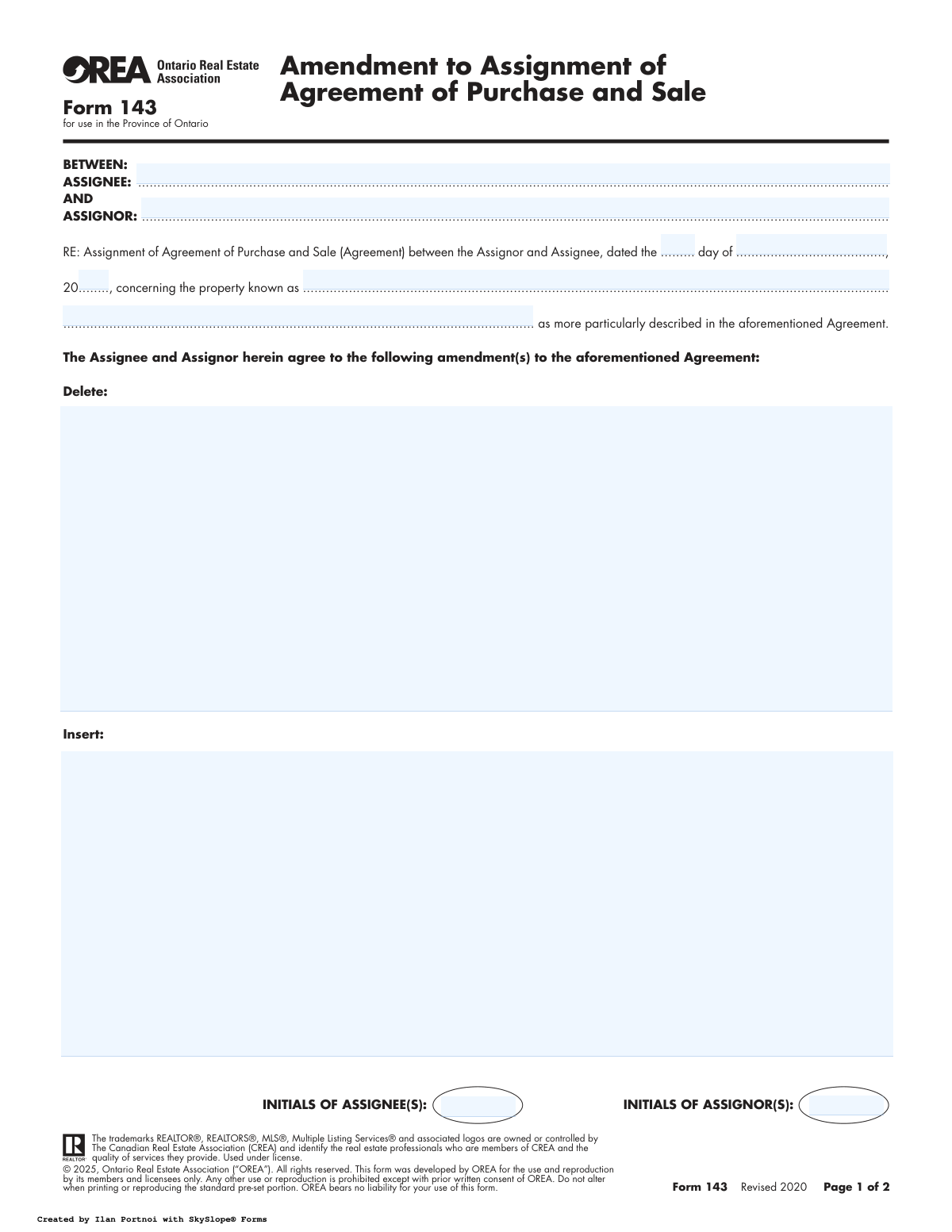
Yes! You can use AI to fill out Form 143, Amendment to Assignment of Agreement of Purchase and Sale

OREA Form 143 is a legal document for Ontario real estate transactions, used to make official changes to a previously executed 'Assignment of Agreement of Purchase and Sale'. It's important for formally documenting modifications to the terms between the assignor and assignee, ensuring all parties are legally bound to the updated conditions. The form clearly outlines which clauses are deleted and which are inserted, creating a precise record of the amendment. Today, this form can be filled out quickly and accurately using AI-powered services like Instafill.ai, which can also convert non-fillable PDF versions into interactive fillable forms.
Form 143 is part of the purchase agreement forms and purchase and sale forms categories on Instafill.
Our AI automatically handles information lookup, data retrieval, formatting, and form filling.
It takes less than a minute to fill out Form 143 using our AI form filling.
Securely upload your data. Information is encrypted in transit and deleted immediately after the form is filled out.

Form specifications

Form name: Form 143, Amendment to Assignment of Agreement of Purchase and Sale
Number of fields: 57
Number of pages: 2
Filled form examples: Form Form 143 Examples
Language: English
main-image

Instafill Demo: How to fill out PDF forms in seconds with AI

How to Fill Out Form 143 Online for Free in 2026

Are you looking to fill out a FORM 143 form online quickly and accurately? Instafill.ai offers the #1 AI-powered PDF filling software of 2026, allowing you to complete your FORM 143 form in just 37 seconds or less.
Follow these steps to fill out your FORM 143 form online using Instafill.ai:
  1. 1 Navigate to Instafill.ai and upload or select the OREA Form 143.
  2. 2 Use the AI assistant to identify and fill in the names of the Assignee and Assignor, and the date and property details of the original agreement being amended.
  3. 3 In the 'Delete' section, specify the exact text, clauses, or terms from the original assignment agreement that are being removed.
  4. 4 In the 'Insert' section, provide the new text, clauses, or terms that are being added or are replacing the deleted content.
  5. 5 Complete the Irrevocability section if applicable, detailing who the offer is irrevocable by and until what date and time.
  6. 6 Follow the prompts to have all parties (Assignor and Assignee) initial and sign the document electronically, along with their witnesses.
  7. 7 Review the completed form for accuracy, then download, print, or securely share the final, signed amendment with all parties, including lawyers and brokerages.

Our AI-powered system ensures each field is filled out correctly, reducing errors and saving you time.

Why Choose Instafill.ai for Your Fillable Form 143 Form?

Speed

Complete your Form 143 in as little as 37 seconds.

Up-to-Date

Always use the latest 2026 Form 143 form version.

Cost-effective

No need to hire expensive lawyers.

Accuracy

Our AI performs 10 compliance checks to ensure your form is error-free.

Security

Your personal information is protected with bank-level encryption.

Frequently Asked Questions About Form Form 143

Form 143, Amendment to Assignment of Agreement of Purchase and Sale, is used to make written changes to an existing assignment agreement that has already been signed by both the Assignor and Assignee.

The 'Assignor' is the original purchaser of the property who is selling their rights in the Agreement of Purchase and Sale. The 'Assignee' is the new buyer who is purchasing those rights from the Assignor.

You will need the date of the original assignment agreement, the full legal names of the Assignor and Assignee, and the property address as it appears on that agreement.

In the 'Delete' section, you must write the exact wording of the clause you want to remove from the original assignment agreement. In the 'Insert' section, you write the new clause that will be added or will replace the deleted one.

No, this form only modifies the specific clauses detailed in the 'Delete' and 'Insert' sections. The form clearly states that all other terms and conditions of the original assignment agreement remain the same.

The Irrevocability clause sets a firm deadline by which the other party must accept the proposed amendment. If it is not accepted by the specified time and date, the offer to amend becomes null and void.

Initialing the first page confirms that both the Assignor and Assignee have reviewed and acknowledged the specific changes being made to the agreement as detailed in the 'Delete' and 'Insert' sections.

Once fully signed and accepted by all parties, this amendment becomes a legally binding part of the Assignment of Agreement of Purchase and Sale. Copies should be distributed to the Assignor, Assignee, their lawyers, and the brokerage(s).

Typically, no. This form is an agreement between the Assignor and the Assignee, so the original seller is not usually a party to this amendment.

Yes, services like Instafill.ai use AI to accurately auto-fill form fields, which saves time and helps prevent errors when entering names, dates, and property details.

You can upload the form to the Instafill.ai platform, and its AI will identify all the fields for you. Simply provide the required information to automatically populate the form, making it ready for review and digital signatures.

You can use a tool like Instafill.ai, which is designed to convert flat, non-fillable PDFs into interactive, fillable forms. This allows you to easily type your information directly into the document online.

This section is used to record the exact time and date that the amendment was finally accepted by all parties. This creates a clear and official record of when the changes became legally binding.

Compliance Form 143
Validation Checks by Instafill.ai

1
Ensures Amendment Content Exists
This check verifies that at least one of the 'Content to Delete' or 'Content to Insert' fields is populated. An amendment form must specify what is being changed. If both fields are empty, the form serves no purpose and should be rejected as incomplete.
2
Validates Original Agreement Date
This validation ensures that the 'Day', 'Month', and 'Year of Agreement' fields combine to form a valid calendar date that occurs in the past. This is crucial for correctly identifying the original agreement being amended. An invalid or future date would make the reference ambiguous and legally questionable.
3
Verifies Presence of All Parties
This check confirms that both the 'Assignee Name' and 'Assignor Name' fields are filled with non-empty values. These parties are fundamental to the agreement, and their absence makes the contract legally void. The system should flag the submission if either name is missing.
4
Chronological Integrity of Irrevocability Date
This check ensures the 'Irrevocability Expiration' date and time are set in the future relative to the date the amendment is signed. The purpose of an irrevocability clause is to give the other party time to consider the offer. A past or immediate date would render this clause meaningless and could invalidate the offer.
5
Validates 'Irrevocable By' Party
This check verifies that the 'Irrevocable By' field contains a name that exactly matches either the 'Assignor Name' or the 'Assignee Name' entered at the top of the form. This ensures clarity on which party is making the irrevocable offer. A mismatch could lead to disputes about the offer's validity.
6
Chronological Integrity of Acceptance Date
This validation confirms that the 'Confirmation of Acceptance' date is on or after all signature dates and the 'Irrevocability Expiration' date. Acceptance cannot logically occur before the offer is made, signed, or before its irrevocability period ends. This maintains the logical and legal sequence of events.
7
Validates Conditional Field Completion
This is a crucial check to ensure that if any amendment content is provided ('Content to Delete' or 'Content to Insert'), then all dependent sections like 'Irrevocability', 'Signatures', and 'Confirmation of Acceptance' are also filled out. Submitting an amendment without the required signatures or acceptance details would render it unenforceable. The form should be rejected if these sections are incomplete when an amendment is proposed.
8
Verifies Signatory and Party Name Consistency
This check compares the names entered in the various 'Assignee/Assignor' signature fields against the primary 'Assignee Name' and 'Assignor Name' fields at the beginning of the form. This ensures the people signing the document are the actual parties to the agreement. A discrepancy could indicate an unauthorized signature and invalidate the amendment.
9
Validates Lawyer Email Format
This check ensures that the 'Assignor's Lawyer Email' and 'Assignee's Lawyer Email' fields, if populated, contain strings that conform to a standard email format (e.g., [email protected]). Proper formatting is essential for ensuring legal notices and communications can be delivered successfully. An invalid format would lead to communication failures.
10
Validates Telephone Number Format
This check verifies that all telephone and fax number fields contain values that match a recognized North American phone number format. This ensures the contact information is usable for communication between parties and their representatives. If the format is incorrect, the system should prompt the user for correction to prevent data entry errors.
11
Ensures Presence of Required Initials
This check verifies that if amendment content is present, the 'INITIALS OF ASSIGNEE(S)' and 'INITIALS OF ASSIGNOR(S)' fields are not empty. These initials serve as an acknowledgement by both parties that they have reviewed the specific changes on that page. Missing initials could be used to argue that a party was unaware of the amendment details.
12
Chronological Integrity of Acknowledgement Date
This validation ensures the 'Acknowledgement Date' for both the Assignor and Assignee is on or after the 'Confirmation of Acceptance' date. A party cannot acknowledge receipt of a fully accepted agreement before it has actually been accepted. This check maintains the logical timeline of the transaction.
13
Verifies Property Identification
This check ensures the 'Property Address Line 1' field is not empty. The property is the subject of the entire agreement, and its clear identification is paramount. Without a property address, the amendment is ambiguous and has no legal standing.

Common Mistakes in Completing Form 143

Using Incomplete or Incorrect Legal Names

This occurs when parties enter nicknames, initials, or omit corporate suffixes (e.g., Inc., Ltd.) instead of their full legal names. This mistake can create ambiguity about the identities of the parties, leading to potential legal challenges, title transfer issues, or even voiding the amendment. To prevent this, always use the complete, official legal names for all Assignors and Assignees as they appear on government ID and the original contract.

Incorrectly Referencing the Original Agreement Date

Users often misremember or fail to check the date of the original 'Assignment of Agreement of Purchase and Sale' they are amending. An incorrect date is a critical error because it means the amendment is referencing the wrong contract, which can render it legally invalid and unenforceable. Always have the original agreement on hand and carefully transcribe the exact day, month, and year to ensure the amendment is properly linked.

Vague 'Delete' and 'Insert' Language

Parties frequently write imprecise instructions in the amendment sections, such as 'remove financing condition' instead of quoting the exact clause. This ambiguity is a primary source of future disputes, as the parties may have different interpretations of what was changed. To avoid this, you must quote the exact text to be deleted and provide the precise, complete wording for the new clause to be inserted, leaving no room for misinterpretation.

Missing Initials on Page One

In the rush to sign the document, both Assignors and Assignees often forget to initial the bottom of the first page. These initials serve as formal acknowledgment that all parties have reviewed and agreed to the contents of that page, which contains the core amendments. A missing initial could be used in a dispute to argue that a party was unaware of the page's content, potentially weakening the amendment's legal standing.

Improperly Filled Irrevocability Clause

This critical section is prone to errors, such as forgetting to specify a.m./p.m., setting an unclear deadline, or naming the wrong party (Assignor/Assignee) as making the offer. An improperly defined irrevocability period can make the amendment offer void from the start or cause disputes about when it expired. Always double-check that a specific time with 'a.m.' or 'p.m.' is included and that the correct party is identified as being bound by the deadline.

Missing or Invalid Witness Signatures

A signature is often only legally binding when properly witnessed, yet parties frequently forget to have a witness sign alongside them, or they use an inappropriate witness like another party to the contract. This oversight can invalidate the signatures and, by extension, the entire amendment. Always ensure a neutral, third-party adult witnesses each signature and completes the witness portion of the form correctly. AI-powered tools like Instafill.ai can help by highlighting all required signature and witness fields to prevent omissions.

Inconsistent Dates Across Sections

This form contains multiple date fields for signatures, irrevocability, and final acceptance. A common mistake is entering conflicting dates, such as a signature date that occurs after the final acceptance date. These inconsistencies create a confusing record that can be challenged in a legal dispute. It is crucial to fill out the form chronologically and ensure all dates align logically with the sequence of events.

Omitting the Exact Time of Final Acceptance

The 'Confirmation of Acceptance' section requires the exact time the amendment was finalized, as the contract states 'Time shall in all respects be of the essence'. Many users only enter the date, which creates ambiguity about the precise moment the amendment became legally binding. To avoid disputes, the party signing the confirmation must record the precise time (including a.m./p.m.) of acceptance by all parties. Smart form-filling tools can flag this field as mandatory to prevent this error.

Vague Property Description

Users sometimes enter a partial or informal address for the property instead of the full, legally recognized address, including the unit number and postal code. An ambiguous property description is a serious error that could lead to a challenge that the amendment is void for uncertainty. To avoid this, always use the complete and official property address as stated in the original Agreement of Purchase and Sale. If the form is a non-fillable PDF, a tool like Instafill.ai can make it fillable, ensuring information is entered clearly.

Outdated Lawyer or Service Information

The sections for lawyer and service contact details are critical for official communication, but are often filled with outdated information or left blank. This can cause crucial legal notices to be delayed or sent to the wrong address, potentially leading to missed deadlines or default. Always verify and provide current, complete contact details for legal counsel and for service of documents. Using a tool like Instafill.ai can help by saving and reusing verified contact information, reducing the risk of typos.
Saved over 80 hours a year

“I was never sure if my IRS forms like W-9 were filled correctly. Now, I can complete the forms accurately without any external help.”

Kevin Martin Green

Your data stays secure with advanced protection from Instafill and our subprocessors

Robust compliance program

Transparent business model

You’re not the product. You always know where your data is and what it is processed for.

ISO 27001, HIPAA, and GDPR

Our subprocesses adhere to multiple compliance standards, including but not limited to ISO 27001, HIPAA, and GDPR.

Security & privacy by design

We consider security and privacy from the initial design phase of any new service or functionality. It’s not an afterthought, it’s built-in, including support for two-factor authentication (2FA) to further protect your account.

Fill out Form 143 with Instafill.ai

Worried about filling PDFs wrong? Instafill securely fills form-143-amendment-to-assignment-of-agreement-of-purchase-and-sale forms, ensuring each field is accurate.