Yes! You can use AI to fill out Form 801, Offer Summary Document for use with Agreement of Purchase and Sale

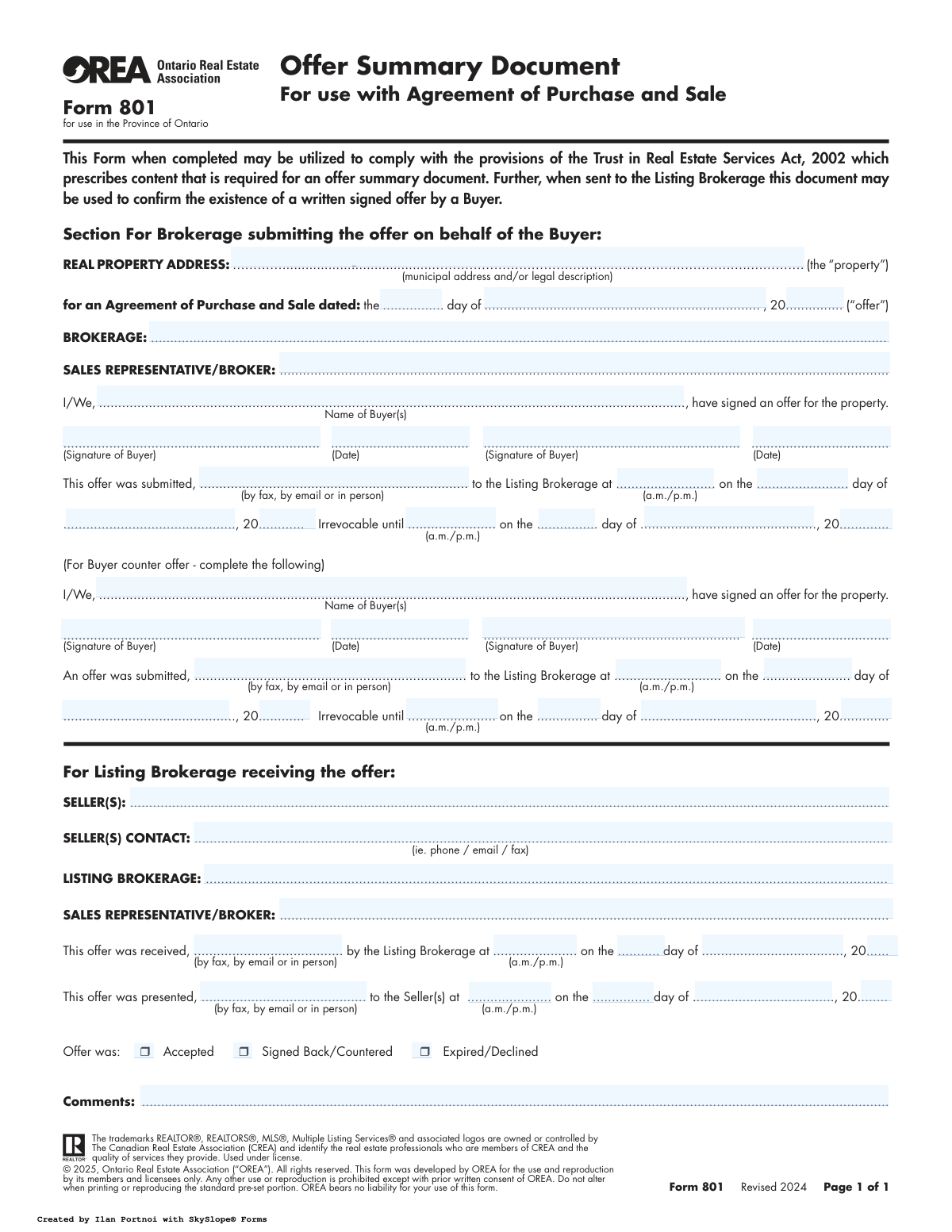
Ontario Real Estate Association (OREA) Form 801, the Offer Summary Document, is used by real estate professionals in Ontario to summarize the key details of a buyer's offer and confirm its submission to the listing brokerage. This document helps ensure compliance with the Trust in Real Estate Services Act, 2002, by providing a standardized record of the offer's existence and terms. Today, this form can be filled out quickly and accurately using AI-powered services like Instafill.ai, which can also convert non-fillable PDF versions into interactive fillable forms.
Form 801 is part of the purchase agreement forms and purchase and sale forms categories on Instafill.
Our AI automatically handles information lookup, data retrieval, formatting, and form filling.
It takes less than a minute to fill out Form 801 using our AI form filling.
Securely upload your data. Information is encrypted in transit and deleted immediately after the form is filled out.

Form specifications

Form name: Form 801, Offer Summary Document for use with Agreement of Purchase and Sale
Number of fields: 52
Number of pages: 1
Filled form examples: Form Form 801 Examples
Language: English
main-image

Instafill Demo: How to fill out PDF forms in seconds with AI

How to Fill Out Form 801 Online for Free in 2026

Are you looking to fill out a FORM 801 form online quickly and accurately? Instafill.ai offers the #1 AI-powered PDF filling software of 2026, allowing you to complete your FORM 801 form in just 37 seconds or less.
Follow these steps to fill out your FORM 801 form online using Instafill.ai:
  1. 1 Navigate to an AI-powered platform like Instafill.ai and upload or select OREA Form 801.
  2. 2 Use the AI assistant to input the property address and the date of the Agreement of Purchase and Sale.
  3. 3 Enter the information for the brokerage submitting the offer, including the sales representative's name and the buyer's name(s).
  4. 4 Provide the offer submission details, such as the method (e.g., email, in person), date, time, and the irrevocability period.
  5. 5 If a counter-offer is being made, complete the corresponding section with the buyer's details and new irrevocability terms.
  6. 6 Review all the information auto-filled by the AI for accuracy, then have the buyer(s) apply their digital or physical signatures and dates.
  7. 7 Download, print, or securely share the completed Form 801 with the listing brokerage and other relevant parties.

Our AI-powered system ensures each field is filled out correctly, reducing errors and saving you time.

Why Choose Instafill.ai for Your Fillable Form 801 Form?

Speed

Complete your Form 801 in as little as 37 seconds.

Up-to-Date

Always use the latest 2026 Form 801 form version.

Cost-effective

No need to hire expensive lawyers.

Accuracy

Our AI performs 10 compliance checks to ensure your form is error-free.

Security

Your personal information is protected with bank-level encryption.

Frequently Asked Questions About Form Form 801

Form 801 is used in Ontario to summarize the key details of a formal offer on a property. It serves as a cover sheet to the main Agreement of Purchase and Sale, confirming the offer's existence and tracking its submission.

No, this form is not the offer itself, but a summary that accompanies the full Agreement of Purchase and Sale. It is used to register and track the offer with the seller's brokerage.

The buyer's real estate agent fills out the top section, which the buyer then signs. The seller's agent completes the bottom section to log the offer's receipt, presentation, and outcome.

This is the deadline by which the seller must accept your offer. If they do not respond by this specific time, your offer automatically becomes void.

The first section is for your initial offer. The second section, labeled 'For Buyer counter offer,' is only used if you are responding with a new offer after the seller has countered your original one.

The seller's agent uses this section to officially record when they received your offer, when they presented it to the seller, and what the seller's final decision was (Accepted, Countered, or Declined).

Your agent submits this form along with your full offer to the seller's brokerage. This creates a formal record and initiates the offer presentation process with the seller.

'Accepted' means the seller agrees to your terms. 'Signed Back/Countered' means the seller has proposed changes, and 'Expired/Declined' means the offer was rejected or the time limit passed.

Yes, services like Instafill.ai use AI to accurately auto-fill form fields, which can save your agent time and help prevent errors when preparing your offer documents.

Your agent can use a service like Instafill.ai to upload and complete the form digitally. The platform makes it easy to enter all required information, obtain e-signatures, and share the completed document securely.

If you have a non-fillable or 'flat' PDF, a platform like Instafill.ai can convert it into an interactive, fillable form. This allows for easy digital completion without needing to print and scan the document.

This form helps brokerages comply with TRESA regulations in Ontario, which mandate the creation of a written record for every offer received on a property. It ensures a transparent and documented process for handling all offers.

Compliance Form 801
Validation Checks by Instafill.ai

Common Mistakes in Completing Form 801

Ambiguous Irrevocability Time

Users often enter a time in the 'Irrevocable until' field without specifying 'a.m.' or 'p.m.'. This happens due to haste or assuming the context is clear. The consequence is critical ambiguity, as an offer intended to be open until 9:00 p.m. could be interpreted as expiring at 9:00 a.m., potentially causing the buyer to lose the property. Always double-check that 'a.m.' or 'p.m.' is clearly marked to create a legally sound and unambiguous deadline.

Incomplete Real Property Address

People frequently provide only the street address, omitting the unit number for condos or the full legal description when required. This oversight can lead to confusion, especially in buildings with multiple units or for properties with complex legal boundaries. An incomplete address can delay the transaction or create legal issues later. To avoid this, always include the full municipal address, including any unit/suite numbers, and attach the legal description if necessary.

Incorrect Use of the Counter Offer Section

A common error is for a buyer's agent to fill out the 'For Buyer counter offer' section when submitting the initial offer. This section is exclusively for when a buyer is responding to a seller's sign-back, not for the first offer. This mistake creates a confusing and incorrect document, misrepresenting the offer's history. Ensure only the top section is completed for the initial offer submission.

Using Informal or Incomplete Names

Buyers or agents may enter nicknames or incomplete versions of legal names in the 'Name of Buyer(s)' field. Real estate transactions require full legal names as they appear on government-issued ID and title documents. Using incorrect names can lead to significant delays and require amendments to the Agreement of Purchase and Sale. Always use the full, official legal names for all parties involved in the transaction.

Mismatched Agreement and Submission Dates

The date on the 'Agreement of Purchase and Sale' and the 'offer was submitted' date are often entered incorrectly, sometimes showing the submission date as being before the agreement was even dated. This logical inconsistency occurs from simple data entry errors but can undermine the document's credibility and create confusion during audits or disputes. Carefully verify that all dates are entered in the correct sequence. AI-powered tools like Instafill.ai can help flag such logical inconsistencies.

Missing Signatures or Signature Dates

In transactions with multiple buyers, it's easy to miss a signature or its corresponding date. An offer is not legally binding until all named buyers have signed and dated it. This omission can invalidate the offer or give the seller grounds to ignore it. Before submission, meticulously review the document to ensure all required signature and date fields are completed for every buyer.

Omitting the Submission Method

The field specifying how the offer was submitted ('by fax, by email or in person') is frequently left blank. This information is crucial for creating a clear audit trail and can be vital in disputes over when and how an offer was officially delivered. Failing to record the method weakens the formal record of the offer process. Always explicitly state the delivery method as part of a complete submission.

Buyer's Agent Filling the Listing Brokerage Section

The agent submitting the offer sometimes mistakenly fills out the bottom section reserved 'For Listing Brokerage receiving the offer'. This section is the sole responsibility of the seller's agent to document their receipt and presentation of the offer. This error creates an inaccurate record and shows a lack of procedural understanding. The submitting agent must only complete the top sections related to the buyer's offer and submission.

Inconsistent Timestamps Between Brokerages

The buyer's agent records a submission time, and the listing agent records a reception time, but these times can be inconsistent or lack verification, leading to disputes about when the offer was officially received. This is especially problematic in multiple-offer situations where timing is critical. To prevent this, it is best practice to use a verifiable delivery method like email, which provides a digital timestamp, and ensure both agents acknowledge the specific time of receipt.

Leaving Offer Status Unchecked

The listing agent, after presenting the offer to the seller, may forget to check one of the final status boxes: 'Accepted', 'Signed Back/Countered', or 'Expired/Declined'. This form serves as a summary and record of the offer's journey, and omitting the final outcome leaves the record incomplete. This can cause issues for brokerage compliance and record-keeping. The listing agent must always complete this final step to officially close the loop on the offer summary. Since this form is a non-fillable PDF, a tool like Instafill.ai can convert it into a fillable version, making it easier to complete all required fields digitally.
Saved over 80 hours a year

“I was never sure if my IRS forms like W-9 were filled correctly. Now, I can complete the forms accurately without any external help.”

Kevin Martin Green

Your data stays secure with advanced protection from Instafill and our subprocessors

Robust compliance program

Transparent business model

You’re not the product. You always know where your data is and what it is processed for.

ISO 27001, HIPAA, and GDPR

Our subprocesses adhere to multiple compliance standards, including but not limited to ISO 27001, HIPAA, and GDPR.

Security & privacy by design

We consider security and privacy from the initial design phase of any new service or functionality. It’s not an afterthought, it’s built-in, including support for two-factor authentication (2FA) to further protect your account.

Fill out Form 801 with Instafill.ai

Worried about filling PDFs wrong? Instafill securely fills form-801-offer-summary-document-for-use-with-agreement-of-purchase-and-sale forms, ensuring each field is accurate.