Yes! You can use AI to fill out Form 300, Buyer Representation Agreement, Authority for Purchase or Lease
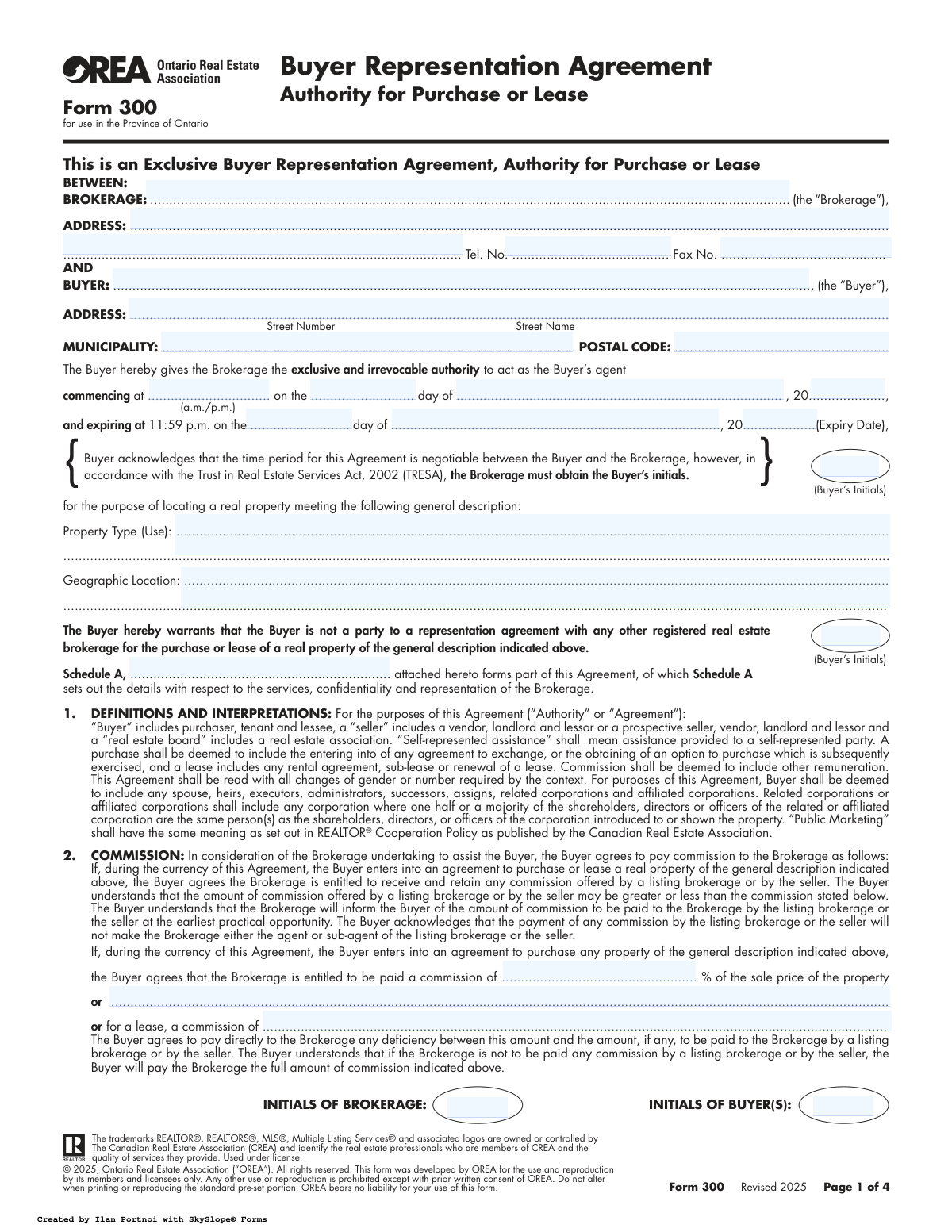
OREA Form 300 is a legally binding contract in Ontario that establishes an exclusive agency relationship between a prospective property buyer and a real estate brokerage. This agreement grants the brokerage the sole authority to represent the buyer in locating and negotiating the purchase or lease of a property, detailing the scope of representation, commission terms, and the obligations of both parties. Today, this form can be filled out quickly and accurately using AI-powered services like Instafill.ai, which can also convert non-fillable PDF versions into interactive fillable forms.
OREA Form 300 is part of the
lease agreement forms and purchase agreement forms categories on Instafill.
Our AI automatically handles information lookup, data retrieval, formatting, and form filling.
It takes less than a minute to fill out OREA Form 300 using our AI form filling.
Securely upload your data. Information is encrypted in transit and deleted immediately after the form is filled out.
Form specifications
| Form name: | Form 300, Buyer Representation Agreement, Authority for Purchase or Lease |
| Number of fields: | 50 |
| Number of pages: | 4 |
| Filled form examples: | Form OREA Form 300 Examples |
| Language: | English |
Instafill Demo: How to fill out PDF forms in seconds with AI
How to Fill Out OREA Form 300 Online for Free in 2026
Are you looking to fill out a OREA FORM 300 form online quickly and accurately? Instafill.ai offers the #1 AI-powered PDF filling software of 2026, allowing you to complete your OREA FORM 300 form in just 37 seconds or less.
Follow these steps to fill out your OREA FORM 300 form online using Instafill.ai:
- 1 Navigate to Instafill.ai and upload your OREA Form 300 or select it from the template library.
- 2 Use the AI assistant to automatically populate the Brokerage and Buyer information, including names, addresses, and contact details.
- 3 Enter the commencement and expiry dates for the agreement, and provide the buyer's initials to acknowledge the negotiable time period.
- 4 Clearly define the desired property type and geographic location the buyer is seeking.
- 5 Specify the commission details, including the percentage or fixed amount for a purchase or lease, and the duration of the holdover period.
- 6 Review all sections, including representation duties and multiple representation clauses, and add initials for the buyer and brokerage on each page as required.
- 7 Electronically sign and date the agreement in the designated fields for the buyer(s) and the authorized brokerage representative to finalize the contract.
Our AI-powered system ensures each field is filled out correctly, reducing errors and saving you time.
Why Choose Instafill.ai for Your Fillable OREA Form 300 Form?
Speed
Complete your OREA Form 300 in as little as 37 seconds.
Up-to-Date
Always use the latest 2026 OREA Form 300 form version.
Cost-effective
No need to hire expensive lawyers.
Accuracy
Our AI performs 10 compliance checks to ensure your form is error-free.
Security
Your personal information is protected with bank-level encryption.
Frequently Asked Questions About Form OREA Form 300
This is OREA Form 300, an Exclusive Buyer Representation Agreement. It is a contract between a home buyer and a real estate brokerage in Ontario, establishing an exclusive agency relationship for purchasing or leasing a property.
Exclusive representation means you agree to work solely with the specified brokerage for the duration of the agreement to find a property. You cannot use another real estate agent for the property type and location described in the agreement during this period.
Typically, the commission is paid by the seller's brokerage from the sale proceeds. However, if the seller offers less than the commission rate you agreed to in this form, you are responsible for paying the shortfall to your brokerage.
The holdover period is a specified number of days after the agreement expires. If you buy a property that was introduced to you during the agreement's term within this period, you may still owe the brokerage a commission.
The agreement is valid for the period between the commencement date and the expiry date, which are specified on the first page. The length of this period is negotiable between you and the brokerage.
Multiple representation occurs if your brokerage also represents the seller of a property you want to buy. In this case, the brokerage must be impartial to both parties, and you will be asked to provide written consent to proceed.
You are required to inform your brokerage about any property you become interested in, regardless of the source. If you purchase that property during the agreement's term, the commission terms of this agreement still apply.
You will need to provide your full legal name and address, the desired property type and geographic location, and agree on the start and end dates for the agreement. You will also need to initial and sign in several designated spots.
Schedule A is an attachment that forms part of the agreement and provides more specific details about the services, confidentiality, and representation the brokerage will provide. You must initial this schedule along with the main agreement.
Yes, services like Instafill.ai use AI to accurately auto-fill form fields, which can save you time and help reduce errors when completing the agreement.
You can use a service like Instafill.ai to upload the form, which makes it an interactive document. You can then type in your information, add your electronic signature, and share it easily.
You can use a platform like Instafill.ai, which can convert flat, non-fillable PDFs into interactive forms. This allows you to easily type your information into the correct fields online without needing to print the document.
While not legally mandatory to view properties, signing a BRA is required to formalize your relationship with a brokerage and have them represent your interests in a transaction. It clarifies services, responsibilities, and compensation.
Compliance OREA Form 300
Validation Checks by Instafill.ai
1
Agreement Expiry Date After Commencement Date
This validation ensures that the 'Expiry Date' of the agreement is chronologically after the 'Commencement Date'. An agreement cannot expire before it begins, and this check is crucial for defining a valid and enforceable contract term. If the expiry date is not after the commencement date, the form should be rejected and the user prompted to correct the dates to reflect a logical time frame.
2
Canadian Postal Code Format Validation
This check verifies that the 'Buyer Postal Code' field follows the standard Canadian format of 'A1A 1A1'. Correct postal codes are essential for mailings, location verification, and data integrity. An invalid format could lead to returned mail or inability to properly record the buyer's address, so the system should flag an incorrect format and request correction.
3
Mutually Exclusive Commission Fields for Purchase
This check validates the commission section to ensure that for a property purchase, either the 'Commission Percentage' or the 'Fixed Commission Amount (Purchase)' is filled, but not both. This prevents ambiguity in how the commission is calculated and ensures the financial terms are clear and indisputable. If both are filled, the user should be prompted to choose one.
4
Mandatory Buyer's Initials for TRESA Acknowledgement
This validation confirms that the 'Buyer's Initials' field next to the TRESA time period acknowledgement is not empty. The form explicitly states that the brokerage must obtain the buyer's initials for this clause. Failure to capture these initials could render the agreement non-compliant with the Trust in Real Estate Services Act, 2002, creating legal risks for the brokerage.
5
Signature and Date Field Co-dependency
This check ensures that whenever a signature field (e.g., 'Buyer Signature', 'Brokerage Representative Signature') is filled, its corresponding date field ('Signature Date', 'Agreement Date') must also be filled. A signature without a date is legally ambiguous as it does not establish when the agreement was executed. This validation enforces completeness and is critical for establishing the contract's timeline.
6
Page-by-Page Initial Verification
This validation verifies that the 'Brokerage Initials' and 'Buyer(s) Initials' fields are present on every required page (e.g., Page 2, Page 4/Schedule A). These initials confirm that all parties have reviewed each page of the agreement. Missing initials on any page could be used to argue that the party was not aware of the terms on that page, weakening the enforceability of the contract.
7
Holdover Period Numeric Validation
This validation ensures that the value entered for the 'Holdover Period' is a positive integer representing a number of days. This period is a critical term defining the brokerage's right to a commission after the agreement expires. Entering non-numeric text would make this clause unenforceable, so the system must ensure a valid number is provided.
8
Insurance Declaration Signature Dependency
This check validates that the 'Signature of Salesperson/Broker/Broker of Record' is only present if the 'Salesperson/Broker/Broker of Record Name' field is also filled. An anonymous signature is invalid and does not fulfill the declaration requirement. This ensures that the declaration of insurance is properly attributed to a specific, named individual as required by TRESA.
9
Logical Acknowledgement Date
This validation checks that the 'Acknowledgement Date' is on or after the 'Signature Date' of the agreement. A buyer cannot acknowledge receipt of a copy of the agreement before it has been signed. This ensures a logical and legally sound sequence of events, preventing claims that the buyer did not receive a copy of what they signed.
10
Brokerage and Buyer Name Completeness
This validation ensures that the 'Brokerage Name' and 'Buyer Name' fields on the first page are not left blank. These fields identify the primary parties to the contract, and their absence would render the entire agreement invalid. This is a fundamental completeness check required for any legal contract.
11
Property and Location Description Completeness
This check verifies that the 'Property Type (Use)' and 'Geographic Location' fields contain descriptive text and are not empty. These fields define the scope of the brokerage's work and the type of property covered by the agreement. Leaving them blank creates ambiguity and could lead to disputes over which properties fall under the terms of the contract.
12
Second Buyer Information Consistency
This validation ensures that if the 'Second Buyer Signature' field is filled, then the corresponding 'Second Buyer Signature Date' and 'Second Buyer Telephone Number' fields are also completed. It also checks that the second buyer's signature appears on the acknowledgement section if they signed the main agreement. This ensures complete and consistent information for all parties to the contract.
13
Conditional Commission Field Population
This check ensures that commission fields for a specific transaction type are only filled if that type is relevant. For example, 'Commission for Lease' should only be populated if the 'Property Type (Use)' indicates a lease. This prevents contradictory or irrelevant financial information from being included in the contract, reducing confusion and potential disputes.
Common Mistakes in Completing OREA Form 300
Users often enter the commencement and expiry dates but forget to specify the time, including a.m./p.m., for the start, or they create conflicting dates where the expiry precedes the commencement. This ambiguity can lead to disputes about when the agent's authority officially began or ended, potentially affecting commission eligibility for properties viewed near these dates. To avoid this, double-check that all parts of the date and time fields are complete and logical, ensuring the contract term is clearly defined.
The form requires the buyer's initials in several key places, such as acknowledging the negotiable time period (per TRESA regulations on page 1) and at the bottom of each page. Overlooking these initial fields is common but can weaken the enforceability of specific clauses or even the entire page's terms. The consequence is that a party could later claim they were unaware of or did not agree to a particular section, so it is crucial to scan each page specifically for initial boxes before final signing.
Buyers may write overly broad descriptions like 'a house' in the 'Property Type' field or 'the city' in the 'Geographic Location' field. This lack of specificity fails to give the brokerage clear instructions and can lead to the agent wasting time on unsuitable properties. To prevent this, be as specific as possible (e.g., 'Detached, 3+ bedroom bungalow') and define clear neighborhood boundaries or major intersections for the geographic area.
In Section 2, users may mistakenly fill in both the percentage and the fixed dollar amount for commission, creating a contradiction, or leave the fields entirely blank. These mistakes lead to confusion and potential legal disputes over compensation, as the core financial terms of the agreement are unclear. It is crucial to define the commission structure by filling in only one applicable field (percentage or fixed amount) and specifying the lease commission if relevant.
The agreement explicitly references 'Schedule A' and provides a space to note how many are attached, but filers often leave this blank or forget to physically attach the corresponding schedule. This omission means that important additional terms, services, or confidentiality details outlined in the schedule are not legally part of the agreement. To avoid this, ensure the Schedule A is completed, securely attached, and correctly referenced on the first page of the main agreement.
A frequent error is having mismatched dates between the main signature section and the separate 'Acknowledgement' section on page 3, or forgetting to date the signatures altogether. This creates an inconsistent record and can be used to question when the agreement became effective or when a copy was provided. Ensure all signature and acknowledgement dates are filled in accurately and consistently at the time of signing to maintain a clear legal record.
When a property is being purchased by multiple parties, it is crucial that all buyers are listed, sign the agreement, and provide their initials where required. A common mistake is for only one buyer to sign, leaving the other party legally unbound by the agreement's terms, including exclusivity and commission obligations. Always ensure every individual who will be on the title of the property is included as a 'Buyer' on the agreement.
People sometimes enter nicknames, abbreviations, or incomplete names for the 'Buyer' or the 'Brokerage' instead of their full, official legal names. Since this is a legally binding contract, using incorrect names can create issues with enforceability and problems when drafting subsequent documents like an Agreement of Purchase and Sale. Always use the full legal names as they appear on government-issued identification or official corporate registration documents.
While the buyer fills most of the form, the agent has their own required fields, including the 'Declaration of Insurance' on page 3. An agent may overlook signing this section, which is a declaration required by the Trust in Real Estate Services Act (TRESA). This oversight reflects poorly on the agent's professionalism and could be raised as a compliance issue in a dispute, so the agent must always complete and sign this section.
Schedule A (page 4) requires the Brokerage and Buyer names to be re-entered, but it is a common mistake to leave these fields blank. Without this information, the schedule could be seen as a generic, unattached document, making its terms difficult to enforce as part of this specific agreement. To ensure the schedule is unequivocally linked, the Brokerage and Buyer names must be filled out to match page 1. AI-powered form filling tools like Instafill.ai can prevent this by auto-populating recurring information across all pages and schedules.
When filling out a physical or non-fillable PDF copy, illegible handwriting for critical details like dates, commission percentages, or the holdover period can render the contract ambiguous. A poorly written '30' could look like '80', causing significant legal challenges over the contract's intent. Using a fillable PDF or a tool like Instafill.ai, which can convert flat PDFs into fillable versions, ensures all entries are typed and perfectly legible, preventing interpretation errors.
On page 2, the form includes a 'Holdover Period' clause, which specifies a number of days after the agreement expires during which a commission may still be owed. Filers often overlook this field, leaving it blank. This creates uncertainty and may render the clause unenforceable, potentially costing the brokerage a commission they otherwise would have earned, so it is essential to negotiate and clearly enter a specific number of days.
Saved over 80 hours a year
“I was never sure if my IRS forms like W-9 were filled correctly. Now, I can complete the forms accurately without any external help.”
Kevin Martin Green
Your data stays secure with advanced protection from Instafill and our subprocessors

Robust compliance program
Transparent business model
You’re not the product. You always know where your data is and what it is processed for.
ISO 27001, HIPAA, and GDPR
Our subprocesses adhere to multiple compliance standards, including but not limited to ISO 27001, HIPAA, and GDPR.
Security & privacy by design
We consider security and privacy from the initial design phase of any new service or functionality. It’s not an afterthought, it’s built-in, including support for two-factor authentication (2FA) to further protect your account.
Fill out OREA Form 300 with Instafill.ai
Worried about filling PDFs wrong? Instafill securely fills form-300-buyer-representation-agreement-authority-for-purchase-or-lease forms, ensuring each field is accurate.



