
Instafill.ai
7 days free
AI form filling · 123 fields · 6 pages · done in seconds

Yes! You can use AI to fill out Form 100, Agreement of Purchase and Sale

Don't type 123 fields by hand. Tell our AI about yourself, or upload a document you already have, and it fills every field in seconds. You check it, then download, print or sign.
7 days free, then $19.99/month · Cancel anytime
AI fills it, no typingEncrypted, never used to train AICancel in two clicks
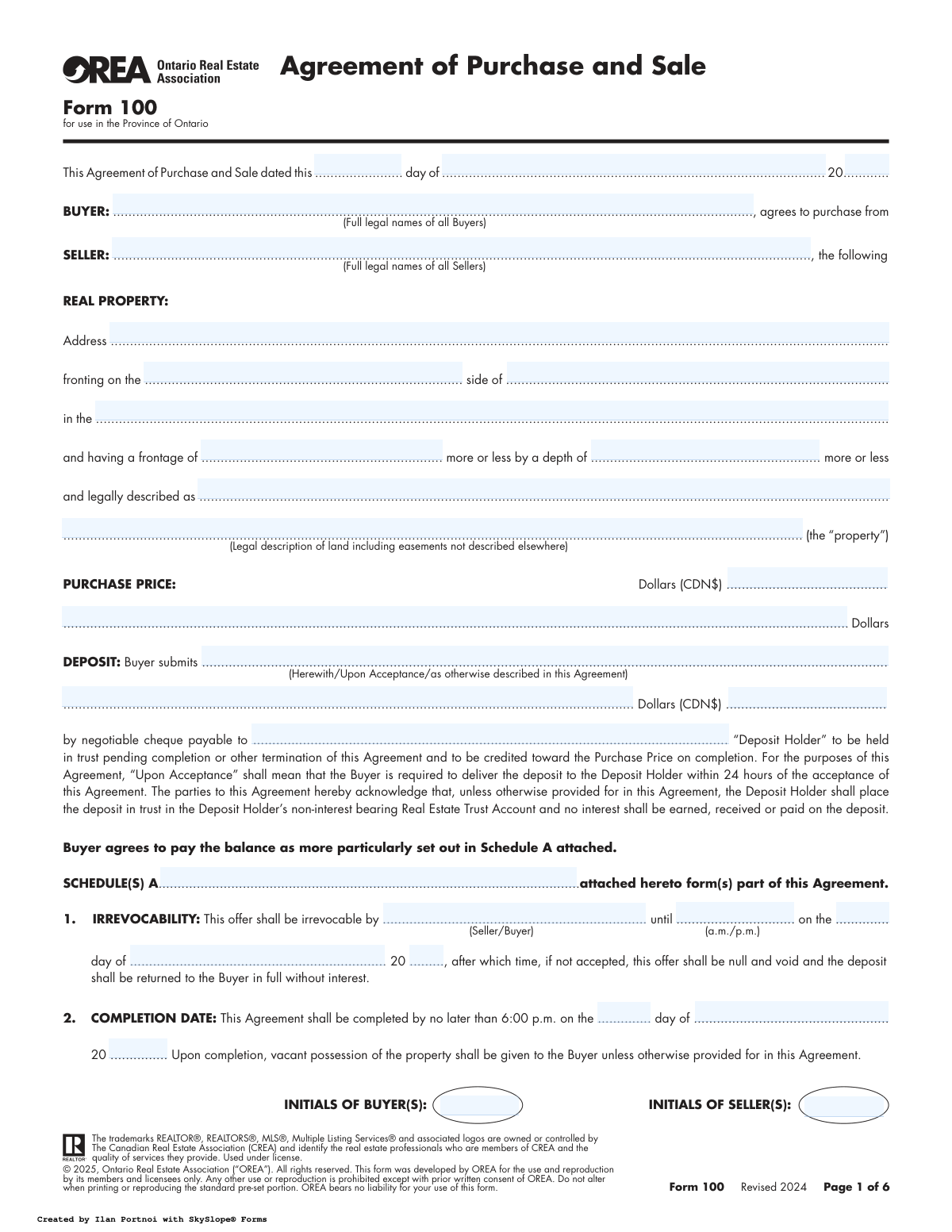
Form 100, Agreement of Purchase and Sale, page 1
Complex · 72/100Form Complexity Index

The AI does the filling. You just check it.

No typing into boxes, nothing to install.

Tell the AI about youAnswer a few questions in plain words, or upload a document you already have. That is all the typing there is.
AI fills every field in secondsIt puts each answer in the right box on every page, tables and checkboxes included.
Check it and downloadReview every field, change anything, then download, print or sign the PDF.

What this form asks for

The AI fills all of it, from your answers or your documents.

OREA Form 100, the Agreement of Purchase and Sale, is a crucial legal document used in Ontario for residential real estate transactions. It formalizes the offer from a buyer to a seller, detailing all terms of the sale including the price, deposit, closing date, and any conditions. This binding contract is essential for protecting the interests of both parties throughout the property transfer process. Today, this form can be filled out quickly and accurately using AI-powered services like Instafill.ai, which can also convert non-fillable PDF versions into interactive fillable forms.
Fillable fields123
Pages6
Sections49
Tables and lists5
Questions that depend on earlier answers21
Form Complexity IndexComplex, 72/100

The AI checks your answers before you download

14 checks built for this form, so a wrong date or a missing answer is caught before anyone else sees it.

Validate Date Sequence Integrity

This check ensures that all key dates in the agreement follow a logical chronological order: Agreement Date <= Irrevocability Date <= Requisition Date < Completion Date. This is critical for establishing a valid and enforceable timeline for the contract. A failure indicates a temporal inconsistency that could void the agreement or lead to legal disputes over deadlines.

Ensures Deposit is Less Than Purchase Price

This validation confirms that the 'Deposit Amount' is numerically less than the total 'Purchase Price'. A deposit is a partial payment, not the full amount, so it cannot logically equal or exceed the purchase price. If this check fails, it indicates a significant data entry error that misrepresents the financial terms of the agreement.

Completion Date Must Be in the Future

This check verifies that the 'Completion Date' is a future date relative to the 'Agreement Date'. The closing of a real estate transaction cannot happen in the past. This validation prevents impossible or erroneous dates that would make the contract's performance timeline invalid from the outset.

Irrevocability Period Validity

This validation ensures the 'Irrevocability' date and time are set after the agreement is dated but before the 'Completion Date'. This period defines a binding window for acceptance. An invalid period (e.g., a date in the past) would render the offer immediately void or create ambiguity about its status, preventing a valid acceptance.

Buyer and Seller Full Legal Name Completeness

This check ensures that the 'Buyer' and 'Seller' name fields are not empty. A valid contract requires the clear identification of all parties involved using their full legal names. Failure to provide these names makes the agreement unenforceable as it's unclear who is bound by its terms.

Mandatory HST Clause Selection

This validation verifies that one of the two options ('included in' or 'in addition to') has been selected for the Harmonized Sales Tax (HST) clause. This term has a significant financial impact on the final amount payable and must be explicitly defined. An omission creates ambiguity over the true purchase price and can lead to major disputes at closing.

And 8 more checks
  • Requisition Date Precedes Completion Date
  • Conditional Spousal Consent Completeness
  • Confirmation of Acceptance Date Logic
  • Validate Contact Information Format
  • Irrevocable Party Specification
  • Deposit Holder Name Presence
  • Required Initials Completeness
  • Purchase Price and Deposit Numeric Validation

Let AI fill out your OREA Form 100

No typing. Every field filled in seconds, checked, ready to sign.

7 days free, then $19.99/month · Cancel anytime

How to Fill Out OREA Form 100 Online for Free in 2026

What the AI walks you through.

  1. Navigate to Instafill.ai and upload your OREA Form 100 document.
  2. Provide the full legal names and contact information for both the Buyer(s) and Seller(s) as prompted by the AI.
  3. Enter the complete details of the real property, including the address, legal description, and dimensions.
  4. Specify the financial terms of the agreement, such as the purchase price, deposit amount, and payment schedule.
  5. Define critical dates for the agreement, including the irrevocability date, requisition date, and the final completion date.
  6. List all chattels included, fixtures excluded, and any rental items that the buyer will assume.
  7. Review all entered information for accuracy, electronically sign the document, and download your completed Agreement of Purchase and Sale.

Common Mistakes in Completing OREA Form 100

The ones the AI is built to catch.

Using Incorrect or Incomplete Party Names
This mistake occurs when buyers or sellers use nicknames, common names, or omit middle names instead of their full legal names as they appear on government identification and property title documents. This can create significant issues during the title transfer process and with mortgage financing applications, as names must match perfectly across all legal documents. To avoid this, always verify and enter the full legal names of all parties involved; AI-powered tools like Instafill.ai can help by storing and accurately populating this information consistently across all required fields.
Incomplete or Inaccurate Legal Property Description
Parties often correctly fill in the civic address but struggle with the lengthy and complex legal description, leading to transcription errors or omissions. The legal description, not the street address, is what legally defines the property being transferred. An error here can lead to a void contract, disputes over property boundaries, or even the transfer of the wrong parcel of land, causing catastrophic closing delays. This information should be copied verbatim from the current owner's deed or a recent survey, a task that can be automated and validated to prevent errors.
Ambiguous Deposit Details
The deposit section requires multiple precise details: the amount, the timing (e.g., 'Upon Acceptance'), and the payee (the 'Deposit Holder'). People often leave these fields vague or enter incorrect information, such as the wrong brokerage name. This can invalidate the offer, cause the buyer to lose the property to a competing offer, or result in the deposit being sent to the wrong entity. To prevent this, clearly define the deposit amount, the 24-hour delivery window for 'Upon Acceptance', and the exact legal name of the listing brokerage's trust.
Vague Descriptions of Chattels and Fixtures
This is one of the most common sources of post-closing disputes. Parties use generic terms like 'appliances' or 'window coverings' instead of being specific, leading to disagreements over what was included. A seller might replace a high-end stove with a basic model, or a buyer might be surprised to find the custom drapes are gone. To avoid this, list every included chattel and excluded fixture with as much detail as possible (e.g., 'Samsung stainless steel refrigerator Model #...').
Omitting Rented Equipment
Sellers often forget they are renting equipment like hot water tanks, furnaces, or water softeners, as the payments are often bundled with utility bills. Failure to disclose these items in Section 6 means the seller is in breach of the agreement, as they cannot provide clear title to the item. This can force the seller to buy out the contract at a high cost or lead to the buyer unexpectedly inheriting a multi-year rental contract and monthly payments. Sellers must review their bills to identify and list all such items.
Incorrect or Unrealistic Irrevocability Period
An offer is irrevocable for a specific period, and errors in setting this time are common. Parties may set a deadline that is too short for a proper response, causing the offer to expire, or forget to specify 'a.m.' or 'p.m.', creating ambiguity. This can lead to missed opportunities or disputes over when the offer officially expired. Always set a clear, specific date and time that is reasonable for all parties to review, sign, and return the document.
Missing Initials on Pages
This agreement requires buyers and sellers to initial each page, signifying they have reviewed and accepted its terms. It is easy to miss an initial box when flipping through a multi-page document. A missing initial can create a legal vulnerability, as the other party could later claim that the terms on the uninitialed page were not agreed to, potentially jeopardizing the entire contract. A thorough final review is crucial, and digital form-filling platforms can often highlight all required initial and signature fields to ensure none are missed.
Neglecting the Spousal Consent Section
Under Ontario's Family Law Act, if the property is a matrimonial home, the non-titled spouse must consent to the sale, even if they are not on the title. Sellers often misunderstand this requirement or forget to have their spouse sign, especially if they are separated. Failure to obtain this consent makes the Agreement of Purchase and Sale unenforceable and can cause the entire transaction to collapse at the last minute, leading to significant legal and financial consequences.
Improperly Attaching or Completing Schedules
The agreement often relies on attached schedules (like Schedule A for payment details) to include additional terms, conditions, or financing information. Common mistakes include forgetting to attach the schedule, failing to reference it in the main agreement, or not having all parties initial the schedule itself. This can render the conditions within the schedule void and unenforceable, meaning critical components of the deal, like a financing condition, may not be legally part of the contract.
Incorrectly Specifying HST Application
Section 7 requires the parties to specify if HST is 'included in' or 'in addition to' the purchase price. This is often misunderstood, particularly for new homes, substantially renovated properties, or properties with some commercial use. An incorrect selection can result in a surprise tax bill amounting to tens of thousands of dollars for either the buyer or the seller. It is critical to get legal or accounting advice on the property's HST status before completing this section.

Frequently Asked Questions About OREA Form 100


Is it really free for 7 days?
Yes. You pay $0 today. Cancel before Nov 4 and you are never charged. Keep it, and it is $19.99 a month for 5 fills of your OREA Form 100.
Can I fill other forms too?
This plan is for your OREA Form 100: your own AI agent fills it as often as 5 times a month. To fill other forms and upload your own, choose a Professional plan from your account.
How do I cancel?
From your account, in two clicks, any time. No email, no call.
How does the AI fill out OREA Form 100?
You answer a few questions in plain words, or upload a document you already have. The AI reads what you give it and puts each answer into the right field of OREA Form 100, on every page, in seconds. It checks the answers against the form's own rules, and you review and change anything before you download, print or sign.
What happens to my information?
It is encrypted in transit and at rest, and it is never used to train AI.
How complex is OREA Form 100 to fill out?
OREA Form 100 has a Form Complexity Index of 72 out of 100, in the complex tier: 123 fillable fields across 6 pages. Instafill.ai's AI fills it in under a minute, with every field there for you to review before you download.
What is OREA Form 100, the Agreement of Purchase and Sale?
This is a legally binding contract used in Ontario to formalize an offer from a buyer to a seller for a real estate property. It outlines all the terms and conditions of the sale, including price, dates, and other conditions.
Who needs to fill out this form?
This form is typically filled out by a real estate professional on behalf of a buyer making an offer on a property. Both the buyer and seller, along with their legal representatives, will use this form to complete the transaction.
What happens to the deposit money?
The deposit is paid to the 'Deposit Holder' (usually the listing brokerage) and held in a trust account. It is applied toward the purchase price on the completion date and is returned to the buyer if the offer is not accepted or conditions are not met.
What does the 'Irrevocability' section mean?
This is the deadline by which the person receiving the offer must accept it. The party making the offer cannot withdraw it during this time, but if it's not accepted by the specified time, the offer becomes void.
What is the difference between the 'Completion Date' and the 'Requisition Date'?
The 'Completion Date' is the closing day when ownership is transferred and the buyer gets the keys. The 'Requisition Date' is the deadline for the buyer's lawyer to complete title searches and raise any legal objections about the property's title.
What is the difference between 'Chattels Included' and 'Fixtures Excluded'?
Chattels are movable items (e.g., a refrigerator, washer) that you want included in the price, while fixtures are items attached to the home (e.g., a chandelier) that the seller plans to remove. Be very specific in these sections to avoid misunderstandings.
What is Schedule A for?
Schedule A is a critical part of the agreement where you detail how the balance of the purchase price will be paid. It is also used to add any other conditions to the offer, such as financing, home inspection, or the sale of the buyer's current property.
Why is there a section for 'Spousal Consent'?
Under Ontario's Family Law Act, if the property being sold is a matrimonial home, the non-owning spouse must consent to the sale. This section ensures this legal requirement is met to provide a clear title to the buyer.
How is Harmonized Sales Tax (HST) handled in this agreement?
Section 7 specifies whether HST is included in the purchase price or is an additional cost on top of the price. This is particularly important for new or substantially renovated properties, and it must be clearly defined.
What information do I need for my lawyer?
The form includes a section to provide your lawyer's name, address, email, and phone number. It's important to have this information ready so that all parties can communicate effectively through their legal representatives.
Can I use an AI tool to help fill out this form?
Yes, services like Instafill.ai use AI to auto-fill form fields accurately and save time, which is helpful for real estate professionals managing multiple documents. However, all legal agreements should be reviewed by a lawyer.
How can I fill out Form 100 online using Instafill.ai?
You can upload the PDF of Form 100 to Instafill.ai. The platform will make the document interactive, allowing you to easily click and type information into the correct fields, then save or share the completed form.
What should I do if my PDF of Form 100 is not fillable?
If you have a flat, non-fillable PDF, you can use a service like Instafill.ai to convert it into an interactive, fillable form. This allows you to complete the agreement digitally without needing to print it.
What does the 'Adjustments' clause cover?
This clause details how prepaid expenses like property taxes and utility bills are prorated between the buyer and seller. The costs are divided so that the seller is responsible up to the completion day, and the buyer is responsible from that day forward.
Encrypted in transit and at restNever used to train AIDelete your forms any time

Get your OREA Form 100 filled out by AI

$0 today. Cancel before Nov 4 and you pay nothing.

7 days free, then $19.99/month · Cancel anytime