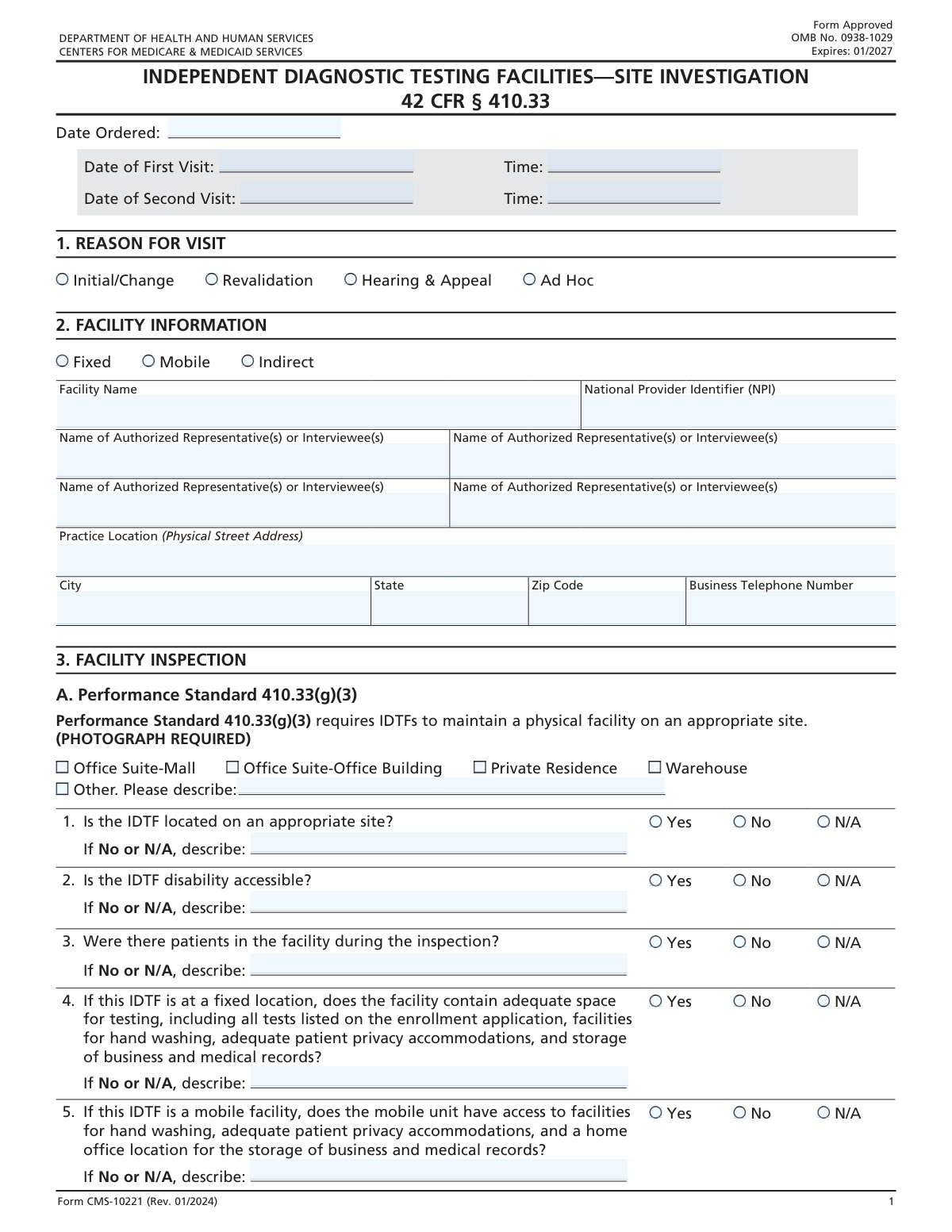
Yes! You can use AI to fill out Independent Diagnostic Testing Facility (IDTF) Site Verification Report

This form is a comprehensive checklist and report used to verify that an Independent Diagnostic Testing Facility (IDTF) meets the stringent performance standards set by the Centers for Medicare & Medicaid Services (CMS) under 42 CFR § 410.33. It is completed during a site visit to document the facility's operational status, equipment, personnel, and record-keeping practices, ensuring compliance for Medicare enrollment and participation. Today, this form can be filled out quickly and accurately using AI-powered services like Instafill.ai, which can also convert non-fillable PDF versions into interactive fillable forms.
Our AI automatically handles information lookup, data retrieval, formatting, and form filling.
It takes less than a minute to fill out IDTF Site Verification Report using our AI form filling.
Securely upload your data. Information is encrypted in transit and deleted immediately after the form is filled out.

Form specifications

Form name: Independent Diagnostic Testing Facility (IDTF) Site Verification Report
Number of fields: 170
Number of pages: 5
Language: English
main-image

Instafill Demo: How to fill out PDF forms in seconds with AI

How to Fill Out IDTF Site Verification Report Online for Free in 2026

Are you looking to fill out a IDTF SITE VERIFICATION REPORT form online quickly and accurately? Instafill.ai offers the #1 AI-powered PDF filling software of 2026, allowing you to complete your IDTF SITE VERIFICATION REPORT form in just 37 seconds or less.
Follow these steps to fill out your IDTF SITE VERIFICATION REPORT form online using Instafill.ai:
  1. 1 Navigate to Instafill.ai and upload or select the IDTF Site Verification Report.
  2. 2 Use the AI to automatically populate initial fields such as the facility name, National Provider Identifier (NPI), and address from your records.
  3. 3 Systematically complete the checklist by answering the yes/no/N.A. questions regarding facility standards, accessibility, and equipment based on the site visit findings.
  4. 4 For any 'No' or 'N/A' responses, use the AI assistant to help draft the required detailed explanations, ensuring they are clear and compliant.
  5. 5 Document findings related to personnel, including supervising physicians and technicians, and detail the methods for medical record storage and retrieval.
  6. 6 Enter any additional comments, describe evidence of non-compliance if applicable, and fill in the declarant and execution date information.
  7. 7 Review the entire completed report for accuracy and completeness before signing and finalizing for submission.

Our AI-powered system ensures each field is filled out correctly, reducing errors and saving you time.

Why Choose Instafill.ai for Your Fillable IDTF Site Verification Report Form?

Speed

Complete your IDTF Site Verification Report in as little as 37 seconds.

Up-to-Date

Always use the latest 2026 IDTF Site Verification Report form version.

Cost-effective

No need to hire expensive lawyers.

Accuracy

Our AI performs 10 compliance checks to ensure your form is error-free.

Security

Your personal information is protected with bank-level encryption.

Frequently Asked Questions About Form IDTF Site Verification Report

This form is used to document the findings of a site visit at an Independent Diagnostic Testing Facility (IDTF). It serves as a checklist to ensure the facility complies with federal performance standards for enrollment, revalidation, or other inspections.

This form is designed to be completed by an inspector or surveyor conducting a site visit. The facility's representatives provide information and answer questions, but the inspector records the official findings.

The NPI is a unique 10-digit identification number for health care providers. It is required on this form to accurately and uniquely identify the facility being inspected for regulatory and billing purposes.

A 'Fixed' facility operates from a permanent, stationary location, while a 'Mobile' facility is a movable unit that provides services at different locations. The form contains specific compliance questions tailored to each type.

Select 'N/A' (Not Applicable) when a question does not apply to the specific facility being inspected. For example, questions about mobile units are not applicable to a fixed facility, and vice versa.

Yes, for nearly all questions on this form, selecting 'No' or 'N/A' requires you to provide a detailed explanation in the corresponding description field. This clarifies the reason for non-compliance or why the standard is not applicable.

If the IDTF shares its location, equipment, or leases its practice, you must check 'Yes' for the relevant question. You are then required to provide a detailed description explaining the nature and specifics of the sharing or leasing arrangement.

If the facility does not have its hours of operation posted, you should check 'No' for the 'Posted Hours of Operation' question. You must then use the 'Reason for No/N/A Hours' field to explain that the hours were not displayed as required.

If you obtain evidence that the facility is not in compliance with regulations like 42 CFR 410.33, you must check 'Yes' for the 'Supplier Compliance Evidence' question. You will then need to describe the specific evidence of non-compliance in detail.

The form requires you to verify the method of record storage (on-site, electronic, etc.) and confirm if the IDTF can retrieve medical records within two business days. Any inability to meet these standards must be explained.

Yes, services like Instafill.ai use AI to help auto-fill form fields accurately and save time. This can be particularly useful for pre-populating known facility information like name, address, and NPI before the site visit.

To fill this form online, upload the document to the Instafill.ai platform. The AI will make all the fields interactive, allowing you to easily click and type in your information or use auto-fill features to complete it quickly.

If you have a non-fillable or 'flat' PDF, you can use a service like Instafill.ai. It can convert the static document into an interactive, fillable form that you can easily complete on your computer.

If you are unable to complete the site visit for any reason, select 'No' for the 'Site Visit Completion Status' question. You must then provide a detailed explanation in the 'Reason for Incomplete Site Visit' field.

Compliance IDTF Site Verification Report
Validation Checks by Instafill.ai

Common Mistakes in Completing IDTF Site Verification Report

Ignoring Required Explanation Fields

This form contains numerous yes/no/N/A questions that require a mandatory written explanation if 'No' or 'N/A' is selected. Applicants frequently check the box but forget to fill in the corresponding description field, such as the 'Disability Accessibility Description' or 'Fixed Location Adequacy Description'. This omission leads to an incomplete application, causing processing delays and requiring follow-up from the reviewing agency. To avoid this, carefully review each question and ensure that if you select 'No' or 'N/A', you provide a complete explanation in the associated text box.

Mismatched Facility Type Responses

Many sections are conditionally displayed based on whether the facility is 'Fixed' or 'Mobile'. A common error is answering questions that do not apply to the selected facility type (e.g., filling out 'Mobile Facility Access' questions for a 'Fixed' location). This happens when users quickly scan the form and answer all questions without noticing the conditional logic. This can cause confusion and may require the form to be resubmitted. Always confirm your facility type first and only answer the questions specifically designated for that type.

Incomplete 'Other' Category Descriptions

When a user's situation doesn't fit the provided checkboxes, such as in the 'Physical Facility Type' section, they must check 'Other' and provide a description in a separate field. People often check the 'Other' box but neglect to write the explanation, or they write a description without checking the box. An incomplete entry here leaves the reviewer without necessary information, halting the review process. To prevent this, always ensure that if you check an 'Other' box, you also fill out the corresponding description field with specific details.

Incorrect National Provider Identifier (NPI)

The National Provider Identifier (NPI) is a unique 10-digit number that is critical for identification. Data entry errors such as transposing digits, entering an incorrect number of digits, or using a different ID number are frequent mistakes. An incorrect NPI will cause an immediate data mismatch and rejection of the form, as it is a primary key for verification in healthcare systems. Double-check the NPI against official documentation before entering it. AI-powered form-filling tools can help by validating the number's format and checksum.

Forgetting Mandatory Explanations for 'Yes' Answers

Similar to the 'No/N/A' rule, several questions require a detailed explanation when 'Yes' is selected, such as 'IDTF Share Practice Location' or 'IDTF Share Diagnostic Equipment'. Users often check 'Yes' to affirm the situation but overlook the requirement to provide a detailed description of the arrangement. This missing context is crucial for compliance and can lead to follow-up inquiries or a finding of non-compliance. If you answer 'Yes' to a question about sharing, leasing, or other complex situations, always provide a thorough explanation as instructed.

Inconsistent or Missing Hours of Operation

When indicating that the facility has posted hours of operation, users must then fill out the hours for each day. Common mistakes include using inconsistent formats (e.g., '9-5', '10am to 4:30pm', '13:00-17:00'), leaving some days blank, or forgetting to fill them out entirely after checking 'Yes'. This ambiguity can be a compliance issue and requires clarification. To avoid this, use a consistent format (e.g., HH:MM AM/PM - HH:MM AM/PM) for all days and enter 'Closed' or 'N/A' for days the facility is not open.

Using an Abbreviated or DBA Facility Name

The form explicitly asks for the 'full legal name of the facility'. However, applicants often use a common abbreviation, a 'Doing Business As' (DBA) name, or an incomplete version of the name. This creates a mismatch with official records, which can cause significant delays in verification and processing. Always refer to the facility's official registration or licensing documents and enter the legal name exactly as it appears there.

Failing to Provide Supervising Physician Details

The section on 'Supervising Physician Identification' has conditional logic that is easily missed. If 'Yes' is selected (the staff can identify the physician), the user must then provide the physician's name in the 'Supervising Physician Names' field. A common mistake is to check 'Yes' without providing the name, leaving the response incomplete. This forces reviewers to assume the information is missing and can trigger further investigation. Always complete all parts of a question, including follow-up text fields that become active based on your selection.

Inconsistent Date Formatting

Date fields, such as 'Date Ordered' and the multi-part 'Execution Date' (Month, Day, Year), are prone to errors. Users may enter dates in a non-standard format (e.g., DD-MM-YYYY instead of MM-DD-YYYY), or input incorrect values in the separate Day/Month/Year fields. These mistakes can lead to incorrect record-keeping and processing failures. To prevent this, pay close attention to the specified format for each date field. Using an AI form-filler like Instafill.ai can help by automatically formatting dates correctly and populating them from a central source.

Omitting Required Lists or Documentation Details

The form asks if the IDTF can provide written lists of technicians or supervising physicians upon request. Users may answer 'Yes' but fail to have the documents ready, or answer 'No' without providing the required explanation in the 'Technician List Explanation' field. This indicates a potential compliance failure and will likely result in a negative finding during an audit or inspection. Before filling out the form, ensure all required documentation, such as staff lists, maintenance logs, and licenses, are prepared and accessible.
Saved over 80 hours a year

“I was never sure if my IRS forms like W-9 were filled correctly. Now, I can complete the forms accurately without any external help.”

Kevin Martin Green

Your data stays secure with advanced protection from Instafill and our subprocessors

Robust compliance program

Transparent business model

You’re not the product. You always know where your data is and what it is processed for.

ISO 27001, HIPAA, and GDPR

Our subprocesses adhere to multiple compliance standards, including but not limited to ISO 27001, HIPAA, and GDPR.

Security & privacy by design

We consider security and privacy from the initial design phase of any new service or functionality. It’s not an afterthought, it’s built-in, including support for two-factor authentication (2FA) to further protect your account.

Fill out IDTF Site Verification Report with Instafill.ai

Worried about filling PDFs wrong? Instafill securely fills independent-diagnostic-testing-facility-idtf-site-verification-report forms, ensuring each field is accurate.