Yes! You can use AI to fill out AIA International Limited Medical Claim Form

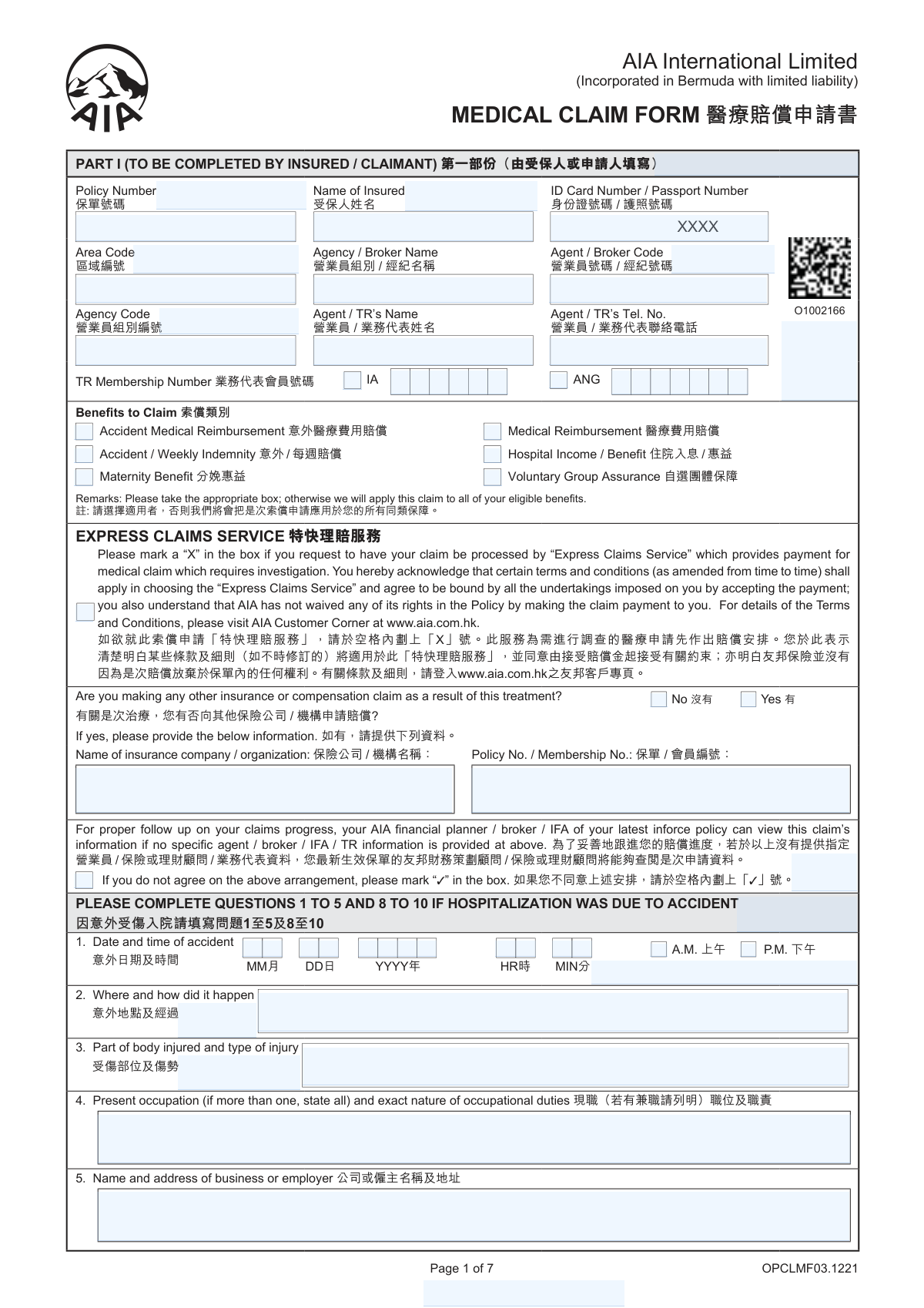
The AIA Medical Claim Form is a crucial document for policyholders of AIA International Limited to formally request payment for covered medical services. It gathers necessary information from both the insured claimant (Part I) and the attending physician (Part II) to process claims for benefits like hospital income, medical reimbursement, and accident indemnity. Today, this form can be filled out quickly and accurately using AI-powered services like Instafill.ai, which can also convert non-fillable PDF versions into interactive fillable forms.
OPCLMF03.1221 is part of the employment eligibility forms, employment forms and verification forms categories on Instafill.
OPCLMF03.1221 has a moderate Form Complexity Index of 59/100 — 270 fillable fields across 7 pages. Instafill’s AI completes it accurately in under a minute.

Form specifications

Form name: AIA International Limited Medical Claim Form
Number of fields: 270
Number of pages: 7
FCI: Moderate (59/100)
Language: English
Our AI automatically handles information lookup, data retrieval, formatting, and form filling.
It takes less than a minute to fill out OPCLMF03.1221 using our AI form filling.
Securely upload your data. Information is encrypted in transit and deleted immediately after the form is filled out.
Preview of AIA International Limited Medical Claim Form

Instafill Demo: How to fill out PDF forms in seconds with AI

How to Fill Out OPCLMF03.1221 Online for Free in 2026

Are you looking to fill out a OPCLMF03.1221 form online quickly and accurately? Instafill.ai offers the #1 AI-powered PDF filling software of 2026, allowing you to complete your OPCLMF03.1221 form in just 37 seconds or less.
Follow these steps to fill out your OPCLMF03.1221 form online using Instafill.ai:
  1. 1 Navigate to Instafill.ai and upload or select the AIA Medical Claim Form.
  2. 2 Use the AI assistant to populate Part I with your personal and policy information, including your name, policy number, and contact details.
  3. 3 Select the type of benefits you are claiming, such as Accident Medical Reimbursement or Hospital Income.
  4. 4 Provide detailed information about the accident or illness, including dates, how it occurred, and the doctors you consulted.
  5. 5 Choose your preferred claims payment option, such as FPS, e-BankIn, or cheque, and enter the required details.
  6. 6 Ensure your attending physician completes Part II, providing the final diagnosis, treatment details, and professional declaration.
  7. 7 Review all sections for accuracy, sign the declaration and authorization, and submit the completed form with all necessary supporting documents like medical receipts.

Our AI-powered system ensures each field is filled out correctly, reducing errors and saving you time.

Why Choose Instafill.ai for Your Fillable OPCLMF03.1221 Form?

Speed

Complete your OPCLMF03.1221 in as little as 37 seconds.

Up-to-Date

Always use the latest 2026 OPCLMF03.1221 form version.

Cost-effective

No need to hire expensive lawyers.

Accuracy

Our AI performs 10 compliance checks to ensure your form is error-free.

Security

Your personal information is protected with bank-level encryption.

Frequently Asked Questions About OPCLMF03.1221

OPCLMF03.1221 has a Form Complexity Index of 59 out of 100, placing it in the moderate complexity tier. This score is calculated deterministically from the form’s own structure using Instafill’s published Form Complexity Index methodology, so it can be reproduced and independently verified — it is not a subjective estimate.

For OPCLMF03.1221 specifically, the score reflects 270 fillable fields across 7 pages. The number of fields is the largest factor in the base score (weighted 36%), followed by how difficult those fields are to complete based on their type, where free-text and signature fields count for more than simple checkboxes (26%). The number of pages that actually contain fields (15%), the amount of conditional “fill-only-if” logic (16%), and how many sections the form is divided into (7%) account for the rest of the base. On top of that base, the index adds points for tables and repeating lists, bundled instruction pages, and dense page layouts — capturing difficulty the base alone can miss.

In practical terms, a moderate score means the form takes real effort: there are enough fields, pages and rules that errors are easy to make by hand. Instafill removes that effort entirely: our AI reads your information, maps each value to the correct field — including the conditional ones — and completes OPCLMF03.1221 accurately in under a minute, with every field available for you to review before you download. See exactly how the Form Complexity Index is calculated.

This is a Medical Claim Form used to request payment from AIA International Limited for various medical benefits, such as medical reimbursement, hospital income, or accident-related expenses.

Part I must be completed by you, the insured person or claimant. Part II must be completed by your attending physician or surgeon at your own expense.

You need to attach the required claims documents, such as original medical receipts and any sick leave certificates. You can find a detailed list of required documents on the AIA website.

You can opt for direct payment to your bank account via FPS or e-BankIn by filling out the details on pages 2 and 3. Otherwise, payment will be made by cheque.

This is an optional service for potentially faster payment on medical claims that do not require investigation. By selecting it, you agree to specific terms and conditions found on the AIA website.

No, if your claim is for an illness, you only need to complete questions 6 to 10 in Part I. Questions 1 to 5 are for accident-related claims only.

You can submit your completed form and supporting documents to your AIA financial planner or broker, or mail it directly to the AIA Customer Service Centre address provided on page 4.

Yes, to have your original documents returned, you must also complete and submit the 'Request for Return of Original Document(s)' form along with your claim application.

Yes, you must declare on page 1 if you are making a claim with any other insurance company or organization for the same treatment and provide the requested details.

If a claim is paid, the company will recalculate your eligible NCD based on the actual number of Claims Free Years. Any over-discounted premium may be deducted from your insurance proceeds.

Yes, services like Instafill.ai use AI to accurately auto-fill form fields with your saved information, saving you time and helping to avoid mistakes.

Simply upload the AIA Medical Claim Form PDF to Instafill.ai. The platform's AI will help you fill in your personal details and other required information quickly before you download it for submission.

You can use a service like Instafill.ai, which can convert flat, non-fillable PDFs into interactive forms. This allows you to easily type your information directly onto the form online.

Compliance OPCLMF03.1221
Validation Checks by Instafill.ai

1
Policy Number Existence and Status Check
This validation verifies that the provided 'Policy Number' exists within the company's database and corresponds to an active, in-force policy. It is a critical first step to ensure the claim is associated with a valid contract. If the policy number is not found or is inactive, the form submission should be rejected or flagged for immediate manual review to prevent processing fraudulent or ineligible claims.
2
Benefit Selection Requirement
Ensures that the claimant has selected at least one checkbox under the 'Benefits to Claim' section. This information is fundamental for the claims department to understand the nature of the claim and to route it to the correct assessment team. A failure to select any benefit would make the claim's purpose ambiguous and halt processing until clarification is obtained from the claimant.
3
Conditional Accident Section Completion
This check enforces a logical rule: if the claimant selects 'Accident Medical Reimbursement' or 'Accident / Weekly Indemnity' as a benefit, then questions 1 through 5 regarding the accident details must be completed. This ensures that all necessary information for assessing an accident-related claim is provided upfront. If the benefit is selected but the section is incomplete, the submission is flagged as incomplete.
4
Conditional Illness Section Completion
This validation ensures that if a benefit such as 'Medical Reimbursement' or 'Hospital Income' is claimed for an illness, questions 6 through 10 regarding the illness details are filled out. This is crucial for gathering the medical history and context necessary for the assessment. A claim for illness benefits without this information would be considered incomplete and require follow-up.
5
Hospital Admission and Discharge Date Logic
Validates that the 'Date of Discharge' (in both Part I, Q9a and Part II, Q2) is on or after the 'Date of Admission'. This check prevents logical impossibilities in the data. A discharge date preceding an admission date is a clear data entry error that must be corrected before the claim can be accurately assessed for hospital income or confinement benefits.
6
Date Chronology Validation
This check verifies the logical sequence of dates provided. The 'Date of accident' (Part I, Q1) or 'symptoms first appeared' (Part II, Q4) must occur on or before the 'Date of first consultation' (Part II, Q5), which in turn must be on or before the 'Date of Admission'. It also ensures none of these dates are in the future. This maintains the integrity of the event timeline, which is essential for determining policy coverage and claim eligibility.
7
Conditional Other Insurance Information
If the claimant answers 'Yes' to the question 'Are you making any other insurance or compensation claim...', this validation ensures that the subsequent fields for 'Name of insurance company / organization' and 'Policy No. / Membership No.' are not empty. This information is vital for coordination of benefits and subrogation purposes. Failure to provide these details when required will delay the claim as the information must be requested.
8
Exclusive FPS Proxy ID Selection
For the 'Claims Payment Option', if the claimant selects 'FPS', this validation ensures that exactly one of the three Proxy ID checkboxes (Mobile Number, Email, FPS Identifier) is ticked and the corresponding text field is filled. Selecting none or more than one option is an invalid state. This prevents ambiguity and ensures the payment can be correctly routed through the Faster Payment System.
9
e-BankIn Details Completeness
If the claimant selects the 'e-BankIn' payment option for either Hong Kong or Macau policies, this check verifies that all required bank account fields are completed. This includes Bank Name, Bank Number, Branch Number, and Account Number. Incomplete bank details would result in a failed payment transaction, requiring manual intervention and delaying the claimant's receipt of funds.
10
Owner Signature and Date Requirement
This validation confirms that the 'Signature of Owner / Trustee' field in the 'Declaration and Authorization' section is signed and the adjacent 'Date' field is filled. The signature is a legal requirement confirming the truthfulness of the provided information and authorizing the company to process the claim. The date must be a valid, non-future date, and should be on or after the last date of service (e.g., discharge date).
11
Data Consistency Between Claimant and Physician Parts
This check cross-references key information between Part I (completed by claimant) and Part II (completed by physician). Specifically, it compares the 'Date of Admission' and 'Date of Discharge' (Part I, Q9a vs. Part II, Q2). Significant discrepancies must be flagged for review, as they could indicate a misunderstanding, data entry error, or fraudulent activity.
12
Intensive Care Unit Period Validation
If a period in the Intensive Care Unit is specified (Part I, Q9b), this validation ensures that the 'From' and 'To' dates for the ICU stay fall within the main hospital admission and discharge dates provided in Q9a. This logical check ensures the data is consistent and supports the claim for any specific ICU-related benefits. An ICU stay outside the hospitalization period is a data error.
13
Home Leave Period Validation
If the claimant answers 'Yes' to taking home leave during hospital confinement (Part I, Q9c), this check validates that the provided leave dates fall within the hospital admission and discharge dates. Hospital indemnity benefits are often not payable for periods of home leave, so accurate data is essential for correct benefit calculation. An invalid date would require clarification.
14
ID Number Format Validation
This check ensures the 'ID Card Number / Passport Number' provided by the claimant in Part I matches a valid format for the expected document type (e.g., Hong Kong Identity Card format). This helps ensure data quality for a critical piece of personally identifiable information used for verification. An incorrectly formatted ID can cause failures in matching the claimant to the policyholder record.

Common Mistakes in Completing OPCLMF03.1221

Incomplete or Incorrect Policy and Agent Information

Claimants often enter the wrong policy number, leave it blank, or provide incomplete agent/broker details. This usually happens when they don't have their policy documents readily available. An incorrect policy number prevents the insurer from locating the record, causing immediate processing delays until the information is corrected.

Submitting the Form Without the Attending Physician's Report (Part II)

A frequent and critical error is submitting only Part I of the form, which is completed by the claimant. Claimants may not realize that Part II must be completed by their doctor at their own expense. Without the medical details and diagnosis from the physician in Part II, the insurance company cannot assess the medical necessity of the treatment, and the claim will be considered incomplete and cannot be processed.

Missing or Mismatched Signatures

The form requires signatures from the Policy Owner and the Insured (if they are different people and the insured is over 18). Forgetting one of these signatures, or using a signature that doesn't match the one on file, will invalidate the form. The claim will be returned for proper signing, causing significant delays in processing and payment.

Incorrect Configuration of Claims Payment Options

The payment section is complex, leading to many errors. People often select both FPS and e-BankIn when the form requires choosing only one, or they provide details for a joint bank account which is not allowed. These mistakes lead to failed payment setups and force the insurer to default to a slower payment method like a cheque.

Forgetting to Attach Required Documents for e-BankIn

When selecting the e-BankIn payment option, claimants are required to submit a copy of a bank statement, passbook, or card showing the account holder's name and account number. It is common for people to overlook this requirement and submit the form without the necessary proof. This prevents the registration of the bank account and delays the claim payment until the document is provided.

Vague or Incomplete Description of Accident or Illness

In sections asking for details about an accident or illness, claimants may provide overly brief or unclear descriptions, such as writing "fell down" for an accident. This lack of detail forces the claims assessor to issue a follow-up request for more information. To avoid this, provide a clear, step-by-step account of the event or the progression of symptoms.

Failing to Disclose Other Insurance Coverage Details

When a claimant indicates they are claiming from another insurance company by checking 'Yes', they often fail to fill in the subsequent fields with the other insurer's name and policy number. This omission halts the coordination of benefits process, delaying the final claim settlement. It's crucial to provide all details for any other active claims related to the same event.

Undeclared Home Leave During Hospitalization

For claims involving Hospital Income benefits, any time taken as 'home leave' from the hospital must be declared. People often forget to report these periods, assuming they are insignificant. However, this can affect the calculation of benefits for continuous confinement and may lead to claim adjustments and disputes if discovered later.

Ambiguous Selection of Benefits to Claim

The form lists several types of benefits (e.g., 'Accident Medical Reimbursement', 'Medical Reimbursement', 'Hospital Income'). Claimants sometimes tick the wrong box or multiple boxes that conflict with their supporting documents. This ambiguity requires the claims department to contact the claimant for clarification, thereby delaying the assessment of the claim.

Using Incorrect Date Formats or Inconsistent Dates

The form specifies a 'MM DD YYYY' format, but people often default to other formats like DD/MM/YYYY or mix them up. Inconsistent dates for admission, discharge, or the accident across the form and supporting medical documents are also common. Such discrepancies are red flags that require verification and can slow down the entire claims process. AI-powered tools like Instafill.ai can help prevent this by validating and standardizing date formats automatically.
Saved over 80 hours a year

“I was never sure if my IRS forms like W-9 were filled correctly. Now, I can complete the forms accurately without any external help.”

Kevin Martin Green

Your data stays secure with advanced protection from Instafill and our subprocessors

Robust compliance program

Transparent business model

You’re not the product. You always know where your data is and what it is processed for.

ISO 27001, HIPAA, and GDPR

Our subprocesses adhere to multiple compliance standards, including but not limited to ISO 27001, HIPAA, and GDPR.

Security & privacy by design

We consider security and privacy from the initial design phase of any new service or functionality. It’s not an afterthought, it’s built-in, including support for two-factor authentication (2FA) to further protect your account.

Fill out OPCLMF03.1221 with Instafill.ai

Worried about filling PDFs wrong? Instafill securely fills aia-international-limited-medical-claim-form forms, ensuring each field is accurate.

Related forms by category

employment eligibility forms The E-Verify Memorandum of Understanding for Employers, Form I-9, Employment Eligibility Verification, Form I-9, Employment Eligibility Verification (08/01/23), Form I-9, Employment Eligibility Verification (08/01/23) - Duplicate, Formulario I-9, Verificación de Elegibilidad de Empleo
employment forms Form I-765, Application for Employment Authorization, Form CMS L564, Request for Employment Info, Form OF-306, Declaration for Federal Employment, Form NYS DHR, Employment Complaint Form, Form AO 78, Application for Employment, Illinois State Board of Education (ISBE) Application for Employment (ISBE 61-08), Form SS-8 (Rev. December 2023), Determination of Worker Status for Purposes of Federal Employment Taxes and Income Tax Withholding, Prudential Group Disability Insurance – Education and Employment History Form (GL.2009.009, Ed. 06/2017), HR-Pol-Rec&Res-04 Employment Application Form (Recruitment of Permanent Employees), City of Carlinville Application for Employment (An Equal Opportunity Employer), U.S. Equal Employment Opportunity Commission (EEOC) Form 453, Recommendation for Recognition, The Prudential Insurance Company of America Group Disability Insurance – Education and Employment History Form (GL.2009.009, Ed. 06/2017), St. Paul’s Hospital Application for Employment (職位申請表) – SPHF-HRD-035, U.S. Equal Employment Opportunity Commission (EEOC) Form 453, Recommendation for Recognition, Prudential Group Disability Insurance – Education and Employment History Form (GL.2009.009, Ed. 06/2017), Claim for Special Employment Advance (SU514), New York State Employment Application: Part 1 – Pre-Interview (Form #S1000), New York State Employment Application Form, Sidney Sussex College Cambridge, Application for Employment, Z83, Application for Employment in the Republic of South Africa Government Department · + 35 more →
verification forms Address Verification Letter of Authorization, Form G-845, Verification Request, Form I-9, Employment Eligibility Verification, Uniform Mitigation Verification Inspection Form, Independent Diagnostic Testing Facility (IDTF) Site Verification Report, Medical Assistant Training Verification, Centrelink Form SY041 - Verification of your family circumstances: Unreasonable to live at home, Centrelink Form SY015 - Verification of 'Unreasonable to Live at Home', Day Care Service Application Worker Verification Checklist, Form I-9, Employment Eligibility Verification (08/01/23), Form I-9, Employment Eligibility Verification (08/01/23) - Duplicate, Formulario I-9, Verificación de Elegibilidad de Empleo