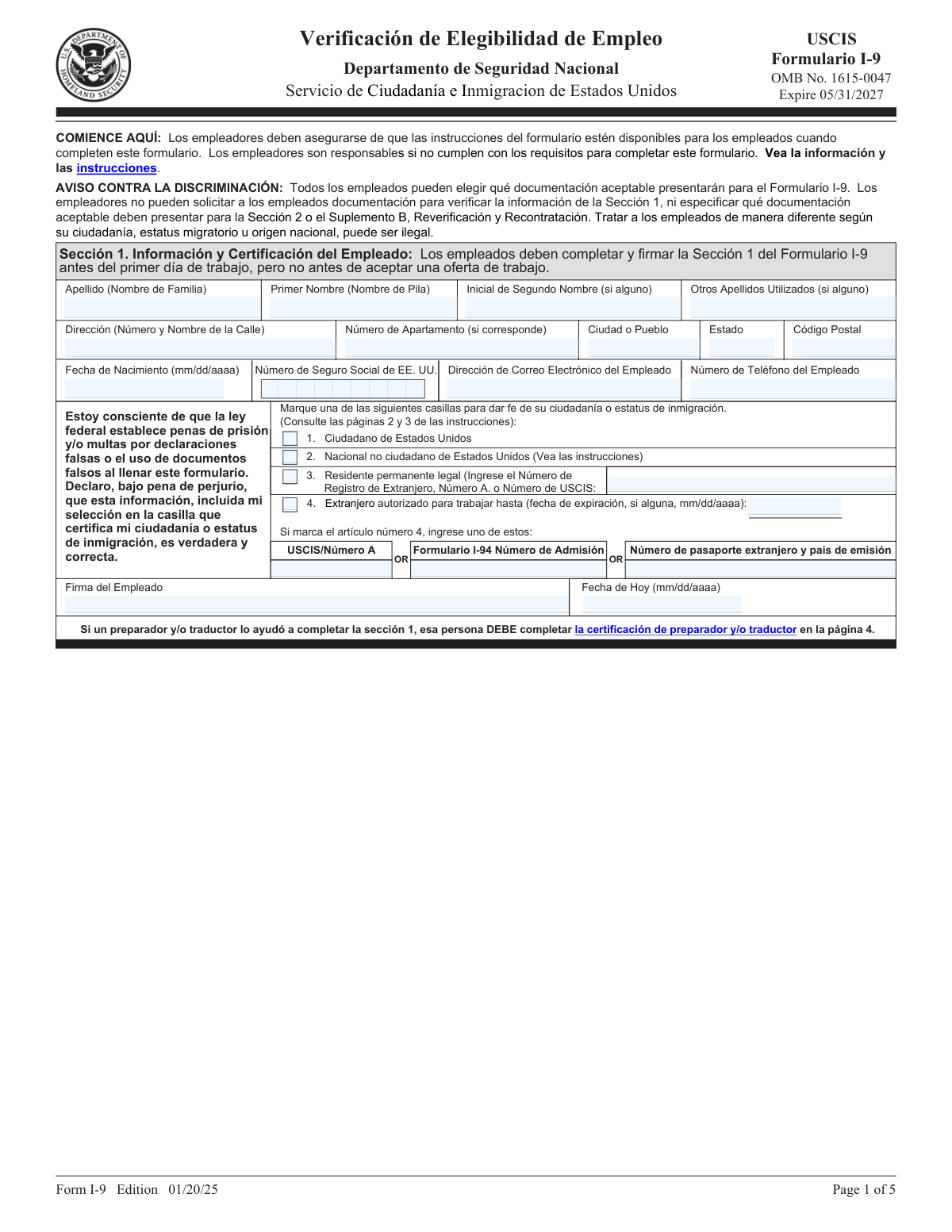
Yes! You can use AI to fill out Formulario I-9, Verificación de Elegibilidad de Empleo

Formulario I-9 is a U.S. Citizenship and Immigration Services (USCIS) form required for all employers to verify the identity and employment authorization of individuals hired for employment in the United States. Both employees and employers must complete their respective sections to comply with federal law. Today, this form can be filled out quickly and accurately using AI-powered services like Instafill.ai, which can also convert non-fillable PDF versions into interactive fillable forms.
Formulario I-9 is part of the employment eligibility forms, employment forms and verification forms categories on Instafill.
Formulario I-9 has a complex Form Complexity Index of 70/100 — 130 fillable fields across 5 pages. Instafill’s AI completes it accurately in under a minute.

Form specifications

Form name: Formulario I-9, Verificación de Elegibilidad de Empleo
Number of fields: 130
Number of pages: 5
FCI: Complex (70/100)
Field instructions: Formulario I-9 Instructions
Language: English
Our AI automatically handles information lookup, data retrieval, formatting, and form filling.
It takes less than a minute to fill out Formulario I-9 using our AI form filling.
Securely upload your data. Information is encrypted in transit and deleted immediately after the form is filled out.
Preview of Formulario I-9, Verificación de Elegibilidad de Empleo

Instafill Demo: How to fill out PDF forms in seconds with AI

How to Fill Out Formulario I-9 Online for Free in 2026

Are you looking to fill out a FORMULARIO I-9 form online quickly and accurately? Instafill.ai offers the #1 AI-powered PDF filling software of 2026, allowing you to complete your FORMULARIO I-9 form in just 37 seconds or less.
Follow these steps to fill out your FORMULARIO I-9 form online using Instafill.ai:
  1. 1 Navigate to Instafill.ai and upload or select the Formulario I-9.
  2. 2 As the employee, provide your personal information in Section 1, including your full name, address, date of birth, and Social Security Number.
  3. 3 Attest to your citizenship or immigration status by checking the appropriate box in Section 1 and providing any required document numbers.
  4. 4 Sign and date Section 1. If a preparer or translator assisted you, they must complete and sign Supplement A.
  5. 5 As the employer, physically examine the original documents presented by the employee to verify their identity and employment authorization.
  6. 6 Complete Section 2 by recording the document titles, issuing authorities, numbers, and expiration dates, then sign and date the employer certification.
  7. 7 Review all sections for completeness and accuracy before securely storing the form as required by law.

Our AI-powered system ensures each field is filled out correctly, reducing errors and saving you time.

Why Choose Instafill.ai for Your Fillable Formulario I-9 Form?

Speed

Complete your Formulario I-9 in as little as 37 seconds.

Up-to-Date

Always use the latest 2026 Formulario I-9 form version.

Cost-effective

No need to hire expensive lawyers.

Accuracy

Our AI performs 10 compliance checks to ensure your form is error-free.

Security

Your personal information is protected with bank-level encryption.

Frequently Asked Questions About Formulario I-9

Formulario I-9 has a Form Complexity Index of 70 out of 100, placing it in the complex complexity tier. This score is calculated deterministically from the form’s own structure using Instafill’s published Form Complexity Index methodology, so it can be reproduced and independently verified — it is not a subjective estimate.

For Formulario I-9 specifically, the score reflects 130 fillable fields across 5 pages, grouped into 23 sections, and 40 conditional fields that only apply depending on earlier answers, 3 tables or repeating lists. The number of fields is the largest factor in the base score (weighted 36%), followed by how difficult those fields are to complete based on their type, where free-text and signature fields count for more than simple checkboxes (26%). The number of pages that actually contain fields (15%), the amount of conditional “fill-only-if” logic (16%), and how many sections the form is divided into (7%) account for the rest of the base. On top of that base, the index adds points for tables and repeating lists, bundled instruction pages, and dense page layouts — capturing difficulty the base alone can miss.

In practical terms, a complex score means the form is demanding, with many fields, multiple pages and branching rules that are easy to get wrong. Instafill removes that effort entirely: our AI reads your information, maps each value to the correct field — including the conditional ones — and completes Formulario I-9 accurately in under a minute, with every field available for you to review before you download. See exactly how the Form Complexity Index is calculated.

Form I-9 is used to verify the identity and employment authorization of individuals hired for employment in the United States. It must be completed for every new hire.

Both the employee and the employer have responsibilities. The employee must complete and sign Section 1, while the employer must complete Section 2 after examining the employee's documents.

You must complete and sign Section 1 of the form on or before your first day of work, but not before you have accepted a job offer.

You must present either one unexpired document from List A or a combination of one unexpired document from List B and one from List C. Your employer cannot tell you which specific documents to present.

List A documents establish both identity and employment authorization (e.g., a U.S. Passport). List B documents establish identity (e.g., a Driver's License), and List C documents establish employment authorization (e.g., a Social Security card).

Your employer must complete their section and physically examine your documents within three business days of your first day of employment.

If anyone helped you prepare or translate Section 1, they must complete and sign the 'Suplemento A, Certificación del Preparador y/o Traductor' to certify their assistance.

Providing your Social Security Number is generally voluntary for Form I-9. However, it is mandatory if your employer uses the E-Verify system.

Supplement B is used by the employer if your employment authorization needs to be re-verified, if you are rehired within three years, or to record a legal name change.

No, that would be discriminatory. You are allowed to choose which acceptable, unexpired documents from the lists you wish to present.

Yes, services like Instafill.ai use AI to accurately auto-fill form fields, which helps save time and prevent common errors when completing the form.

You can use a service like Instafill.ai to complete the form digitally. Simply upload the Form I-9 PDF, and the platform will guide you through filling out the required fields online.

If you have a flat, non-fillable PDF, Instafill.ai can convert it into an interactive, fillable form. This allows you to easily type your information into the correct fields before printing and signing.

Compliance Formulario I-9
Validation Checks by Instafill.ai

1
Validates Citizenship Status Selection
This check ensures that the employee has selected exactly one of the four available citizenship or immigration status options in Section 1. Selecting none or more than one option makes the attestation invalid. Failure to select a single, valid status will prevent form submission and require the employee to correct the section before proceeding.
2
Conditional Requirement for Lawful Permanent Resident
This validation verifies that if an employee checks the box for 'Residente permanente legal' (Lawful Permanent Resident), they must also provide an Alien Registration Number (A-Number) or USCIS Number. This number is required to confirm the employee's status. If the status is selected but the number is missing, the form will be considered incomplete and an error will be flagged.
3
Conditional Requirement for Alien Authorized to Work
This check ensures that if an employee selects 'Extranjero autorizado para trabajar' (Alien authorized to work), they must provide a work authorization expiration date and one of the required document numbers (USCIS/A-Number, Form I-94 Admission Number, or Foreign Passport Number). This information is critical for verifying temporary work authorization. A failure will result in an error message indicating that required information for the selected status is missing.
4
Validates Social Security Number Format
This check verifies that the 'Número de Seguro Social de EE. UU.' field contains a 9-digit number. While the SSN is not mandatory for all employees on their first day, if a number is entered, it must conform to the standard format. This prevents data entry errors and ensures data integrity for payroll and tax purposes. An invalid format will trigger an error.
5
Validates All Date Formats (mm/dd/yyyy)
This validation ensures that all date fields on the form, such as 'Fecha de Nacimiento', 'Fecha de Hoy', and document expiration dates, are entered in the correct mm/dd/yyyy format. Consistent date formatting is crucial for legal compliance and record-keeping. Any date entered in an incorrect format will be rejected, and the user will be prompted to correct it.
6
Section 1 Signature Date Timeliness
This check verifies that the employee's signature date in Section 1 is on or before the 'Primer día de trabajo del empleado' (Employee's First Day of Employment) listed in Section 2. The law requires employees to complete Section 1 by their first day of work. A signature date after the first day of employment is a compliance violation and will be flagged as an error.
7
Section 2 Document Combination Logic
This validation enforces the rule that an employer must record either one document from List A OR a combination of one document from List B and one from List C. It prevents invalid combinations, such as providing only a List B document or documents from all three lists. This is a core requirement of the I-9 process, and an incorrect combination will result in a validation failure.
8
Section 2 Document Expiration Date Validity
This check ensures that any document presented for Section 2 with an expiration date is unexpired as of the date of examination by the employer. The form explicitly states that documents must be current. Submitting information for an expired document is a compliance violation and will be flagged, requiring the employee to present a valid, unexpired document.
9
Section 2 Employer Completion Deadline
This validation verifies that the employer's signature date in Section 2 is within three business days of the employee's first day of employment. This is a strict federal deadline for employers. A date outside this window indicates a potential compliance issue and should be flagged for review or correction.
10
Supplement A Preparer/Translator Certification Completeness
This check ensures that if a preparer and/or translator is used to complete Section 1, all required fields in Supplement A are filled out, including the preparer's name, signature, date, and address. Incomplete certification can invalidate the employee's attestation. The system should flag any missing fields in this section if it is determined to be required.
11
Supplement B Reverification Document Logic
This validation confirms that for a reverification action in Supplement B, the document provided is from either List A or List C. List B documents establish identity only and are not acceptable for reverifying employment authorization. Attempting to use a List B document for reverification will result in an error, as it does not prove continued eligibility to work.
12
Name Consistency Across Form Sections
This check verifies that the employee's name entered at the top of Supplement A (Preparer/Translator Certification) and Supplement B (Reverification and Rehires) matches the name provided in Section 1. This ensures that the supplemental pages are correctly associated with the employee's original Form I-9. A mismatch would indicate a potential record-keeping error and should be flagged for correction.

Common Mistakes in Completing Formulario I-9

Incorrect or Inconsistent Date Formatting

The form explicitly requires dates in a mm/dd/aaaa format, but users often enter them in other formats like dd/mm/yyyy or m/d/yy. This happens due to habit or not paying close attention to the instructions. Inconsistent or incorrect date formats can lead to processing delays or the form being flagged as incorrect during an audit. To avoid this, carefully follow the specified format for all date fields, including birth dates, signature dates, and document expiration dates. AI-powered tools like Instafill.ai can help by automatically formatting dates correctly as you fill out the form.

Leaving Required Fields Blank Instead of Using 'N/A'

Employees often leave fields that don't apply to them, such as 'Inicial de Segundo Nombre' (Middle Initial) or 'Otros Apellidos Utilizados' (Other Last Names Used), completely blank. However, USCIS instructions typically require that you enter 'N/A' (Not Applicable) in these fields. Leaving fields blank can result in the form being considered incomplete, which is a compliance violation. Always fill every field in Section 1, using 'N/A' for any that do not apply to you.

Incorrect Timing of Section 1 Completion and Signature

A frequent compliance error is completing Section 1 at the wrong time. The employee must complete and sign Section 1 only after they have accepted a job offer, and no later than their first day of employment. Signing before a job offer is made or after the first day of work violates I-9 rules. This can lead to fines for the employer during an audit. To prevent this, employers should integrate the I-9 completion into their first-day onboarding process and provide clear instructions on the timing.

Misclassifying Citizenship or Immigration Status

Employees can be confused by the four attestation categories and may check the wrong box. For example, a lawful permanent resident might mistakenly check 'Ciudadano de Estados Unidos' (U.S. Citizen). This is a serious error that constitutes a false claim and can have severe immigration consequences. Employees should carefully read the definitions in the form instructions to select the correct status. If unsure, they should consult the official USCIS I-9 instructions or seek guidance from an immigration expert, not the employer.

Forgetting to Provide Required Document Numbers for Non-Citizens

When an employee attests to being a 'Residente permanente legal' (Lawful Permanent Resident) or an 'Extranjero autorizado para trabajar' (Alien Authorized to Work), they must provide an associated document number, such as an Alien Registration Number (A-Number) or Form I-94 Admission Number. It is a common oversight to check the box but forget to enter the required number and expiration date. An incomplete attestation invalidates Section 1. To avoid this, double-check that all required fields corresponding to your selected status are filled in completely.

Improperly Recording Documents in Section 2

Employers frequently make errors when recording the employee's documents in Section 2. Common mistakes include accepting an invalid combination of documents (e.g., two from List B), failing to record all required information (document title, issuing authority, number, and expiration date), or accepting and recording expired documents. These errors are major red flags in an I-9 audit and can result in significant financial penalties. Employers must carefully follow the rule of accepting either one document from List A or one from List B and one from List C, and meticulously record all details from unexpired, original documents.

Over-documenting by Requesting or Recording Too Many Documents

Some employers, in an attempt to be thorough, ask for more documents than the law requires (e.g., asking for a passport AND a driver's license). This practice, known as 'over-documenting,' is prohibited and can be considered a discriminatory practice, as it may place an undue burden on the employee. Employers must allow the employee to choose which acceptable documents to present and must not ask for more than the minimum required to satisfy the I-9 requirements. Recording more documents than necessary can also lead to compliance issues.

Missing Preparer and/or Translator Certification

If anyone helps the employee complete Section 1, such as a family member or translator, that person is required to fill out and sign the 'Suplemento A, Certificación del Preparador y/o Traductor'. This is one of the most frequently missed parts of the form, especially when assistance is provided informally. Failure to complete this supplement when required makes the Form I-9 incomplete and non-compliant. Employers should ask employees if they received help and ensure the supplement is completed and attached if the answer is yes.

Using an Outdated Version of the Form I-9

USCIS periodically updates the Form I-9, and employers are required to use the most current version. Using an expired or outdated version of the form is a substantive violation that renders the employment verification invalid. Employers must always check the USCIS website for the latest version of the form before providing it to a new hire. The edition date is printed on the bottom of each page (e.g., 'Form I-9 Edition 01/20/25').

Confusing List A and List C Documents

The form lists specific documents for each category, but employers can still get them confused. A classic example is miscategorizing the Employment Authorization Document (Form I-766) as a List C document when it is actually a List A document. This error leads the employer to incorrectly request a List B document from the employee, resulting in over-documentation and potential discrimination claims. Carefully referencing the 'Lists of Acceptable Documents' page is crucial to avoid this mistake. AI-powered form-filling tools like Instafill.ai can also help by guiding users to enter documents in the correct sections.
Saved over 80 hours a year

“I was never sure if my IRS forms like W-9 were filled correctly. Now, I can complete the forms accurately without any external help.”

Kevin Martin Green

Your data stays secure with advanced protection from Instafill and our subprocessors

Robust compliance program

Transparent business model

You’re not the product. You always know where your data is and what it is processed for.

ISO 27001, HIPAA, and GDPR

Our subprocesses adhere to multiple compliance standards, including but not limited to ISO 27001, HIPAA, and GDPR.

Security & privacy by design

We consider security and privacy from the initial design phase of any new service or functionality. It’s not an afterthought, it’s built-in, including support for two-factor authentication (2FA) to further protect your account.

Fill out Formulario I-9 with Instafill.ai

Worried about filling PDFs wrong? Instafill securely fills formulario-i-9-verificaci-n-de-elegibilidad-de-empleo forms, ensuring each field is accurate.

Related forms by category

employment eligibility forms The E-Verify Memorandum of Understanding for Employers, Form I-9, Employment Eligibility Verification, Form I-9, Employment Eligibility Verification (08/01/23), Form I-9, Employment Eligibility Verification (08/01/23) - Duplicate, AIA International Limited Medical Claim Form
employment forms Form I-765, Application for Employment Authorization, Form CMS L564, Request for Employment Info, Form OF-306, Declaration for Federal Employment, Form NYS DHR, Employment Complaint Form, Form AO 78, Application for Employment, Illinois State Board of Education (ISBE) Application for Employment (ISBE 61-08), Form SS-8 (Rev. December 2023), Determination of Worker Status for Purposes of Federal Employment Taxes and Income Tax Withholding, Prudential Group Disability Insurance – Education and Employment History Form (GL.2009.009, Ed. 06/2017), HR-Pol-Rec&Res-04 Employment Application Form (Recruitment of Permanent Employees), City of Carlinville Application for Employment (An Equal Opportunity Employer), U.S. Equal Employment Opportunity Commission (EEOC) Form 453, Recommendation for Recognition, The Prudential Insurance Company of America Group Disability Insurance – Education and Employment History Form (GL.2009.009, Ed. 06/2017), St. Paul’s Hospital Application for Employment (職位申請表) – SPHF-HRD-035, U.S. Equal Employment Opportunity Commission (EEOC) Form 453, Recommendation for Recognition, Prudential Group Disability Insurance – Education and Employment History Form (GL.2009.009, Ed. 06/2017), Claim for Special Employment Advance (SU514), New York State Employment Application: Part 1 – Pre-Interview (Form #S1000), New York State Employment Application Form, Sidney Sussex College Cambridge, Application for Employment, Z83, Application for Employment in the Republic of South Africa Government Department · + 35 more →
verification forms Address Verification Letter of Authorization, Form G-845, Verification Request, Form I-9, Employment Eligibility Verification, Uniform Mitigation Verification Inspection Form, Independent Diagnostic Testing Facility (IDTF) Site Verification Report, Medical Assistant Training Verification, Centrelink Form SY041 - Verification of your family circumstances: Unreasonable to live at home, Centrelink Form SY015 - Verification of 'Unreasonable to Live at Home', Day Care Service Application Worker Verification Checklist, Form I-9, Employment Eligibility Verification (08/01/23), Form I-9, Employment Eligibility Verification (08/01/23) - Duplicate, AIA International Limited Medical Claim Form