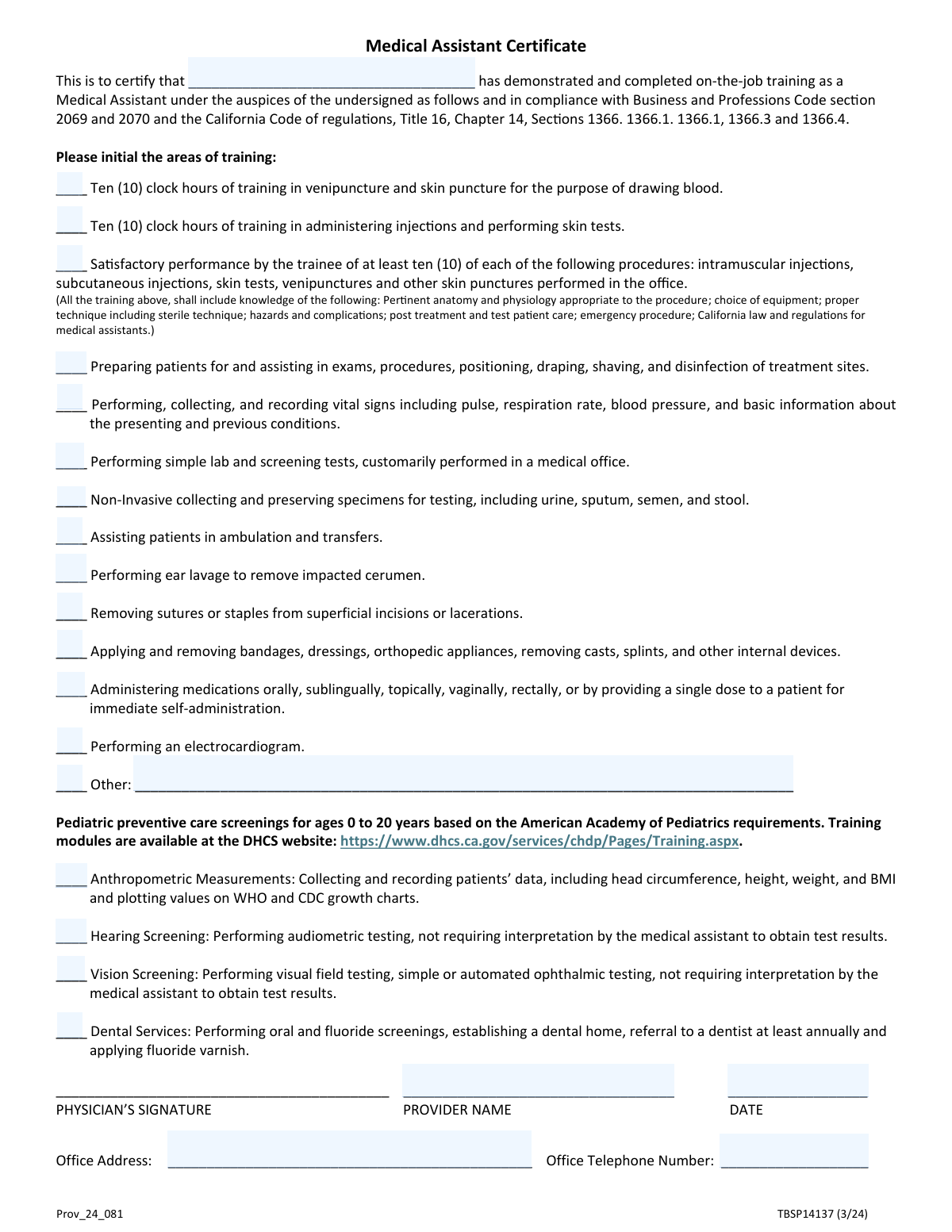
Yes! You can use AI to fill out Medical Assistant Training Verification
This form is a declaration used by a licensed physician or healthcare provider to verify that a medical assistant under their supervision has completed specific training in various medical procedures, such as administering injections, drawing blood, and performing basic lab tests. It serves as an official record of the assistant's qualifications, ensuring compliance and patient safety. Today, this form can be filled out quickly and accurately using AI-powered services like Instafill.ai, which can also convert non-fillable PDF versions into interactive fillable forms.
Our AI automatically handles information lookup, data retrieval, formatting, and form filling.
It takes less than a minute to fill out MA Training Verification using our AI form filling.
Securely upload your data. Information is encrypted in transit and deleted immediately after the form is filled out.
Form specifications
| Form name: | Medical Assistant Training Verification |
| Number of fields: | 24 |
| Number of pages: | 1 |
| Language: | English |
| Categories: | Medi-Cal forms, medical forms, VA medical forms |
Instafill Demo: How to fill out PDF forms in seconds with AI
How to Fill Out MA Training Verification Online for Free in 2026
Are you looking to fill out a MA TRAINING VERIFICATION form online quickly and accurately? Instafill.ai offers the #1 AI-powered PDF filling software of 2026, allowing you to complete your MA TRAINING VERIFICATION form in just 37 seconds or less.
Follow these steps to fill out your MA TRAINING VERIFICATION form online using Instafill.ai:
- 1 Navigate to Instafill.ai and upload your Medical Assistant Training Verification form or find it in the template library.
- 2 Enter the full name of the Medical Assistant whose training is being certified.
- 3 Review the list of training areas and check the boxes for all procedures and skills the medical assistant has successfully completed, such as venipuncture, administering injections, and taking vital signs.
- 4 If applicable, specify any 'Other' training areas not listed on the form.
- 5 Input the supervising provider's name, the office address, and the office telephone number.
- 6 Enter the current date to finalize the verification.
- 7 Review all entered details for accuracy, then securely download or share the completed verification form.
Our AI-powered system ensures each field is filled out correctly, reducing errors and saving you time.
Why Choose Instafill.ai for Your Fillable MA Training Verification Form?
Speed
Complete your MA Training Verification in as little as 37 seconds.
Up-to-Date
Always use the latest 2026 MA Training Verification form version.
Cost-effective
No need to hire expensive lawyers.
Accuracy
Our AI performs 10 compliance checks to ensure your form is error-free.
Security
Your personal information is protected with bank-level encryption.
Frequently Asked Questions About Form MA Training Verification
This form is used by a supervising healthcare provider to verify and document that a medical assistant has successfully completed training and demonstrated competency in a variety of clinical skills.
The supervising physician or licensed healthcare provider who oversaw the medical assistant's training is responsible for accurately completing and signing this form to attest to their qualifications.
No, you should only check the boxes for the specific training areas that the medical assistant has fully completed and in which they have demonstrated proficiency. The form documents the scope of their training, not a mandatory list of all possible skills.
This requires the supervising provider to confirm the medical assistant has successfully performed, under supervision, a minimum of ten venipunctures, ten skin tests, ten intramuscular injections, and so on, to prove their practical competence.
Use this field to describe any relevant clinical training the medical assistant completed that is not already listed as an option on the form. You should only fill this out if you have also checked the 'Other training' box.
You will need the medical assistant's full name, a detailed record of their completed training, the supervising provider's full name, and the office's complete address and telephone number.
Submission instructions are typically provided by the organization requesting the form, such as an employer, a state licensing board, or a certification agency. Please refer to their specific guidelines for where and how to submit it.
You should enter the current date when you are signing the form, as your signature attests that the information is accurate as of that day.
Yes, services like Instafill.ai use AI to help you accurately auto-fill form fields with your saved information, which can save time and help prevent errors.
You can use a platform like Instafill.ai to upload the form, even from a scan or photo. It will convert the document into a fillable format that you can complete, sign, and download or share digitally.
If you have a non-fillable or 'flat' PDF, you can upload it to a service like Instafill.ai. The platform's technology can convert it into an interactive, fillable form for you to complete easily online.
This form itself serves as the attestation by the supervising provider. While you should maintain internal records of the training, you typically do not need to attach separate certificates unless specifically requested by the receiving organization.
Compliance MA Training Verification
Validation Checks by Instafill.ai
1
Ensures Medical Assistant Name is Provided
This validation confirms that the 'Medical Assistant Name' field is not empty. It is critical to identify the individual who has completed the training for certification and record-keeping purposes. If this field is left blank, the submission will be rejected as it's impossible to associate the training with a specific person.
2
Ensures Provider Name is Provided
This check verifies that the 'Provider Name' field has been filled out. The provider's name is required to confirm who is attesting to the medical assistant's completed training. A missing provider name invalidates the attestation, so the form submission will fail until the name is supplied.
3
Requires at Least One Training Area to be Checked
This validation ensures that at least one checkbox from the 'Areas of Training' section has been selected. The purpose of the form is to certify training in specific skills, so a submission with no training areas selected is incomplete and provides no value. The form will be rejected if no training areas are indicated.
4
Conditional Requirement for 'Other Training Area' Text
This check enforces a logical dependency: if the 'Other training' checkbox is selected, the corresponding 'Other Training Area' text field must contain a description. This prevents submissions that indicate 'other' training was completed without specifying what that training entailed. Failure to describe the other training will result in a validation error prompting the user to provide details.
5
Conditional Requirement for 'Other training' Checkbox
This is the reverse of the previous check, ensuring data consistency. If the user has entered text into the 'Other Training Area' field, the 'Other training' checkbox must also be selected. This prevents accidental text entry from being submitted without the explicit confirmation that 'other' training was indeed part of the curriculum, avoiding data ambiguity.
6
Ensures Attestation Date is Provided
This validation confirms that the 'Date' field under 'Physician's Information' is not left blank. The date of signature is a crucial piece of information for legal and auditing purposes, establishing when the attestation was made. A form without a date is considered incomplete and will be rejected.
7
Validates the Format of the Date Field
This check ensures that the value entered in the 'Date' field conforms to a standard date format, such as MM/DD/YYYY. Consistent date formatting is essential for accurate data processing, sorting, and record-keeping in the system. An incorrectly formatted date will trigger an error, requiring the user to correct it before submission.
8
Ensures the Attestation Date is Not in the Future
This validation checks that the provided date is not a future date. A provider cannot attest to training on a date that has not yet occurred, so any future date is logically invalid. This check prevents data entry errors and ensures the integrity of the attestation record.
9
Ensures Office Address is Provided
This check verifies that the 'Office Address' field is filled out. The physical address of the practice is essential contact information for verification, communication, and official records. Submissions with a missing address will be flagged as incomplete and will not be processed.
10
Ensures Office Telephone Number is Provided
This validation confirms that the 'Office Telephone Number' field is not empty. A phone number is a primary piece of contact information needed to verify the training or contact the provider's office if necessary. The form will be considered incomplete and rejected if this required contact information is missing.
11
Validates the Format of the Office Telephone Number
This check ensures the 'Office Telephone Number' is entered in a valid and recognizable format, including the area code (e.g., (XXX) XXX-XXXX or XXXXXXXXXX). Proper formatting is crucial for data consistency and for ensuring the number is functional for automated dialing or contact systems. An invalid format will prompt the user for correction.
12
Validates Medical Assistant Name for Fullness
This check verifies that the 'Medical Assistant Name' field likely contains a full name, for instance by checking for at least two separate words (first and last name). This helps ensure that a complete legal name is provided rather than a single name or an initial, which is important for official certification records. A name that appears incomplete may trigger a warning or error.
Common Mistakes in Completing MA Training Verification
Users often enter a nickname or partial name instead of the full legal name required for the 'Medical Assistant Name' field. This happens because they use the name the person goes by in the office, not realizing the form is for official certification. An incorrect name can cause a mismatch with state licensing boards or certification exam records, leading to processing delays or rejection. Always enter the Medical Assistant's full legal name as it appears on their government-issued identification.
A supervisor might check a box indicating training was completed without rigorously verifying the exact requirements, such as the 'ten (10) clock hours' or 'at least ten (10) of each' procedure. This is a serious error as the form is a legal document, and falsifying information can lead to professional and legal consequences for the provider. Before checking any box, carefully review the trainee's logs and records to confirm that all specific quantitative and qualitative requirements have been met and documented.
When filling out the 'Provider Name,' the supervising physician or provider may just write their name without professional titles (e.g., 'Jane Doe' instead of 'Jane Doe, MD'). This can make it difficult for the reviewing body to verify the provider's credentials and authority to sign the form. To avoid this, the provider should always include their full name followed by their relevant credentials (e.g., MD, DO, NP, PA) to ensure the form's validity.
A common error is checking the 'Other training' box but failing to describe the training in the corresponding text field, or vice-versa. This happens when the user overlooks one of the two connected fields, rendering the entry incomplete. If the 'Other training' box is checked, a description is mandatory; otherwise, the attestation is meaningless and the form may be returned. Always ensure both the checkbox and the text field are filled out together.
People frequently omit crucial parts of the office address, such as a suite number, building name, or the full nine-digit ZIP code. This oversight can occur when rushing and can lead to returned mail or an inability for the certifying body to verify the practice's location. To prevent delays, double-check that the full, unabbreviated street address, including any suite/floor numbers, city, state, and ZIP code, is entered correctly.
The 'Office Telephone Number' is often entered without an area code or is missing a necessary extension. This typically happens when the person filling out the form assumes the area code is known or forgets about the office's phone tree system. An incomplete number prevents the agency from contacting the office for verification, which can halt the certification process. Always enter the full 10-digit number including the area code and add the extension if one is required for direct contact.
Users may enter the date in a non-standard format (e.g., DD-MM-YYYY instead of MM-DD-YYYY) or accidentally enter a future date. This can cause data entry errors in automated systems or lead to the form being flagged for manual review, causing delays. To ensure smooth processing, use the standard U.S. format (MM/DD/YYYY) and verify that the date entered is the current date of signing.
If the form is a non-fillable PDF that is printed and filled out by hand, poor handwriting can make names, addresses, and numbers impossible to read. This is a very common reason for rejection, as the data cannot be accurately entered into the system. To prevent this, it is best to fill out the form electronically. AI-powered tools like Instafill.ai can convert flat, non-fillable PDFs into fillable forms, ensuring all entries are clear, legible, and correctly formatted.
Rushing through the form can lead to accidentally skipping required fields like the provider's name, date, or office contact information. An incomplete form will be immediately rejected by the processing agency, forcing the applicant to start the submission process over again. Before submitting, perform a final review of the entire document to ensure no fields have been missed. Using a digital form filler can help by highlighting required fields and preventing submission until they are complete.
Saved over 80 hours a year
“I was never sure if my IRS forms like W-9 were filled correctly. Now, I can complete the forms accurately without any external help.”
Kevin Martin Green
Your data stays secure with advanced protection from Instafill and our subprocessors

Robust compliance program
Transparent business model
You’re not the product. You always know where your data is and what it is processed for.
ISO 27001, HIPAA, and GDPR
Our subprocesses adhere to multiple compliance standards, including but not limited to ISO 27001, HIPAA, and GDPR.
Security & privacy by design
We consider security and privacy from the initial design phase of any new service or functionality. It’s not an afterthought, it’s built-in, including support for two-factor authentication (2FA) to further protect your account.
Fill out MA Training Verification with Instafill.ai
Worried about filling PDFs wrong? Instafill securely fills medical-assistant-training-verification forms, ensuring each field is accurate.