Yes! You can use AI to fill out Appointment of Representative Form

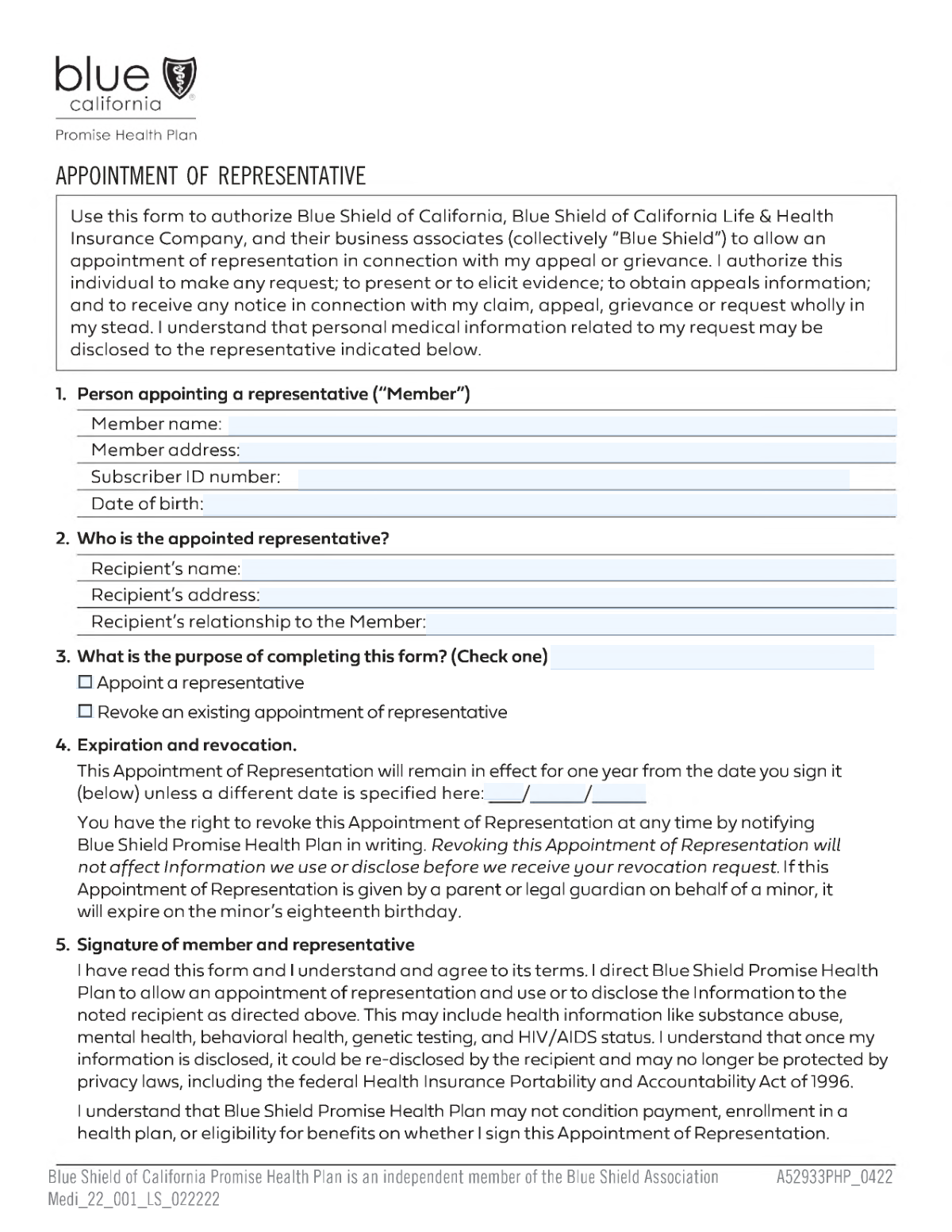
An Appointment of Representative form is a legal document that allows a member of a health plan to designate another person or organization to act on their behalf in matters such as filing grievances, requesting appeals, or accessing personal health information. This is crucial for members who need assistance navigating their healthcare benefits or are unable to manage their own affairs. Today, this form can be filled out quickly and accurately using AI-powered services like Instafill.ai, which can also convert non-fillable PDF versions into interactive fillable forms.
Our AI automatically handles information lookup, data retrieval, formatting, and form filling.
It takes less than a minute to fill out Appointment of Representative using our AI form filling.
Securely upload your data. Information is encrypted in transit and deleted immediately after the form is filled out.

Form specifications

Form name: Appointment of Representative Form
Number of fields: 20
Number of pages: 2
Language: English
Categories: representative forms
main-image

Instafill Demo: How to fill out PDF forms in seconds with AI

How to Fill Out Appointment of Representative Online for Free in 2026

Are you looking to fill out a APPOINTMENT OF REPRESENTATIVE form online quickly and accurately? Instafill.ai offers the #1 AI-powered PDF filling software of 2026, allowing you to complete your APPOINTMENT OF REPRESENTATIVE form in just 37 seconds or less.
Follow these steps to fill out your APPOINTMENT OF REPRESENTATIVE form online using Instafill.ai:
  1. 1 Navigate to Instafill.ai and upload your Appointment of Representative form or find it in the template library.
  2. 2 Enter the member's information, including their full name, address, date of birth, and subscriber ID number.
  3. 3 Provide the details of the appointed representative, such as their name and relationship to the member.
  4. 4 Specify the purpose of the form by checking the box to either appoint a new representative or revoke an existing one.
  5. 5 If appointing a representative, set an expiration date for the authorization if required.
  6. 6 The member must sign and date the form to make it legally valid. The representative may also need to sign to accept the role.
  7. 7 Use Instafill.ai to review all entered information for completeness and accuracy before downloading the final document.

Our AI-powered system ensures each field is filled out correctly, reducing errors and saving you time.

Why Choose Instafill.ai for Your Fillable Appointment of Representative Form?

Speed

Complete your Appointment of Representative in as little as 37 seconds.

Up-to-Date

Always use the latest 2026 Appointment of Representative form version.

Cost-effective

No need to hire expensive lawyers.

Accuracy

Our AI performs 10 compliance checks to ensure your form is error-free.

Security

Your personal information is protected with bank-level encryption.

Frequently Asked Questions About Form Appointment of Representative

This form allows a member to either appoint a person or organization to act on their behalf regarding their account, or to revoke a previously made appointment.

Any member who wishes to grant another person permission to access their information and make decisions on their behalf, or any member who wants to cancel a previous representative appointment, should complete this form.

You will need to provide your full name, mailing address, date of birth, and your Subscriber ID number.

Your Subscriber ID Number is typically printed on your member identification card, on official correspondence, or can be found by logging into your online member portal.

You must provide the full name of your appointed representative and state their relationship to you, such as spouse, child, attorney, or friend.

Select 'Appoint a representative' if you are naming someone new to act for you. Choose 'Revoke an existing appointment' if you want to cancel the authority of a person you previously appointed.

Yes, if you are appointing a new representative, you must enter an expiration date. The appointment will automatically end on this date unless you revoke it sooner.

When appointing a representative, both you (the member) and your chosen representative must sign and date the form. If you are only revoking an appointment, only the member's signature is typically required.

If a legal representative is signing for the member, they must provide their name, their relationship to the member, and indicate what type of legal documentation is being submitted to prove their authority.

Submission instructions are usually provided by the organization that requires the form. Check their website or contact them directly for information on where to mail, fax, or upload the completed document.

Yes, services like Instafill.ai use AI to accurately auto-fill form fields using your saved information, which saves time and helps prevent errors.

Simply upload the form to the Instafill.ai platform. The AI will identify all the fields, allowing you to fill them interactively or have the system auto-fill them from your secure profile.

You can use a service like Instafill.ai, which is designed to convert flat, non-fillable PDFs into interactive forms that you can easily complete and sign on your computer or mobile device.

Compliance Appointment of Representative
Validation Checks by Instafill.ai

1
Mutually Exclusive Purpose Selection
This check ensures that the user selects either 'Appoint a representative' or 'Revoke an existing appointment of representative', but not both. These actions are mutually exclusive, and selecting both would create ambiguity in the form's intent. If validation fails, the user should be prompted to choose only one option.
2
Core Member Information Completeness
Validates that 'Member Name', 'Member Address', 'Date of Birth', and 'Subscriber ID Number' are all filled out. This information is critical for uniquely identifying the member and processing the request correctly. A failure would prevent the form from being submitted until all required member details are provided.
3
Valid and Plausible Date of Birth
This check verifies that the 'Date of Birth' is a valid calendar date and is in the past. It prevents impossible dates like 'February 30th' or future dates of birth. This is crucial for identity verification and eligibility checks, and a failure would require the user to correct the date.
4
Subscriber ID Number Format
Ensures the 'Subscriber ID Number' adheres to a predefined format, such as a specific length, character set (e.g., alphanumeric), or pattern. This validation prevents data entry errors and ensures the ID can be found in the system. If the format is incorrect, the system cannot identify the member, and the user must correct the entry.
5
Appointment Section Completeness
If the 'Appoint a representative' box is checked, this validation confirms that all related fields are filled, including 'Recipient's Name', 'Recipient's Relationship to Member', and the expiration date fields. Appointing a representative requires all these details to be legally valid. A failure would prompt the user to complete the necessary information for the appointment.
6
Valid Expiration Date Construction
This check combines the 'Expiration Month', 'Expiration Day', and 'Expiration Year' fields to ensure they form a valid calendar date. It prevents invalid entries like 'November 31' or '02/30/2025'. An invalid date would make the appointment's terms unclear, so the user must correct the date components upon failure.
7
Future Expiration Date Logic
Verifies that the complete expiration date is set in the future, relative to the date of submission. An appointment cannot expire in the past. This ensures the appointment is valid for a future period. If the date is not in the future, the user will be required to enter a new, valid expiration date.
8
Valid and Timely Signature Date
Checks that the 'Signature Date' is a valid calendar date and is not in the future. The signature date documents when the form was authorized and cannot be post-dated. This is important for legal and auditing purposes, and a failure would require the user to enter a current or past date.
9
Member Name and Printed Name Consistency
This validation ensures that the name entered in the 'Member's Printed Name' field is an exact match to the name in the 'Member Name' field at the top of the form. This confirms that the person signing the form is the member who is appointing a representative. A mismatch could indicate a potential error or fraud and would require correction.
10
Legal Representative Section Completeness
If the 'Representative Signature' field is filled (indicating someone other than the member signed), this check ensures the 'Representative's Name', 'Relationship to Member', and 'Type of Documentation Submitted' fields are also completed. This information is legally required to prove the signer has the authority to act on the member's behalf. Failure would require the user to provide the necessary legal representative details.
11
Conditional Requirement for Appointed Representative Details
When 'Appoint a representative' is selected, this check verifies that 'Recipient's Name' and 'Recipient's Relationship to Member' are both provided. These fields are essential to identify who is being appointed. Without this information, the appointment is incomplete and legally void, so the form cannot be processed.
12
Date Chronology Sanity Check
Ensures the 'Signature Date' is not earlier than the member's 'Date of Birth'. This is a logical check to catch significant data entry errors. A signature date preceding the signer's birth is impossible and indicates a mistake in one of the date fields, which must be corrected.
13
Conditional Field Population Logic
This check ensures that fields that are conditional on 'Appoint a representative' being 'Yes' (e.g., 'Expiration Day', 'Signature Date') are left blank if the purpose is to 'Revoke an existing appointment'. This prevents submission of contradictory or irrelevant information. If validation fails, the user would be instructed to clear the unnecessary fields.

Common Mistakes in Completing Appointment of Representative

Using an Incomplete or Informal Member Name

Applicants often enter a nickname or an abbreviated name instead of their full legal name as it appears on official records. This causes a mismatch when the form is processed against their account information, leading to verification failures and rejection. To avoid this, always use your full legal name as shown on your insurance card or government-issued ID.

Incorrect or Transposed Subscriber ID Number

The Subscriber ID Number is a long string of digits that is easy to mistype or transpose. This error is one of the most common reasons for immediate rejection, as the system cannot identify the member's account. Always copy the number directly from the member's insurance card and double-check it for accuracy before submitting the form.

Ambiguous Purpose Selection

Users sometimes check both the 'Appoint a representative' and 'Revoke an existing appointment' boxes, or they neglect to check either one. This makes the form's intent unclear, rendering it invalid and preventing any action from being taken. Carefully read section 3 and select only one option that reflects your goal.

Missing or Invalid Expiration Date

When appointing a representative, filers often forget to enter an expiration date or enter it in an incorrect format across the separate Month, Day, and Year fields. This can result in the appointment being considered invalid or having an unintended duration. Ensure you fill in a specific date if required, as this defines the legal timeframe of the representation.

Confusing Signature Date with Date of Birth

It's a frequent mistake to accidentally enter the member's date of birth in the 'Signature Date' field. This happens when rushing and not reading field labels carefully. An incorrect signature date can call the form's legal validity into question, so always ensure you are entering the current date on which the form is being signed.

Missing Required Signatures

A form appointing a representative is a legal document that is invalid without the proper signatures from both the member and the representative. Forgetting to sign is a simple oversight that leads to automatic rejection and significant delays. Before submitting, perform a final check to ensure all required signature lines are completed.

Inconsistent Name Spelling

People sometimes write their full name in the 'Member Name' field at the top but use an initial or a slightly different version in the 'Member's Printed Name' field in the signature section. This inconsistency can create ambiguity and may require follow-up or cause the form to be rejected. Ensure the printed name in the signature block exactly matches the full name provided in the member information section.

Illegible Handwriting on Printed Forms

When a form is only available as a non-fillable PDF, it must be printed and filled out by hand, often resulting in illegible handwriting. This can lead to data entry errors for critical information like names, addresses, and ID numbers, causing processing failures. To prevent this, print clearly in block letters or use a tool like Instafill.ai, which can convert flat PDFs into digitally fillable forms to ensure perfect clarity.

Failing to Attach Required Legal Documentation

If someone with legal authority (e.g., power of attorney) signs on behalf of the member, they must submit supporting legal documents. Filers often complete the 'Legal Representative Details' section but forget to attach the required proof. This renders the submission incomplete and invalid until the documentation is received, so always attach copies of the relevant legal papers with the form.

Entering the Wrong Address Type

The form specifically requests the 'mailing address', but people often enter their physical home address out of habit, which may be different. This can cause critical communications regarding the appointment to be lost or delayed. Carefully read the field instructions and provide the correct address for receiving mail. AI-powered tools like Instafill.ai can help by saving and correctly populating different address types to avoid this error.
Saved over 80 hours a year

“I was never sure if my IRS forms like W-9 were filled correctly. Now, I can complete the forms accurately without any external help.”

Kevin Martin Green

Your data stays secure with advanced protection from Instafill and our subprocessors

Robust compliance program

Transparent business model

You’re not the product. You always know where your data is and what it is processed for.

ISO 27001, HIPAA, and GDPR

Our subprocesses adhere to multiple compliance standards, including but not limited to ISO 27001, HIPAA, and GDPR.

Security & privacy by design

We consider security and privacy from the initial design phase of any new service or functionality. It’s not an afterthought, it’s built-in, including support for two-factor authentication (2FA) to further protect your account.

Fill out Appointment of Representative with Instafill.ai

Worried about filling PDFs wrong? Instafill securely fills appointment-of-representative-form forms, ensuring each field is accurate.