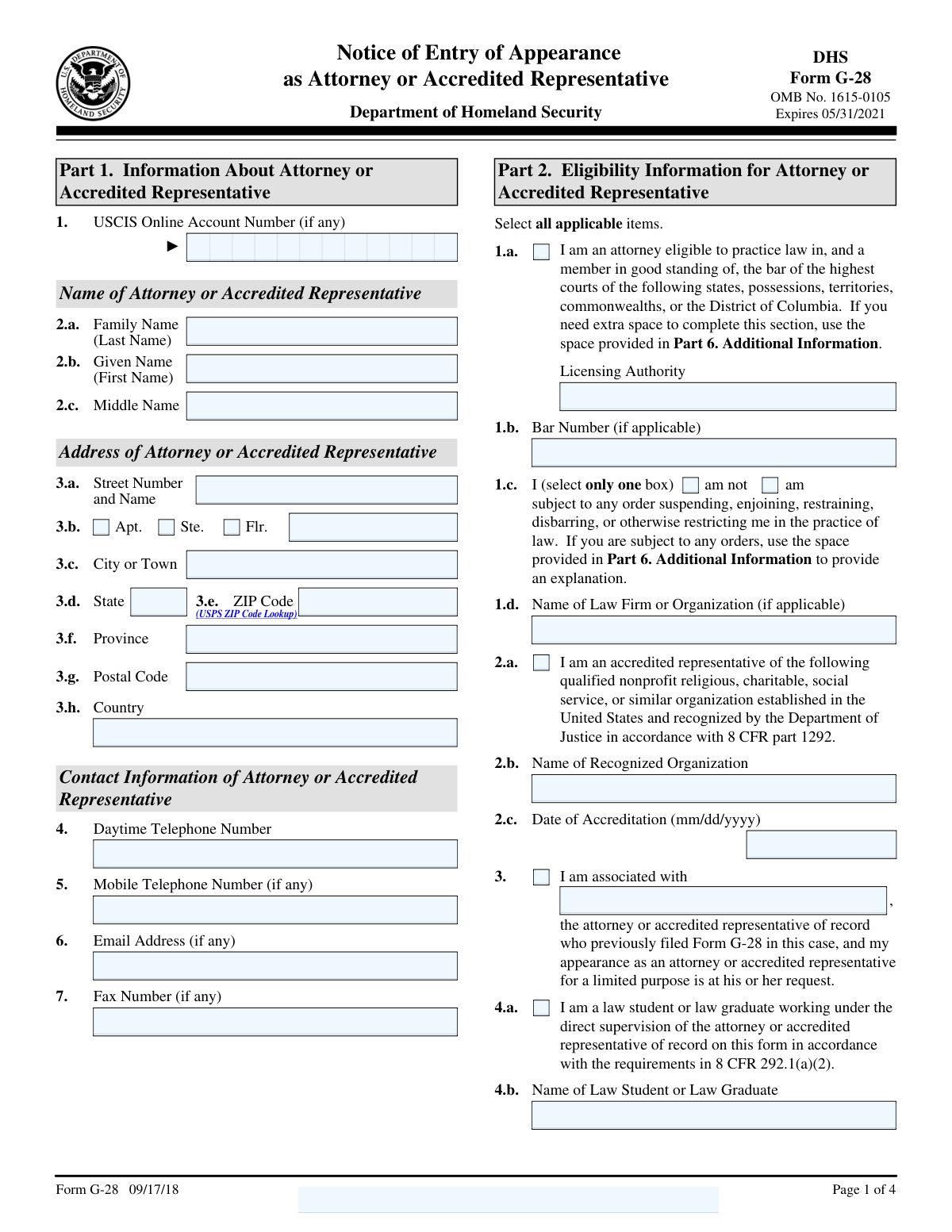
Yes! You can use AI to fill out Form G-28, Notice of Entry of Appearance as Attorney or Accredited Representative

Form G-28 is the official 'Notice of Entry of Appearance as Attorney or Accredited Representative' used within the U.S. immigration system. Filing this form with USCIS, ICE, or CBP establishes a formal attorney-client relationship, authorizing the legal representative to act on the client's behalf and receive all official case-related notices and documents. This is a critical step for ensuring proper legal representation in any immigration proceeding, and today this form can be filled out quickly and accurately using AI-powered services like Instafill.ai, which can also convert non-fillable PDF versions into interactive fillable forms.
Our AI automatically handles information lookup, data retrieval, formatting, and form filling.
It takes less than a minute to fill out G-28 using our AI form filling.
Securely upload your data. Information is encrypted in transit and deleted immediately after the form is filled out.

Form specifications

Form name: Form G-28, Notice of Entry of Appearance as Attorney or Accredited Representative
Number of fields: 101
Number of pages: 4
Language: English
Categories: credit forms, representative forms
main-image

Instafill Demo: How to fill out PDF forms in seconds with AI

How to Fill Out G-28 Online for Free in 2026

Are you looking to fill out a G-28 form online quickly and accurately? Instafill.ai offers the #1 AI-powered PDF filling software of 2026, allowing you to complete your G-28 form in just 37 seconds or less.
Follow these steps to fill out your G-28 form online using Instafill.ai:
  1. 1 Navigate to Instafill.ai and upload your Form G-28, or use the platform's search function to find the latest version.
  2. 2 Use the AI assistant to fill in the attorney's or representative's information in Part 1 and 2, including name, address, contact details, and bar or accreditation status.
  3. 3 Complete Part 3 by selecting the government agency (USCIS, ICE, or CBP) and providing details about the specific matter for which you are entering an appearance.
  4. 4 Enter your client's information in Part 4, including their full name, contact details, mailing address, and any relevant identifiers like an A-Number or USCIS Online Account Number.
  5. 5 Review the client's consent options for receiving notices, then ensure both the client and the representative sign and date the form in the designated signature sections.
  6. 6 Carefully review all auto-filled and manually entered information across the form for complete accuracy.
  7. 7 Download the completed Form G-28, print it for required ink signatures, and file it with the appropriate government agency as required for the specific case.

Our AI-powered system ensures each field is filled out correctly, reducing errors and saving you time.

Why Choose Instafill.ai for Your Fillable G-28 Form?

Speed

Complete your G-28 in as little as 37 seconds.

Up-to-Date

Always use the latest 2026 G-28 form version.

Cost-effective

No need to hire expensive lawyers.

Accuracy

Our AI performs 10 compliance checks to ensure your form is error-free.

Security

Your personal information is protected with bank-level encryption.

Frequently Asked Questions About Form G-28

This form is used by an attorney or accredited representative to notify a U.S. government agency, such as USCIS, ICE, or CBP, that they are officially representing a client in a specific immigration matter.

The attorney or accredited representative completes the form with their information and the client's details. Both the representative and the client must physically sign the form with ink to validate it.

An A-Number is a unique identifier assigned to non-citizens. You should enter your client's A-Number if they have one, but the field can be left blank if one has not been assigned.

No, a USCIS Online Account Number is not mandatory. Both the representative and the client should provide their number if they have one, but it is acceptable to leave this field blank.

In Part 3, you must select the agency (USCIS, ICE, or CBP) and enter the specific form numbers or a description of the matter. If you have a receipt number for the case, you should enter it in the designated field.

Part 4 allows you to choose where USCIS sends official notices and documents. You can elect to have original notices or secure documents like a Green Card sent directly to your attorney's U.S. business address instead of your own.

No, the instructions specify that you cannot type your name or use a digital signature. You must print the completed form and sign it with ink in the designated signature box.

If you are a law student working under the supervision of the attorney of record, check the box for 'I am a law student or law graduate' in Part 1. You will also need to sign the form in the designated space in Part 5.

Use Part 6, 'Additional Information,' to provide any extra details. Make sure to reference the Page Number, Part Number, and Item Number that your additional information corresponds to.

A Petitioner files a case for someone else (the Beneficiary), while an Applicant files for their own benefit. Your representative must select the box that correctly identifies your role in the immigration matter.

Yes, services like Instafill.ai use AI to accurately auto-fill form fields from your saved information, which saves time and helps prevent errors. After the AI populates the fields, you can review and finalize the form.

Simply upload the form's PDF to the Instafill.ai platform. The AI technology will identify the fields and fill them in for you, after which you can review, download, and print the form for signing.

You can use a service like Instafill.ai, which can convert flat, non-fillable PDFs into interactive forms. Just upload the file, and the platform will make the fields fillable so you can type your information directly.

The attorney must provide their bar number and the name of the licensing authority (e.g., 'State of New York Bar'). They must also confirm they are a member in good standing and not subject to any disciplinary orders.

Compliance G-28
Validation Checks by Instafill.ai

1
Ensures Attorney's Full Name is Provided
This check validates that the 'Given Name (First Name)' and 'Family Name (Last Name)' for the attorney or accredited representative are not empty. These fields are essential for identifying the legal representative on record for the case. Failure to provide a complete name will result in form rejection as the representative cannot be properly identified or verified.
2
Ensures Client's Name or Entity Name is Provided
This check verifies that either the client's 'Given Name' and 'Family Name' are filled out, or the 'Name of Entity' is provided. It is critical to identify who is being represented in the legal matter. If neither the individual client's name nor the entity's name is present, the form is invalid as the subject of representation is unknown.
3
Validates Mutually Exclusive Disciplinary Status Selection
This validation ensures that the user selects either 'Not subject to disciplinary or restraining order' or 'Subject to disciplinary or restraining order', but not both. Selecting both options creates a logical contradiction regarding the attorney's professional standing. The form submission should be blocked until only one, unambiguous selection is made to ensure data integrity.
4
Conditional Validation of Attorney Bar Number and Licensing Authority
This check verifies that if the 'Attorney eligible and member in good standing' box is checked, then the 'Bar Number' and 'Licensing Authority' fields must be filled. These details are necessary to verify the attorney's credentials with the relevant bar association. If the box is checked but the bar information is missing, the form is considered incomplete and cannot be processed.
5
Conditional Validation of Law Student Information
This validation ensures that if the 'I am a law student or law graduate' box is checked, the 'Name of Law Student or Law Graduate' field is completed. This is required to identify the supervised individual working on the case under the attorney of record. An incomplete submission would prevent proper registration of the law student's involvement as required by regulations.
6
Validates Correct Usage of Domestic vs. International Address Fields
This check ensures logical consistency in the address blocks for both the attorney and the client. If the 'Country' is 'United States' or a U.S. territory, the 'State' and 'ZIP Code' fields must be used, while 'Province' and 'Postal Code (International)' should be empty. This prevents data entry errors and ensures official correspondence is routed correctly, avoiding critical delays.
7
Ensures All Date Fields Use MM/DD/YYYY Format and are Valid
This validation checks that all date fields, such as 'Date of Accreditation' and signature dates, are entered in the specified MM/DD/YYYY format and represent a valid calendar date. It should also verify that the date is not in the future. Incorrectly formatted or invalid dates can cause processing delays or outright rejection of the form.
8
Validates Agency Selection and Corresponding Matter Description
This check ensures that if an agency checkbox (USCIS, ICE, or CBP) is selected, the corresponding 'specific matter' text field is also filled out. The form requires knowing both which agency the appearance is for and the specific case or application involved. A submission with a selected agency but no matter description is incomplete and cannot be directed to the correct department.
9
Ensures Only One Representation Role is Selected
This validation verifies that only one role ('Applicant', 'Petitioner', 'Respondent', 'Requestor', or 'Beneficiary/Derivative') is selected in the 'Representation Role' section. Selecting multiple roles creates ambiguity about the client's position in the legal matter. The system should enforce a single selection to ensure the representative's role is clearly and accurately recorded.
10
Conditional Validation of Associated Attorney Name
This check confirms that if the 'I am associated with' checkbox is selected, the 'Associated Attorney or Representative Name' field is filled. This information is crucial for linking the new representative to the existing attorney of record for the case. Failure to provide the name of the primary attorney would make it impossible to establish the association and process the appearance correctly.
11
Validates U.S. ZIP Code Format
This check ensures that the 'ZIP Code' field, when provided for a U.S. address, contains either a valid 5-digit or 9-digit (ZIP+4) numeric code. This is essential for the correct and timely delivery of mail by the U.S. Postal Service. An invalid format could lead to returned mail and critical delays in communication with the client or attorney.
12
Validates Alien Registration Number (A-Number) Format
This check verifies that the 'Alien Registration Number (A-Number)' field, if provided, follows the correct format, which is typically the letter 'A' followed by 8 or 9 digits. This number is a unique identifier for the client within the immigration system. An incorrectly formatted A-Number could lead to misidentification of the client or failure to link the form to the correct case file.
13
Conditional Validation of Authorized Signatory Title
This validation ensures that if the 'Name of Entity' field is filled out for the client, the 'Title of Authorized Signatory for Entity' field is also completed. This is necessary to confirm that the person signing on behalf of the company has the authority to do so. Without the title, the legitimacy of the representation agreement for the entity is questionable and may be rejected.
14
Validates Completeness of Additional Information References
This check ensures that if any 'Additional Information' text field is used in Part 6, the corresponding 'Page Number', 'Part Number', and 'Item Number' fields are also filled out. This context is essential for officials to understand which part of the form the additional information pertains to. Missing references make the supplemental data ambiguous and potentially unusable, leading to requests for clarification.

Common Mistakes in Completing G-28

Incorrectly Formatting Address Information

Users often enter the entire address, including apartment or suite numbers, into the 'Street Number and Name' field instead of using the separate designated fields for 'Apt./Suite/Floor'. This happens due to haste or not noticing the separate fields. This can lead to mail processing errors, causing critical notices from USCIS, ICE, or CBP to be delayed or returned as undeliverable. To avoid this, carefully parse the address into the specific fields provided and check the corresponding box (Apt., Ste., Flr.) if applicable.

Confusing USCIS Online Account Number and A-Number

Applicants frequently mistake the Alien Registration Number (A-Number) for the USCIS Online Account Number and enter it in the wrong field for either the client or the attorney. These are distinct identifiers used for different purposes, and mixing them up can lead to failures in linking the representation form to the correct case file, causing significant processing delays. Always double-check the number format and source document to ensure the correct number is entered in the corresponding field.

Improperly Signing the Form

The signature fields for both the attorney and the client explicitly state that they cannot be digitally signed or have a name typed in; they must be physically signed in ink. In an increasingly digital world, it's common to attempt a digital or typed signature, which will lead to the form's rejection. The form must be printed, signed by hand, and then scanned if being submitted electronically. If the form is a non-fillable PDF, tools like Instafill.ai can make it fillable before printing for signature.

Failing to Specify the Correct Agency and Matter

This form covers appearances before USCIS, ICE, and CBP, and users must check the correct box and describe the specific matter. Attorneys sometimes select the wrong agency or provide a vague description in the 'specific matter' field. This error can cause the notice of appearance to be misrouted or rejected, leaving the client unrepresented in the intended proceeding. Always confirm which agency is handling the case and provide the precise form or case number.

Incomplete or Incorrect Attorney Bar Number

The form requires the attorney's full bar number, including any letters or leading zeros. Attorneys may forget these details or enter the number from memory incorrectly, leading to failed verification with the state bar association. An unverifiable bar number can result in the rejection of the representation and requires refiling, delaying the case. It is crucial to copy the bar number exactly as it appears on the official bar license or directory.

Ignoring Conditional Logic for Fields

Many fields are conditional, meaning they should only be filled out if a specific box is checked (e.g., providing 'Name of Recognized Organization' only if you are an accredited representative, not an attorney). Users often overlook these instructions and either fill in unnecessary information or omit required details. This can confuse the adjudicator and may require a Request for Evidence (RFE) to clarify. AI-powered tools like Instafill.ai can help by showing or hiding conditional fields based on your answers, preventing these errors.

Incorrectly Using the 'Additional Information' Section

When using Part 6 for extra space, filers must specify the Page, Part, and Item Number that the additional information relates to. A common mistake is to provide the extra text without these crucial cross-references. Without them, the reviewing officer cannot connect the information to the correct part of the form, rendering it useless and potentially leading to a decision based on incomplete information. Always ensure every entry in this section is clearly linked to a specific question.

Misunderstanding the Client Consent Options for Notices

Part 4 contains critical choices about where USCIS sends notices and secure documents (like Green Cards). Clients may not fully understand the implications of each checkbox, potentially causing sensitive documents to be mailed to an old or incorrect address. For instance, failing to select the option to have documents sent to the attorney could result in a missed notice if the client moves. It is vital for the attorney to explain these options clearly to the client before they sign.

Using Incorrect Date Formats

The form specifies a MM/DD/YYYY format for all date fields. Applicants, especially those accustomed to different international standards (like DD/MM/YYYY), often enter the date incorrectly. This can lead to data entry errors by the agency, potentially creating discrepancies in the official record regarding filing dates or dates of signature. To prevent this, always use the two-digit month, two-digit day, and four-digit year format as instructed. Form-filling tools can automatically enforce this format.

Mixing Up Individual and Entity Client Information

The form has separate fields for individual clients (name) and business/organizational clients (entity name, signatory title). When a company is the petitioner, filers might mistakenly enter the signatory's name in the client name fields instead of the company's legal name in the 'Name of Entity' field. This creates confusion about who the actual client is—the person or the business—and can lead to rejection or RFEs. Ensure the correct fields are used based on whether the client is a person or a legal entity.
Saved over 80 hours a year

“I was never sure if my IRS forms like W-9 were filled correctly. Now, I can complete the forms accurately without any external help.”

Kevin Martin Green

Your data stays secure with advanced protection from Instafill and our subprocessors

Robust compliance program

Transparent business model

You’re not the product. You always know where your data is and what it is processed for.

ISO 27001, HIPAA, and GDPR

Our subprocesses adhere to multiple compliance standards, including but not limited to ISO 27001, HIPAA, and GDPR.

Security & privacy by design

We consider security and privacy from the initial design phase of any new service or functionality. It’s not an afterthought, it’s built-in, including support for two-factor authentication (2FA) to further protect your account.

Fill out G-28 with Instafill.ai

Worried about filling PDFs wrong? Instafill securely fills form-g-28-notice-of-entry-of-appearance-as-attorney-or-accredited-representative-2 forms, ensuring each field is accurate.