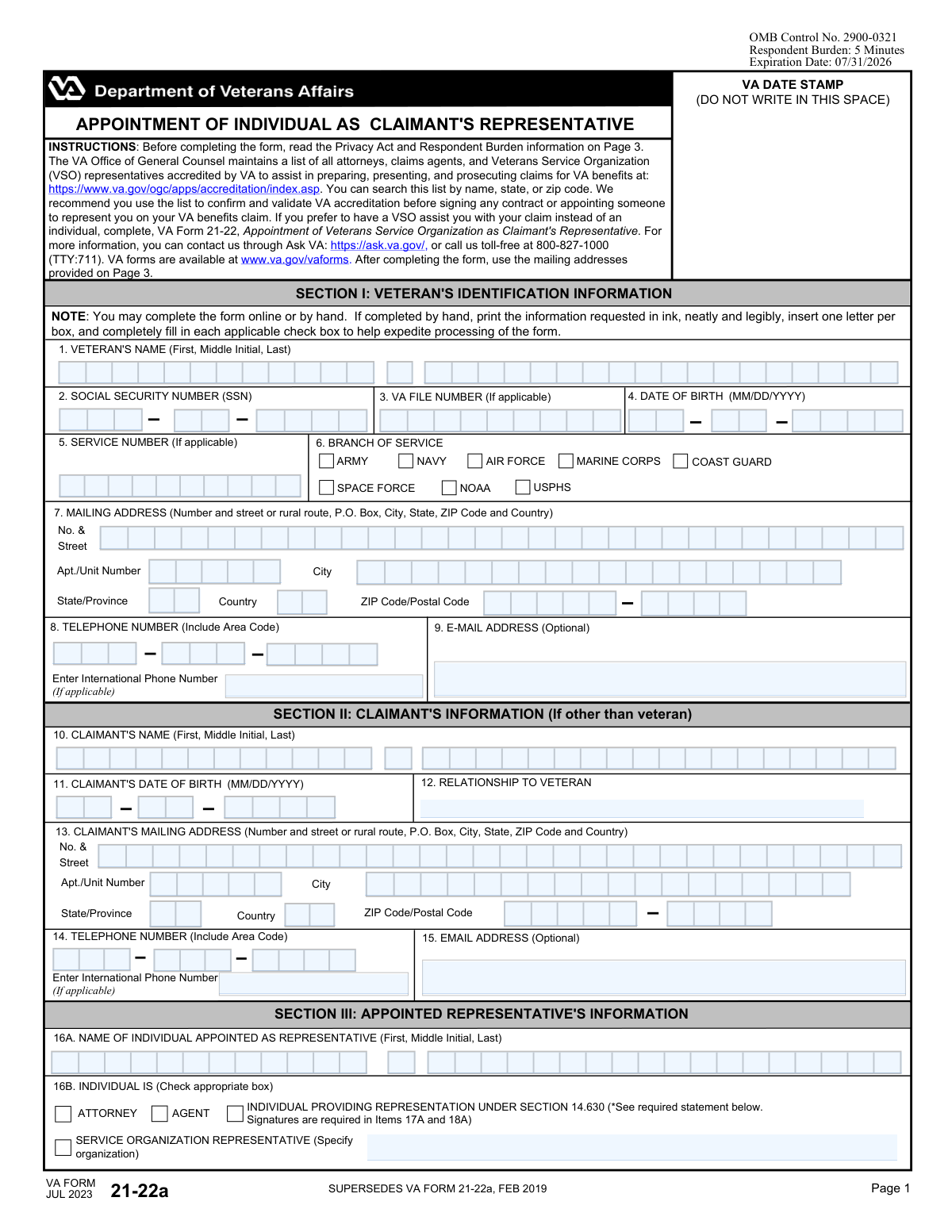
Yes! You can use AI to fill out VA Form 21-22a, Appointment of Individual as Claimant's Representative

VA Form 21-22a, Appointment of Individual as Claimant's Representative, is a Department of Veterans Affairs document used to legally appoint a specific person to act on a claimant's behalf for VA benefits claims. This authorization allows the representative to prepare, present, and prosecute claims and access the claimant's records. Today, this form can be filled out quickly and accurately using AI-powered services like Instafill.ai, which can also convert non-fillable PDF versions into interactive fillable forms.
VA Form 21-22a is part of the representative forms and VA claim forms categories on Instafill.
Our AI automatically handles information lookup, data retrieval, formatting, and form filling.
It takes less than a minute to fill out VA Form 21-22a using our AI form filling.
Securely upload your data. Information is encrypted in transit and deleted immediately after the form is filled out.

Form specifications

Form name: VA Form 21-22a, Appointment of Individual as Claimant's Representative
Number of fields: 100
Number of pages: 3
Filled form examples: Form VA Form 21-22a Examples
Language: English
main-image

Instafill Demo: How to fill out PDF forms in seconds with AI

How to Fill Out VA Form 21-22a Online for Free in 2026

Are you looking to fill out a VA FORM 21-22A form online quickly and accurately? Instafill.ai offers the #1 AI-powered PDF filling software of 2026, allowing you to complete your VA FORM 21-22A form in just 37 seconds or less.
Follow these steps to fill out your VA FORM 21-22A form online using Instafill.ai:
  1. 1 Navigate to Instafill.ai and upload or select the VA Form 21-22a.
  2. 2 Use the AI assistant to accurately fill in the Veteran's Identification Information in Section I, including name, SSN, and contact details.
  3. 3 If you are not the veteran, complete Section II with the claimant's personal information, such as name, date of birth, and relationship to the veteran.
  4. 4 Provide the full details of the appointed representative in Section III, specifying their name, address, and type (e.g., attorney, agent, or service organization representative).
  5. 5 Carefully review and complete Section IV, the authorization sections, granting or limiting the representative's access to sensitive records and their ability to change your address.
  6. 6 Review all entered information for accuracy before electronically signing and dating the form in the designated signature blocks for the claimant and representative.
  7. 7 Securely download, print, or submit your completed VA Form 21-22a directly to the appropriate VA office as per the form's instructions.

Our AI-powered system ensures each field is filled out correctly, reducing errors and saving you time.

Why Choose Instafill.ai for Your Fillable VA Form 21-22a Form?

Speed

Complete your VA Form 21-22a in as little as 37 seconds.

Up-to-Date

Always use the latest 2026 VA Form 21-22a form version.

Cost-effective

No need to hire expensive lawyers.

Accuracy

Our AI performs 10 compliance checks to ensure your form is error-free.

Security

Your personal information is protected with bank-level encryption.

Frequently Asked Questions About Form VA Form 21-22a

This form is used to officially appoint an individual, such as an attorney, claims agent, or another person, to represent you in your claim for VA benefits. It grants them permission to access your records and act on your behalf.

Use Form 21-22a to appoint an individual representative, like a specific attorney or agent. Use Form 21-22 if you want to appoint a Veterans Service Organization (VSO) as your representative.

Any veteran or claimant (such as a spouse, child, or parent) who wants a specific person to help them prepare, present, and prosecute their VA benefits claim should complete this form.

You should complete Section II if you are the person filing the claim (the claimant) and you are not the veteran. This applies to spouses, children, or parents filing for benefits based on the veteran's service.

You will need the veteran's full name, Social Security Number, date of birth, and service information. You will also need the full name and contact information for the individual you are appointing as your representative.

The VA maintains a list of accredited attorneys, agents, and VSO representatives on its website. You can search this list by name or location to confirm their status before you sign any agreement.

No, you are not required to share them. To authorize disclosure of records related to HIV, drug/alcohol abuse, or sickle cell anemia, you must check the box in Item 20; otherwise, they will not be shared.

Your representative can only change your address if you explicitly grant them permission. To do this, you must check the authorization box in Item 22 of the form.

This option is for appointing an individual for a single claim on an unpaid basis, and they generally cannot represent more than one claimant. If you select this, both you and your representative must sign in the designated signature blocks in Items 17A and 18A.

You can mail the form to the address on Page 3 that corresponds to your claim type. However, the VA recommends submitting it electronically via the Direct Upload tool on va.gov for the fastest processing.

The form itself is estimated to take about 5 minutes to complete. VA processing times can vary, but submitting the form electronically is the fastest way to get it into their system.

Yes, AI-powered services like Instafill.ai can help you fill out this form accurately and efficiently. These tools can auto-fill your information from a saved profile, reducing manual data entry and saving you time.

With Instafill.ai, you can upload the VA Form 21-22a, and its AI will identify the fields for you. You can then type your information directly into the digital form, save your progress, and download the completed, signed PDF.

If you have a non-fillable or 'flat' PDF, you can use a service like Instafill.ai to instantly convert it into an interactive, fillable form. This allows you to type your answers directly onto the document instead of printing and filling it out by hand.

Compliance VA Form 21-22a
Validation Checks by Instafill.ai

1
Validates Veteran's Social Security Number Format and Completeness
This check ensures the Social Security Number entered in Item 2 and in the headers of subsequent pages consists of a full 9 digits. The SSN is the primary identifier for the veteran's records, and an incomplete or improperly formatted number will prevent the system from locating the correct file. Failure to provide a valid 9-digit SSN will result in the form's rejection.
2
Ensures Veteran and Claimant Dates of Birth are Valid and Plausible
This validation verifies that the dates entered in Item 4 (Veteran's DOB) and Item 11 (Claimant's DOB) are in a valid MM/DD/YYYY format and represent a logical past date. The date cannot be in the future or an unreasonable date in the past (e.g., more than 120 years ago). This prevents data entry errors and ensures the identity information is credible for processing.
3
Confirms Required Signatures and Dates are Present
This check verifies that the mandatory signatures in Item 23A (Veteran/Claimant) and Item 25A (Representative) are provided, along with their corresponding dates in Items 23B and 25B. These signatures are legally required to execute the appointment of representation. A missing signature or date invalidates the entire form, and it will be returned for completion.
4
Verifies a Single Representative Type is Selected
This validation ensures that exactly one checkbox is selected in Item 16B to define the type of representative being appointed (e.g., Attorney, Agent). The VA must have a clear, unambiguous record of the representative's official capacity. If zero or more than one box is checked, the appointment is considered ambiguous and cannot be processed.
5
Validates Conditional Signatures for Section 14.630 Representation
This check confirms that if the box for 'Individual Providing Representation Under Section 14.630' is checked in Item 16B, then signatures are present in both Item 17A and Item 18A. This specific representation type has unique attestation requirements that must be met. Failure to provide these specific signatures when required will lead to the rejection of the appointment under this rule.
6
Ensures Service Organization Name is Provided When Required
This validation verifies that if 'Service Organization Representative' is selected in Item 16B, the name of the specific organization is filled in the corresponding text field. The VA needs to know which specific Veterans Service Organization (VSO) is being appointed. If the organization name is missing, the appointment is incomplete and cannot be recorded.
7
Validates Claimant Information Completeness When Section II is Used
If any information is entered in Section II (Claimant's Information), this check ensures that the Claimant's Name (Item 10), Date of Birth (Item 11), and Relationship to Veteran (Item 12) are all complete. When the claimant is not the veteran, these key identifiers are necessary to establish the claimant's identity and relationship. Incomplete information will halt processing for the non-veteran claimant.
8
Ensures Veteran's SSN is Consistent Across All Pages
This check verifies that the Veteran's Social Security Number entered in the header of pages 2 and 3 matches the SSN provided in Item 2 on page 1. This consistency is crucial for ensuring all pages of the document are correctly associated with the same veteran's file during scanning and processing. A mismatch could lead to misfiled pages or processing delays.
9
Validates Logic for Limitation of Consent in Item 21
This validation confirms that if text is entered into Item 21 (Limitation of Consent), the authorization box in Item 20 must be checked. It is not logical to limit consent that has not been granted in the first place. If Item 21 is filled but Item 20 is not checked, it indicates a user error that requires correction before the authorization can be properly recorded.
10
Verifies At Least One Branch of Service is Selected
This check ensures that at least one checkbox is marked in Item 6 (Branch of Service). This information is a fundamental part of the veteran's identification and service record. Failure to select a branch of service results in an incomplete identification profile and will prevent the form from being processed.
11
Validates Completeness of All Required Mailing Addresses
This check ensures that the required components of the mailing addresses in Item 7 (Veteran) and Item 16C (Representative) are present, including Street, City, State, and ZIP Code. If Section II is filled, the Claimant's address in Item 13 is also checked. A complete and valid address is essential for all future correspondence, and missing components will cause critical mail to be returned as undeliverable.
12
Ensures Signature Dates are Logically Valid
This check verifies that all signature dates on the form (Items 17B, 18B, 23B, 25B) are not set to a future date. A signature is a legal attestation that occurs at a specific point in time, which cannot be in the future. A future date would invalidate the legal effect of the signature and cause the form to be rejected.
13
Validates Conditional Completion of Authorization Fields
This check ensures that if authorization is given by checking the box in Item 19a or 19b, the corresponding fields for the firm/organization name or employee names are filled out. Granting authorization without specifying who is being authorized is ambiguous and legally insufficient. The form will be considered incomplete if an authorization box is checked but the required names are missing.
14
Validates Domestic Phone Number Format
This check verifies that U.S. phone numbers entered in Items 8, 14, and 16D consist of a 10-digit number (3-digit area code and 7-digit number). This ensures the contact information is correctly formatted and usable for communication. Incomplete or incorrectly formatted numbers can hinder the VA's ability to contact the veteran, claimant, or representative if needed.

Common Mistakes in Completing VA Form 21-22a

Confusing Veteran and Claimant Information

This error occurs when a non-veteran claimant (e.g., a spouse or child) fills their own information into Section I, which is reserved for the veteran. This leads to confusion, as the VA may try to process the claim against the wrong person's service record. To avoid this, carefully read the section headers; Section I is always for the veteran, and Section II is for the claimant if they are not the veteran.

Missing or Incorrectly Placed Signatures

The form has multiple signature blocks with specific conditions, which are often missed or signed incorrectly. For example, Items 17A and 18A are only for a specific representation type, while 23A and 25A are always required. An unsigned or improperly signed form is legally invalid and will be rejected immediately, halting the entire process. Always read the instructions for each signature block, paying close attention to the 'Required' and 'Required only for...' notes.

Using the Wrong Form for VSO Representation

Applicants often use this form (21-22a) when they intend to appoint a Veterans Service Organization (VSO) like the VFW or American Legion. This form is for appointing an individual representative, not an organization. Using the wrong form will cause the appointment to be rejected, forcing the applicant to start over with the correct VA Form 21-22. Always confirm if you are appointing an individual or an organization before selecting a form.

Incomplete or Inaccurate Identification Numbers

Entering an incorrect Social Security Number, VA File Number, or Service Number is a frequent mistake, often due to transcription errors or not having documents on hand. This is a critical failure, as it prevents the VA from locating the correct veteran's file, leading to significant processing delays or outright rejection. Always double-check these numbers against official records like a DD-214 or previous VA correspondence before submitting.

Overlooking Authorization Checkboxes

Applicants frequently fail to check the boxes in Item 20 (for access to sensitive medical records) or Item 22 (to allow the representative to change the claimant's address). They may assume consent is automatic or simply miss these items. This can severely hamper a representative's ability to gather evidence or perform simple administrative tasks, causing delays. The claimant must consciously review and check these boxes to grant these specific permissions.

Illegible Handwriting on Paper Forms

The form instructions require neat, legible printing in ink, with one letter per box. However, handwritten forms are often difficult to read, leading to data entry errors by VA staff, which can result in returned mail and processing delays. The best way to avoid this is to complete the form online. If the form is a non-fillable PDF, AI-powered tools like Instafill.ai can convert it into a fillable version, eliminating handwriting issues entirely.

Forgetting to Add SSN on Subsequent Pages

The form requires the veteran's Social Security Number at the top of pages 2 and 3, in addition to page 1. Applicants often fill it out on the first page and forget the others. If the pages become separated during manual processing, the VA may be unable to re-associate them with the correct file, potentially losing critical information. To prevent this, review every page header and footer before submission. AI form-filling tools can help by automatically populating such repeating fields.

Incorrect Representative Type Selection

In Item 16B, applicants may check the wrong box for their representative's role (e.g., confusing an 'Agent' with a 'Service Organization Representative'). Each type has different rules, fee structures, and signature requirements, so an incorrect selection can invalidate the appointment. Before filling out the form, confirm the exact accreditation status of your representative, using the VA's OGC accreditation search tool as recommended in the instructions.

Submitting the Form to the Wrong VA Office

Page 3 lists several different mailing addresses for various claim types (Compensation, Pension, Fiduciary, etc.). Applicants can easily get confused and mail the form to the wrong intake center. This mistake doesn't necessarily cause a rejection, but it guarantees a significant delay as the form is rerouted internally. To avoid this, carefully identify your claim type and use the corresponding address, or better yet, submit the form electronically via the VA's website for the fastest and most accurate delivery.

Improperly Formatting Address Fields

The form breaks address fields into separate components (Street, City, State, ZIP), but users often enter the full address on a single line or mix up the fields. This can lead to automated systems being unable to validate the address, causing mail from the VA to be returned as undeliverable. To prevent this, enter information precisely as requested in each box. AI-powered form fillers like Instafill.ai excel at parsing addresses and placing each component in the correct field, ensuring accuracy.
Saved over 80 hours a year

“I was never sure if my IRS forms like W-9 were filled correctly. Now, I can complete the forms accurately without any external help.”

Kevin Martin Green

Your data stays secure with advanced protection from Instafill and our subprocessors

Robust compliance program

Transparent business model

You’re not the product. You always know where your data is and what it is processed for.

ISO 27001, HIPAA, and GDPR

Our subprocesses adhere to multiple compliance standards, including but not limited to ISO 27001, HIPAA, and GDPR.

Security & privacy by design

We consider security and privacy from the initial design phase of any new service or functionality. It’s not an afterthought, it’s built-in, including support for two-factor authentication (2FA) to further protect your account.

Fill out VA Form 21-22a with Instafill.ai

Worried about filling PDFs wrong? Instafill securely fills va-form-21-22a-appointment-of-individual-as-claimants-representative forms, ensuring each field is accurate.