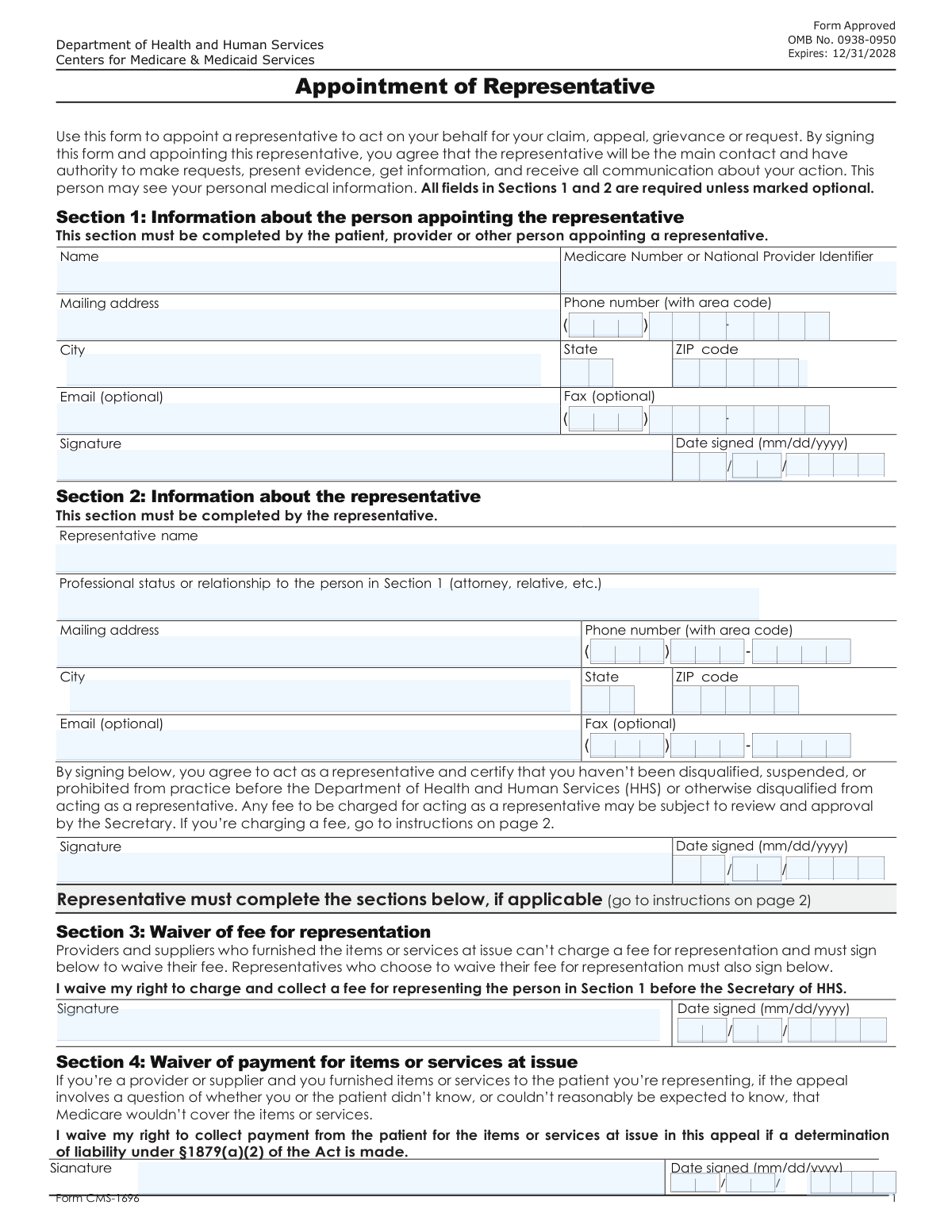
Yes! You can use AI to fill out Form CMS-1696, Appointment of Representative
Form CMS-1696, Appointment of Representative, is a legal document used by a Medicare beneficiary to authorize another person or organization to act on their behalf in a Medicare claim or appeal. This authorization is crucial as it allows the representative to access the beneficiary's personal health information and communicate directly with Medicare, ensuring proper handling of their case. Today, this form can be filled out quickly and accurately using AI-powered services like Instafill.ai, which can also convert non-fillable PDF versions into interactive fillable forms.
Our AI automatically handles information lookup, data retrieval, formatting, and form filling.
It takes less than a minute to fill out CMS-1696 using our AI form filling.
Securely upload your data. Information is encrypted in transit and deleted immediately after the form is filled out.
Form specifications
| Form name: | Form CMS-1696, Appointment of Representative |
| Number of fields: | 40 |
| Number of pages: | 2 |
| Language: | English |
| Categories: | CMS forms, representative forms |
Instafill Demo: How to fill out PDF forms in seconds with AI
How to Fill Out CMS-1696 Online for Free in 2026
Are you looking to fill out a CMS-1696 form online quickly and accurately? Instafill.ai offers the #1 AI-powered PDF filling software of 2026, allowing you to complete your CMS-1696 form in just 37 seconds or less.
Follow these steps to fill out your CMS-1696 form online using Instafill.ai:
- 1 Navigate to Instafill.ai and upload your CMS-1696 form, or select it from their library of templates.
- 2 Provide the appointing person's details, including their full name, Medicare number, and complete contact information as prompted by the AI assistant.
- 3 Enter the appointed representative's name, professional status or relationship to the beneficiary, and their full contact information.
- 4 Address the 'Waiver of Fee' and 'Waiver of Payment' sections if applicable. The AI can guide you on whether these sections need to be completed based on the representative's status.
- 5 Both the appointing person and the representative must sign and date the form. Instafill.ai allows for secure electronic signatures to be placed directly on the document.
- 6 Review the entire completed form for accuracy. Once confirmed, you can download, print, or submit the form directly as required by the Medicare office handling the claim or appeal.
Our AI-powered system ensures each field is filled out correctly, reducing errors and saving you time.
Why Choose Instafill.ai for Your Fillable CMS-1696 Form?
Speed
Complete your CMS-1696 in as little as 37 seconds.
Up-to-Date
Always use the latest 2026 CMS-1696 form version.
Cost-effective
No need to hire expensive lawyers.
Accuracy
Our AI performs 10 compliance checks to ensure your form is error-free.
Security
Your personal information is protected with bank-level encryption.
Frequently Asked Questions About Form CMS-1696
This form is used to officially appoint a person or organization to act as your representative in a Medicare-related matter, such as an appeal. This gives them legal authority to communicate and make decisions on your behalf.
The 'appointing person' is the individual with the Medicare claim or issue who wants to grant someone else the authority to represent them. You must provide your personal details, including your Medicare Number or National Provider Identifier.
You must provide your representative's full name, mailing address, and phone number. You also need to state their professional status or their relationship to you (e.g., 'Attorney', 'Daughter', 'Advocacy Group').
An NPI is a unique identification number for health care providers. You should enter your NPI if you are a provider; otherwise, you should enter your Medicare Number.
Both the appointing person and the chosen representative must sign and date the form in their designated sections. Without both signatures, the appointment is not valid.
This section is for representatives who agree not to charge a fee for their services. It is mandatory for providers or suppliers acting as representatives, and optional for others who choose to waive their fee.
This section is only for cases where the representative is a provider or supplier and the appeal involves a specific liability question. By signing, the provider agrees not to collect payment from the appointing person for the services at issue.
Providing a fax number is optional, and you can leave those fields blank. While the representative's email is also marked as optional, providing one can help speed up communication.
Submission instructions are typically provided with your appeal paperwork or other related correspondence. You should send this completed form to the Medicare office handling your claim or appeal.
Yes, services like Instafill.ai use AI to accurately auto-fill form fields, which can save you time and help reduce errors. This is especially helpful for entering your contact information correctly.
You can upload the form's PDF to the Instafill.ai platform. The service will automatically identify the fields, allowing you to type in your information and have it placed correctly throughout the document.
If you have a non-fillable or 'flat' PDF, you can use a tool like Instafill.ai. It can convert the document into an interactive, fillable form so you can easily type your answers directly into the fields.
The form itself does not specify an expiration date, but the appointment is generally valid for the duration of the claim or appeal process. You can revoke the appointment at any time by notifying the appropriate Medicare office in writing.
Compliance CMS-1696
Validation Checks by Instafill.ai
1
Medicare Number or NPI Format Validation
This check verifies that the 'Medicare Number or National Provider Identifier' field conforms to a valid format for either a Medicare Number (e.g., 11 alphanumeric characters) or an NPI (10 numeric digits). A valid identifier is crucial for correctly identifying the appointing person in the system. If the format is incorrect, the form cannot be processed as the primary identifier is invalid, leading to rejection of the submission.
2
Appointing Person's Signature Date Validity
This validation ensures that the 'Date Signed Day', 'Month', and 'Year' for the appointing person combine to form a real calendar date (e.g., not April 31). It also confirms the date is not in the future. An invalid or future date would render the appointment legally void, so this check prevents the submission of logically flawed forms.
3
Representative's Signature Date Validity
This validation ensures that the 'Representative's Signature Day', 'Month', and 'Year' combine to form a valid calendar date. The check also confirms the date is not set in the future. This is important for establishing a legally sound timeline for the representation agreement and prevents data entry errors.
4
Signature Date Chronology
This check compares the signature dates of the appointing person and the representative. It ensures the representative's signature date is on or after the appointing person's signature date. A representative cannot logically accept an appointment before it has been signed and offered, and this validation enforces that chronological consistency.
5
Address Geolocation Consistency
This validation cross-references the 'ZIP Code' with the 'City' and 'State' fields for both the appointing person and the representative. It checks to ensure the provided ZIP code is valid for the given city and state combination. This prevents data entry errors and ensures mail can be successfully delivered, which is critical for official correspondence.
6
Representative's Phone Number Structure
This check validates the structure of the representative's phone number, which is split into three fields: 'Representative Phone Area Code', 'Prefix', and 'Line Number'. It ensures the area code is 3 digits, the prefix is 3 digits, and the line number is 4 digits, and that all contain only numeric characters. This guarantees a complete and correctly formatted phone number for contact purposes.
7
Conditional Fee Waiver Completion
This validation is triggered based on the 'Professional Status or Relationship' field. If the status indicates a required fee waiver (e.g., provider/supplier), this check ensures the 'Waiver of Fee Signature' and associated date fields are filled out. Failure to complete these required conditional fields would result in an incomplete and non-compliant submission.
8
Conditional Payment Waiver Completion
This check verifies that if the 'Professional Status or Relationship' is a 'provider or supplier' and the appeal involves a liability question, the 'Waiver of Payment Signature' and its corresponding date fields are completed. This is a critical compliance check for specific appeal types. An incomplete waiver section when required would halt the processing of the appeal.
9
Appointing Person's Core Information Completeness
This check ensures that all mandatory fields for the appointing person are filled, including Name, Medicare/NPI, full mailing address (Address, City, State, ZIP), and phone number. Incomplete core information prevents proper identification and communication with the appointing person. The form will be rejected until all required fields are provided.
10
Representative's Core Information Completeness
This validation confirms that all required fields for the representative have been completed, such as Name, full mailing address, phone number, and Professional Status. Missing information would prevent the system from properly registering the representative or understanding their relationship to the appointer. The submission will be blocked until these fields are complete.
11
Optional Email Format Validation
This check applies if an email address is entered in either the appointing person's or the representative's optional email field. It verifies that the provided string matches a standard email format (e.g., '[email protected]'). This prevents the storage of useless, malformed data and ensures that if an email is provided, it is usable for communication.
12
Signature Field Presence
This validation confirms that the signature fields for both the appointing person and the representative are not empty. A signature is a fundamental requirement for authorizing the representation. The form is considered invalid and cannot be accepted without both signatures being present.
13
Waiver of Fee Date Validity
This check ensures that the 'Waiver of Fee Date (Day, Month, Year)' fields, if completed, form a valid calendar date that is not in the future. An invalid date on a legal waiver could compromise its validity. This check maintains the integrity of the waiver documentation.
14
Waiver of Payment Date Validity
This validation confirms that the 'Waiver Payment Day, Month, Year' fields, if filled, create a legitimate calendar date that is not in the future. Accurate dating is essential for legal documents like a payment waiver. This prevents the submission of forms with nonsensical or invalid waiver dates.
Common Mistakes in Completing CMS-1696
This form asks for a Medicare Number or National Provider Identifier (NPI). Appointing individuals (patients) should enter their Medicare Number, while providers use an NPI. Entering the wrong type of identifier or transposing digits will cause a mismatch in the system, leading to immediate rejection or significant processing delays. Always double-check the number against the official card or document before entering it.
A form appointing a representative is a legal document that is invalid without signatures from both the appointing person and the representative. This is one of the most common reasons for outright rejection, forcing the entire process to start over. Before submitting, always perform a final check to ensure both signature lines are properly signed and dated.
The form splits phone numbers into separate fields (e.g., Area Code, Prefix, Line Number). A frequent error is entering the entire 10-digit number into the first field or mixing up the segments. This makes the contact information unusable and can prevent the agency from contacting you about your case. To avoid this, carefully enter each part of the phone number into its designated box. AI-powered tools like Instafill.ai can automatically parse and place phone numbers into the correct fields.
The date fields next to the signatures are just as critical as the signatures themselves. Common mistakes include forgetting to fill in the date, using a future date, or having a representative's signature dated before the appointing person's. Such errors can invalidate the document, as they fail to establish a clear timeline of appointment. Ensure all date fields (Day, Month, Year) are filled accurately for both parties.
The 'Waiver of Fee' and 'Waiver of Payment' sections are conditional and often misunderstood. People may fill them out when not required, or more critically, fail to complete them when their representative's status (e.g., a provider) mandates it. Failing to complete a required waiver will halt the processing of the appointment until a corrected form is submitted. Carefully read the instructions for these sections to determine if they apply to your situation.
Simple typos, missing apartment or suite numbers, or an incorrect ZIP code in the address fields are very common. This mistake can lead to crucial documents, such as decisions or requests for information, being returned as undeliverable, causing major delays or missed deadlines. Always double-check the entire address for accuracy, and use a standard format. Form-filling tools like Instafill.ai can help prevent this by validating addresses against a postal database.
The 'Professional Status or Relationship' field requires a specific description to establish the representative's authority. Using vague terms like 'friend' or 'helper' may trigger a request for more information, delaying the case. Be specific with titles like 'Spouse,' 'Attorney,' 'Daughter,' or 'Billing Manager for [Provider Name]' to ensure the relationship is clearly understood.
Signature fields require a legally binding signature, not just a typed name. On a paper form, this must be handwritten. On a digital form, it requires a valid electronic signature. Simply typing a name, even in a cursive font, is typically not acceptable and will lead to the form being rejected. If you receive a flat, non-fillable PDF, a tool like Instafill.ai can convert it into a fillable version that allows for a proper, secure e-signature.
The appointing person's name must be entered exactly as it appears on their official Medicare card or government ID. Using nicknames, initials instead of full names, or other variations can cause an identity verification failure when the form is processed. This mismatch will result in the form being rejected until the name is corrected to match official records.
Fields like the representative's email address are often marked 'Optional' and skipped. However, providing an email address can dramatically speed up communication, as notices and updates can be sent instantly instead of through postal mail. Leaving this blank when an email is available is a missed opportunity for faster case resolution and can mean missing time-sensitive updates.
This form separates dates into Day, Month, and Year fields, which often leads to errors. Users might enter a single digit for the month (e.g., '7' instead of '07') or accidentally swap the day and month values. These formatting errors can cause data entry failures on the receiving end or invalidate the date. Always use the specified two-digit format for day and month (e.g., MM/DD/YYYY) to ensure the data is processed correctly.
Saved over 80 hours a year
“I was never sure if my IRS forms like W-9 were filled correctly. Now, I can complete the forms accurately without any external help.”
Kevin Martin Green
Your data stays secure with advanced protection from Instafill and our subprocessors

Robust compliance program
Transparent business model
You’re not the product. You always know where your data is and what it is processed for.
ISO 27001, HIPAA, and GDPR
Our subprocesses adhere to multiple compliance standards, including but not limited to ISO 27001, HIPAA, and GDPR.
Security & privacy by design
We consider security and privacy from the initial design phase of any new service or functionality. It’s not an afterthought, it’s built-in, including support for two-factor authentication (2FA) to further protect your account.
Fill out CMS-1696 with Instafill.ai
Worried about filling PDFs wrong? Instafill securely fills form-cms-1696-appointment-of-representative forms, ensuring each field is accurate.