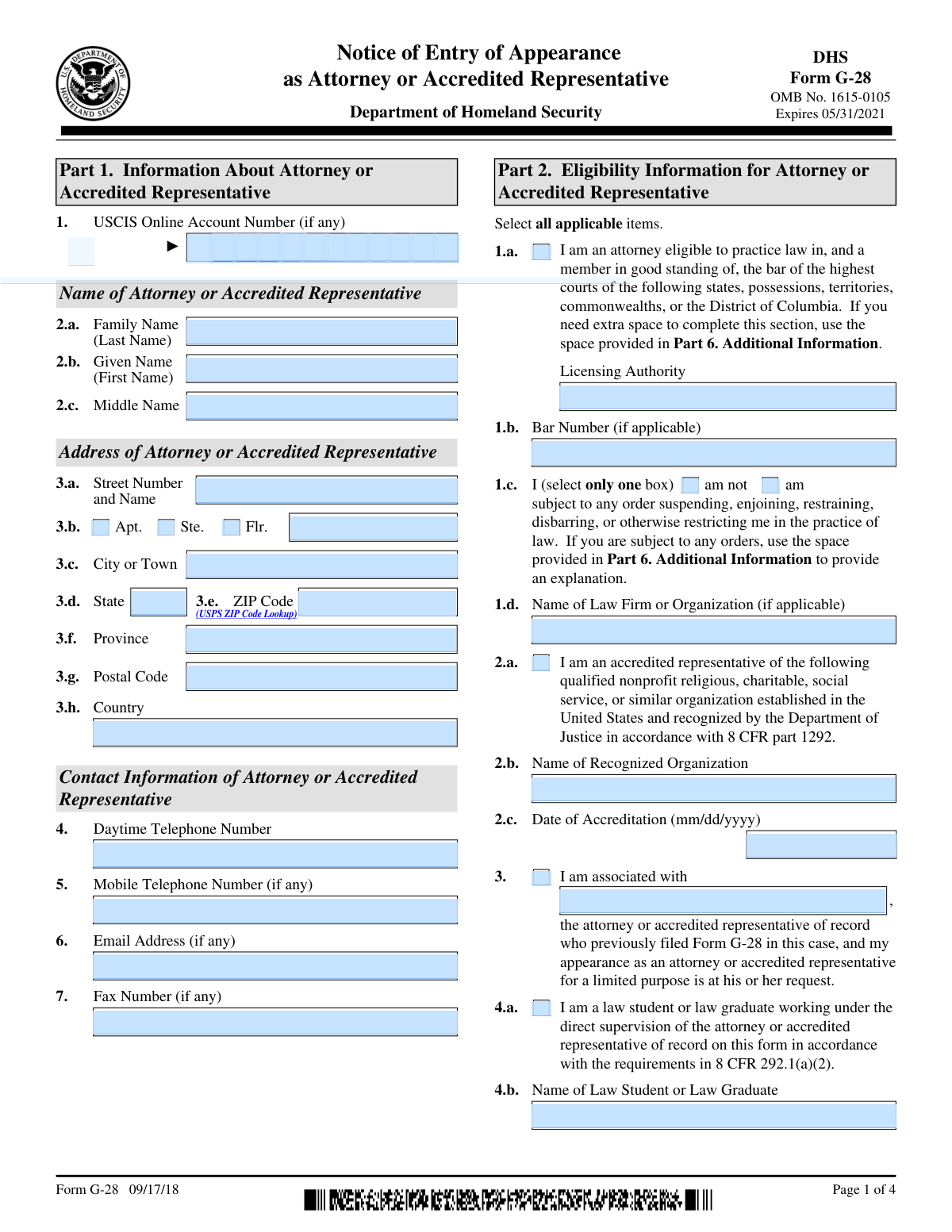
Yes! You can use AI to fill out Form G-28, Notice of Entry of Appearance as Attorney or Accredited Representative

Form G-28 is a Department of Homeland Security (DHS) document used by an attorney or an accredited representative to provide notice that they are representing a client in an immigration matter. Filing this form is crucial as it officially informs USCIS, ICE, or CBP of the representation, ensuring that the representative receives all correspondence related to the case. Today, this form can be filled out quickly and accurately using AI-powered services like Instafill.ai, which can also convert non-fillable PDF versions into interactive fillable forms.
Our AI automatically handles information lookup, data retrieval, formatting, and form filling.
It takes less than a minute to fill out G-28 using our AI form filling.
Securely upload your data. Information is encrypted in transit and deleted immediately after the form is filled out.

Form specifications

Form name: Form G-28, Notice of Entry of Appearance as Attorney or Accredited Representative
Number of pages: 4
Language: English
main-image

Instafill Demo: How to fill out PDF forms in seconds with AI

How to Fill Out G-28 Online for Free in 2026

Are you looking to fill out a G-28 form online quickly and accurately? Instafill.ai offers the #1 AI-powered PDF filling software of 2026, allowing you to complete your G-28 form in just 37 seconds or less.
Follow these steps to fill out your G-28 form online using Instafill.ai:
  1. 1 Navigate to Instafill.ai and upload your Form G-28 or select it from the platform's template library.
  2. 2 Complete Part 1 and Part 2 with the attorney's or accredited representative's information, including contact details, bar number, and eligibility status.
  3. 3 In Part 3, specify the DHS agency (USCIS, ICE, or CBP), the specific matter of the appearance, and provide the client's information.
  4. 4 Proceed to Part 4 to record the client's consent to representation and obtain their signature and the date.
  5. 5 The attorney or representative must complete Part 5 by providing their signature and the date, and selecting options for receiving notices.
  6. 6 Use the AI assistant to review all entered information across all parts for completeness and accuracy before finalizing the document.
  7. 7 Download the completed, signed Form G-28, ready for submission to the relevant DHS agency.

Our AI-powered system ensures each field is filled out correctly, reducing errors and saving you time.

Why Choose Instafill.ai for Your Fillable G-28 Form?

Speed

Complete your G-28 in as little as 37 seconds.

Up-to-Date

Always use the latest 2026 G-28 form version.

Cost-effective

No need to hire expensive lawyers.

Accuracy

Our AI performs 10 compliance checks to ensure your form is error-free.

Security

Your personal information is protected with bank-level encryption.

Frequently Asked Questions About Form G-28

Form G-28, Notice of Entry of Appearance, is used by an attorney or accredited representative to notify U.S. immigration agencies (USCIS, ICE, CBP) that they are representing a client. It must be filed whenever a representative appears on behalf of an applicant, petitioner, or respondent in an immigration matter.

Yes, a properly completed and signed Form G-28 must be submitted for each individual application, petition, or request. This ensures the representative is associated with the correct case file and receives all relevant correspondence.

An accredited representative is a non-attorney who is authorized by the Department of Justice (DOJ) to provide immigration legal services. They must work for a DOJ-recognized nonprofit, religious, charitable, or social service organization.

Yes, the client must sign Part 4 to consent to the representation and authorize the release of their information to you. If the client is an entity, an authorized signatory must sign on its behalf.

In Part 3, you must select the agency (USCIS, ICE, or CBP) and then list the specific form numbers (e.g., I-485, I-589) or the nature of the proceeding. This is crucial for linking your appearance to the correct case.

In Part 4, your client can check boxes to authorize USCIS to send original notices and secure documents directly to your business address. By default, USCIS sends copies to both the client and the representative.

Yes, if you are a law student or law graduate working under the direct supervision of the attorney of record, you must be listed in Part 2. You are also required to sign the form in Part 5.

File Form G-28 along with the application, petition, or request you are submitting on behalf of your client. If a case is already pending, file the G-28 with the office that has jurisdiction over the matter.

Part 6 of the form is a dedicated section for additional information. If you run out of space on any part of the form, you can use this section, making sure to reference the corresponding page, part, and item number.

Part 1 is for your business contact information. Part 3 requires the client's actual mailing address; you should not list your office address here unless it is also serving as the client's designated safe mailing address for the case.

Yes, services like Instafill.ai use AI to accurately auto-fill form fields, which can save significant time and reduce the chance of errors. This is especially useful for attorneys and representatives who handle many cases.

You can use a service like Instafill.ai to fill out the form online. Simply upload the PDF, and the platform will make it an interactive, fillable form that you can complete on your computer, save, and print.

If you have a non-fillable or 'flat' PDF, you can use Instafill.ai to convert it into a fully interactive and fillable form. This allows you to easily type your information directly into the fields instead of printing and filling it out by hand.

Compliance G-28
Validation Checks by Instafill.ai

1
Ensures Representative Type and Corresponding Information are Complete
This validation checks that if the user selects 'I am an attorney' (Part 2, 1.a), they must provide a Licensing Authority and Bar Number. If they select 'I am an accredited representative' (Part 2, 2.a), they must provide the Name of Recognized Organization and Date of Accreditation. This is crucial for verifying the representative's eligibility to practice before DHS. Failure to provide this conditional information will result in an incomplete and invalid submission.
2
Requires Explanation for Practice Restrictions
This validation verifies that if the representative checks the box 'am subject to any order...' (Part 2, 1.c), then an explanation must be provided in Part 6, Additional Information. This is a critical disclosure requirement for assessing the representative's good standing. If the box is checked but no explanation is provided, the form is considered incomplete and may be rejected.
3
Enforces Single Agency Selection in Part 3
This validation confirms that only one agency checkbox (USCIS, ICE, or CBP) is selected in Part 3. The form explicitly states to 'select only one box,' as a single G-28 is filed for a matter before a single agency component. Selecting multiple agencies would create ambiguity and likely lead to processing errors or rejection of the form.
4
Validates Agency Selection and Corresponding Matter Description
This check ensures that when an agency (USCIS, ICE, or CBP) is selected in Part 3, the corresponding text field for 'List the form numbers or specific matter' is not empty. The form requires specifying the exact matter for which the representative is entering an appearance. An omission here would make the notice of appearance ambiguous and ineffective, causing the form to be rejected by the agency.
5
Ensures Either Client Name or Entity Name is Provided
This validation checks that either the client's individual name (Part 3, 6.a and 6.b) or the entity's name (Part 3, 7.a) is provided. The form must be associated with a specific client, whether an individual or an organization. If both are left blank, the representation is not tied to any party, making the form invalid.
6
Requires Signatory Title if Entity Name is Provided
This check ensures that if a 'Name of Entity' (Part 3, 7.a) is entered, the 'Title of Authorized Signatory for Entity' (Part 3, 7.b) must also be filled out. This is necessary to confirm that the person signing on behalf of the entity has the authority to do so. Failure to provide the title may call into question the validity of the client's consent and lead to rejection of the form.
7
Validates Format of Client's Alien Registration Number (A-Number)
This validation checks that the Client's A-Number (Part 3, Item 8), if provided, follows the correct format, which is the letter 'A' followed by 8 or 9 digits. The A-Number is a primary identifier within DHS systems, and an incorrectly formatted number will prevent the system from linking the G-28 to the correct client file. This can cause significant delays or failure to record the representation.
8
Confirms Presence of Required Signatures and Dates
This validation ensures that both the client (or authorized signatory) in Part 4 and the representative in Part 5 have signed and dated the form. Signatures and dates are legally required to execute the consent for representation and the declaration under penalty of perjury. A missing signature or date invalidates the entire form, and it will be rejected.
9
Verifies All Dates are in MM/DD/YYYY Format and are Valid
This check applies to all date fields on the form, such as the Date of Accreditation and signature dates. It ensures the date is entered in the specified mm/dd/yyyy format and represents a real, valid date (e.g., not 13/45/2023). Incorrectly formatted or invalid dates can cause data entry errors and may lead to the form being rejected for being improperly completed.
10
Ensures Law Student Name is Provided When Selected
This validation confirms that if the 'Law student or law graduate' box (Part 2, 4.a) is checked, the name of the student/graduate is provided in the corresponding field (Part 2, 4.b). The regulations require identifying the supervised individual appearing on the case. Failure to provide the name results in an incomplete form and the student's appearance will not be recognized.
11
Validates U.S. ZIP Code Format
This check ensures that the ZIP Code fields for U.S. addresses (Part 1, 3.e and Part 3, 13.e) contain a valid 5-digit or 9-digit (ZIP+4) format. Correct ZIP codes are essential for the accurate and timely delivery of mail, including critical notices and documents from DHS. An invalid format could lead to returned mail and missed deadlines.
12
Validates Completeness of Additional Information References
This validation checks that if any text is entered into the free-text fields in Part 6 (Additional Information), the corresponding Page Number, Part Number, and Item Number fields are also filled out. This cross-referencing is essential for reviewers to understand which part of the form the additional information pertains to. Missing references make the information difficult to process and could lead to it being overlooked.
13
Enforces Mutually Exclusive Basis for Appearance Selection
This validation ensures that only one box is selected in Part 3, Item 5, to indicate whether the appearance is at the request of the Applicant, Petitioner, Requestor, etc. The form requires a single selection to clarify the relationship between the representative and the parties to the case. Selecting multiple or no options creates ambiguity and will lead to rejection.
14
Verifies Client Signature and Date Presence
This check confirms that the 'Signature of Client or Authorized Signatory for an Entity' (Part 4, 2.a) and the 'Date of Signature' (Part 4, 2.b) are both present. The client's signed consent is the legal basis for the representation and release of information. A missing signature or date invalidates this consent and will cause the form to be rejected immediately.

Common Mistakes in Completing G-28

Failing to Specify the Exact Matter of Representation

In Part 3, filers often check the box for an agency (USCIS, ICE, or CBP) but leave the corresponding text field (1.b, 2.b, or 3.b) blank. This happens because they overlook the instruction to 'List the form numbers or specific matter.' An incomplete G-28 can be rejected or may not be properly associated with the case, leading to processing delays and missed communications. Always specify the exact form number (e.g., I-485) or the nature of the proceeding (e.g., 'Removal Proceedings').

Missing or Incorrect Signatures

Both the client (Part 4) and the attorney/representative (Part 5) must physically sign and date the form. A common error is for one party to forget, or to use a typed name instead of a valid signature on a paper filing. An unsigned G-28 is invalid and will be rejected, preventing the representative from being recognized by DHS. Always double-check that both required signatures are present and dated correctly before filing.

Incorrectly Selecting Client Type

In Part 3, Item 5, filers must select who they are representing (Applicant, Petitioner, Beneficiary, etc.), and only one box should be checked. People often get confused between 'Applicant' and 'Petitioner,' or they select the wrong party in a family-based case. This can cause confusion and may lead to the G-28 being associated with the wrong individual in the case file. Carefully review the underlying application to correctly identify the client's role.

Using the Attorney's Address for the Client

Part 3, Item 13 explicitly asks for the client's mailing address and warns against using the attorney's address unless it serves as a designated safe mailing address. Attorneys sometimes default to entering their own office address here out of habit. This can result in the client's secure documents, like a Green Card, being sent to the wrong location if the separate notice elections in Part 4 are not made correctly. Always enter the client's actual mailing address in Part 3.

Incomplete Attorney Bar Information

In Part 2, Item 1.a, attorneys must list the licensing authority for their bar admission. Sometimes, attorneys admitted in multiple states only list one, or they forget to include their bar number in Item 1.b. Incomplete or inaccurate bar information can lead to delays while USCIS verifies eligibility to practice. Ensure all jurisdictions of admission are listed and the corresponding bar number is entered correctly.

Ignoring the Disciplinary Action Declaration

Representatives often overlook the mandatory declaration in Part 2, Item 1.c, regarding disciplinary history. Failing to select either 'am' or 'am not' subject to a restrictive order will render the form incomplete. If you are subject to an order, you must check the 'am' box and provide a detailed explanation in Part 6. Overlooking this section can lead to form rejection or questions about the representative's eligibility.

Confusion Over Notice and Document Delivery Options

The checkboxes in Part 4 (Items 1.a, 1.b, 1.c) determine where USCIS sends notices and secure documents, and they are often misunderstood. A client might not realize that checking Item 1.b sends their Green Card to the attorney's office, which may not be what they want. It is crucial for the representative to explain these options to the client so they can make an informed choice, as failure to do so can lead to important documents being mailed to an unintended address.

Improperly Using the 'Additional Information' Section

When information doesn't fit in a standard field, it must be placed in Part 6. A frequent mistake is to add information without referencing the corresponding Page Number, Part Number, and Item Number. This makes it difficult for the adjudicating officer to understand the context of the information, potentially causing it to be overlooked. Always ensure every entry in Part 6 is clearly cross-referenced to the specific field it supplements.

Missing Client A-Number or Receipt Number

In Part 3, fields for the client's Alien Registration Number (A-Number) and case Receipt Number are critical for linking the G-28 to the correct file. These are often left blank even when the numbers are known or available on prior correspondence. Omitting these identifiers significantly increases the risk of the G-28 not being properly associated with the case, causing the attorney to not receive notices. AI-powered tools like Instafill.ai can help prevent this by auto-populating details from a client's profile.

Filing a Non-Fillable PDF Without Conversion

Often, government forms are only available as flat, non-fillable PDFs, leading to messy, handwritten submissions that are prone to errors and can be difficult for officials to read. This can cause data entry mistakes on the agency's end or outright rejection of the form. To avoid this, use a tool like Instafill.ai, which can convert any non-fillable PDF into an interactive, fillable form, ensuring a clean, professional, and error-free submission.
Saved over 80 hours a year

“I was never sure if my IRS forms like W-9 were filled correctly. Now, I can complete the forms accurately without any external help.”

Kevin Martin Green

Your data stays secure with advanced protection from Instafill and our subprocessors

Robust compliance program

Transparent business model

You’re not the product. You always know where your data is and what it is processed for.

ISO 27001, HIPAA, and GDPR

Our subprocesses adhere to multiple compliance standards, including but not limited to ISO 27001, HIPAA, and GDPR.

Security & privacy by design

We consider security and privacy from the initial design phase of any new service or functionality. It’s not an afterthought, it’s built-in, including support for two-factor authentication (2FA) to further protect your account.

Fill out G-28 with Instafill.ai

Worried about filling PDFs wrong? Instafill securely fills form-g-28-notice-of-entry-of-appearance-as-attorney-or-accredited-representative-1 forms, ensuring each field is accurate.