Yes! You can use AI to fill out WestRock Credit Application and Uniform Sales & Use Tax Exemption/Resale Certificate — Multijurisdiction

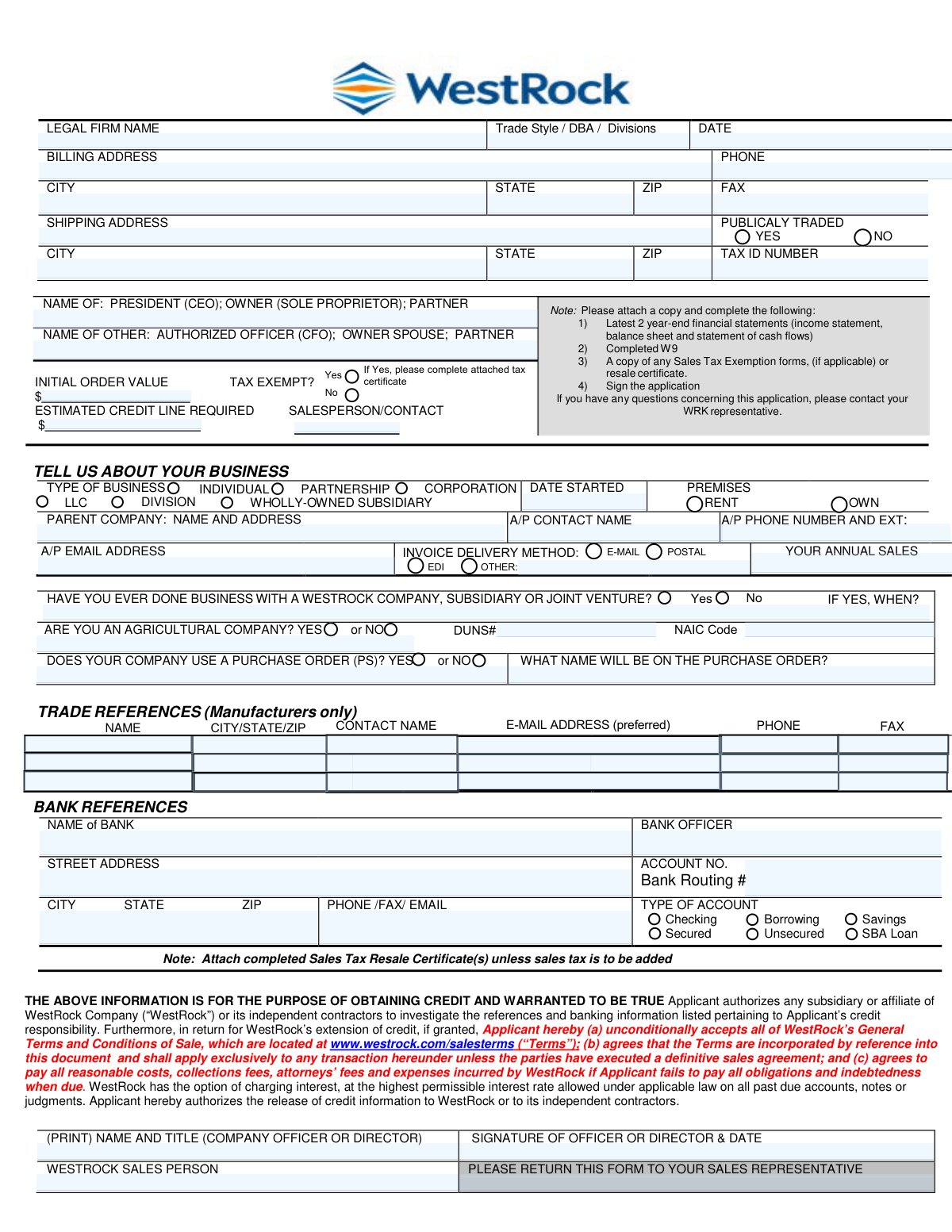
This packet combines a WestRock customer credit application with the Multistate Tax Commission’s Uniform Sales & Use Tax Exemption/Resale Certificate (Multijurisdiction). The credit application collects company identity, ownership/officer information, billing/shipping details, financials, bank and trade references, and an authorized signature so WestRock can evaluate and extend trade credit under its published Terms and Conditions of Sale. The resale/exemption certificate is used to support sales-tax-free purchases for resale (where accepted by the relevant state) by listing the buyer’s business type and state registration/permit numbers. Completing both correctly helps avoid credit delays and prevents improper sales tax charges or compliance issues.
Our AI automatically handles information lookup, data retrieval, formatting, and form filling.
It takes less than a minute to fill out WestRock Credit App + MTC Uniform Resale/Exemption Certificate using our AI form filling.
Securely upload your data. Information is encrypted in transit and deleted immediately after the form is filled out.

Form specifications

Form name: WestRock Credit Application and Uniform Sales & Use Tax Exemption/Resale Certificate — Multijurisdiction
Number of pages: 8
Language: English
main-image

Instafill Demo: filling out a legal form in seconds

How to Fill Out WestRock Credit App + MTC Uniform Resale/Exemption Certificate Online for Free in 2026

Are you looking to fill out a WESTROCK CREDIT APP + MTC UNIFORM RESALE/EXEMPTION CERTIFICATE form online quickly and accurately? Instafill.ai offers the #1 AI-powered PDF filling software of 2026, allowing you to complete your WESTROCK CREDIT APP + MTC UNIFORM RESALE/EXEMPTION CERTIFICATE form in just 37 seconds or less.
Follow these steps to fill out your WESTROCK CREDIT APP + MTC UNIFORM RESALE/EXEMPTION CERTIFICATE form online using Instafill.ai:
  1. 1 Enter applicant business details: legal firm name, trade style/DBA/divisions, tax ID, DUNS/NAICS (if available), and billing/shipping addresses with phone/fax/email.
  2. 2 Provide ownership/officer information and credit request details: president/owner/partner names, other authorized officer, initial order value, estimated credit line required, and salesperson/contact.
  3. 3 Complete the business profile section: entity type (LLC/corporation/partnership/individual), date started, premises (rent/own), parent company (if any), annual sales, A/P contact info, and purchasing order name/PO usage.
  4. 4 Add references: list required trade references (manufacturers only) and bank reference details (bank name, officer, address, account number, routing number, account type, secured/unsecured/SBA loan).
  5. 5 Attach required supporting documents: latest two year-end financial statements (income statement, balance sheet, cash flows), completed IRS Form W-9, and any sales tax exemption/resale documentation if applicable.
  6. 6 If claiming tax-exempt/resale status, complete the Uniform Sales & Use Tax Exemption/Resale Certificate: fill in seller name/address, buyer name/address, business type, description of business and items/services to be purchased, and enter the correct state registration/permit/ID numbers for applicable states.
  7. 7 Review acknowledgments and terms, choose invoice delivery method (EDI/email/postal/other), then print name/title and sign/date as an authorized officer; submit the full packet to the WestRock sales representative.

Our AI-powered system ensures each field is filled out correctly, reducing errors and saving you time.

Why Choose Instafill.ai for Your Fillable WestRock Credit App + MTC Uniform Resale/Exemption Certificate Form?

Speed

Complete your WestRock Credit App + MTC Uniform Resale/Exemption Certificate in as little as 37 seconds.

Up-to-Date

Always use the latest 2026 WestRock Credit App + MTC Uniform Resale/Exemption Certificate form version.

Cost-effective

No need to hire expensive lawyers.

Accuracy

Our AI performs 10 compliance checks to ensure your form is error-free.

Security

Your personal information is protected with bank-level encryption.

Frequently Asked Questions About Form WestRock Credit App + MTC Uniform Resale/Exemption Certificate

This is a credit application used to request trade credit terms and an estimated credit line with WestRock (or a WestRock affiliate). It also collects tax and invoicing preferences needed to set up your account.

An authorized company representative must complete it, and it must be signed by a company officer or director (or the owner/partner for non-corporate businesses). The form also asks for the name of the President/CEO/Owner/Partner and may request another authorized officer (e.g., CFO) or owner spouse/partner.

Attach your latest two year-end financial statements (income statement, balance sheet, and cash flows), a completed W-9, and any sales tax exemption/resale documentation if applicable. Don’t forget to sign the application.

Return the completed form to your WestRock sales representative (the form states: “WESTROCK SALES PERSON PLEASE RETURN THIS FORM TO YOUR SALES REPRESENTATIVE”). If you’re unsure who that is, contact the salesperson/contact listed on the application.

Initial Order Value is the expected dollar amount of your first order. Estimated Credit Line Required is the ongoing credit limit you’re requesting to support future purchases.

You’ll provide your business type (e.g., LLC, corporation, partnership), date started, whether you rent or own your premises, parent company details (if any), annual sales, and accounts payable contact information (name, phone, email). These details help evaluate credit and set up billing.

Use your legal business name in the legal name field, and list any “doing business as” (DBA), trade styles, or divisions that may appear on purchase orders or invoices. This helps match your orders and payments to the correct entity.

The Tax ID number is typically required for account setup and credit review. DUNS# and NAIC code appear as fields on the form and may be requested if available; provide them if you have them, or ask your representative if they are mandatory for your situation.

Enter both addresses exactly as they should appear on invoices (billing) and deliveries (shipping). If you have multiple ship-to locations, ask your sales representative how to add additional addresses.

Provide your bank name, bank officer (if known), address, account number, routing number, and contact details, and indicate the type of account (checking, savings, borrowing; secured/unsecured; SBA loan). This information is used to verify creditworthiness.

List companies that can confirm your payment history—typically suppliers or manufacturers you buy from (the form notes “Trade References (Manufacturers only)”). Include contact name, email (preferred), phone, and fax if available.

If you claim sales tax exemption, select “Yes” and complete/attach the appropriate tax certificate (such as the Uniform Sales & Use Tax Exemption/Resale Certificate or your state-specific exemption form). If you do not provide valid documentation, WestRock may be required to charge sales tax.

Fill in the seller’s name/address at the top (“Issued to Seller”), then enter your buyer information, business type, description of business, and what you’re purchasing. For each state listed where applicable, enter your state registration/seller’s permit/ID number, then sign and date as an authorized signer.

State rules vary: some states require registration in that state, while others may accept an ID from another state. If you’re unsure, check with the relevant state revenue department or ask your WestRock representative what documentation they can accept.

Often yes—many states allow it to be kept on file for multiple transactions with the same seller. Some states require periodic renewal, so you should confirm requirements for the states involved.

Compliance WestRock Credit App + MTC Uniform Resale/Exemption Certificate
Validation Checks by Instafill.ai

1
Required Applicant Identity Fields Present (Legal Firm Name and Authorized Signer)
Validates that the applicant’s Legal Firm Name (and any Trade Style/DBA/Division if provided) and at least one authorized individual name (e.g., President/CEO/Owner/Partner and/or other authorized officer) are completed. These fields establish who is requesting credit and who has authority to bind the company. If missing, the submission should be rejected or routed to exception handling because the application cannot be legally or operationally processed.
2
Application Date Format and Reasonableness
Checks that the application DATE is present and in an accepted format (e.g., MM/DD/YYYY) and is not in the future beyond a small tolerance (e.g., 1 day for time zones). The date is used for auditability, credit decision timelines, and document validity. If invalid or missing, the system should flag the record and prevent final submission until corrected.
3
Officer/Director Signature and Signature Date Captured
Ensures the (PRINT) NAME AND TITLE and SIGNATURE OF OFFICER OR DIRECTOR & DATE fields are completed, and that the signature date is a valid date. This is critical because the applicant is accepting WestRock’s Terms and authorizing credit/reference checks. If absent, the application should be considered incomplete and not eligible for credit review.
4
Initial Order Value and Estimated Credit Line Are Valid Currency Amounts
Validates that INITIAL ORDER VALUE and ESTIMATED CREDIT LINE REQUIRED are numeric currency values (no letters), non-negative, and within configured business limits (e.g., not exceeding a maximum allowed request without escalation). These values drive credit underwriting and internal approvals. If formatting is invalid or values are unreasonable (e.g., zero/blank when credit is requested), the system should block submission or require confirmation.
5
Credit Line vs. Initial Order Logical Consistency
Checks that the estimated credit line required is greater than or equal to the initial order value (or, if lower, requires an explicit justification/override). A credit line smaller than the first order typically indicates data entry error or misunderstanding. If inconsistent, the system should prompt the user to correct the amounts or provide an exception reason for review.
6
Billing Address Completeness and Postal Validation
Ensures BILLING ADDRESS, CITY, STATE, and ZIP are present and that STATE is a valid US state/territory code and ZIP is 5 digits (or ZIP+4). Accurate billing address is required for invoicing, tax determination, and credit verification. If invalid, the system should fail validation and request correction; optionally run address standardization to reduce downstream returns.
7
Shipping Address Completeness and Distinctness Rules
Validates SHIPPING ADDRESS, CITY, STATE, and ZIP are present and properly formatted, and applies a rule that shipping cannot be blank even if it matches billing (allow “Same as billing” only if explicitly indicated). Shipping location affects tax, freight, and fulfillment. If missing or malformed, the order and tax setup may be incorrect, so the submission should be blocked until fixed.
8
Phone/Fax Number Format Validation (Company and A/P Contact)
Checks that PHONE, FAX (if provided), and A/P PHONE NUMBER AND EXT are valid phone formats (e.g., 10-digit US numbers with optional country code and extension). Reliable contact numbers are necessary for collections, invoice disputes, and onboarding. If invalid, the system should flag the specific field and require correction or allow submission only with a warning based on policy.
9
Email Address Format Validation (A/P and Trade References)
Validates that A/P EMAIL ADDRESS and any trade reference E-MAIL ADDRESS entries match standard email syntax and do not contain obvious OCR artifacts (spaces, double @, trailing punctuation). Email is used for invoice delivery and reference verification. If invalid, the system should prevent selecting email-based delivery and require correction to avoid failed communications.
10
Business Type Selection Is Exactly One and Consistent
Ensures TYPE OF BUSINESS has exactly one selection among INDIVIDUAL, PARTNERSHIP, CORPORATION, LLC, etc., and that mutually exclusive options are not simultaneously selected. Business type impacts required documentation, tax treatment, and who must sign. If multiple or none are selected, the system should block submission and prompt for a single valid choice.
11
Date Started and Premises (Rent/Own) Consistency
Validates DATE STARTED is a valid past date and that PREMISES has exactly one selection (RENT or OWN). These fields support credit risk assessment and business verification. If DATE STARTED is in the future or premises is not selected, the system should flag the application as incomplete and require correction.
12
Tax ID Number Format and Presence Rules
Checks that TAX ID NUMBER is present and matches expected formats (e.g., EIN: 9 digits, optionally with hyphen XX-XXXXXXX; or other allowed tax IDs per configuration). Tax ID is required for credit checks, tax exemption processing, and regulatory reporting. If missing or malformed, the system should reject submission or route to manual review depending on jurisdiction and customer type.
13
Publicly Traded Flag Requires Supporting Identifier (DUNS/NAIC) When Provided
Validates that PUBLICALY TRADED is explicitly marked YES or NO, and if YES, requires at least one corporate identifier such as DUNS# and/or NAIC Code (if those fields are present on the form). Public company status often changes verification steps and credit evaluation sources. If YES is selected without identifiers, the system should request additional information or flag for follow-up.
14
Invoice Delivery Method Selection and Dependency Checks
Ensures INVOICE DELIVERY METHOD has a valid selection (EDI, E-MAIL, POSTAL, OTHER) and enforces dependencies: if E-MAIL is selected, a valid A/P email must exist; if EDI is selected, require EDI contact/details in the OTHER field or a configured EDI profile reference. Delivery method drives billing operations and failure to validate causes invoice non-delivery and payment delays. If dependencies are not met, the system should block submission or force a different delivery method.
15
Tax Exempt Selection Requires Certificate Attachment and Certificate Completeness
If TAX EXEMPT is marked Yes, validates that an attached tax certificate is included and that key certificate fields are completed (Buyer name/address, authorized signature, title, date, and at least one state registration/permit/ID number where applicable). This prevents improper tax exemption that could create liability for the seller. If missing or incomplete, the system should default the account to taxable (or block submission) until valid documentation is provided.
16
Trade and Bank Reference Minimum Data and Format Validation
Validates that at least one bank reference is provided (bank name, bank officer, street address, city/state/zip, phone/email) and that any provided trade references include name and location plus at least one contact method (phone or email). References are required to investigate credit responsibility as stated in the authorization language. If references are missing or lack contactable details, the system should flag the application as insufficient for credit review and require completion.

Common Mistakes in Completing WestRock Credit App + MTC Uniform Resale/Exemption Certificate

Leaving officer/owner names blank or listing the wrong person

Applicants often skip the “NAME OF: PRESIDENT (CEO); OWNER; PARTNER” and “NAME OF OTHER: AUTHORIZED OFFICER (CFO); OWNER SPOUSE; PARTNER” fields or enter a non-authorized employee. This happens because people assume any contact person is acceptable, but credit applications typically require legally responsible principals. If the wrong person is listed, the application may be delayed for clarification or rejected due to insufficient authorization. Use the legal names and titles of the actual principals/officers and ensure they match corporate records.

Not attaching required documents (financials, W-9, tax certificates)

A very common issue is submitting the form without the latest two year-end financial statements, a completed W-9, and sales tax exemption/resale documentation (if applicable). People miss this because the requirements are in a note block and they assume the form alone is enough. Missing attachments usually triggers back-and-forth emails and can prevent credit approval or delay order release. Before submitting, use a checklist: 2 year-end financial statement sets (IS/BS/CF), signed W-9, and any exemption/resale certificates.

Forgetting to sign and date the application (or signing as an unauthorized person)

Applicants frequently overlook the signature line for the “COMPANY OFFICER OR DIRECTOR” or provide a signature without a date. This happens when the form is routed internally and returned incomplete, or when someone in A/P signs even though they are not an officer/director. An unsigned/undated application is typically considered invalid and will stall credit review. Ensure an authorized officer/director signs, prints their name and title, and dates the signature.

Mixing up Legal Firm Name vs. Trade Style/DBA/Divisions

Many businesses enter their DBA/trade name in the “LEGAL FIRM NAME” field and omit the actual legal entity name, or they list multiple divisions without clarifying the contracting entity. This confusion is common because customers use the DBA in day-to-day operations, but credit is extended to the legal entity. The consequence is mismatched records, W-9/TIN validation failures, and delays in setting up the account correctly. Enter the exact legal entity name as shown on the W-9 and list DBA/divisions separately in the Trade Style/DBA/Divisions field.

Providing inconsistent or incomplete addresses (billing vs. shipping)

People often copy the billing address into the shipping address field (or vice versa), omit suite/unit numbers, or provide a PO Box where a physical shipping location is required. This happens because the form layout is dense and applicants assume one address is sufficient. Incorrect addresses can cause delivery failures, tax jurisdiction errors, and invoice disputes. Provide complete, standardized addresses for both billing and shipping, including suite numbers, and confirm the shipping address is deliverable for freight.

Incorrect Tax ID number or mismatch with W-9

A frequent error is entering the wrong Tax ID (EIN/SSN), transposing digits, or using a state tax ID instead of the federal EIN. This often occurs when someone pulls a number from an old invoice or state registration rather than the W-9. A mismatch can trigger compliance holds, failed vendor/customer setup, and delays in credit approval. Always copy the TIN directly from the completed W-9 and double-check digit accuracy.

Not selecting the correct business type or leaving key business profile fields blank

Applicants commonly fail to check the correct entity type (LLC, corporation, partnership, individual) or skip related fields like Date Started, Premises (Rent/Own), and Parent Company name/address. This happens because the “Tell us about your business” section looks optional, but it’s used for risk assessment and account setup. Missing or incorrect entity details can lead to wrong credit evaluation and legal documentation issues. Select the exact legal structure and complete the supporting fields consistently with formation documents and financial statements.

Entering unrealistic or blank credit request fields (Initial Order Value / Estimated Credit Line Required)

Many applicants leave dollar fields blank, enter placeholders (e.g., “TBD”), or request a credit line that doesn’t align with annual sales or expected purchasing. This happens because they’re unsure what to request or assume the seller will decide. Incomplete or inconsistent amounts slow underwriting and may result in a lower-than-needed limit, causing order holds later. Estimate the initial order and ongoing monthly/peak needs based on purchasing forecasts and provide reasonable figures supported by financials.

Incomplete A/P contact information (missing email, extension, or correct contact)

Applicants often provide a generic company phone number, omit the A/P email, or list a salesperson instead of the accounts payable contact. This happens because the person completing the form may not know who handles invoices or assumes any contact works. The result is missed invoices, delayed payments, and avoidable collections activity due to communication failures. Provide a dedicated A/P contact name, direct phone with extension, and a monitored A/P email address.

Trade references and bank references missing key details or using inappropriate references

Common issues include listing references without contact names, emails/phones, or providing personal references instead of trade/bank contacts; manufacturers may also skip the “Trade References (Manufacturers only)” section even when applicable. This happens because applicants don’t want to “bother” references or don’t have details readily available. Incomplete references prevent verification and can delay or reduce credit approval. Provide current references with full contact details (preferably email), and ensure bank reference includes routing number, account type, and a bank officer/contact.

Tax-exempt/resale certificate completed incorrectly (wrong seller/buyer fields, missing state IDs, missing reason)

On the multijurisdiction resale certificate, people frequently put their own company in the “Issued to Seller” line, leave state registration/permit numbers blank, fail to check the correct business type (wholesaler/retailer/manufacturer), or omit the exemption/resale reason where required (e.g., Ohio). This happens because the form is multi-state and the buyer/seller roles are easy to confuse. Errors can invalidate the certificate, forcing sales tax to be charged and creating audit exposure for both parties. Fill “Issued to Seller” with the vendor’s name/address, complete buyer details accurately, provide the correct state permit/ID numbers for relevant states, select the correct business classification, and sign/date by an authorized signer.
Saved over 80 hours a year

“I was never sure if my IRS forms like W-9 were filled correctly. Now, I can complete the forms accurately without any external help.”

Kevin Martin Green

Your data stays secure with advanced protection from Instafill and our subprocessors

Robust compliance program

Transparent business model

You’re not the product. You always know where your data is and what it is processed for.

ISO 27001, HIPAA, and GDPR

Our subprocesses adhere to multiple compliance standards, including but not limited to ISO 27001, HIPAA, and GDPR.

Security & privacy by design

We consider security and privacy from the initial design phase of any new service or functionality. It’s not an afterthought, it’s built-in, including support for two-factor authentication (2FA) to further protect your account.

Fill out WestRock Credit App + MTC Uniform Resale/Exemption Certificate with Instafill.ai

Worried about filling PDFs wrong? Instafill securely fills westrock-credit-application-and-uniform-sales-use forms, ensuring each field is accurate.