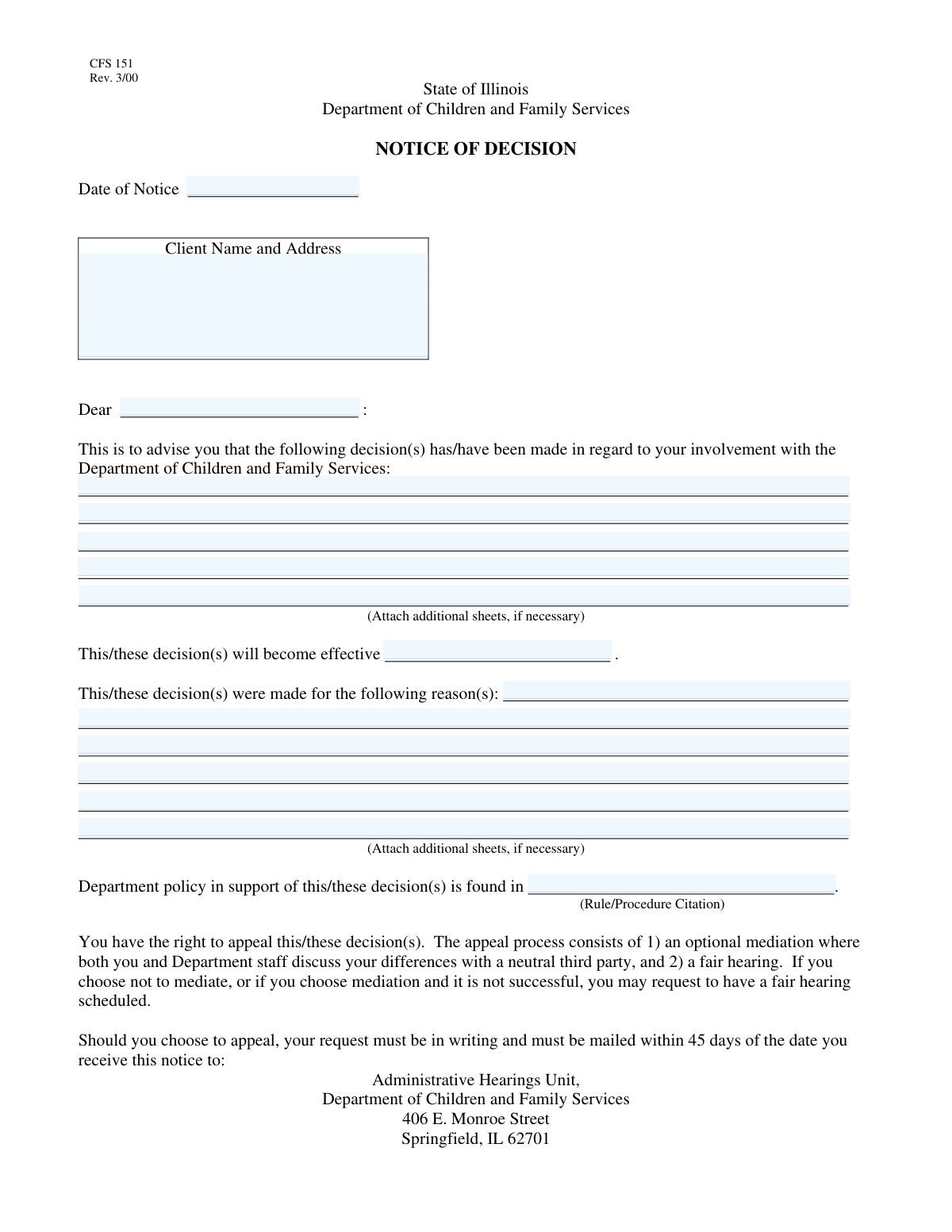
Yes! You can use AI to fill out CFS 403-2, Notice of Decision

The CFS 403-2, Notice of Decision, is an official document from the Department of Children and Family Services (DCFS) used to formally notify clients of significant decisions affecting their case. It details the decision, the reasons behind it, the effective date, and the supporting policies, ensuring transparency and proper communication. Today, this form can be filled out quickly and accurately using AI-powered services like Instafill.ai, which can also convert non-fillable PDF versions into interactive fillable forms.
CFS 403-2 is part of the 403(b) forms category on Instafill.
Our AI automatically handles information lookup, data retrieval, formatting, and form filling.
It takes less than a minute to fill out CFS 403-2 using our AI form filling.
Securely upload your data. Information is encrypted in transit and deleted immediately after the form is filled out.

Form specifications

Form name: CFS 403-2, Notice of Decision
Number of fields: 20
Number of pages: 2
Filled form examples: Form CFS 403-2 Examples
Language: English
main-image

Instafill Demo: How to fill out PDF forms in seconds with AI

How to Fill Out CFS 403-2 Online for Free in 2026

Are you looking to fill out a CFS 403-2 form online quickly and accurately? Instafill.ai offers the #1 AI-powered PDF filling software of 2026, allowing you to complete your CFS 403-2 form in just 37 seconds or less.
Follow these steps to fill out your CFS 403-2 form online using Instafill.ai:
  1. 1 Navigate to Instafill.ai and upload or select the CFS 403-2, Notice of Decision form.
  2. 2 Use the AI assistant to populate the client's full name, address, and salutation.
  3. 3 Enter the date the notice is being issued and the effective date of the decision.
  4. 4 Clearly describe the decision(s) made and provide a detailed explanation of the reasons for the decision in the appropriate sections.
  5. 5 Input the specific rule or procedure citation for the department policy that supports the decision.
  6. 6 Provide the worker's telephone number and the TDD number for hearing-impaired individuals.
  7. 7 Review all entered information for accuracy with the AI's help, then finalize the document to be sent to the client.

Our AI-powered system ensures each field is filled out correctly, reducing errors and saving you time.

Why Choose Instafill.ai for Your Fillable CFS 403-2 Form?

Speed

Complete your CFS 403-2 in as little as 37 seconds.

Up-to-Date

Always use the latest 2026 CFS 403-2 form version.

Cost-effective

No need to hire expensive lawyers.

Accuracy

Our AI performs 10 compliance checks to ensure your form is error-free.

Security

Your personal information is protected with bank-level encryption.

Frequently Asked Questions About Form CFS 403-2

This form is an official notice from the Department of Children and Family Services to inform you about a specific decision made regarding your case. It details what the decision is, why it was made, and when it will take effect.

This form is completed by a representative from the Department of Children and Family Services, not by the client. You are receiving it as a notification of a decision that has already been made.

The 'Decision Description' section provides a clear and detailed explanation of the specific action or conclusion the department has reached in your case. This is the core message of the notice.

The 'Decision Description' tells you *what* the department decided, while the 'Reasons for Decision' explains *why* they made that choice. The reasons section provides the justification and context for the action being taken.

This is a reference to the specific rule, law, or departmental procedure that gives the agency the authority to make the decision. It provides the legal or policy basis for the action described in the notice.

You should carefully read the entire notice to understand the decision and the reasons behind it. If you have questions or do not agree, you should contact your assigned worker using the phone number provided on the form.

This is the date on which the decision outlined in the notice officially begins or goes into effect. It is a critical date to be aware of as it marks the start of the new status or action.

The form provides a 'Worker's Telephone Number' for you to call your assigned case worker with any questions or concerns. A TDD number is also listed for hearing-impaired individuals.

If you disagree with the decision, you may have the right to an appeal or a formal review. Contact your worker immediately to understand the specific process and deadlines for challenging the decision.

While you don't fill out this notice yourself, AI services like Instafill.ai can help you manage related tasks. For example, if you need to fill out an appeal or application form in response, AI can auto-fill your information to save time and ensure accuracy.

If you need to complete a related form, you can upload it to Instafill.ai. The platform uses AI to help you fill in fields like your name, address, and case details quickly and accurately, directly from your browser.

Services like Instafill.ai can solve this problem by converting flat, non-fillable PDFs into interactive forms. You can then easily type your information, sign electronically, and save or print the completed document.

Compliance CFS 403-2
Validation Checks by Instafill.ai

1
Date of Notice - Valid and Not in Future
This validation checks that the 'Date of Notice' is a validly formatted date (e.g., MM/DD/YYYY) and is not a date in the future. It is crucial that the notice reflects the actual date it was issued for legal and chronological accuracy. If the date is invalid or in the future, the system should prevent submission and prompt the user for correction.
2
Effective Date - Chronological Consistency
This check ensures the 'Effective Date of Decision' is on or after the 'Date of Notice'. A decision cannot logically become effective before the notice about it has been issued. This validation prevents chronological errors that could invalidate the notice, and a failure would require the user to adjust one of the dates.
3
Client Information - Required Field
This validation verifies that the 'Client Name and Address' field is not empty. This information is absolutely critical for identifying the recipient and ensuring the notice can be delivered correctly. A submission with missing client information would be rejected, forcing the user to provide the necessary details.
4
Decision Description - Completeness Check
This check confirms that the 'Decision Description' field contains text and has not been left blank. This field communicates the core action being taken, and its absence would render the notice incomplete and confusing. The system should prevent submission until a description is provided.
5
Reasons for Decision - Completeness Check
This validation ensures that the 'Reasons for Decision' field is filled out. Providing the rationale for a decision is often a legal requirement and is essential for the client to understand the justification for the department's action. An empty field would block submission and require the user to input the reasons.
6
Supporting Policy Citation - Required Field
This check validates that the 'Supporting Policy Citation' field is not empty. This citation provides the legal or procedural authority for the decision, which is crucial for transparency and legal soundness. A failure would require the user to find and enter the appropriate rule or policy number before proceeding.
7
Worker's Telephone Number - Format Validation
This validation checks that the 'Worker's Telephone Number' is entered in a standard 10-digit phone number format (e.g., XXX-XXX-XXXX or (XXX) XXX-XXXX). This ensures the client has a usable contact number to reach their worker with questions. An incorrectly formatted number would trigger an error message asking for correction.
8
Worker's Telephone Number - Completeness Check
This check ensures a telephone number for the worker is provided on the form. This is a critical contact point for the client to seek clarification or discuss the notice. The form should not be submittable without this essential contact information.
9
TDD Number - Optional Format Validation
If a value is entered into the 'TDD Number' field, this check validates that it conforms to a standard phone number format. This ensures that if a TDD number is provided for accessibility, it is a valid and usable number. An invalid format would prompt the user for correction, while an empty field would be accepted.
10
Client Salutation - Consistency with Client Name
This check performs a comparison to see if the name used in the 'Client Salutation' is present within the 'Client Name and Address' field. This helps prevent typos and ensures the notice is personally and correctly addressed to the intended recipient. A mismatch would generate a warning to review the names for accuracy.
11
Address - Structural Plausibility Check
This validation performs a basic check on the 'Client Name and Address' field to ensure it contains more than just a name, suggesting a street, city, and state are included. This is a heuristic check to catch incomplete addresses that could lead to delivery failure. A failure would prompt the user to review and complete the address details.
12
Decision Details - Minimum Content Length
This check verifies that the 'Decision Description' and 'Reasons for Decision' fields meet a minimum character threshold (e.g., 25 characters). This discourages one-word or unhelpful entries and encourages the user to provide the 'detailed' information requested by the form. If the content is too short, the system would ask for a more thorough explanation.

Common Mistakes in Completing CFS 403-2

Confusing Notice Date with Effective Date

Users often incorrectly enter the same date for both the 'Date of Notice' and the 'Effective Date of Decision'. This happens due to rushing or misunderstanding the purpose of each field. The consequence is significant confusion for the recipient, who may not understand the correct timeline for action or appeal, potentially missing critical deadlines. To avoid this, carefully distinguish between the date the document is created ('Date of Notice') and the future date when the decision officially begins ('Effective Date').

Incomplete or Incorrect Client Address

A frequent error is providing an incomplete mailing address, such as omitting an apartment or suite number, or entering an incorrect ZIP code. This mistake often leads to the notice being returned as undeliverable, causing critical delays and potentially violating legal requirements for notification. Always verify the client's full, current address against official records before filling out the form. AI-powered tools like Instafill.ai can help by validating addresses against postal service databases to ensure accuracy and deliverability.

Vague or Ambiguous Decision Description

Instead of stating the decision clearly and directly, users sometimes fill the 'Decision Description' with jargon, background information, or the reasons for the decision. This forces the recipient to guess the actual outcome, leading to confusion, anxiety, and an increase in follow-up calls or appeals. To prevent this, state the decision in plain, unambiguous language first (e.g., 'Your request for overnight visits is approved effective on the date specified'). The 'Reasons for Decision' field should be used for the explanation.

Incorrect or Outdated Policy Citation

Entering an incorrect, incomplete, or outdated 'Supporting Policy Citation' is a critical error that can undermine the legal validity of the entire notice. This often happens when referencing from memory or using an old template. An incorrect citation can be grounds for a successful appeal by the client. To avoid this, always copy the exact rule or procedure number from the most current, official version of the department's policy manual.

Insufficient Justification in 'Reasons for Decision'

This mistake occurs when the 'Reasons for Decision' field contains generic statements or opinions rather than specific, fact-based explanations. A legally defensible notice must clearly connect the facts of the case to the cited policy. Insufficient justification makes the decision appear arbitrary and invites legal challenges. Always detail the specific facts, events, or evidence that were considered and explain how they support the decision based on the cited policy.

Truncating Long Explanations

When a detailed explanation for the decision or reasons exceeds the space in the main text box, users may fail to use the provided continuation fields (Text4-Text8, Text10-Text15). This results in an abrupt, incomplete, and unprofessional notice that omits critical information. If the form is a non-fillable PDF, this becomes a major challenge. To avoid this, use the numbered continuation fields to ensure your explanation is complete. Tools like Instafill.ai can convert flat PDFs into fillable forms, making it easier to manage text across multiple fields.

Mismatch Between Salutation and Client Name

A simple but common mistake is having a discrepancy between the 'Client Salutation' (e.g., 'Dear Jane Smith') and the full legal name listed in the 'Client Name and Address' block (e.g., 'Jane A. Smith-Doe'). This appears careless and can cause confusion if multiple individuals reside at the address. To prevent this, ensure the name used in the salutation is consistent with the primary client name on the form. Automation tools can populate these fields simultaneously to prevent such mismatches.

Omitting Accessibility Information (TDD Number)

The 'TDD Number' field is often left blank, either because the user doesn't know it or assumes it's not needed. This is a compliance risk, as it fails to provide accessible contact methods for hearing-impaired clients, potentially violating ADA regulations. The correct TDD number for the department should always be included. If your organization has standard contact information, using a tool like Instafill.ai can ensure these critical fields are pre-filled correctly on every form.

Using Informal Names or Nicknames

In the 'Client Name' and 'Client Salutation' fields, users sometimes enter a nickname or an informal version of the client's name. As this is a formal legal notice, using anything other than the client's full legal name as it appears in the official record can create ambiguity and weaken the document's authority. Always use the full, official name to ensure there is no question about who the notice is intended for.

Incorrect Phone Number Formatting

Users may enter the 'Worker's Telephone Number' in various non-standard formats, sometimes omitting the area code or extension. This can prevent the client from being able to make contact, leading to frustration and delaying the resolution of questions. Always include the full 10-digit phone number with the area code, and add the extension if required. AI form-fillers can help by automatically formatting phone numbers into a consistent, standard format.
Saved over 80 hours a year

“I was never sure if my IRS forms like W-9 were filled correctly. Now, I can complete the forms accurately without any external help.”

Kevin Martin Green

Your data stays secure with advanced protection from Instafill and our subprocessors

Robust compliance program

Transparent business model

You’re not the product. You always know where your data is and what it is processed for.

ISO 27001, HIPAA, and GDPR

Our subprocesses adhere to multiple compliance standards, including but not limited to ISO 27001, HIPAA, and GDPR.

Security & privacy by design

We consider security and privacy from the initial design phase of any new service or functionality. It’s not an afterthought, it’s built-in, including support for two-factor authentication (2FA) to further protect your account.

Fill out CFS 403-2 with Instafill.ai

Worried about filling PDFs wrong? Instafill securely fills cfs-403-2-notice-of-decision forms, ensuring each field is accurate.